Focus
JavaScript Injection vs Client-Side vs Server-Side A/B Testing: How to Choose
Alexandre Suon · 2026-09-27
There are three main ways to run an A/B test on a website: inject JavaScript that changes the page after it loads, code the variants into the front-end application, or decide the variant on the server. This Focus explains how each works, what each costs in speed, flicker and effort, where edge and proxy testing fit, and how e-commerce teams of any size should choose.
Executive summary
- The three methods differ in where the variant is decided and where the change is applied. JavaScript injection changes the page in the browser after it starts to load. Client-side SDK testing lets the front-end application render the chosen variant itself. Server-side testing decides the variant before the page or data leaves the server.
- JavaScript injection is the fastest way to start, and its main cost is page speed. Marketers can build tests in a visual editor without a code release. But the page must be hidden or it will flicker, and default maximum hiding times range from 1 second at Kameleoon to 3 seconds at Adobe Target. Google's web.dev names A/B testing libraries as a cause of delayed Largest Contentful Paint.
- Client-side SDKs suit modern single-page applications. Variants are written into the application code, so there is no page patching and no conflict with frameworks such as React. The decision still happens in the browser, which needs either a network call or pre-computed results.
- Server-side testing can test anything and adds no flicker, but every test needs developers and a release. It is the only practical option for pricing, search ranking and algorithms, and the usual choice for checkout logic; native apps rely on mobile SDKs backed by server-side flags. Caching must be handled so that each variant is stored separately.
- Edge testing is closing the gap. CDN workers from Cloudflare, Fastly, Akamai and Vercel can decide the variant close to the visitor and serve a finished page. Most major vendors now document edge delivery, and Vercel and Cloudflare launched their own feature-flag products in 2026.
- Most teams should run a hybrid. Use injection for quick, low-risk changes to content and layout, and server-side or edge testing for anything touching revenue logic, performance-critical pages or apps. Whatever the method, Safari's storage limits, consent rules and Google's guidance on testing still apply.
Section 1 · The basics
The three methods differ in where the variant is decided and where the change is applied
Client-side vs server-side A/B testing describes where a test runs. In client-side testing, the visitor's browser decides the variant and changes or renders the page. In server-side testing, the server decides the variant before sending the page or data. JavaScript injection is the most common form of client-side testing.
The terms cause confusion because vendors use "client-side" for two different things. Most web testing tools, such as the visual editors of Optimizely Web Experimentation, Kameleoon, AB Tasty, VWO and Convert, call their tag-based products client-side. Developer platforms use "client-side SDK" for code inside the application. We separate them because they behave very differently in practice.
| JavaScript injection | Client-side SDK | Server-side | |
|---|---|---|---|
| Where the variant is decided | In the browser, by the testing tag | In the browser, by an SDK in the application | On the server, by an SDK or API |
| How the change is applied | The tag edits the page after it starts loading | The application renders the variant as part of its normal code | The server returns different HTML or data |
| Who builds a test | Marketers or CRO specialists, often without developers | Front-end developers | Back-end or full-stack developers |
| Needs a code release? | No | Yes, for each new variant | Yes, for each new variant |
| Typical tests | Copy, images, layout, calls to action, landing pages | Components and features in React, Vue or mobile apps | Pricing, search, recommendations, checkout, algorithms, apps |
Two further methods sit alongside these. Edge testing makes the server-side decision on a CDN server close to the visitor. Proxy-based testing places a reverse proxy between visitors and the web server. Both are covered in Section 6. For the basics of A/B testing, see our essential guide to A/B testing; for how to analyse the results, see our Focus on A/B test statistics.
For leaders. The choice of method decides who can run tests, how fast and on which parts of the business. Injection gives marketing speed and independence; server-side gives reach into revenue logic and apps. Most programmes that grow beyond landing-page tests end up needing both.
Section 2 · How it works
Each method moves the testing decision closer to the server, trading speed of set-up for speed of the page
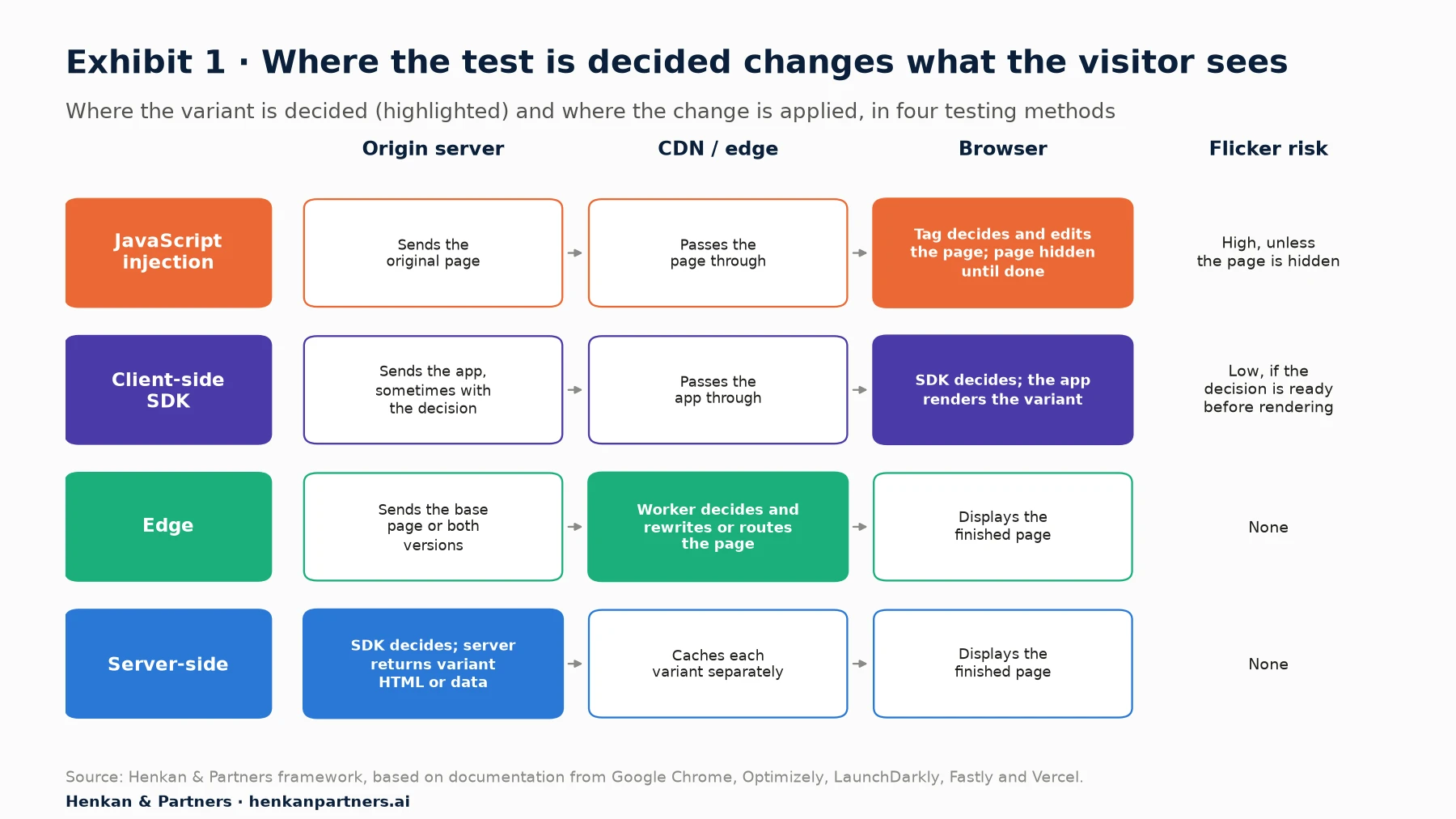
What this shows. The later in the chain the change is applied, the more the visitor can see of the original page and the more work the browser does. JavaScript injection applies the change last, after the page has started to render. Server-side and edge testing apply it first, so the browser receives the finished variant. Client-side SDKs sit between the two: the browser still decides, but the application renders the right version directly instead of patching the page.
In every method, bucketing works in a similar way. Optimizely's documentation explains that its SDK uses "the MurmurHash function to hash the user ID and experiment ID into an integer" that maps to one of 10,000 buckets, so "the same user ID always maps to the same bucket". Because the hash is computed locally, "there is no network call to an external service". What differs is where that ID comes from and how long it survives, which Section 7 covers.
Section 3 · JavaScript injection
JavaScript injection gets tests live fastest, but the page pays for it in speed and flicker
JavaScript injection is how most companies start testing. You add one tag to every page, and a visual or code editor lets you change text, images, layout and styles, or add new elements, without touching the site's code. Optimizely describes the appeal: "Marketers with little technical knowledge can deploy tests using a WYSIWYG editor", and "there is no need to coordinate with a website code release to deploy experiments." For a team of one or two people, that independence often decides whether testing happens at all.
The flicker problem
The weakness is timing. Guidance published by the Google Chrome team summarises it: client-side tools "work by loading a script that modifies the DOM after the browser has already begun constructing the page. Without intervention, the user briefly sees the original content before it flickers or flashes to the experiment variant." Flicker is more than cosmetic. Visitors who glimpse the original page are exposed to both versions, which can blur the result.
Vendors offer two answers. The first is to load the tag synchronously, which blocks the page until the script has run: Optimizely Web Experimentation "uses a synchronous snippet to prevent flickering", while Kameleoon says of its own synchronous tag, "we do not recommend this option". The second is an anti-flicker snippet, which hides the page until the variant is applied or a timeout expires.
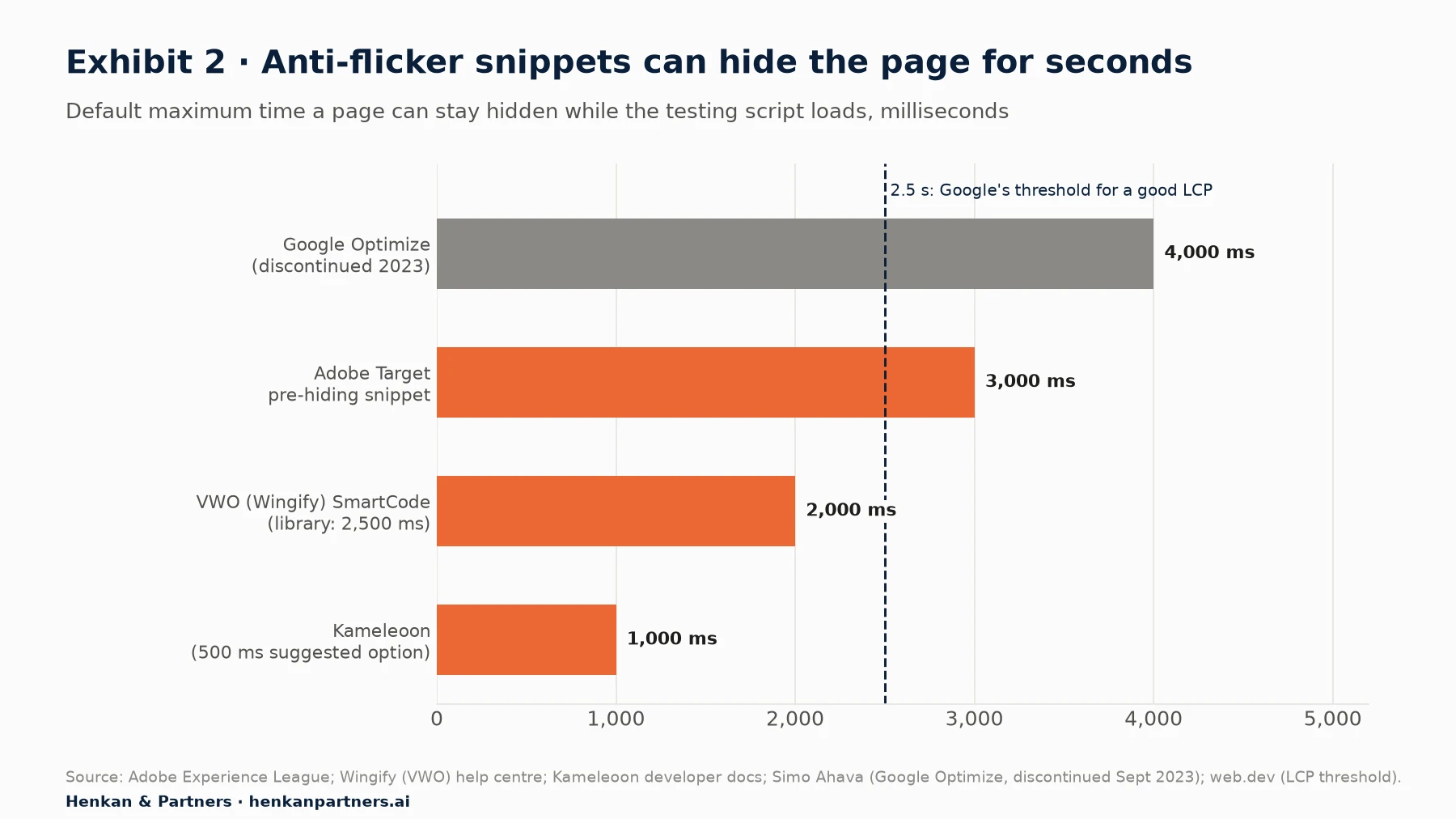
What this shows. Anti-flicker snippets trade one problem for another. If the testing script is slow, visitors stare at a blank page for up to the timeout, and if the timeout is reached, they may see flicker anyway. A 3-second default alone exceeds Google's 2.5-second threshold for a good Largest Contentful Paint. In practice most visitors wait much less than the maximum: Kameleoon, for example, says its anti-flicker style is typically removed in under 50 milliseconds, a vendor claim.
What the measurements show
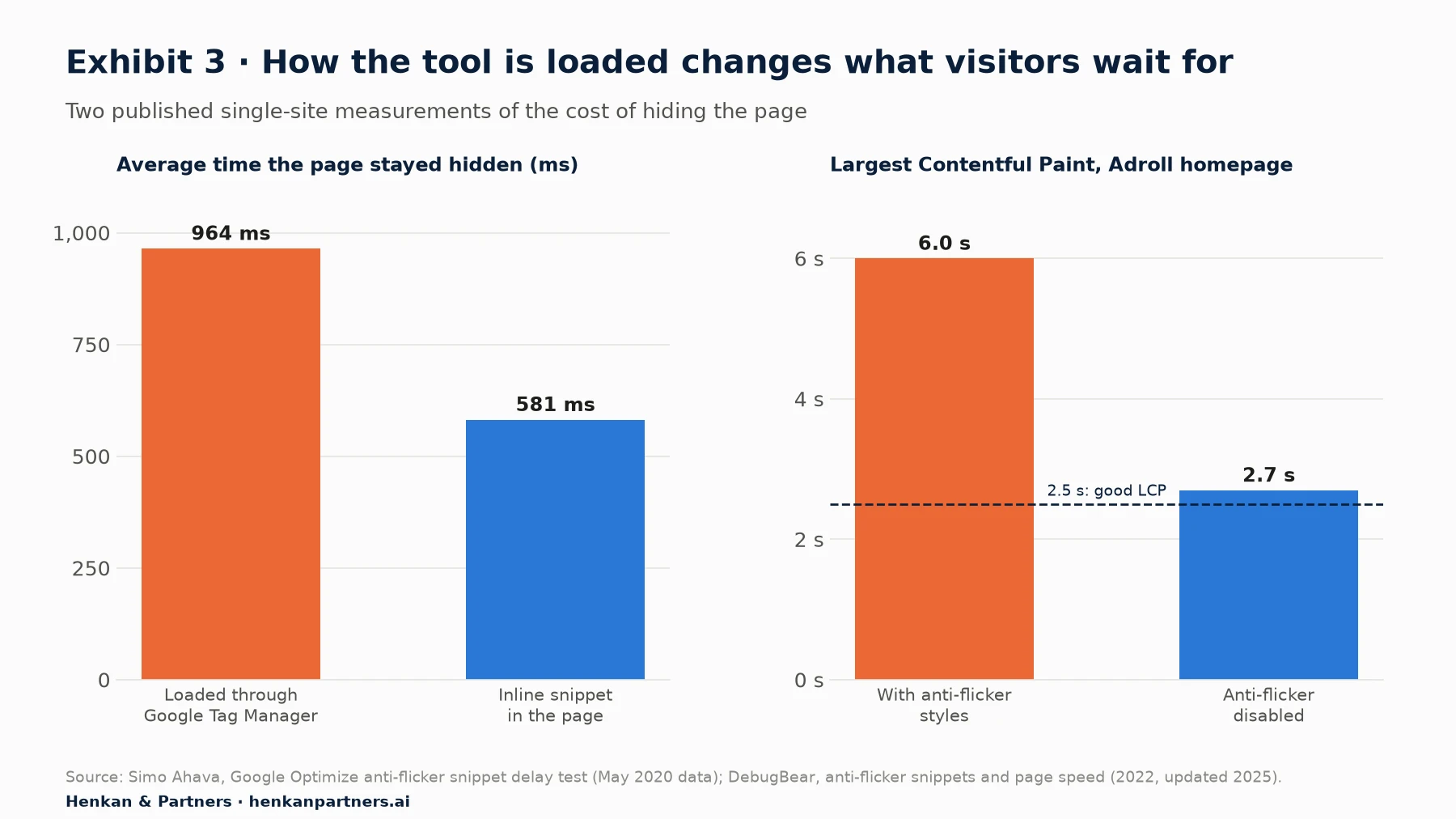
What this shows. How the tool is loaded matters as much as which tool you choose. Loading through a tag manager added about 380 milliseconds of hidden page in Simo Ahava's test, and removing page hiding more than halved LCP in DebugBear's example. Google's web.dev guidance notes that A/B testing scripts "can also often delay rendering" and that most "block content display until they complete processing", even when loaded asynchronously. It also reports that Casper "managed to shave 1.7 seconds off load times by self-hosting an A/B testing script."
Script weight adds to the delay. Vendors publish different figures, measured in different ways: Kameleoon says its application file is 29 kB compressed with Brotli; AB Tasty says an empty tag weighs 35 kB and that a tag "going over 125 kB is too heavy to comply with good performances"; Convert describes its snippet as about 50 kB. Every live test, audience and goal adds to the file, so archiving finished tests is basic hygiene.
Newer browser features help. Chrome's guidance recommends loading the testing script with the `blocking="render"` attribute, which stops the browser painting until the variant is applied, with "no opacity hacks, no arbitrary timeouts, and no flicker". It is supported in Chrome and Edge since version 105 (2022) and Safari since 18.2 (December 2024), but not in Firefox, and it only works if the script itself is fast: the guide suggests keeping it under 100 milliseconds of execution.
Single-page applications
Injection was designed for pages that load once. In single-page applications, the framework keeps rewriting the page. Optimizely warns that with React server-side rendering, React "attempts to reconcile the DOM to match its virtual DOM, often overwriting Optimizely's changes", which shows up "as flickering or flashing and lost or inconsistent changes." AB Tasty's tag watches the whole page and "re-applies its changes" when the framework modifies it. These workarounds function, but on heavily dynamic sites, coding the variant into the application is often more reliable.
For marketers. If you use injection, put the tag directly in the page head rather than in a tag manager, keep the anti-flicker timeout as low as your tool allows, apply it only to the parts of the page being tested where possible, and archive finished tests. Measure LCP with and without the tag on your key templates.
Section 4 · Client-side SDK testing
Client-side SDKs fit modern front-end applications, because the application renders the variant itself
In client-side SDK testing, developers write both versions into the front-end code and wrap them in a feature flag. A JavaScript, React or mobile SDK decides which version the visitor gets, and the application renders it through its normal code. Nothing is patched after the fact, so there is no conflict with React or Vue and no anti-flicker snippet, provided the decision is available before the component renders.
That last condition is the practical challenge. For security, LaunchDarkly explains, "client-side SDKs cannot download and store an entire ruleset", so they "delegate the flag evaluation to LaunchDarkly", which requires a network call. Other vendors pre-compute: Statsig "precomputes all evaluations on its servers and sends results to your client applications". Many teams pass the decision from the server when the page is first rendered, so the browser has it immediately.
Client-side SDKs are also how native mobile apps are tested. Injection does not work in an iOS or Android app, and app-store releases are slow, so testing depends on SDKs and remote configuration. Optimizely, AB Tasty, Kameleoon, Dynamic Yield and others all provide mobile SDKs for this reason.
For leaders. Client-side SDK testing makes testing part of product development rather than a layer on top of it. It suits teams that release often and have front-end developers who own experiments; it does not suit a marketing team that needs to change a landing page this afternoon.
Section 5 · Server-side testing
Server-side testing can test anything with no flicker, but every test becomes a development task
In server-side testing, the web or application server decides the variant and returns different HTML, data or behaviour. The browser receives the finished page, so there is no flicker and no testing script to slow the page. Because the decision happens in your own code, you can test things injection cannot reach: prices and discounts, search and recommendation algorithms, shipping rules, checkout steps, payment options and any feature in a native app. AB Tasty's guide to server-side experiments says such tools let you "test business transactions, algorithms, and new functional variants".
Server SDKs usually evaluate flags locally from a cached copy of the rules. LaunchDarkly's server-side SDKs "evaluate feature flags using their cached ruleset", and Statsig says evaluations after start-up "typically have less than 1ms latency" (vendor claim). The cost moves from the page to the team. AB Tasty's guide also notes that server-side experiments "require code releases" and involve more teams depending on your "deployment and QA strategy", and each test needs developer time to build, review and remove.
Caching needs care
Most e-commerce sites serve pages from a CDN cache. If the server returns different versions of the same URL, the cache must store them separately, or visitors will receive the wrong one. Fastly explains that the HTTP `Vary` header tells the cache "what other properties the cache should consider a distinct object". GOV.UK, for example, uses a custom `Vary` header so that Fastly will "cache both versions of the page separately". Getting this wrong either breaks the test or reduces cache efficiency, which can slow the whole site.
For marketers. Server-side testing does not have to mean losing control. Ask for a feature-flag set-up where developers build the variants once and you control targeting, traffic split and start and stop dates in the testing tool.
Section 6 · Edge and proxy testing
Edge and proxy testing move the decision out of the browser, and edge testing is becoming mainstream
Edge testing runs the server-side decision on a CDN server near the visitor, using services such as Cloudflare Workers, Fastly Compute, Akamai EdgeWorkers, AWS Lambda@Edge or Vercel. The worker assigns the visitor, stores the choice in a cookie and returns the right version of the page, either by fetching a different URL or by rewriting the HTML on the way through. Fastly argues that visitors then "won't suffer due to decreased performance while a separate segmentation service is consulted", and that it "prevents delays on the client while it re-renders the page."
Edge testing fixes two server-side problems at once. It works with CDN caching instead of against it, and it can serve variants built in a visual editor. Kameleoon's edge kits are designed for parts of a site "that are heavily cached" and move bucketing to the edge "with reduced latency and avoid caching issues". Optimizely's Performance Edge "gets its speed by moving work out of your visitors' browsers and into CDN edge servers", sending each visitor a small, tailored "microsnippet"; the trade-offs are fewer features, such as no multivariate tests or custom-attribute audiences, and no running a Performance Edge test and a Web test on the same page at the same time. Convert says its SDK in Cloudflare Workers adds about 5 to 8 milliseconds (vendor figure).
Proxy-based testing goes one step further. SiteSpect, acquired by Monetate in June 2025, places its engines "in the flow of traffic between the end-user and your web server" and differentiates itself from tools "that rely on tags or SDKs". The proxy can change content, route requests and collect metrics without a tag on the page. It needs to be built into your hosting and CDN set-up, which makes it an enterprise choice.
For leaders. Edge testing is where the market is heading. Vercel made its Flags product generally available in April 2026 and Cloudflare launched Flagship, a feature-flag service at the edge, in public beta in May 2026. If your site already runs on one of these platforms, edge testing may cost less effort than a classic server-side set-up.
Section 7 · Identity, consent and SEO
Every method must deal with Safari's storage limits, consent rules and Google's testing guidance
Keeping visitors in the same variant
A test only works if returning visitors see the same variant. Injection tools and client-side SDKs usually store the visitor ID in a cookie or local storage created by JavaScript, and Safari limits these. WebKit states that Intelligent Tracking Prevention "deletes all cookies created in JavaScript and all other script-writeable storage after 7 days of no user interaction with the website", and caps such cookies at 24 hours when visitors arrive through links decorated with tracking parameters from sites it classifies as trackers. Optimizely warns that after such a gap a returning visitor is "subject to a new random variation allocation"; Kameleoon notes that on mobile-heavy sites iOS devices can be "closer to the 40%-50% range" of traffic.
The usual fix is to set the visitor ID cookie from your own server in an HTTP response, which Kameleoon and Optimizely both recommend. That works best when the server shares your site's IP address range: since Safari 16.4 (March 2023), WebKit has also capped at 7 days cookies set in responses from third-party IP addresses. Server-side and edge set-ups set cookies this way by design, which is one reason they keep visitors in the same variant more reliably.
Consent
Changing where a test runs does not change the rules on consent. Testing tools store an identifier on the visitor's device, which in the EU and UK usually requires consent. GOV.UK's developer documentation, for example, states that "A/B tests are only enabled for users who have opted in to analytics cookies." Server-side testing without any identifier stored in the browser is rare in practice. Our Focus on user consent in e-commerce explains the rules, including France's narrow exemption for audience measurement.
Search engines
Google's guidance on website testing applies to every method. It says: "Don't show one set of URLs to Googlebot, and a different set to humans. This is called cloaking". It asks sites to use `rel="canonical"` on alternate URLs, to "use a 302 (temporary) redirect, not a 301" for redirect tests, and, once a test ends, to "remove all elements of the test as soon as possible." It adds that small changes, such as the colour or placement of a button, "often have little or no impact" on search results. Server-side and edge tests are no riskier than injection if Googlebot is treated like any other visitor.
Section 8 · Comparison
No method wins on every criterion, which is why most mature programmes combine them
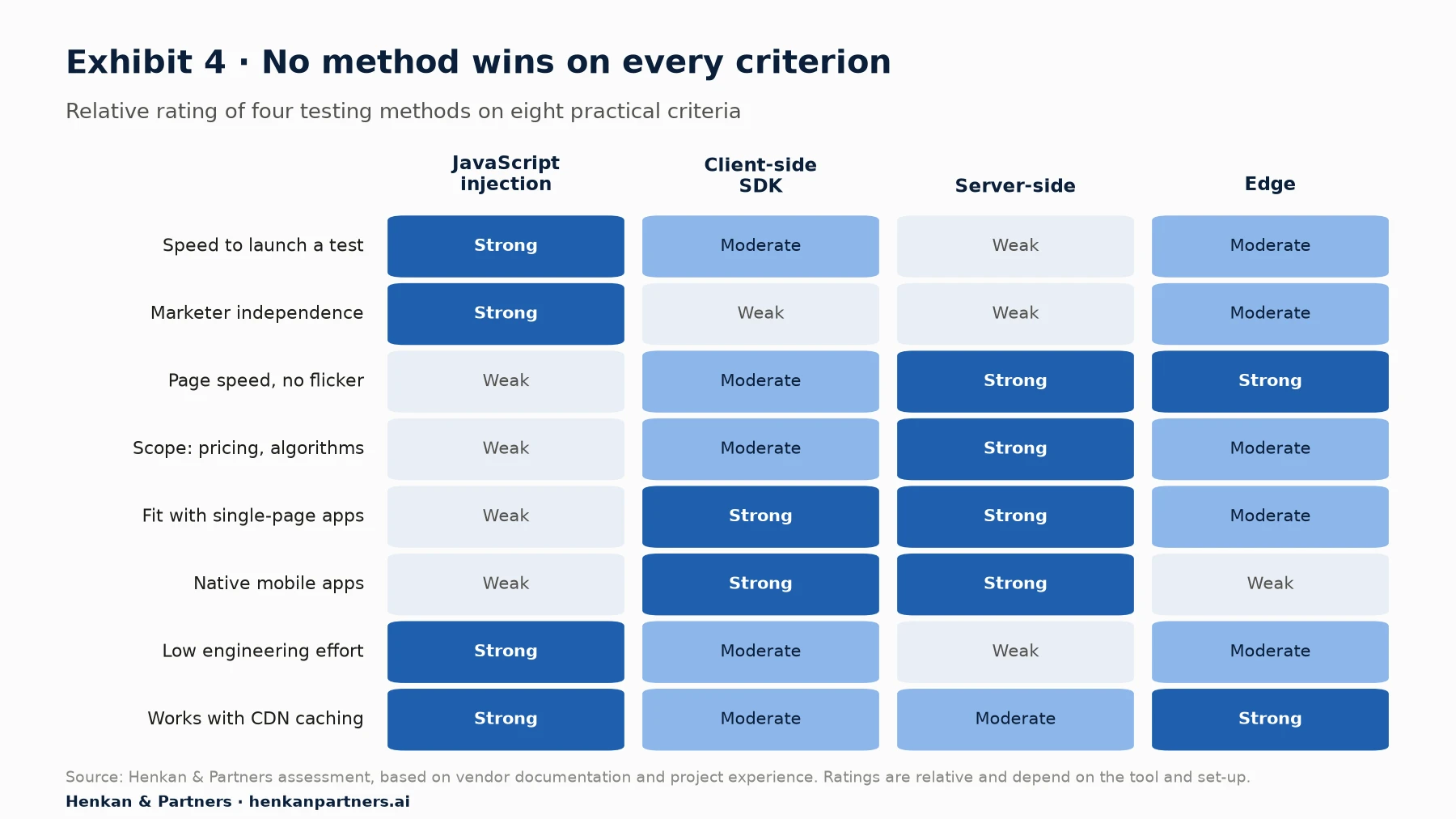
What this shows. Injection is strong where the business needs speed and independence, and weak where it needs performance and reach. Server-side testing is the mirror image. Client-side SDKs and edge testing sit between them, each strong in a specific context: SDKs for application teams and apps, edge for fast, cached websites. The right choice depends on what you want to test more than on the tool.
| If you want to test… | Best method | Why |
|---|---|---|
| Headlines, images, banners, calls to action | JavaScript injection | Quick to build and remove; low risk |
| A landing page or homepage with high traffic and strict speed targets | Edge, or injection with careful loading | No flicker and good LCP on entry pages |
| A new component in a React or Vue storefront | Client-side SDK | The application renders the variant without conflicts |
| Prices, discounts, shipping rules or payment options | Server-side | The change lives in business logic, not on the page |
| Search ranking, recommendations or merchandising algorithms | Server-side | The algorithm runs on the server |
| Checkout steps or account flows | Server-side, or client-side SDK | Reliability and security matter more than speed of set-up |
| Features in an iOS or Android app | Client-side (mobile) SDK with server-side flags | Injection does not work in native apps |
Section 9 · Vendors and market
Most major testing vendors now offer injection, SDKs and edge delivery, and the market is consolidating around platforms that combine them
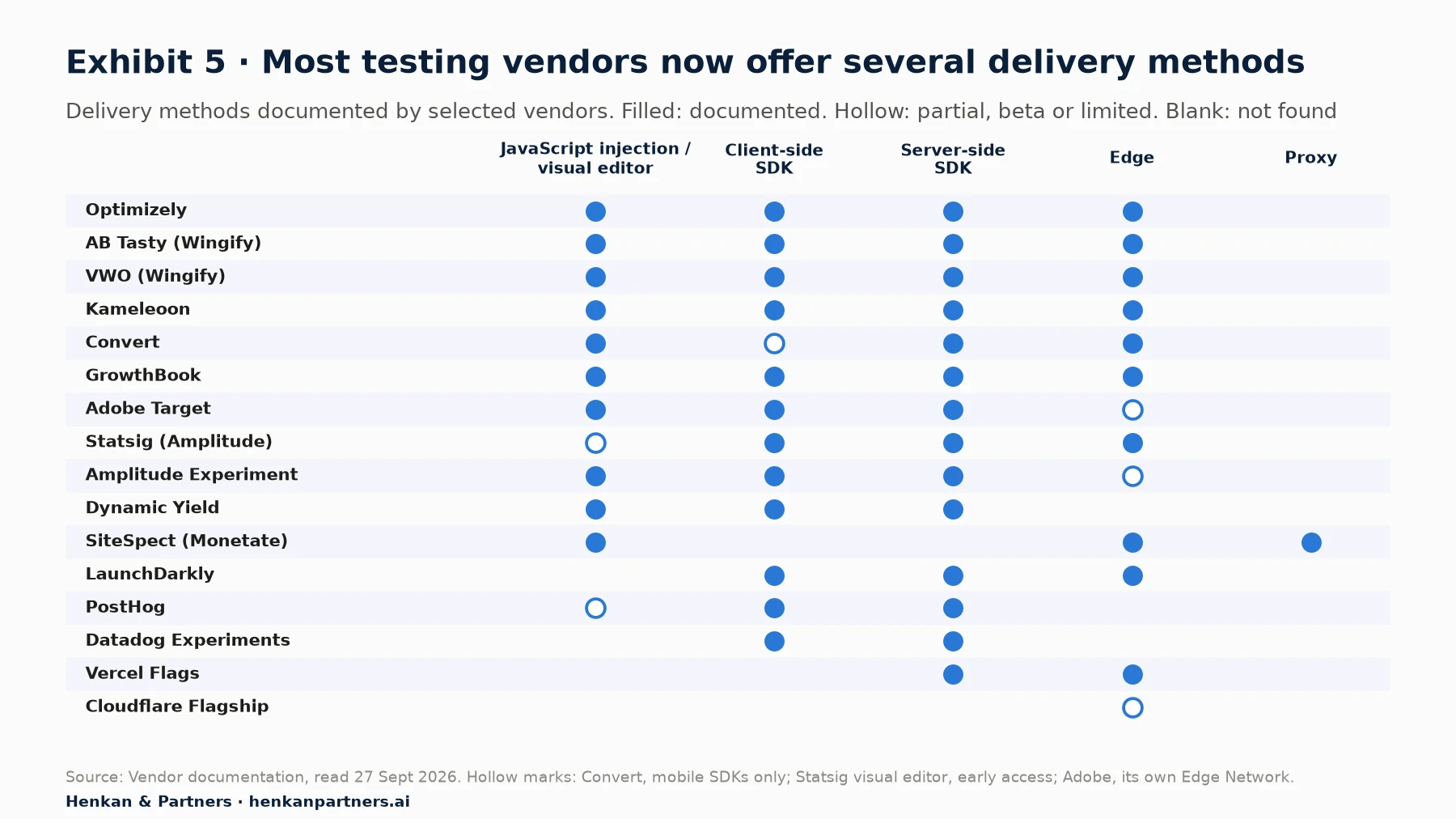
What this shows. The old split between web testing tools for marketers and feature-flag platforms for developers has largely disappeared. Web testing vendors such as Optimizely, Kameleoon, AB Tasty and VWO now sell SDKs and edge kits; developer platforms such as Statsig, GrowthBook and Amplitude have added visual editors. The real differences lie in depth: how good the visual editor is, how many SDKs are maintained, how analysis works and how pricing scales.
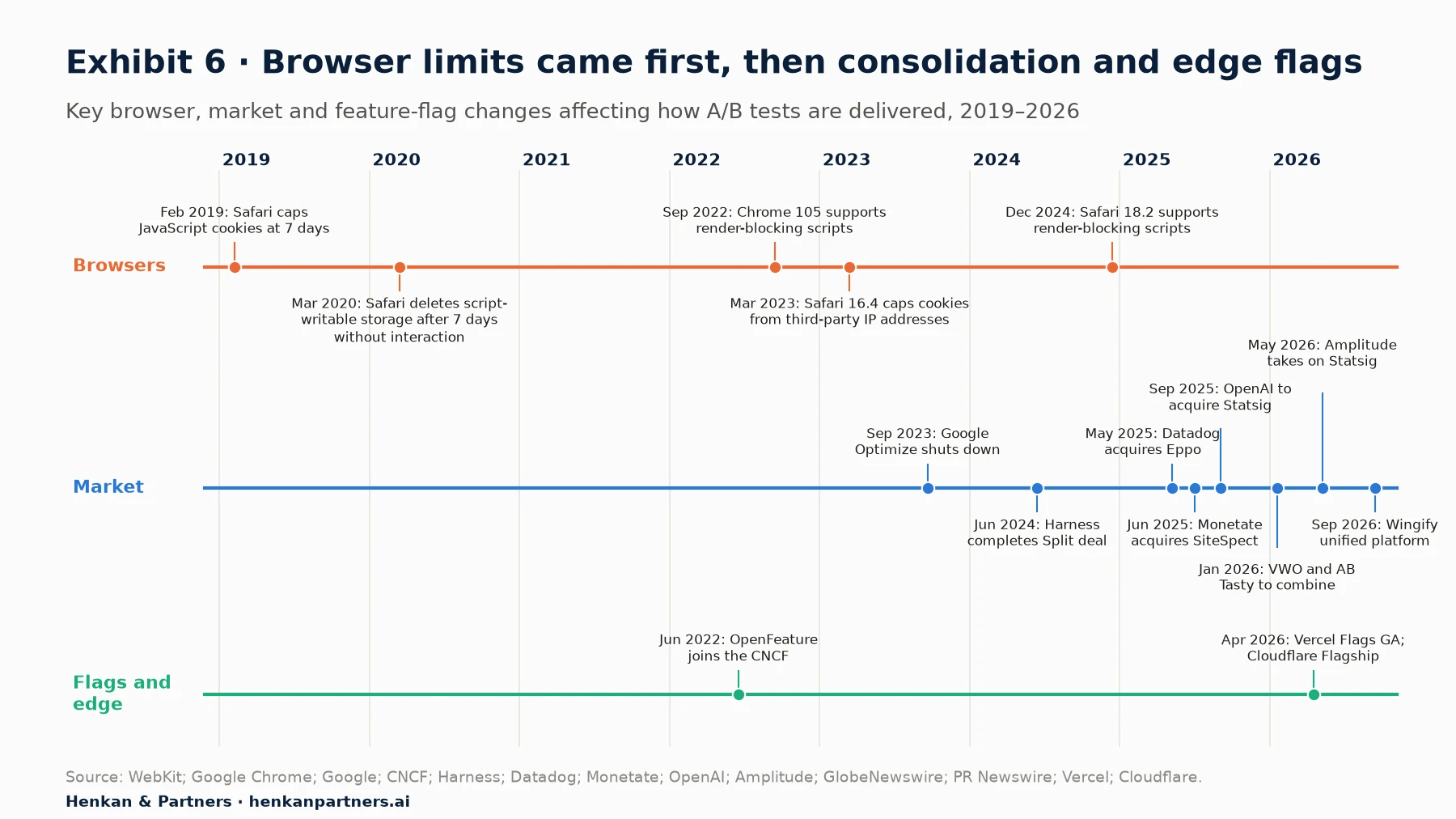
What this shows. Browser limits on script-set storage came first; consolidation followed. The closure of Google Optimize in September 2023 removed the free injection tool many small teams relied on. Since then, feature-flag and experimentation companies have been bought by larger platforms, VWO and AB Tasty have combined under the Wingify brand, and infrastructure companies such as Vercel and Cloudflare have built flags into their platforms. OpenFeature, an open standard for feature-flag APIs, has been an incubating Cloud Native Computing Foundation project since November 2023, which makes switching providers easier. For a full history of vendors, funding and deals, see our A/B testing tool market report.
Pricing models differ by origin. Web testing tools usually charge by monthly tested visitors; Kameleoon lists a starter plan from $495 a month and Optimizely packages every plan individually. Developer platforms often charge by events, seats or service connections, and several offer free tiers: GrowthBook is open source, and Statsig, PostHog and LaunchDarkly publish free plans. Check how cost grows with traffic and with the number of server-side services before choosing.
Section 10 · By team size
Start where your team's skills are, and add methods as the programme grows
| Team | Recommended approach | Why |
|---|---|---|
| One or two people (small shop or first programme) | One JavaScript injection tool, loaded directly in the page head with a short anti-flicker timeout; tests on content, layout and landing pages; server-side changes through your e-commerce platform's own features where available | Fastest route to learning with no developer dependency; performance risk is manageable at low test volume |
| Growing CRO, product or data team | Hybrid: injection for marketing tests, a feature-flag SDK for front-end and back-end tests, a shared visitor ID set by the server, and one analysis method across both | Reaches checkout, search and pricing while keeping marketing speed |
| Multi-brand or international retailer | Server-side and edge testing as the default for core templates and apps, injection kept for campaigns, OpenFeature-compatible flags, a release process with QA, and monitoring of LCP by variant | Scale, performance targets and many teams need consistent, governed delivery |
For leaders. Match the method to the question, not to the tool you already own. A one-page testing charter that says which kinds of change go through which method, who approves them and how performance is monitored prevents most of the friction between marketing and engineering.
Section 11 · What to do next
Five moves to choose and run the right testing method
1. Map what you want to test
List the next 20 test ideas and mark which ones change content, which change front-end components and which change business logic. The mix tells you which methods you need.
2. Measure the cost of your current tag
Compare LCP on key templates with and without your testing script, and record the anti-flicker timeout and how the tag is loaded. Move it out of the tag manager and into the page head if it is not already there.
3. Fix visitor identity
Set the testing visitor ID from your own server, on your own domain, so returning Safari visitors stay in the same variant. Check it against the consent choices you collect.
4. Pilot server-side or edge testing on one high-value flow
Pick one test that injection cannot do well, such as a shipping-threshold or search-ranking change, and run it with a feature-flag SDK or edge worker. Handle caching explicitly and compare results in the same analysis tool.
5. Agree who owns what
Decide which team builds, approves and removes each kind of test, and how flags are cleaned up after a decision. Unused flags and forgotten tests are the most common long-term cost of server-side testing.
Our view. The best testing method is the one that lets you test the changes that matter most to customers, without slowing the site they use. For most e-commerce teams that means starting simple, measuring the cost, and moving the tests that touch revenue closer to the server.
FAQ
Frequently asked questions about client-side and server-side A/B testing
Frequently asked questions
What is the difference between client-side and server-side A/B testing?
In client-side testing, the visitor's browser decides the variant and either edits the page with injected JavaScript or renders it through the application's own code. In server-side testing, the server decides the variant and sends the finished page or data. Server-side testing avoids flicker and can test business logic, but needs developers for every test.
Is JavaScript injection the same as client-side testing?
It is the most common form of client-side testing, and most web testing vendors use the terms interchangeably. We separate it from client-side SDK testing, where developers code the variants into a front-end application and an SDK chooses which one to render, because the two behave differently for speed, flicker and single-page applications.
Does client-side A/B testing slow down my website?
It can. Testing scripts add weight and usually hide the page until the variant is applied, with default maximum hiding times of 1 to 3 seconds depending on the tool. Google's web.dev lists A/B testing libraries as a cause of delayed Largest Contentful Paint. Loading the script directly in the page head, keeping it small and using a short timeout reduce the impact.
How do I stop flicker in A/B testing?
Load the testing script early and directly in the page head, use a short anti-flicker timeout, hide only the elements being tested where your tool allows it, and archive finished tests. Where supported, the blocking="render" attribute prevents flicker without hiding the page. For flicker-free delivery, use server-side or edge testing.
When should I use server-side A/B testing?
Use it for changes that live in business logic or code rather than on the page: prices, discounts, shipping rules, search and recommendations, checkout flows and native app features. It is also the better choice for performance-critical pages and single-page applications where injected changes conflict with the framework.
What is edge A/B testing?
Edge testing decides the variant on a CDN server close to the visitor, such as a Cloudflare Worker or Vercel's edge network, and serves the finished page. It combines the speed and caching of a CDN with no flicker in the browser. Optimizely, Kameleoon, VWO, AB Tasty, Convert, GrowthBook, LaunchDarkly and Statsig document edge delivery.
Does server-side A/B testing avoid cookie consent?
No. Moving the decision to the server does not remove the need for consent when an identifier is stored on or read from the visitor's device. In the EU and UK, most A/B testing set-ups should run only for visitors who have consented, as GOV.UK does.
Key terms
- JavaScript injection
- A testing method where a tag loaded in the browser changes the page after it starts to load, usually built in a visual or code editor. Many vendors call it client-side testing.
- Client-side SDK testing
- A method where developers code the variants into the front-end application and a JavaScript SDK decides which one the browser renders.
- Server-side testing
- A method where the server decides the variant and returns different HTML or data. Nothing is patched in the browser.
- Edge testing
- Deciding the variant on a CDN server close to the visitor, such as a Cloudflare Worker, before the page reaches the browser.
- Proxy-based testing
- A method where a reverse proxy between the visitor and the web server changes pages and routes traffic, without a tag or SDK. SiteSpect is the best-known example.
- Visual editor (WYSIWYG)
- A point-and-click tool for creating variants without writing code. It is the main reason marketers can run tests alone.
- Flicker
- The brief display of the original page before the test variant replaces it. It can bias results and annoys visitors.
- Anti-flicker snippet
- Code that hides the page until the testing script has applied the variant or a timeout expires. It prevents flicker but delays what visitors see.
- Feature flag
- A switch in the code that turns a feature on or off, or chooses between versions, for chosen users without a new release. Server-side and SDK tests are built on flags.
- Bucketing
- Assigning a visitor to a variant, usually by hashing their ID so the same visitor always gets the same variant.
- Local evaluation
- Deciding a flag or variant inside the SDK from rules already downloaded, with no network call for each decision.
- Single-page application (SPA)
- A website that updates the page with JavaScript instead of loading new pages, typically built with React, Vue or Angular. Injection tools can conflict with it.
- Largest Contentful Paint (LCP)
- Google's Core Web Vitals metric for when the main content appears. Google considers 2.5 seconds or less good.
- Hybrid testing
- Using injection and server-side or SDK testing together, often with a shared visitor ID and shared reporting.
Sources
Vendor documentation, browser vendor pages, Google guidance and press releases were checked against the original pages on 27 September 2026. Performance measurements are single published cases, and vendor claims about their own products are labelled as such. The architecture diagram, method comparison, decision tables, programme by team size and recommendations are Henkan & Partners' own analysis.
- Google Chrome, Flicker-free client-side A/B testing (modern web guidance)
- web.dev, Optimize Largest Contentful Paint
- web.dev, Third-party JavaScript performance
- web.dev, Efficiently load third-party JavaScript
- web.dev, Largest Contentful Paint (LCP)
- Simo Ahava, Google Optimize Anti-flicker Snippet Delay Test
- Andy Davies, The Case Against Anti-Flicker Snippets, 2020
- SpeedCurve, Understanding the performance impact of anti-flicker snippets
- DebugBear, Anti-Flicker Snippets From A/B Testing Tools And Page Speed
- Google, Sunset of Google Optimize
- Wingify (VWO), Customize your Wingify SmartCode
- Kameleoon, Flicker management and performance
- Kameleoon, Impact of Kameleoon on your website's performance
- AB Tasty, Troubleshooting performance
- AB Tasty, Tag size
- Convert, Frequently Asked Questions
- Optimizely, Load snippet synchronously and asynchronously
- Optimizely, Understand Optimizely's impact on page load speed
- Adobe Experience League, Add Adobe Target with tags
- Optimizely, Implement Optimizely with React SSR and hydration
- AB Tasty, How the AB Tasty tag is designed to handle Single Page Apps
- Optimizely, Server-side testing (glossary)
- Wingify (AB Tasty), Client-Side vs. Server-Side Experiments
- Kameleoon, Hybrid experimentation
- Optimizely, How bucketing works (Feature Experimentation)
- LaunchDarkly, Client-side, server-side, and edge SDKs
- Statsig, Client vs Server SDKs
- Statsig, Behind the scenes: Statsig's backend performance, 2024
- AB Tasty, Feature Experimentation & Rollout
- Kameleoon, How to perform mobile app A/B testing
- Fastly, A/B testing at the edge
- GOV.UK Developer documentation, A/B testing
- Cloudflare Workers, A/B testing with same-URL direct access
- Vercel, How to run A/B tests with Next.js and Vercel, 2022
- Kameleoon, Serverless edge compute starter kits
- Optimizely, How Performance Edge works
- Optimizely, Performance Edge and Web Experimentation
- Optimizely, Feature Experimentation edge workers and agents
- Convert, Cloudflare Workers
- Convert, Full-Stack
- SiteSpect, How SiteSpect Works
- Monetate, Monetate Acquires SiteSpect, 2025
- Vercel, Vercel Flags is now generally available, 2026
- Cloudflare, Introducing Flagship: feature flags built for the age of AI, 2026
- WebKit, Tracking Prevention in WebKit
- WebKit, Intelligent Tracking Prevention 2.1, 2019
- WebKit, Full Third-Party Cookie Blocking and More, 2020
- WebKit pull request 5347, Cap cookie lifetimes to 7 days for responses from third party IP addresses, 2022
- Optimizely, Intelligent Tracking Prevention
- Kameleoon, ITP management
- Google Search Central, Minimize A/B testing impact in Google Search
- Wingify (VWO), Edge support
- AB Tasty, Flagship edge worker integration
- Kameleoon, Feature management and experimentation overview
- Adobe Experience League, How does on-device decisioning work with at.js?
- Adobe Experience League, Target server-side delivery APIs and SDKs
- Dynamic Yield, Implementation overview
- GrowthBook, Cloudflare Workers Edge App
- Statsig, Cloudflare KV integration
- Statsig, Visual Editor
- Amplitude, Feature and Web Experiment use cases
- LaunchDarkly, SDKs
- PostHog, No-code web experiments
- Eppo, SDKs
- Datadog, Datadog Experiments launches, 2026
- WebKit, Intelligent Tracking Prevention 2.2, 2019
- Snowplow, Safari tracking cookie lifetimes
- CNCF, OpenFeature project
- Harness, Harness Completes Acquisition of Split
- Datadog, Datadog Acquires Eppo, 2025
- OpenAI, Vijaye Raji to become CTO of Applications with acquisition of Statsig, 2025
- Amplitude, Amplitude and Statsig partnership, 2026
- GlobeNewswire, VWO and AB Tasty Join Forces, January 2026
- PR Newswire, AB Tasty and VWO Unite Under Wingify, September 2026
- Optimizely, report on 127,000 experiments (PR Newswire), 2023
- Kameleoon, Plans
- Optimizely, Pricing
- GrowthBook, Pricing
- Henkan & Partners, The Essential Guide to A/B Testing
- Henkan & Partners, A/B Test Statistics: Every Model to Analyse a Test
- Henkan & Partners, User Consent in E-commerce: Everything to Know Before 2027
- Henkan & Partners, The A/B Testing Tool Market, 2006–2026