Guide
Advanced DOM Manipulation for A/B Tests: A Developer's Guide to Robust, Fast and Safe Variations
Alexandre Suon · 2026-09-27
Variation code in a JavaScript-injection A/B test runs on a page you do not control, at a time you do not fully choose, alongside a framework that may undo your work. This guide covers how to write it well: execution timing, robust selectors, waiting for elements, idempotent changes, single-page applications and hydration, flicker and Core Web Vitals, XSS and Content Security Policy, tracking, accessibility, QA automation and handing winners over to production.
Executive summary
- Treat variation code as production code that runs in a hostile environment. It executes before, during or after the page's own scripts, often before the DOM is ready, and it must survive re-renders, route changes and redesigns. Optimizely states plainly that custom code "runs immediately and exactly as written, often before the DOM is ready."
- Wait with MutationObserver, not timers, and always stop waiting. Several vendors document a helper for this: Optimizely's `waitForElement` and `observeSelector`, Kameleoon's MutationObserver-based `runWhenElementPresent` and AB Tasty's Element JS watcher. Polling helpers such as Kameleoon's 200 ms `runWhenConditionTrue` are documented as a flicker risk.
- Make every change idempotent and put visual changes in CSS. Code that can run twice without doubling content, that marks what it has changed and that leaves styling to a stylesheet survives single-page application route changes and framework re-renders, and it paints earlier.
- Do not fight the framework. React's documentation warns that changing DOM nodes it manages "can lead to inconsistent visual results or crashes", and Optimizely documents React hydration "often overwriting" its changes. Apply after hydration, change only what the framework will not re-render, or move the test into the code base.
- Budget for speed and security from the start. Google Chrome's modern-web-guidance recommends a small render-blocking experiment script, with an example budget of under 100 ms of execution, instead of hiding the page for up to about 4 seconds. Build DOM with `textContent` and elements rather than HTML strings: Trusted Types became Baseline in February 2026, and 92% of sites whose CSP sets a script policy still allow `unsafe-inline`.
- Automate QA and plan the exit. Forced-variation URLs, screenshot comparison in Playwright and a review checklist catch most defects before launch. A winning variant is a temporary patch; rebuild it in the application and delete the test code.
Section 1 · Execution model
Know exactly when your code runs, because the page is rarely ready for it
A JavaScript-injection tag is loaded in the page `<head>`, decides the visitor's variant and then runs the variant's code. What exists in the DOM at that moment depends on where the tag sits, whether it is synchronous, and each vendor's own ordering. Optimizely documents a fixed order: project JavaScript, then campaign JavaScript and CSS, then experiment JavaScript and CSS, then visual-editor changes, and warns that custom code runs "often before the DOM is ready."
Other vendors choose differently. AB Tasty runs campaign JavaScript "when the DOM is ready" by default, with an option to untick "Wait for DOM-ready to execute JavaScript" and an "Element JS" option that waits for a specific element; it also cautions that unticking the option "does not mean that the JavaScript will systematically be executed before DOM-Ready". Wingify (VWO) advises against wrapping code in `vwo_$()`, because "the wrapped code runs on the DOM Ready", which delays changes and causes flicker.
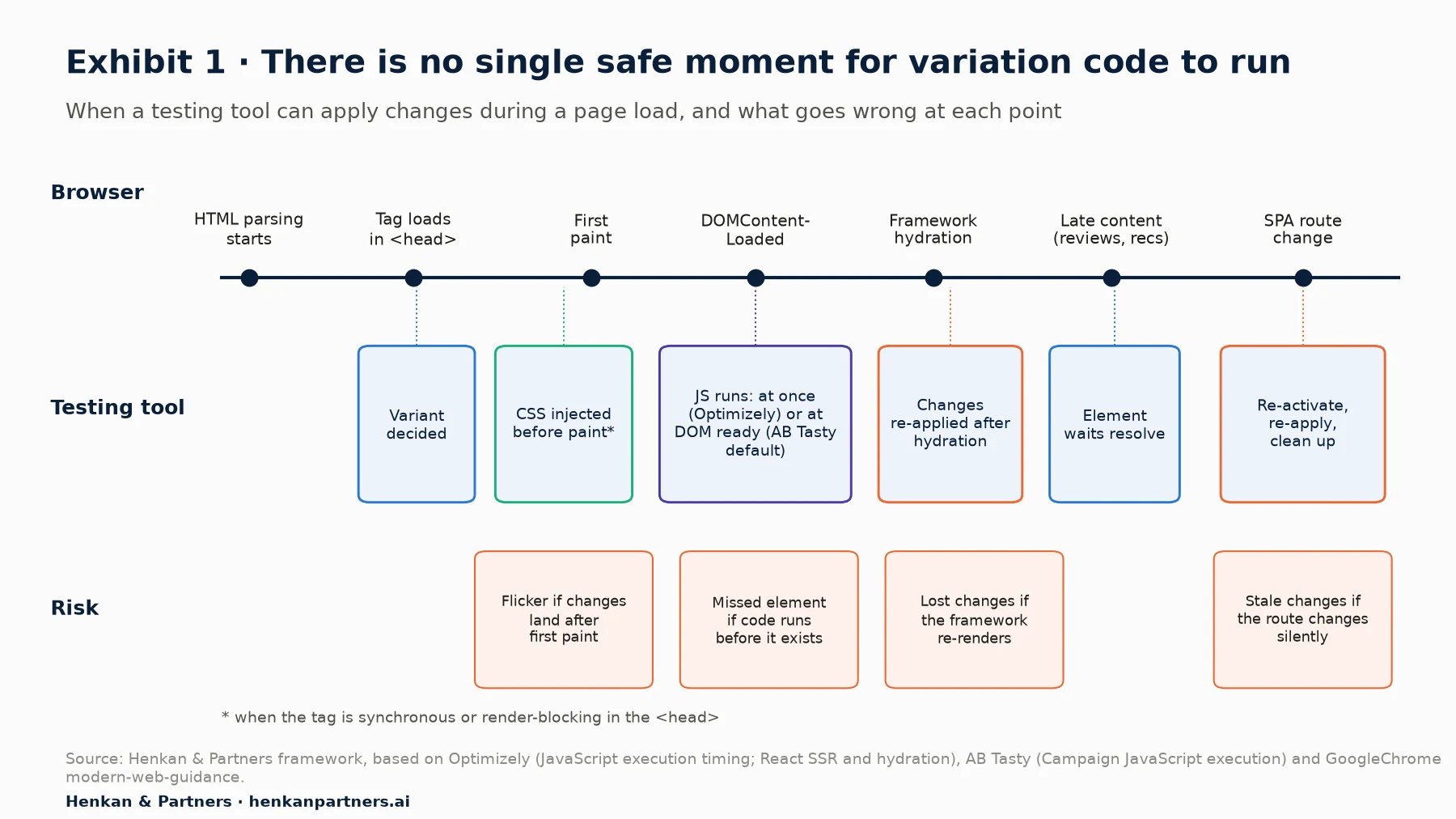
What this shows. There is no single safe moment. CSS applied before first paint avoids flicker; JavaScript usually needs to wait for its element; framework pages need changes re-applied after hydration and after every route change. Good variation code is written to handle all of these, not to hope for one.
Three practical rules follow. Put everything that can be CSS into the variant's CSS, which most tools inject immediately. Never assume an element exists: wait for it with a helper and a timeout. And never assume your code runs once: write it so a second run changes nothing.
For engineering leads. Ask for the tag to be installed synchronously or render-blocking in the `<head>`, with no tag manager in between, if you run visual tests on key pages. A tag fired late from a tag manager almost always means flicker or a longer anti-flicker hide.
Section 2 · Selecting elements
Select by contract, scope the search and escape what you did not write
`document.querySelector()` returns "the first Element within the document that matches the specified CSS selector", or `null`, searching depth-first; `querySelectorAll()` returns "a static (not live) NodeList" in document order. An invalid selector throws a `SyntaxError`, so a single typo in variation code can stop everything after it. Class or ID values that are not valid CSS identifiers, such as IDs starting with a digit, must be escaped with `CSS.escape()`.
Robust variation code selects on attributes that are meant to stay: an agreed `data-test` or `data-exp` attribute, an ARIA role or label, or a stable ID. Avoid positional paths and hashed class names from CSS Modules or similar build tools, whose default names look like `._23_aKvs-b8bW2Vg3fwHozO`. Scope searches to a container found once, and use `closest()` to climb from a stable child to the block you need.
function applyVariant() {
  // Scope once, then search inside the container
  const buybox = document.querySelector('[data-test="pdp-buybox"]');
  if (!buybox) return;                                // fail quietly, never throw

  // Climb from a stable child to the block you need
  const row = buybox.querySelector('[data-test="price"]')?.closest('[data-test="price-row"]');

  // Escape values you did not write before building a selector from them
  const sku = buybox.dataset.sku;
  const swatch = sku && buybox.querySelector('[data-sku="' + CSS.escape(sku) + '"]');
  // ...
}
Two modern selectors need care. `:has()` has been Baseline since December 2023, but MDN warns that some uses "can significantly impact page performance, particularly during dynamic updates (DOM mutations)" and advises against anchoring it on `body`, `:root` or `*`. And selectors do not cross boundaries: `document.querySelectorAll()` does not find elements inside a shadow root, closed shadow roots return `null` from `element.shadowRoot`, and a cross-origin iframe's `contentDocument` is `null`. If the element you need lives in a closed shadow root or a third-party frame, the test belongs in that component's code, not in injected script.
For engineering leads. Add a `data-test` attribute convention to your component library and document which attributes are a contract for experimentation and automated tests. It costs little, and it lets marketers' visual-editor tests, AI-generated variants and your end-to-end tests all target the same stable names.
Section 3 · Waiting for elements
Wait with MutationObserver and a timeout, preferably through your vendor's helper
Elements that are not yet in the DOM are the most common reason variation code does nothing. The old answer was polling with `setInterval`, which costs CPU while it runs and, at typical intervals of 50 to 200 ms, can leave the original visible for a frame or more. The modern answer is `MutationObserver`, which the DOM standard delivers as a microtask batch after the change, before the browser gets a chance to paint.
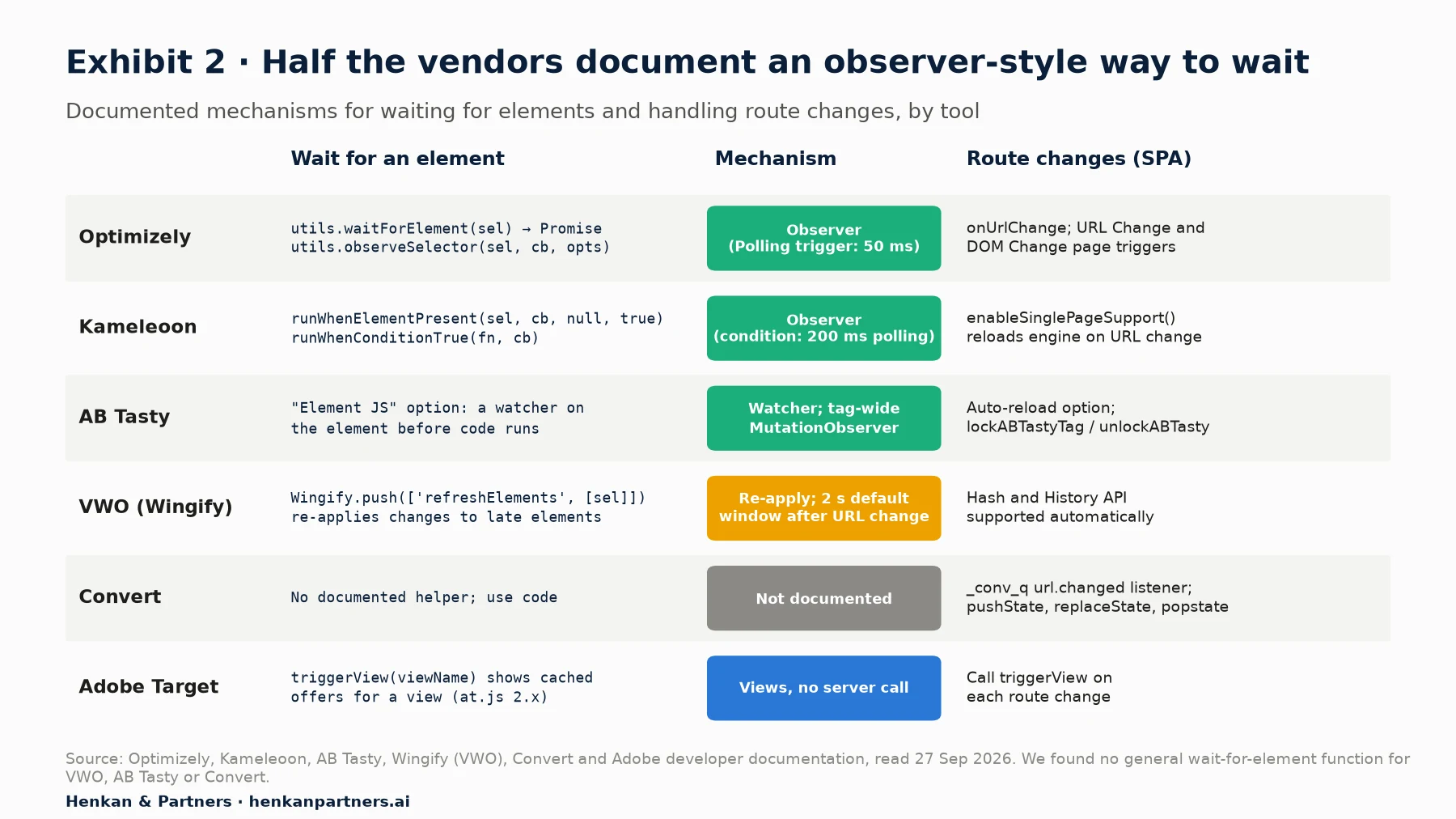
What this shows. Where a vendor offers an observer-based helper, use it: it is tested, it cleans up after itself and it usually ties into the tool's anti-flicker handling. Kameleoon, for example, says `runWhenElementPresent` "uses mutation observers to power antiflickering technology", while its polling-based `runWhenConditionTrue` "might cause flickering".
Optimizely's utilities are reached through `window["optimizely"].get("utils")`. `waitForElement(selector)` "Returns a Promise that is resolved with the first HTMLDomElement that matches the supplied selector", and `observeSelector(selector, callback, options)` calls back for each match, with `once`, `timeout` and `onTimeout` options and a return value that stops observing.
// Optimizely
const utils = window['optimizely'].get('utils');
utils.waitForElement('[data-test="delivery-message"]').then(applyDelivery);
const stop = utils.observeSelector('[data-test="product-card"]', decorateCard, { timeout: 5000 });

// Kameleoon: the callback receives an array; null keeps mutation observers
// (a polling interval switches to legacy polling); true keeps watching for dynamic elements
Kameleoon.API.Core.runWhenElementPresent('[data-test="delivery-message"]',
  (elements) => elements.forEach(applyDelivery), null, true);
Where there is no helper, write a small one. The pattern below resolves immediately if the element exists, watches the whole document otherwise, and always disconnects, either on success or after a timeout. Scope `root` to a container when you can, since observing `subtree` on a large document is not free.
function waitForElement(selector, { root = document, timeout = 3000 } = {}) {
  return new Promise((resolve, reject) => {
    const existing = root.querySelector(selector);
    if (existing) return resolve(existing);

    let timer;
    const observer = new MutationObserver(() => {
      const el = root.querySelector(selector);
      if (el) { observer.disconnect(); clearTimeout(timer); resolve(el); }
    });
    observer.observe(root, { childList: true, subtree: true });
    timer = setTimeout(() => {
      observer.disconnect();
      reject(new Error('waitForElement timed out: ' + selector));
    }, timeout);
  });
}
Set the timeout deliberately. If the element has not appeared within a few seconds, the visitor has already seen the original, and applying the change late creates exactly the flicker the test should avoid. It is often better to give up, log it and exclude that visitor from analysis through your tool's audience or activation rules.
Section 4 · Writing changes
Write changes that are idempotent, CSS-first and cheap for the browser
Put visual changes in CSS
A stylesheet rule applies to matching elements whenever they appear, including those rendered later or re-rendered by a framework, and it costs no JavaScript. Optimizely's own fix for flicker is to move visual changes into variation CSS, because it "runs immediately" when set to synchronous timing. Use JavaScript only to change content or structure, and let it add a class that the CSS styles.
/* Variation CSS: applies before paint and survives re-renders */
[data-test="add-to-cart"] { background: #1baf7a; }
.exp142-note { min-height: 1.5rem; margin: 0.5rem 0 0; }   /* reserve space: no layout shift */
html.exp142 [data-test="promo-strip"] { display: none; }
If you must beat the site's specificity, prefer a more specific selector or a class on `<html>` over `!important`. When you do need it from JavaScript, pass it as the third argument: `el.style.setProperty('color', '#0b1f3a', 'important')`, since the value itself must not contain "!important". For larger rule sets, a constructed stylesheet added through `document.adoptedStyleSheets` (Baseline since March 2023) can be updated or removed in one place, and can also be shared with shadow roots you own.
Make every change idempotent
Testing tools re-run variation code on route changes, re-activations and sometimes after DOM mutations. Code that inserts a banner every time it runs will insert two, then three. Mark what you have changed and check the mark first; a test-prefixed `data-` attribute works well, and `dataset` maps `data-exp142-applied` to `dataset.exp142Applied`.
const EXP = 'exp142-b';

function applyDelivery(el) {
  if (el.dataset.exp142Applied === EXP) return;       // already applied: do nothing
  el.dataset.exp142Applied = EXP;
  document.documentElement.classList.add('exp142');

  const note = document.createElement('p');
  note.className = 'exp142-note';
  note.textContent = 'Free returns within 30 days';   // text, never HTML
  el.insertAdjacentElement('afterend', note);
}
Choose the right DOM method
| Task | Use | Avoid | Why |
|---|---|---|---|
| Change text | `textContent` | `innerHTML`, `innerText` for writes | MDN: setting text through innerHTML "is still less semantic and slower because it needs to invoke the HTML parser"; reading `innerText` "triggers a reflow" |
| Insert new markup | `createElement` plus `insertAdjacentElement`, or a `<template>` cloned with `importNode` | Rebuilding a parent with `innerHTML` | `insertAdjacentHTML` "does not reparse the element it is being used on"; rebuilding a parent destroys its listeners and framework state |
| Move an element | `insertAdjacentElement` or `append` with the existing node | Cloning and deleting | Inserting an existing node moves it and keeps its listeners |
| Duplicate an element | `cloneNode(true)`, then remove or change `id`s | Cloning blindly | MDN: "cloneNode() may lead to duplicate element IDs"; listeners added with `addEventListener` are not copied |
| Toggle styles | `classList.add/remove/toggle` | Editing `className` strings or inline styles | Keeps the site's classes intact and moves styling to CSS |
| Hide | A class that sets `display: none` | `remove()` on framework-managed nodes | Removing nodes a framework manages can crash its next update |
Avoid layout thrashing
Reading a layout property such as `offsetHeight` right after a style change forces the browser to calculate layout synchronously; doing it in a loop is layout thrashing. Google's guidance is to batch reads, then writes. Keep each piece of work under the 50 ms long-task threshold, and split large jobs so the browser can paint and respond to input in between.
// Read everything first...
const cards = [...document.querySelectorAll('[data-test="product-card"]')];
const heights = cards.map((card) => card.offsetHeight);

// ...then write
requestAnimationFrame(() => {
  cards.forEach((card, i) => card.classList.toggle('exp7-compact', heights[i] > 420));
});
Be wary of broad selectors on large pages. Lighthouse warns above roughly 800 nodes in the body and errors above about 1,400, and Chrome's Lighthouse documentation warns that with a general selector such as `document.querySelectorAll('li')` you "may be unknowingly storing references to a very large number of nodes".
Section 5 · SPAs and frameworks
On framework sites, apply after hydration, change only what will not re-render, and re-run on every route
Single-page applications break two assumptions of injected testing: that the page loads once, and that nothing else rewrites the DOM. React's documentation is explicit: "Avoid changing DOM nodes managed by React. Modifying, adding children to, or removing children from elements that are managed by React can lead to inconsistent visual results or crashes", though "you can safely modify parts of the DOM that React has no reason to update."
Server-side rendering adds hydration. React's `hydrateRoot()` "expects the rendered content to be identical with the server-rendered content" and treats mismatches as bugs; Next.js lists "browser extensions modifying the HTML" among the causes of hydration errors, and injected test code looks the same to it. Optimizely's documentation describes the result: React "attempts to reconcile the DOM to match its virtual DOM, often overwriting Optimizely's changes because it is unaware of the experiment modifications", with "flickering or flashing and lost or inconsistent changes" as symptoms. Vue recovers from mismatches by discarding nodes and mounting new ones, at a performance cost.
| Approach | When it works | Trade-off |
|---|---|---|
| Apply after hydration | The tool can wait for an app-ready signal: Optimizely manual or callback activation, AB Tasty's `window.lockABTastyTag = true` then `window.unlockABTasty()` | Flicker unless the change is CSS-only or hidden briefly |
| Change only stable parts | Static content, CSS-only changes, elements added next to (not inside) framework-managed nodes | Limits what you can test |
| Re-apply on mutation | Small, idempotent changes to elements the framework re-renders occasionally | Risk of fighting the framework; needs loop protection |
| Re-run on route change | Every SPA test: the tool's SPA mode, `onUrlChange`, `enableSinglePageSupport`, `url.changed`, `triggerView` | Must clean up the previous screen's changes |
| Move the test into the code base | Changes to component logic, state or anything the framework re-renders often | Needs a release; use a client-side SDK or feature flag |
When you do need to keep a change applied to a re-rendering area, observe the smallest container you can, disconnect while you write so you do not trigger yourself, and batch to one run per frame:
function keepApplied(container, apply) {
  let frame = 0;
  let stopped = false;
  const observer = new MutationObserver(() => {
    if (!frame && !stopped) frame = requestAnimationFrame(run);   // at most one run per frame
  });
  function run() {
    frame = 0;
    if (stopped) return;
    observer.disconnect();                 // don't observe our own writes
    try { apply(); }                       // must be idempotent
    finally { observer.observe(container, { childList: true, subtree: true }); }
  }
  run();
  return function stop() {                 // call on route change or test end
    stopped = true;
    cancelAnimationFrame(frame);
    observer.disconnect();
  };
}
Route changes need the same care. `history.pushState()` does not fire `popstate` ("just calling history.pushState() or history.replaceState() won't trigger a popstate event") or `hashchange`, which is why older code patched the History API. The Navigation API, Baseline since January 2026, fires a `navigate` event for every navigation from one central place. Prefer your vendor's SPA hook, since it also re-evaluates targeting and counts views correctly; if you must detect routes yourself:
// Call once per page load (for example from project-level code), not from variation code that re-runs.
// The callback can run before the new screen renders: wait for elements inside it.
function onRouteChange(callback) {
  let last = location.href;
  const check = () => {
    if (location.href === last) return;                 // ignore same-URL state updates
    last = location.href;
    callback(last);
  };
  if ('navigation' in window) {                         // Baseline since January 2026
    navigation.addEventListener('navigatesuccess', check);
    return;
  }
  for (const method of ['pushState', 'replaceState']) {
    const original = history[method];
    history[method] = function (...args) { const result = original.apply(this, args); check(); return result; };
  }
  window.addEventListener('popstate', check);
  window.addEventListener('hashchange', check);
}
Clean up as carefully as you apply. Kameleoon's `enableSinglePageSupport()` removes elements whose IDs start with `kameleoonElement` or `kameleoonStyleSheet` when it reloads; Wingify notes that its `revertChanges` cannot revert "JS changes or editor changes". Give every inserted node and class a test-specific prefix so a cleanup function can find and remove them on route change.
For engineering leads. Decide per template whether injected tests are allowed. On server-rendered React or Vue pages with frequent re-renders, a client-side SDK or feature flag in the code base is usually cheaper than keeping injected code alive. Our comparison of testing methods sets out the options.
Section 6 · Flicker and performance
Replace page hiding with a small render-blocking script and hold variation code to a budget
Anti-flicker snippets hide the page, typically with `opacity: 0`, "until the experiment script finishes or an arbitrary timeout (typically 4 seconds) elapses". The GoogleChrome modern-web-guidance note on flicker-free testing says this "sacrifices progressive rendering, allows accidental clicks on invisible content". Its recommended alternative is to load the experiment script in the `<head>` with `async` and `blocking="render"`, keep it small with a budget of "under 100ms execution time", and not combine it with legacy anti-flicker snippets.
<!-- In <head>: async so parsing continues, blocking="render" so nothing paints until it runs -->
<script async blocking="render" src="https://cdn.your-testing-tool.example/tag.js"></script>

<!-- A script added dynamically must set the attribute itself (MDN):
     script.blocking = 'render'; -->
Browser support sets the limit. `blocking="render"` works in Chrome and Edge from version 105 (September 2022) and Safari 18.2 (December 2024), but not in Firefox, where the guidance recommends a feature-detected anti-flicker fallback. Harry Roberts calls its application in client-side A/B testing "its most compelling use-case", while adding that "most of us won't need blocking=render". There is no developer-controlled timeout for `blocking="render"`: if the vendor's CDN fails, rendering waits on the browser's own heuristics, so the vendor needs strong uptime.
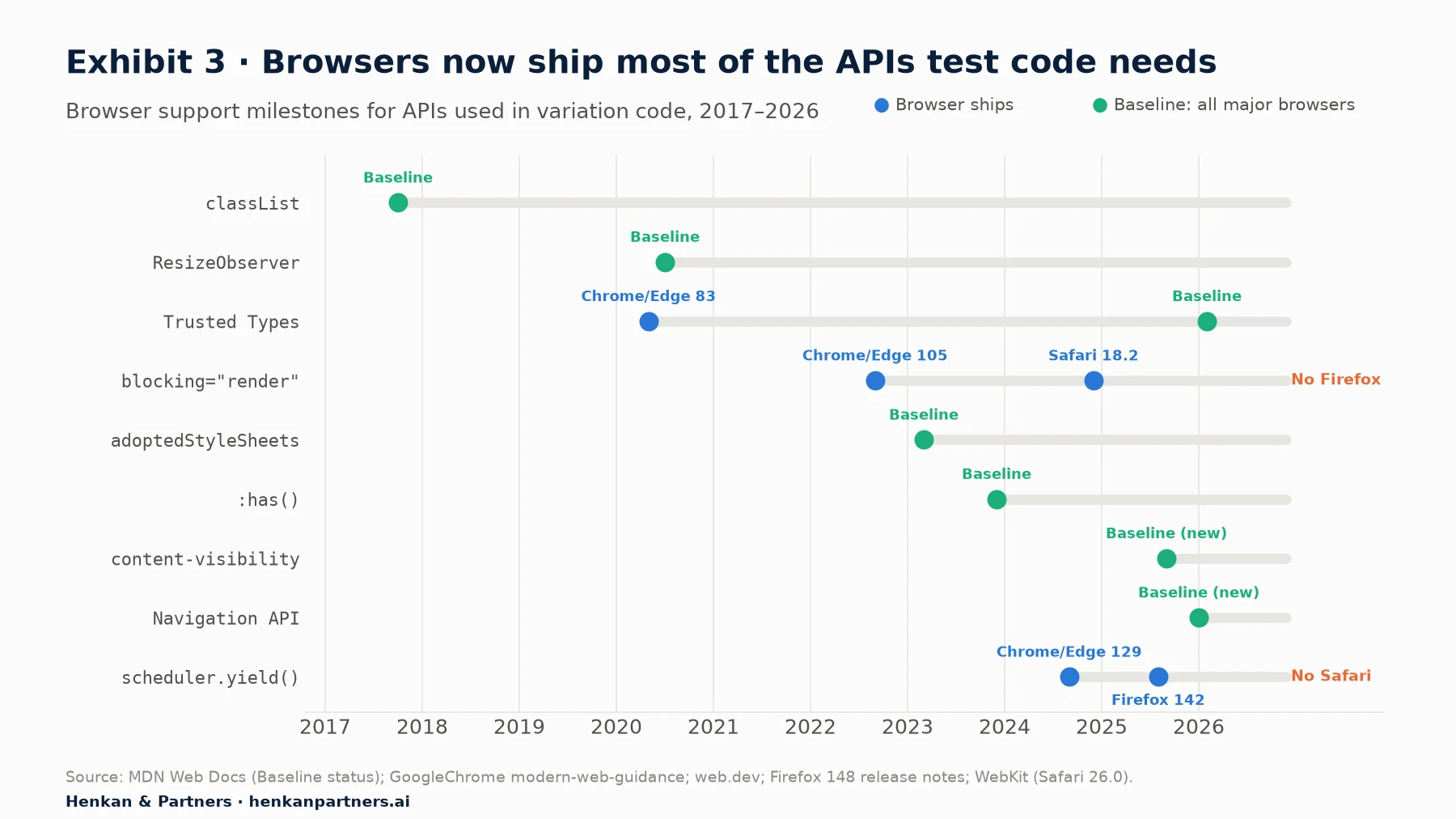
What this shows. The platform now covers most of what testing code used to hand-roll: observing DOM and route changes, blocking render briefly, adopting stylesheets and enforcing safe HTML. Two gaps remain for cross-browser code: `blocking="render"` in Firefox and `scheduler.yield()` in Safari, so both need feature detection.
Variation code also counts towards Core Web Vitals. Injected content near the top of the viewport "usually causes greater layout shifts than content injected lower in the viewport", so reserve space with `min-height`, `aspect-ratio` or a placeholder; composited animations using `transform: translate()` do not count towards CLS. Inserting a larger element can create a new Largest Contentful Paint candidate. And every long task in a click handler you add feeds into Interaction to Next Paint, where good is 200 ms or less at the 75th percentile.
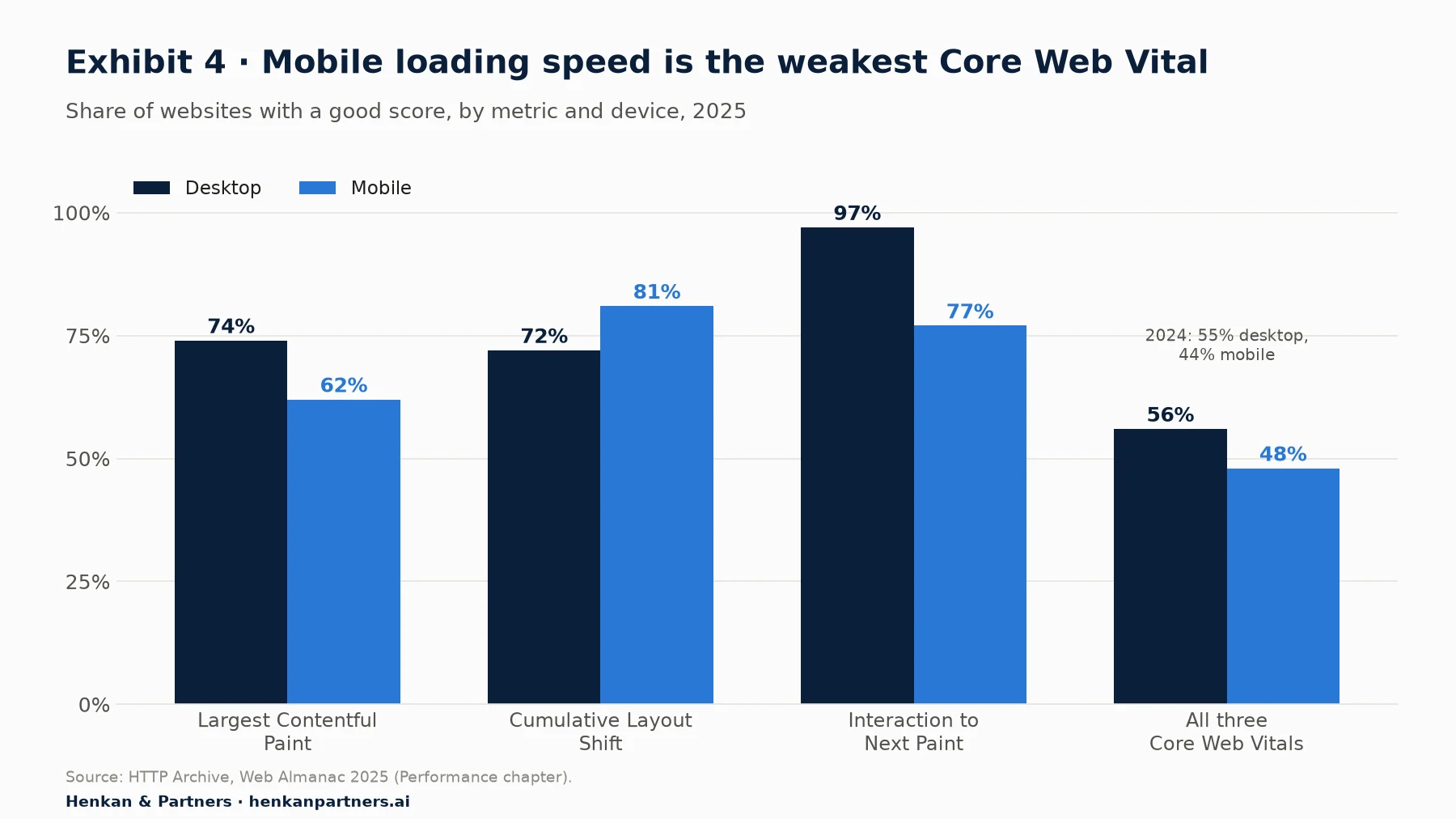
What this shows. Loading speed on mobile is the weakest metric, and it is the one page hiding and late-applied variants hurt most. Most sites have little headroom: a testing tag that adds a second of hidden page can move a template from passing to failing.
A performance budget for variation code
| Measure | Budget | Source |
|---|---|---|
| Render-blocking experiment script execution | Under 100 ms | GoogleChrome modern-web-guidance |
| Any single task you add | Under 50 ms (the long-task threshold) | web.dev, Optimize long tasks |
| Largest Contentful Paint, variant vs control | No regression; 2.5 s or less is good | web.dev, LCP |
| Cumulative Layout Shift added by the variant | Close to zero; 0.1 or less overall is good | web.dev, CLS |
| Interaction to Next Paint on changed components | 200 ms or less | web.dev, INP |
Section 7 · Security
Build DOM from nodes and text, and make the testing tag work with a strict CSP
Variation code runs with full access to the page, so it can introduce DOM-based cross-site scripting (XSS). MDN calls `innerHTML` "probably the most common vector for cross-site scripting (XSS) attacks"; `insertAdjacentHTML` "does not perform any sanitization". The risk appears whenever test code copies something an attacker can influence, such as a URL parameter, a search term, a product review or a referrer, into an HTML string. OWASP's rule is simple: "Populate the DOM using safe JavaScript functions or properties", and treat untrusted data "only ... as displayable text".
// Unsafe: search term from the URL becomes HTML
banner.innerHTML = `Results for <b>${new URLSearchParams(location.search).get('q')}</b>`;

// Safe: structure from code, data as text
const b = document.createElement('b');
b.textContent = new URLSearchParams(location.search).get('q') ?? '';
banner.replaceChildren('Results for ', b);
Two platform changes make this enforceable. Trusted Types, which blocks plain strings from reaching HTML sinks when a CSP requires it, has been Baseline since February 2026, after Firefox 148 and Safari 26.0 added support; with `require-trusted-types-for 'script'`, assigning a string to `innerHTML` throws a `TypeError`. And `element.setHTML()`, an "XSS-safe method to parse and sanitize a string of HTML", is shipping (Firefox 148 includes it) but is not yet Baseline. If your site enforces Trusted Types, test code that uses `innerHTML` will break, which is the point.
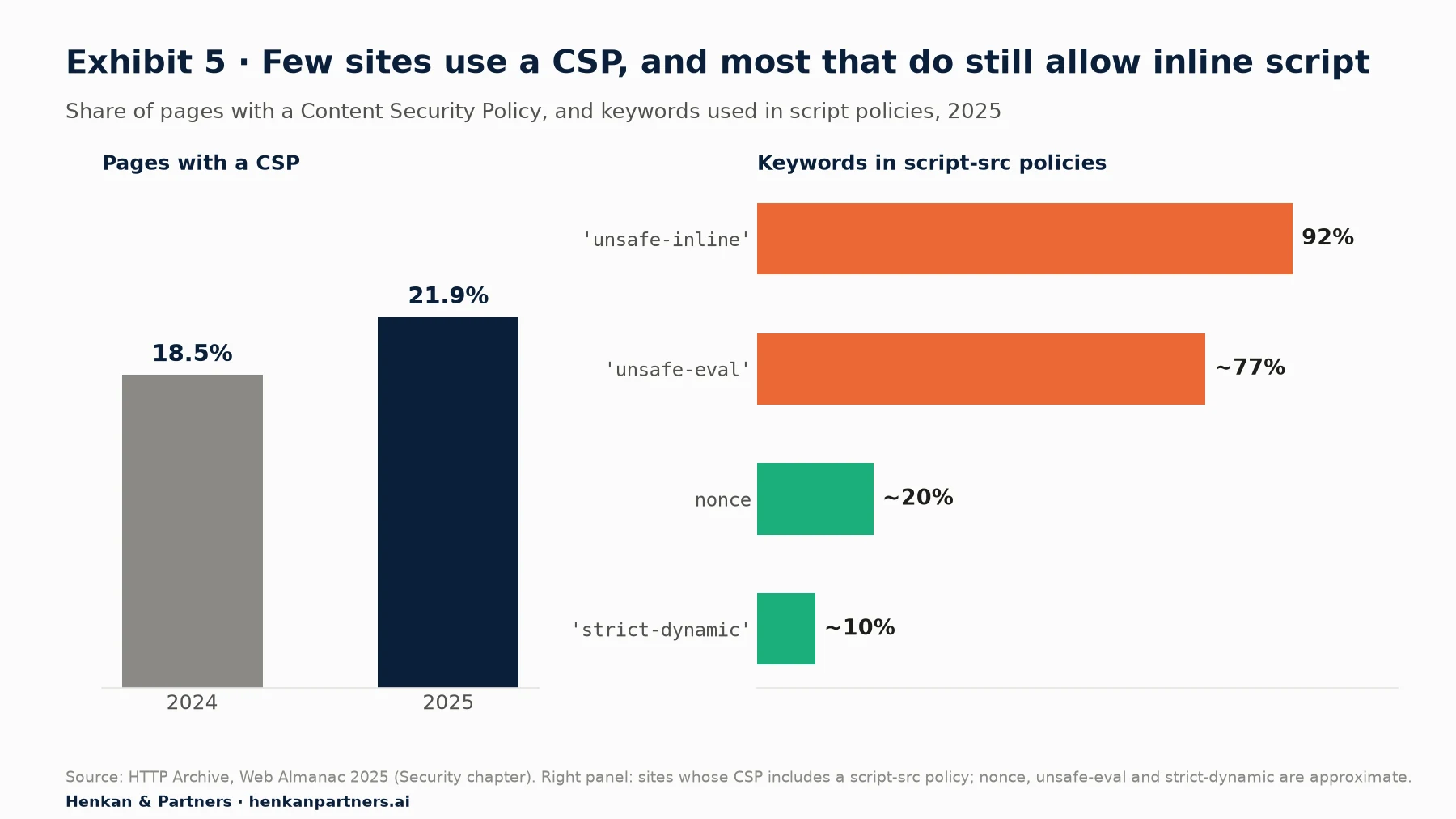
What this shows. Most sites either have no CSP or have one that still allows inline script, in many cases because third-party tags, testing tools among them, ask for it. Moving to nonces with `strict-dynamic` lets the testing tag load its own scripts without opening the door to all inline code.
Vendors document their requirements. Optimizely's recommended policy uses a nonce and `'strict-dynamic'` on `script-src`, so that, in browsers that support it, "it is only necessary to apply the nonce value to the Optimizely Experimentation snippet script tag", plus `https://.optimizely.com` on `style-src` with `'unsafe-inline'` and on `connect-src`; `'unsafe-eval'` is needed only for features such as custom JavaScript audiences. AB Tasty lists `.abtasty.com` with `'unsafe-inline'` on `script-src` and `style-src`, and says a nonce with `'strict-dynamic'` can replace `'unsafe-inline'`. Kameleoon's FAQ for its client-side feature-experimentation SDKs includes `'unsafe-eval'` in `script-src`. Note that under a `style-src` without `'unsafe-inline'`, MDN says style properties set directly through `element.style` are still allowed, which favours `el.style.setProperty()` (not `cssText`, which is blocked) and classes styled by an allowed stylesheet over injected `<style>` tags or `style` attributes.
Subresource Integrity does not fit most testing tags. If a script's hash does not match, the browser "will refuse to load the resource", and vendor snippets are regenerated whenever an experiment changes, so a pinned hash would break the tag. Rely on CSP, vendor access controls and review of what goes into the tag instead.
For engineering leads. Treat the testing tool as a deployment channel for JavaScript. Limit who can publish, require review for custom code (including AI-generated code), log changes, and include the tag's policy in your CSP work rather than exempting it.
Section 8 · Tracking
Send goals from custom code once, with the vendor's own API, in both control and variant
A variant that adds new interactions, such as a new button or a form, needs goals sent from code. Use the vendor's documented call, fire it in control as well as variant where the equivalent action exists, and guard against double counting: listeners attached on every re-run or route change are the usual cause of inflated conversions.
| Tool | Send a custom goal or event | Notes |
|---|---|---|
| Optimizely | `window['optimizely'].push({ type: 'event', eventName: 'watchedVideo', tags: { revenue: 5000 } })` | Create the event in the UI first; revenue is an integer, 100 times the currency unit |
| Kameleoon | `Kameleoon.API.Goals.processConversion(goalNameOrID, revenue, metadata)` | Metadata must be configured in the app first |
| AB Tasty | `ABTastyClickTracking(trackingName)` or `window.abtasty.send('event', { ec, ea, el, ev })` | `ABTastyEvent()` is deprecated |
| Convert | `_conv_q.push(['triggerConversion', '12345678'])` | Goal ID from the Convert app |
| Google Tag Manager | `window.dataLayer = window.dataLayer || []; dataLayer.push({ event: 'event_name' })` | Never reassign `dataLayer`: direct assignment "will overwrite any existing values" |
function trackOnce(el, send) {
  if (el.dataset.exp142Tracked) return;          // survives re-runs of the variant code
  el.dataset.exp142Tracked = '1';
  el.addEventListener('click', send);
}

// Inside applyDelivery, after inserting the note:
trackOnce(note, () => window['optimizely'].push({ type: 'event', eventName: 'returns_note_click' }));
Check tracking during QA with the network panel, and know your tool's quirks: Optimizely disables event tracking on views forced with `optimizely_x` unless you add `optimizely_force_tracking=true`.
Section 9 · Accessibility
Injected content must manage focus, announce changes and keep a logical order
In our reviews, visual-editor tests most often fail accessibility on colour and alt text, and hand-written variants on behaviour. The W3C patterns give clear rules. For a modal dialog, "when a dialog opens, focus moves to an element inside the dialog", Tab and Shift+Tab stay inside, Escape closes it, and focus returns to the element that opened it; the native `<dialog>` element with `showModal()` handles much of this. Under WCAG 2.2 success criterion 2.4.3, focus order must preserve meaning, and the W3C technique is to insert dynamic content immediately after its trigger in the DOM, not at the end of `<body>`. Criterion 2.4.11, new in WCAG 2.2, requires that a focused element is not entirely hidden by author-created content such as a sticky banner.
Status messages such as "Free delivery applied" should be announced to screen readers without moving focus. MDN's guidance is to "establish the live region before updating its content", so create the region first and fill it after a short delay; `role="status"` is polite by default, and assertive announcements "should only be used sparingly".
const live = document.createElement('div');
live.setAttribute('role', 'status');                  // implicit aria-live="polite"
live.setAttribute('aria-live', 'polite');             // redundant, for compatibility (MDN)
live.className = 'visually-hidden';
document.body.append(live);

// Later, after the region exists:
setTimeout(() => { live.textContent = 'Free delivery applied to your basket'; }, 300);
Section 10 · QA and automation
Force each variant, test it like a feature and automate the checks you repeat
Every tool can show a chosen variant for QA, but the mechanisms differ, and so does their effect on tracking:
| Tool | Force or preview a variant | Watch out for |
|---|---|---|
| Optimizely | `?optimizely_x=VARIATION_ID`, plus `&optimizely_token=PUBLIC` for drafts; `optimizely_log=info` for logs; `optimizely_disable=true` to switch off | Forcing a variation "will not force an experiment or Page to activate"; tracking is off unless `optimizely_force_tracking=true` |
| Kameleoon | Activation API `assignVariation(experimentID, variationID, override)`; simulation panel | Clear the assignment after QA |
| AB Tasty | QA Assistant "Force display"; `window.ABTastyStartTest(campaignId, variationId)` | Forcing "may lead to unintended exposure beyond the target audience" |
| Convert | Forced-variation URLs (`_conv_eforce`) with a QA audience | Remove the QA audience before launch |
| Adobe Target | Activity QA preview links | QA mode persists for the session; leave it with the Target QA bookmarklet (an empty `at_preview_token` works only with at.js 1.x) |
Automate what you check on every test. Playwright's `toHaveScreenshot()` compares a page with a stored baseline, with tolerances such as `maxDiffPixels`, though its documentation warns that rendering "can vary based on the host OS, version, settings, hardware", so run baselines in the same environment each time. Cypress "does not perform image comparison itself" and relies on plugins or services.
import { test, expect } from '@playwright/test';

// Relative URLs need baseURL in playwright.config. Leave optimizely_force_tracking off
// against a live experiment: forced views with tracking on count in the results.
test('PDP variant B renders once', async ({ page }) => {
  await page.goto('/p/linen-shirt?optimizely_x=VARIATION_ID&optimizely_token=PUBLIC');
  await expect(page.locator('[data-test="add-to-cart"]')).toHaveText('Add to bag');
  await expect(page.locator('.exp142-note')).toHaveCount(1);     // idempotent: exactly one
  await expect(page).toHaveScreenshot('pdp-variant-b.png', { maxDiffPixels: 100 });
});
Code review checklist for variation code
- Selectors target agreed attributes, are scoped, and fail quietly when nothing matches.
- Waiting uses an observer-based helper with a timeout, and every observer and interval is cleared.
- Idempotency: running the code twice changes nothing; inserted nodes and classes carry a test prefix.
- Styling is in CSS; any space for new content is reserved.
- Framework safety: no edits inside framework-managed nodes, correct activation after hydration and on route changes, and cleanup.
- Security: no untrusted data in HTML strings, no `eval`, and the code works under the site's CSP.
- Tracking fires once, in control and variant, and is visible in the network panel.
- Accessibility: focus, keyboard access, announcements and contrast checked.
- Performance: no long tasks added, no LCP or CLS regression against control.
Section 11 · Production and teams
A winning variant is a patch: rebuild it in the application and delete the test code
Optimizely's guidance on implementing wins describes the right sequence: run the winner at 100% only as an interim step, then "the developer abstracts the code, builds a permanent feature in the production environment". It notes that every visual change adds variation code, which can cause flashing as it grows, and that copying variation code straight into the site "is not sustainable when you implement changes from multiple experiments over time". Every test left running at 100% adds weight to the tag, another chance of conflict and another thing to break in the next redesign.
| Team | Recommended set-up | Why |
|---|---|---|
| One developer supporting marketing | Vendor helpers for waiting and SPAs; a shared snippet file with `waitForElement`, `keepApplied` and `trackOnce`; `data-test` attributes on key templates; the review checklist | Makes each test faster and removes the most common bugs |
| Growing CRO or product engineering team | Tag installed render-blocking in the head; performance budget per test; Playwright checks against forced variants; CSP with nonces and `strict-dynamic`; winners rebuilt within a sprint or two | More tests on more templates multiply conflicts and speed costs |
| Multi-brand or international platform | Injected tests limited to templates that allow them; client-side SDK or server-side flags for framework-heavy pages; Trusted Types enforced; publishing rights and code review in the testing tool | Security, performance and consistency at scale |
For engineering leads. Track three numbers for your testing programme: the number of tests live at 100% (aim for zero), the median time from a win to its production release, and the LCP difference between variant and control on key templates. They show whether testing is helping the site or quietly weighing it down.
Section 12 · What to do next
Six moves to make injected tests robust, fast and safe
1. Agree stable selectors
Add `data-test` attributes to key components and document them as a contract for experiments and automated tests.
2. Standardise helpers
Use your vendor's wait and SPA helpers, and keep a small, reviewed library for waiting, re-applying, route changes and tracking.
3. Fix the tag's loading
Load the testing tag in the `<head>`, render-blocking where supported, and replace long anti-flicker timeouts with a performance budget.
4. Harden security
Ban HTML strings built from untrusted data in variation code, move your CSP to nonces with `strict-dynamic`, and plan for Trusted Types.
5. Automate QA
Run Playwright checks and screenshots against forced variants for every test on key templates, and use the review checklist.
6. Close tests properly
Rebuild winners in the application, remove test code and document the result. See our marketer's guide for the parts of this process your marketing colleagues own, and A/B testing statistics for reading results.
Our view. Injected testing is a powerful way to learn what customers respond to, and developers make it trustworthy. Code that waits properly, respects the framework, keeps the page fast and safe and is removed once it has served its purpose lets the business test more ideas with less risk, which is what turns experiments into a better customer experience, revenue and lifetime value.
FAQ
Frequently asked questions about DOM manipulation for A/B tests
Frequently asked questions
How do I wait for an element to exist before changing it in an A/B test?
Use your testing tool's helper if it has one, such as Optimizely's `utils.waitForElement` or Kameleoon's `runWhenElementPresent`. Otherwise use a MutationObserver that resolves when the element appears and disconnects after a timeout. Avoid long polling loops, which cost CPU and can cause flicker.
Why does React overwrite my A/B test changes?
React owns the DOM nodes it renders. During hydration and re-renders it reconciles the DOM with its virtual DOM, so changes it does not know about are overwritten. Apply changes after hydration, use CSS, change only parts React will not re-render, or build the test in the code base with a client-side SDK or feature flag.
How do I run A/B tests on a single-page application?
Enable your tool's SPA support so it re-evaluates targeting on route changes, make variation code idempotent, and clean up changes when leaving a route. `history.pushState()` does not fire `popstate`, so rely on the vendor's hooks or the Navigation API, Baseline since January 2026.
How can I avoid flicker without an anti-flicker snippet?
Load the testing script in the `<head>` with `async` and `blocking="render"`, keep its execution under about 100 ms, and put visual changes in CSS. `blocking="render"` is supported in Chrome, Edge and Safari 18.2 but not in Firefox, so keep a feature-detected fallback there.
Is it safe to use innerHTML in A/B test code?
Only with fixed markup you wrote, never with data from URLs, search terms, reviews or other user-influenced sources. Build elements with `createElement` and set text with `textContent`. Sites enforcing Trusted Types, Baseline since February 2026, will block string assignments to `innerHTML`.
What Content Security Policy does an A/B testing tool need?
It depends on the vendor. Optimizely documents a nonce with `strict-dynamic` on `script-src`, plus its domains on `style-src` and `connect-src`; AB Tasty lists its domains with `unsafe-inline` or a nonce with `strict-dynamic`. Check `unsafe-eval` requirements for custom JavaScript audiences.
How do I track conversions from custom A/B test code?
Use the vendor's API, such as Optimizely's `push({ type: 'event' })`, Kameleoon's `processConversion`, AB Tasty's `ABTastyClickTracking` or Convert's `triggerConversion`. Fire the goal in control and variant, and guard against attaching listeners twice when code re-runs.
Key terms
- Variation code
- The JavaScript and CSS that turn the control page into a variant. It may be written by hand, generated by a visual editor or produced by an AI assistant.
- Execution order
- The sequence in which a testing tag runs project, campaign and variation code and visual-editor changes. Knowing it tells you what already exists when your code runs.
- MutationObserver
- A browser API that reports changes to the DOM tree in batches, as a microtask after the change. It is the efficient way to wait for elements and to re-apply changes.
- Idempotent change
- Code that gives the same result however many times it runs. Essential when route changes or re-renders make the tool run your code again.
- Hydration
- The step in which a framework such as React or Vue attaches to server-rendered HTML and makes it interactive. It can overwrite changes made before or during it.
- Reconciliation
- The framework's process of comparing its virtual DOM with the real DOM and patching differences. Your changes to nodes it manages look like differences to fix.
- Single-page application (SPA)
- A site that changes screens with the History or Navigation API instead of full page loads. Tests must activate, re-apply and clean up on route changes.
- Render-blocking script
- A script the browser must run before first paint. `blocking="render"` makes an async script render-blocking so a variant can paint without flicker.
- Long task
- Main-thread work longer than 50 ms. It delays rendering and responses to input and harms Interaction to Next Paint.
- Layout thrashing
- Alternating DOM writes and layout reads, such as `offsetHeight`, so that the browser recalculates layout again and again. Fixed by batching reads, then writes.
- DOM-based XSS
- Cross-site scripting where page JavaScript writes attacker-controlled data into the DOM as HTML. `innerHTML` with untrusted data is the classic cause.
- Trusted Types
- A browser API that, when enforced by CSP, blocks strings from reaching HTML sinks such as `innerHTML`. Baseline since February 2026.
- Content Security Policy (CSP)
- An HTTP header that restricts which scripts, styles and connections a page may use. Testing tags need explicit allowances, ideally with nonces and `strict-dynamic`.
- Forced variation
- A URL parameter, cookie or API call that shows a specific variant for QA. Some tools disable event tracking on forced views unless told otherwise.
Sources
MDN, WHATWG, web.dev, W3C, OWASP, framework and vendor developer documentation were checked against the original pages on 27 September 2026; the flicker-free testing guidance was read from Google Chrome's modern-web-guidance repository on GitHub. Code examples are Henkan & Partners illustrations built on the documented APIs; test them in your own environment. The execution timeline, method tables, checklist, budgets and recommendations are Henkan & Partners' own analysis.
- MDN, Document.querySelector()
- MDN, Document.querySelectorAll()
- MDN, Element.closest()
- MDN, Element.insertAdjacentHTML()
- MDN, Element.insertAdjacentElement()
- MDN, Element.innerHTML
- MDN, Node.textContent
- MDN, Node.cloneNode()
- MDN, Element.classList
- MDN, HTMLElement.dataset
- MDN, CSSStyleDeclaration.setProperty()
- MDN, Document.adoptedStyleSheets
- MDN, MutationObserver
- MDN, MutationObserver.observe()
- WHATWG, DOM Standard: Mutation observers
- MDN, Window.requestAnimationFrame()
- MDN, ResizeObserver
- MDN, Navigation API
- MDN, Window: popstate event
- MDN, History.pushState()
- MDN, :has()
- MDN, Using shadow DOM
- MDN, HTMLIFrameElement.contentDocument
- MDN, The template element
- MDN, The script element
- MDN, ARIA live regions
- MDN, Trusted Types API
- MDN, Element.setHTML()
- MDN, Content Security Policy guide
- MDN, CSP: style-src
- MDN, Subresource Integrity
- Chrome for Developers, Avoid an excessive DOM size
- GoogleChrome modern-web-guidance, Flicker-Free Client-Side A/B Testing
- CSS Wizardry, blocking=render: Why would you do that?!, 2024
- web.dev, Cumulative Layout Shift (CLS)
- web.dev, Optimize Cumulative Layout Shift
- web.dev, Interaction to Next Paint (INP)
- web.dev, Largest Contentful Paint (LCP)
- web.dev, Optimize long tasks
- web.dev, Avoid large, complex layouts and layout thrashing
- web.dev, content-visibility
- React, hydrateRoot
- React, Manipulating the DOM with Refs
- Next.js, Text content does not match server-rendered HTML
- Vue.js, Server-Side Rendering
- Vue.js, Rendering Mechanism
- OWASP, DOM based XSS Prevention Cheat Sheet
- Mozilla, Firefox 148.0 release notes
- WebKit, WebKit Features in Safari 26.0
- W3C WAI-ARIA Authoring Practices, Dialog (Modal) Pattern
- W3C, Understanding Success Criterion 2.4.3: Focus Order
- W3C, Understanding Success Criterion 2.4.11: Focus Not Obscured (Minimum)
- HTTP Archive, Web Almanac 2025: Security
- HTTP Archive, Web Almanac 2025: Performance
- Optimizely, Get utils
- Optimizely, JavaScript execution timing
- Optimizely, React server-side rendering and hydration
- Optimizely, Implement on dynamic websites
- Optimizely, Page activation
- Optimizely, event
- Optimizely, Query parameters
- Optimizely, Debug variations by forcing behavior with query parameters
- Optimizely, Update your site's Content Security Policies
- Optimizely, Fix flashing or flickering variation content
- Optimizely, Implement wins on your production site
- Kameleoon, Activation API reference
- Kameleoon, Experiment on a single-page application
- Kameleoon, Feature management and experimentation FAQ
- AB Tasty, Campaign JavaScript execution
- AB Tasty, How the tag handles single-page apps
- AB Tasty, Global methods and variables
- AB Tasty, Troubleshooting CSP
- AB Tasty, How to force the display of a variation
- Wingify, Best Practices for Using Custom Code
- Wingify, How to Use Wingify for Single Page Applications
- Convert, SPA support
- Convert, Tracking form submission using a JavaScript-triggered goal
- Convert, QA Guide
- Adobe Experience League, adobe.target.triggerView()
- Adobe Experience League, Target for single-page applications
- Adobe Experience League, Activity QA
- Google Tag Platform, The data layer
- Playwright, Visual comparisons
- Cypress, Visual Testing
- webpack, css-loader (GitHub)
- Henkan & Partners, DOM Manipulation for A/B Testing: The Marketer's Guide
- Henkan & Partners, JavaScript Injection, Client-Side or Server-Side A/B Testing
- Henkan & Partners, A/B Testing Statistics for Marketers
- Henkan & Partners, The Essential Guide to A/B Testing