Guide
Beyond the Numbers: How GA4 Actually Works
Alexandre Suon · 2026-09-27
Most teams read Google Analytics 4 reports every day without knowing how the numbers are made. This guide opens the machine: how GA4 collects events, recognises users, builds sessions, applies consent, processes and estimates data, attributes credit and exports it, so you know when to trust a number and what to do when two numbers disagree.
Executive summary
- GA4 is an event database with a reporting layer on top, and every number you see is the output of a pipeline. The browser sends events; Google filters, stitches and processes them; and each report, exploration, API call or BigQuery table then applies its own rules. Knowing which rules apply explains most surprises.
- GA4 counts browsers, not people, unless you tell it otherwise. A user is a first-party cookie by default. Safari deletes script-set cookies after 7 days without a visit, and the same person on phone and laptop counts twice unless you send a User-ID for signed-in visitors.
- A session is a label GA4 computes, not something it records. GA4 stamps a session ID on events and groups them after 30 minutes of inactivity. Unlike Universal Analytics, it does not start a new session at midnight or when the campaign changes, so session counts are not comparable with the old tool.
- Users and sessions in reports are estimates, and data is not final for about three days. GA4 uses the HyperLogLog++ algorithm, which, at the precision Google says GA4 uses, gives a 95% confidence interval of about ±1.6% for user counts and ±3.3% for session counts. Processing takes 24 to 48 hours, and late events are accepted for two calendar days plus today.
- Consent, bots, filters and thresholds decide what GA4 shows before any analysis starts. Refused cookies can be partly modelled, but only in reports and never in BigQuery. Known bots are removed without a count. Internal traffic filters delete data permanently. Small groups can be hidden to protect privacy.
- When numbers disagree, the question is which rules each source applies, not which one is right. GA4, BigQuery, Google Ads and your back office count different things at different times with different identity and attribution rules. Teams that document those rules, check them weekly and keep raw data in BigQuery make better decisions faster.
Google Analytics 4 (GA4) is Google's web and app analytics tool. It records every interaction as an event with parameters, groups events into users and sessions, and turns them into reports, explorations and raw exports. It replaced Universal Analytics, whose standard properties stopped collecting data on 1 July 2023 (Analytics 360 properties a year later).
Section 1 · The basics
GA4 is an event database with a reporting layer on top, and each number is the output of a pipeline
Most people meet GA4 through its reports: users, sessions, engagement rate, revenue by channel. Those numbers look like facts, but each one is the end of a chain of steps. Something in the browser decides to send an event. Google's servers receive it, remove known bots, apply your filters, attach it to a user and a session, and process it over the next day or two. Then the report you open applies its own rules: which identity to count, which attribution model to use, whether to estimate, sample, hide small rows or group rare values.
This matters because nearly every "GA4 is wrong" conversation is really about a step in that chain. A drop in users may be a consent banner change. A missing campaign may be a tag firing too late. A total that does not match BigQuery may be an estimate. Once you know the steps, you can ask the right question instead of doubting the whole tool.
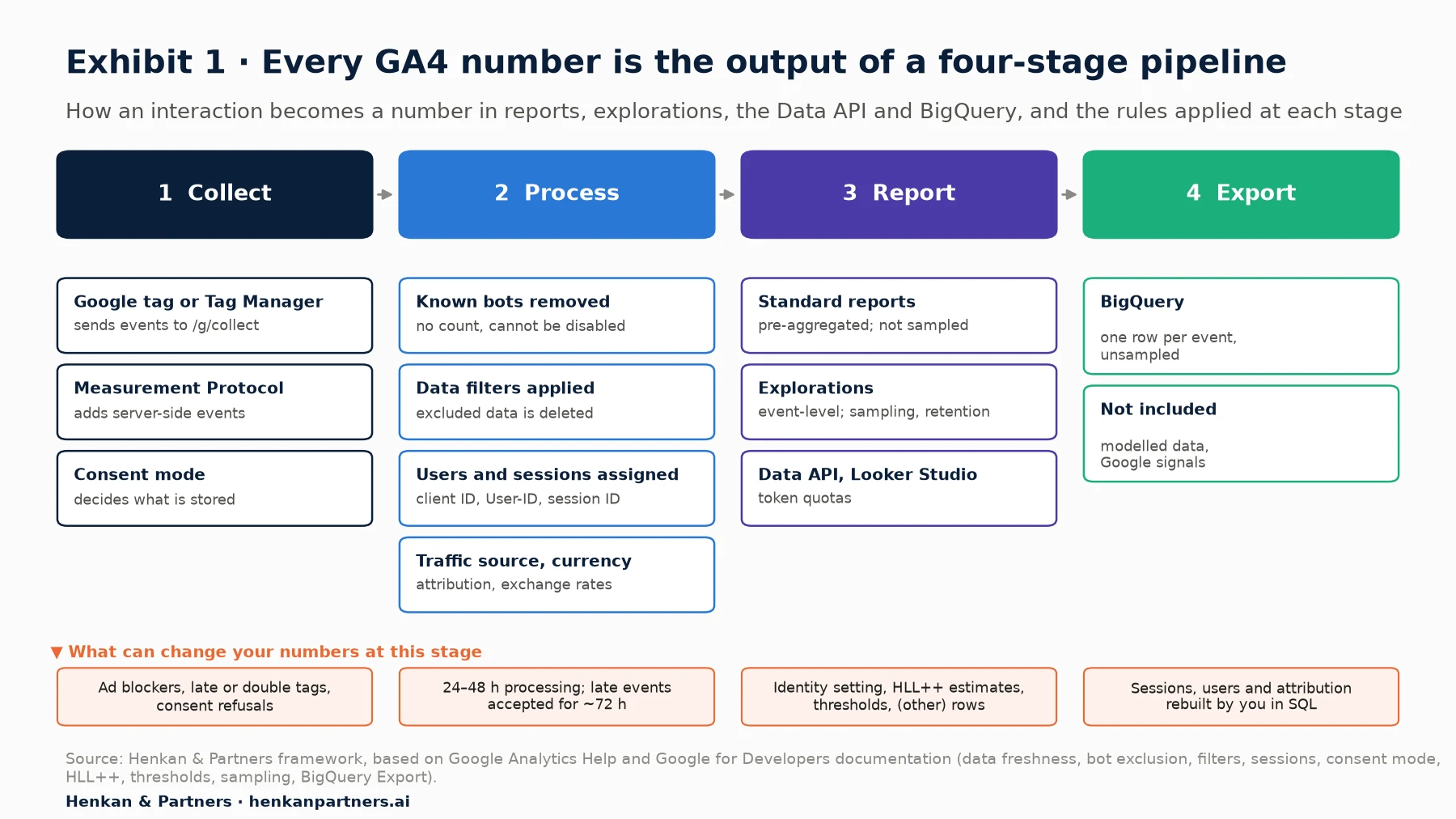
What this shows. Rules are applied at every stage, and the four outputs on the right do not apply the same ones. Standard reports, explorations, the Data API and BigQuery can all be "correct" and still show different numbers for the same day.
| Stage | What happens | What can change your numbers |
|---|---|---|
| Collect | The Google tag, Google Tag Manager or the Measurement Protocol sends events with parameters | Tags firing late or twice, ad blockers, consent choices, missing parameters |
| Process | Google removes known bots, applies filters, assigns users and sessions, attributes traffic, converts currency | Destructive filters, late events, time zone, attribution settings |
| Report | Reports, explorations and the API count, estimate and display | Reporting identity, HyperLogLog++ estimates, thresholds, (other) rows, sampling, retention |
| Export | BigQuery receives the raw events | No modelled data, no Google signals, sessions and attribution to rebuild yourself |
For leaders. Treat GA4 figures as measurements with known rules, not as accounting records. Ask your team to write down, in one page, which rules apply to the numbers in your main dashboard: identity setting, attribution model, filters, consent set-up and date of last check. That page ends most debates about "whose number is right".
Section 2 · Data model
In GA4 everything is an event, and parameters give each event its meaning
Universal Analytics, Google's previous tool, had separate hit types: page views, events with a category, action and label, transactions and more. GA4 replaced all of them with one idea. As Google's own comparison puts it, "every 'hit' is an event", and GA4 events "have no notion of Category, Action, and Label". A page view is an event called `page_view`; a purchase is an event called `purchase`; each carries parameters such as the page URL, the order value or the list of products.
Google sorts events into four groups. Automatically collected events need no extra code, such as `first_visit`, `session_start` and `user_engagement`. Enhanced measurement events are switched on in the admin screen, such as scrolls, outbound clicks, site search, video and file downloads. Recommended events have names and parameters that Google defines, such as `add_to_cart` or `purchase`, and GA4's standard reports rely on them. Custom events are your own; Google's advice is to "only create custom events when no other events work for your use case".
| Building block | What it is | Example | Limit on a standard property |
|---|---|---|---|
| Event | One interaction | `add_to_cart` | Name up to 40 characters; no limit on distinct names for web streams |
| Event parameter | Detail about the event | `value: 59.90`, `currency: EUR` | 25 per event; values up to 100 characters (page_location 1,000) |
| Item | A product inside an e-commerce event | `item_id`, `item_name`, `price` | Up to 200 items per event, with up to 27 custom item parameters |
| User property | An attribute of the user | `loyalty_tier: gold` | 25 per property; values up to 36 characters |
| Custom dimension or metric | A parameter registered so it appears in reports | Registering `loyalty_tier` | 50 event-scoped dimensions, 25 user-scoped, 10 item-scoped, 50 metrics |
One detail causes a lot of confusion: sending a parameter is not enough to see it. A parameter only appears as a dimension or metric in reports after you register it as a custom definition, and only from that moment on (plus 24 to 48 hours of processing). It is, however, present in the BigQuery export from the start, which is one reason teams with BigQuery lose less history when they discover a gap.
For marketers. Before asking developers for a new event, check whether a recommended event already exists. Using Google's names (`generate_lead`, `sign_up`, `view_item`) means standard reports work without extra set-up, and it keeps your data comparable with Google's benchmarks and with Google Ads.
Section 3 · Collection
What reaches GA4 is what the browser actually sends, so the collect request is the first thing to check
On a website, events are sent by the Google tag (gtag.js), either added directly to the page or deployed through Google Tag Manager. Google's own comparison is simple: with gtag.js "you need to write code to deploy tags", while Tag Manager lets you "deploy and modify both tags from Google and third-parties on the fly without editing code". Either way, the result in the browser is the same: a network request to Google's collect endpoint, `google-analytics.com/g/collect`, carrying one or more events.
You can see these requests yourself in the Network tab of your browser's developer tools by filtering on `collect`. Google does not publish a full list of the parameters in this request, but practitioners who have documented it, such as the Analytics Debugger project, agree on the main ones. Reading them is the fastest way to check what GA4 really received, before any processing.
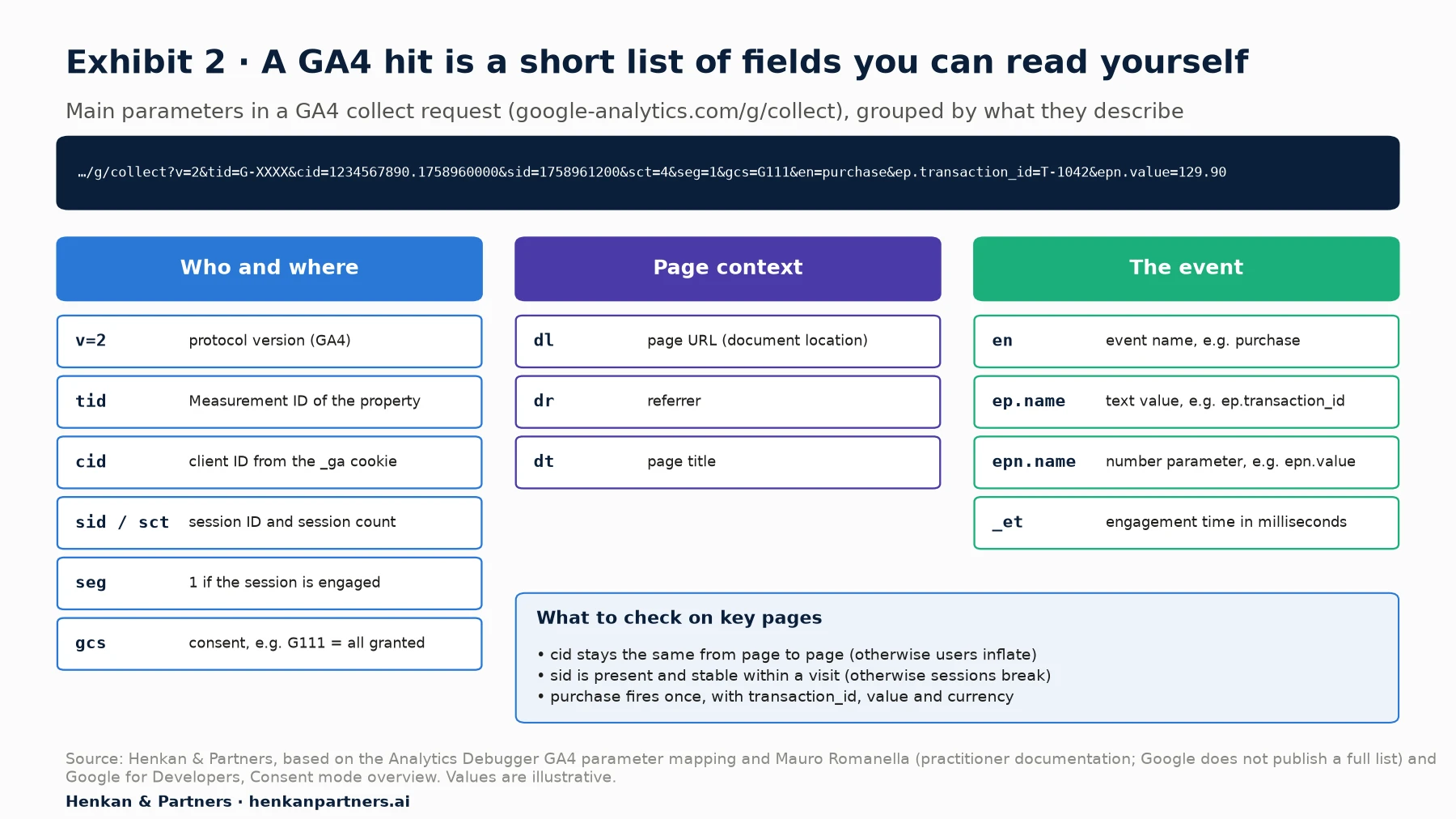
What this shows. Every GA4 number starts as a few short fields in this request. If the client ID changes on every page, users will be inflated. If the session ID is missing, sessions break. If `gcs` shows analytics storage denied, GA4 will not store identifiers for that visitor. Checking a handful of requests on key pages catches most tracking problems before they reach a report.
Batching, timing and the order of tags
The Google tag groups events that happen close together into a single request, so one request can carry a page view and a scroll. Timing matters more than most teams expect. If a purchase event fires before the Google tag has loaded, or after the visitor has left the page, it may never be sent. The `(not set)` value in the session source report is one symptom: Google lists a missing `session_start` event and a configuration tag not triggered on "Initialization" among its common causes.
Server-side events: the Measurement Protocol
Some events never happen in a browser: a refund in your order system, a subscription renewal, an offline sale. The Measurement Protocol lets a server send these to GA4. Google is clear that it is "to augment automatic collection through gtag, Tag Manager, and Google Analytics for Firebase, not to replace it". Each event must carry the visitor's `client_id` so GA4 can join it to the right user, and a `session_id`, sent within 24 hours of the session start, if it should count in a particular session. Google recommends sending events joined to browser activity within 48 hours, and events can be backdated by no more than 72 hours.
| Method | Where it runs | Good for | Watch out for |
|---|---|---|---|
| Google tag (gtag.js) | Browser | Simple sites; developers who prefer code | Every change needs a code release |
| Google Tag Manager (web) | Browser | Most sites; marketing teams managing many tags | Governance: many tags, many people, no tests |
| Server-side Tag Manager | Your own cloud server, then Google | Control over data sent to vendors; longer-lived cookies | Hosting cost and set-up skills |
| Google tag gateway for advertisers | Your CDN or web server, on your own domain | Serving Google tags from first-party infrastructure (general availability from May 2025) | A new product; check how it works with your consent platform |
| Measurement Protocol | Your servers | Refunds, offline sales, server-confirmed events | Needs the client ID; 25 events per request; 72-hour backdating limit |
For marketers. Ask your developer to show you the collect requests for a test purchase in the browser's Network tab and in GA4's DebugView. Checking that `purchase` fires once, with a `transaction_id`, a `value` and a `currency`, takes ten minutes and protects every revenue report you will build.
Section 4 · Identity
GA4 counts browsers, not people, unless you give it a better identifier
GA4 recognises a returning visitor through two first-party cookies. Google describes `_ga` as "used to distinguish users" and `_ga_<container-id>` as "used to persist session state". The `_ga` cookie holds the client ID, in practice a random number followed by the time of the first visit, which becomes `user_pseudo_id` in BigQuery. Both cookies last two years by default. When a visitor clears cookies, switches browser or uses another device, GA4 sees a new user.
Browsers shorten that life. Google notes that, if a visitor does not come back, browsers limit first-party cookies to a maximum of 400 days in Chrome and 7 days in Safari. Safari's rule comes from Intelligent Tracking Prevention: WebKit states that it "deletes all cookies created in JavaScript and all other script-writeable storage after 7 days of no user interaction with the website". A Safari visitor who comes back every ten days can appear as a new user each time.
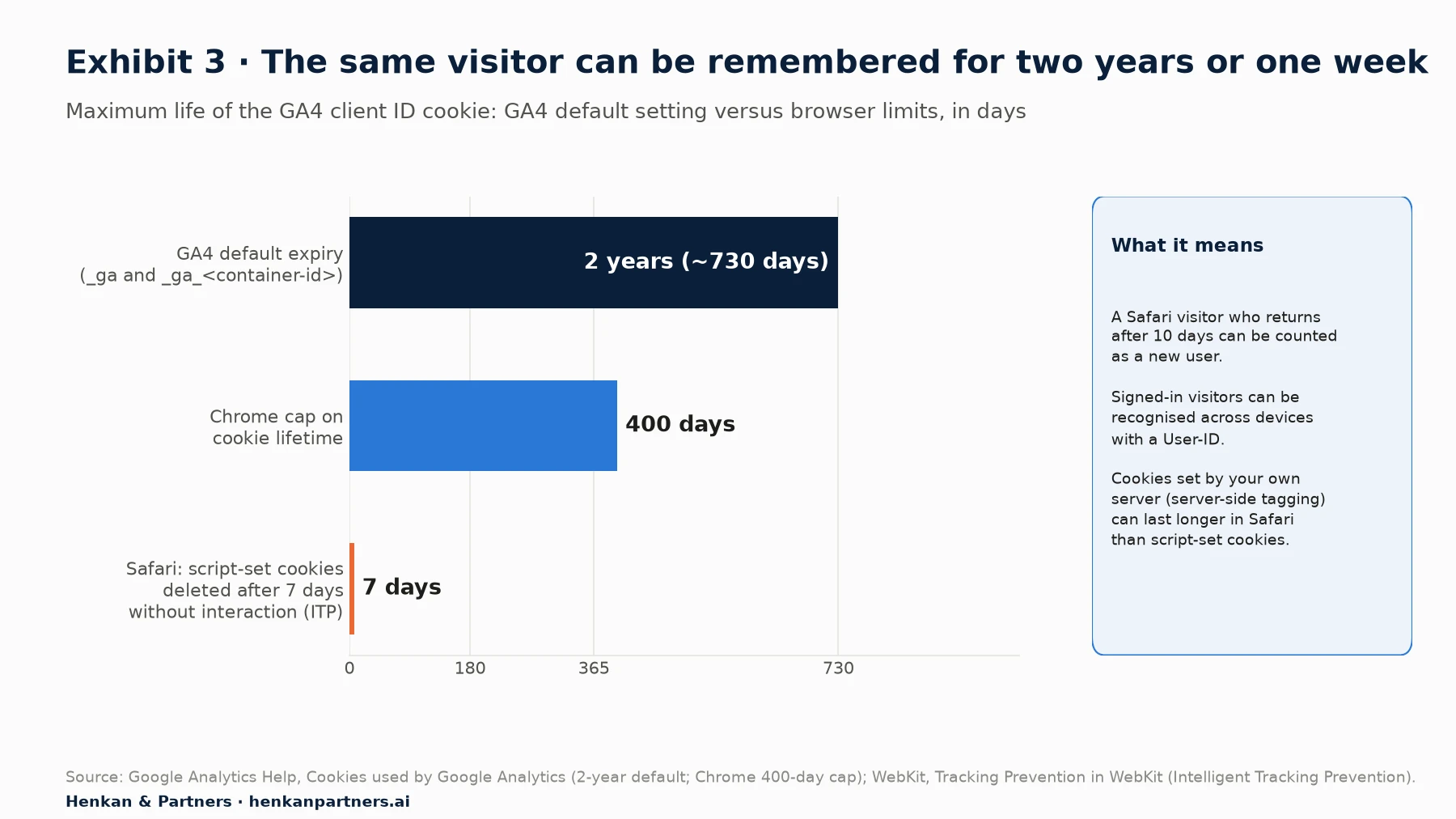
What this shows. The same visitor can be remembered for up to 400 days in Chrome and for a week in Safari. New-user and returning-user figures, and any metric built on them such as customer lifetime or retention, are therefore weakest for Safari visitors. Server-side tagging can set the cookie from your own server instead of JavaScript, which lets it last longer in Safari, provided the server sits on the site's own infrastructure: WebKit still caps cookies set by servers it detects as third-party to 7 days.
Three identity settings, three different user counts
You can improve on the cookie with a User-ID: your own identifier for signed-in customers, which Google calls "the most accurate identity space". It must not contain personal data such as an email address. GA4 then combines identifiers according to the property's reporting identity:
| Reporting identity | Google's definition | When to use it |
|---|---|---|
| Blended | "By User-ID, device ID, then modeling" | Default for most sites; the only option that includes modelled data for visitors who refuse cookies |
| Observed | "By User-ID, then device ID" | When you want only observed data, for example to compare with BigQuery |
| Device-based | "Uses only the device ID and ignores all other IDs that are collected" | When you want counts closest to cookie-based tools |
Two points are often misunderstood. First, reporting identity changes how users are counted in reports, not what is stored, and you can switch it at any time. Second, Google signals, which links activity from signed-in Google account users, is no longer part of reporting identity: Google removed it in February 2024. It still feeds demographics and audiences shared with Google Ads, and it can trigger data thresholds. A separate feature, user-provided data collection, sends consented, hashed contact details such as email addresses to improve matching with Google's advertising products. That is a third, different mechanism.
For leaders. If customers sign in, sending a User-ID is the single biggest improvement to user-level data in GA4. It makes cross-device journeys visible and gives more reliable retention and lifetime figures. It is a small development task, but it needs a privacy review and a clear rule that the ID is never personal data.
Section 5 · Sessions
A session is a label GA4 computes from events, and it does not work like Universal Analytics
GA4 does not send sessions. When a visit starts, Google explains that it "automatically collects a `session_start` event and generates a session ID (`ga_session_id`) and session number (`ga_session_number`)". The session ID is simply "the timestamp in seconds when a session starts". Every later event carries it, and GA4 groups events with the same user and session ID into one session.
By default, a session "ends (times out) after 30 minutes of user inactivity", and you can raise the timeout to a maximum of 7 hours and 55 minutes. Two old habits no longer apply. In Universal Analytics a session ended at midnight and restarted when the campaign changed. In GA4, as practitioners have documented, a session can run across midnight and is not split when the visitor returns through a new campaign during the same session. Sessions in GA4 are therefore usually fewer than in Universal Analytics for the same traffic, and the two should not be compared as one trend line.
Engagement: the metric that replaced bounce rate as the default
GA4 defines an engaged session as one "that lasts longer than 10 seconds, has a key event, or has at least 2 pageviews or screenviews". Engagement rate is the share of sessions that were engaged, and bounce rate is now simply the share that were not. The 10-second timer can be raised in the stream settings, and practitioners report a maximum of 60 seconds. Engagement time is measured only while the page is in focus, through the `user_engagement` event, so a tab left open in the background does not count.
| Metric | GA4 definition | Common mistake |
|---|---|---|
| Total users | "unique users who triggered any event" | Assuming it is the "Users" shown in reports |
| Active users | "unique users who engaged with your site or app"; shown as Users in most reports | Comparing it with Universal Analytics Users |
| New users | Users who logged `first_visit` or `first_open` | Google notes "new users may exceed active users" |
| Sessions | Groups of events with the same session ID | Comparing with Universal Analytics sessions (midnight and campaign rules differ) |
| Engagement rate | Engaged sessions ÷ sessions | Reading it as time on page |
| Bounce rate | 1 − engagement rate | Comparing with the old single-page bounce rate |
Section 6 · Consent
Consent mode decides what GA4 may store, and modelling fills only part of the gap
In Europe and many other markets, visitors must agree before analytics cookies are set. Consent mode is how Google tags follow that choice. It uses four signals: `ad_storage`, `analytics_storage`, `ad_user_data` and `ad_personalization`. Since March 2024 Google has required consent signals, usually sent through consent mode, from advertisers who want to keep using Google Ads audience and measurement features for traffic from the European Economic Area.
There are two ways to implement it. In basic mode, Google tags do not load until the visitor accepts, so GA4 receives nothing from those who refuse. In advanced mode, tags load with consent denied by default and send cookieless pings, which do not store identifiers but let Google estimate what happened. The consent state travels with each request in the `gcs` parameter: for example `G100` means advertising and analytics storage are both denied and `G111` means both are granted.
How much data is at stake? The French regulator CNIL found in 2022 that 39% of French internet users refused cookies, after it pushed websites to make refusing as easy as accepting. The exact share on your site depends on your banner, your audience and your country.
Behavioural modelling: useful, but with conditions
With advanced consent mode, GA4 can use behavioural modelling to estimate the behaviour of visitors who refused, based on similar visitors who accepted. Google sets eligibility thresholds: at least "1,000 events per day with analytics_storage='denied' for at least 7 days" and at least "1,000 daily users sending events with analytics_storage='granted' for at least 7 of the previous 28 days". Modelled data appears only when the reporting identity is Blended, and it is excluded from exports such as BigQuery.
For marketers. When comparing periods, check whether the consent banner, the consent mode set-up or the reporting identity changed in between. A change to any of them can move users and key events sharply with no change in real behaviour. Keep a dated log of these changes next to your dashboard.
Section 7 · Processing
GA4 data is not final for about three days, and some processing choices cannot be undone
When an event arrives, Google does not simply add it to a counter. It removes known bots, applies your data filters, attaches the event to a user and a session, works out the traffic source, converts revenue into the property's currency and writes the result into the tables behind your reports. Google's own warning is short: "Data processing can take 24-48 hours. During that time, data in your reports may change."
Different views of the data arrive at different speeds. The Realtime report shows the last few minutes but covers fewer features. On a standard property, intraday data takes 2 to 6 hours; daily data about 12 hours. Events can also arrive late, for example from a mobile app that was offline. Google accepts them up to a point: it "ignores events that arrive more than 2 calendar days, plus today after the events are triggered". In practice, yesterday's numbers are still moving, and a day is settled after about 72 hours.
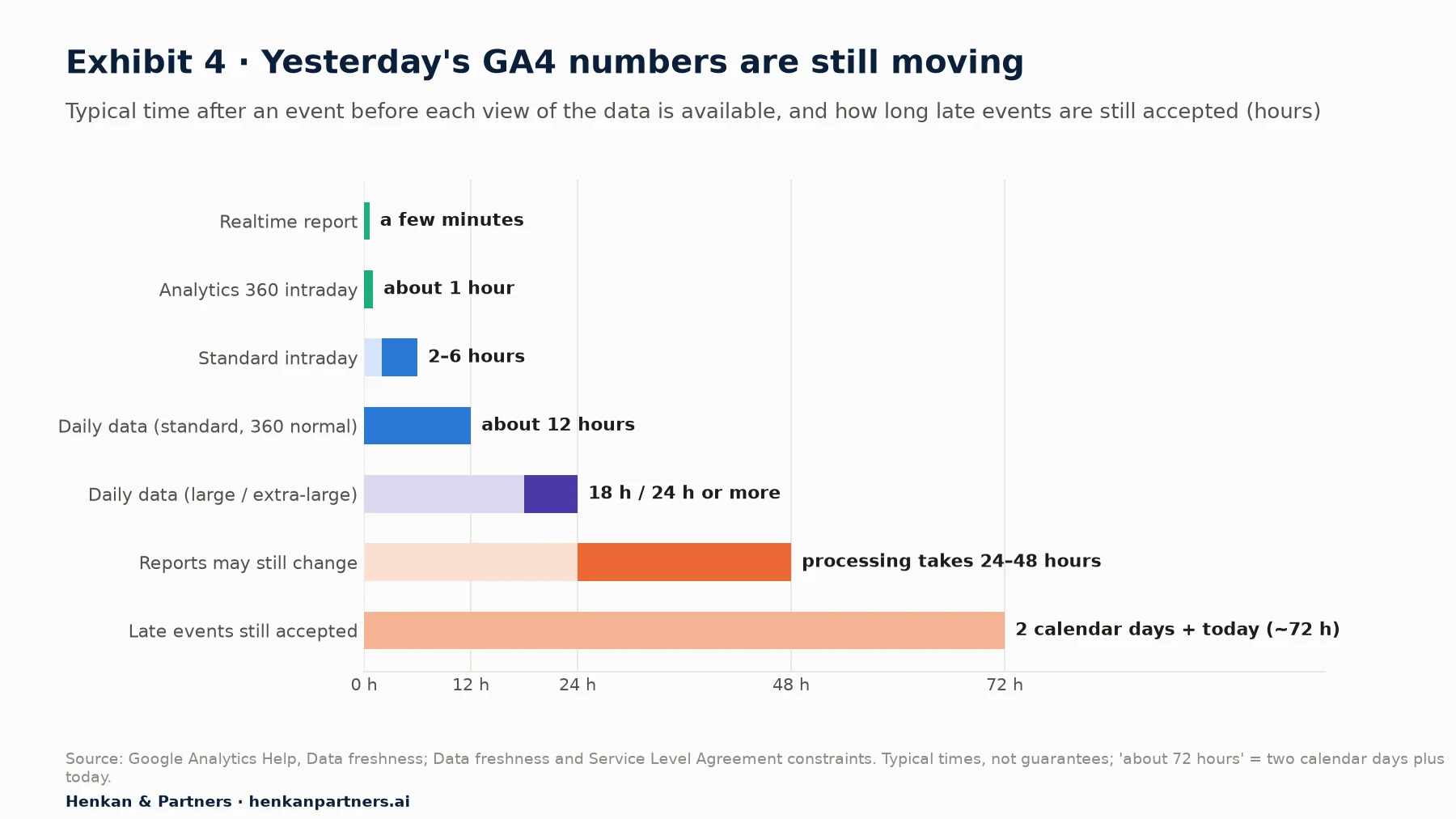
What this shows. A daily report pulled at 9am covers a day whose data is still being processed. Automated alerts and dashboards that compare "yesterday" with "the same day last week" will often show a false drop. Google also says its processing times are "not a guarantee, nor an SLA or an SLO".
Three processing steps you cannot reverse
- Known bots are removed, silently. Google excludes traffic from known bots using its own research and the IAB's International Spiders and Bots List, and states: "you cannot disable known bot traffic exclusion or see how much known bot traffic was excluded". Bots that are not on the list still get through.
- Active data filters delete data. Google is explicit: "if you apply an exclude data filter, the excluded data is never processed and will never be available in Analytics or BigQuery." Test every filter in its Testing state first.
- Data-deletion requests are permanent. They take 7 to 63 days to process, the data must be more than 12 days old, and once processed "the deletion of the data is not reversible".
Currency is a softer trap. GA4 converts revenue into the property's reporting currency using exchange rates, so revenue sent in several currencies will not match your finance figures to the cent. Always send the `currency` parameter with any `value`; without it, revenue is not recorded correctly.
Section 8 · Estimates
Users and sessions in GA4 reports are estimates, accurate to within a few percent
Counting exact unique users across billions of events is slow and expensive. Google explains that "measuring exact distinct counts (i.e. cardinality) for large datasets requires significant memory and affects performance". So GA4 uses HyperLogLog++ (HLL++), an algorithm developed at Google that estimates the number of unique items from a small summary called a sketch. Google's developer blog gives the settings: sessions are estimated at precision 12, and active users and total users at precision 14. Higher precision means a smaller error.
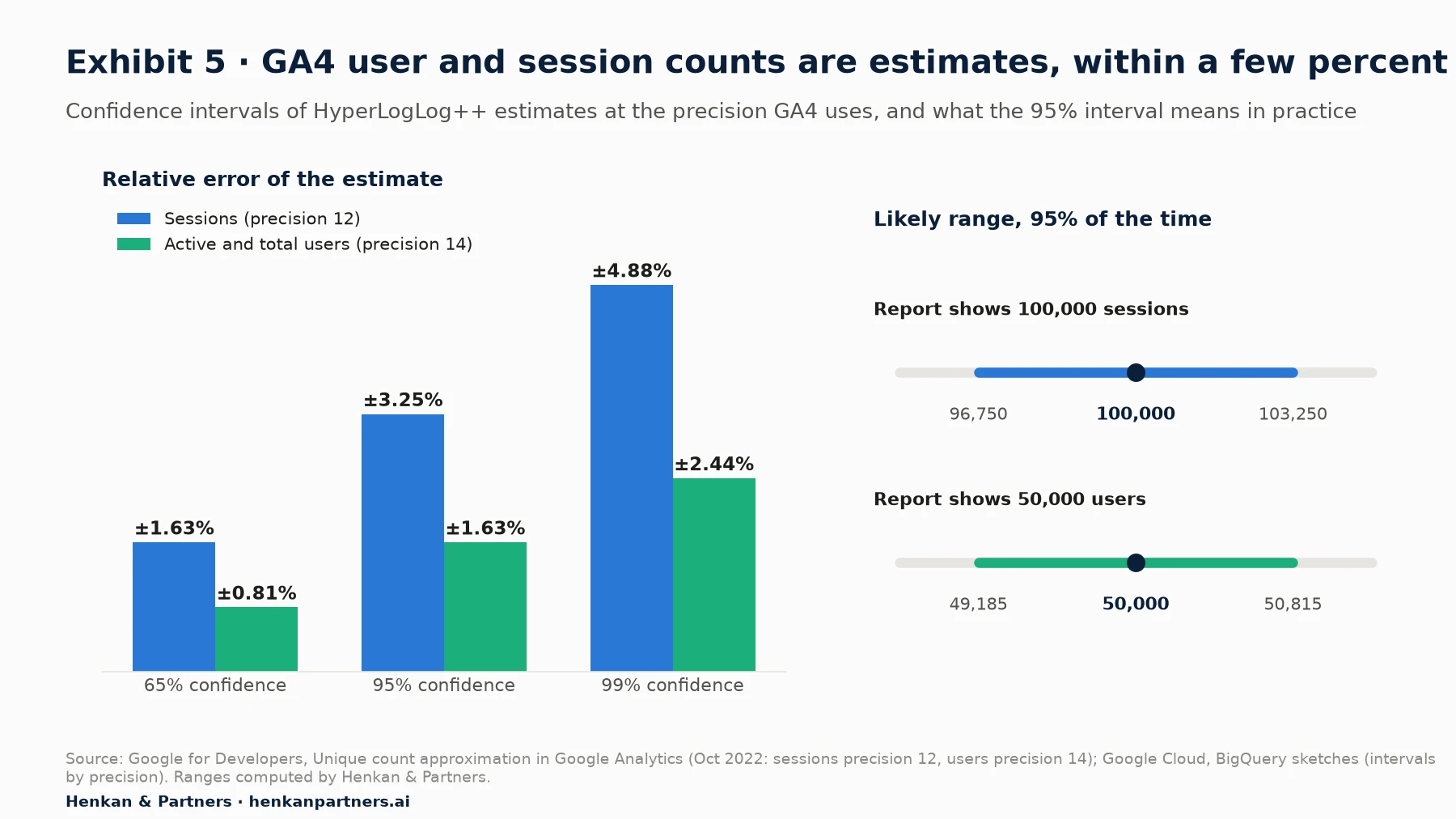
What this shows. For most business decisions, an error of 1% to 3% does not matter. It does matter when you compare small segments, read a test result from GA4 reports rather than from raw data, or try to reconcile totals to the unit. For small counts GA4 uses a more precise "sparse" mode, so the error is lower on low-traffic pages.
Estimation also explains a puzzle every analyst meets: the rows of a report do not add up to the total. Each row and the total are separate estimates, and one user who visits through two channels is counted once in the total but once in each channel row. Neither is a bug.
For leaders. Do not ask for GA4 user counts to match another system exactly; ask for the gap to be explained and stable. If a decision depends on a difference of a few percent between two segments, it should be measured with a proper experiment or from raw data, not read from a standard report.
Section 9 · Reporting
Each GA4 reporting surface applies different rules, so the same question can get different answers
GA4 offers four main ways to get numbers out, and they are built differently. Standard reports read from pre-aggregated tables. Explorations query event-level data for ad hoc analysis. The Data API, used by Looker Studio and other dashboards, runs queries against a token quota. BigQuery holds the raw events. The rules below explain most differences between them.
| Rule | What it does | Where it applies |
|---|---|---|
| Data thresholds | Hides rows with too few users when a report includes demographics, audiences based on them or search queries; "system defined. You can't adjust them" | Reports, explorations, API; not BigQuery |
| Cardinality and (other) | When a report has too many unique rows, less frequent values are grouped into (other); Google cites a limit of 50,000 values | Standard reports and API, mostly with high-cardinality dimensions such as page URL with parameters |
| Sampling | Explorations above the quota use a sample: 10 million events per query on standard, up to 1 billion on 360 | Explorations; standard reports are not sampled |
| Data retention | Event-level data kept 2 or 14 months on standard (up to 50 months on 360); "does not affect standard aggregated reports" | Explorations and funnel reports; not standard reports or BigQuery |
| API quotas | Each request uses tokens; standard properties get 200,000 tokens a day and a limit on concurrent requests | Data API, Looker Studio and other connectors |
Two settings deserve a check on day one. First, data retention is set to two months on new properties unless someone changes it. Google's documentation offers 2 or 14 months on standard properties (large properties are limited to 2 months), and anything shorter than 14 months makes year-on-year explorations impossible. Second, dimensions with too many values, such as full URLs with query strings or product IDs as custom dimensions, push useful rows into (other). Clean URLs and register only the dimensions you need.
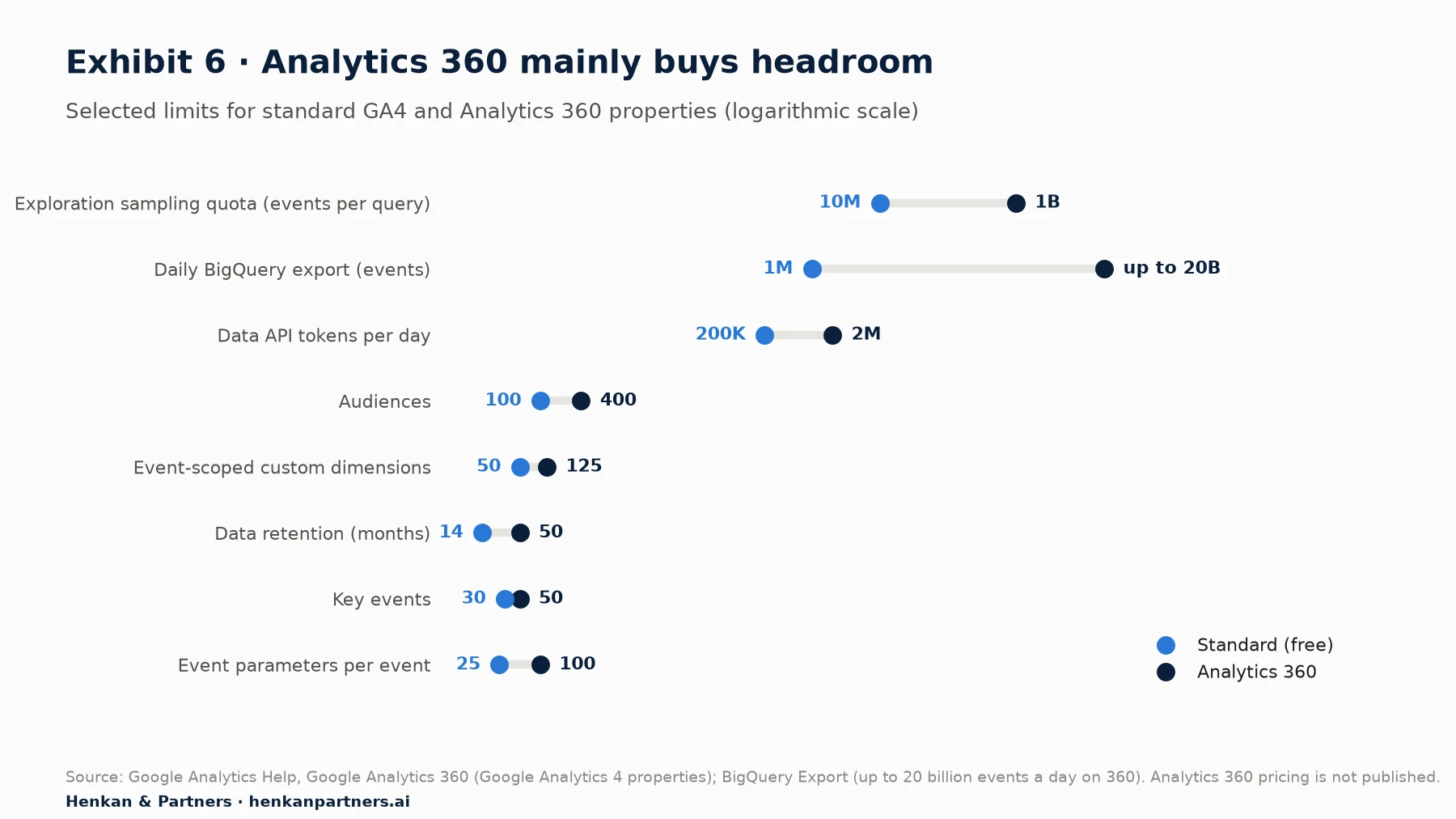
What this shows. The paid version mainly buys headroom: much larger sampling and export limits, more history and more configuration slots. For most small and mid-sized sites, the free limits are not the problem; data quality and set-up are. Above roughly a million events a day, or when explorations regularly hit sampling, the limits start to shape what you can analyse.
AI assistants read the same processed data
GA4 now includes Ask Advisor, which Google describes as "an agentic conversational experience in Google Analytics, powered by the latest Gemini models", and general AI assistants can query GA4 through Google's Model Context Protocol server. Both are useful for fast questions. But they read the same reports and API, with the same thresholds, estimates, attribution settings and retention. An AI answer inherits every rule in this guide, so check the metric definitions and date range it used before acting on it.
Section 10 · Attribution
GA4 has three different traffic source dimensions, and choosing the wrong one gives the wrong answer
"Where did this revenue come from?" has three answers in GA4, depending on the scope of the dimension you pick. Google's documentation separates them clearly:
| Scope | Example dimension | Question it answers | Report where it appears |
|---|---|---|---|
| User | First user source / medium | Where did we first acquire this user? | User acquisition |
| Session | Session source / medium | Where did this session come from? | Traffic acquisition |
| Event (key event) | Source / medium | Which touchpoints get credit for this key event under the attribution model? | Advertising: model comparison, attribution paths |
The event-scoped dimension uses the property's reporting attribution model. Since November 2023, GA4 offers only three: data-driven (the default), paid and organic last click, and Google paid channels last click. Google states that "the first click, linear, time decay, and position-based attribution models are no longer available". Direct visits are handled specially: "All attribution models exclude direct visits from receiving attribution credit, unless the path to key event consists entirely of direct visits."
Two settings change the numbers behind your back. The lookback window is 30 days by default for acquisition key events (first visit, first open) and 90 days for all others, with shorter options. And "changing the reporting attribution model applies to historical and future data", so a report exported last month may not match the same report today if someone changed the setting.
Key events: count once, and deduplicate purchases
A key event can be counted once per event, which Google recommends, or once per session, a legacy option used by default for goals migrated from Universal Analytics. Five form submissions in one session count as 5 under the first and 1 under the second. For purchases on web streams, GA4 deduplicates events with the same `transaction_id`, which protects revenue when a customer reloads the confirmation page, but only if you send one.
For marketers. Use session source / medium for channel performance, first user source for acquisition quality, and the key event attribution reports for budget discussions. Write the chosen dimension and attribution model in the title of every dashboard chart, so nobody compares a session-scoped number with an event-scoped one by mistake.
Section 11 · BigQuery
BigQuery gives you every raw event, but you rebuild sessions, attribution and metrics yourself
Every GA4 property, including free ones, can export raw events to BigQuery, Google's data warehouse. The daily export "exports all the raw, unsampled event data once per day from the previous day". The streaming export adds today's events within minutes into an intraday table that is replaced once the daily table is complete. Standard properties have a daily export limit of 1 million events (the streaming export has no such limit). Google emails a warning when you go over it, pauses the daily export if you consistently exceed it, and may pause it immediately if you exceed it by a wide margin. Analytics 360 raises the limit to billions of events a day.
The cost is usually small for small and mid-sized sites. BigQuery's free tier includes the first 10 GiB of storage and the first 1 TiB of queries each month, and a sandbox lets you start without a credit card. Costs rise with data volume and with careless queries that scan whole tables.
What the raw data looks like
The export has one row per event. Parameters sit in a nested field, `event_params`, where each entry has a `key` and a value in one of several columns (`string_value`, `int_value`, `float_value`, `double_value`). Products sit in a nested `items` field. Each row has a `user_pseudo_id` (the client ID), an optional `user_id`, and an `event_timestamp` in microseconds, UTC. Three traffic source fields answer different questions: `traffic_source` is the source that first acquired the user, `collected_traffic_source` is what was present on the event, and `session_traffic_source_last_click` holds the last-click session source across Google Ads and manual campaign data.
| In GA4 reports | In BigQuery | What you need to do |
|---|---|---|
| Sessions | Not a column | Count distinct `user_pseudo_id` + `ga_session_id` pairs |
| Users (active users) | Not a column | Define active users yourself, for example with engagement signals, and count distinct IDs |
| Session source / medium | `session_traffic_source_last_click` | Use this record rather than `traffic_source`, which is first-user only |
| Modelled data (consent mode) | Not exported | Accept that BigQuery shows only observed data |
| Google signals, demographics | Not exported | Use GA4 reports for these |
| Data-driven attribution | Not exported | Build your own model or use GA4 reports |
BigQuery is the closest thing to the truth that GA4 offers: every event that passed collection and processing, unsampled and without thresholds. It is also the only way to keep event-level history beyond the retention period, to join GA4 data with orders, CRM and costs, and to count users exactly rather than estimate them. The trade-off is that metric definitions become your responsibility.
For leaders. Turn on the BigQuery export now, even if nobody will query it this year. The export only starts from the day you link it, so history you do not export is gone once it passes the retention period. The cost of storing the export is usually small compared with the value of the history it keeps.
Section 12 · Reconciliation
When numbers disagree, compare the rules each source applies before looking for a bug
Google's own developer blog (April 2023) lists eight reasons why the GA4 interface and the BigQuery export differ: sampling, the definition of active users, HLL++ estimation, events arriving up to 72 hours late, (other) rows in high-cardinality reports, Google signals merging users (no longer part of reporting identity since 2024), consent mode modelling and GA4's own session-level attribution. The same logic applies to every other comparison.
| Comparison | Main reasons for the gap | What a normal gap looks like |
|---|---|---|
| GA4 reports vs BigQuery | Estimation, modelled data, Google signals, (other), sampling, late events, time zone | Small and stable; users and sessions within a few percent |
| GA4 vs Google Ads conversions | Different attribution models and channels credited; Google Ads records a conversion on the click date, GA4 on the event date; cross-device and modelled conversions | Google Ads usually higher for its own campaigns |
| GA4 vs back-office orders | Consent refusals, ad blockers, tags that fail or fire late, orders outside the website, refunds and cancellations | GA4 lower; the gap should be measured and stable |
| GA4 vs Universal Analytics | Different session rules (midnight, campaign change), engaged sessions instead of bounces, different user metric | Do not join the two in one trend line |
| GA4 standard report vs exploration | Thresholds, sampling, retention, data freshness | Usually identical for small date ranges on small properties |
The back-office gap is the one that matters most commercially, because it sets how far every channel report can be trusted. Several forces remove orders from GA4 before any tag error: GWI reports that nearly one in three internet users globally blocks ads at least sometimes, some of which also block analytics; consent refusals remove identifiers or whole visits; and automated traffic distorts the denominator. Imperva's 2025 Bad Bot Report found that bots made up 51% of all web traffic in 2024.
A reconciliation routine that works for teams of any size
- Pick one reference number. Usually confirmed online orders and revenue from your back office, by day.
- Compare like with like. Same time zone, same date range, same order status (before refunds), same currency.
- Track the ratio, not the difference. GA4 purchases ÷ back-office orders, by day, by device and by browser. A stable ratio is fine; a sudden change points to a tag, consent or release problem.
- Check the collect request when the ratio moves. A test purchase on the affected device and browser usually finds the cause in minutes.
- Write down the known causes and their size. For example: consent refusals, a payment page on another domain, orders by phone. This becomes the explanation leaders need.
For marketers. A GA4 revenue figure 10% to 20% below the back office is not automatically a problem. A figure that is 12% below one week and 30% below the next is. Ask for the weekly ratio, not for a perfect match.
Section 13 · What to do next
Five checks make GA4 numbers trustworthy, whatever the size of your team
| Team | What to set up | Why |
|---|---|---|
| One or two people | 14-month retention; internal traffic filter tested before activation; purchase event with transaction_id, value and currency; BigQuery export on; a monthly check of the GA4-to-orders ratio | Protects history and revenue data at almost no cost |
| Growing e-commerce or CRO team | Tracking plan with owners; User-ID for signed-in customers; weekly reconciliation by device and browser; dashboards that state dimension scope and attribution model; a dated change log for tags and consent | Consistent definitions across more people and more campaigns |
| Multi-brand or international retailer | Server-side tagging or a tag gateway; BigQuery as the source of truth for users and revenue; documented identity and attribution settings per property; Analytics 360 where limits require it; automated tag monitoring | Scale and regulation need auditable, repeatable numbers |
1. Check what the browser sends
Open the Network tab on your top five pages and your checkout, and confirm that the client ID stays the same across pages, that the session ID is present and that `purchase` fires once with a transaction ID. Repeat after every major release.
2. Fix the settings that destroy history
Set data retention to 14 months, turn on the BigQuery export, and test every data filter before activating it. These three actions protect data you cannot get back later.
3. Decide your identity and attribution rules, and write them down
Choose the reporting identity, the attribution model and the lookback windows on purpose, record them with the date, and put the chosen traffic source dimension in chart titles. Every later comparison depends on this page.
4. Measure the gap with your back office every week
Track the ratio of GA4 purchases to real orders by device and browser. A stable ratio lets you use GA4 with confidence; a moving ratio is your earliest warning of a tracking problem.
5. Read estimates as estimates
Treat small differences in users and sessions between segments as noise unless raw data or an experiment confirms them. For decisions that depend on a few percent, use BigQuery or a controlled test. Our Essential Guide to A/B Testing explains how.
For the wider picture of metrics, measurement plans and tools, see our Essential Guide to Web Analytics, and for tag set-up, The Essential Guide to Tag Management.
FAQ
Frequently asked questions about how GA4 works
Frequently asked questions
How does GA4 count users?
By default GA4 counts browsers, using a random client ID stored in the first-party `_ga` cookie. If you send a User-ID for signed-in customers, GA4 can recognise the same person across devices. The reporting identity setting (Blended, Observed or Device-based) decides which identifiers are used, and in reports users are estimated with the HyperLogLog++ algorithm rather than counted exactly.
Why don't GA4 and BigQuery numbers match?
Google lists eight reasons: sampling, the active users definition, HyperLogLog++ estimation in the interface, events arriving up to 72 hours late, (other) rows, Google signals, consent mode modelling (not exported) and GA4's own session attribution. Small, stable differences are normal. BigQuery shows observed events only, without modelled data.
How long does GA4 take to process data?
Realtime shows the last few minutes. On standard properties, intraday data takes 2 to 6 hours and daily data about 12 hours, and Google warns that processing can take 24 to 48 hours, during which numbers may change. Late events are accepted until two calendar days plus today, so a day is settled after about 72 hours.
Does GA4 sample data?
Standard reports are not sampled. Explorations are sampled when a query exceeds the quota: 10 million events on standard properties and up to 1 billion on Analytics 360. User and session counts in all reports are estimates, which is different from sampling: GA4 uses every event but estimates unique counts.
What does (not set) or (other) mean in GA4?
(not set) is a placeholder GA4 uses when it has not received a value for a dimension, for example when a session has no `session_start` event or a landing page has no page view. (other) groups less frequent values when a report has too many unique rows, typically with detailed URLs or custom dimensions.
What is the difference between session source and first user source?
First user source is where a user was first acquired and never changes. Session source is where each session came from. Source/medium without a prefix is event-scoped and uses your attribution model to share credit for key events. Each answers a different question, so use the one that matches yours.
Why do GA4 and Google Ads show different conversions?
They use different attribution rules and dates. Google Ads credits only its own campaigns and records the conversion on the click date; GA4 shares credit across all channels, excludes direct visits unless the whole path is direct, and records the key event on the day it happened. Modelled and cross-device conversions also differ.
Key terms
- Event
- A single recorded interaction, such as a page view, a click or a purchase. In GA4 everything is an event, which is why the data model is flexible but needs a plan.
- Event parameter
- Extra detail sent with an event as a name and value, such as the page URL or order value. Parameters give events meaning; up to 25 can be sent per event on a standard property.
- User property
- An attribute of the user rather than of one event, such as membership tier. Useful for segmenting, but limited to 25 per property on standard GA4.
- Google tag (gtag.js)
- Google's JavaScript library that sends events from the browser to GA4. Google Tag Manager can deploy it without editing site code.
- Measurement Protocol
- An API for sending events to GA4 from a server, for example a refund processed in your back office. Google says it should add to browser tagging, not replace it.
- Client ID
- A random identifier stored in the `_ga` cookie that GA4 uses to recognise a browser. It is called `user_pseudo_id` in BigQuery. Most GA4 users are client IDs.
- User-ID
- Your own non-personal identifier for signed-in customers. It lets GA4 recognise one person across devices, and must never contain an email or name.
- Reporting identity
- The setting that decides which identifiers GA4 uses to count users: Blended, Observed or Device-based. It changes user counts in reports but not the raw data.
- Session
- A group of events from one user, ended by 30 minutes of inactivity by default. GA4 computes it from a session ID attached to each event.
- Engaged session
- A session that lasts longer than 10 seconds, has a key event, or has at least two page or screen views. The basis of engagement rate and bounce rate.
- Key event
- An event you mark as important to the business, such as a purchase or a lead. Google renamed GA4 "conversions" to key events in 2024.
- Consent mode
- Google's way for tags to adjust to a visitor's cookie choices. It controls what GA4 stores and allows modelling of some activity from visitors who refuse.
- HyperLogLog++ (HLL++)
- The algorithm GA4 uses to estimate counts of unique users and sessions quickly. It is why totals can differ slightly between reports and from BigQuery.
- Cardinality and (other)
- Cardinality is the number of unique values a dimension has. When a report has too many rows, GA4 groups the rest into a row called (other).
- Data threshold
- A privacy rule that hides rows with too few users in reports using demographics or search queries. You cannot adjust it.
- BigQuery export
- The daily (free) or streaming (paid) copy of your raw GA4 events into Google's data warehouse. It is the only place where you see every event, but you must rebuild metrics yourself.
Sources
Methodology. This guide was researched in September 2026 from Google's own documentation (Google Analytics Help, Google for Developers, Google Tag Manager Help, Google Ads Help and Google Cloud), supported by recognised practitioner sources where Google does not document a behaviour, such as the parameters in the collect request or session behaviour at midnight. Every source was opened and checked on 27 September 2026. GA4 changes often; limits and settings are those in force on that date. Figures marked as Henkan & Partners analysis or experience are our own.
- W3Techs, Usage statistics of Google Analytics
- Wikipedia, Google Analytics
- Google Analytics Help, About events
- Google Analytics Help, Automatically collected events
- Google Analytics Help, Enhanced measurement events
- Google Analytics Help, Event naming rules
- Google Analytics Help, Event collection limits
- Google Analytics Help, Configuration limits
- Google Analytics Help, Custom dimensions and metrics
- Analytics Mania, A guide to custom dimensions in Google Analytics 4
- Google for Developers, Measure ecommerce (GA4)
- Google Analytics Help, Universal Analytics versus Google Analytics 4 data
- Google Tag Manager Help, Difference between Google Tag Manager and the Google tag
- Analytics Debugger, GA4 for AMP parameter mapping (GitHub)
- Mauro Romanella, Anatomy of an event in GA4
- Google Analytics Help, The value (not set)
- Google for Developers, Measurement Protocol (GA4)
- Google for Developers, Send Measurement Protocol events
- Google Ads Help, Google tag gateway for advertisers
- Simo Ahava, The FPID cookie for Google Analytics in server-side tagging
- Google Analytics Help, Cookies used by Google Analytics
- WebKit, Tracking Prevention in WebKit
- Simo Ahava, Expiration cap removed from JavaScript cookies in WebKit browsers, 2022
- Google Analytics Help, Reporting identity
- Google Analytics Help, Best practices to avoid sending personally identifiable information
- Google Analytics Help, User-provided data collection
- Google Analytics Help, Activate Google signals
- Loves Data, Google signals will be removed from the reporting identity, 2024
- Google Analytics Help, About Analytics sessions
- Google Analytics Help, Session
- Google for Developers, Measure sessions and user engagement
- Bounteous, Understanding sessions in Google Analytics 4
- MeasureU, Google Analytics sessions: everything you need to know
- Google Analytics Help, Engagement rate and bounce rate
- Google Analytics Help, Understand user metrics
- Google for Developers, Consent mode overview
- Google for Developers, Set up consent mode on websites
- Google Ads Help, Updates to consent mode for traffic in the EEA
- Usercentrics, Google's March deadline for consent mode
- dumbdata, How to read Google consent mode GCS values
- CNIL, Evolution of practices on the web regarding cookies, 2022
- Google Analytics Help, Behavioral modeling for consent mode
- Google Analytics Help, Data freshness
- Google Analytics Help, Data freshness and Service Level Agreement constraints
- Google Analytics Help, Known bot-traffic exclusion
- Google Analytics Help, Filter out internal traffic
- Google Analytics Help, Data-deletion requests
- Google for Developers, Unique count approximation in Google Analytics, October 2022
- Google Cloud, BigQuery sketches (HLL++ confidence intervals)
- Heule, Nunkesser and Hall (Google), HyperLogLog in Practice, EDBT 2013
- Google for Developers, Reporting data expectations (Data API)
- Google Analytics Help, About data thresholds
- Google Analytics Help, Cardinality
- Google Analytics Help, About data sampling
- Google Analytics Help, Data retention
- MeasureU, Change your Google Analytics data retention setting
- Google for Developers, Managing quota for the Google Analytics Data API, 2023
- Google Analytics Help, Google Analytics 360 (Google Analytics 4 properties)
- Google Analytics Help, Ask Advisor in Google Analytics (Beta)
- Google, Google Analytics MCP server (GitHub)
- Google Analytics Help, Scopes of traffic-source dimensions
- Google Analytics Help, Select attribution settings
- Google Analytics Help, Get started with attribution
- Google Analytics Help, About key events
- Search Engine Journal, Google unifies conversion reporting across Ads and Analytics, March 2024
- Google Analytics Help, Change the counting method of key events
- Google Analytics Help, Minimize duplicate key events with transaction IDs
- Google Analytics Help, BigQuery Export
- Google Analytics Help, Set up BigQuery Export
- Google Cloud, BigQuery pricing
- Google Analytics Help, BigQuery Export schema
- Google for Developers, Bridge the gap between the Google Analytics UI and BigQuery export, April 2023
- Nice Looking Data, Google Ads vs GA4 conversions don't match
- GWI, What are ad-blockers?
- Imperva, 2025 Bad Bot Report (Business Wire)
- Google Analytics Help, What's new in Google Analytics
- Henkan & Partners, The Essential Guide to Web Analytics
- Henkan & Partners, The Essential Guide to A/B Testing
- Henkan & Partners, The Essential Guide to Tag Management
- Henkan & Partners, Server-Side Google Tag Manager for E-commerce
- Henkan & Partners, User Consent in E-commerce: Everything to Know Before 2027