Focus
Server-Side Google Tag Manager for E-commerce: What It Fixes, What It Costs
Alexandre Suon · 2026-09-26
Server-side Google Tag Manager moves your tracking from the shopper's browser to a server you control. This Focus explains how it works, what it really improves, what it does not fix, what it costs, how it compares with Google tag gateway, and how e-commerce teams of any size should decide before 2027.
Executive summary
- Server-side tagging puts a server you control between your site and your vendors. The browser sends one stream of data to your tagging server, which then decides what to send to Google Analytics, Google Ads, Meta, TikTok and others. Google made server-side Google Tag Manager (sGTM) generally available in September 2021.
- Its main benefits are control, data durability and lighter pages. You can remove or hash personal data before any vendor sees it, set longer-lasting first-party cookies from your own domain, and run fewer third-party scripts in the browser. Platform case studies claim gains, such as a 46% increase in reported conversions at Square, but these are vendor figures, not independent evidence.
- It does not bypass consent or reliably beat ad blockers. The UK regulator says the cookie rules apply in first-party and server-side contexts alike. A 2026 academic preprint found that a common blocklist blocked 93.5% of the server-side Google Analytics requests it detected, by matching standard request paths and Google Analytics parameters.
- Set-up choices decide whether it works. Google calls serving the tagging server from your own site's origin a best practice, yet only 18.4% of detected set-ups did so. Practitioners report that subdomain set-ups hosted on a different IP address from the main site can still run into Safari's cookie limits.
- It costs from under €20 to a few hundred euros a month to host for most sites, more at very high traffic, plus people. Google estimates about $45 a month per Cloud Run server and recommends at least two; paid plans at managed hosts such as Stape, TAGGRS and Addingwell start between $17 and €90 a month, after free tiers for testing. Implementation and maintenance time usually cost more than hosting.
- Google tag gateway is a lighter option for Google-only needs. It serves Google's tags through your own domain via a CDN, but it cannot transform data or feed Meta or TikTok. Choose sGTM when you need data control across several vendors.
Section 1 · The basics
What is server-side Google Tag Manager?
Server-side Google Tag Manager (sGTM) is a version of Google Tag Manager that runs on a server you control instead of in the visitor's browser. The website sends data to this tagging server, which processes it and decides what to forward to analytics and advertising vendors.
In a traditional set-up, a web page loads a tag for each vendor, and each tag sends data straight from the shopper's browser to that vendor. With server-side tagging, the browser sends one stream of data to your own server, usually on your domain. Google describes the benefit simply: "only you have access to the data in the server until you choose to send it elsewhere. You have full control over how that data is shaped, and where it is routed from the server."
Server-side tagging is not new, but it has become mainstream. Google opened a public beta in August 2020 and made it generally available in September 2021, adding server-side tags for Google Ads conversion tracking and remarketing the same year. Since then, managed hosting providers have multiplied, and Google has added a lighter option, Google tag gateway, for advertisers who mainly want their Google tags served from their own domain. For a wider view of tag management and its vendors, see our essential guide to tag management and our tag management market report.
For leaders. Server-side tagging is infrastructure, not a campaign tool. It pays off when someone owns it, maintains it and uses the control it provides. Buy it for a clear reason, such as data control, cookie durability or conversion data for advertising platforms, not because competitors have it.
Section 2 · How it works
A web container sends one data stream to your server, which decides what each vendor receives
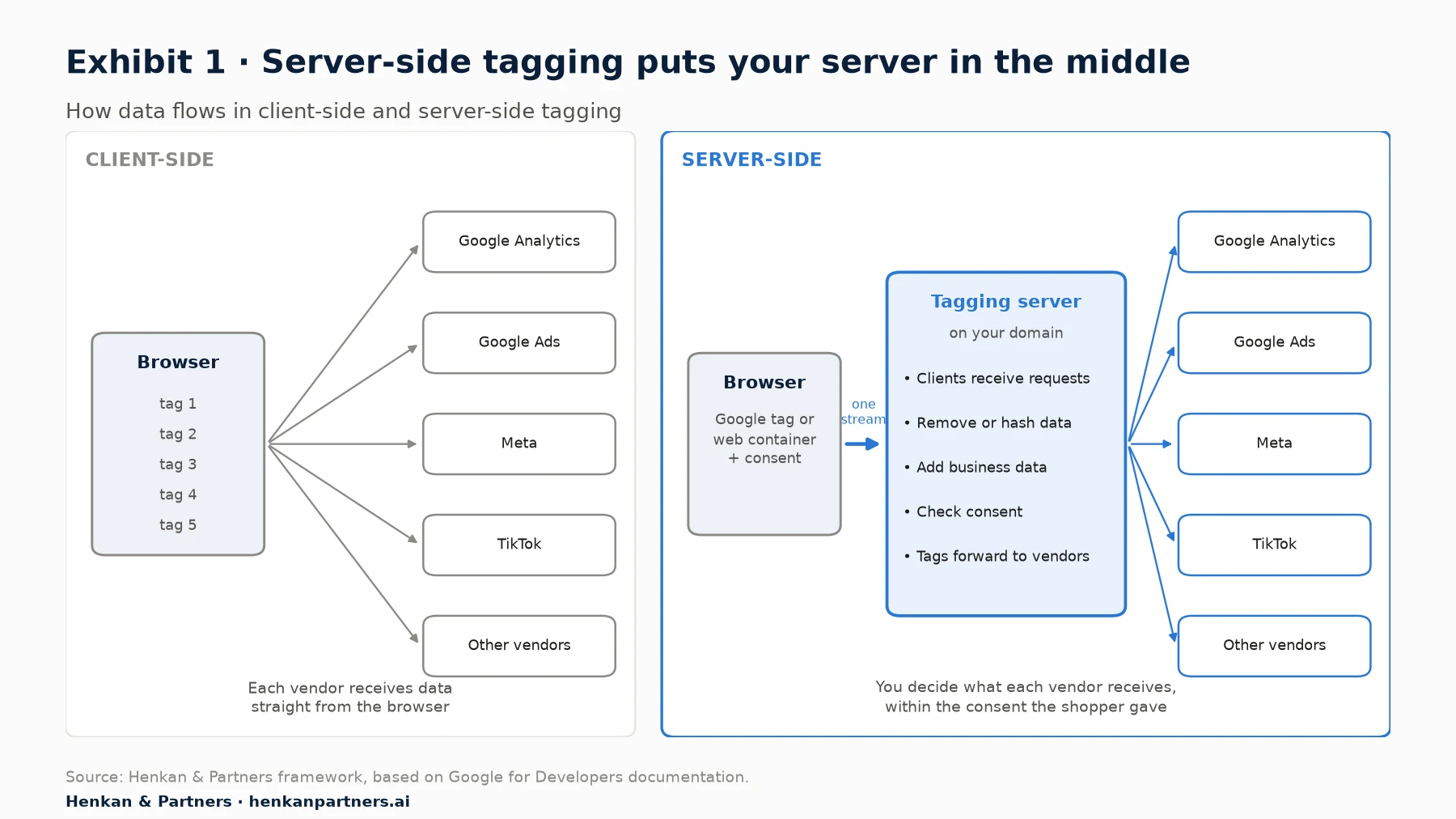
What this shows. Server-side tagging does not remove the browser from the picture. A web container or the Google tag still collects events and consent choices on the page. What changes is where data goes next: to your own server first, where you can inspect, clean and route it before any vendor sees it.
- The web container or Google tag collects events on the page, such as page views, add-to-cart and purchases, together with the visitor's consent choices, and sends them to your tagging server.
- Clients in the server container receive each request and turn it into event data. Google explains that a single incoming request can be claimed by only one client, for example the GA4 client.
- Tags in the server container forward the event data to vendors: GA4, Google Ads, Floodlight, Meta's Conversions API, TikTok's Events API and others. Tags, triggers and variables work as they do in a web container.
- The tagging server runs on Google Cloud Run by default, or on other infrastructure or a managed host. Google recommends mapping it to your own domain before production use.
Section 3 · Why it matters now
Browsers now limit cookies set by scripts, which makes where your data is collected matter
Much of the case for server-side tagging comes from browser privacy protections, especially Safari's, the default browser on iPhone.
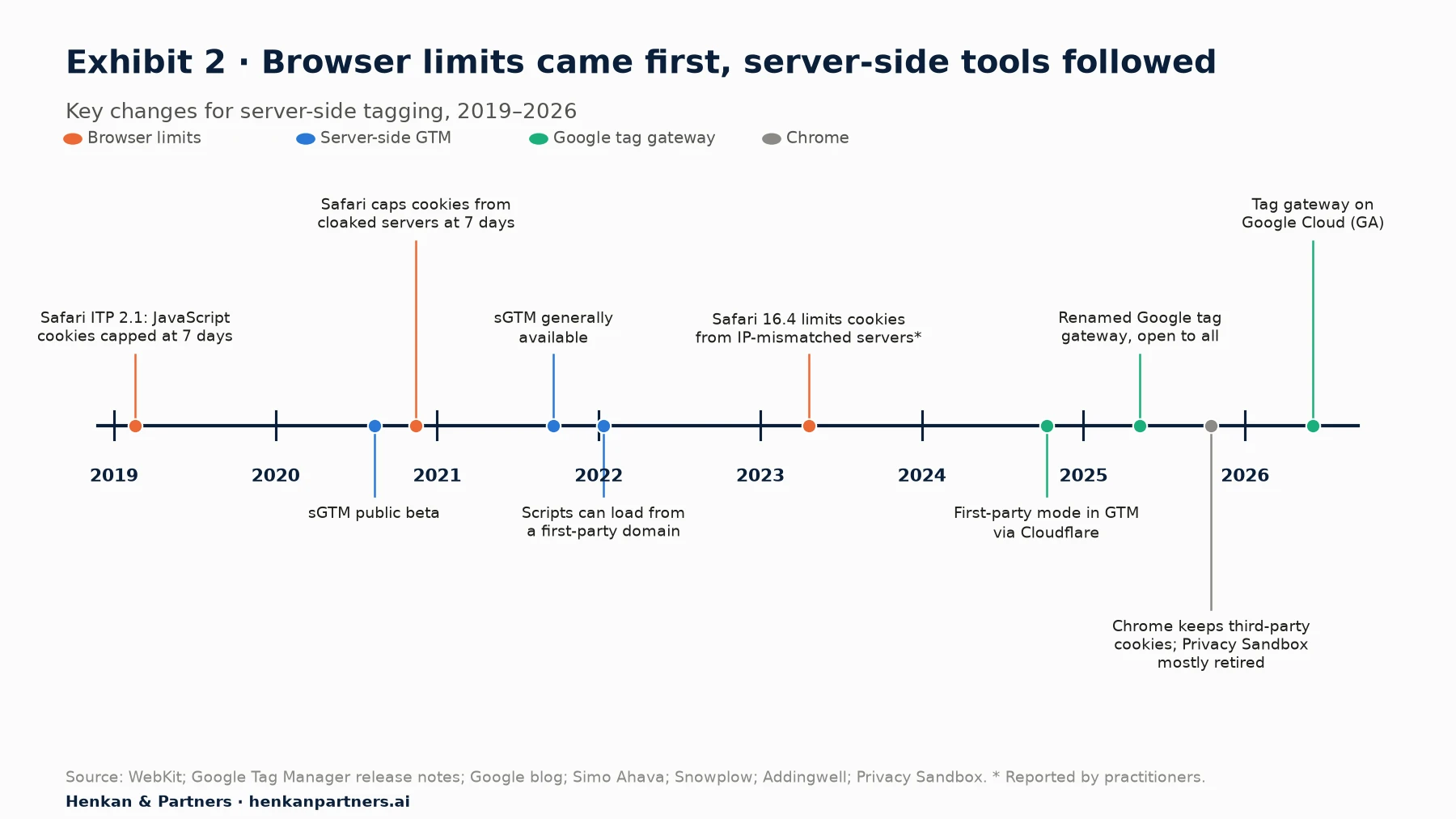
What this shows. Browser limits on cookies arrived first, and Google's server-side and first-party tools followed. Safari caps cookies created by JavaScript at 7 days, deletes script-writable storage after 7 days without interaction, and caps cookies from cloaked third-party servers at 7 days. A returning shopper who visits every two weeks may therefore look like a new visitor. Cookies set by a server on your own site's origin are not affected by these particular caps, which is why the set-up details matter. Longer-lasting cookies still need consent wherever the law requires it.
Chrome, by contrast, kept third-party cookies. In October 2025 Google confirmed it would maintain users' choice over third-party cookies and retire most Privacy Sandbox technologies. The durability case for server-side tagging therefore rests mainly on Safari and on ad blockers, not on Chrome.
Section 4 · Benefits
Server-side tagging improves control, cookie durability and page weight, though most published gains are vendor claims
| Benefit | How it works | Evidence | Strength of evidence |
|---|---|---|---|
| Data control | Remove, hash or reshape data before vendors receive it; send each vendor only what it needs | Google documentation | Strong: a design feature |
| Cookie durability | Your server sets first-party cookies through HTTP headers, which avoid Safari's 7-day cap on script-set cookies when served correctly | WebKit documentation; Google custom-domain guidance | Strong for same-origin set-ups; for subdomains, depends on IP matching (practitioner reports) |
| Lighter pages | Fewer vendor scripts run in the browser | Google: "fewer measurement tags ... means less code to run"; Nemlig reported 7% faster page loads (Google, 2021) | Moderate: one platform case study |
| Better conversion data for ad platforms | Send purchases and leads server to server to Google Ads, Meta and TikTok, with deduplication | Square reported a 46% increase in reported conversions (Google, 2021); Google says tag gateway users saw an 11% uplift in signals (Google tag loads, not sales) | Weak to moderate: platform claims |
| Data enrichment | Add business data such as product margin or customer status before sending | Google documentation | A design feature; value depends on use |
Two cautions apply. First, more "reported conversions" is not the same as more sales: it can mean that tracking lost fewer conversions, which improves bidding, but it does not prove incremental revenue. Second, published gains come from Google and vendors describing their own products. Measure your own before-and-after results, ideally by comparing reported conversions with orders in your back office.
For marketers. Define the benefit you want before starting: fewer lost conversions in Google Ads and Meta, longer recognition of returning Safari visitors, fewer scripts on key templates or stricter control of personal data. Then measure that benefit specifically.
Section 5 · Limits
Server-side tagging does not bypass consent, and most set-ups are still easy to block
Consent still applies
Moving tags to a server changes where data is processed, not whether you need permission to collect it. The UK Information Commissioner's Office states that the storage and access rules apply "whether in a first-party context or a third-party context", describes server-side tag management explicitly and says the rule applies "whenever the use of scripts and tags accesses or stores information on a user's device". In the EU, the European Data Protection Board's Guidelines 2/2023 say that the ePrivacy storage-and-access rule, which usually requires consent, covers tracking pixels and tracking links, not just cookies.
In practice, consent is collected on the page and travels with the data. Google's documentation explains that the Google tag adds consent parameters to each request, and Google's server-side tags, such as GA4, Google Ads and Floodlight, read them. Tags for other vendors, such as Meta or TikTok templates, do not honour consent automatically; you must configure them. Our Focus on user consent in e-commerce covers the rules in detail.
Ad blockers still catch most set-ups
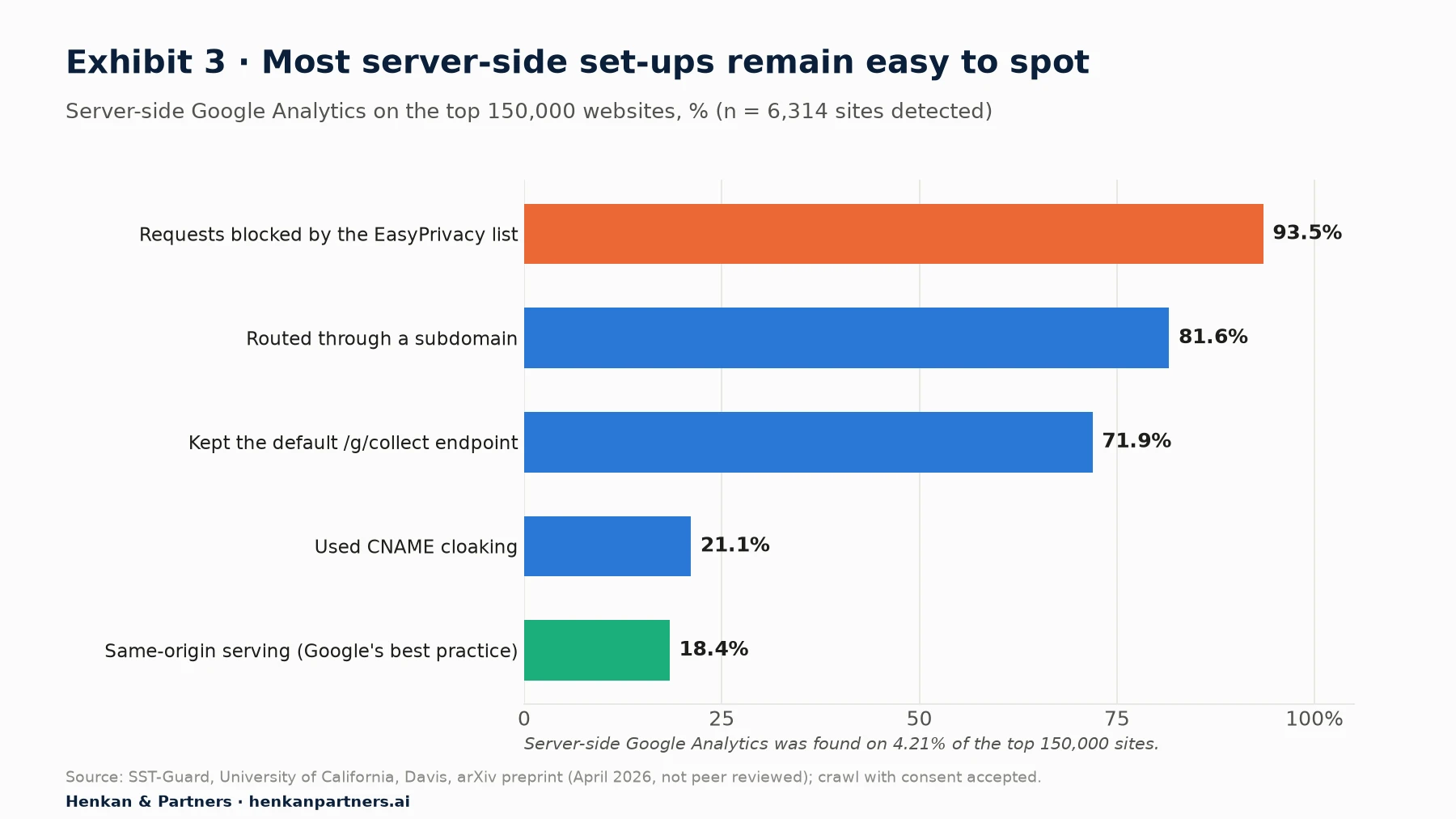
What this shows. Server-side Google Analytics appeared on 4.21% of the top 150,000 websites in this study. Most set-ups did not follow Google's best practice of same-origin serving, and most kept the default request path, which blocklists recognise. Server-side tagging is not a way around ad blockers, and should not be sold as one. Respecting a shopper who blocks tracking is also the right choice for trust.
Other limits
- Data transfers. Hosting in an EU region helps, but data forwarded to US vendors still relies on the EU-US Data Privacy Framework, in force since July 2023 and upheld by the EU General Court in September 2025; an appeal to the Court of Justice was pending in 2026. The CNIL sets strict conditions for using a proxy to make audience measurement compliant, such as not passing IP addresses to the tool.
- Maintenance. Self-hosted tagging servers need updates. Google released several server image updates in 2025 and 2026, including a move to a new Node.js version in November 2025.
- Complexity and debugging. Two containers replace one, and errors can hide between them. A preview server and monitoring are essential.
- Cost control. Google notes that the maximum-instances setting is the worst case for what you will pay; traffic spikes, such as sales events, raise costs.
For leaders. If a vendor pitches server-side tagging as a way to track shoppers who refused consent or who block tracking, walk away. The legal and reputational risk outweighs any data gained.
Section 6 · Costs
Hosting costs from under €20 to a few hundred euros a month for most sites, but people time is the larger cost
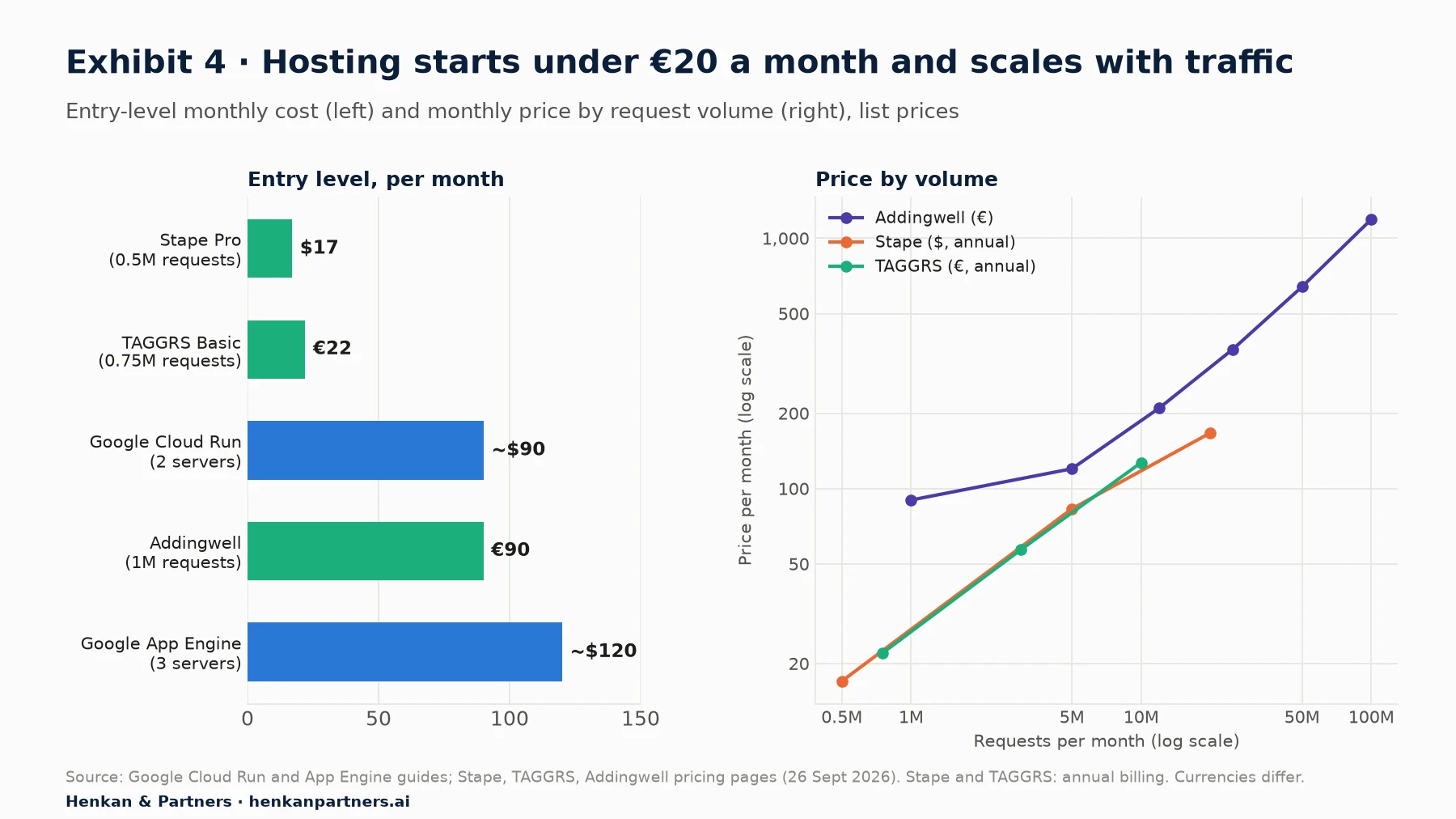
What this shows. Hosting is rarely the deciding cost. Google estimates about $45 a month per Cloud Run server, with at least two recommended for production, handling roughly 35 to 350 requests per second when autoscaling between 2 and 10 servers. Managed hosts charge by request volume and handle updates, domains and monitoring for you, starting from $17 to €90 a month for small sites. At very high volumes, list prices pass €1,000 a month (Addingwell, 100 million requests). The larger costs are implementation, testing and maintenance time, which depend on how many vendors and events you move.
| Hosting option | Best for | Watch-outs |
|---|---|---|
| Google Cloud Run (self-hosted) | Teams with cloud skills who want full control and Google's default path | You own updates, scaling, logging and cost monitoring |
| Managed host (e.g. Stape, TAGGRS, Addingwell) | Small and mid-sized teams that want a quick, maintained set-up | Check data location, request pricing, support and contract terms |
| Enterprise event platforms (e.g. Tealium EventStream, Commanders Act, JENTIS) | Large or regulated businesses with many sources and destinations | Higher cost; broader scope than tag management alone |
The market is consolidating. Didomi, a consent management vendor, acquired Addingwell in April 2025, linking consent and server-side tagging in one offer.
Section 7 · Options
Choose sGTM for multi-vendor control, and Google tag gateway when you mainly need Google tags served first-party
| Client-side only | Google tag gateway | Server-side GTM | |
|---|---|---|---|
| What it does | Tags run in the browser and send data to each vendor | Serves Google's scripts and measurement requests through your own domain, via a CDN, load balancer or tagging server | A server container receives data and forwards it to any vendor |
| Vendors covered | All | Google tags | Google and non-Google (Meta, TikTok and others) |
| Data transformation | Limited | No | Yes: remove, hash, enrich, route |
| Effort | Low | Low to moderate; one-click with some CDNs | Moderate to high |
| Hosting cost | None | Usually within existing CDN costs | Under €20 to a few hundred euros a month for most sites; over €1,000 at very high traffic |
| Google's claimed effect | None | 11% uplift in signals (Google tag loads); 14% average uplift in conversions; up to 7% lower CPA (Google claims) | Case studies, e.g. Square +46% reported conversions (2021) |
Google tag gateway, introduced as first-party mode in 2024 and added to Tag Manager through a Cloudflare integration in October 2024, was renamed and opened to everyone in May 2025, and added Akamai and a generally available Google Cloud integration in 2026. It is the quickest way to serve Google tags from your own domain. It does not give you a place to clean or enrich data, and it does not help with Meta, TikTok or other vendors. Many businesses will use both: tag gateway for Google's tags, and sGTM where they need control across vendors.
For marketers. Start from your vendor list. As a rule of thumb, if more than half of your paid media runs on Meta, TikTok or other non-Google platforms, and you send them purchase data, sGTM with their server-side APIs is usually the more useful investment.
Section 8 · Implementation
Implement server-side tagging in eight steps, starting with GA4 and ending with monitoring
The steps below broadly follow Google's recommended sequence, adapted with lessons from projects we have seen. Timings depend on the number of vendors and events; start with one vendor and expand.
Step 1: Define the goal and scope
Write down why you are doing it and which vendors and events move first, for example GA4 purchase events and Meta's Conversions API. List every current tag and its purpose.
Step 2: Fix consent first
Make sure your consent banner and Google Consent Mode work correctly on the page, because the server container relies on the consent signals it receives. Decide how non-Google server tags will check consent.
Step 3: Choose hosting and region
Choose Google Cloud Run or a managed host, and a data region that suits your markets. For production, follow Google's recommendation of at least two servers on Cloud Run, and set a maximum to cap costs.
Step 4: Map your domain, ideally same-origin
Serve the tagging server from your own site's origin, for example through your CDN or load balancer, or at least from a subdomain that shares your main site's IP address range, which practitioners report Safari checks. Google calls same-origin serving a best practice; the default domain can only set JavaScript cookies.
Step 5: Move GA4 first
Send GA4 events from the web container to the server container through the GA4 client, then configure the GA4 tag in the server container. Compare data with the client-side set-up in parallel before switching over.
Step 6: Add advertising platforms with deduplication
Add Google Ads conversion tracking and enhanced conversions, then Meta's Conversions API and TikTok's Events API. When the same event is sent from the browser and the server, use a shared event ID: Meta and TikTok both deduplicate events with the same event name and event ID received within 48 hours. Hash customer data such as email addresses as each platform requires.
Step 7: Test in preview, then compare with your orders
Use the server container's preview mode to check every event, then compare purchases reported in analytics and ad platforms with orders in your back office, before and after the change.
Step 8: Monitor and maintain
Track error rates, request volumes and costs, apply server updates, and review tags and data sent to each vendor at least every quarter.
Section 9 · By team size
The right set-up depends on your team, your vendors and your traffic
| Team | Recommended approach | Why |
|---|---|---|
| One or two people (small shop) | Google tag gateway or your platform's native integrations (e.g. Shopify's Meta and Google apps); a managed sGTM host only if you need Meta or TikTok server events and have help to set it up | Low effort; most of the benefit for Google tags without new infrastructure |
| Growing digital, CRO or data team | sGTM on a managed host or Cloud Run, same-origin serving, GA4 plus two or three ad platforms, deduplication and consent checks | Control across vendors at modest cost, with a named owner |
| Multi-brand or international retailer | sGTM or an enterprise event platform per region, with data governance, enrichment (e.g. margin), monitoring and a release process | Scale, compliance and data quality across sites and markets |
For leaders. Ask for a one-page business case before approving server-side tagging: the goal, the vendors in scope, the expected change in reported conversions or data quality, the monthly hosting and maintenance cost, and the named owner.
Section 10 · What to do next
Five moves to make before 2027
1. Audit your tags and consent
List every tag, what it sends, to whom and whether it waits for consent. Fix consent problems before moving anything to a server.
2. Measure your data loss
Compare purchases in GA4, Google Ads and Meta with back-office orders by browser and device. A large gap on Safari or iOS is the strongest signal that server-side tagging can help.
3. Try Google tag gateway if you rely on Google
If your CDN supports it, enable tag gateway for Google tags as a low-effort first step, and measure the change.
4. Pilot sGTM on one high-value flow
Move GA4 and one advertising platform's purchase events to a server container with same-origin serving, deduplication and consent checks, and compare results for at least four to six weeks, which in our experience covers normal weekly swings.
5. Decide on ownership and scale
If the pilot shows a clear gain, assign an owner, choose long-term hosting and move the remaining vendors in stages. If not, keep the simpler set-up.
Our view. Server-side tagging is worth it when it improves data you actually use to make decisions and serve customers better, and when it respects the choices customers make. Treated as a shortcut around consent or ad blockers, it adds cost and risk without lasting value.
FAQ
Frequently asked questions about server-side Google Tag Manager
Frequently asked questions
What is server-side Google Tag Manager?
It is a version of Google Tag Manager that runs on a server you control instead of in the visitor's browser. The website sends data to this tagging server, which processes it and forwards it to analytics and advertising tools such as GA4, Google Ads, Meta and TikTok.
How much does server-side GTM cost?
Google estimates about $45 a month per Cloud Run server and recommends at least two for production, so about $90 a month before other cloud charges. Managed hosts start from about $17 to €90 a month for small sites, based on request volume. Set-up and maintenance time usually cost more than hosting.
Does server-side tagging bypass cookie consent?
No. The UK ICO says the storage and access rules apply in first-party and server-side contexts, and EU guidance covers pixels and tracking links as well as cookies. Where consent is required, it must be collected on the page and respected by every server tag.
Does server-side tagging stop ad blockers?
Not reliably. A 2026 academic preprint found that the EasyPrivacy blocklist blocked 93.5% of detected server-side Google Analytics requests, by matching standard request paths and Google Analytics parameters. Respecting shoppers who block tracking is also better for trust.
Does server-side GTM fix Safari's 7-day cookie limit?
It can, if set up correctly. Safari caps cookies set by JavaScript at 7 days, but cookies set by your own server through HTTP headers on the same origin are not affected by that cap. Practitioners report that subdomains served from a different IP address range can still be limited.
What is the difference between server-side GTM and Google tag gateway?
Google tag gateway serves Google's tags and measurement requests through your own domain via a CDN or load balancer, with little set-up. Server-side GTM gives you a server container where you can clean, enrich and route data to any vendor, including Meta and TikTok.
Do I need server-side tagging for Meta's Conversions API?
Not necessarily. You can connect Meta's Conversions API directly from your own back end, through your e-commerce platform's integration, through Meta's Conversions API Gateway or another partner, or through server-side GTM. Meta recommends using it alongside the pixel, which it calls a redundant set-up, with deduplication through matching event names and event IDs.
Key terms
- Client-side tagging
- Tags that run in the shopper's browser and send data directly to each vendor. It is how most sites have worked for 20 years.
- Server-side tagging
- A set-up where the browser sends data to your own tagging server, which then forwards it to vendors. You decide what each vendor receives.
- Server container
- The Google Tag Manager container that runs on your tagging server. It holds clients, tags, triggers and variables, like a web container.
- Client (in sGTM)
- The part of a server container that receives an incoming request, such as a GA4 hit, and turns it into event data for tags to use.
- Tagging server
- The cloud server that runs the server container, on Google Cloud Run, another cloud or a managed host such as Stape or Addingwell.
- First-party context
- Data collected and cookies set on your own domain rather than a vendor's. Browsers treat first-party cookies more favourably than third-party ones.
- Same-origin serving
- Serving the tagging server from a path on your main site (for example, shop.com/metrics) rather than a subdomain. Google calls it a best practice.
- Intelligent Tracking Prevention (ITP)
- Safari's privacy protections. They cap many cookies at 7 days, which shortens how long returning visitors are recognised.
- Conversions API (CAPI)
- Meta's server-to-server interface for sending website and offline events. TikTok's equivalent is the Events API.
- Deduplication
- Matching the same event sent from the browser and from the server, usually with a shared event ID, so it is counted once.
- Enhanced conversions
- Google Ads feature that sends hashed first-party customer data, such as an email address, with conversions to improve matching.
- Google tag gateway for advertisers
- A Google feature, previously called first-party mode, that serves Google's scripts and measurement requests through your own domain via a CDN or load balancer.
- Consent Mode
- Google's system for passing consent choices to its tags. It works in both web and server containers, but other vendors' server tags must be configured separately.
Sources
Google documentation, browser vendor documentation, regulator guidance and pricing pages were checked against the original pages on 26 September 2026; the EDPB guidelines are cited for their general scope. Performance claims by Google and vendors are their own and are labelled as such. The SST-Guard study is a preprint that had not been peer reviewed at the time of writing. The architecture diagram, comparison tables, programme by team size and recommendations are Henkan & Partners' own analysis.
- Google for Developers, server-side tagging overview
- Google for Developers, an introduction to server-side tagging
- Google for Developers, what is server-side tagging? (SST fundamentals)
- Google for Developers, why and when to use server-side tagging
- Google for Developers, server-side tagging fundamentals course
- Simo Ahava, Server-side tagging in Google Tag Manager, August 2020
- Google blog, Bring performance and privacy together with Server-Side Tagging, September 2021
- Google Tag Manager release notes
- Google for Developers, server-side tagging release notes
- Google for Developers, Cloud Run set-up guide
- Google for Developers, App Engine set-up guide
- Google for Developers, map a custom domain
- Google Cloud, Cloud Run pricing
- Google for Developers, Google tag gateway for advertisers
- Google Ads Help, Google tag gateway for advertisers
- Google Business, Google tag gateway
- Google for Developers, server-side tagging and consent mode
- Google Ads Help, about enhanced conversions
- WebKit, Intelligent Tracking Prevention 2.1, 2019
- WebKit, full third-party cookie blocking and more, 2020
- WebKit, CNAME cloaking and bounce tracking defense, 2020
- Snowplow, Safari tracking cookie lifetimes
- Addingwell, Safari ITP update 2023 explained
- Privacy Sandbox, update on plans for Privacy Sandbox technologies, October 2025
- ICO, what are storage and access technologies?
- EDPB, Guidelines 2/2023 on the technical scope of Art. 5(3) of the ePrivacy Directive
- CNIL, audience measurement and data transfers
- WilmerHale, Court of Justice to review challenge to the EU-US Data Privacy Framework, December 2025
- SST-Guard: Detecting and Characterizing Server-Side Google Analytics in the Wild (arXiv preprint, 2026)
- Meta for Developers, Conversions API
- Meta for Developers, deduplicate pixel and server events
- TikTok Ads Help, event deduplication
- Stape, pricing
- TAGGRS, prices
- Addingwell, pricing
- Didomi, Didomi acquires Addingwell, April 2025
- Analytics Mania, Google Tag Manager server-side tagging guide
- Henkan & Partners, User Consent in E-commerce: Everything to Know Before 2027
- Henkan & Partners, The Essential Guide to Tag Management
- Henkan & Partners, The Tag Management Market, 2007–2026