Guide
The Essential Guide to Tag Management
Alexandre Suon · 2026-09-26
A tag manager decides which tracking and marketing code runs on your website, when it runs, and what data it sends. This guide explains how tag management works, how to build a data layer, what tags cost in speed, why data goes missing, when server-side tagging is worth it, how to wire in consent, how to keep payment pages safe, and how to choose a tool.
Executive summary
- A tag manager is the control panel for the third-party code on your website. Analytics, advertising pixels, heatmaps, chat widgets and A/B testing tools all arrive as small pieces of code called tags. A tag manager loads them from one container, decides when each one fires, and lets marketers change them without a website release.
- Google Tag Manager is the default almost everywhere. It is free, runs on 45.1% of all websites, and holds 99.6% of the sites that use any tag manager. Paid tools such as Tealium, Adobe Experience Platform Tags and Commanders Act survive among large companies that need governance, support and data control.
- The data layer matters more than the tool. A data layer is a structured list of facts about the page and the user's actions, written by your developers, that every tag reads from. Without one, tags scrape the page, break when the design changes and disagree with each other.
- Every tag costs speed. Third-party code is the heaviest load most sites carry, and slow pages lose customers. Tags that fire on every page, custom code pasted into the container and duplicate pixels are the usual causes.
- Your tools never see all your customers. Safari limits cookies set by scripts to seven days, around three in ten internet users run an ad blocker, and many visitors refuse consent. Treat analytics numbers as a sample, and check key figures such as orders against your own back-end data.
- Server-side tagging gives you back control, but it is not a way round consent. Sending data first to a server on your own domain lets you clean it, remove personal data and choose what each vendor receives. It costs money and skills, and every consent rule still applies.
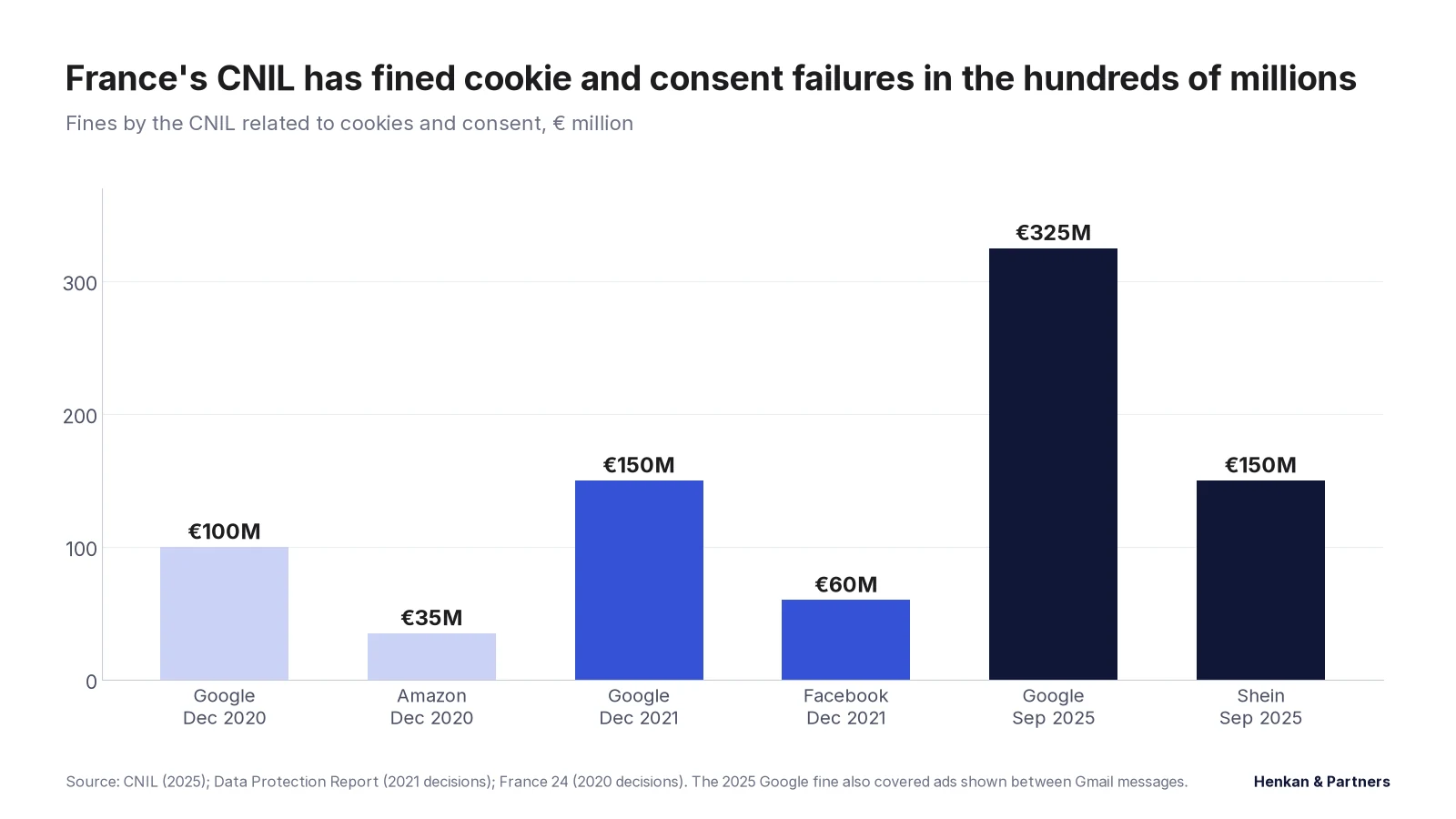
- Consent must be built into the tag manager. Google requires Consent Mode v2 signals to use its personalised advertising features for European users, and regulators fine companies whose tags fire before or without consent. France's CNIL fined Google €325 million in 2025, partly over advertising cookies.
- Tags on payment pages are a security risk. Attackers have stolen card details by altering third-party scripts, and since 31 March 2025 the PCI DSS card-security standard requires merchants to keep an inventory of every script on payment pages and to detect unauthorised changes.
What is tag management?
Tag management is the practice of deploying, controlling and governing the third-party and first-party code on a website or app from one central system, so that the right data reaches the right tools, at the right moment, with the visitor's consent.
Almost every tool a digital team uses needs its own code on the website. The analytics tool needs a tag to count visits. The advertising platforms need pixels to count conversions and build audiences. The testing tool, the heatmap tool, the review widget and the chat window all need theirs. Before tag managers, each of these snippets was pasted into the site's templates by developers, and every change waited for the next website release.
A tag manager replaces all of those snippets with one. Developers install the container once, and from then on the tags live inside it. Marketers and analysts can add, change or remove a tag, test it in a preview mode, and publish it, without touching the site's code. Google describes its own tool in exactly these terms: two snippets on the page, and the tag manager replaces hand-coded tags from Google and third parties.
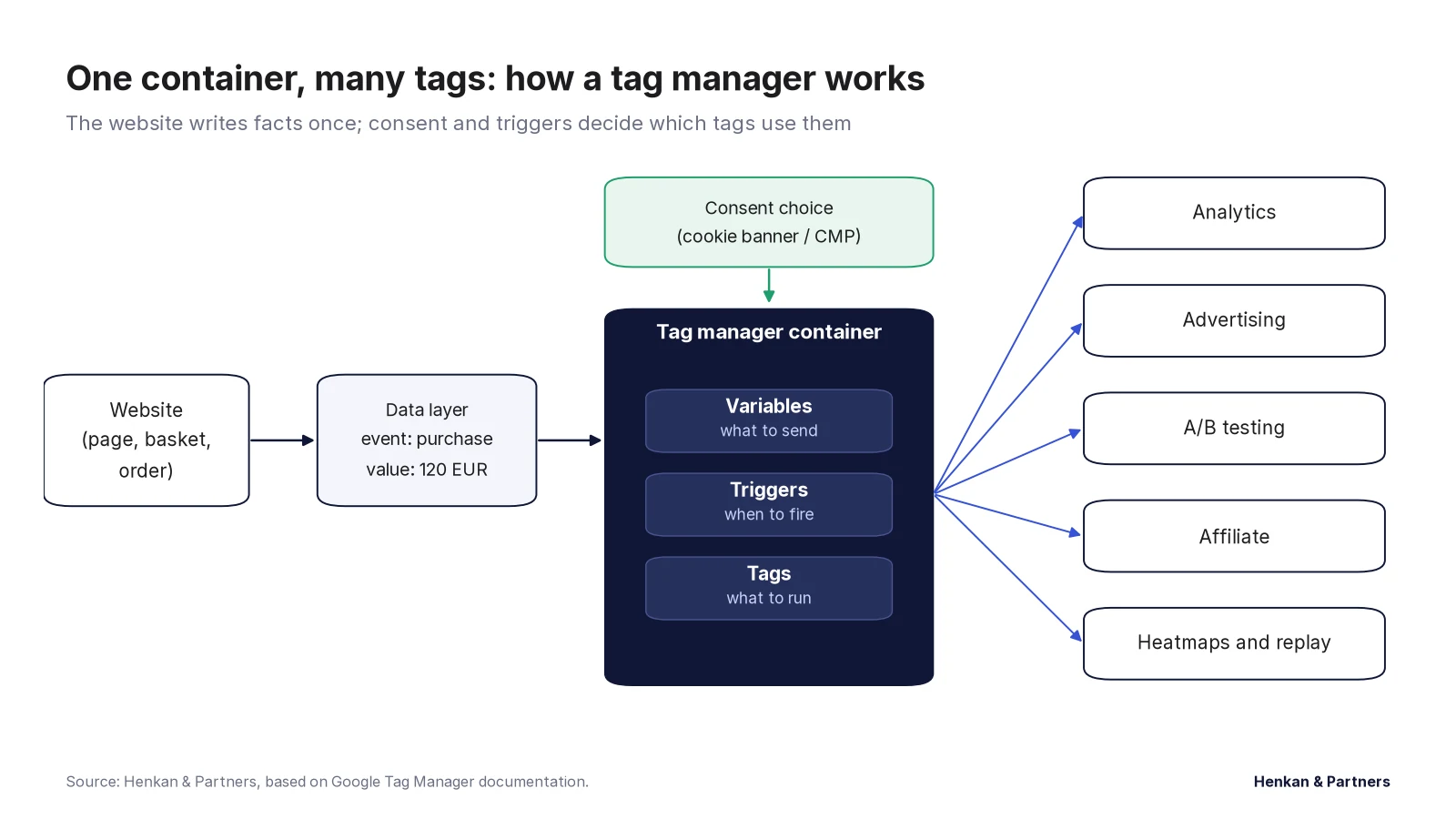
Every tag manager works with the same three building blocks, even if the names differ:
- Tags: what to run. The code that sends data to a vendor, for example the Google Analytics tag or the Meta pixel.
- Triggers: when to run it. A condition such as "page view on the order confirmation page" or "click on the add-to-basket button".
- Variables: what to send. The values the tag needs, such as the order value, the currency or the product IDs in the basket.
A worked example: one purchase, five tags
A customer buys a pair of shoes. On the confirmation page, the website writes one event into the data layer: a purchase, with an order ID, a value of €120, the currency and the two products bought. The tag manager sees the event, checks the visitor's consent, and fires five tags from that single set of facts: the Google Analytics purchase event, the Google Ads conversion, the Meta purchase event, the affiliate network's commission pixel and the A/B testing tool's revenue goal. Each vendor receives the same order value, because each tag reads it from the same place.
Without the tag manager and data layer, each of those five snippets would have been installed separately, often months apart, each scraping the price from the page in its own way. That is how companies end up with five tools reporting five different revenue figures.
Tag manager vs Google tag (gtag.js)
Google also offers the Google tag, a single piece of code that sends data to Google Analytics, Google Ads and other Google products. It is fine for a small site that only uses Google tools. Once you need non-Google tags, rules about when tags fire, or people other than developers making changes, a tag manager is the better fit, and Google itself recommends Tag Manager for anyone not comfortable editing JavaScript. In 2026 Google began merging the two, bringing Tag Manager's features into the Google tag, as an opt-in upgrade.
Nearly every website runs third-party code, and one free tool manages most of it
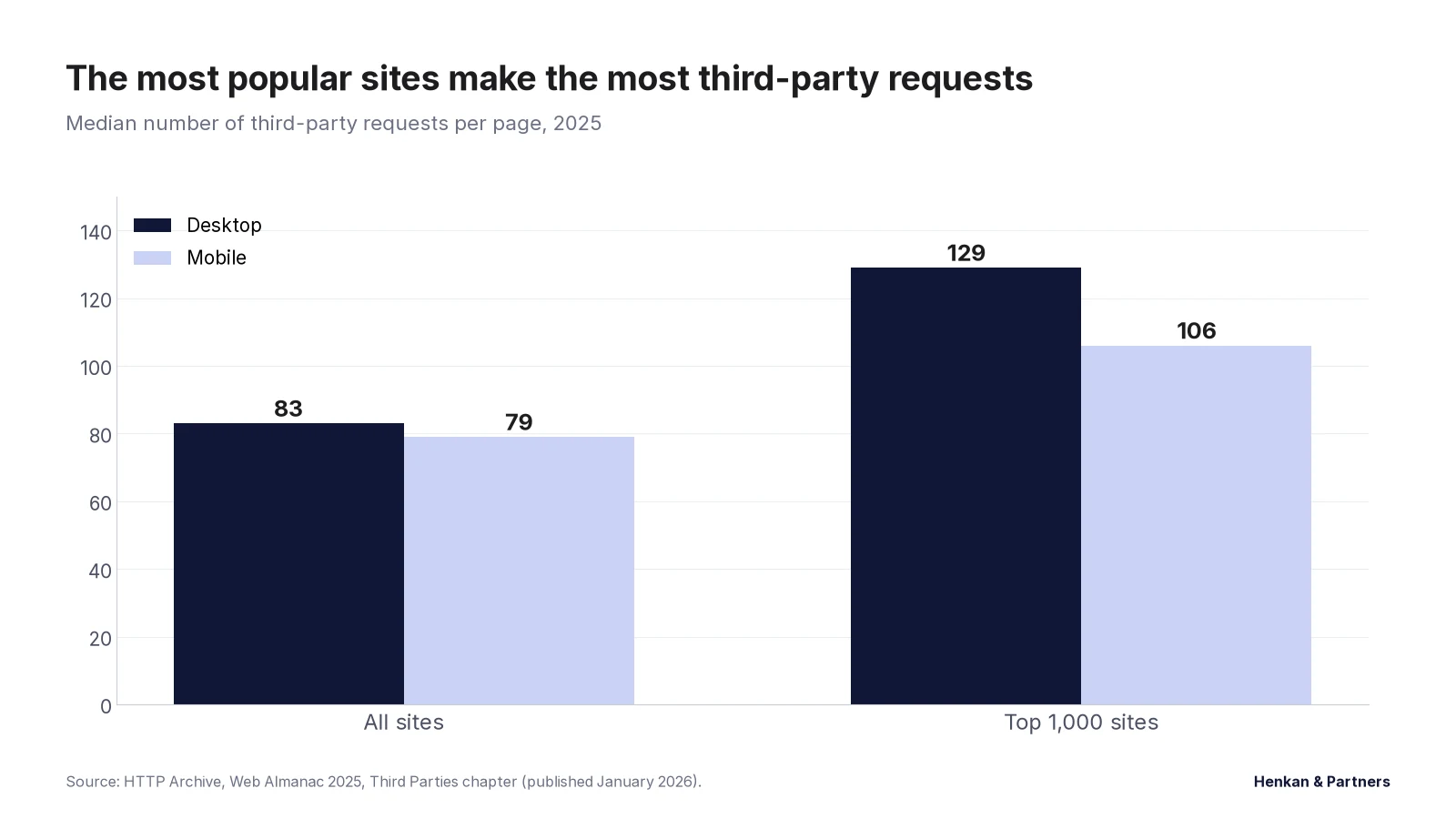
Third-party code is everywhere. The HTTP Archive, which measures millions of web pages every year, found that 94% of sites used at least one third party in 2022, and that around 45% of all requests a page made went to third parties. In its 2024 study, the median page on the 1,000 most popular sites loaded code from 66 different third parties; across the top million sites the median was 27. Its 2025 study ranked the Google Tag Manager domain as the second most common third party on the web.
That tag manager dominance is near total. According to W3Techs, which tracks technologies on the top 10 million websites, Google Tag Manager ran on 45.1% of all websites in September 2026, up from 11.7% in February 2018. Among sites that use a tag manager at all, it holds 99.6%. The next largest, Adobe's tag manager, is on 0.2% of sites.
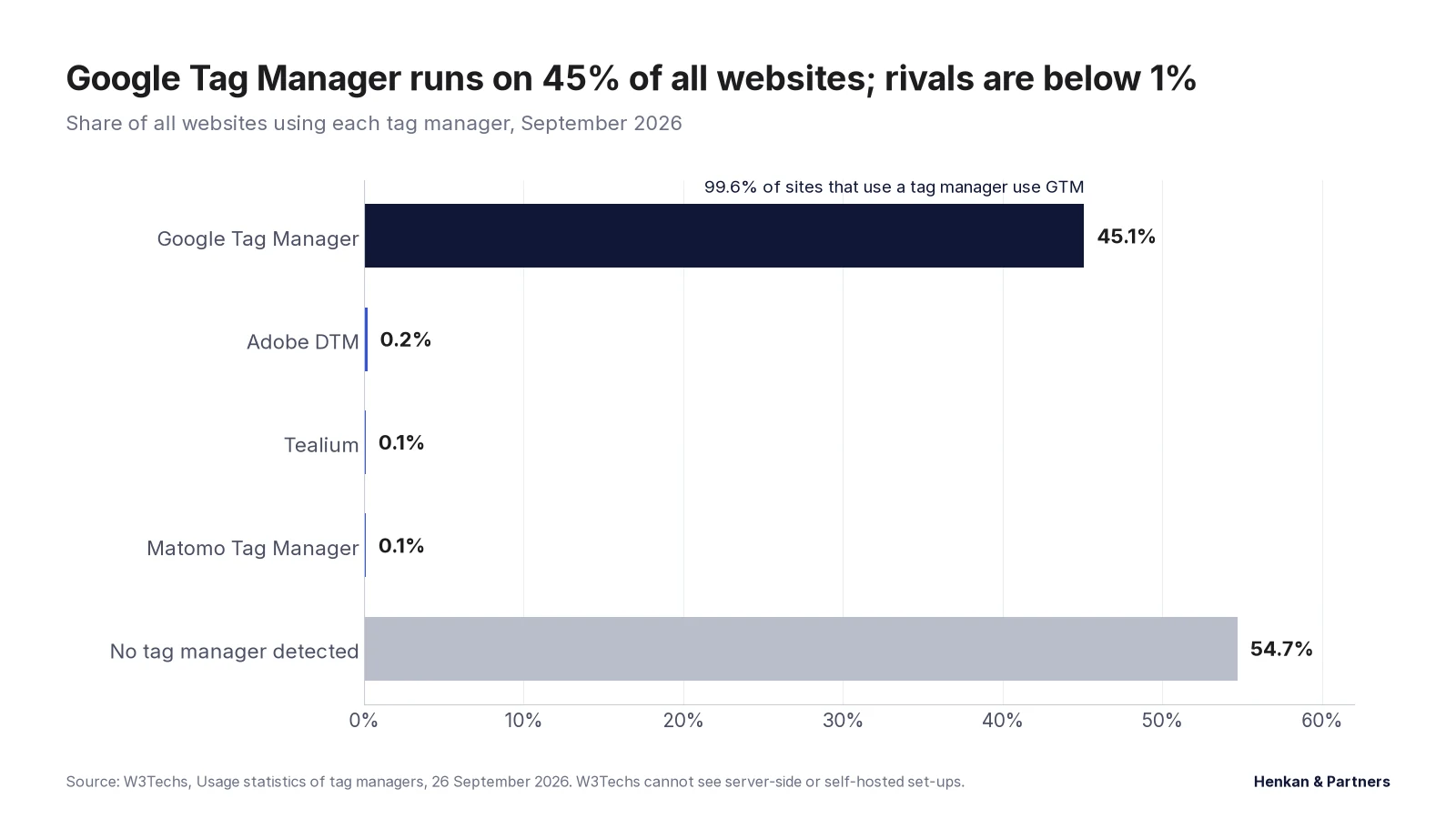
What this shows. For most companies the question is not which tag manager to buy, since the free one is the default, but how well it is run. Paid tools matter mainly for large, regulated or multi-brand companies, and the numbers above understate them: W3Techs counts sites, not revenue, and big companies are few. We cover the paid market, its history and its economics in our tag management market report.
The data layer is the contract between your website and your tools
The single most important decision in tag management is not the tool but the data layer. A data layer is a JavaScript object on each page where the website writes, in a fixed structure, the facts that tags need: what kind of page this is, what products are shown, what is in the basket, whether the user is logged in, and which actions they take.
Tags then read those facts instead of scraping them from the page's text and layout. This matters because page layouts change constantly. A tag that reads the price from a CSS class breaks the day a designer renames it; a tag that reads `ecommerce.value` from the data layer keeps working.
In Google Tag Manager, the data layer is an array called `dataLayer`. Developers declare it before the container loads and add information with a push. A push that contains an `event` key can fire triggers. A purchase might look like this:
window.dataLayer = window.dataLayer || [];
window.dataLayer.push({
  event: "purchase",
  ecommerce: {
    transaction_id: "T-10482",
    value: 120.00,
    currency: "EUR",
    items: [
      { item_id: "SKU-2231", item_name: "Leather sneaker", price: 90.00, quantity: 1 },
      { item_id: "SKU-0917", item_name: "Suede cleaner", price: 30.00, quantity: 1 }
    ]
  }
});
Google's documentation sets three simple rules: declare the data layer before the container, never overwrite it after the tag manager loads, and keep one data layer per page with consistent names. Adobe publishes its own open-source equivalent, the Adobe Client Data Layer, and a W3C community group published a shared specification in 2013 with standard objects for the page, product, cart, transaction, user and events. The exact structure matters less than having one, documenting it, and holding developers and analysts to it.
In our experience, the data layer is where most tracking projects succeed or fail. Write a tracking plan first: every event, when it fires, and each field with an example value. Then have developers build the data layer to that plan, and test it on every release. The tags are the easy part.
Every tag slows the site down, so every tag must earn its place
Tags are code that the visitor's browser must download and run, often on the same thread that responds to taps and clicks. The HTTP Archive's lab tests in 2022 found that the ten most common third parties blocked page rendering for about 1.4 seconds at the median, and it measured Google Tag Manager's median render-blocking time at around 1.8 seconds, though much of that is the tags a container loads rather than the tag manager itself. Tags also load other tags: the 2024 study found that 14% of third-party loading chains were more than five steps deep.
This shows up in Google's Core Web Vitals, the three speed and stability measures Google uses to judge page experience. Since March 2024 the responsiveness measure is Interaction to Next Paint (INP), which records how quickly the page reacts to every click, tap and key press; 200 milliseconds or less is rated good. Heavy tags that run when a user clicks, such as tags triggered by "all clicks", hurt INP directly. Tags that insert content can also make the layout jump, which hurts the stability measure.
Google's own guidance on tags and tag managers gives the practical fixes:
- Keep the container small. Google Tag Manager caps a container at 300 KB and warns at 70% of that; the median container was around 50 KB when Google last published figures.
- Fire non-essential tags later. Load tags that do not need to run immediately, such as chat widgets and survey tools, after the page has finished loading.
- Avoid custom HTML tags where a template exists. Pasted custom code is easy to misuse and can force the browser to recalculate the layout.
- Avoid broad click and timer triggers. Listen for specific interactions, not every click on the page.
- Remove what nobody uses. A tag for a tool the company stopped paying for still costs every visitor time.
Browsers, blockers and consent choices remove data before it reaches your tools
No analytics tool sees every visitor. Three forces remove data before it arrives, and they compound.
Browser privacy limits
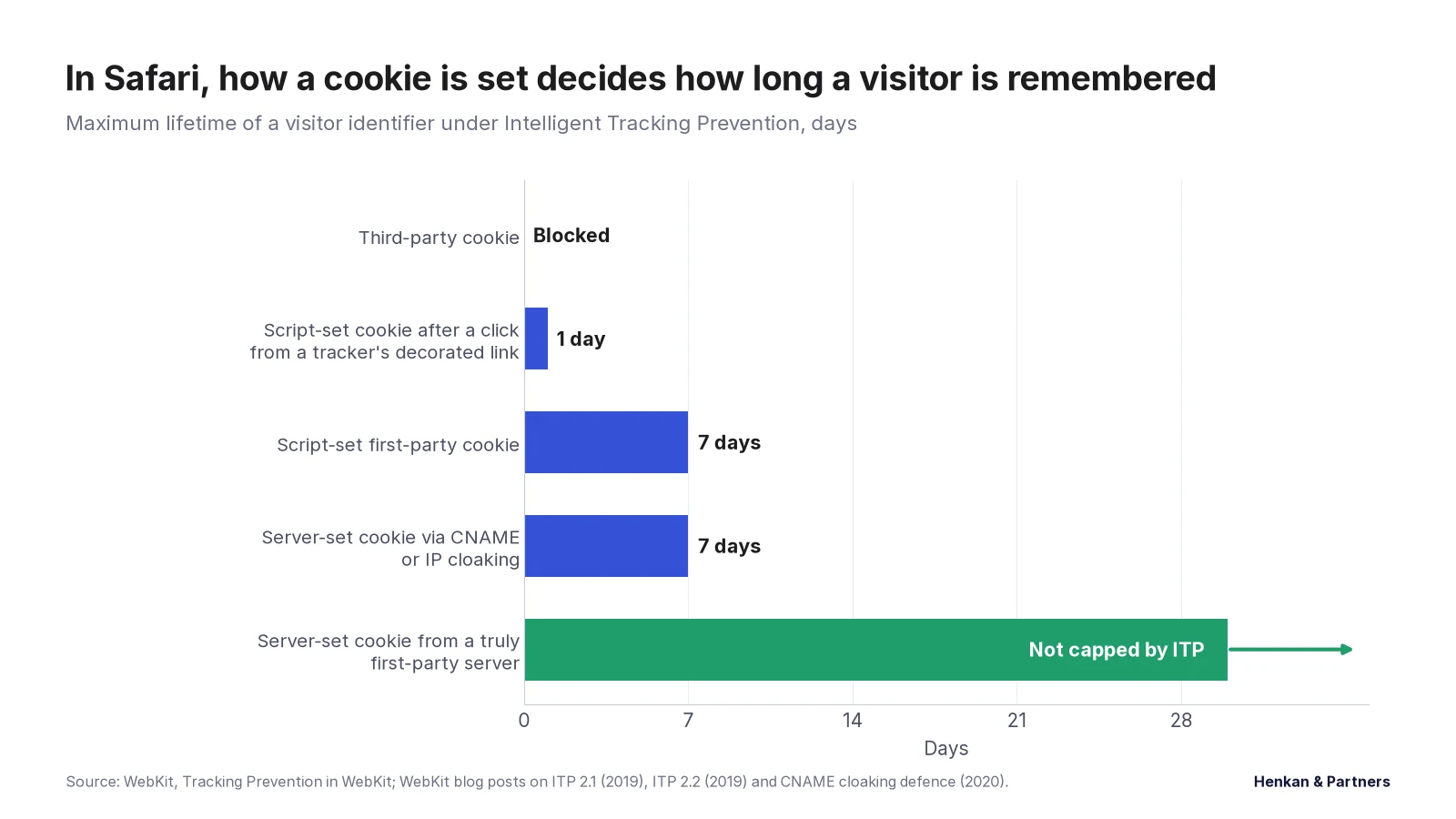
Apple's Safari, which accounts for about 16% of browsing worldwide and a much larger share on iPhones, limits tracking through a system called Intelligent Tracking Prevention (ITP). Third-party cookies are blocked. Cookies set by JavaScript, which is how most analytics tags remember a returning visitor, are deleted after seven days without a visit, and after only 24 hours when the visitor arrived from a known tracker's link with tracking parameters in the address. Cookies set by a server that only pretends to be first-party, through CNAME or IP address tricks, are also capped at seven days. The result: a customer who visits on Monday and returns ten days later in Safari looks like a new visitor.
Chrome, the largest browser, kept third-party cookies after Google abandoned its plan to remove them in 2024 and 2025, and announced in October 2025 that it would retire most of its Privacy Sandbox replacement tools. So the gap between browsers remains, and depends heavily on your audience.
Ad blockers
Around 29.5% of internet users worldwide say they use an ad blocker, according to GWI's 2025 survey data reported by DataReportal. Many blocking lists also block analytics and advertising tags, so a meaningful share of visitors never appear in some tools at all.
Consent refusals
In Europe and a growing number of other places, tags that store or read information on the visitor's device need consent. Visitors who refuse are, correctly, not tracked in the normal way. Refusal rates vary widely by banner design, audience and country, which is one reason two similar sites can see very different data gaps.
What to do about it. Treat analytics as a large sample, not a census. Reconcile the numbers that matter most, such as orders and revenue, against your back-end systems every month, and note the gap. Compare trends and tests within the same tool rather than absolute numbers across tools. Be sceptical of any vendor that promises to "recover" a precise percentage of lost data.
Server-side tagging moves control to your own server, but it is not a way round consent
In a classic set-up, every tag runs in the visitor's browser and sends data directly to its vendor: ten vendors, ten scripts, ten streams of data leaving the browser. Server-side tagging changes the route. The browser sends one stream of events to a server running on your own domain, such as `data.yourshop.com`. A server-side container there receives the events, and its own tags decide what to forward to each vendor, in what shape.
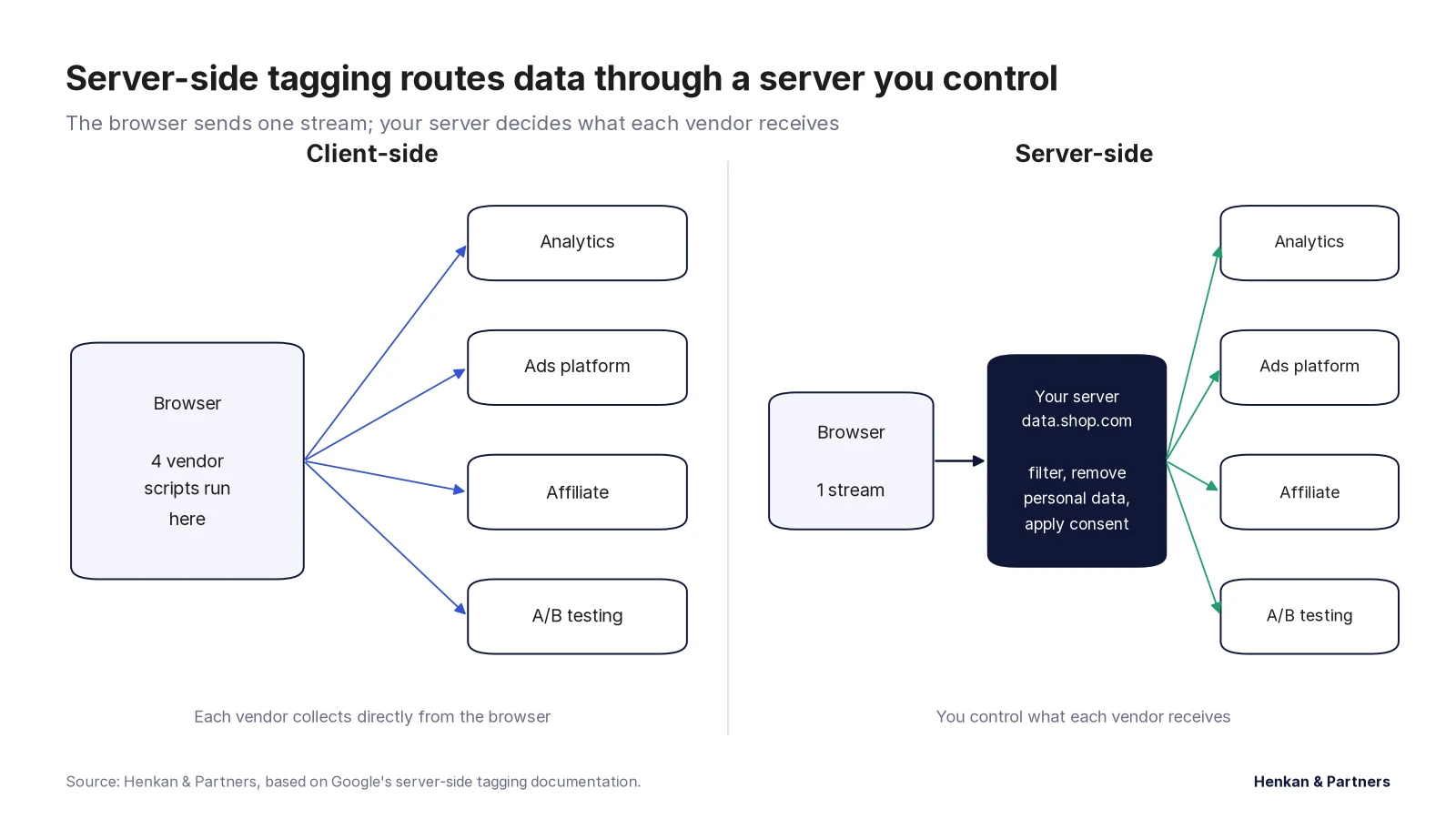
Google launched server-side tagging for Tag Manager in beta in August 2020 and made it generally available in September 2021. The benefits are real:
- Control. Only you see the data until you decide to send it on. You can remove IP addresses, email addresses or anything a vendor should not receive.
- Speed. Fewer vendor scripts run in the browser.
- Durability. Cookies set by a server on your own domain, with an IP address that matches your main site, are not capped by Safari's seven-day rule for script-set cookies, so returning visitors are recognised for longer.
- Better conversion data for advertising. Server-to-server feeds, such as Meta's Conversions API, are less exposed to blockers and browser limits.
And so are the costs and limits:
- Hosting. Google's recommended production set-up on its Cloud Run service is at least two servers at about $45 each per month, so around $90 a month before traffic grows; two to ten servers handle roughly 35 to 350 requests a second. Hosting services such as Stape and Addingwell sell managed plans instead, with free tiers and paid plans from around $17 (billed annually) and €90 a month.
- Skills. Someone must build, monitor and maintain a second container, and debug problems across two systems.
- Consent still applies in full. Moving collection to your server does not change what you may collect. Visitors who refuse must still not be tracked, and the consent choice must be passed to the server container and respected there. Addingwell's own documentation says it plainly: server-side tracking is not a way around the GDPR.
Google has also built a lighter option. Google tag gateway for advertisers, launched in May 2025 after a 2024 trial called first-party mode, serves Google's tag from your own domain through a content delivery network such as Cloudflare, Akamai, Fastly or Amazon CloudFront. Google reported an 11% uplift in measurement signals for advertisers who set it up. It only covers Google's own tags.
| Option | What it does | Typical cost | Best for |
|---|---|---|---|
| Client-side only | All tags run in the browser | Free (Google Tag Manager) | Small sites with few tags and simple needs |
| Google tag gateway | Serves Google's tags from your own domain via your CDN | Included in CDN costs | Advertisers relying mainly on Google Ads and Analytics |
| Server-side container, self-hosted | Your own server receives events and forwards them | From about $90 a month on Google Cloud Run, plus team time | Teams with engineering support and many vendors |
| Server-side container, managed hosting | A provider runs the server for you | Free tiers; paid plans from about $17 (Stape, billed annually) or €90 (Addingwell) a month | Growing teams without cloud engineers |
| Enterprise platform | Tag management, server-side collection and customer data in one product | Usually five to six figures a year | Large, multi-brand or regulated companies |
Consent has to be wired into the tag manager, and regulators fine the gaps
In the European Union, the ePrivacy rules require prior consent before a site stores or reads information on a visitor's device, except where it is strictly necessary. European regulators confirmed in 2024 that this covers tracking pixels and tracking links, not just cookies. So the cookie banner is not enough on its own: the tag manager must read the visitor's choice and hold back every tag that needs consent until it is given.
Tag managers now have this built in. Google Tag Manager has a Consent Initialization trigger that fires before any other, consent checks on each tag, a consent overview that flags tags with no consent settings, and ready-made templates for more than 30 consent platforms. Tealium, Adobe and Commanders Act offer similar controls, and Commanders Act sells its own consent platform alongside its tag manager.
Google Consent Mode v2
Consent Mode passes the visitor's choices to Google's tags. Version 2, announced in late 2023, added two signals, `ad_user_data` and `ad_personalization`, to the existing ones for advertising and analytics storage. Since March 2024, Google has required these signals for European users before it will use their data for personalised advertising, such as remarketing audiences. This followed the EU's Digital Markets Act, whose obligations applied to Google from March 2024.
It works in two ways. In basic mode, Google tags do not load at all until the visitor makes a choice. In advanced mode, tags load with consent set to "denied" and send cookieless signals, which Google uses to model the conversions it cannot observe. Advanced mode gives Google more data to model with; basic mode is simpler to defend. Which is right depends on your legal advice, not on your tag manager.
What regulators have fined
France's CNIL has led enforcement on cookies. It fined Google €100 million and Amazon €35 million in December 2020 for advertising cookies set without consent, then Google €150 million and Facebook €60 million in December 2021 because refusing cookies took several clicks while accepting took one. In September 2025 it fined Google €325 million and Shein €150 million, in Google's case over advertising cookies at account creation and ads shown between Gmail messages without consent.
Pixels can also leak data a company never meant to share. In 2024 Sweden's regulator fined two online pharmacies, Apoteket SEK 37 million and Apohem SEK 8 million, after a feature of the Meta pixel sent customers' purchases of health products to Meta; the regulator stressed that neither company had processes to notice. In the United States, an investigation by The Markup in 2022 found the Meta pixel sending appointment-booking data from 33 of the top 100 hospitals' websites, which led to federal guidance and a wave of lawsuits and settlements.
In our experience, the cheapest protection is a quarterly tag audit: list every tag, its owner, its purpose, its consent category and exactly what data it sends, then test the site with consent refused and check that nothing fires that should not. Most problems we find are old tags nobody remembers adding.
Tags on payment pages are a security risk, and card rules now require a script inventory
Any script on a page can read what the user types on it. Attackers know this. In 2018, attackers used a supplier's login to add 22 lines of skimming code to British Airways' payment pages; around 429,000 people were affected, and the UK regulator fined the airline £20 million in 2020. The same year, Ticketmaster UK was fined £1.25 million after a third-party chat widget on its payment page was compromised; the regulator found it had not properly assessed the risks of third-party code on that page.
The card industry responded. Version 4.0 of PCI DSS, the security standard every merchant that accepts cards must follow, added two requirements that became mandatory on 31 March 2025:
- Requirement 6.4.3: every script on a payment page must be authorised, have its integrity checked, and be listed in an inventory with a written reason for it being there.
- Requirement 11.6.1: a mechanism must detect unauthorised changes to the payment page and its security headers as the browser receives them, at least weekly or at a frequency set by the merchant's own risk analysis.
For tag management, this means three things. Keep marketing tags off payment pages unless they are truly needed. Restrict who can publish the container, and use approval workflows where your tool has them. And prefer sandboxed templates over custom HTML: in Google Tag Manager, templates run in a restricted environment with declared permissions, while custom HTML tags can do anything a script can do.
How to set up tag management well in 8 steps
Step 1: Inventory what is already there
Crawl the site and list every tag that fires, in and outside the tag manager: vendor, pages, owner, purpose, consent category and contract status. Delete what has no owner or purpose. In our experience, on older sites this alone often removes a large share of the tags.
Step 2: Write a tracking plan
Start from the business questions, not the tools. For each question, list the events and fields needed, with examples. A typical online shop needs page views, product views, add-to-basket, checkout steps and purchase, plus a few site-specific actions. Name events consistently, in the style your main analytics tool expects.
Step 3: Build the data layer
Have developers write each event and its fields into the data layer, exactly as specified in the plan. Include page context on every page, such as page type, language and login state. Test it on staging before any tag is built on top.
Step 4: Connect consent first
Install the consent platform, map every tag to a consent category, set default consent to denied where the law requires it, and use the tag manager's consent initialisation so nothing fires before the visitor's choice is known. Implement Consent Mode v2 if you use Google's advertising products with European traffic.
Step 5: Build tags from templates, with clear names
Use official or vetted templates rather than custom code. Name every tag, trigger and variable to a convention, for example `GA4 – Event – purchase` or `Meta – Purchase`, so anyone can understand the container in a year's time. Add a note with the owner and the ticket that requested it.
Step 6: Test before every publish
Use preview mode to check that each tag fires on the right action, only once, with the right values, and not at all when consent is refused. Check the data arriving in each vendor's debugging view. Use separate development and staging environments for larger changes.
Step 7: Control publishing
Limit publish rights to a few trained people. Write a short description of every version. On enterprise tools, use approval workflows; on free Google Tag Manager, which allows three workspaces at a time, agree a simple review rule.
Step 8: Monitor and audit
Set alerts on key numbers such as daily orders by tool, compare them with back-end data, and repeat the tag inventory at least every quarter. Consider automated tag monitoring if you have many sites or strict regulatory exposure.
Choosing a tag manager: free is enough for most, paid tools sell governance and data control
Google Tag Manager is the right answer for most companies: it is free, widely known by agencies and freelancers, integrates natively with Google's advertising and analytics products, and has a large library of community templates. Its enterprise version, Tag Manager 360, adds unlimited workspaces, approval workflows, zones that limit what teams can deploy, and service-level agreements; it is sold with Google's enterprise analytics package.
The paid alternatives win on things Google does not prioritise: independence from an advertising company, data residency, support contracts, integrated consent, and customer data features.
| Tool | Owner and origin | Strengths | Pricing |
|---|---|---|---|
| Google Tag Manager | Google, launched 2012 | Free, largest community and template library, native Google integrations, server-side containers | Free |
| Tag Manager 360 | Unlimited workspaces, approvals, zones, SLAs and support | Sold with Google Analytics 360; quote only | |
| Tealium iQ | Tealium, San Diego, founded 2008 | Vendor-neutral, 1,300+ integrations, server-side and customer data platform in one suite | Quote only; buyer data suggests mostly five to six figures a year |
| Adobe Experience Platform Tags | Adobe (formerly Launch and DTM) | Deep integration with Adobe Analytics and Target, event forwarding | Included with Adobe Experience Cloud licences |
| Commanders Act | Paris, founded 2010 | European hosting, tag manager with its own consent platform and server-side | Quote only |
| Piwik PRO Tag Manager | Piwik PRO, Poland | Privacy-focused suite with analytics and consent | Quote-based plans |
| CHEQ (formerly Ensighten) | Part of CHEQ's Control & Compliance products since 2022 | Security and compliance controls over scripts | Quote only |
Four questions settle most choices:
- Who will run it? If you rely on agencies and freelancers, the tool they know, usually Google Tag Manager, lowers cost and risk.
- How many sites, brands and teams? Many brands and teams publishing independently is where approval workflows and permissions in paid tools pay back.
- How strict are your data rules? Health, finance and public-sector sites, or companies that want data kept in Europe, often need server-side collection and stronger controls, whichever tag manager they use.
- Do you also need a customer data platform? Tealium and Adobe bundle tag management with customer data features; if you are buying those anyway, the tag manager may come with them.
10 common tag management mistakes, and how to avoid them
- No data layer. Tags scrape prices and product names from the page and break with every redesign. Build a data layer from a written tracking plan.
- Tags that fire before consent. The most expensive mistake in Europe. Map every tag to a consent category and test with consent refused.
- Duplicate tags. The same pixel installed in the site's code and in the container, doubling conversions. Keep all tags in the tag manager, and audit for duplicates.
- Custom HTML everywhere. Pasted code is slow, fragile and a security risk. Use templates first.
- Tags on every page "just in case". Load each tag only where it is needed, and never load marketing tags on payment pages without a reason.
- No naming convention. Six months later, nobody knows what `Tag 47 copy` does. Name and describe everything.
- Everyone can publish. One untested change can stop all tracking or break the checkout. Limit publish rights and test every version.
- Trusting one tool's revenue. Analytics platforms and ad platforms count conversions differently and miss some visitors. Reconcile against back-end orders.
- Server-side as a consent workaround. Moving tags to a server does not change what you are allowed to collect. Pass consent to the server container and respect it there.
- Never cleaning up. Tags for tools you no longer use still slow every page. Audit every quarter and delete without regret.
What AI changes in tag management
AI is changing tag management in three ways, and only the first is clearly positive.
Configuration becomes machine-editable. Tag managers expose programming interfaces, and in 2025 and 2026 vendors and the community started connecting them to AI assistants through the Model Context Protocol (MCP), a standard way for AI tools to use other software. Stape published an MCP server that lets an AI assistant create and edit Google Tag Manager tags, triggers and variables; Tealium launched managed MCP servers, including one in August 2026 that lets AI agents edit configurations, with changes held in draft for human review. Google's official MCP server for Google Analytics, released in July 2025, is read-only. This can remove hours of repetitive setup, but an AI with publish rights is a governance risk: keep AI changes in drafts and keep a human reviewer.
Google is simplifying tagging for advertisers. In 2026 Google began bringing Tag Manager's features into the Google tag, including a visual, point-and-click tool for setting up conversions. This will lower the barrier for small advertisers, and further concentrate tagging decisions in Google's products.
AI agents muddy the data. AI browsers such as ChatGPT Atlas, launched in October 2025, and Perplexity's Comet run a full browser, so tags fire when an agent visits a site on a user's behalf, and some present a standard Chrome user agent, so their visits look like ordinary traffic. Simple AI crawlers that only read the page's HTML do not run tags at all. Expect more visits and sessions that are not quite human, and watch for odd patterns in engagement and conversion rates.
Five moves turn tag management into better data, a faster site and less risk
1. Treat the data layer as a product
Give it an owner, a written specification and tests on every release. It is the foundation for analytics, advertising, testing and personalisation, and it outlives any tool.
2. Make consent the first thing the container does
Nothing should fire before the visitor's choice is known. Test it monthly with consent refused, and keep Consent Mode v2 in place if you advertise with Google in Europe.
3. Put a budget on third-party code
Decide how many tags and how much script weight a page may carry, measure it, and make every new tag replace or justify itself. Speed is part of the customer experience.
4. Move to server-side when the numbers justify it
Server-side tagging pays back when you run many vendors, spend heavily on advertising, or have strict data rules. Start with the tags that matter most, such as analytics and your largest ad platform, and keep consent intact.
5. Audit every quarter, and reconcile every month
A quarterly tag inventory and a monthly comparison of tool numbers with back-end orders catch most problems before they become fines, broken tests or wasted budget. For how the tools and vendors in this space are evolving, read our tag management market report, and for how clean data feeds into testing, our guide to A/B testing.
Frequently asked questions about tag management
Frequently asked questions
What is tag management?
Tag management is the practice of controlling the tracking and marketing code on a website from one central system, called a tag manager. The tag manager loads each tag only when its rules and the visitor's consent allow, and lets marketers change tags without a website release.
What is a tag in digital marketing?
A tag is a small piece of code, usually JavaScript or a tracking pixel, that sends information from a website to a tool such as an analytics platform, an advertising network or a testing tool, for example that a page was viewed or an order was placed.
What is Google Tag Manager used for?
Google Tag Manager is a free tag manager used to install and manage tags such as Google Analytics, Google Ads and Meta pixels without editing the website's code. It runs on around 45% of all websites.
What is the difference between Google Tag Manager and Google Analytics?
Google Analytics collects and reports data about visitors. Google Tag Manager is the tool that installs and controls the tags, including the Google Analytics tag, that send that data. Many sites use Tag Manager to deploy Analytics.
What is a data layer?
A data layer is a structured object on the web page where the website writes facts about the page, the user and their actions, such as the product viewed or the order value. Tags read these facts from the data layer instead of scraping the page, which makes tracking more reliable.
What is server-side tagging?
Server-side tagging sends data from the browser to a server on your own domain, which then decides what to forward to each vendor. It gives more control over data, can speed up pages and makes cookies last longer in Safari, but it costs money to run and does not remove the need for consent.
Is server-side tagging GDPR compliant?
Server-side tagging can help compliance, because you can remove personal data before it reaches vendors, but it does not make tracking compliant on its own. You still need a lawful basis and, for most marketing tags, the visitor's consent, and the server must respect the visitor's choice.
What is Google Consent Mode v2?
Consent Mode v2 is Google's system for passing visitors' consent choices to Google tags, with two advertising signals added in 2023: ad_user_data and ad_personalization. Since March 2024 Google has required these signals for European users before it uses their data for personalised advertising.
Do tag managers slow down websites?
The tag manager itself is light, but the tags it loads can slow a site considerably, especially custom code and tags that run on every click. Keeping the container small, loading non-essential tags later and removing unused tags limits the impact.
Which tag manager is best?
For most companies, Google Tag Manager is the best choice because it is free, widely supported and integrates with Google's products. Large, regulated or multi-brand companies often choose Tealium, Adobe Experience Platform Tags or Commanders Act for governance, support, data control or integrated consent.
Key terms
- Tag
- A snippet of code, usually JavaScript or a tracking pixel, that sends information from your website to a tool such as Google Analytics, Meta or a heatmap vendor.
- Tag management system (TMS)
- Software that stores all your tags in one place, loads them through a single snippet on the site, and controls when each one fires. Also called a tag manager.
- Container
- The package of tags, rules and settings that the tag manager loads on your site. In Google Tag Manager, one container usually covers one website or app.
- Trigger
- The rule that decides when a tag fires, for example "on every page view" or "when an order is confirmed". Tealium calls these load rules, Adobe calls them rules.
- Variable
- A value a tag needs, such as the page category, order value or product ID, read from the data layer, the page or a cookie. Adobe calls these data elements.
- Data layer
- A structured object on the page where your website writes facts about the page, the user and their actions, so that tags can read them reliably.
- Client-side tagging
- Tags run in the visitor's browser and send data directly to each vendor.
- Server-side tagging
- The browser sends data to a server you control, which then decides what to forward to each vendor.
- Consent management platform (CMP)
- The tool behind the cookie banner. It records what each visitor agreed to and passes that choice to the tag manager.
- Consent Mode
- Google's system for passing a visitor's consent choices to Google tags, which then adjust what they collect. Version 2, with two extra signals for advertising, has been required for European traffic since March 2024.
Sources
- Google Tag Manager Help: Overview · Tag Manager 360 comparison
- Google for Developers: The data layer · W3C Customer Experience Digital Data Layer 1.0 (2013) · Adobe Client Data Layer
- W3Techs: Usage statistics of tag managers · W3Techs, February 2018
- HTTP Archive Web Almanac 2022: Third Parties · 2024 · 2025
- web.dev: Best practices for tags and tag managers · INP becomes a Core Web Vital · Interaction to Next Paint
- WebKit: Tracking Prevention in WebKit · ITP 2.2 · CNAME cloaking defence
- Statcounter: Browser market share · Backlinko: Ad blocker usage, citing GWI and DataReportal
- Google Privacy Sandbox: next steps, April 2025 · Update on Privacy Sandbox technologies, October 2025
- Google: Introduction to server-side tagging · Cloud Run setup guide · Server-side tagging general availability, 2021
- Google tag gateway for advertisers · PPC Land: Google introduces tag gateway · Tag Manager release notes
- Stape pricing · Addingwell pricing · Addingwell: consent in server-side GTM
- Google: Consent mode overview · Google Ads: EU user consent · Tag Manager consent overview
- EDPB Guidelines 2/2023 on the technical scope of Art. 5(3) ePrivacy · IAB Europe: TCF v2.2
- CNIL: Google fined €325 million, September 2025 · Data Protection Report: CNIL sanctions, 2021 · France 24: Google and Amazon fined, 2020 · PrivacyLaws: Google and Shein fines
- IMY: Fines against Apoteket and Apohem · The Markup: Meta pixel on hospital websites · HHS: Use of online tracking technologies
- CNBC: British Airways fined £20 million · Hunton: ICO fines Ticketmaster £1.25 million · Foregenix: PCI DSS 6.4.3 and 11.6.1
- Google: Sandboxed JavaScript for custom templates · Google tag (gtag.js) · Google: Tag Manager and the Google tag, 2026
- Tealium: Q3 2026 product releases · Stape: MCP server for Google Tag Manager · Google Analytics MCP server · Seer Interactive: AI agents and analytics
Want cleaner, faster, consented tracking?
Henkan & Partners audits and rebuilds tag management for e-commerce teams: tracking plans, data layers, consent, server-side tagging and ongoing governance, on Google Tag Manager, Tealium, Adobe or Commanders Act. Talk to our analytics team.