Guide
The Essential Guide to Web Personalisation
Alexandre Suon · 2026-09-26
Web personalisation changes what a visitor sees on your website, based on who they are, where they come from and what they do. This guide explains where it pays, which signals and methods to use, how to test it properly, and how to implement it without slowing pages, hurting search rankings or excluding anyone.
Executive summary
- Web personalisation shows different visitors different pages, content or products. It ranges from simple rules (a returning visitor sees their recently viewed items) to models that choose the best experience for each visitor.
- The best opportunities follow the visitor's intent. Search results, product recommendations, returning-visitor experiences, local delivery and currency information, and landing pages that match the ad a visitor clicked usually pay before homepage banners, in our experience.
- Every personalised experience is a hypothesis. Test it against the default experience for the same audience, and keep a small global holdout, typically up to 5% of visitors, to measure the total effect. Beware slicing results into ever-smaller segments until something looks significant.
- Speed is part of the experience. Client-side tools can hide the page while they load; default anti-flicker timeouts are 1 second (Kameleoon) and 3 seconds (Adobe Target) in the current tools we checked, against a 2.5-second target for the largest content to appear. A 2020 Deloitte study for Google found that a 0.1-second faster mobile site went with 8.4% more retail conversions.
- Search engines usually see the default, and assistive technology must cope with what changes. Googlebot does not keep cookies between page loads, so it usually sees your non-personalised page. Make the default complete, never show search engines something different on purpose, and keep dynamic content accessible.
- Start with rules, graduate to models. In our experience, rules and recommendations deliver most of the value for most sites; contextual bandits and AI decisioning pay off with high traffic, many options and a way to prove they beat simpler rules.
Section 1 · The basics
What is web personalisation?
Web personalisation is the practice of changing a website's content, layout, product selection or messages for different visitors, based on information such as their location, device, traffic source, behaviour on the site or customer history, so that each visitor sees a more relevant experience.
On a personalised site, a visitor from a paid campaign for running shoes lands on a page that leads with running shoes; a returning visitor sees the products they viewed last time; a visitor from Canada sees prices in Canadian dollars and local delivery times; and a customer who just bought a camera sees compatible accessories rather than more cameras. None of this requires advanced AI. It requires knowing which differences between visitors matter, and designing for them.
Web personalisation is one part of a broader discipline that also covers email, apps, advertising and service; our essential guide to personalisation covers the full picture. It is also closely related to A/B testing: testing finds the best experience for everyone on average, while personalisation shows different experiences to different visitors. Every personalised experience should itself be tested; see our essential guide to A/B testing.
Section 2 · Where it pays
Web personalisation pays most where visitors show intent: search, product pages, returning visits and campaign landings
The most valuable web personalisation follows signals the visitor has just given you. The map below shows common use cases across the journey.
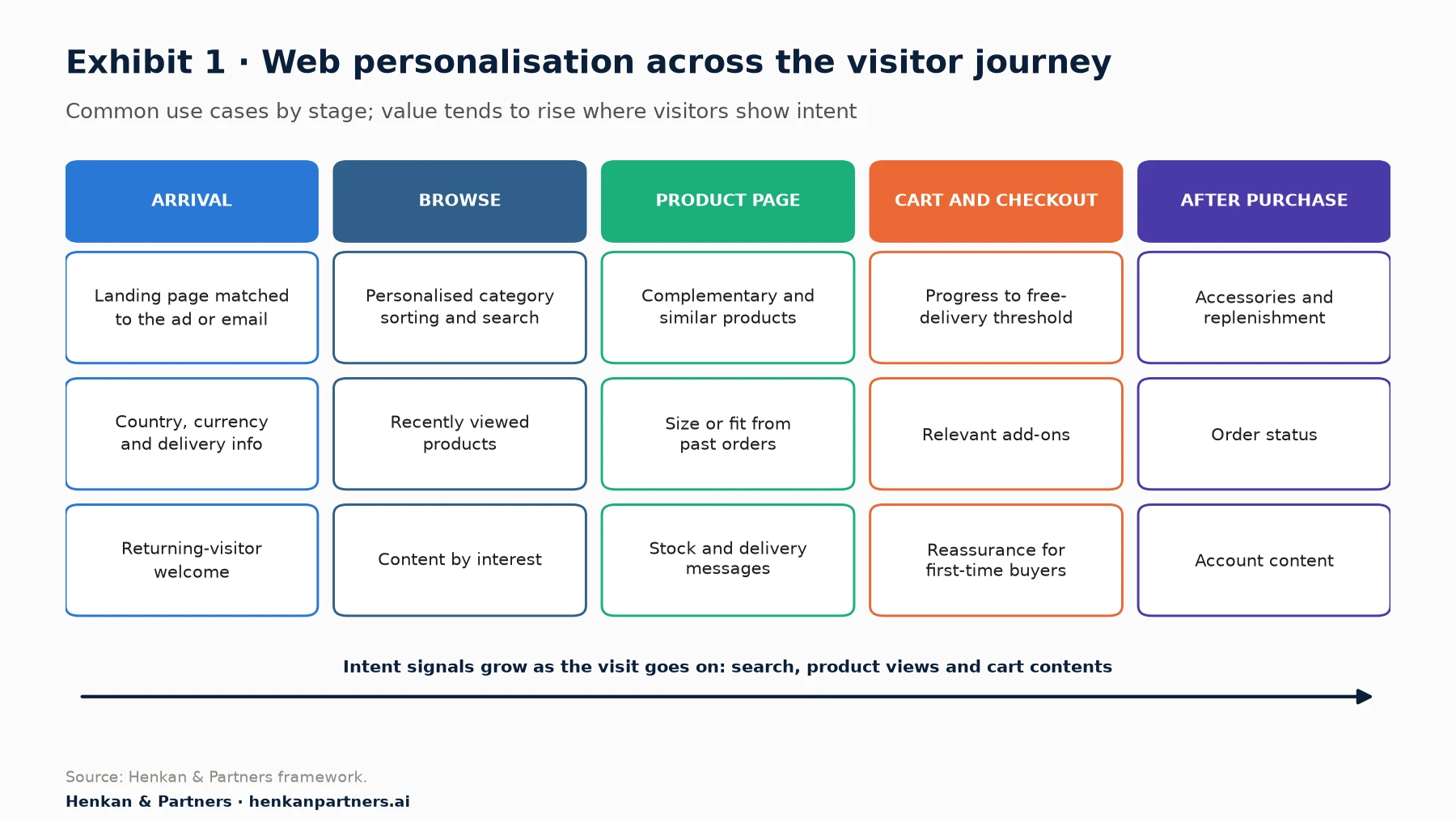
What this shows. The strongest use cases sit where intent is highest: after a search, on a product page, in the cart and after purchase. Homepage banners are the most visible personalisation but, in our experience, rarely the most valuable, because homepage visitors have told you the least.
| Use case | Signal | What changes | Primary metric |
|---|---|---|---|
| Campaign landing match | UTM parameters or referrer | Headline, hero and products match the ad or email | Bounce rate, conversion rate |
| Returning visitor | Cookie or login | Recently viewed products, "continue where you left off" | Return-visit conversion |
| Location | Country from IP address or account | Currency, delivery times, local stock and payment methods | Conversion rate, checkout completion |
| Site search and category ranking | Queries, clicks, purchases | Result order, synonyms, boosted products | Search conversion, revenue per search |
| Product recommendations | Viewed and bought items, product attributes | Complementary or similar products | Add-to-cart from widget, average order value |
| Cart incentives | Cart value | Progress towards a free-delivery threshold | Average order value, margin |
| First-time buyer reassurance | No previous orders | Returns policy, reviews, secure payment messages | Checkout completion |
Details matter. Baymard Institute found in 2021 that 68% of desktop sites in its product-page benchmark gave too little information about cross-sell recommendations, and that in testing, recommendations without a thumbnail, full title, price and rating were largely ignored. A well-designed widget with ordinary recommendations can outperform a clever algorithm shown badly.
For marketers. Before building segments, fix the four experiences every visitor type benefits from: search, product recommendations, delivery and returns information, and a cart that shows progress to free delivery. Then personalise them.
For leaders. Judge web personalisation by the revenue it adds on high-intent pages, not by the number of audiences or banners it runs.
Section 3 · Signals and audiences
Four kinds of signal decide who sees what, and the best ones are what the visitor is doing now
Every web personalisation starts with an audience: a group of visitors defined by one or more conditions. Tools offer long lists of conditions. Optimizely Web Experimentation, for example, lets teams target by ad campaign, browser, cookie, device, IP address, language, location, new or returning session, query parameters, referrer, time of visit, traffic source and predicted intent, among others. Kameleoon's segments add conditions such as screen resolution, ad blocker, goals already converted and likelihood to convert. The choice is wide; the useful choices are narrower.
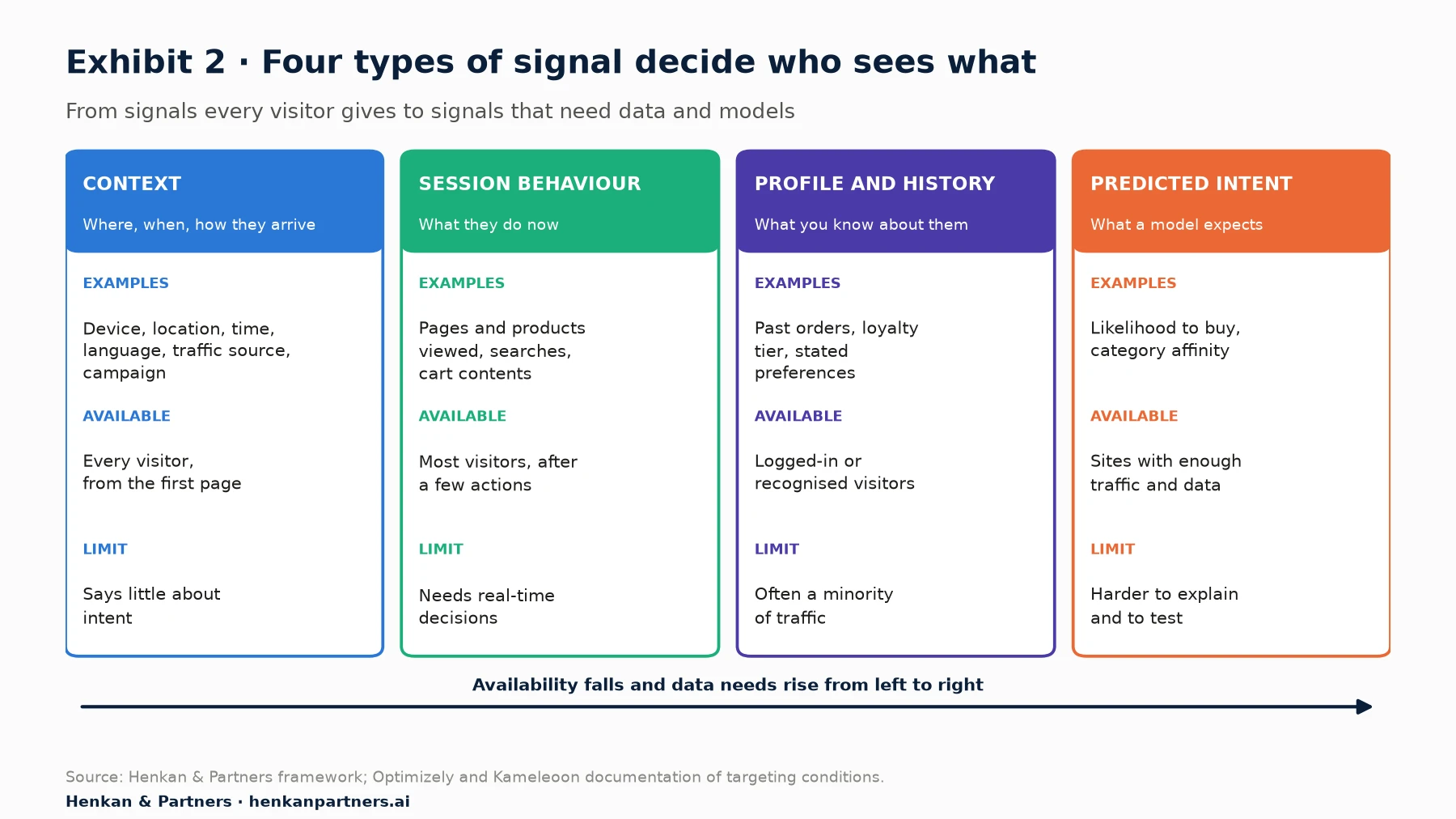
What this shows. Context signals are available for every visitor but reveal little about what they want. Profile data is rich but, on most retail sites, covers only the minority of visitors who are logged in or recognised. Behaviour in the current session sits between the two: available for most visitors after a few clicks, and closely tied to what they want right now. That is why search, product pages and the cart are where web personalisation usually pays first.
How to build audiences that work
- Start from a difference in need, not a data point. "Visitors from Germany need prices in euros and local delivery times" is a need. "Visitors using Safari" is rarely one.
- Keep audiences large enough to test. An audience that receives a few hundred visits a month cannot produce a reliable test result in a reasonable time. Our essential guide to A/B testing explains how to estimate the traffic you need.
- Make audiences mutually exclusive, or set priorities. When a visitor qualifies for two experiences on the same page element, the tool needs a rule for which wins. Undefined overlaps are a common source of broken pages and confusing results.
- Treat location data as approximate. Location from an IP address is an estimate. Optimizely notes that its geolocation comes from the source of the internet connection, that accuracy varies for mobile traffic and that visitors using a VPN appear in the VPN's location. Let visitors change country, currency and language themselves.
- Respect consent. In the EU, targeting that relies on cookies or similar storage generally needs consent unless the storage is strictly necessary. The UK has since February 2026 exempted some preference and analytics storage, provided visitors can opt out; behavioural targeting still generally needs consent. Design a good experience for visitors who decline.
Section 4 · Methods
Rules, tests, bandits and contextual bandits each fit a different problem
Once you know who should see what, there are four ways to decide what each visitor sees. They differ in how much traffic they need, how quickly they react and how much they explain.
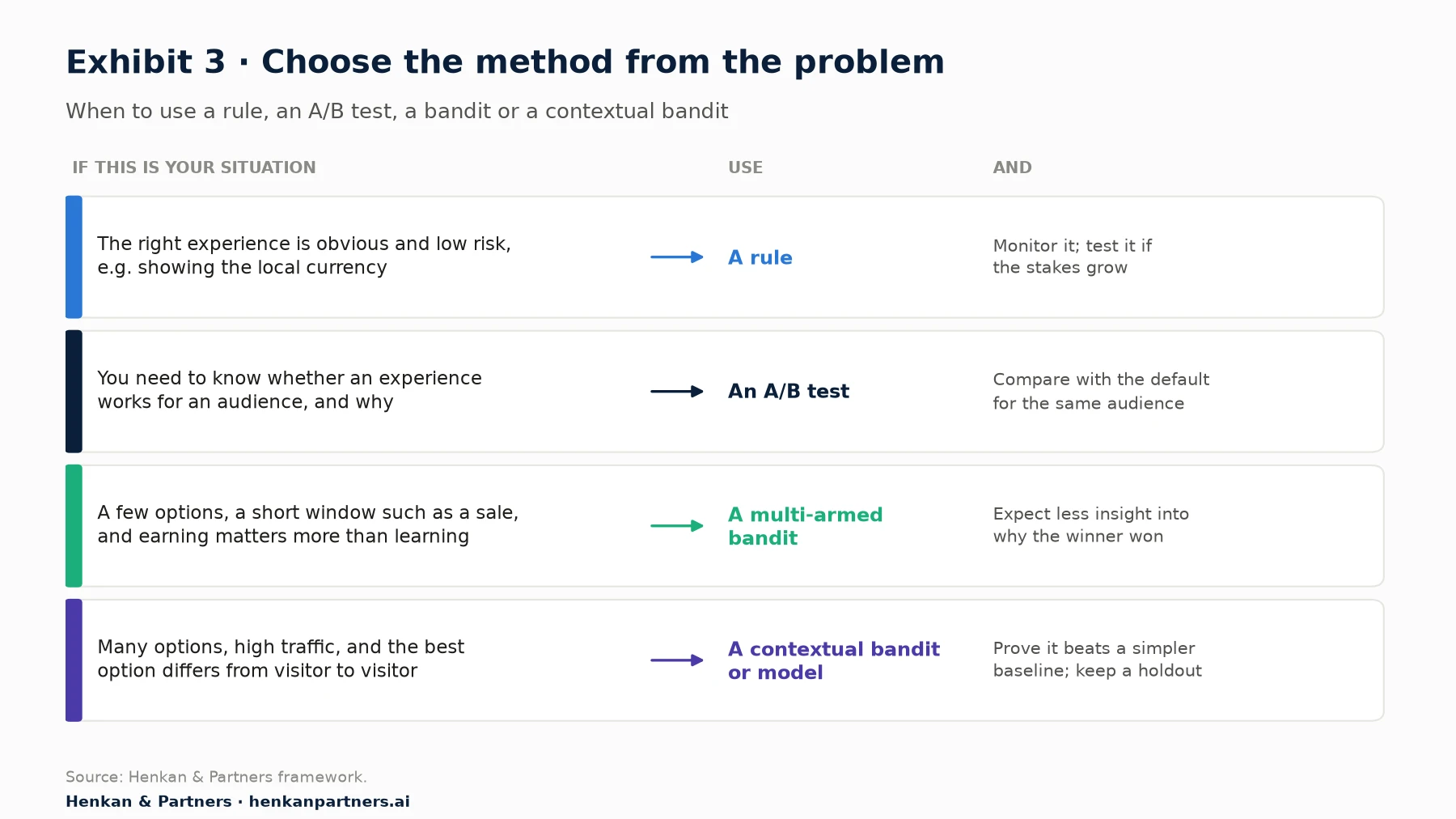
What this shows. Most personalisation on most websites should be rules that have been tested. Bandits are useful when the cost of showing a weaker option while you learn is high, and the window is short. Contextual bandits and other models are worth their complexity when there are many options and the best choice genuinely differs from visitor to visitor.
Rules
A rule says "if the visitor matches this audience, show this experience". Rules are transparent, easy to explain and easy to test. Their weakness is scale: each rule needs content, an owner and maintenance, and a site with a few hundred rules is hard to reason about. Use rules for clear, known differences in need, and test each one against the default before keeping it.
Recommendations
Recommendation widgets use models to choose products or content for each visitor, based on what they and similar visitors have viewed and bought, and on product attributes. They are among the most common forms of one-to-one web personalisation, and most platforms include ready-made strategies such as "recently viewed", "similar items" and "frequently bought together". Choosing the right strategy for each placement matters more than the sophistication of the model: similar items suit a product page when the visitor is still comparing; complementary items suit the cart.
Multi-armed and contextual bandits
A multi-armed bandit shifts traffic towards the best-performing experience as results arrive, so fewer visitors see weaker options. A contextual bandit goes further and learns which experience is best for each visitor, based on information about them. Netflix described in 2017 how it used contextual bandits to choose the artwork shown for each title to each member, and reported significant gains in A/B tests, largest for less familiar titles; it did not publish the size of the lift. In a 2010 study on Yahoo!'s front-page news module, a contextual bandit achieved a 12.5% click lift over a standard bandit that ignored context, in an offline evaluation using 33 million logged events.
Two cautions apply. First, a bandit optimises the metric it is given, usually a short-term one such as clicks, which can differ from revenue or long-term value. Second, a model can be better at its own metric without being better for the business. Booking.com, reviewing 150 production models in 2019, reported that improvements in a model's offline performance did not necessarily translate into business gains, and it tested each model in a randomised experiment.
For leaders. Build on vendors and platforms you can move away from. Microsoft stopped new sign-ups for its Azure AI Personalizer service, a reinforcement-learning personalisation API, in September 2023 and set its retirement for 2026 (its own pages give 25 August and 1 October 2026). Keep your audience definitions, content and test history in systems you own, so that a change of tool does not erase what you have learned.
Section 5 · Testing
Test every personalised experience against the default, and resist slicing results until something wins
Personalisation feels right by design, which makes it easy to skip testing. Yet most ideas do not work: Ron Kohavi and colleagues report that only about a third of ideas tested at Microsoft improved the metric they were designed to improve, and about 10–20% did so at Bing and Google. Personalised ideas are no exception.
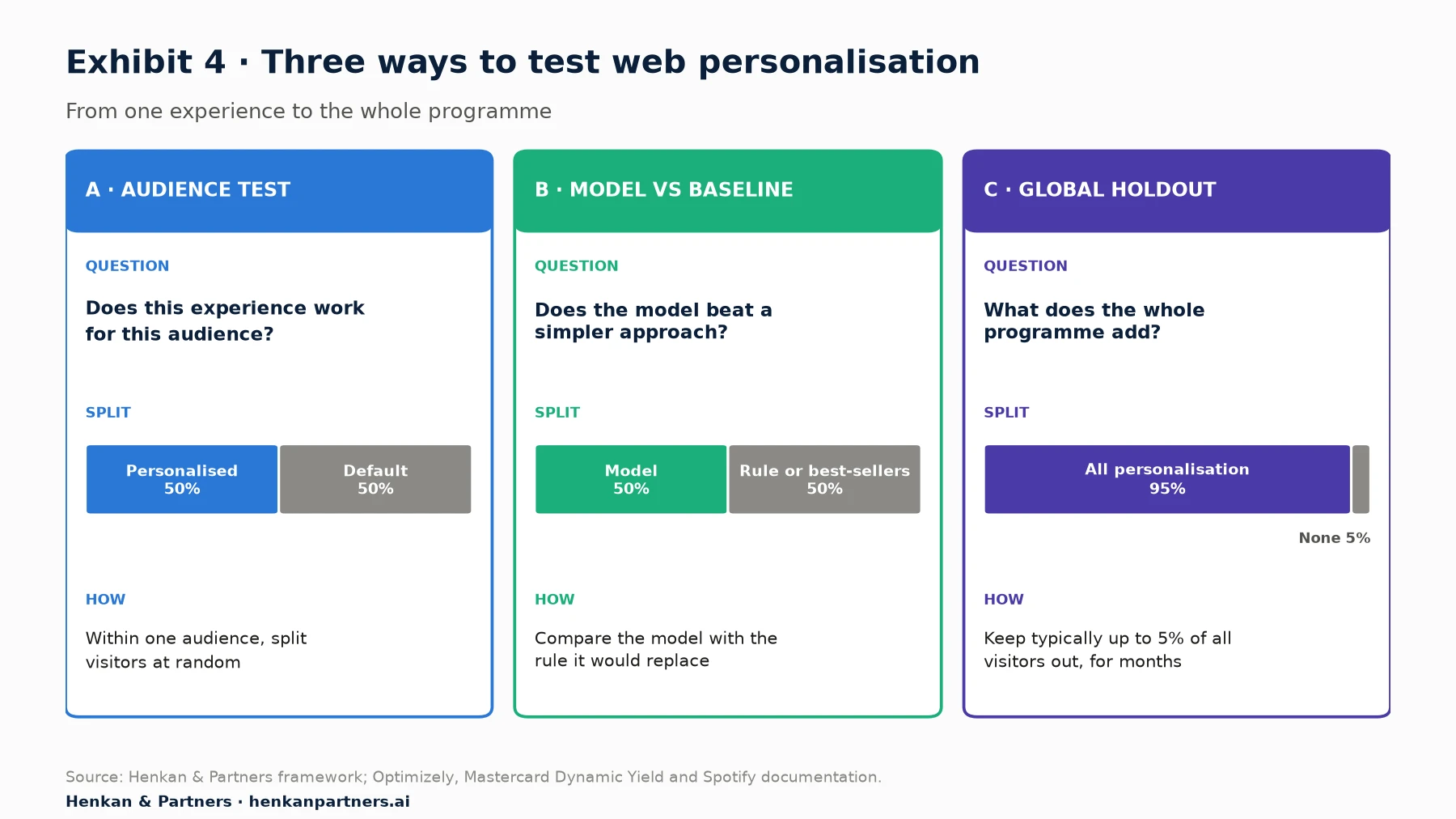
What this shows. Each design answers a different question. Audience tests tell you whether one experience works. Model tests tell you whether complexity pays. A global holdout tells you what the whole programme adds, which is the number a finance director will ask for.
Design A: test within the audience
The correct comparison for a personalised experience is the default experience shown to the same audience, not the rest of the site. Returning visitors usually convert better than new visitors whatever you show them, so comparing personalised returning visitors with everyone else measures the audience, not the personalisation.
Design B: prove the model beats a simpler baseline
When a vendor or data team proposes a model, test it against the rule it would replace, or against a simple strategy such as best-sellers. Booking.com's approach is useful here: it compared models only on the visitors for whom the new and old models would make different decisions, which isolates the effect of the change.
Design C: keep a global holdout
A global holdout is a small, random group of visitors who never see personalisation. Comparing them with everyone else over months measures the programme's total incremental effect, including effects that individual tests miss. Web tools point to about 5%: Optimizely suggests typically up to 5% of traffic for its experimentation holdouts and warns above that; Mastercard's Dynamic Yield uses a 95/5 split. Spotify creates a new holdback group each quarter and, at the end of the quarter, compares it with users who received every shipped change.
Avoid the segment trap
After a test, it is tempting to look for segments in which the experience won. Microsoft's research on common experiment pitfalls warns that recursively splitting users until a statistically significant difference appears is a common route to Simpson's paradox, where a result improves in every segment but falls overall, or the reverse. Two rules help: decide the segments you will analyse before the test starts, and never define a segment by something the experience itself changes, such as "visitors who clicked the banner". Treat a segment that wins after the fact as a new hypothesis to test, not a result.
For marketers. Before launching any personalised experience, write down the audience, the default it will be compared with, the primary metric and the segments you will analyse. If the test cannot reach a reliable result with the audience's traffic, widen the audience or choose a more important page.
Section 6 · Implementation
Where the decision runs, in the browser, on the server or at the edge, decides how fast the page feels
A personalisation tool must decide what each visitor sees and then change the page. Where that happens has consequences for speed, flicker, development effort and what the tool can do.
| Approach | How it works | Strengths | Watch-outs |
|---|---|---|---|
| Client-side | A JavaScript tag in the browser decides and changes the page after it starts loading | Fast to set up; marketers can build experiences with a visual editor | Flicker, or a hidden page while the tag loads; extra script weight; limited on single-page apps without care |
| Server-side | The server decides before sending the page, using a software development kit (SDK) | No flicker; works across web, apps and back-end logic such as search ranking and pricing rules | Needs developer time for each experience; marketers depend on release cycles |
| Edge | Content-delivery-network servers close to the visitor decide and adjust the page or route the request | Close to server-side speed with lighter integration | Not every targeting condition or feature is supported; caching must be designed carefully |
| Hybrid | Server or edge decides; the browser tag handles tracking, analytics and some visual changes | Balances speed and marketer autonomy | Two systems to maintain and keep consistent |
Flicker and anti-flicker snippets
When a client-side tool changes a page that has already started to display, visitors may briefly see the default before the personalised version appears. This is flicker, and it can distort results as well as annoy visitors. To prevent it, tools use an anti-flicker snippet that hides all or part of the page until the tool has loaded, or until a timeout expires. The page is then protected from flicker, but visitors look at a blank screen for longer.
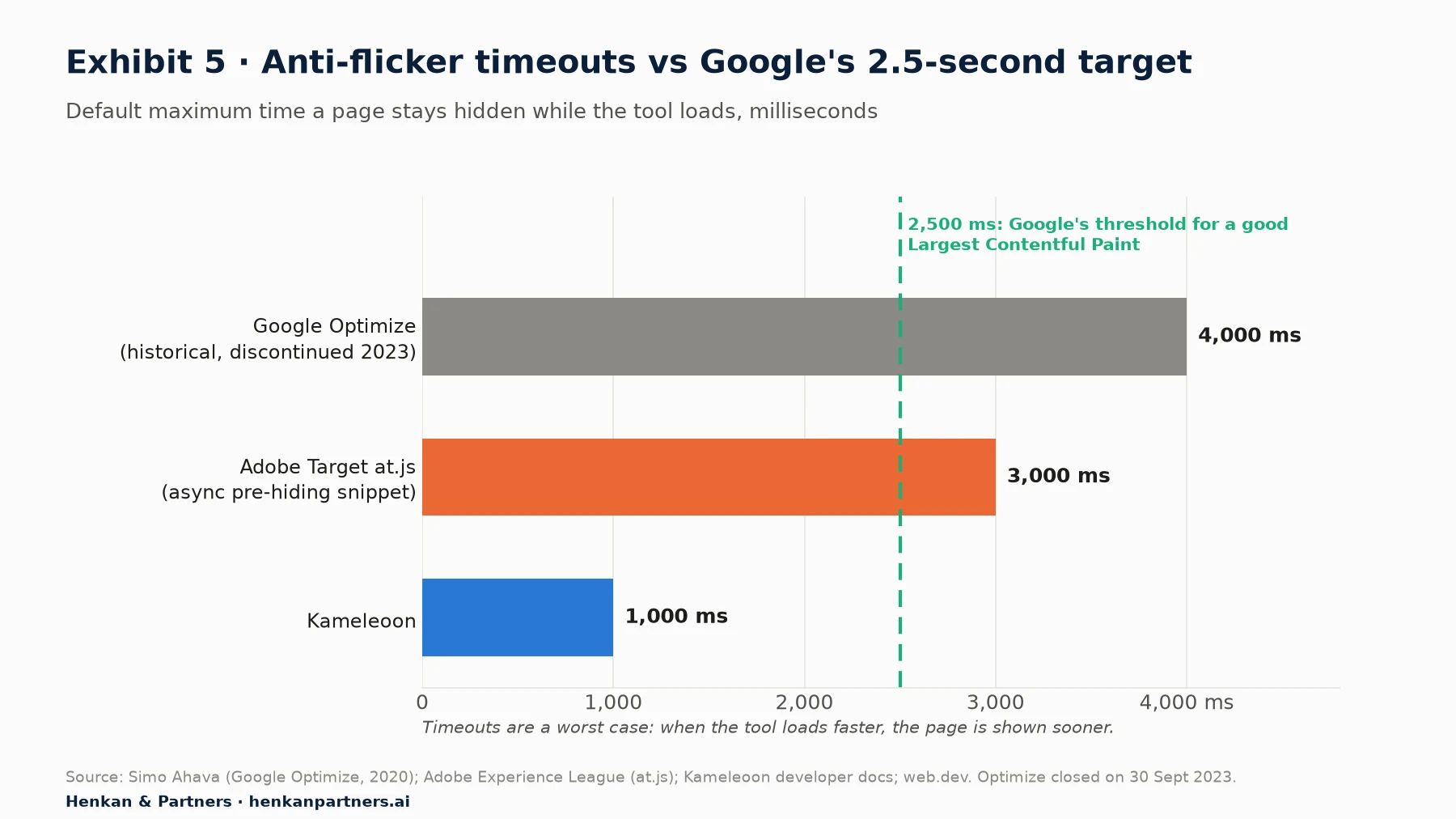
What this shows. Timeouts are a worst case, not a typical wait: when the tool loads quickly, the page is revealed sooner. But on slow connections the worst case is what visitors experience, and a timeout of 3 or 4 seconds is longer than Google's whole target for the largest content to appear. SpeedCurve, a performance-monitoring vendor, reported that anti-flicker snippets can delay the first content by up to the timeout, that at one retailer the snippet delayed content by about 2 seconds, and that in its data bounce rates were higher the longer pages were hidden.
Why speed is part of personalisation
Google's Core Web Vitals define a good experience as Largest Contentful Paint within 2.5 seconds, Interaction to Next Paint of 200 milliseconds or less and Cumulative Layout Shift of 0.1 or less, measured at the 75th percentile of page loads. Personalisation can harm all three: a hidden page delays the largest content, heavy scripts slow interactions, and banners inserted after load push content down the page.
Speed and revenue are linked. In "Milliseconds Make Millions", a 2020 study by Deloitte for Google across 37 European and US brands, a 0.1-second improvement in mobile site speed went with 8.4% more conversions and 9.2% higher average order value for retail sites, and 10.1% more conversions for travel sites. The study was observational, so it shows association rather than cause. Randomised evidence points the same way: Booking.com reported that an increase of about 30% in latency cost about 0.5% in conversion rate.
How to keep personalisation fast
- Load the tag asynchronously and limit what is hidden. Hide only the elements you change, not the whole page, and use the shortest timeout that works. Kameleoon, for example, recommends asynchronous loading and describes synchronous loading as not good practice.
- Move stable, high-traffic experiences server-side or to the edge. Country, currency and delivery information, search ranking and recommendations on key templates are good candidates.
- Reserve space for inserted content. Give banners and widgets a fixed space in the layout so they do not shift content when they appear.
- Measure speed for each experience. Compare Core Web Vitals for personalised and default versions using field data, and treat a slower experience as a cost to set against any conversion gain.
- Remove what you no longer use. Retire ended experiences and unused audiences so the tag does not grow with every campaign.
For leaders. Ask the team to report page speed alongside conversion for every personalised experience. A personalisation that adds revenue on one page while slowing every page can lose money overall.
Section 7 · Search and accessibility
Search engines usually see the default, so it must be complete; assistive technology must follow what changes
Two audiences of every website are easy to forget when designing personalised experiences: search engine crawlers and people using assistive technology such as screen readers. Both are served best by the same principle: a complete default experience, and personalisation that adds to it rather than replacing it.
What Google says
- Google's definition of cloaking turns on intent. Google defines cloaking as presenting different content to users and search engines "with the intent to manipulate search rankings and mislead users". Its testing guidance states: "Don't show one set of URLs to Googlebot, and a different set to humans." Never target search engine crawlers with a special experience.
- Googlebot usually sees your default experience. Google's documentation says Googlebot clears cookies, local storage and session storage between page loads, and declines permission requests such as geolocation. Its default crawler addresses appear to be in the United States, though it also crawls from other countries, and it sends requests without an `Accept-Language` header. A returning-visitor experience will therefore rarely be what Google indexes, and a location-based one only for the locations Googlebot crawls from.
- Use separate URLs for languages and countries. Google recommends separate locale URLs annotated with `hreflang`, rather than changing the language of one URL based on the visitor, and warns that it might not crawl, index or rank all content for different locales on a single adaptive URL.
- For tests that use separate URLs, use `rel="canonical"` and 302 redirects, and run the test only as long as necessary. Google warns that running an experiment for an unnecessarily long time may be interpreted as an attempt to deceive search engines.
- Remove what you no longer use. After a test, Google asks site owners to update the site with the chosen content and remove test elements such as alternate URLs and testing scripts as soon as possible.
Accessibility
Personalised content is often inserted, rotated or changed after the page loads, which creates specific accessibility risks. The Web Content Accessibility Guidelines (WCAG 2.2) cover the main ones:
- Moving content needs a pause control. Any moving or scrolling content that starts automatically, lasts more than five seconds and appears alongside other content must be possible to pause, stop or hide (success criterion 2.2.2). This applies to auto-rotating carousels of personalised offers.
- Status messages must reach screen readers. Messages such as "Your order now qualifies for free delivery" should be announced by assistive technology without moving the visitor's focus (success criterion 4.1.3).
- Navigation should stay consistent. Navigation repeated across pages should appear in the same relative order unless the visitor changes it (success criterion 3.2.3). Menus that re-order themselves as a visitor moves between pages work against this.
Usability research points the same way. Nielsen Norman Group advises against auto-advancing carousels on mobile, recommends five or fewer frames, and reports that people often scroll straight past large images at the top of a page. A personalised hero banner is still a banner.
For marketers. Check every personalised experience with a keyboard and a screen reader before launch, and check that the default page, with no cookies and no location, is complete and indexable.
Section 8 · The process
How to launch web personalisation in 8 steps
The steps below work for a first returning-visitor experience on a small shop and for a programme across many markets.
Step 1: Fix the default experience
Personalisation cannot rescue a slow, confusing or incomplete site. Start with usability, speed, search and product information for everyone. Many opportunities that look like personalisation, such as clearer delivery information, are improvements for all visitors.
Step 2: Find differences in need
Use analytics to compare behaviour by traffic source, device, country, new versus returning visitors and product category. Use session replay, surveys and interviews to understand why groups behave differently; our essential guide to Voice of Customer and essential guide to session replay explain how.
Step 3: Choose the signal and the audience
Pick the simplest signal that identifies the difference in need, check that it is reliable and available on the first page view where needed, and check that the audience has enough traffic to test.
Step 4: Write a hypothesis
Because we observed [evidence about this audience],
we believe that showing [personalised experience] to [audience]
will cause [effect on behaviour],
compared with the default experience.
We will know when [primary metric] improves against a control.
Step 5: Design the experience and the default
Design the personalised experience and confirm that the default is complete for everyone else, including search engines. Check the experience on mobile, with a keyboard and with a screen reader.
Step 6: Choose where it runs
Decide whether the experience runs in the browser, on the server or at the edge, based on its traffic, how long it will run and its effect on speed. Short tests can run client-side; experiences you plan to keep on key templates should usually move server-side or to the edge.
Step 7: Test against the default
Run the experience against the default for the same audience with random assignment, with the primary metric, sample size, duration and segments decided before launch. Track page speed for both versions.
Step 8: Keep what wins, retire what does not, and hold out
Ship winners, remove losers and document both. Keep a global holdout to measure the programme's total effect, and review every live experience at least twice a year: audiences change, products change and content goes stale.
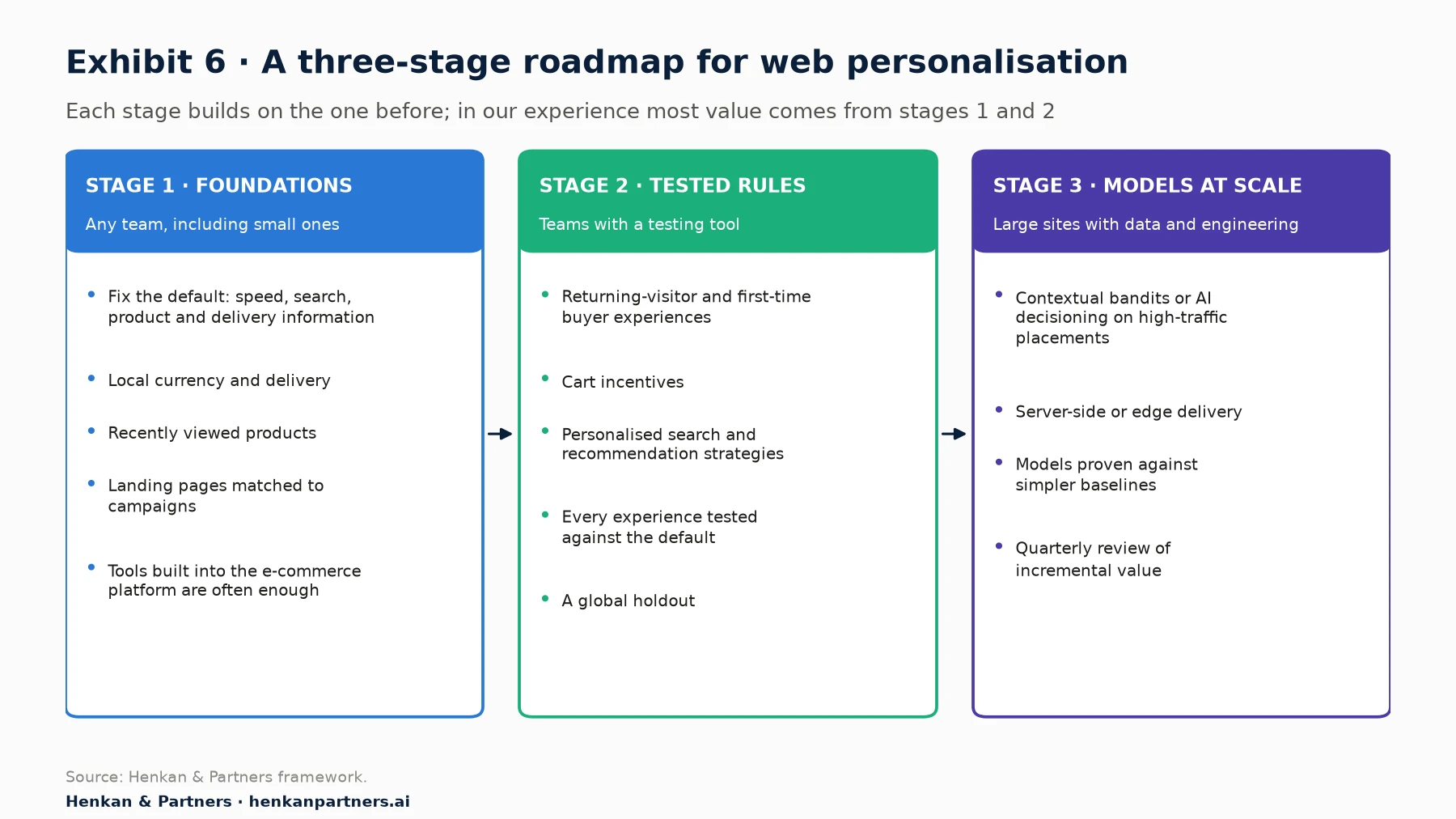
What this shows. The stages build on each other. In our experience, most sites get most of the value from stages 1 and 2, and a team that skips to stage 3 without a tested baseline cannot tell whether its models are working.
Section 9 · Common mistakes
Ten mistakes that make web personalisation cost more than it earns
| Mistake | Why it hurts | What to do instead |
|---|---|---|
| Personalising a broken default | Adds complexity without fixing what stops most visitors | Fix speed, search and product information for everyone first |
| Starting with the homepage banner | Homepage visitors have told you the least; banners are often ignored | Start where intent is highest: search, product pages, cart |
| No control group | You cannot tell whether the experience caused the result | Test every experience against the default for the same audience |
| Comparing different audiences | Returning visitors usually convert better whatever they see | Compare personalised and default within the same audience |
| Slicing results until something wins | Produces false positives and Simpson's paradox | Decide segments before the test; treat new ones as hypotheses |
| Audiences too small to test | Tests never reach a reliable result | Widen audiences or focus on high-traffic pages |
| Hiding the whole page to avoid flicker | Slows every visit, especially on slow connections | Hide only changed elements, shorten timeouts, move key experiences server-side |
| Showing search engines something special | Breaks Google's spam policies | Serve crawlers what any visitor from their location would see |
| Inaccessible dynamic content | Excludes visitors and creates legal risk | Pause controls, announced status messages, consistent navigation |
| Rules that never retire | Hundreds of stale experiences slow the site and conflict | Give every experience an owner, an end date and a review |
Section 10 · Tools
Choose tools by where decisions must run and who will build experiences, not by feature lists
Web personalisation tools fall into a few families: experimentation platforms with personalisation features, specialist personalisation and recommendation engines, e-commerce search and merchandising tools, the personalisation features built into e-commerce platforms and content management systems, and customer data and decisioning platforms that feed them. Our personalisation market report maps the vendors in each family and how the market has changed since 2000.
Four questions narrow the choice quickly:
- Where must decisions run? If speed and search are priorities, favour tools with mature server-side or edge delivery.
- Who will build experiences? Marketers need a visual editor and templates; engineering-led teams need good SDKs and feature flags.
- Which data will you use? Check that the tool can use your customer data, product catalogue and consent signals without duplicating them.
- How will you measure it? Insist on proper randomisation, a global holdout and results you can export and check.
For leaders. Before buying a new tool, check what your current e-commerce platform, content management system and testing tool already offer. In our experience, many teams use a fraction of the personalisation features they already pay for.
Section 11 · Next steps
Five things to do in the next 90 days
1. Audit the default experience
Check speed, search, product information and delivery information on mobile, with no cookies, from your main markets. Fix what is broken for everyone.
2. List three high-intent opportunities
Choose three experiences on search, product, cart or campaign landing pages where a clear group of visitors has a different need, and write a hypothesis for each.
3. Measure what your tags cost
Measure Core Web Vitals with and without your personalisation and testing tags, and check the anti-flicker settings.
4. Set up a global holdout
Hold out a small share of visitors from all personalisation, typically up to 5%, and agree how you will report incremental value each quarter.
5. Clean up
List every live experience and audience, give each an owner and an end date, and switch off anything without evidence behind it.
Frequently asked questions
Frequently asked questions
What is web personalisation?
Web personalisation is changing a website's content, layout, products or messages for different visitors, based on information such as their location, device, traffic source, behaviour or customer history, so that each visitor sees a more relevant experience.
What is the difference between web personalisation and A/B testing?
A/B testing compares versions of an experience to find the one that works best for visitors on average. Web personalisation shows different experiences to different visitors. The two work together: every personalised experience should be tested against the default for the same audience.
Does web personalisation hurt SEO?
Not if it is done properly. Personalisation becomes cloaking, which breaks Google's spam policies, when search engines are shown different content with the intent to manipulate rankings. Googlebot does not keep cookies between page loads and usually sees your default experience, so make that default complete, use separate URLs with hreflang for languages and countries, and never target crawlers with a special experience.
What is flicker, and how do I avoid it?
Flicker is when a visitor briefly sees the default page before a client-side tool shows the personalised version. Anti-flicker snippets prevent it by hiding the page until the tool loads or a timeout expires, which slows the page. Hide only the elements you change, use the shortest timeout that works, and move experiences you plan to keep to the server or the edge.
How much traffic do I need for web personalisation?
Rules such as showing local currency need no minimum, but every experience you want to test needs enough traffic within its audience to reach a reliable result. Contextual bandits and other models need high traffic and many options to beat simpler rules. Smaller sites should focus on a few large audiences and high-traffic pages.
How do I measure the ROI of web personalisation?
Test each experience against the default for the same audience, and keep a global holdout, typically up to 5% of visitors, who see no personalisation. Compare revenue per visitor between the holdout and everyone else over several months, and set any gain against the cost of tools, content and any loss of page speed.
Do I need consent for web personalisation?
In the EU, personalisation that relies on cookies or similar storage on the visitor's device generally needs consent, unless the storage is strictly necessary for a service the visitor asked for. In the UK, since February 2026, storage that adapts the site to preferences the visitor has chosen, such as language, is exempt if visitors can opt out; behavioural targeting still generally needs consent. Personalisation based only on the current page request, such as the language of the browser, raises fewer issues. Design a good experience for visitors who decline, and take legal advice for your markets.
Key terms
- Web personalisation
- Changing a website's content, layout, products or messages for different visitors, based on data about them. It is personalisation applied to the site itself.
- Audience (segment)
- A group of visitors defined by conditions, such as country, device, traffic source or behaviour. Audiences decide who sees a personalised experience.
- Experience (variation)
- The version of a page or element that an audience sees. Every experience needs a default for everyone else.
- Targeting condition
- A rule used to define an audience, such as "visited from a paid campaign" or "has items in the cart".
- Recommendation widget
- A block on the page that shows products chosen for the visitor, such as "recently viewed" or "customers also bought".
- Multi-armed bandit
- A method that sends more traffic to better-performing experiences as results come in. Faster to exploit a winner, less suited to learning why it won.
- Contextual bandit
- A bandit that also uses information about the visitor to pick the best experience for each person. It learns continuously, using a small amount of random exploration.
- Global holdout
- A random share of visitors who never see personalisation, used to measure the total incremental effect.
- Client-side personalisation
- Changes applied in the visitor's browser by a JavaScript tag. Quick to set up, but can cause flicker and slow pages.
- Server-side personalisation
- Changes decided on the server before the page is sent. No flicker, but needs developer work.
- Edge personalisation
- Decisions made on content-delivery-network servers close to the visitor. Aims to combine the speed of server-side with easier deployment.
- Flicker (flash of original content)
- When a visitor briefly sees the default page before the personalised version appears. Anti-flicker snippets hide the page to prevent it, at the cost of speed.
- Core Web Vitals
- Google's page-experience metrics: Largest Contentful Paint, Interaction to Next Paint and Cumulative Layout Shift. Personalisation scripts can affect all three.
- Cloaking
- Showing search engines different content from what users see, with the intent to manipulate rankings. It breaks Google's spam policies.
Sources
Google's guidance, web standards and research findings were checked against the original publications, publishers' pages or, where access was blocked, a copy or review of them, on 26 September 2026. Tool defaults and holdout guidance come from each vendor's own documentation and may change. The Deloitte study for Google is observational. The use-case map, signal framework, method guide, test designs, roadmap and recommendations are Henkan & Partners' own and are labelled as such. Henkan & Partners works with several personalisation and experimentation vendors, including as a certified partner of Kameleoon and AB Tasty (now part of Wingify); this guide does not rank vendors.
- Google Search Central, A/B testing best practices for Search
- Google Search Central, Spam policies for Google web search
- Google Search Central, How Google crawls locale-adaptive pages
- Google Search Central, Fix Search-related JavaScript problems
- web.dev, Web Vitals
- web.dev, Milliseconds make millions (Deloitte for Google, 2020)
- Simo Ahava, Google Optimize anti-flicker snippet delay test, 2020
- Google, Optimize sunset notice
- Adobe Experience League, How at.js manages flicker
- Kameleoon developer documentation, Flicker management and performance
- Kameleoon developer documentation, Hybrid experimentation
- SpeedCurve, Understanding the performance impact of anti-flicker snippets
- Optimizely, How Performance Edge works
- Vercel, How to drive experiments and personalization without impacting performance, 2023
- Optimizely Support, Target audiences with conditions
- Kameleoon user manual, Create a segment
- Netflix Technology Blog, Artwork personalization at Netflix, 2017
- Li, Chu, Langford and Schapire, A contextual-bandit approach to personalized news article recommendation, WWW 2010
- Bernardi et al., 150 successful machine learning models: 6 lessons learned at Booking.com, KDD 2019
- Microsoft Learn, Azure AI Personalizer documentation
- Dmitriev, Gupta, Kim and Vaz, A dirty dozen: twelve common metric interpretation pitfalls in online controlled experiments, KDD 2017
- Kohavi, Tang and Xu, Trustworthy Online Controlled Experiments, Cambridge University Press, 2020
- Optimizely Support, Global holdouts
- Mastercard Dynamic Yield, Ten principles of personalization impact report success
- Spotify Engineering, Spotify's new experimentation platform (part 2), 2020
- Baymard Institute, 6 list item attributes to include for cross-sell recommendations, 2021
- W3C, Understanding WCAG 2.2 success criterion 2.2.2 Pause, Stop, Hide
- W3C, Understanding WCAG 2.2 success criterion 4.1.3 Status Messages
- W3C, Understanding WCAG 2.2 success criterion 3.2.3 Consistent Navigation
- Osborne Clarke, New exceptions explained in ICO final guidance on storage and access technologies
- Nielsen Norman Group, Carousel usability
- Henkan & Partners, The Essential Guide to Personalisation
- Henkan & Partners, The Personalisation Market, 2000–2026
- Henkan & Partners, The Essential Guide to A/B Testing