Research
How AI Is Reshaping A/B Testing: What 19 Prompt-Built Tests Tell Us About Speed, Quality and Limits
Alexandre Suon · 2025-08-01
In the summer of 2025 we rebuilt 19 real, hand-coded A/B tests using only prompts written in plain English. Prompting cut build time by about 89% on average. Fidelity to the original was high for simple changes and fell for precise visual work and business logic. This is what we measured, what has changed since, and how to use prompt-built tests without hurting the customer experience.
Executive summary
- Prompts can now build most everyday A/B tests. 11 of the 19 tests we rebuilt with Kameleoon's Prompt-Based Experimentation (PBX) reached 90% fidelity or better against the hand-built original, and the median score was 92%.
- Build time fell by about 89%, from 8.7 hours to 55 minutes per test on average. Every test saved time, from 66% to 98%. Speed was never the constraint; quality was.
- Fidelity depends on how precisely a change can be described, more than on how complex it looks. Static content changes averaged 91.7% and complex user-experience changes 76.5%, but every category contained both near-perfect and failed builds. Visual precision caused 52% of shortfalls and conditional logic 31%.
- AI-generated variants need a stricter launch process, not a looser one. Five of the 19 builds scored below 70%. Global CSS, single-page-app routing and non-deterministic output (the same prompt giving different code) are new failure modes that standard QA does not always catch.
- The tools have moved on since our study, and the operating model matters more than the tool. By mid-2026 VWO, Optimizely, Amplitude and AB Tasty offered AI-built variants too, and Kameleoon had extended PBX with agents. Teams that pair them with precise briefs, visual QA and a test log can run more tests on the same budget, and learn faster what improves the customer experience.
Section 1 · The question
We asked whether a prompt alone could rebuild tests that developers had already built and run
Every A/B testing programme has the same bottleneck: somebody has to build the variant. For a simple copy change, that can take an hour. For a new filter, a gallery or a checkout step, it can take days of developer time, plus QA. Most teams therefore run fewer tests than they would like, and they choose the tests that are easiest to build rather than the ones customers most need.
On 30 June 2025, Kameleoon made Prompt-Based Experimentation (PBX) generally available. PBX runs as a browser extension on top of the Kameleoon snippet: the user describes the change in plain English and the tool writes the variant code. Kameleoon explained why it built the feature: visual editors "often broke on modern web stacks. SPAs, dynamic content, and custom components quickly exposed the limits."
Vendor demos show what a tool can do on a chosen page. We wanted to know what it does on real work. So in July and August 2025, Henkan & Partners took 19 historical A/B tests that we had designed, built by hand and run for a large hospitality group, and rebuilt each one with PBX using prompts only. Our researcher Laura Polet ran and scored every reconstruction. We asked three questions:
- Fidelity. How closely can a prompt-built variant reproduce a test that a developer built by hand?
- Quality. Is the generated code as clean, fast, secure and accessible as the original?
- Limits. Where does prompting stop working, and why?
The answers matter beyond one vendor. Most major testing platforms now offer some form of AI-built variant (Section 10), and the failure modes we found come from how large language models turn words into code, not from Kameleoon specifically.
For leaders. The build step is where most experimentation budgets go and where most programmes stall. If prompts can take it over for routine changes, the same team can run several times more tests. That means faster learning about what customers value, and more revenue and lifetime value from the same budget.
Section 2 · Method
Each test was rebuilt from its original brief, scored against the original, and grouped by complexity
We used a reconstruction design. For each historical test we already had three things: the original brief, the hand-built code and the live result. That gave us a known-good answer to compare against. Each reconstruction followed the same four steps:
- Write the prompt. From the original test documentation, write a plain-English description of the change, without referring to how the original was coded. Prompts followed the pattern "Create [what] for [which visitors] that [requirements]".
- Generate. PBX builds the variant from the prompt alone. No manual code edits and no visual editor were allowed. The tester could refine the prompt and regenerate as many times as needed; each round counts as one iteration.
- Verify function. Test the variant against the original's functional requirements, with automated scripts and manual checks on desktop and mobile.
- Assess quality. Review the code for cleanliness, performance impact, security issues and accessibility (WCAG AA).
Each test was given a fidelity score from 0 to 100% for how completely the prompt-built variant reproduced the original, in behaviour and appearance, and the saving in build time against the original build. The tests were chosen to cover four levels of complexity:
| Category | What it covers | Tests | Examples from the study |
|---|---|---|---|
| A · Static content | Text, colour and simple layout changes | 7 | Hide a header, change mini-cart wording, show dates differently |
| B · Interactive elements | Links, banners, repositioned buttons, filters | 5 | Make hotel names clickable, add a regional tax banner, move a call to action |
| C · Complex UX | Multi-step flows, conditional display, galleries | 5 | Sort brand filters, member-rates pop-up, gallery with map |
| D · Advanced technical | Custom JavaScript, animation, redesigned components | 2 | Conversational search entry point, homepage hero redesign |
The setup reflects the tool as it was in summer 2025: the early release of PBX, running on OpenAI's o3 model, on a site built with the Nuxt (Vue) framework.
About this edition. The first version of this study (August 2025) reported 17 tests and four category averages, some of which did not match its own test-level appendix. This edition recomputes every figure from the 19 test-level results. Category A is 91.7% (first reported as 93.6%), B is 80.2% (unchanged), C is 76.5% (73.3%) and D is 80.0% (62.5%). The conclusions do not change, but the neat decline from A to D is weaker than first reported, as Section 4 explains.
Three limits apply. First, 19 tests from one company in one industry is a small sample, so the figures are indicative, not general benchmarks. Second, one evaluator scored every test, so the scores carry that person's judgement; a second rater would make them more robust. Third, we measured the build only, over four weeks. We did not measure how the code holds up over months of site changes.
Section 3 · Headline results
Prompt-built variants matched the original at 90% or better in 11 of 19 tests
The headline is that prompting works for most everyday tests. Across the 19 reconstructions, the median fidelity score was 92% and the average 83.4%. Eleven tests reached 90% or more, nine reached 95% or more, and two were perfect. Five tests fell below 70% and needed substantial manual work before they could have gone live.
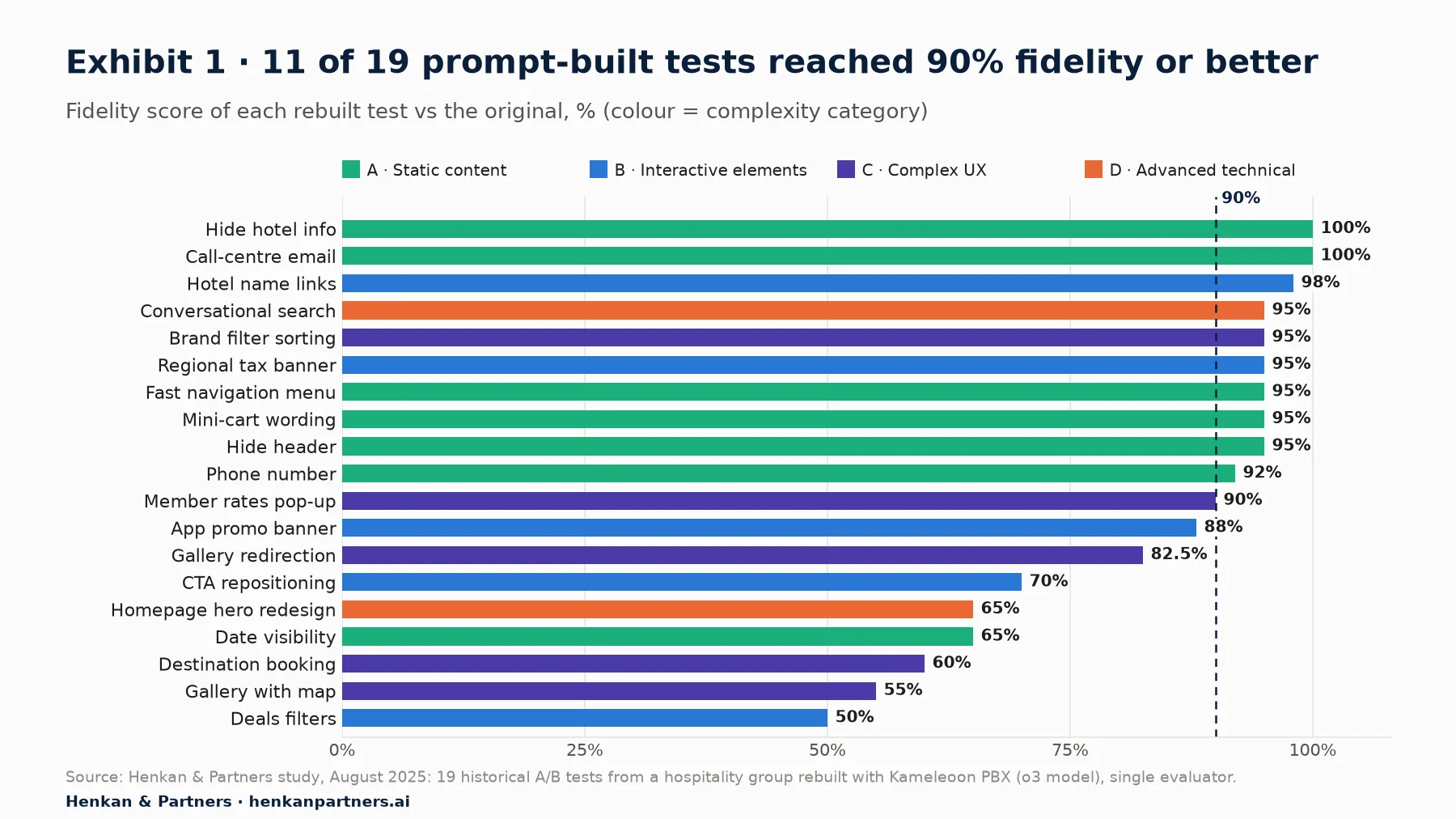
What this shows. The distribution is lopsided. Most tests cluster at 90–100%, then a tail of five tests drops to 50–70%. The high scorers include tests from every category, among them an advanced conversational-search component at 95%. The low scorers share a pattern: each needed a precise visual layout or a business rule that the prompt could not pin down.
Three tests show what the best results looked like:
- Hotel name links (98%, two iterations). Turning hotel names into accessible links, with keyboard navigation and ARIA labels (the attributes screen readers use). The generated code was cleaner than the original.
- Brand filter sorting (95%). Grouping and sorting brand filters by locale while keeping the native page elements. The prompt described the sorting rules explicitly.
- Conversational search (95%, three variations). Animated banners, tooltips and a modal window, all within brand guidelines. Detailed specifications made a complex build succeed.
And three show where prompting fell short:
- Deals filters (50%). The tool could not map each offer URL to its category label, despite clear instructions. The display was right; the logic was not.
- Gallery with map (55%, nine iterations). Reproducing a Figma layout with a restructured image gallery and an interactive map. The tool tended to rebuild page sections rather than rearrange the existing ones.
- Destination booking (60%). Identical prompts produced different implementations on different runs, which made the result hard to stabilise.
For marketers. Read these results as a triage guide. If a test changes words, visibility, links or a banner, a prompt will probably get it right the first or second time. If it depends on pixel-exact layout or on data rules, plan for developer time from the start.
Section 4 · Where it breaks
Fidelity fell with complexity, but precision of the brief explained more than the category did
Average fidelity fell from 91.7% for static changes to 80.2% for interactive elements and 76.5% for complex user-experience changes. That matches intuition. But the spread inside each category was wider than the gap between categories. Static content ranged from 65% to 100%, interactive elements from 50% to 98%, and complex UX from 55% to 95%. Category D had only two tests (95% and 65%), so its 80% average tells us little.
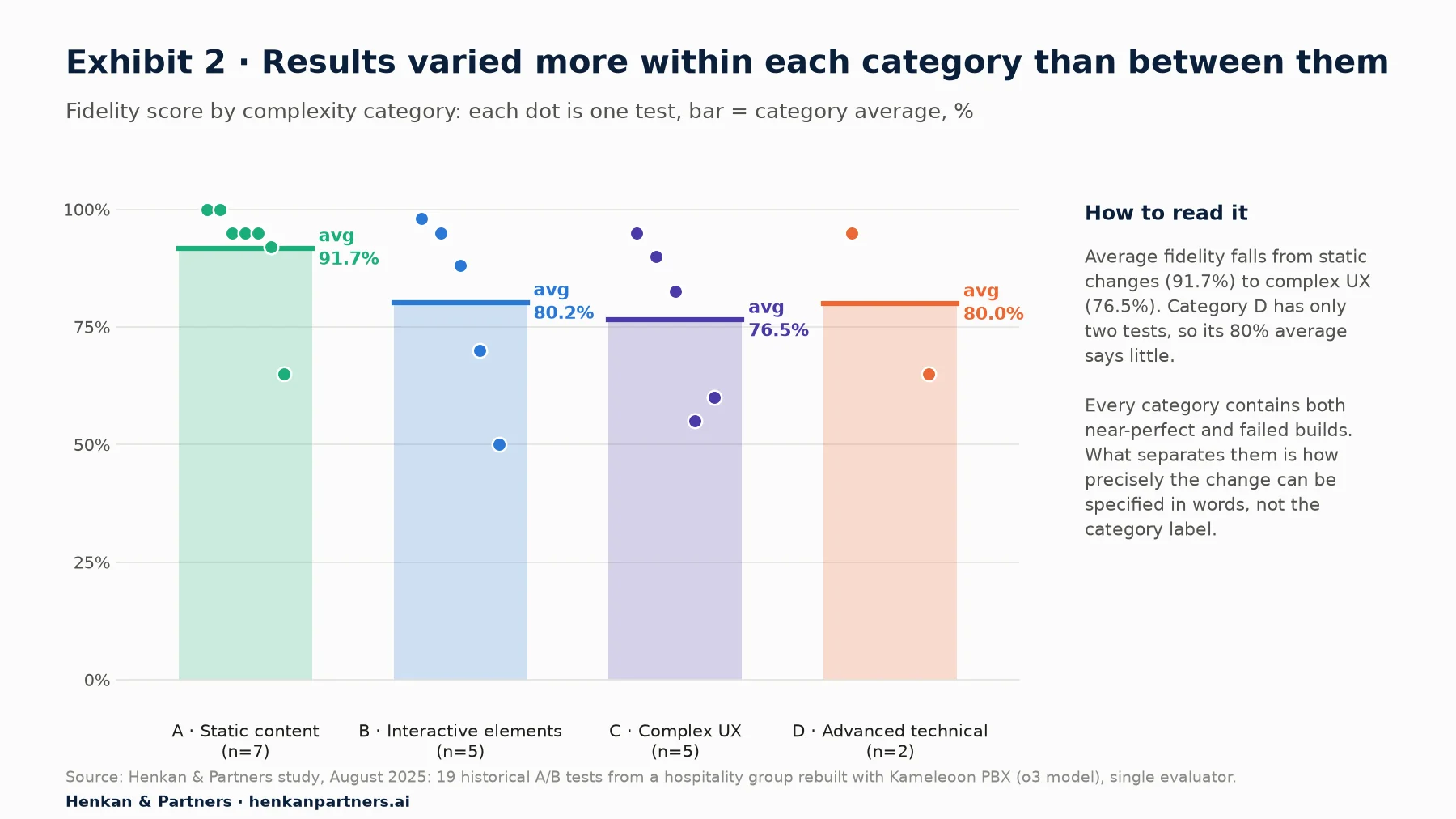
What this shows. The category label is a weak predictor on its own. A "static" date-display change scored 65% because it needed exact layout at desktop and mobile breakpoints, while an "advanced" conversational-search component scored 95% because its brief was detailed. What the failures share is a gap between what the person meant and what the words specified.
We call this the intent-execution precision gap: prompting works when the intended change can be stated precisely in words, and struggles when the intent lives in a picture (a Figma layout) or in business knowledge (which URL belongs to which offer). This is the main finding of the study, and it has a practical consequence: the skill that decides success is writing a precise brief, not coding.
It also explains a broader idea from software research. Scholars of end-user development have long studied how people who are not professional programmers can create or change software, provided the tools constrain the task well. Large language models push that boundary much further, but they do not remove it: the constraint now sits in the precision of the specification. We describe the result as specification-mediated automation: the output is automated, but its quality depends on the human's specification.
For leaders. Do not budget AI-assisted testing by test category alone. Budget by how well the change can be specified. Changes backed by a clear design system, exact selectors and written business rules will go fast; changes that live only in a designer's head will not.
Section 5 · Speed and cost
Every test was built faster by prompt, cutting average build time from 8.7 hours to 55 minutes
Time saving was the most consistent result. The original hand builds averaged 8.7 hours per test. Prompt builds, including all refinement rounds, averaged 55 minutes: a reduction of about 89%. The smallest saving was 66% (destination booking) and the largest 98% (deals filters). Sixteen of the 19 tests saved 88% or more.
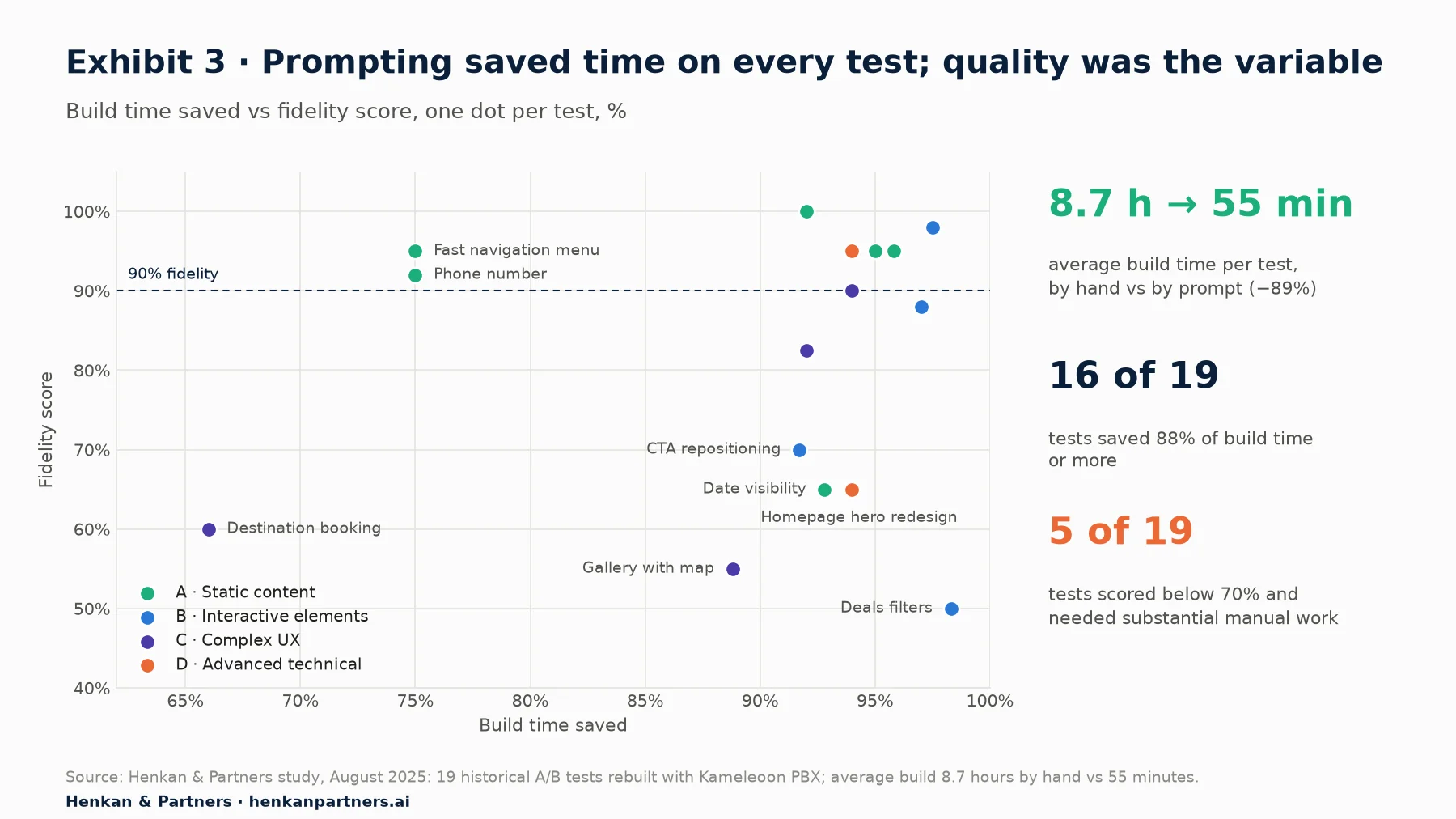
What this shows. Time saved and quality are almost unrelated (the correlation is 0.14). The fastest build, deals filters, was also the worst. A fast build that fails QA is not a saving, so speed figures only mean something next to a quality measure.
Two cautions apply before turning these numbers into a business case. First, our 55 minutes covers the build only, not QA, launch and analysis, which do not shrink as much. Second, measured and perceived AI productivity can differ. In a 2025 randomised study by the research group METR, 16 experienced open-source developers took 19% longer with AI tools on their own projects, while believing they had been about 20% faster. METR's later work with newer models, published in February 2026, pointed to modest speed-ups instead and noted design problems in measuring them. The lesson is to measure your own cycle time before and after, not to rely on claims.
Kameleoon's own figures are higher than ours. In July 2025 it reported a 97% reduction in build time across 1,000 prompt-based experiments on 48 websites, assuming three developer days per hand-built test. That is vendor-reported and uses a longer baseline than our measured 8.7 hours, which explains most of the gap.
What does an 89% cut mean in practice? As an illustration only: a team with 40 hours of build capacity a month could build about four to five tests at 8.7 hours each, or up to about 40 at 55 minutes each, if QA and traffic allowed. In reality, traffic and QA become the new limits. The benefit is still large, because a small team without a developer can now run a real testing programme, and a large team can spend developer time on the complex tests that need it.
For investors. The build step is becoming cheap. The value in an experimentation programme is moving to what cannot be automated in the same way: choosing what to test from customer research, QA and governance, statistical discipline, and turning results into decisions. Assess vendors and service firms on those, not on build capacity.
Section 6 · Why builds fail
Half of all shortfalls came from visual precision, and complex changes took four times as many prompts
When a build fell short, the evaluator recorded the main cause. Three causes explained all the shortfalls: visual fidelity (52%), conditional logic (31%) and non-deterministic output (17%). The number of prompt iterations needed rose steadily with complexity: 1.4 on average for static changes, 2.8 for interactive elements, 4.25 for complex UX and 5.5 for advanced changes.
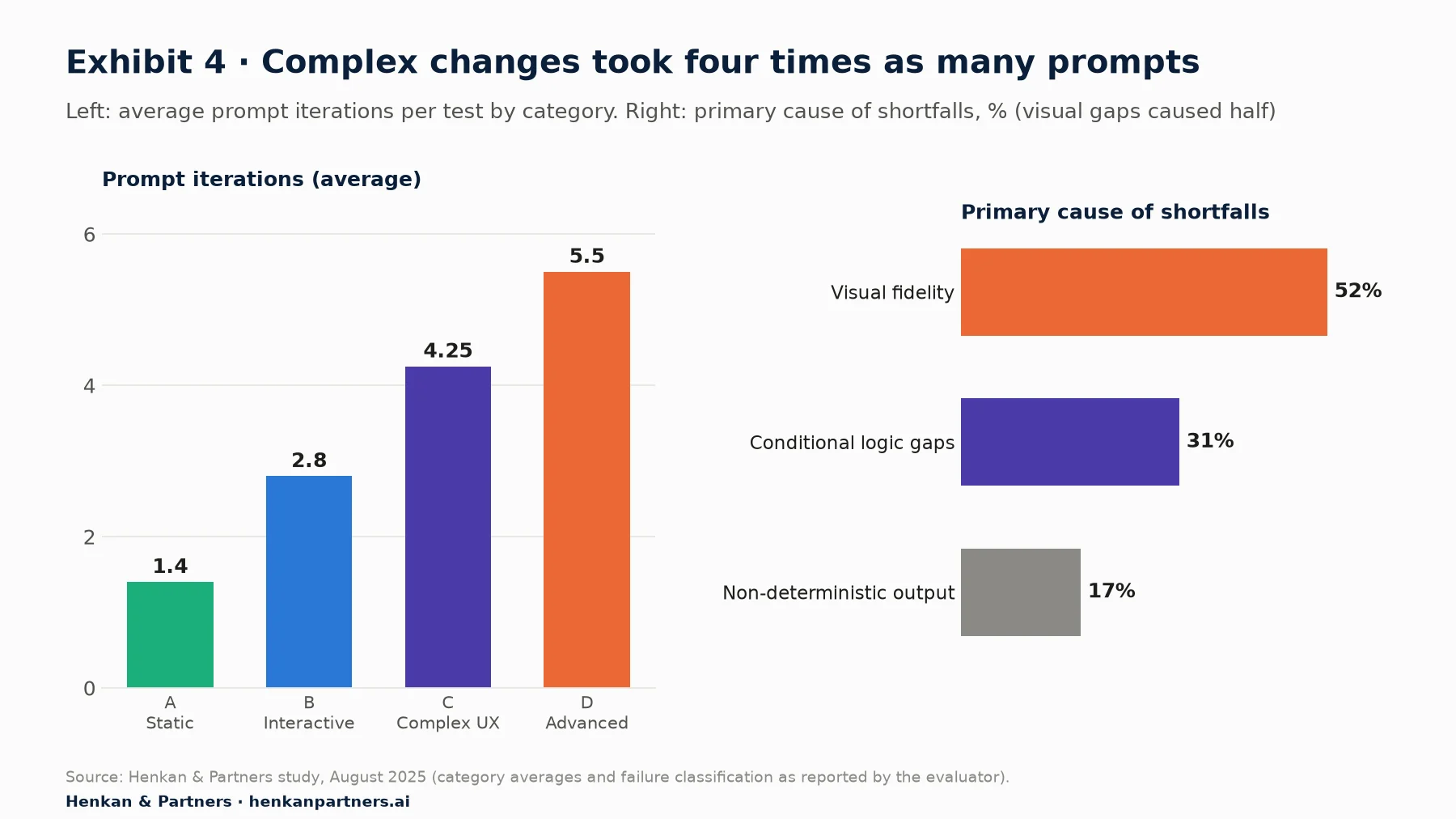
What this shows. Each extra iteration is human time spent reviewing and rewriting, so complex tests keep less of the speed gain. Visual precision is the biggest single problem, which points to design-file integration as the most valuable improvement for vendors.
Visual fidelity: words are a poor way to describe a layout
The CTA repositioning test took seven iterations with Figma references and still reached only 60–80% visual accuracy, although it worked correctly. The date-visibility change needed four iterations and never matched the design exactly at mobile and desktop breakpoints. Instructions such as "below the header" were interpreted in different ways. At the time, Kameleoon told us it was working on direct Figma integration to address this.
Conditional logic: the tool built the display, not the rule
In the deals-filters test, PBX produced the filter interface but could not apply the rule linking each offer URL to its category label. The logic was simple for a person and clearly stated, yet it was not implemented. In our tests, the tool behaved more like a presentation-layer generator than a business-logic engine.
Non-determinism: the same prompt gave different code
In the destination-booking test, identical prompts produced different implementations on different runs. This is a known property of large language models: a 2023 study by Ouyang and colleagues found that ChatGPT returned code with no identical test outputs across repeated requests for between 48% and 76% of tasks, depending on the benchmark, and that setting the model's temperature to zero reduced but did not remove the variation. For experimentation, it means the code that was reviewed must be the code that ships, and it must be saved with the test.
Two framework traps: single-page routing and global CSS
Two failures came from the site's framework rather than the prompt. A fast-navigation menu scored 95% but its anchor links triggered "route not found" errors in the single-page app, which would have broken navigation if launched unchecked. In the homepage hero redesign (65%), the tool wrote site-wide CSS rules that broke dropdown menus and pop-over layers elsewhere on the page.
Section 7 · Code quality
When builds worked, the generated code was often cleaner than the hand-written original
On the builds that succeeded, the code was good. The evaluator rated code cleanliness 4.2 out of 5 on average (range 3–5). Performance impact was minimal in every test, every build passed the security review, and 95% met WCAG AA accessibility checks.
| Strengths of the generated code | Weaknesses of the generated code |
|---|---|
| Consistent use of MutationObserver, so variants survived content loading late in single-page apps | Verbose: more lines than needed for simple changes |
| Better encapsulation and naming, so less risk of clashing with site code | Over-engineered solutions for basic requirements |
| Sturdier event handling when the page structure changed | Global CSS rules that affected elements outside the test |
The pattern is useful for teams. The model is reliable at the defensive coding that developers often skip under time pressure, such as waiting for elements to appear. It is less reliable at knowing where to stop, which is why the scope check in Section 9 matters.
Section 8 · Writing prompts that work
Prompts that named exact elements, values and limits succeeded far more often
Across the 19 tests, the successful prompts shared three habits, and the failed ones usually lacked them:
- Name exact elements. Give the CSS selector or class of the element to change, not a description such as "the booking button". Tests that named selectors had higher first-attempt success.
- Give numbers, not adjectives. Exact pixel sizes, colour codes, spacing and breakpoints produced consistent results; "make it bigger" or "below the header" did not.
- Say what not to do. Explicit constraints such as "Do not replace the container; modify it in place" or "Scope all CSS to this component" prevented the most common errors.
| Weak prompt | Stronger prompt |
|---|---|
| Move the booking button higher on mobile. | On screens narrower than 768px, move the element `.booking-cta` directly after `.price-summary`. Keep its existing styles and event listeners. Do not change desktop layout. Scope any new CSS to `.booking-cta`. |
| Add a banner about taxes for Latin American visitors. | For visitors whose locale starts with `es-` or `pt-` on `/hotel/*` pages, insert a 48px-high banner above `.rate-list` with the text below, background #F4F3EF, 14px text. Do not move other elements. |
| Show the right label on each deal. | For each `.deal-card`, read the `href`. If it contains `/offers/early-booking`, show the label "Early booking"; if `/offers/last-minute`, "Last minute"; otherwise show nothing. Here is the full mapping table: ... |
A good prompt reads like a good developer ticket. That is the practical point: the discipline of writing a precise specification does not disappear with AI, it becomes the main job. Teams should budget two to three refinement rounds for complex changes and keep a shared library of prompts that worked.
For marketers. You do not need to code to write these prompts, but you do need to know your page. Learn to open the browser's inspector and copy an element's class name. It takes ten minutes and it is the single biggest improvement you can make to your prompt success rate.
Section 9 · QA and governance
A prompt-built test needs the same launch checks as a hand-built one, plus three more
The risk with fast builds is that they skip the checks that protect customers. A variant that looks right on one laptop can break checkout on an older phone, and a broken variant does not just lose the test: it damages the experience of every visitor who sees it. Our study suggests a seven-step workflow, where three steps are specific to AI generation:
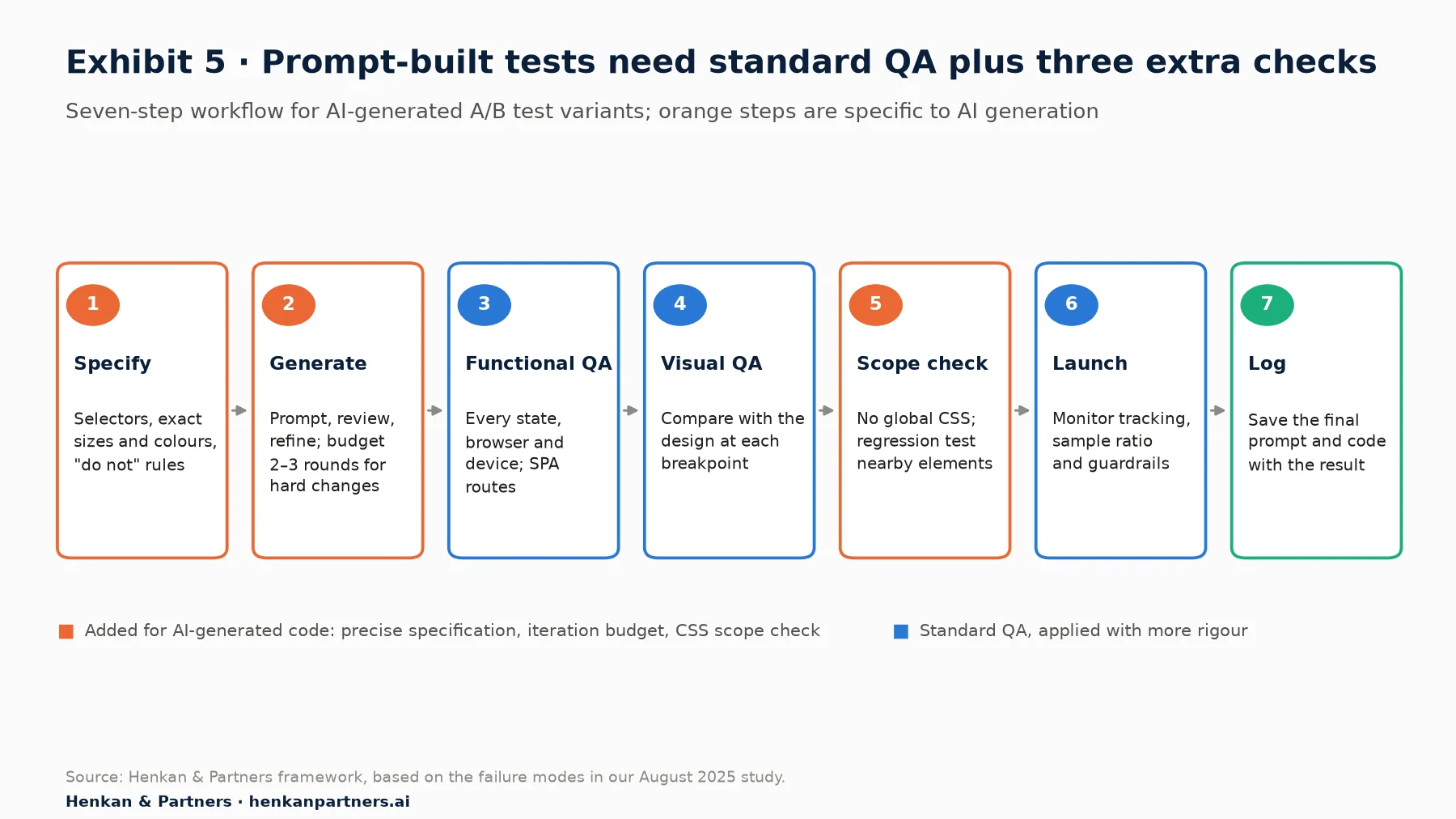
What this shows. Most of the workflow is standard good practice. The additions are a precise specification up front, a budget for prompt iterations, and a scope check that looks for global CSS and regressions in nearby elements, the failure that broke dropdowns in our hero test.
Non-determinism also changes governance. Traditional change control assumes the same specification gives the same code. With AI generation it does not, so three rules help:
- Approve the code, not the prompt. Review and QA the exact build that will go live, and never regenerate after approval.
- Store prompt and code with the result. The test log should hold the final prompt, the generated code and the outcome, so a winning variant can be rebuilt or handed to developers.
- Check the data before the result. Confirm tracking fires and watch for sample ratio mismatch in the first days. A variant bug often shows up as an unexpected visitor split before it shows up anywhere else.
Accountability also needs deciding. When a marketer can put code live through a prompt, someone must still own the QA sign-off. In small teams that can be the same person with a checklist; in large ones it is usually a named reviewer. For the statistics behind launch checks, see our guide to A/B testing.
Section 10 · Since the study
Since our study, most major testing vendors have added AI-built variants, and Kameleoon has moved to agents
Our study used an early release. The market has moved quickly since then, and the tools are likely better at some of the weaknesses we found. The main developments:
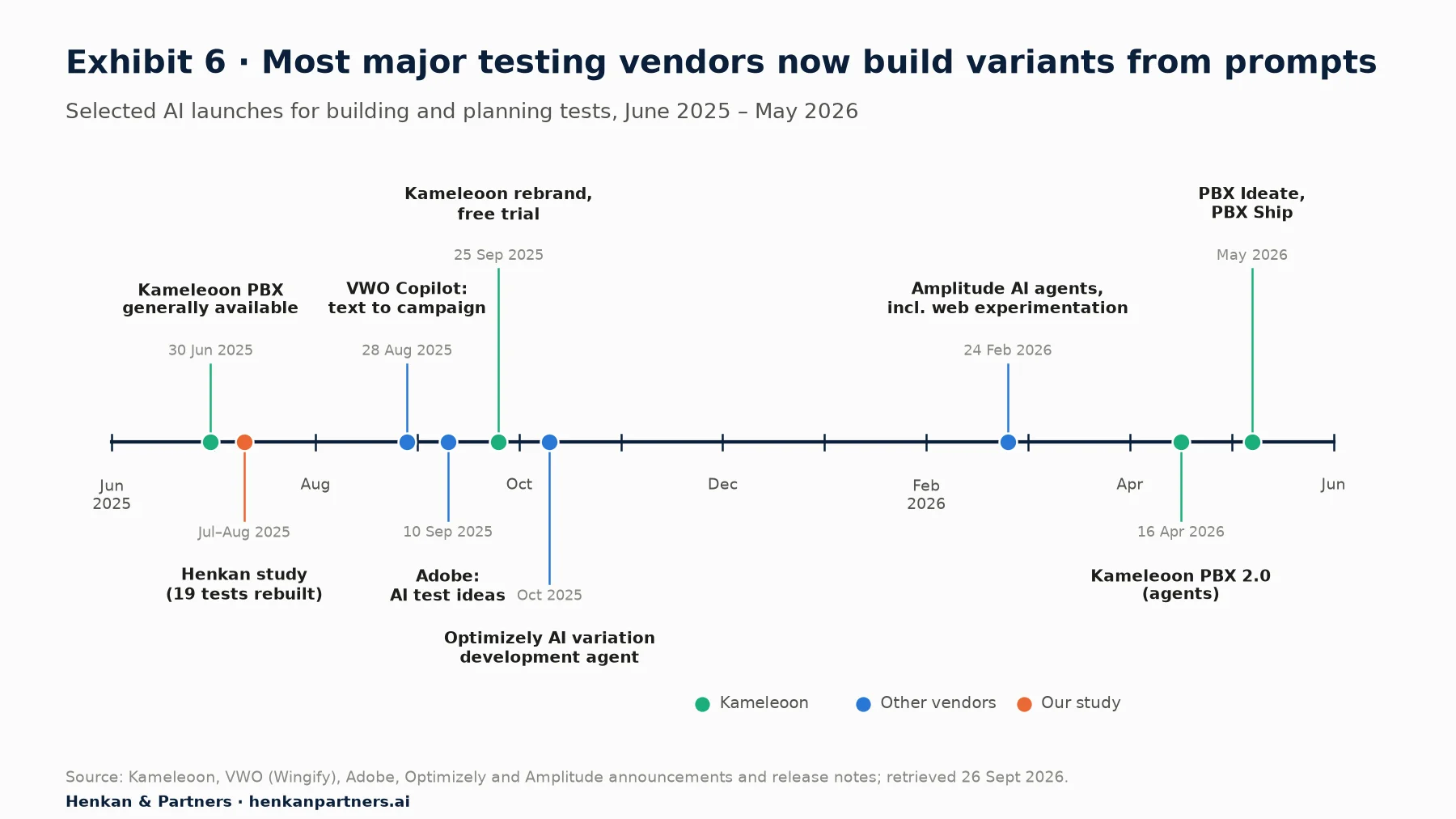
What this shows. AI-built variants went from one vendor's new feature to a standard capability in under a year. Kameleoon has since extended the idea from building a variant to the whole test cycle, with agents that suggest ideas, build, configure, analyse and ship.
- Kameleoon relaunched its brand around PBX on 25 September 2025 with a free trial. PBX 2.0 (16 April 2026) added agents across the cycle; PBX Ideate (May 2026) suggests test ideas drawing on more than 20,000 historical experiments; PBX Ship (May 2026) turns winning variants into production code behind a feature flag, through an MCP server in the developer's code editor.
- VWO Copilot builds an entire campaign from a plain-English description (announced 28 August 2025).
- Adobe introduced the Journey Optimizer Experimentation Accelerator on 10 September 2025. It analyses past and live tests and suggests what to test next, rather than building variants.
- Optimizely released an AI variation development agent in October 2025, within its Opal AI platform.
- Amplitude launched a set of AI agents, including one for web experimentation, on 24 February 2026.
- AB Tasty documented Evi Content, which changes selected page elements from prompts, by November 2025.
Two of our findings are the most likely to have improved: visual fidelity, as design-file integrations mature, and code shipping, now that tools like PBX Ship turn a winning variant into production code. Two are likely to persist, because they come from language models and from organisations rather than from one product: non-determinism, and the need to specify business rules precisely. We have not re-run the study on the 2026 tools, and any team adopting them should run a small reconstruction test of its own, as described below.
Section 11 · Implications
Adopt prompt-built tests for routine changes now, and invest the saved time in better questions
The study supports a clear, staged position. Prompts should build routine tests now. Complex tests should use prompts for a first draft with a developer finishing the work. And the time saved should go into the part of experimentation that still depends on people: understanding customers well enough to test the right things.
1. Start with static and banner-type tests
Move text, visibility, link and banner tests to prompt building first. In our study most of these reached 90% fidelity or better, usually within one or two iterations. Keep hand-built or hybrid builds for pixel-exact layouts, multi-step flows and anything driven by business rules until your own results show otherwise.
2. Run your own reconstruction test before scaling
Pick 10 to 20 tests you have already run, rebuild them with your chosen tool and score them as we did. It takes a few days and tells you, for your site and your framework, where the tool is reliable. That evidence is worth more than any vendor benchmark, including ours.
3. Make the brief the core skill
Train marketers and product managers to write specifications with selectors, values and constraints, and keep a shared prompt library. Precision of the brief was the strongest driver of success in our study.
4. Keep QA, and add the three AI-specific checks
Adopt the workflow in Exhibit 5: precise specification, iteration budget and scope check on top of functional, visual and data QA. Approve the exact code that ships and store it with the result.
5. Spend the saved time on research, not just on more tests
More tests only help if they test better ideas. Use the time freed from building to do customer research, analytics and qualitative work that finds real friction. The goal is not test volume; it is a better customer experience that grows revenue and lifetime value. For the executive view of the same shift, read our memo on why prompt-based experimentation belongs on the C-level agenda.
Our view. "The future of experimentation lies not in replacing human expertise, but in co-creative collaboration between human intent and AI execution." A year on, we would add one point: the teams that gain most are not the ones with the best tool, but the ones that write the clearest briefs and keep the strictest launch checks. That applies whether you are a single marketer or a fifty-person experimentation team.
FAQ
Frequently asked questions about prompt-based experimentation
Frequently asked questions
What is prompt-based experimentation?
Prompt-based experimentation means building an A/B test variant by describing the change in plain English, with an AI model writing the code. Kameleoon launched it as PBX in June 2025, and most major testing platforms now offer a version.
How accurate are AI-generated A/B test variants?
In our study of 19 real tests rebuilt with Kameleoon PBX in 2025, 11 reached 90% fidelity or better and the median was 92%. Five scored below 70%, mostly where the change needed exact visual layout or business logic.
How much time does prompt-based testing save?
Build time fell from 8.7 hours to 55 minutes per test on average, about 89%, and every test saved at least 66%. QA, launch and analysis time shrink less, so measure your full cycle time, not just the build.
What kinds of tests should not be built with prompts?
Changes that depend on pixel-exact layouts, multi-step flows, conditional business rules or site-wide styling were the weakest in our study. Use prompts for a first draft and have a developer finish them.
Do AI-built A/B tests need QA?
Yes, and slightly more than hand-built ones. Add a precise specification, a budget for prompt iterations and a check that no CSS leaks outside the test, and approve the exact code that goes live.
Is prompt-based experimentation only for large companies?
No. It helps small teams most, because a marketer without developer support can now build routine tests. Larger teams gain by moving developer time to complex tests.
Key terms
- A/B test
- An experiment that shows two versions of a page to randomly split groups of visitors and compares results. It is the most reliable way to know whether a change improves the customer experience or revenue.
- Variant
- The changed version of the page in an A/B test. Building the variant is the step that usually needs a developer, and it is the step prompts automate.
- Prompt-Based Experimentation (PBX)
- Kameleoon's feature that builds a test variant from a description in plain English. It matters because it removes the developer from routine test builds.
- Prompt
- The written instruction given to an AI model. Its precision largely decides the quality of the output.
- Prompt iteration
- One round of reviewing the AI's output and refining the prompt. More iterations mean more human time, which eats into the speed gain.
- Fidelity score
- In our study, the evaluator's percentage rating of how completely a prompt-built variant reproduced the original, both in function and in look. It is the main quality measure in this report.
- DOM
- Document Object Model: the structure of elements (headings, buttons, images) the browser builds from a page. Test tools change the DOM to create a variant.
- CSS selector
- An address that identifies an element on a page, such as a button's class name. Naming exact selectors in a prompt was one of the strongest predictors of success.
- Global CSS
- Style rules that apply across the whole page rather than to one element. AI-generated global rules broke unrelated menus in one of our tests.
- Single-page application (SPA)
- A site that updates content without reloading the page, built with frameworks such as React, Vue or Nuxt. SPAs have long been hard for visual test editors.
- MutationObserver
- A browser feature that watches for changes to the page. AI-generated code used it consistently, which helped variants survive content that loads late.
- Conditional logic
- Rules of the form "if this, then that", such as mapping each offer URL to a label. It was the second-largest source of failures.
- Non-determinism
- The same prompt producing different code on different runs. It matters for governance, because two builds of one brief may not behave the same.
- WCAG AA
- The middle conformance level of the Web Content Accessibility Guidelines. Meeting it means most people with disabilities can use the page.
- Sample ratio mismatch (SRM)
- When the split of visitors between versions differs from the plan, for example 52/48 instead of 50/50. It usually signals a bug and invalidates the result.
Sources
Test-level results come from the Henkan & Partners study of 19 historical A/B tests from a hospitality group, rebuilt with the early release of Kameleoon PBX (o3 model) in July and August 2025 and scored by one evaluator. All averages in this edition are recomputed from the test-level data. Market developments were checked on vendor sites on 26 September 2026. Vendor performance claims are labelled as vendor-reported.
- Henkan & Partners, Evaluating the Technical Efficacy of Prompt-Based Experimentation, August 2025 (research by Laura Polet; test-level data in Exhibits 1–4).
- Kameleoon, "Introducing Prompt-based Experimentation", 30 June 2025
- Kameleoon, "What we learned from 1,000 prompt-based experiments", July 2025
- Kameleoon, "Introducing Kameleoon's new brand", September 2025
- Kameleoon, "PBX 2.0 is changing testing again", 16 April 2026
- Kameleoon, "Expanding prompt-based experimentation with PBX Ideate", May 2026
- Kameleoon, "PBX Ship", May 2026
- Wingify (VWO), "Vibe experimentation with VWO Copilot", 28 August 2025
- Adobe, "Introducing Adobe Journey Optimizer Experimentation Accelerator", 10 September 2025
- Optimizely, "AI variation development agent"
- Amplitude, "Amplitude introduces agentic AI analytics", 24 February 2026
- AB Tasty, "Using the editor Copilot" (Evi Content)
- Ouyang, Zhang, Harman and Wang, "LLM is Like a Box of Chocolates: the Non-determinism of ChatGPT in Code Generation", 2023
- METR, "Measuring the Impact of Early-2025 AI on Experienced Open-Source Developer Productivity", 10 July 2025
- METR, "We are changing our developer productivity experiment design", 24 February 2026
- Lieberman, Paternò, Klann and Wulf, "End-User Development: An Emerging Paradigm", Springer, 2006
- Austin et al., "Program Synthesis with Large Language Models", 2021
- Brown et al., "Language Models are Few-Shot Learners", 2020
- W3C, Web Content Accessibility Guidelines (WCAG) 2.2