Guide
Session Replay in 2026: Why You Need It, How to Choose a Tool, and What Changes with AI
Alexandre Suon · 2026-09-26
Analytics tells you where customers drop off. Session replay shows you why. This guide explains what replay is for, how to choose between Clarity, Contentsquare, FullStory, PostHog and the rest, and what to demand from a tool now that AI, not people, watches most recordings.
Executive summary
- Session replay rebuilds real visits so you can see the friction behind a number. It records page structure and interactions, not video, and shows the broken button, confusing form or slow step behind a drop in a funnel.
- Friction is still everywhere. More than a third of web sessions (35.2%) show signs of frustration in Contentsquare's 2026 benchmark, and about 7 in 10 online carts are abandoned. On retail sites, JavaScript errors alone affect 17.8% of sessions.
- Replay explains; it does not measure. Use it to find and understand problems, then size them in analytics and prove fixes with an A/B test. A two-to-three-hour routine turns replays into a ranked list of testable problems.
- The market has consolidated and the entry level is free. Contentsquare owns Hotjar, Microsoft Clarity is free with no traffic limit, product analytics tools bundle replay, Cisco is retiring Smartlook and Glassbox was taken private in 2024. Choose on your main question and on who will use the tool every week, not on feature lists.
- In the AI era, access matters as much as playback. Favour tools whose data your own AI assistant can query (API, MCP, warehouse export), whose summaries cite how many sessions they rest on, and that separate human visitors from AI agents.
- Consent comes first. The French regulator (CNIL) says replay needs prior consent, and US courts have let wiretapping claims against replay scripts go ahead. Record only after consent, mask by default and keep recordings for a limited time.
Section 1 · The basics
What is session replay?
Session replay (also called session recording) is software that records how a visitor interacts with a website or app, including page changes, clicks, taps, scrolls, mouse movements and form interactions, and rebuilds that visit so a team can play it back like a video.
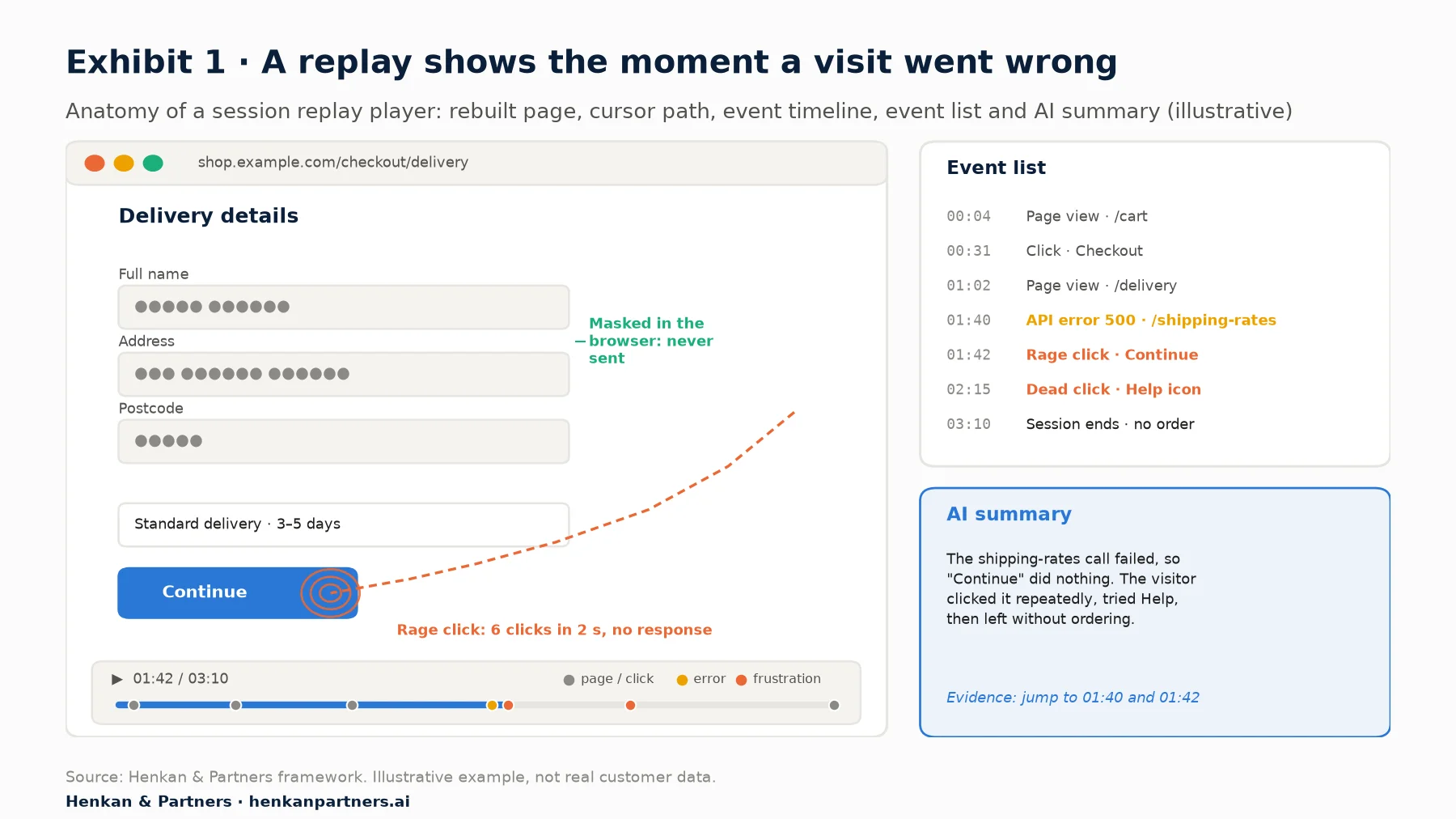
What this shows. The value of a replay is the moment it points to. Here the event list shows a failed shipping-rates call at 01:40, two seconds before the visitor rage-clicks a Continue button that no longer works. Personal fields are masked in the browser, so the team sees the problem without seeing the customer's details. A good AI summary names the cause and links to the exact moments that support it.
Despite the video-like playback, most tools do not film the screen. A small script captures the structure of the page (the DOM) when it loads, then records each change and each interaction as a lightweight event. The player rebuilds the page from that record. This is why replays are small to store, why they can be searched by event ("show me sessions with a payment error") and why sensitive fields can be masked before any data leaves the visitor's browser.
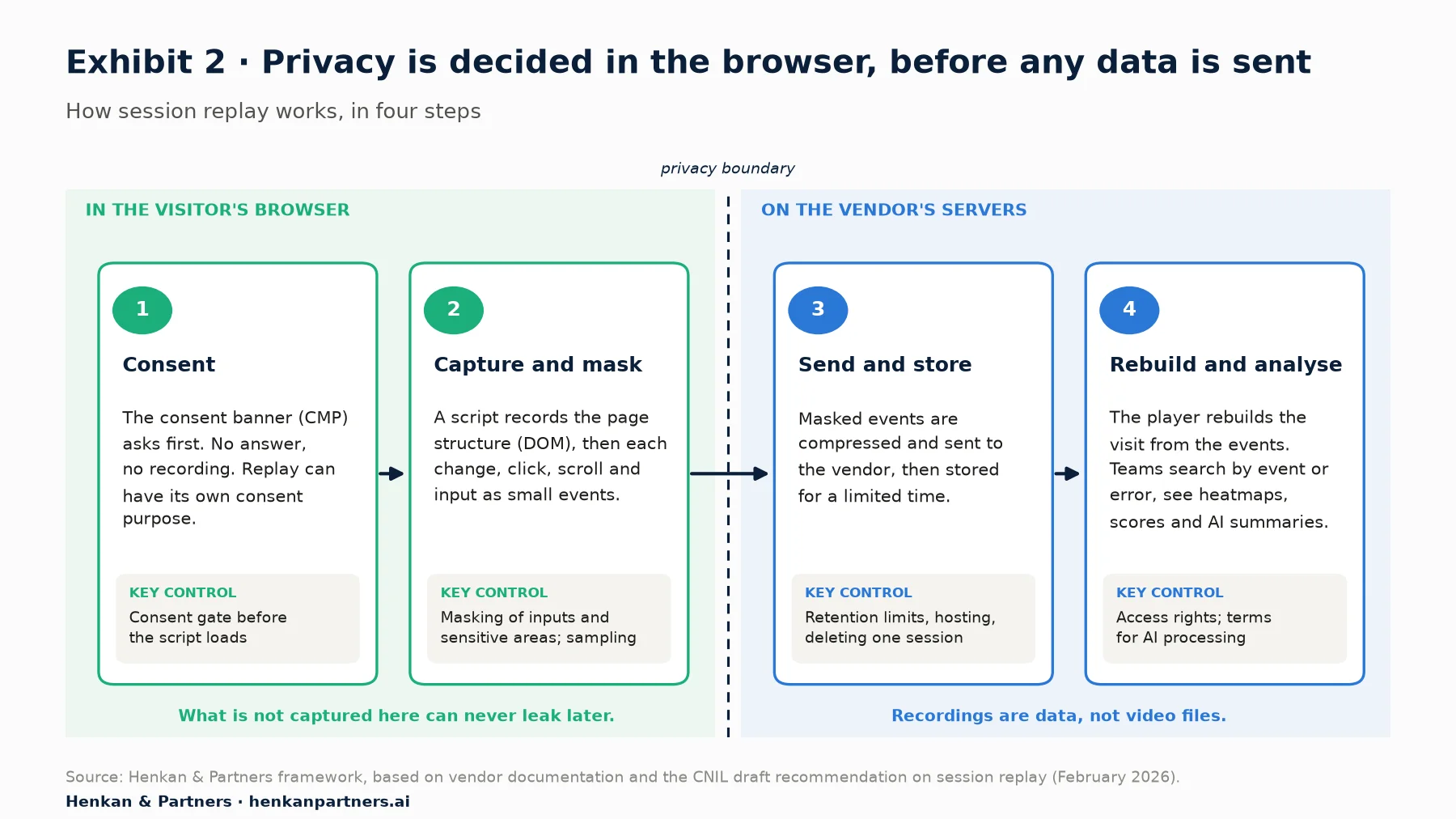
What this shows. Privacy is decided on the left of the line. Consent and masking happen in the visitor's browser, before any data is sent; whatever is not captured there can never leak later. On the vendor's side, the controls that matter are retention, hosting and the ability to delete a single session on request.
Replay usually sits alongside other experience analytics features: heatmaps, which aggregate clicks and scrolls across many visitors on one page; frustration signals such as rage clicks and dead clicks; and error and performance monitoring. Native mobile apps are recorded differently, often as wireframes or screenshots, which affects fidelity and masking.
Section 2 · Why it matters
Why you need session replays: dashboards show where customers drop off, not why
Every analytics team eventually hits the same wall. The dashboard shows, say, that mobile checkout conversion fell last week, or that half of visitors leave the product page without adding to cart. It does not show why. Teams then guess, debate, and ship fixes to the wrong problem.
Session replay closes that gap. Watching the visits behind a number turns an abstract drop into something concrete: a promo-code field that clears the basket, a size selector hidden below the fold on small screens, a delivery estimate that only appears after the payment step. The scale of the opportunity is large.
The benchmarks in the figures at the top of this guide come from Baymard Institute's meta-analysis of 50 cart abandonment studies and from Contentsquare's 2026 Digital Experience Benchmark, built on 99 billion sessions across more than 6,500 websites, comparing the fourth quarter of 2025 with the same quarter of 2024. Overall frustration fell 4.3% year on year, but new technical sources such as API errors (+16%) are growing as sites become more modular. Only a qualitative tool shows what those errors look like to a customer.
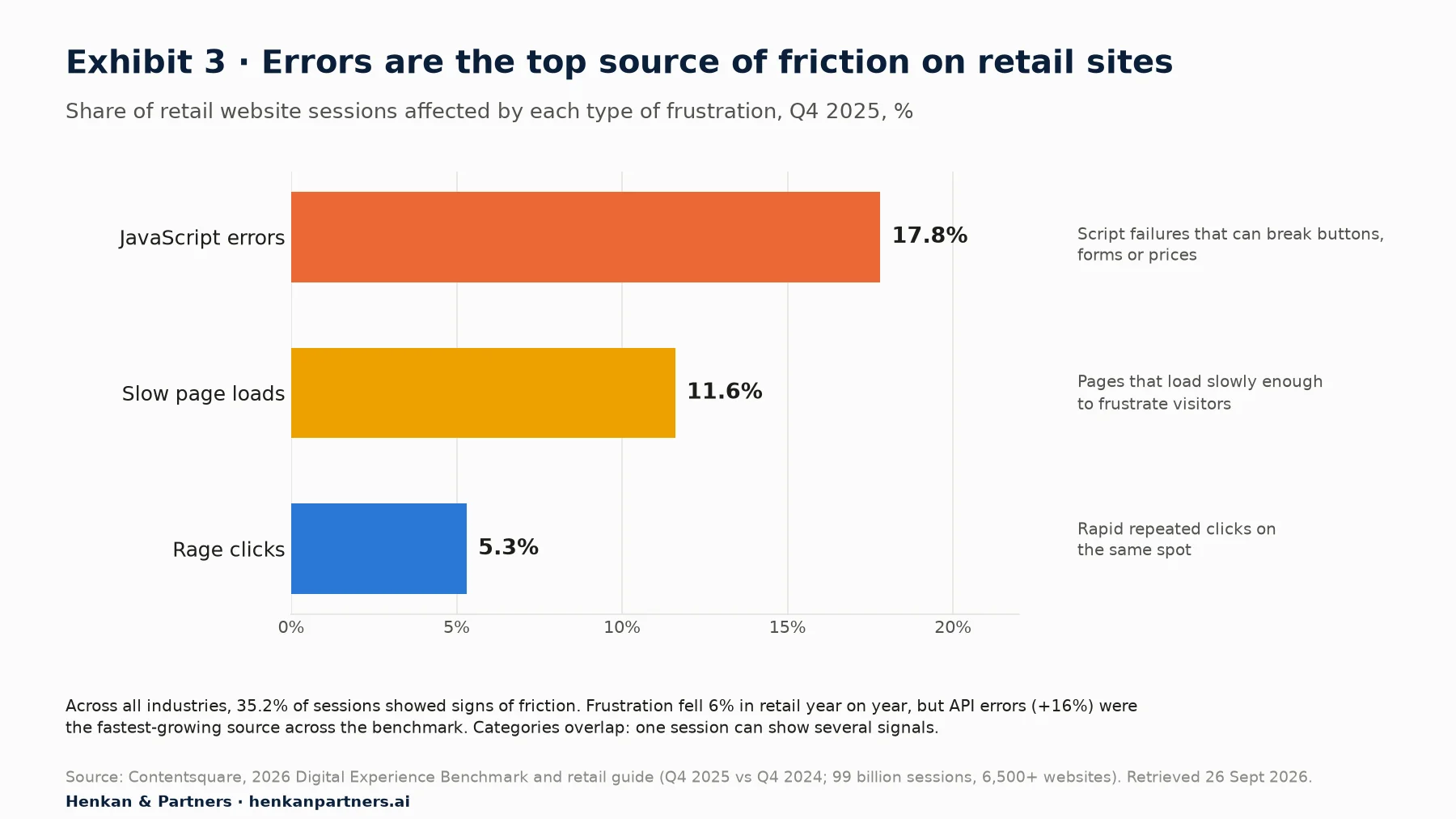
What this shows. On retail sites, technical problems are more common than visible signs of anger. JavaScript errors touch almost one session in five and slow loads more than one in ten, while rage clicks appear in about one in twenty. Many errors are silent: the visitor simply leaves. That is why replay works best when it is filtered by errors, not only by rage clicks, and paired with error monitoring.
Six jobs session replay does well
- Finding the cause of a conversion drop. Filter to the sessions that abandoned a step and watch what they had in common.
- Generating test hypotheses. Good A/B tests start from observed problems, not opinions. Replays give you evidence for a hypothesis and the words to describe it.
- Reproducing bugs. Engineers see the exact sequence of clicks, the browser, the console errors and the failed network calls, instead of "it doesn't work on my phone".
- Quality-checking A/B tests. Watching sessions in each variant catches flicker, broken layouts or a variant that fails on one browser before it corrupts the results. After the test, replays help explain why a variant won or lost.
- Supporting customers. Support agents can open the session behind a complaint and resolve it without asking for screenshots.
- Aligning teams. A two-minute clip of a real customer struggling persuades stakeholders faster than any chart.
What replay cannot do. A replay is one visit, and the sessions you choose to watch are rarely representative. Replay tells you what can go wrong, not how often or how much it costs. Always size a problem in your analytics tool before prioritising it, and prove a fix with an experiment before claiming a gain.
Section 3 · The routine
How to watch replays without losing a week: start from a number, end with a test
The most common failure with replay is aimless viewing: someone watches 40 random sessions, notices a few odd things and moves on. In our experience, a disciplined routine takes two to three hours per question and produces a prioritised list of problems:
- Start from a number. Pick one metric and one step, for example mobile visitors who reached checkout but did not pay.
- Filter hard. Narrow to that step, device and period, and prioritise sessions with errors, rage clicks or unusual durations.
- Watch 20 to 30 sessions and write down every point of friction you see, in plain words, with a link to the moment in the replay.
- Group and count. Cluster the notes into themes. As a rule of thumb, anything seen in three or more sessions is worth sizing.
- Size it in analytics. Build a segment or event that captures the behaviour ("opened the delivery options twice") and measure how many visitors, and how much revenue, it affects.
- Turn it into a hypothesis. Write the change, the expected effect and the metric, then test it.
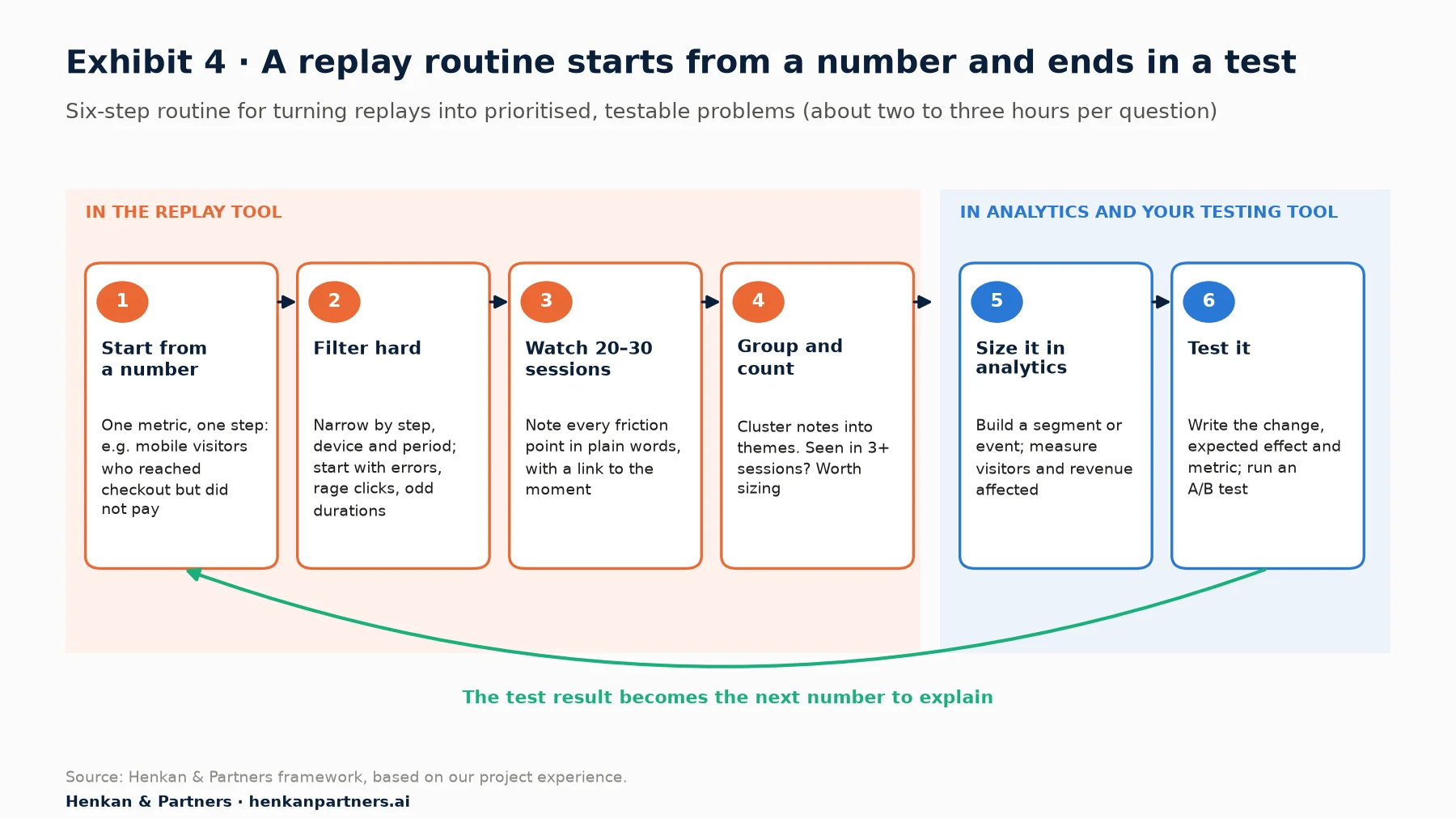
What this shows. The first four steps happen in the replay tool and the last two elsewhere. The hand-off is the point: a theme only becomes a priority once analytics has sized it, and only becomes a result once a test has proved it. The loop back matters as much as the steps, because every test result is the next number to explain.
For marketers. Book the routine as a fixed slot, for example two hours every other week on one funnel step, and keep a shared log of themes with links to the replays. After a quarter, the log is your best source of test ideas and a clear record of what customers struggle with.
For leaders. Ask for one number from the replay programme: how many problems found in replay were sized, tested and shipped this quarter. If the answer is zero, the issue is routine and ownership, not the tool.
Section 4 · The market
The session replay market in 2026 is consolidated, bundled and free at the entry level
Replay began as a standalone category with tools such as ClickTale (founded in 2006), Hotjar and FullStory (both 2014). In 2026 it is mostly a feature inside larger platforms, sold in five broad families. Knowing which family a tool belongs to explains its strengths, its pricing and who inside your company will use it.
| Family | Examples | Built for | Typical trade-off |
|---|---|---|---|
| Free standalone | Microsoft Clarity | Marketing, UX and small teams that want replay and heatmaps at no cost | Limited segmentation depth, no enterprise contract or data residency choice |
| Experience analytics suites | Contentsquare (now including Hotjar), Quantum Metric, Glassbox | Conversion, UX and digital teams at mid-sized and large brands | Richest analysis of pages and journeys; modular, quote-based pricing at upper tiers |
| Behavioural data platforms | FullStory | Product, UX and engineering teams that want autocapture and deep search | Strong replay and data export; cost grows with session volume |
| Product analytics bundles | Amplitude, Mixpanel, PostHog | Product teams already using the analytics tool | Replay is linked to events and cohorts; replay-specific analysis is lighter |
| Engineering and monitoring | LogRocket, Sentry, Datadog | Developers debugging front-end errors and performance | Excellent technical context; weaker for marketing and conversion analysis |
Three shifts define the market today. First, consolidation: Contentsquare bought Hotjar in 2021, Hotjar merged fully into the Contentsquare group on 1 July 2025, and hotjar.com now redirects to Contentsquare. Second, bundling: replay is now included in the free plans of Amplitude, Mixpanel and PostHog, and Microsoft Clarity gives it away with no paid tier. Third, AI: every major vendor now summarises sessions automatically, and most expose their data to AI assistants through the Model Context Protocol (MCP).
Who owns what in session replay
Ownership matters to buyers because it shapes roadmaps, pricing and how long a product will be supported. Four facts summarise the current picture:
| Tool | Owner or status, September 2026 | What it means for buyers |
|---|---|---|
| Hotjar | Owned by Contentsquare (acquired 2021); merged into the Contentsquare group on 1 July 2025 | Hotjar customers now buy Contentsquare plans; the free plan includes 10,000 replays a month |
| Microsoft Clarity | Free Microsoft product, generally available since October 2020 | No paid tier and no traffic limit, which sets the price floor for the whole category |
| Smartlook | Owned by Cisco since 2023; end of life announced 31 March 2026, end of sale 31 May 2026, no renewals after 31 August 2026, platform shut on 30 September 2027 | Existing customers need a migration plan now; features move to Cisco's Splunk Observability Cloud |
| Glassbox | Taken private by Alicorn Venture Partners in October 2024, in a deal valued at about $150M, against about $500M at its 2021 listing | An independent enterprise suite under private ownership; check roadmap and support commitments in contracts |
These moves are part of a wider consolidation across analytics. Our companion report, The Digital Analytics Market, 1995–2026, traces how experience analytics, product analytics and web analytics converged, and why free tools such as Clarity now set the entry price. Analyst estimates put the session replay software market at about $1.2 billion in 2024, a small pool next to the wider analytics market.
For leaders. Before signing or renewing, ask three questions: who owns the vendor, what happens to your data and contract if the product is merged or retired, and can you export recordings and events in a usable format. Smartlook's customers have about 16 months between end of sale and shutdown; a clean exit clause makes that a project, not a crisis.
Section 5 · Tools and pricing
Leading session replay tools compared: free allowances range from 500 to 30,000 a month
| Tool | Best for | Free entry point | AI and agent access |
|---|---|---|---|
| Microsoft Clarity | Getting started, SEO and marketing teams, AI bot visibility | Free, with no paid tier and no traffic limit (up to 100,000 sessions per project per day) | Copilot session summaries; official open-source MCP server; AI bot activity reports |
| Contentsquare (incl. Hotjar) | Conversion and UX teams that need page, zone and journey analysis | Free plan with 200,000 sessions and 10,000 replays a month; Growth, Pro and Enterprise plans are paid, the upper tiers set by contract | Session Replay Summaries; Sense AI analyst; MCP server for Claude, Cursor and Copilot, with native connectors in Dust and Figma |
| FullStory | High-fidelity replay with deep behavioural search | Free plan with 30,000 sessions a month and 12-month retention | StoryAI summaries and agents; MCP server released in 2026 |
| PostHog | Technical and product teams wanting analytics, replay, flags and tests in one place | 5,000 web and 2,500 mobile recordings free each month, then usage-based | AI assistant and MCP server; replay linked to events, flags and experiments |
| Mixpanel | Product teams already on Mixpanel | 10,000 replays a month on the free plan | AI summaries per replay and per playlist |
| Amplitude | Product teams already on Amplitude | 10,000 session replays a month on the free plan | Official MCP server with session replay tools; AI agents |
| LogRocket | Engineering-led teams fixing front-end issues | 14-day free trial; paid plans from $176 a month | Galileo AI (on the Pro plan); Ask Galileo usable through MCP |
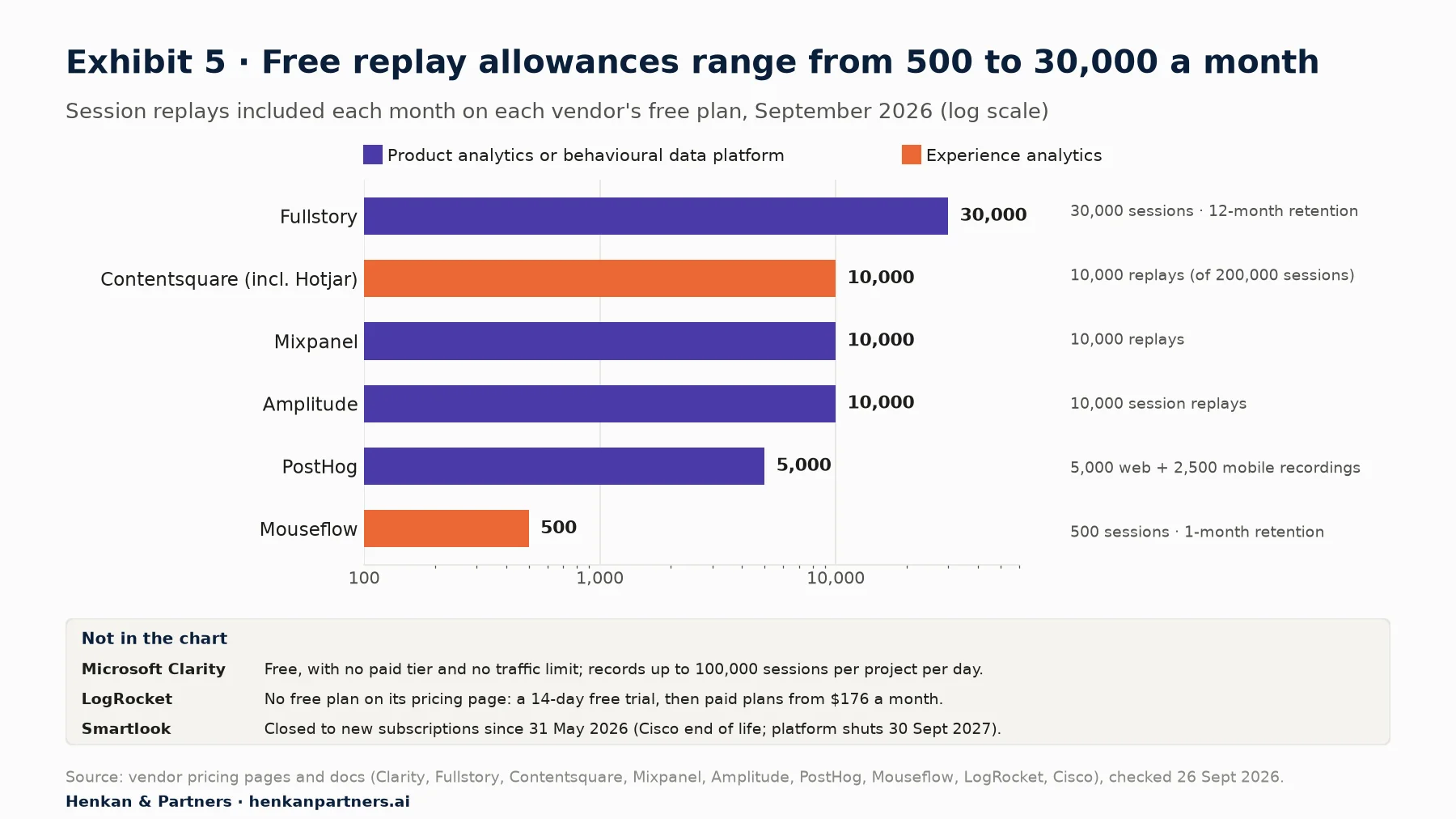
What this shows. Free allowances vary sixtyfold, from 500 sessions at Mouseflow to 30,000 at FullStory, and Microsoft Clarity sits outside the scale with no traffic limit at all. For most small and mid-sized sites, cost is no longer the barrier to starting. The real differences are in segmentation, retention, integrations and how easily your team and your AI assistant can reach the data.
Disclosure: Henkan & Partners is a Contentsquare partner and works with clients on most of the tools above. Several of our recommendations below point to free options.
Section 6 · How to choose
How to pick a session replay tool: start from your main question, then score eight criteria
Tool comparisons usually start with feature lists, which all look alike. Start instead from the question you most need answered and from the people who will use the tool every week. Then score shortlisted tools on the eight criteria below.
| Criterion | What to ask | Red flag |
|---|---|---|
| 1. Main use case and owner | Is the tool mainly for conversion and UX research, for engineering, or for product? Who will open it every week? | A tool chosen by one team that nobody else can use |
| 2. Platform coverage | Does it record your web stack (single-page apps, iframes, shadow DOM, canvas) and your native apps (iOS, Android, React Native, Flutter)? | Blank or broken replays on key templates during the trial |
| 3. Search and segmentation | Can you filter sessions by events, errors, frustration signals, revenue, campaign and A/B test variant? | Search limited to URL and device |
| 4. Integration with your stack | Does it connect to your analytics, A/B testing, tag manager, CDP and support tools, and can you export data to your warehouse? | No link between a test variant and its replays |
| 5. Privacy and compliance | Is masking on by default? Can recording wait for consent, including a replay-specific consent? Where is data hosted, for how long, and can you delete one session? | Recording starts before the consent banner is answered |
| 6. Performance and sampling | How heavy is the script, and can you sample or target recording by page, segment or feature flag? | Measurable slowdown on mobile pages |
| 7. Pricing model | What is billed: sessions, recordings, events or seats? How are mobile, retention, overages and AI usage priced? | A price that doubles when traffic grows or when you turn on AI |
| 8. AI and agent readiness | Can AI summarise across sessions with evidence, and can your own AI assistant query the data? See Section 7. | AI features that only work inside the vendor's interface |
Which family fits your stage
Session replay is useful at every size. The right starting point depends on your team and traffic, not on how big the brand is:
- A one- or two-person team, or a first step. Start with Microsoft Clarity, or with the replay already included in your product analytics plan. Spend the budget on time: two hours a week of structured viewing beats an expensive tool nobody opens.
- A growing conversion or e-commerce team running regular tests. Look at an experience analytics suite or FullStory. The value is in segmentation, zone-level analysis, frustration scoring and a clean link to your A/B testing tool.
- A product-led company with strong engineering. PostHog, Amplitude or Mixpanel keep replay next to events, cohorts and feature flags, and LogRocket or Sentry cover debugging.
- A large or regulated organisation. Prioritise data residency, retention controls, granular masking, contractual terms and single sign-on, then compare suites such as Contentsquare, Quantum Metric, Glassbox and FullStory.
Run a two-week proof of concept before you sign. Install the shortlisted tools on the same two or three templates with the same consent set-up. Prepare five real questions from your backlog ("why do mobile visitors abandon the delivery step?") and ask each tool, and each tool's AI, to answer them. Compare how long it takes, how much evidence each answer links to, and what the page-speed impact is.
Section 7 · The AI era
Picking the right tool for the AI era: favour data your assistant can query and summaries that cite evidence
For a decade, the limit on session replay was human attention. A site with a million visits a month produces far more recordings than any team can watch, so most replays were never seen. AI removes that limit, and it changes what a good tool looks like.
1. From watching sessions to reading summaries
Every major vendor now uses AI to watch recordings for you. Contentsquare offers Session Replay Summaries, Microsoft Clarity's Copilot writes a summary of any recording, Mixpanel summarises single replays and whole playlists, FullStory's StoryAI summarises sessions and its agents find, quantify and rank issues, and LogRocket's Galileo AI flags the issues affecting users. The question is no longer whether a tool has AI, but whether its AI is trustworthy: does each finding say how many sessions it is based on, and link to the moments in the replays that support it?
2. From dashboards to agents
The bigger change is where analysis happens. Teams increasingly ask questions in a general AI assistant, such as Claude, ChatGPT, Copilot, Gemini or Cursor, that pulls data from several tools at once. The Model Context Protocol (MCP) is the standard that makes this possible, and replay vendors have adopted it quickly: Microsoft published an open-source Clarity MCP server, Contentsquare launched an MCP server in March 2026 and native connectors in Dust and Figma since, FullStory released its MCP server in April 2026 and announced it as a product in June, LogRocket's Ask Galileo can be queried through MCP, and Amplitude's MCP server includes session replay tools.
This matters for tool choice. A replay tool whose insights live only inside its own interface becomes a silo. A tool your assistant can query can be combined with your analytics, test results and customer feedback in one answer: "Which friction points on the delivery step appeared after last Tuesday's release, and did they affect the variant we are testing?"
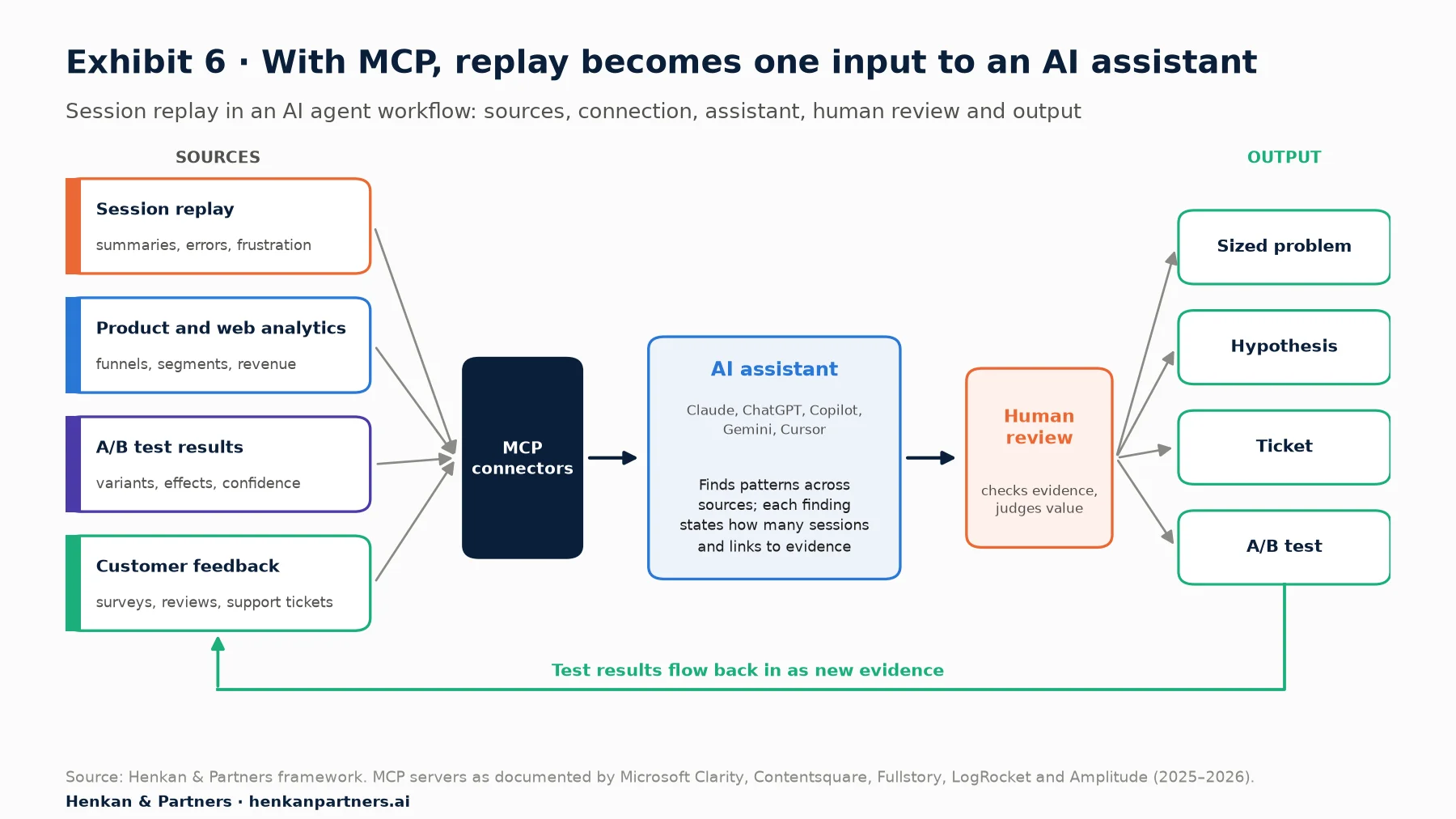
What this shows. Replay becomes most useful when it is one input among four. MCP connectors let one assistant combine what customers did (replay), how many did it (analytics), what changed it (tests) and what they said (feedback). A person still reviews each finding before it becomes work, and test results flow back in as new evidence.
3. From human visitors to humans and agents
Not every visitor is a person any more. AI crawlers read pages to answer questions, and AI agents increasingly browse on a customer's behalf. Microsoft Clarity added AI bot activity reporting in January 2026, FullStory now tags spiking issues driven by bot sessions, and Contentsquare tracks traffic referred by AI assistants, which grew 632% in a year but is still only 0.2% of visits. For replay, this has two consequences: bot and agent sessions must be separated from human ones so they do not distort your analysis, and agent sessions are becoming a new source of insight into how machines read your site.
Six questions to ask about any AI feature
- What does the AI actually read? The full session with events, errors and network calls, or only a sample or the visual replay?
- Does it quantify and cite? A useful summary says how many sessions show the problem and links to examples. A summary with no evidence is an opinion.
- Can other AI tools access the data? Look for a documented API, an MCP server and warehouse export, all respecting your user permissions.
- Where does the data go? Check that masking applies before data reaches the model, where the model runs, whether your data trains the vendor's models, and how this fits your consent notice.
- What does it cost? Some vendors meter AI queries or MCP tool calls separately. Model the cost at the volume you expect once the whole team uses it.
- Does it close the loop? The best set-ups turn a finding into a sized problem, a hypothesis, a ticket and an experiment, not just a paragraph of text.
Our view. AI makes replay more valuable, not less, because it turns millions of unwatched sessions into evidence an assistant can use. But an AI summary is a hypothesis, not a result. As producing ideas and variants gets cheaper, the scarce skills become judgement about which problems matter, clean data that assistants can trust, and experiments that prove which fixes actually help customers.
Section 8 · Privacy and consent
Privacy and consent: get this right before you record anything
Session replay records more detail about individual behaviour than almost any other analytics tool, and regulators and courts have noticed. Treat compliance as a selection criterion, not an afterthought. This section is general information, not legal advice.
- France and the EU. On 25 February 2026 the CNIL, France's data protection authority, published a draft recommendation on session replay. It treats replay as subject to prior consent under the cookie and tracker rules, outside the consent exemption available for strict audience measurement. It also recommends collecting only what the purpose needs, masking forms, text fields and images by default, random sampling, retention of a few hours for customer support and a few months for UX and error analysis, and a set-up that can delete individual sessions. It excludes use for advertising retargeting. The public consultation closed on 22 April 2026 and a final text is expected.
- The United States. Plaintiffs have filed wiretapping claims against website tracking at scale: 1,853 federal and state wiretapping and related cases were filed between February 2022 and March 2025, 83% of them in California, many under the California Invasion of Privacy Act (CIPA) and many targeting replay scripts. The Ninth Circuit held in 2022 that consent must come before recording starts (Javier v. Assurance IQ), and in June 2025 revived a claim alleging that a retailer's replay vendor intercepted the contents of visitors' communications (Mikulsky v. Bloomingdale's).
In practice, a compliant set-up has five features: recording starts only after consent; all input fields and sensitive page areas are masked by default, with explicit allow-listing; no recording on account, payment or health pages unless strictly needed; short retention with the ability to delete a session on request; and a data processing agreement that covers AI processing. Several vendors now support a replay-specific consent option separate from general analytics consent.
For marketers. Check three things this week: open your site in a private window and confirm the replay script does not load before the consent banner is answered; watch five replays of your checkout and account pages to confirm that no personal data is visible; and write down your retention setting. If any of the three surprises you, fix it before anything else in this guide.
Section 9 · Mistakes to avoid
Seven common mistakes turn replay into an expensive archive
- Recording everything, watching nothing. Without a routine and an owner, replay becomes an expensive archive.
- Generalising from a handful of sessions. Three memorable replays are anecdotes until you size the behaviour in analytics.
- Treating AI summaries as conclusions. Check the evidence behind each finding and validate important ones with an experiment.
- Loading the script before consent. This is the single most common legal exposure.
- Masking too little, or too much. Unmasked fields create risk; masking entire pages hides the friction you are looking for.
- Buying twice. Check whether your product analytics or monitoring contract already includes replay before signing a new one.
- Keeping replay away from testing. Replay is most valuable when it feeds the test backlog and explains test results.
Section 10 · What to do next
Five steps turn session replay from a video archive into better customer experiences
Whatever your size, the goal is the same: find the moments where customers struggle, fix the ones that matter most, and prove the gain. A two-person team can do this well with a free tool and a weekly routine; a large retailer may need an embedded team and an enterprise suite.
1. Check what you already pay for
Microsoft Clarity is free, and Amplitude, Mixpanel, PostHog, FullStory and Contentsquare all include replay in free plans. Audit your contracts before buying anything new.
2. Fix consent and masking first
Make sure recording waits for consent, fields are masked by default and retention is short. Everything else depends on data you are allowed to hold.
3. Give replay an owner and a routine
Name one person responsible, book a fixed slot and use the six-step routine in Section 3. Measure the programme by problems sized, tested and shipped.
4. Connect replay to analytics and testing
Link replays to test variants and analytics segments, so every finding can be sized and every test result explained.
5. Choose for the AI era
Prefer tools whose data your own assistant can query and whose AI summaries cite their evidence. Not sure which set-up fits you? Talk to us for a candid review of your stack.
FAQ
Frequently asked questions about session replay
Frequently asked questions
What is session replay?
Session replay is software that records a visitor's interactions with a website or app, such as clicks, scrolls, taps, page changes and form interactions, and rebuilds the visit so a team can play it back like a video. It is used to understand why visitors struggle or leave, to reproduce bugs and to generate ideas for A/B tests.
Is session replay the same as screen recording?
No. Most tools do not film the screen. They capture the page structure and each change or interaction as data, then rebuild the page in a player. That keeps recordings small, makes them searchable by event and allows sensitive fields to be masked in the visitor's browser before any data is sent.
Is session replay legal under GDPR?
It can be, with the right set-up. In France, the CNIL's February 2026 draft recommendation says replay needs prior consent and cannot use the consent exemption for audience measurement. It also recommends default masking, sampling, limited retention and the ability to delete individual sessions. Check your set-up with your data protection officer or lawyer.
What is the best free session replay tool?
Microsoft Clarity is free with no paid tier or traffic limit and includes replays, heatmaps and AI summaries. FullStory's free plan includes 30,000 sessions a month; Contentsquare (which replaced Hotjar's plans), Mixpanel and Amplitude include 10,000 replays a month; PostHog includes 5,000 web recordings. If you already use a product analytics tool, check its plan first.
Who owns Hotjar now?
Contentsquare. It bought Hotjar in 2021, and Hotjar merged into the Contentsquare group on 1 July 2025. Hotjar's heatmaps, recordings and surveys are now sold as part of Contentsquare's plans, and hotjar.com redirects to Contentsquare.
How many session recordings should I watch?
For a focused question, 20 to 30 well-filtered sessions usually reveal the main patterns in our experience. Filter to the step and segment you care about, note each point of friction, then size the most frequent ones in your analytics tool before prioritising them.
Does session replay slow down my website?
Modern replay scripts are designed to be lightweight, but the impact varies by tool and set-up. Measure page speed with and without the script during your trial, and use sampling or page targeting on high-traffic or performance-sensitive templates.
Will AI replace watching session replays?
Largely, for first-pass analysis. AI can review every session and summarise recurring problems far faster than a person. People still need to check the evidence behind each finding, judge which problems matter commercially and validate fixes with experiments.
What is an MCP server for session replay?
An MCP server lets AI assistants such as Claude, ChatGPT, Copilot or Cursor query a tool's data directly using the Model Context Protocol. For session replay, it means an assistant can search recordings, pull summaries and combine them with analytics or test results in a single answer. Microsoft Clarity, Contentsquare, FullStory, Amplitude and LogRocket offer one.
Key terms
- Session
- A single visit to a site or app, usually closed after about 30 minutes of inactivity. It is the unit most replay tools record and bill, so it drives both what you can watch and what you pay.
- Session replay (session recording)
- Software that records a visit's page changes and interactions and rebuilds it for playback. It shows why a visitor struggled, which dashboards cannot.
- DOM (Document Object Model)
- The structure of a web page that the browser builds from its code. Replay tools record it and its changes to rebuild visits, which is why replays are small, searchable and maskable.
- Heatmap
- A visual summary of where many visitors click, move or scroll on a page. It shows patterns across visitors, while a replay shows one visitor in detail.
- Rage click
- Several rapid clicks on the same spot, usually a sign that something did not respond. It is one of the fastest ways to find broken elements.
- Dead click
- A click on an element that does nothing, such as an image that looks like a button. It points to design that misleads visitors.
- Frustration signal
- An automatic flag for behaviour that suggests difficulty: rage clicks, dead clicks, errors, rapid back-and-forth navigation or slow loads. Filtering on these signals is how you find the replays worth watching.
- Masking
- Hiding text, inputs or page areas in the visitor's browser so they are never recorded. It is the main privacy control; masking too little creates risk, masking too much hides the friction.
- Sampling
- Recording only a share of sessions, or only chosen pages or segments. It controls cost, page speed and data volume, and regulators see it as a way to collect less.
- Autocapture
- Recording every interaction automatically, without defining events in advance. It lets you ask new questions about past visits.
- Experience analytics (DXA)
- The category of tools that combine replay, heatmaps, journey analysis and frustration signals to explain behaviour on a page or screen. Contentsquare, FullStory, Quantum Metric and Glassbox are the main suites.
- A/B test
- An experiment that shows two versions of a page to comparable groups of visitors and compares the results. It is how you prove that a fix found in replay actually helps.
- MCP (Model Context Protocol)
- An open standard that lets AI assistants connect to tools and data sources, such as a replay or analytics platform. A tool with an MCP server can feed your own assistant instead of staying a silo.
- Consent management platform (CMP)
- The software behind a cookie banner that collects visitors' choices and controls which scripts may run. It decides whether the replay script is allowed to start.
Sources
Vendor plans, allowances and prices were checked on each vendor's pricing page or documentation on 26 September 2026; they change often. Benchmarks are as published by Baymard Institute and Contentsquare and were not independently audited. Legal information is general and is not legal advice. Exhibits 1, 2, 4 and 6 are Henkan & Partners frameworks; the routine and rules of thumb (20 to 30 sessions, three or more occurrences) reflect our project experience rather than published research.
- Baymard Institute. Cart Abandonment Rate Statistics.
- Contentsquare (2026). 2026 Digital Experience Benchmark, frustration findings, traffic findings and retail frustration.
- Contentsquare (2026). New AI agent and analytics capabilities and Platform updates, August 2026.
- Contentsquare. Enhanced Free and Growth plans and Help Center: Hotjar is now part of Contentsquare.
- Contentsquare (2021). Contentsquare acquires Hotjar.
- Microsoft. Clarity FAQ, Clarity MCP server, AI bot activity in Clarity and Copilot session summaries.
- Fullstory. Plans, Fullstory launches three new solutions (2026) and release notes.
- PostHog. Session replay pricing and MCP server.
- Mixpanel. Pricing and Session replay updates (2026).
- Amplitude. Pricing and Amplitude MCP server.
- LogRocket. Pricing and Introducing Ask Galileo (2026).
- Mouseflow. Pricing.
- Cisco. End-of-sale and end-of-life announcement for Smartlook, Smartlook acquisition and Smartlook pricing and end-of-life notice.
- Glassbox (2024). Glassbox completes go-private transaction with Alicorn; Calcalist. Glassbox to be taken private by Alicorn in $150 million deal.
- Credence Research. Session replay software market.
- CNIL (2026). Session replay: public consultation on the draft recommendation and draft recommendation (PDF, French).
- Loeb & Loeb (2025). Understanding session replay: legal risks and how to mitigate them.
- Troutman Pepper (2022). Ninth Circuit rejects retroactive consent for recording website users; Mayer Brown (2025). The Ninth Circuit briefly speaks on CIPA Section 631.
- Henkan & Partners. The Digital Analytics Market, 1995–2026.