Focus
Which Custom Dimensions to Collect in Your E-commerce Analytics
Alexandre Suon · 2026-09-27
Out of the box, analytics tools know the page, the device and the source of each visit. They do not know whether the visitor is a loyal customer, whether the product was in stock or whether delivery was free. Custom dimensions add that context. This focus explains which ones an online shop should collect, which it should not, and how to keep them useful.
Executive summary
- Custom dimensions add the business context that analytics tools cannot see on their own. They describe the customer, the page, the product or the order with your own values, such as loyalty tier, stock status or delivery promise, so reports can answer the questions your team actually asks.
- Slots are limited, so choose dimensions by the decisions they support. A standard Google Analytics 4 (GA4) property allows 50 event-scoped, 25 user-scoped and 10 item-scoped custom dimensions. In our view, each one should answer a recurring question that leads to a decision, with a named owner and a small, stable set of values.
- Use what the tool already provides before creating anything. GA4's recommended e-commerce parameters and standard dimensions already cover brand, five levels of category, variant, list, promotion, coupon, device and traffic source. Duplicating them wastes capacity and splits reports.
- A short list of sixteen dimensions covers most e-commerce questions. Customer segment, login status, loyalty tier and lifetime orders; page type, search results and sort order; stock status, price type, size availability and seller; delivery promise, shipping cost band, checkout type and error type; and test variant. Start with the eight that match your biggest leaks.
- Keep them clean, legal and documented. Avoid values with more than a few hundred variants a day, never send personal data (European regulators treat a hashed email as personal data), name everything in lower-case snake_case and define each dimension once in the data layer and the tracking plan.
A custom dimension is an attribute you define yourself and attach to the data your analytics tool collects, such as a customer's loyalty tier, a product's stock status or the delivery promise shown at checkout. It lets you break down and filter standard metrics (sessions, conversion rate, revenue) by the business context that matters to your shop.
Section 1 · The basics
Custom dimensions add the business context your analytics tool cannot see on its own
A standard analytics set-up answers generic questions well: how many sessions came from paid search, how conversion differs on mobile, which pages lead to purchases. It cannot answer the questions that are specific to your business. Do members of the loyalty programme convert better after the new delivery offer? How much revenue do we lose when popular sizes are out of stock? Do guest checkouts fail more often than account checkouts? Each needs a piece of context the tool does not collect by default.
Custom dimensions provide that context. In GA4 they come in three scopes. Google describes event-scoped dimensions as reporting on event parameters, user-scoped dimensions as reporting on user properties, and item-scoped dimensions as covering e-commerce data "like item color or item size within the items array". Choosing the right scope matters: a loyalty tier describes the user, a sort order describes one action, and stock status describes a product.
| Scope | Describes | Examples | GA4 standard quota |
|---|---|---|---|
| Event | One action or page view | page_type, search_results_band, sort_order, checkout_type, error_type | 50 |
| User | The user across their visits | customer_segment, loyalty_tier, lifetime_orders_band | 25 |
| Item | A product inside an e-commerce event | stock_status, price_type, seller_type, size_availability | 10 |
First, use what already exists
Many teams spend custom slots on information GA4 already collects. Its recommended e-commerce events include item parameters for brand, five levels of category, variant, list name, promotion, coupon, discount, affiliation and location, and event parameters for coupon, shipping, tax, shipping tier and payment type. Google recommends that you "set each ecommerce parameter you have data for, regardless of whether the parameter is optional." Device, language, country and traffic source are standard dimensions too.
For analysts. Before registering any custom dimension, check the GA4 recommended events reference. If a predefined parameter fits, use it: most, such as brand, category and variant, appear in standard e-commerce reports without a slot and keep your data comparable with other properties. Some recommended parameters, such as payment_type and shipping_tier, still need registering as custom dimensions before they appear in reports, but they keep your naming standard.
Section 2 · Limits
Slots, cardinality and timing limits mean every custom dimension has a cost
Custom dimensions look free, but they are a scarce resource. A standard GA4 property allows 50 event-scoped, 25 user-scoped and 10 item-scoped custom dimensions, plus 50 custom metrics. GA4 360 raises these to 125, 100, 25 and 125. Item-scoped slots are the tightest, and they are exactly the ones an online shop needs most.
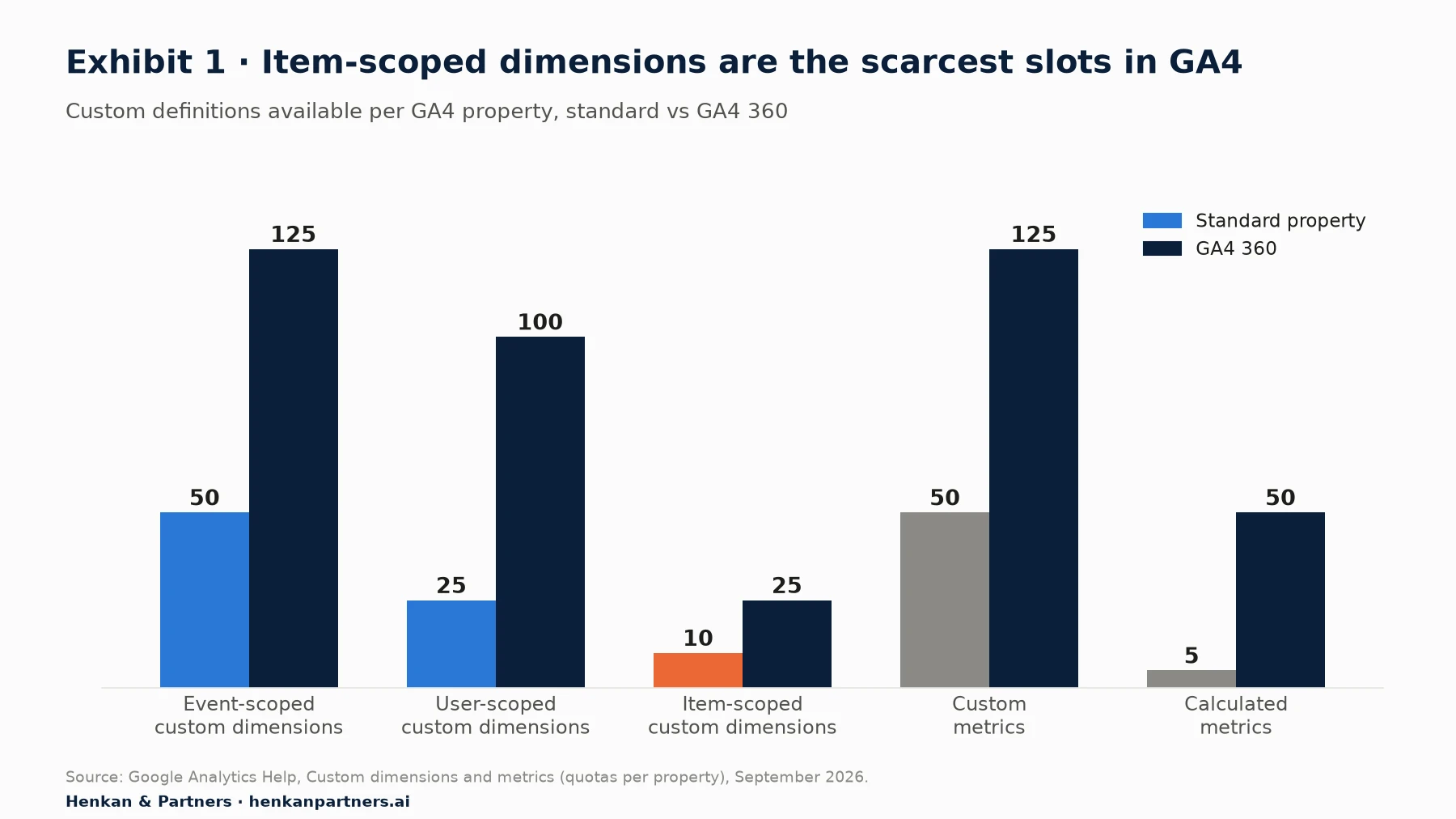
What this shows. A shop can describe its customers and actions in some detail, but only ten attributes of its products in a standard property. That is a strong reason to reserve item-scoped slots for information that changes decisions, such as stock status or price type, and to leave brand, category and variant to GA4's predefined parameters.
Four rules that catch teams out
- Cardinality. Google defines a high-cardinality dimension as one with "more than 500 unique values in one day". These add rows to reports, which then hit their row limits sooner and group the rest into an "(other)" row. Google advises against custom dimensions built from user IDs, session IDs or timestamps.
- Timing. Google says you can report on a new custom dimension after 24 to 48 hours. In practice, data only appears from the time the dimension is registered, so register it before the campaign or release you want to analyse.
- Archiving. Archiving an unused dimension frees its slot, but it "can't be undone", and any audience that uses it stops accumulating users.
- Collection limits. Each GA4 event can carry up to 25 parameters, each value is cut at 100 characters, a property can hold 25 user properties, and each e-commerce event can carry up to 27 custom item parameters.
The raw data is less constrained. GA4's BigQuery export stores user-defined event parameters, user properties and custom item parameters in its own records, so a parameter can be collected and analysed in BigQuery without taking a reporting slot. That is a good home for values you need occasionally or at high cardinality, such as internal search terms by product.
Section 3 · Choosing
A dimension earns its slot when it answers a recurring question that leads to a decision
The most common failure is not too few custom dimensions but too many of the wrong kind: values nobody reads, duplicates of predefined fields, and free-text fields with thousands of values. In our experience, five tests before a dimension is added prevent most of these problems.
- Question. Which recurring question does it answer, in one sentence? "Do out-of-stock sizes cost us orders on best-sellers?"
- Decision. What would the team do differently depending on the answer? Reorder earlier, hide unavailable sizes, change the recommendation logic.
- Owner. Who will look at it every month? If nobody, it can wait.
- Values. Can it be expressed as a short, stable list of values, ideally fewer than twenty? Bands ("0", "1–10", "11–50", "over 50") beat raw numbers.
- Source. Is the value reliably available in the data layer on every relevant page, from the product catalogue, stock system or customer database?
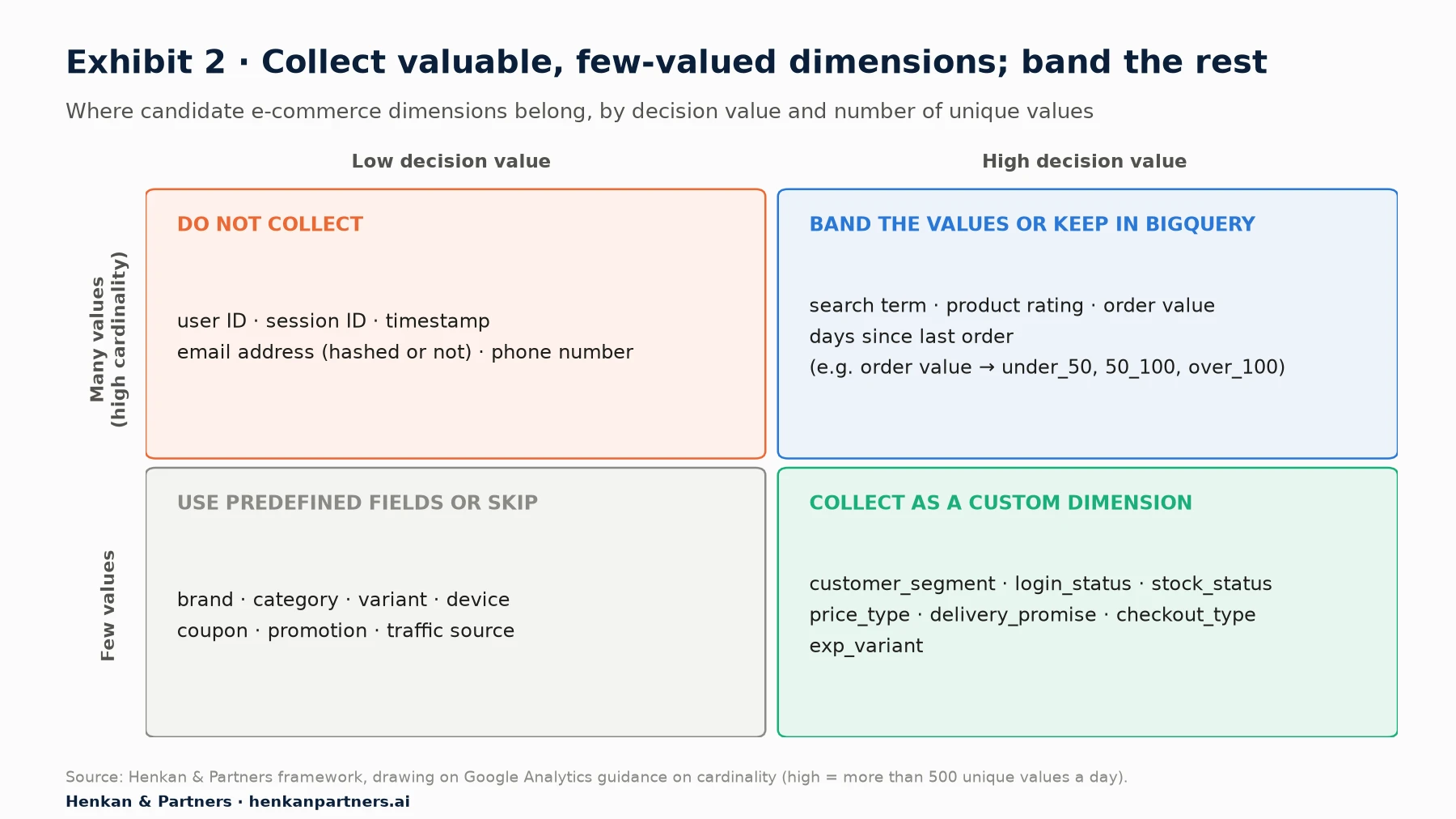
What this shows. The bottom-right quadrant, high decision value and few values, is where custom dimensions belong. Valuable information with many values, such as the exact order value or search term, is better banded into a few groups or analysed in BigQuery. Fields GA4 already provides stay predefined. Identifiers and personal data are never custom dimensions.
For e-commerce managers. Ask your analytics lead for a one-page list of current custom dimensions with their owner and the last decision each one informed. Dimensions with no owner and no decision are candidates for archiving.
Section 4 · The shortlist
Sixteen custom dimensions cover most of the questions an online shop needs to answer
The list below is our recommended starting point for an online shop, based on the questions we see e-commerce teams ask most often. It is an opinion, not a standard: adapt the names and values to your business, and start with the dimensions marked "Start" that match your biggest known problems.
| Dimension | Scope | Example values | Question it answers | Priority |
|---|---|---|---|---|
| customer_segment | User | prospect, first-time buyer, repeat buyer | Do changes help new or returning customers? | Start |
| login_status | Event | logged_in, guest | Do logged-in visitors convert better, and where do guests drop? | Start |
| loyalty_tier | User | none, silver, gold | Is the loyalty programme changing behaviour? | Then add |
| lifetime_orders_band | User | 0, 1, 2–4, 5+ | How does behaviour change with experience? | Then add |
| page_type | Event | home, listing, product, cart, checkout, content | Which page templates lose visitors? (GA4's content_group can also serve) | Start |
| search_results_band | Event | 0, 1–10, 11–50, over_50 | How often does search return nothing, and what happens next? | Start |
| sort_order | Event | relevance, price_asc, newest | Which sort orders lead to purchases? | Then add |
| stock_status | Item | in_stock, low_stock, out_of_stock | How much demand hits unavailable products? | Start |
| price_type | Item | full_price, markdown, member_price | Is growth coming from full-price or discounted sales? | Start |
| size_availability | Item | all_sizes, partial, one_size_left | Do broken size ranges cost conversion? | Then add |
| seller_type | Item | own_stock, marketplace, drop_ship | Do marketplace products convert and return differently? | Then add |
| delivery_promise | Event | same_day, next_day, 2_3_days, 4_plus_days | Does a faster promise lift conversion? | Start |
| shipping_cost_band | Event | free, under_5, 5_10, over_10 | How much do delivery costs deter checkout? | Start |
| checkout_type | Event | guest, account, express_wallet | Which checkout path completes most often? | Then add |
| error_type | Event | payment_declined, address_invalid, promo_invalid | Which errors stop orders? | Then add |
| exp_variant | Event | test id and variant, such as pdp23_b | How does each A/B test variant perform in analytics? | Then add |
A few dimensions deserve a word of explanation. customer_segment is usually set from the customer database when a user logs in or buys, and complements GA4's own new versus returning split, which only knows the browser. Google's purchase event examples also use an event-level customer_type parameter with the values new and returning; we use a different name to avoid confusing the two. stock_status and price_type sit on items, so they must be present in every e-commerce event, from list views to purchase. exp_variant is often sent by the testing tool; keep it to the test identifier and variant, not the full test name, to control cardinality.
Section 5 · Evidence
The biggest reasons for lost orders can only be diagnosed with the right dimensions
Segmenting by the right context changes conclusions. In Contentsquare's 2026 benchmark of 99 billion sessions (vendor data), returning visitors converted at 2.9% and new visitors at 1.7%; desktop converted at 3.4%, 74% higher than mobile web. A shop whose share of new visitors rises will see conversion fall even if nothing on the site changed. GA4's new versus returning split, or better a customer dimension based on purchase history, shows it.
The same logic applies to checkout. Baymard Institute's survey of US online shoppers who abandoned a checkout, excluding those just browsing, lists the reasons below. Most of them can be diagnosed only if the matching context is recorded with each session.
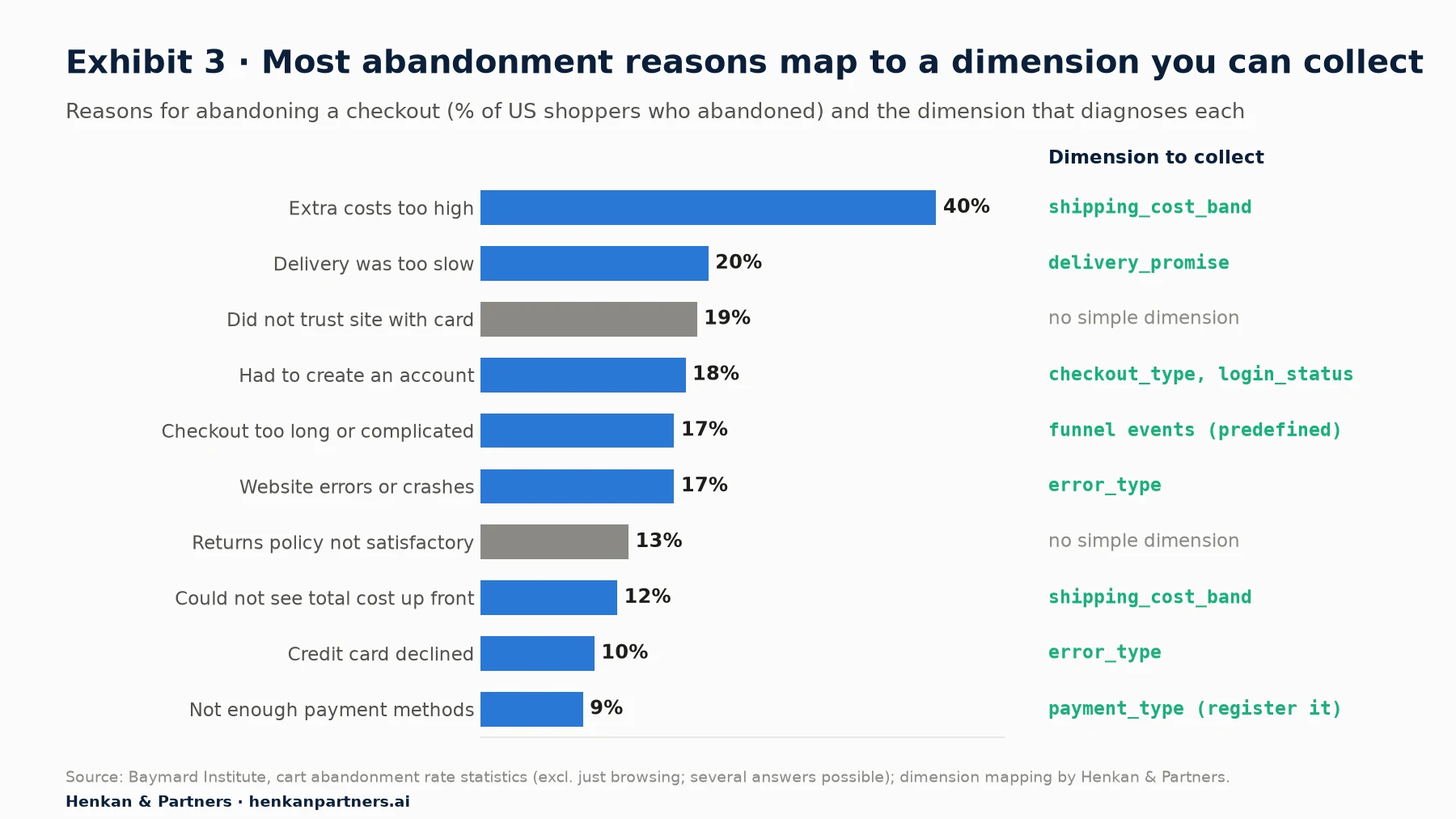
What this shows. The largest reason, extra costs, cannot be measured without knowing what delivery cost each shopper saw. Recording a shipping cost band and a delivery promise on checkout events lets a team compare completion rates for free and paid delivery, and test thresholds with evidence rather than opinion.
Stock status: the dimension most shops forget
Availability is one of the most expensive blind spots. A worldwide study of in-store retail by Thomas Gruen, Daniel Corsten and Sundar Bharadwaj found an average out-of-stock rate of 8.3%, and that when shoppers met an out-of-stock, 31% bought the item at another store and 9% did not buy at all; the authors concluded that retailers are likely to lose almost half of the intended purchases. The study is from 2002 and covers physical grocery stores, but online shoppers can switch to a competitor even more easily.
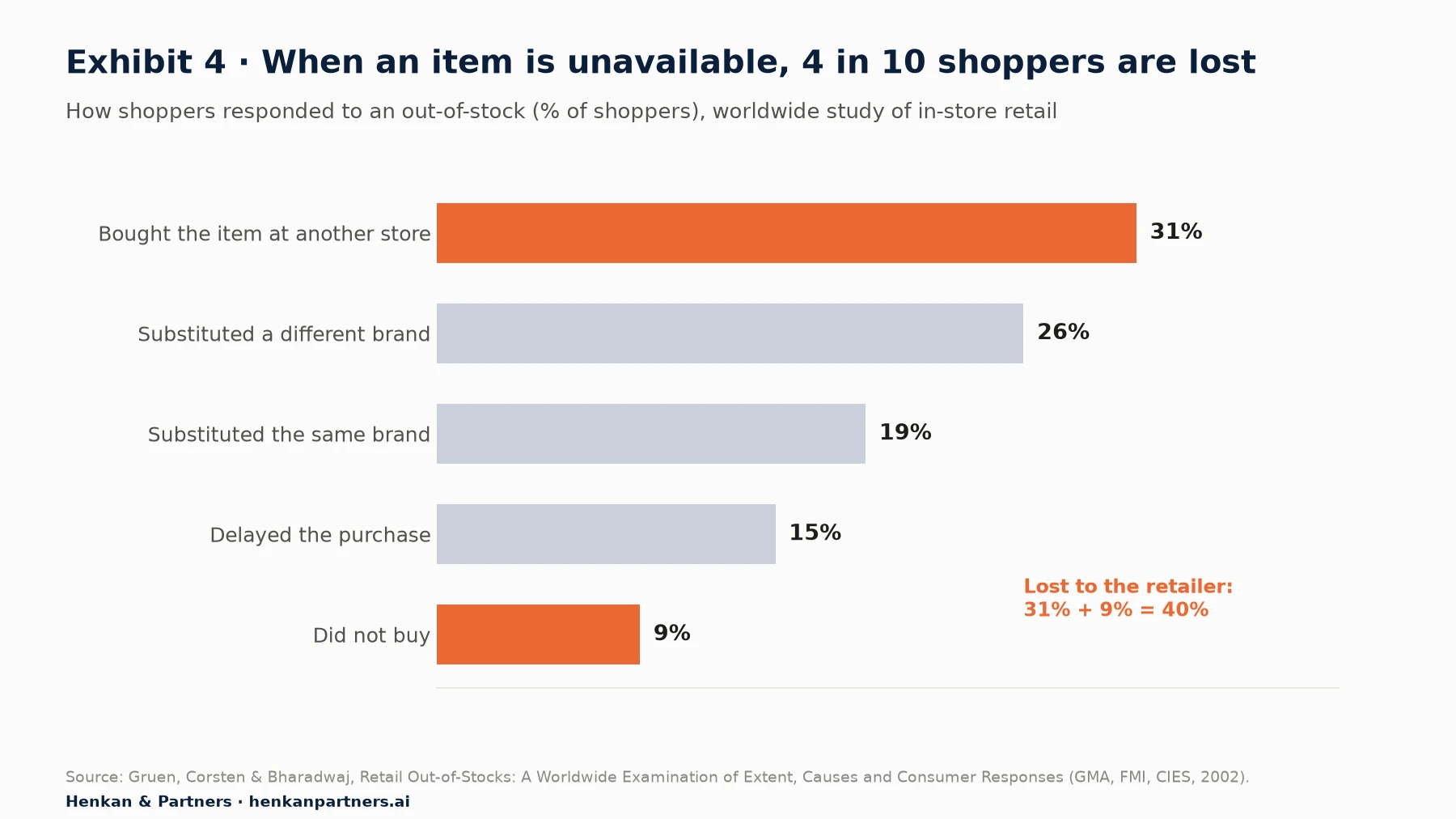
What this shows. Without a stock_status dimension on item views and add-to-cart events, a shop cannot see how much demand lands on unavailable products, which best-sellers suffer most, or whether showing "back soon" alerts keeps customers. Reported as a share of product views, it becomes a weekly number that buying and merchandising teams can act on.
For leaders. Ask for two numbers every month: the share of product views that hit an out-of-stock or broken size range, and the checkout completion rate for free versus paid delivery. Both depend on custom dimensions, and both usually lead to decisions worth far more than the tracking work.
Section 6 · Implementation
Define each dimension once in the data layer and the tracking plan, and name it the same way everywhere
Most custom dimension problems start in implementation: the same value spelled three ways, a dimension set on the product page but not in the basket, a user property that never gets updated. Three habits prevent most of them.
Put the values in the data layer
Google describes the data layer as "an object used by Google Tag Manager and gtag.js to pass information to tags", and recommends consistency: if you set a page category on one page with a variable called pageCategory, "your product and purchase pages should use the pageCategory variable as well." Build custom dimensions from data layer values supplied by the site, the product catalogue or the customer database, not from text scraped from the page, which breaks with every redesign. Standards such as the W3C Community Group's Customer Experience Digital Data Layer (2013) and the Adobe Client Data Layer offer common structures if you are starting from scratch.
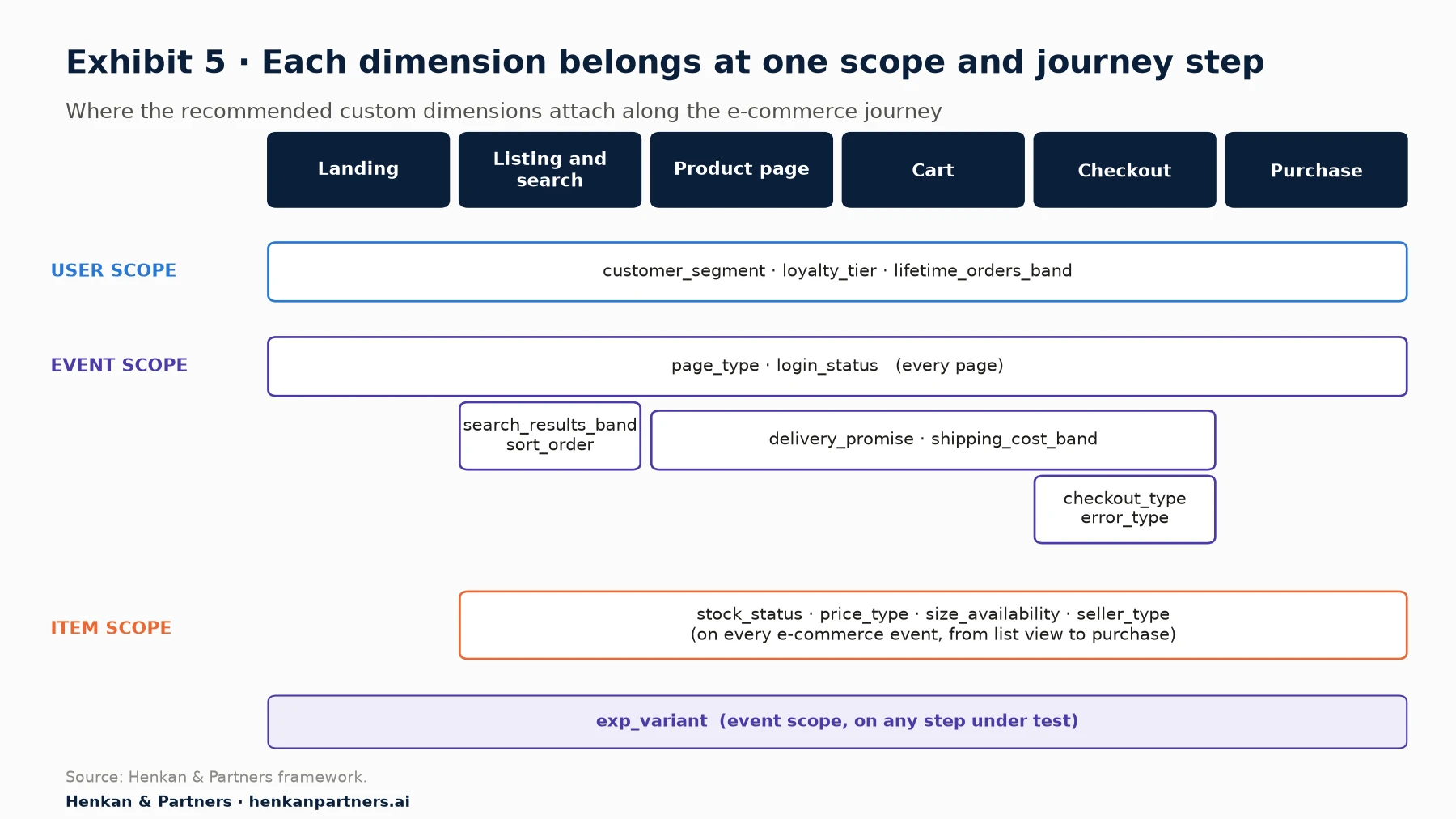
What this shows. User-scoped dimensions follow the customer; event-scoped ones describe what happened at a given step; item-scoped ones must travel with the product through every e-commerce event, from list view to purchase. Missing a step, for example sending stock status on product views but not in the basket, is the most common reason item-level reports do not add up.
Name and document everything
- Use lower-case snake_case. GA4 event names must start with a letter and use only letters, numbers and underscores, and names are case-sensitive: my_event and My_Event are two different events.
- Avoid reserved names and prefixes. GA4 reserves parameter names such as currency, session_id and user_id, and prefixes such as google_, ga_ and firebase_.
- Keep values short and controlled. Parameter values are cut at 100 characters and user property values at 36. Use a fixed list of values and reject anything else.
- Record every dimension in the tracking plan with its scope, allowed values, source, owner and the date it was registered, so everyone reads the same thing.
Our guide Web Analytics for Product Owners shows how to put tracking plans into the definition of done, and Beyond the Numbers: How GA4 Actually Works explains how to check what actually reaches GA4.
Section 7 · Privacy
Custom dimensions must never carry personal data, and hashing does not make it anonymous
Custom dimensions are a common route for personal data to leak into analytics. Google's policy requires that "no data be passed to Google that Google could use or recognize as personally identifiable information (PII)", such as email addresses or phone numbers, and warns that it can slip in through URLs, page titles, custom dimensions and form data. Google also advises: "Don't set custom dimensions based on user IDs."
Hashing is not a way around the rules. The European Data Protection Board's draft guidelines on pseudonymisation, published for consultation in 2025, state that pseudonymised data "which can be linked back to an individual using additional information, is still personal data", and France's CNIL lists hashing an email address as a pseudonymisation technique whose output remains personal data under the GDPR. Customer attributes such as loyalty tier or order band are fine as dimensions; identities are not.
- Band, do not identify. lifetime_orders_band = "2–4" is useful and safe; a customer number is neither.
- Check URLs and page titles for emails and names, especially on account, password reset and order confirmation pages.
- Respect consent. Custom dimensions are collected with the rest of your analytics, so the same consent rules apply. Our focus on user consent in e-commerce covers the wider picture.
Section 8 · Other tools
Other analytics tools have more room, but the same discipline applies
The principles are the same in every tool; the limits differ. Adobe Analytics, common among large retailers, offers far more custom variables and lets values persist across a visit or longer. Product analytics tools set limits per project rather than per property.
| Tool | Custom dimensions available | Notes |
|---|---|---|
| GA4 (standard / 360) | 50 / 125 event-scoped, 25 / 100 user-scoped, 10 / 25 item-scoped | Registered in the interface; the BigQuery export also holds parameters you have not registered |
| Adobe Analytics | Up to 250 eVars and 75 props, "if your contract with Adobe supports it" | eVars persist according to allocation and expiration settings; merchandising eVars tie values to products |
| Adobe Customer Journey Analytics | Up to 5,000 dimensions and 5,000 metrics per data view | Schema-driven; also has limits on derived fields |
| Piwik PRO | 200 event-scoped, 200 session-scoped and 20 product slots (version 16 and later) | Values up to 1,024 characters |
| Amplitude | 2,000 event properties and 1,000 user properties per project | Only the first 1,000 values appear in drop-down menus |
| Mixpanel | Up to 255 properties per event | Soft limit of 5,000 event properties per project |
More slots do not remove the need to choose. A property with 200 dimensions and no owners is as hard to use as one with none. Adobe's merchandising eVars are worth knowing about because they solve a problem GA4 handles only partly: crediting a product with the way it was found, such as the internal search term or recommendation block, all the way to purchase.
Section 9 · What to do next
Five steps turn custom dimensions into decisions, whatever the size of your team
| Team | Start with | Then add |
|---|---|---|
| One or two people | customer_segment, page_type, stock_status and shipping_cost_band, set from the data layer | delivery_promise and search_results_band; one monthly report per dimension |
| Growing e-commerce team | The eight "Start" dimensions, a tracking plan with owners, and quality checks after each release | Item-level price_type and size_availability; exp_variant for every test |
| Multi-brand or international retailer | A shared dimension dictionary across brands and countries, governed centrally | GA4 360 or a warehouse model for high-cardinality analysis; regular slot audits |
1. List the questions first
Write down the ten questions your team asks most often and cannot answer today. Most custom dimensions should come from that list.
2. Check predefined fields
Map each question to GA4's standard dimensions and recommended e-commerce parameters. Create custom dimensions only for what is left.
3. Apply the five tests
Question, decision, owner, values and source. Band anything with many values, and send identifiers and personal data nowhere.
4. Implement through the data layer
Define values in the data layer, register the dimension before you need it, and check it on every page and event where it should appear.
5. Review every quarter
Archive dimensions nobody used, fix the ones with messy values and add the next ones from the question list.
FAQ
Frequently asked questions about e-commerce custom dimensions
Frequently asked questions
What are custom dimensions in GA4?
Custom dimensions are attributes you define and send with your data, such as loyalty tier or stock status, so you can break down standard metrics by your own business context. In GA4 you send them as event parameters, user properties or item parameters and register them in the Admin section as event-, user- or item-scoped custom dimensions.
How many custom dimensions can I create in GA4?
A standard GA4 property allows 50 event-scoped, 25 user-scoped and 10 item-scoped custom dimensions, plus 50 custom metrics. GA4 360 allows 125, 100, 25 and 125. Archiving an unused dimension frees its slot, but archiving cannot be undone.
Which custom dimensions should an e-commerce site track?
Start with the context behind your biggest leaks: customer segment, login status, page type, search results, stock status, price type, delivery promise and shipping cost band. Then add loyalty tier, lifetime orders band, sort order, size availability, seller type, checkout type, error type and test variant as your questions require.
Are GA4 custom dimensions retroactive?
No. Reports only show values from when the dimension was registered, and Google says it can take 24 to 48 hours before you can report on it. Register dimensions before the campaigns or releases you want to analyse. Parameters sent before registration can still be found in the BigQuery export if it was enabled.
What is high cardinality in GA4?
Google defines a high-cardinality dimension as one with more than 500 unique values in a day. Such dimensions add many rows to reports, which then reach their limits sooner and group the remainder into an "(other)" row. Band values or analyse them in BigQuery instead.
Can I send a hashed email address as a custom dimension?
No. Google's policies forbid sending personally identifiable information to Google Analytics, and European regulators treat hashed or pseudonymised data as personal data. Use banded, non-identifying attributes such as loyalty tier or order count band instead.
Key terms
- Dimension
- An attribute used to describe and group data, such as device, country or product category. Metrics (sessions, revenue) are counted; dimensions are what you break them down by.
- Custom dimension
- A dimension you define and send yourself because the tool does not collect it by default. In GA4 you send it as a parameter and then register it in the interface.
- Event parameter
- A piece of information sent with an event, such as the search term on a search event. In GA4 it becomes an event-scoped custom dimension once registered.
- User property
- An attribute of the user, such as loyalty tier, that GA4 applies to that user's later events. It becomes a user-scoped custom dimension.
- Item parameter
- An attribute of a product inside an e-commerce event, such as colour or stock status. It becomes an item-scoped custom dimension.
- Scope
- The level a dimension describes: an event (one action), a user (the person or browser) or an item (a product in an e-commerce event). The wrong scope gives wrong answers.
- Cardinality
- The number of unique values a dimension takes. Google treats more than 500 unique values in a day as high cardinality, which makes reports harder to read.
- (other) row
- A row where GA4 groups values when a report has too many rows. High-cardinality dimensions make it more likely to appear.
- Data layer
- An object on each page that holds structured information, such as product, price and customer status, for tags to read. It is where custom dimensions should be defined.
- Tracking plan
- The shared document that lists every event, parameter and dimension, what it means, its allowed values and who owns it.
- eVar and prop
- Adobe Analytics' custom dimensions. eVars persist beyond the hit, for example until the end of a visit; props apply to a single hit only.
- Personally identifiable information (PII)
- Data that identifies a person, such as a name or email address. Google's policies forbid sending it to Google Analytics.
Sources
Methodology. This focus was researched in September 2026 from official product documentation (Google Analytics, Google Tag Manager, Adobe Experience League, Piwik PRO, Amplitude, Mixpanel), European regulators (EDPB, CNIL), published research (Gruen, Corsten and Bharadwaj; Baymard Institute) and vendor benchmarks, which are labelled as such. Every source was opened and checked on 27 September 2026. The recommended dimension list and Exhibits 2 and 5 are Henkan & Partners recommendations and frameworks.
- Google Analytics Help, About custom dimensions and metrics
- Google Analytics Help, Custom dimensions and metrics (quotas)
- Google Analytics Help, Archive custom dimensions and metrics
- Google Analytics Help, About data cardinality
- Google Analytics Help, Event collection limits
- Google Analytics Help, Event naming rules
- Google Analytics Help, BigQuery Export schema
- Google Analytics Help, Best practices to avoid sending personally identifiable information
- Google for Developers, Send user IDs
- Google for Developers, Measure ecommerce
- Google for Developers, Recommended events reference
- Google for Developers, The data layer
- Analytics Mania, A guide to custom dimensions in Google Analytics 4
- Adobe Experience League, eVar (conversion dimension)
- Adobe Experience League, Prop (traffic variable)
- Adobe Experience League, Merchandising eVars and product finding methods
- Adobe Experience League, Customer Journey Analytics guardrails
- Piwik PRO Help, Custom dimensions
- Amplitude Docs, Limits
- Mixpanel Docs, Events and properties
- W3C Community Group, Customer Experience Digital Data Layer 1.0 (2013)
- Adobe Client Data Layer (GitHub)
- EDPB, Guidelines 01/2025 on pseudonymisation, summary
- CNIL, Identifier les données personnelles
- Contentsquare, Digital retention in 2026
- Contentsquare, 15 mobile analytics stats from the 2026 benchmark report
- Baymard Institute, Cart abandonment rate statistics
- Gruen, Corsten and Bharadwaj, Retail Out-of-Stocks: A Worldwide Examination of Extent, Causes and Consumer Responses, 2002
- Henkan & Partners, The Essential Guide to Web Analytics for Product Owners
- Henkan & Partners, Beyond the Numbers: How GA4 Actually Works