Focus
GA4 Audit Checklist for E-commerce: The Checks That Make Your Data Trustworthy
Alexandre Suon · 2026-09-29
Most GA4 properties look fine until someone compares them with the order system. This GA4 audit checklist for e-commerce is a structured, one-day audit an analyst or e-commerce manager can run: property and data stream settings, consent mode, e-commerce events and parameters, revenue reconciliation, attribution, reporting limits, BigQuery export and tag QA. Each check links to Google's own documentation, and a scoring template turns the findings into a single trust score.
Executive summary
- An untrusted GA4 property is worse than none, because decisions still get made with it. Most problems are not exotic: a wrong time zone or currency, missing filters, a payment gateway stealing attribution, duplicate purchases or a consent banner that blocks tags. A structured audit of ten areas finds them in about a day.
- Check the settings that silently change every number first. Data retention for explorations is 2 or 14 months on standard properties, and demographic data is always kept for 2 months only. Cross-domain measurement, unwanted referrals (up to 50 per stream) and internal traffic filters (up to 10 data filters per property) are not retroactive, so every week they are missing is lost.
- Consent mode decides how much of your traffic GA4 can see. Didomi reports average consent rates (opt-ins as a share of banners displayed) from 71% in France to 89.3% in Eastern Europe in 2025 (vendor data). GA4 only models the rest if the property has at least 1,000 events a day with analytics storage denied and 1,000 consenting daily users, each for at least 7 days.
- The purchase event is the single most important thing to get right. Google requires `transaction_id`, `value`, `currency` and an `items` array on `purchase`. GA4 deduplicates purchases with the same transaction ID on web streams only, and an empty transaction ID causes all such purchases to be deduplicated into one.
- Reconcile GA4 revenue against the back end before anyone uses it. Explain the gap by consent, scope and timing, then judge what is left. Our rule of thumb (Henkan & Partners): an unexplained gap of 5% or less is healthy, 5–10% needs investigation, above 10% means the numbers should not be used for decisions yet.
- Know the limits before you blame the data. Explorations sample above 10 million events per query on standard properties, thresholds hide rows with demographic data, standard properties allow 50 event-scoped custom dimensions and the daily BigQuery export is capped at 1 million events a day. Our scoring template turns all of this into one score out of 100.
Section 1 · Why audit
A GA4 audit checklist is worth a day, because every decision downstream inherits its errors
A GA4 audit checklist is a structured list of checks that verifies a Google Analytics 4 property is configured, collecting and reporting data correctly. For an e-commerce site it covers property and data stream settings, traffic filters, consent mode, e-commerce events and parameters, reconciliation of revenue against the order system, attribution and channel groupings, reporting limits, BigQuery export and tag quality assurance, so that the numbers can be trusted for decisions.
GA4 rarely fails loudly. Reports keep filling up, dashboards keep refreshing, and nobody notices that 20% of revenue is credited to a payment provider, that test orders from the warehouse team are counted as sales, or that half the product views have no item ID. The first person to notice is usually someone in finance, and by then trust in the whole analytics set-up has gone.
That matters because GA4 feeds almost everything an e-commerce team does: media budgets, merchandising, A/B test results, personalisation audiences and board reporting. If you run experiments, a biased purchase event biases every test result that uses it. If you buy media, a broken channel grouping moves budget to the wrong place. An audit is the cheapest insurance you can buy.
If you need a refresher on how GA4 models users, sessions and events before you start, read how GA4 actually works first. For the wider context of what web analytics should deliver, see our essential guide to web analytics.
The audit covers ten areas in three layers
We group the checks into three layers. Configure covers the settings in the GA4 admin that change how data is processed. Collect covers what the site actually sends: tags, events, parameters and consent signals. Report covers whether the resulting numbers match reality and whether the reporting tools can show them without distortion. Exhibit 1 shows the ten areas.
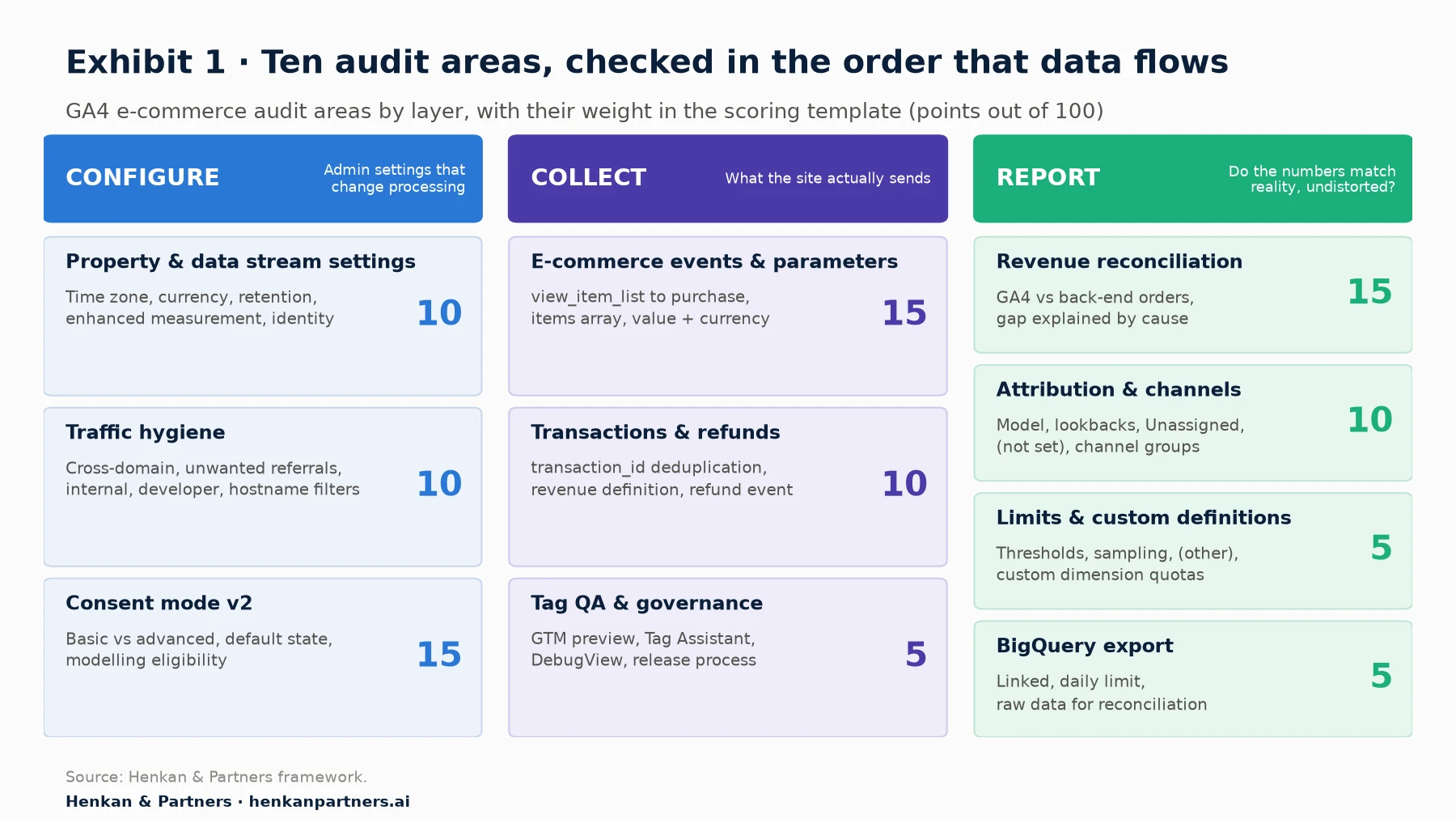
What this shows. The areas are ordered the way data flows: settings first, then what is collected, then what is reported. Consent mode, e-commerce events and revenue reconciliation carry the most weight because a failure there distorts revenue, which is the number everyone uses. Section 11 turns the weights into a score.
Our view. Run the audit in order. A reconciliation gap found in the afternoon is often explained by a setting found in the morning, such as a wrong time zone or a missing unwanted-referral rule. Fixing the cause before measuring the symptom saves a second audit.
What you need before you start
- Editor access to the GA4 property (Editor is also what the BigQuery link requires, together with Owner access to the Google Cloud project), and read access to the Google Tag Manager container or the site's tagging code.
- Back-end order data for the last four to eight weeks: order ID, timestamp, gross revenue, tax, shipping, currency, status (paid, cancelled, refunded) and channel if known.
- The consent management platform (CMP) configuration, including banner behaviour by country and the default consent state.
- A test device and browser profile with a clean cookie state, plus a test payment method so you can place and refund a real order.
- A spreadsheet version of the scoring template in Section 11, so every finding is recorded with evidence and an owner.
Section 2 · Property settings
Property and data stream settings change every number, so check them first
These settings take minutes to check and are the most common source of "the numbers look off" complaints. Several are not retroactive, which means every day they stay wrong is data you will never get back.
Time zone and currency must match how finance counts a day and a euro
The property time zone decides where one day ends and the next begins. If finance closes the day in Paris time and GA4 reports in US Pacific time, daily revenue will never line up, even if the tracking is perfect. Set the time zone to the one your business reports in. Google notes that a change only affects data going forward and can leave a flat spot or a spike on the day of the switch.
For currency, two settings matter. The reporting currency is set on the property. The event currency is sent with each event that has a value: Google's event reference states that if you set `value`, then `currency` is required for revenue metrics to be computed accurately. When events arrive in several currencies, GA4 converts them to the reporting currency using the prior day's exchange rate, according to Google's currency reference. For a multi-currency shop, this alone creates small daily differences with finance, which is expected and should be documented. Unlike the time zone, the reporting currency is retroactive: Google states that changing it converts previous data to the new currency as well as future data.
Data retention limits what explorations can show
Google's data retention setting offers 2 or 14 months on standard properties; Analytics 360 can keep event data for up to 50 months. It only affects explorations and funnel reports, not the standard aggregated reports. Age, gender and interest data is always kept for two months regardless of the setting. Check that retention is set to 14 months unless there is a documented legal reason for less. Google applies an increase to data already collected and not yet deleted, and deletes affected data at the next monthly process after a decrease, so fix a 2-month setting early. If you need longer history, the answer is the BigQuery export (Section 10).
Enhanced measurement should be on, but checked event by event
Enhanced measurement automatically collects page views, scrolls (at 90% of page depth), outbound clicks, site search, form interactions, video engagement and file downloads. Three checks matter for e-commerce:
- Page views on browser history changes. Google's documentation notes that page views can be sent when the browser history state changes. On single-page applications and headless storefronts, this is either what makes page views work or what creates duplicates. Test both paths.
- Site search. GA4 reads search terms from URL query parameters. If your search uses a parameter GA4 does not know (for example `?text=`), add it, or `view_search_results` will never fire.
- Outbound clicks and form interactions. Links to domains set up for cross-domain measurement do not trigger outbound click events. Form interaction events are often noisy on e-commerce sites (newsletter, search and checkout forms all count), so decide whether to keep them.
Session timeout, Google signals and reporting identity
The default session timeout is 30 minutes and the default engaged-session timer is 10 seconds. Both can be changed; neither should be changed without a reason, because it breaks comparability with history.
Google signals enriches reporting with demographic and interest data for users who are signed in to Google and have turned on ads personalisation. That data is useful, but reports that include demographic data are subject to data thresholds (Section 9), and Google signals data is not exported to BigQuery. Turn it on only if you will use the demographics, and make sure your consent set-up covers it.
Reporting identity has three options: blended (User-ID, then device ID, then modelling), observed (User-ID, then device ID) and device-based. Google states that the choice does not affect data collection or processing and can be switched at any time. You need blended to see modelled data from consent mode, so check which one is active before you compare reports with anyone else.
| Setting | What to check | Why it matters | Retroactive? |
|---|---|---|---|
| Time zone | Matches finance's reporting day | Daily revenue will not reconcile otherwise | No, applies going forward |
| Reporting currency | Matches finance's currency | Totals and averages | Yes, history is converted |
| Event currency | Sent with every event that has a value | Revenue metrics need it | No |
| Data retention | 14 months (standard) | Explorations and funnels | Partly: an increase covers data not yet deleted |
| Enhanced measurement | Page views on history change, site search parameter, form events | Duplicates or missing events | No |
| Session timeout | 30 minutes default, documented if changed | Sessions, engagement rate | No |
| Google signals | On only if demographics are used and consent covers it | Thresholds and consent | No |
| Reporting identity | Blended if you rely on consent modelling | Users, modelled data | Yes, switchable |
Section 3 · Traffic hygiene
Traffic hygiene decides whose visits you count, and fixes are never retroactive
The second group of checks is about which sessions and events should be in the property at all, and whether each session keeps its true source.
Cross-domain measurement keeps one journey as one session
If your shop spans more than one root domain (for example a brand site and a separate checkout domain), a user moving between them is counted as two users and two sessions unless cross-domain measurement is set up. GA4 passes the user's identifiers in a `_gl` URL parameter when the user navigates between the configured domains. Configure it in the web data stream's tag settings, then test a real journey: the `_gl` parameter should appear on the destination URL, and the session source in DebugView should not change.
Unwanted referrals stop payment gateways from stealing credit for sales
When a customer pays on a third-party page (a payment provider, a 3-D Secure bank page, a buy-now-pay-later provider) and returns to your confirmation page, that domain can appear as the source of the purchase. Google's own example of when to use the List unwanted referrals setting is exactly this: an e-commerce site whose users return from a third-party payment processor. GA4 then adds `ignore_referrer=true` to matching events. You can list up to 50 unwanted referrals per data stream.
The quick test: in a free-form exploration, look at purchases by session source for the last 90 days. Any payment provider, bank or your own domain in the list is a finding.
Internal and developer traffic filters must be active, not just defined
Defining an internal traffic rule in the data stream only labels matching traffic with the `traffic_type` parameter (default value `internal`). Nothing is excluded until a data filter is created and switched from Testing to Active. In the testing state, GA4 labels matching data in the "Test data filter name" dimension, which lets you check the filter before it permanently removes data. Google notes that a data filter can take 24 to 36 hours to apply, that you can create up to 10 data filters per property, and that once active, excluded data is never processed and will not appear in GA4 or BigQuery. Filters only apply from the moment of creation.
Add the developer traffic filter too: it removes events sent in debug mode, so your QA sessions in DebugView do not inflate reports. Warehouse, customer-service and agency staff placing real orders are a separate question; they should usually be counted as sales but can be tagged for analysis.
Hostname filters and bots: new in 2026
Google added hostname data filters in June 2026 (exclude) and September 2026 (include), so you can now allowlist the domains that are allowed to send data to your property. This is a clean fix for spam hits and for staging or copy sites that reuse your measurement ID. Known bots and spiders are excluded automatically, using Google research and the IAB International Spiders and Bots List; you cannot disable this or see how much was removed.
Section 4 · Consent mode
Consent mode v2 decides how much of your traffic GA4 can see, so audit it like revenue
In our experience, consent is the largest single reason GA4 numbers differ from the back end in Europe. The audit question is not whether you have a cookie banner, but what GA4 receives before and after each choice. Our deep dive on user consent in e-commerce covers the legal side; here we focus on measurement.
Basic and advanced consent mode behave very differently
Google describes two implementations. In basic consent mode, Google tags do not load until the user interacts with the consent banner, and no data is sent to Google before that interaction. In advanced consent mode, tags load when the page opens with consent set to denied by default, and send cookieless pings (functional and aggregate information without identifiers) while consent is denied. Basic mode feeds a general model; advanced mode supports an advertiser-specific model, which Google describes as more detailed.
Consent mode v2 added two parameters to the original `ad_storage` and `analytics_storage`: `ad_user_data` (consent for sending user data to Google for advertising) and `ad_personalization` (consent for personalised advertising). Google requires advertisers with EEA traffic to collect consent and pass these signals to keep personalisation, measurement and remarketing features.
Behavioural modelling has minimum thresholds most small shops do not meet
GA4 can estimate the behaviour of users who decline analytics cookies, but only if the property qualifies. Google's stated prerequisites are at least 1,000 events per day with `analytics_storage='denied'` for at least 7 days, and at least 1,000 daily users sending events with `analytics_storage='granted'` for at least 7 of the previous 28 days. Google adds that meeting them does not guarantee a model, and that modelled data only appears with the blended reporting identity.
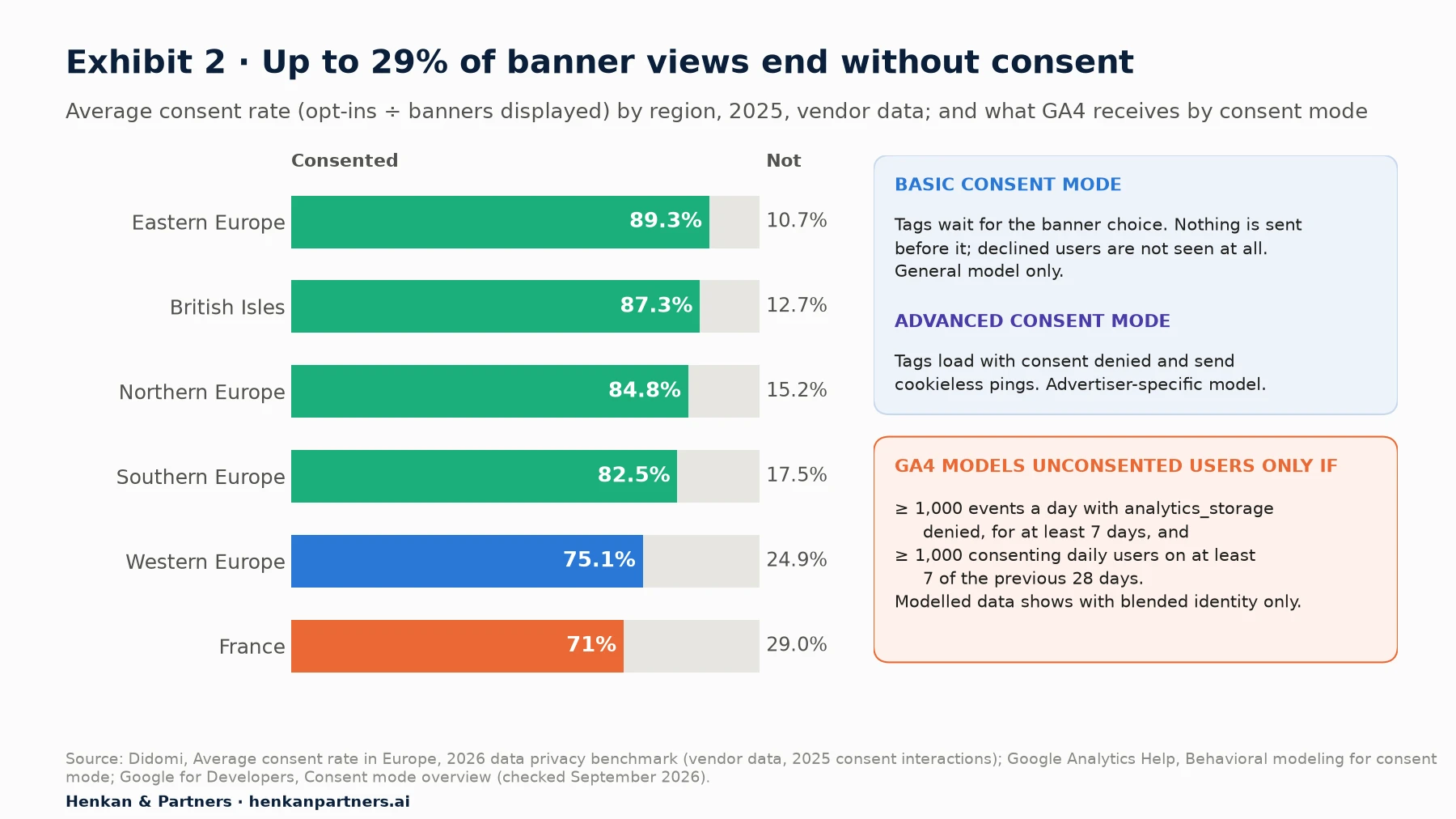
What this shows. Even in the regions with the highest consent rates, roughly one banner display in ten ends without an opt-in; in France it is close to three in ten. Didomi's rate covers consent in general, not analytics consent specifically, so use it as a proxy and measure your own CMP's analytics opt-in rate. With basic consent mode, GA4 does not see those users at all. With advanced mode and enough volume, GA4 can model part of the gap, but a small shop will often not qualify and will see observed data only. Your reconciliation (Section 7) must take this into account before calling anything a tracking bug.
Consent checks to run
- Open GA4 Admin, Consent settings. It shows the share of traffic and key events from the EEA and flags issues with advertising and analytics consent signals for each data stream.
- Check the default state before any interaction. Load a page in a clean browser, and in Tag Assistant confirm the default consent state for all four parameters is set before any Google tag fires.
- Accept, then reject, then change your mind. Confirm the update command fires on each choice, and that the choice persists on the next page.
- Check the banner by country. Many CMPs show different banners outside Europe. Make sure non-EEA defaults are deliberate, not accidental.
- Check modelling eligibility. Count daily events with analytics storage denied and daily consenting users against Google's thresholds, and note whether modelled data is expected at all.
In April 2021, Google reported early Google Ads results showing that conversion modelling through consent mode recovers, on average, more than 70% of ad-click-to-conversion journeys lost to cookie consent choices. Read it with three caveats: it concerns modelled conversions in Google Ads reports, not GA4 reports; it predates consent mode v2; and it is Google's own average across advertisers, not a forecast for your account.
Section 5 · E-commerce events
Recommended e-commerce events only work when every required parameter is present
GA4's e-commerce reports are built entirely from recommended events with fixed names and parameters. If an event name is misspelled (`add_to_basket` instead of `add_to_cart`) or a required parameter is missing, the report stays empty or wrong, and GA4 will not warn you. Exhibit 3 shows the funnel and what each step must carry.
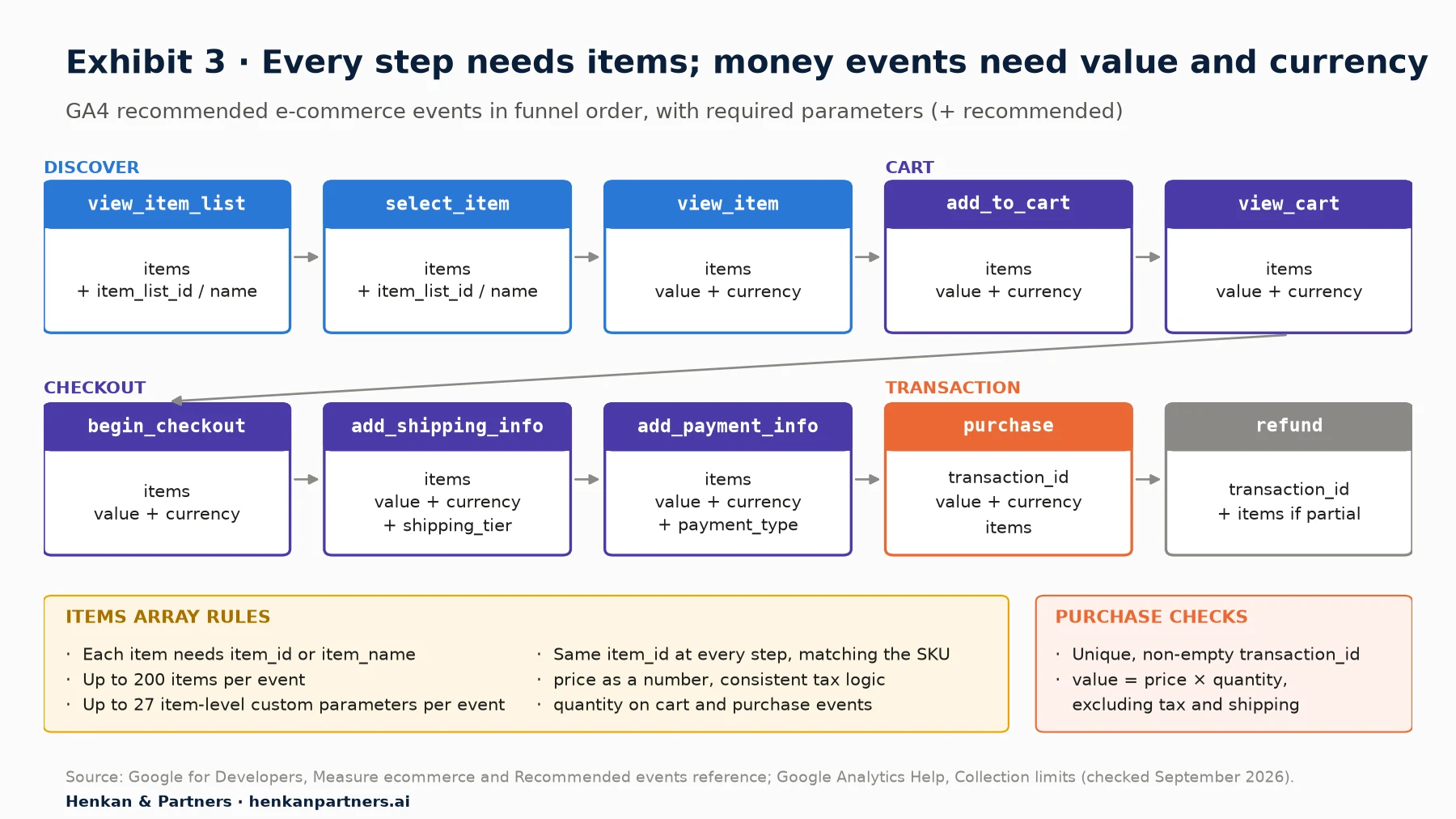
What this shows. Every step from product view to purchase needs an `items` array, and every event that carries money needs `value` and `currency` together. The purchase event is the only one that also needs a `transaction_id`, and it is the one that decides your revenue numbers. The list events are the ones most often missing on real sites, which leaves merchandising reports empty.
The items array is where most e-commerce tracking quietly breaks
Google's reference says each item needs at least one of `item_id` or `item_name`, an `items` array can hold up to 200 elements, and an e-commerce event can carry up to 27 item-level custom parameters. In audits, we check five things on every step of the funnel:
- The same product has the same `item_id` at every step, and it matches the SKU or product ID in the back end. Mixing variant IDs and parent IDs between steps breaks item-level funnels.
- `price` is a number, not a string, and uses the same tax logic everywhere. Prices with tax on product pages and without tax at purchase make item revenue impossible to interpret.
- `quantity` is present on cart and purchase events and matches what the customer actually bought.
- Category and brand fields are filled consistently (`item_category` to `item_category5`, `item_brand`), because merchandising analysis depends on them.
- List context carries through. `item_list_name` or `item_list_id` on `view_item_list` and `select_item` tells you which list or recommendation block drove the click.
If you need more item or event detail than the recommended parameters, register custom dimensions. Our article on which custom dimensions to collect in e-commerce analytics lists the ones worth their quota.
| Event | Required parameters (Google reference) | Common audit finding |
|---|---|---|
| view_item_list / select_item | items (item list id or name recommended) | Not implemented, or fired once per page instead of per list |
| view_item | items; value and currency together | Missing value, or price as a string |
| add_to_cart / view_cart | items; value and currency together | Fires on page load instead of on success |
| begin_checkout | items; value and currency together | Fires again on every checkout step |
| add_shipping_info / add_payment_info | items; value and currency together; shipping_tier / payment_type recommended | Missing entirely on one-page checkouts |
| purchase | transaction_id, value, currency, items | Fires on page reload; value includes tax and shipping |
| refund | transaction_id; items for partial refunds | Never sent, so revenue is gross forever |
For e-commerce managers. You do not need to read code to run this check. Place a test order with DebugView open (Section 10), click each event, and compare what you see with Table 2. Screenshot anything missing.
For analysts. Export a day of events from BigQuery and count purchases with an empty `transaction_id`, items without `item_id`, and events with `value` but no `currency`. Three queries find most of the defects.
Section 6 · Transactions and refunds
Transactions must be unique and refunds must be sent, or revenue will drift away from reality
Transaction ID deduplication works only on web, and only with real IDs
Confirmation pages get reloaded, bookmarked and reopened from email. Google's answer is that GA4 deduplicates purchase events with the same transaction ID. Three details from Google's documentation matter in an audit:
- It only works for web streams, not app streams. If you sell in an app too, the app must prevent duplicate purchases itself.
- Never send an empty string. Google warns that GA4 will deduplicate all purchase events that have `transaction_id=""`, which means one purchase could be counted and the rest dropped.
- Do not reuse IDs across users. Transaction IDs must be unique per transaction.
The test is simple: place an order, reload the confirmation page twice, and confirm in reporting (after 24 hours) that one purchase is counted. Then check the last 90 days for transaction IDs that appear more than once, which is easiest in BigQuery.
Decide what "revenue" means and send it consistently
Google's current reference says `value` on `purchase` should be the sum of price times quantity for all items, without shipping or tax, which are sent in their own `shipping` and `tax` parameters. Many older implementations send the order total instead. Neither is wrong in itself; what breaks reconciliation is not knowing which one you have, or having both across different platforms. Write the definition into the audit report and reconcile against the matching back-end field.
Refunds must be sent, usually from the server
The `refund` event needs the `transaction_id` of the original order. Google's set-up guide notes that a partial refund includes only some of the items purchased, and that each refunded item should be listed in an `items` array. Refunds happen in the back office, not on the website, so they are usually sent with the Measurement Protocol, which Google describes as a way to augment tagging, not replace it: it needs the `client_id` (or app instance ID) from the original web session to join the event to the user. If refunds are not sent, GA4 revenue is gross revenue, and categories with high return rates, such as fashion, look far better than they are.
Our view. Many teams decide not to send refunds to GA4 and to handle net revenue in the data warehouse instead. That is a legitimate choice if it is documented. The failure is the undocumented middle ground, where some refunds are sent by one integration and others are not.
Section 7 · Revenue reconciliation
Reconcile GA4 revenue against the back end and explain the gap before you judge it
Reconciliation is the check that decides whether anyone should use GA4 revenue at all. GA4 will never match the order system exactly, and Google does not publish an "acceptable" gap. The goal is to explain as much of the difference as you can by known causes, and then judge what is left.
A four-step method
- Align the scope. Same dates in the same time zone, same currency, same definition of revenue (with or without tax and shipping), same order statuses (paid orders only, excluding test orders), same sales channels (web only, not phone or marketplace orders).
- Compare order counts first, then revenue. A revenue gap with matching order counts points to value or currency problems. An order-count gap points to missing or duplicate purchase events.
- Explain the gap by known causes. The main one in Europe is consent: with basic consent mode, unconsented purchases are simply not in GA4. Then ad blockers and browser tracking protection, then payment journeys where users never return to the confirmation page.
- Judge the unexplained remainder. Match order IDs between GA4 (via BigQuery) and the back end to see exactly which orders are missing and whether they share a device, browser, payment method or country.
Expected GA4 orders ≈ back-end orders in scope × observed consent rate (basic mode)
Unexplained gap = (expected GA4 orders − actual GA4 orders) ÷ expected GA4 orders
Henkan rule of thumb: ≤ 5% healthy · 5–10% investigate · > 10% do not use for decisions
GA4 orders above back-end orders in scope: duplicates, test orders or scope error, always a finding
The rule of thumb above is our own, from Henkan & Partners audits, not a Google benchmark. It assumes you have already removed the effect of consent. Without that step, a gap of 20% in France could be perfectly normal and a gap of 5% could hide a broken checkout on one browser that is offset by duplicates elsewhere.
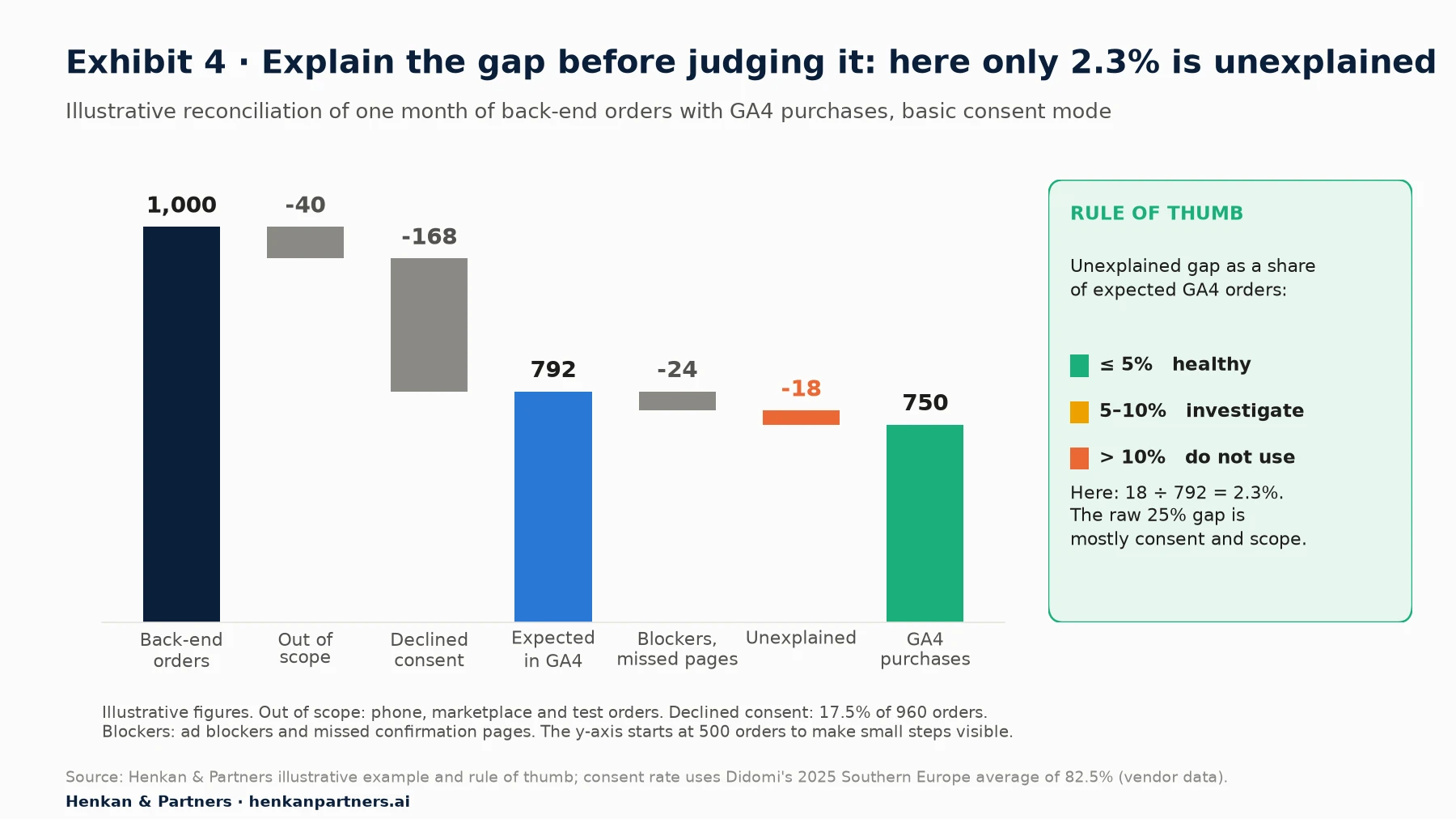
What this shows. In this illustrative shop, GA4 shows 25% fewer orders than the back end, which sounds alarming. After scope and consent are taken out, the unexplained remainder is 18 orders, or 2.3% of what GA4 should have seen. That is healthy. The same raw gap with a 95% consent rate would be a serious finding, which is why reconciliation always starts with consent.
Red flags that point to a tracking bug, not consent
- The gap varies strongly by browser or device. Consent choices do not usually differ tenfold between Safari and Chrome; broken tags often do.
- The gap is concentrated on one payment method. Customers paying with a redirect method may never return to the confirmation page.
- The gap changed on a specific date. Match it against site releases, CMP changes and tag container versions.
- GA4 has more orders than the back end on some days. That is almost always duplicates or test orders.
If the gap cannot be closed with client-side tags, sending the purchase from the server removes browser-side losses (though not the consent obligation). Our article on server-side Google Tag Manager for e-commerce explains what it fixes and what it costs.
Section 8 · Attribution and channels
Attribution settings and channel groups decide who gets credit, so make them deliberate
Attribution model and lookback windows
GA4 offers data-driven attribution and two rules-based models: paid and organic channels last click, and Google paid channels last click. First click, linear, time decay and position-based were removed in November 2023. Key event lookback windows are 7 or 30 days for acquisition key events (default 30) and 30, 60 or 90 days for all others (default 90). Google notes that changing the reporting attribution model applies to historical and future data, while lookback window changes apply only going forward.
The audit check is not which model is "right", but whether the model in GA4 is the one the business thinks it is using, and whether media reports from other tools use comparable settings. Record the model, the lookback windows and the channels that can receive credit.
Channel groups and the Unassigned bucket
Google defines Unassigned as the value GA4 uses when no channel rule matches the event data. A large Unassigned share almost always means inconsistent UTM tagging: custom `utm_medium` values like `newsletter` or `Social_Paid` that match no default rule. Fix the tagging convention first; then, if you still need your own categories, create a custom channel group. Standard properties can have 2 custom channel groups in addition to the default (5 on Analytics 360), each with up to 50 channels, and Google states they can be applied to reports retroactively.
Two 2026 changes are worth checking during the audit. In May 2026 Google added dedicated measurement of traffic from AI assistants such as ChatGPT, Gemini and Claude, and in June 2026 it added a Source Group dimension that consolidates source values for platforms like Facebook, Instagram and TikTok. If your custom channel groups were built before, check they do not hide these sources in a generic referral bucket.
(not set) values each have a specific cause
Google's documentation lists specific causes, and each one points to a fix:
- Landing page (not set): the session has no `page_view` event, for example when a session starts with an event fired before the page view tag.
- Session source or medium (not set): the automatically collected `session_start` is missing, typically because the Google tag in GTM does not fire on the Initialization trigger.
- Custom parameters (not set): the custom dimension was registered less than 24 hours ago, or, for `session_start` and `first_visit`, the parameter was not sent with the event that triggered them.
A few percent of (not set) is normal. A double-digit share on landing page or session source is a finding, because it breaks acquisition and landing-page analysis.
Section 9 · Reporting limits
GA4 limits, thresholds and sampling explain many 'wrong' numbers, so audit the quotas
Some numbers look wrong because GA4 is working as designed. Before logging a finding, check whether a limit, threshold or sample explains it.
Data thresholds withhold rows, and you cannot turn them off
GA4 withholds data when a report or exploration includes demographic data or audiences based on it, and when search query rows have too few users. Google states that thresholds are system-defined and cannot be adjusted; the suggested workaround is a longer date range. If a report suddenly loses rows when you add age or gender, that is a threshold, not a tracking fault.
Sampling in explorations and the (other) row
Explorations are sampled when a query exceeds 10 million events on standard properties (up to 1 billion on Analytics 360); the data quality icon shows the share of data used. Shorten the date range, or move the analysis to BigQuery. Separately, when a table has more rows than its limit, GA4 condenses the least common values into an (other) row. Google advises avoiding high-cardinality custom dimensions (more than 500 values) unless necessary, and never using custom dimensions for user identifiers.
Custom definitions are a scarce, shared resource
On standard properties you can register 50 event-scoped custom dimensions, 25 user properties, 10 item-scoped custom dimensions and 50 custom metrics. Audit the list: remove duplicates, archive dimensions nobody uses, and check that names match the parameters actually sent. A full quota blocks the next project, and a dimension registered with a typo shows nothing forever.
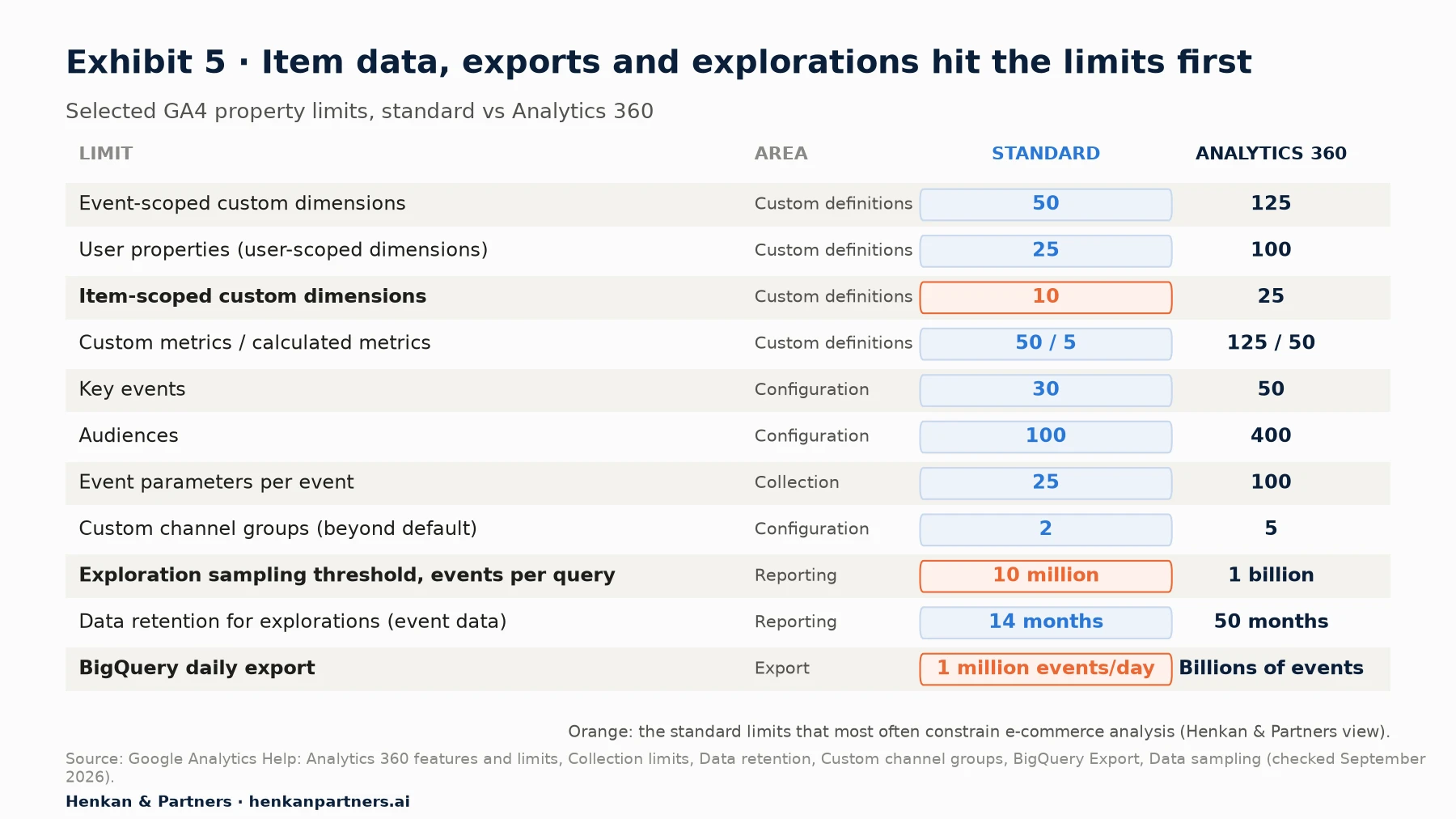
What this shows. The limits that bite first on a standard property are usually item-scoped custom dimensions (10), the daily BigQuery export (1 million events) and exploration sampling (10 million events per query). If your audit finds you constantly working around these, that is a signal to review what you collect, move analysis to BigQuery, or consider Analytics 360.
| Collection limit (standard property) | Value | Audit implication |
|---|---|---|
| Event name length | 40 characters | Longer names are not collected as intended |
| Event parameters per event | 25 (100 on 360) | Check heavy events such as purchase |
| Parameter value length | 100 characters (page_location 1,000) | Long product names or URLs get cut |
| User property value length | 36 characters | IDs and segments may be truncated |
| Item-level custom parameters per event | 27 | Plan item enrichment carefully |
| Events per user per day | 100,000 | Only a concern for bots or loops |
| Items per event | 200 | Very large carts or list views |
Section 10 · BigQuery and tag QA
BigQuery export and tag QA turn a one-off audit into a property you can keep trusting
Link BigQuery now, because the export is not retroactive
The BigQuery export gives you raw, unsampled event data, which is the only way to reconcile order by order, find duplicate transaction IDs, and keep history beyond the retention setting. Google offers a daily export (once a day, for the previous day) and a streaming export (near real time, but it may contain gaps and does not include traffic source data for new users and sessions). Analytics 360 adds a fresh daily export. Standard properties have a daily export limit of 1 million events; if a property consistently exceeds it, Google pauses the daily export, so filter out events you do not need before you get there. Google also notes that daily tables can be updated for up to two days afterwards with late-arriving events, and that Google signals data is not exported.
Google's set-up guide says data starts flowing within 24 hours of linking and describes no way to export events collected before the link, so a missing link is a finding even if nobody uses BigQuery today. The storage cost for a typical mid-size shop is modest; the cost of not having the history when you need it is not.
Tag QA with Tag Assistant, GTM preview and DebugView
The last area checks how the tags are built and changed. In Google Tag Manager, preview mode lets you browse the site as if the current draft were published, and Tag Assistant shows which tags fired, which did not and what triggered them, event by event. DebugView in GA4 shows the events and user properties arriving from a debug device in real time, in a seconds stream and a 30-minute stream. Google recommends filtering out debug traffic so it does not affect reports, which is what the developer traffic filter in Section 3 does. E-commerce reports can take up to 24 hours to show new data, so DebugView is how you validate the same day.
- Walk the full funnel on desktop and mobile: list page, product page, add to cart, cart, checkout steps, purchase, confirmation reload.
- For each event, check name, parameters and values in DebugView against Table 2.
- Repeat with consent denied. Confirm which tags still fire and what GA4 receives.
- Check the GTM container: version history with notes, no paused or duplicate GA4 tags, one Google tag per measurement ID, and the Google tag on the Initialization trigger.
- Check governance: who can publish, whether there is a staging environment and whether releases include an analytics QA step.
For the wider set-up, including naming conventions and container governance, see our essential guide to tag management.
Where AI helps in a GA4 audit, and where it does not
AI assistants can now read GA4 directly. Google publishes an experimental, open-source Google Analytics MCP server (Model Context Protocol, a standard way to connect AI assistants to tools) that uses read-only access and exposes tools to retrieve property details, custom dimensions and metrics, Google Ads links and to run reports, including funnel reports. That makes several audit checks faster: listing custom dimensions against their use, spotting Unassigned and (not set) shares, or comparing purchases by source across periods.
The limits are real. An assistant only sees what the APIs expose, cannot place a test order or read your CMP settings, and can state plausible but wrong conclusions about why a number moved. Use AI to gather evidence and draft findings, and keep a human who checks every finding against DebugView, BigQuery or the back end before it goes in the report.
Section 11 · Scoring template
A weighted score turns forty findings into one decision about whether to trust the data
An audit that ends with a long list of findings rarely gets fixed. Leadership needs one answer (can we use this data?) and the team needs a prioritised list. Our scoring template gives both. Score each of the ten areas 0 (fails), 1 (partly passes) or 2 (passes), multiply by the area's weight, divide by two, and add the points (so the maximum is 100).
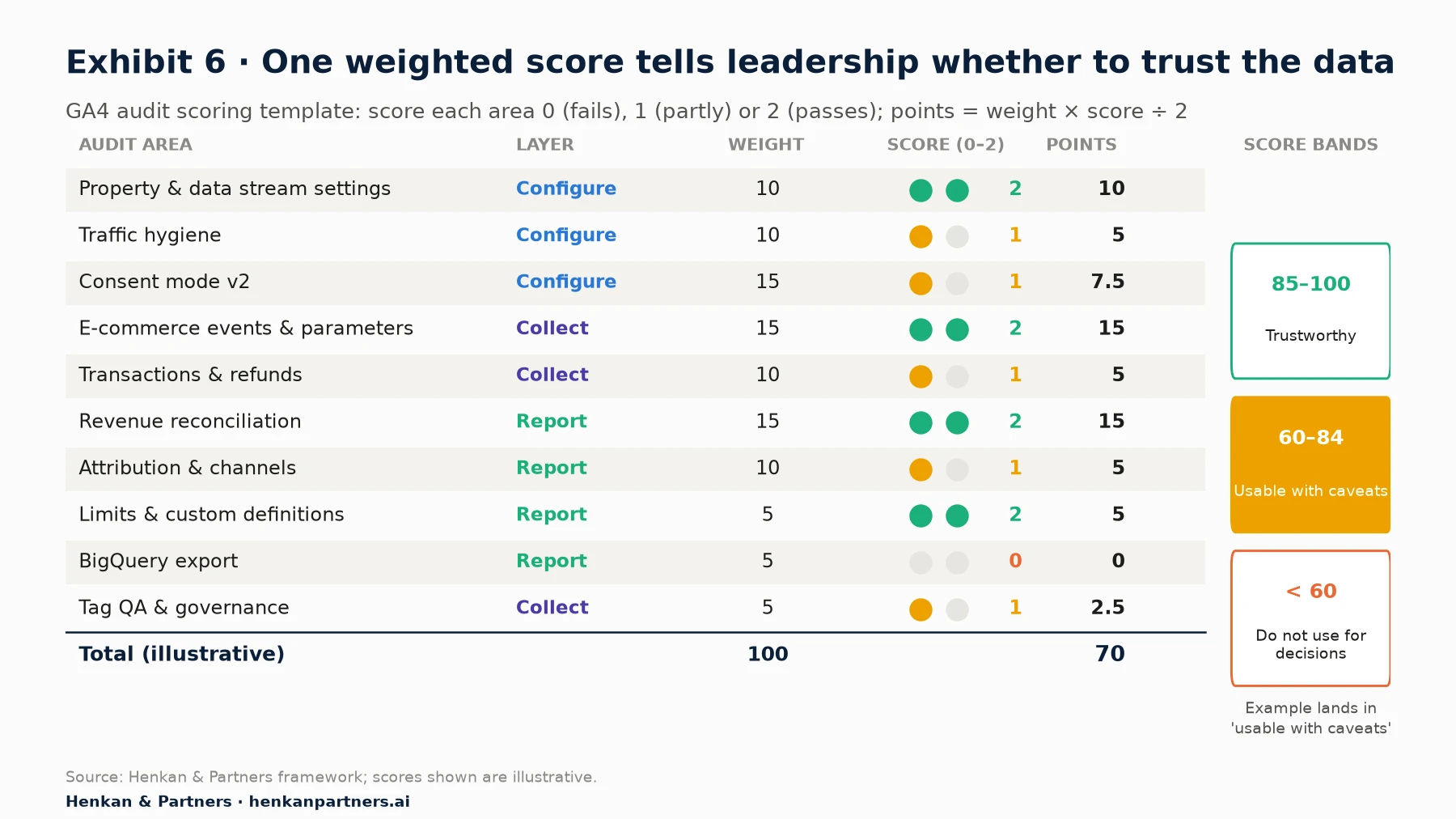
What this shows. In this illustrative audit, the core revenue tracking passes, but consent, filters, refunds and the missing BigQuery link hold the score at 70, which means the data is usable with caveats. The template makes clear that fixing consent mode and traffic hygiene would move the score more than polishing custom dimensions. Keep the evidence for each score, so the next audit can be compared like for like.
| Score band | Meaning | What to do |
|---|---|---|
| 85–100: trustworthy | Numbers can be used for decisions and test analysis | Re-audit every six months or after major releases |
| 60–84: usable with caveats | Use trends, not absolute revenue; state known gaps | Fix the highest-weight failures within a quarter |
| Below 60: do not use for decisions | Revenue or attribution is materially wrong | Stop reporting affected metrics until fixed |
How to fit the audit into one day
| Time | Areas | Output |
|---|---|---|
| 09:00–10:30 | Property and data stream settings, traffic hygiene | Settings checklist with screenshots |
| 10:30–12:00 | Consent mode, tested in Tag Assistant | Consent behaviour by choice and country |
| 13:00–14:30 | Test order and refund in DebugView; e-commerce events | Event-by-event parameter check |
| 14:30–16:00 | Revenue reconciliation against back-end orders | Gap explained by cause, remainder scored |
| 16:00–17:00 | Attribution, channels, limits, BigQuery | Findings list and final score |
Section 12 · What to do next
What to do next
1. Get access and data before the audit day
Request GA4 Editor or Administrator access, GTM read access, CMP settings and four to eight weeks of back-end orders. Missing access is the most common reason a one-day audit takes a week.
2. Run the ten areas in order and record evidence
Use Exhibit 1 as the agenda and the one-day schedule in Table 5. For every check, record the evidence (screenshot, query or DebugView capture), the score and an owner.
3. Fix the non-retroactive settings the same day
Unwanted referrals, internal and developer traffic filters, hostname filters, cross-domain measurement and the BigQuery link take minutes to set up and only work from the day you set them. A 2-month data retention setting keeps deleting exploration data every month it stays in place. Do not wait for the report.
4. Reconcile monthly, not once
Turn the reconciliation in Section 7 into a monthly check, ideally automated from BigQuery. A gap that moves is the earliest warning that a release broke tracking.
5. Get a second pair of eyes if the score is below 85
If your score is below 85, or if revenue drives experiment decisions and media budgets, an outside audit pays for itself quickly. We run GA4 audits and fix the implementation with your teams. Talk to us.
Disclosure: Henkan & Partners audits and implements analytics, including GA4, Google Tag Manager and BigQuery, for clients.
FAQ
Frequently asked questions about the GA4 audit checklist
Frequently asked questions
What is a GA4 audit checklist?
A GA4 audit checklist is a structured list of checks that verifies a Google Analytics 4 property is configured, collecting and reporting data correctly. For e-commerce it covers property settings, filters, consent mode, e-commerce events, transactions and refunds, revenue reconciliation, attribution, reporting limits, BigQuery export and tag QA.
How long does a GA4 audit take?
A focused e-commerce audit of the ten areas in this checklist takes about one day for an experienced analyst, provided access and back-end order data are ready. Fixing the findings usually takes longer, depending on development capacity.
Why doesn't GA4 revenue match my Shopify or back-end revenue?
The usual causes are consent (users who decline analytics cookies are not observed), different revenue definitions (tax, shipping, refunds), time zone and currency differences, orders from other channels, ad blockers, missed confirmation pages and duplicate purchase events. Explain these known causes first, then judge the unexplained remainder.
What is an acceptable difference between GA4 and back-end revenue?
Google does not publish one. Our Henkan & Partners rule of thumb is to remove known causes such as consent and scope first, then treat an unexplained gap of 5% or less as healthy, 5 to 10% as needing investigation and more than 10% as not fit for decisions.
What are the required parameters for the GA4 purchase event?
Google's reference lists transaction_id, value, currency and items as required on purchase. Each item needs at least one of item_id or item_name. If you send value, you must also send currency for revenue metrics to be computed accurately.
Does GA4 remove duplicate transactions?
Yes, on web streams. GA4 deduplicates purchase events with the same transaction ID. It does not do this for app streams, and if you send an empty transaction ID, all purchases with an empty ID are deduplicated, which undercounts revenue.
What is the difference between basic and advanced consent mode?
In basic consent mode, Google tags do not load until the user interacts with the consent banner, so nothing is sent before a choice. In advanced consent mode, tags load with consent denied by default and send cookieless pings, which supports a more detailed, advertiser-specific model.
Why is traffic showing as Unassigned in GA4?
Unassigned is the value GA4 uses when no channel rule matches the event data. It is usually caused by UTM values that do not follow Google's channel definitions, such as custom medium names. Fix the UTM convention or create a custom channel group.
Should I link GA4 to BigQuery?
Yes, for most e-commerce sites. The export gives raw, unsampled data for order-level reconciliation and keeps history beyond the retention setting. Google documents no export of data collected before the link, and standard properties are limited to 1 million events a day in the daily export.
How do I test GA4 e-commerce tracking?
Use Google Tag Manager preview with Tag Assistant to see which tags fire, and GA4 DebugView to see the events and parameters arriving in real time. Place a real test order, reload the confirmation page, and send a refund, then check each event against Google's required parameters.
Key terms
- Data stream
- A source of data flowing into a GA4 property, such as a website or an app. It matters because many audit settings, such as cross-domain measurement and unwanted referrals, are set per stream.
- Recommended events
- Events with names and parameters defined by Google, such as add_to_cart and purchase. They matter because GA4's e-commerce reports only work when these exact names and parameters are used.
- Items array
- The list of products attached to an e-commerce event, each with an ID or name, price, quantity and categories. It matters because all product-level reporting depends on it.
- Transaction ID
- The unique order identifier sent with the purchase event. It matters because GA4 uses it to remove duplicate purchases on web streams and because it is the key for order-level reconciliation.
- Consent mode
- Google's mechanism for adjusting tag behaviour to users' consent choices through parameters such as analytics_storage and ad_user_data. It matters because it decides what GA4 receives from users who decline cookies.
- Behavioural modelling
- GA4's estimation of the behaviour of users who declined analytics cookies, based on similar consenting users. It matters because it can close part of the consent gap, but only above minimum traffic thresholds.
- Reporting identity
- The GA4 setting that chooses how users are identified in reports: blended, observed or device-based. It matters because modelled data only appears with blended identity.
- Unwanted referral
- A domain, such as a payment provider, that GA4 is told to ignore as a traffic source. It matters because without it, returning shoppers are credited to the payment page instead of the real channel.
- Data filter
- A GA4 rule that excludes or includes events, such as internal, developer or hostname traffic. It matters because active filters permanently change what is processed and are not retroactive.
- Data threshold
- A system-defined rule that withholds report rows to protect user privacy, for example with demographic data. It matters because it can make numbers look incomplete when tracking is fine.
- Sampling
- Analysing a subset of events when a query exceeds the property's quota, 10 million events per exploration query on standard properties. It matters because sampled results can be imprecise for small segments.
- Custom dimension
- A registered event, user or item parameter that can be used in reports. It matters because quotas are limited and unregistered parameters cannot be reported in the interface.
- Measurement Protocol
- Google's API for sending events to GA4 from servers, such as refunds from the back office. It matters because events that happen off the website cannot be captured by page tags.
- DebugView
- A GA4 report that shows events and parameters from a debug device in real time. It matters because it lets you validate tracking the same day instead of waiting up to 24 hours for reports.
- Revenue reconciliation
- The comparison of GA4 orders and revenue with the order system for the same scope and period. It matters because it is the only direct test of whether GA4 revenue can be trusted.
Sources
All sources were checked in September 2026. Google documentation is cited as published on Google's help and developer sites at that date; Google updates these pages without version numbers. Didomi consent rates are vendor data from its own customer base, defined as opt-ins over banners displayed. Google's 70% conversion-modelling figure is Google's own 2021 average for Google Ads, not GA4. Exhibits 1 and 6 and Tables 4 and 5 are Henkan & Partners frameworks; Exhibit 4 is an illustrative example; the reconciliation thresholds are a Henkan & Partners rule of thumb, not a Google benchmark.
- Google for Developers (n.d.). Measure ecommerce.
- Google for Developers (n.d.). Recommended events reference.
- Google Analytics Help (n.d.). GA4: Set up ecommerce events.
- Google Analytics Help (n.d.). GA4: Minimize duplicate key events with transaction IDs.
- Google for Developers (n.d.). Measurement Protocol (Google Analytics 4).
- Google Analytics Help (n.d.). GA4: Collection limits.
- Google Analytics Help (n.d.). GA4: Custom dimensions and metrics limits.
- Google Analytics Help (n.d.). GA4: Analytics 360 features and limits.
- Google Analytics Help (n.d.). GA4: Data retention.
- Google Analytics Help (n.d.). Set up Analytics for a website and/or app.
- Google Analytics Help (n.d.). Currency reference.
- Google Analytics Help (n.d.). GA4: Enhanced measurement events.
- Google Analytics Help (n.d.). GA4: Session timeout and engaged session settings.
- Google Analytics Help (n.d.). GA4: Activate Google signals.
- Google Analytics Help (n.d.). GA4: Reporting identity.
- Google Analytics Help (n.d.). GA4: Set up cross-domain measurement.
- Google Analytics Help (n.d.). GA4: Identify unwanted referrals.
- Google Analytics Help (n.d.). GA4: Filter out internal traffic.
- Google Analytics Help (n.d.). GA4: Data filters.
- Google Analytics Help (n.d.). Filter out unwanted traffic in Google Analytics.
- Google Analytics Help (n.d.). GA4: Known bot-traffic exclusion.
- Google Analytics Help (2026). What's new in Google Analytics (entries of 13 May, 11 June and 21 September 2026).
- Google for Developers (n.d.). Consent mode overview.
- Google Ads Help (n.d.). Updates to consent mode for traffic in the European Economic Area (EEA).
- Google Analytics Help (n.d.). GA4: Verify and update consent settings in Google Analytics.
- Google Analytics Help (n.d.). GA4: Behavioral modeling for consent mode.
- de Freitas, H., Google (2021). Conversion modeling through Consent Mode in Google Ads (Google data).
- Didomi (2026). Average consent rate in Europe: 2026 data privacy benchmark (vendor data).
- Google Analytics Help (n.d.). GA4: Attribution settings.
- Google Analytics Help (n.d.). GA4: Default channel group.
- Google Analytics Help (n.d.). GA4: Custom channel groups.
- Google Analytics Help (n.d.). GA4: (not set) in reports.
- Google Analytics Help (n.d.). GA4: Data thresholds.
- Google Analytics Help (n.d.). GA4: Data sampling.
- Google Analytics Help (n.d.). GA4: About the (other) row.
- Google Analytics Help (n.d.). GA4: BigQuery Export.
- Google Analytics Help (n.d.). GA4: Set up BigQuery Export.
- Google Analytics Help (n.d.). GA4: Monitor events in DebugView.
- Google Tag Manager Help (n.d.). Preview and debug containers.
- Google Analytics (n.d.). Google Analytics MCP Server (Experimental). GitHub.