Focus
How to Build an A/B Test with a Prompt: A Step-by-Step Walkthrough
Alexandre Suon · 2026-09-29
You can now build an A/B test variation by describing it in plain English. This step-by-step walkthrough of prompt-based experimentation takes one test from hypothesis to launch: how to write the prompt, what an AI A/B test builder such as Kameleoon PBX, Optimizely Opal, AB Tasty or VWO actually does, how to review the generated code, and when a developer should build the test instead.
Executive summary
- A prompt can now build most everyday test variations, but only if the brief is precise. In our own rebuild of 19 real tests with Kameleoon PBX, build time fell by about 89% on average, from 8.7 hours to 55 minutes, and 11 of the 19 builds matched the hand-built original at 90% fidelity or better. The builds that fell short needed a precise visual layout or a business rule that the prompt could not pin down.
- Treat the prompt as a developer ticket with six parts. Page context, target element, the change, the data and rules, constraints (brand, accessibility, performance, mobile) and acceptance criteria. Kameleoon, Optimizely and AB Tasty all tell users, in their own documentation, to be specific; Kameleoon and AB Tasty add one change at a time, and Optimizely to say what not to do.
- The main tools work differently, so pick the workflow before the tool. Kameleoon PBX builds the whole variant from a prompt window and shows the code; Optimizely's AI variation development agent edits inside the new Visual Editor for 30 to 130 Opal credits a task; AB Tasty's Evi Content and VWO's Wingz change selected elements; general-purpose assistants write code you must inject and test yourself.
- Review the generated code on five points before anyone sees the preview. Robust selectors, no flicker, survival of single-page-app re-renders, working tracking and accessibility, plus a scope check for styles that leak outside the test. In our study, visual precision caused 52% of shortfalls and conditional logic 31%.
- Iterate with small follow-up prompts, then freeze the code. Complex changes needed about four to five prompt rounds in our study, against 1.4 for static changes. The same prompt can give different code on a new run, so approve the exact build that ships and store it with the prompt.
- Use prompts for front-end changes you can describe in words, and developers for the rest. Copy, visibility, banners, links and simple layout moves suit prompting. Pixel-exact redesigns, multi-step flows and anything that depends on back-end data, such as a real delivery promise, need a developer or a hybrid build.
Section 1 · What changes
Prompt-based experimentation moves the build step from code to a written brief
Prompt-based experimentation is a way of building A/B test variations in which a person describes the change in natural language and an AI model writes the code that modifies the page. The person then reviews, previews and quality-checks the variation before it is launched to a share of visitors in the usual way.
An A/B test has always had a build step: someone must turn an idea into HTML, CSS and JavaScript that changes the page for the visitors in the variation. For years that meant either a visual editor, which is fast but fragile on modern sites, or a developer, who is reliable but scarce. Prompt-based tools add a third route. You write what you want; the tool writes the code.
Kameleoon was first to make this its core offer, when it launched Prompt-Based Experimentation (PBX) on 30 June 2025, describing it as a way to "chat with AI to build real, testable experiments on your live website". Optimizely, AB Tasty and VWO now have their own versions, and general-purpose assistants such as ChatGPT or Claude can write test code too. For a broader view of AI across the whole testing cycle, from research to analysis, see our deep dive on AI agents in experimentation.
What does not change is everything around the build. You still need a hypothesis grounded in evidence, one primary metric, a sample-size plan, careful QA and an honest readout. And the quality of a prompt-built variant depends almost entirely on the quality of the brief. That was the central finding of our own study, in which we rebuilt 19 historical tests with PBX in the summer of 2025: we called it the intent-execution precision gap. Prompting works when the change can be stated precisely in words, and struggles when the intent lives in a picture or in business knowledge. The full results are in our research report, what 19 prompt-built tests tell us about speed, quality and limits; this article is the practical companion.
| Stays the same | Changes with prompting |
|---|---|
| Hypothesis, metrics and sample size | The brief must now be precise enough for a machine to build from, not just for a colleague to understand |
| QA on real devices and a launch check | You review code you did not write, and it can differ each time you regenerate it |
| Analysis and the ship decision | Build is no longer the bottleneck; QA capacity and traffic become the limits |
| Who owns the customer experience | A marketer can now put code live, so a named person must sign off the QA |
Disclosure: Henkan & Partners is a Kameleoon Platinum partner. We also build and run tests for clients on Optimizely, AB Tasty, VWO and other platforms. In this article we describe each tool only from its own documentation and announcements, and we say where each one stops.
Section 2 · The walkthrough
Seven steps take a prompt-built test from hypothesis to launch, and only one of them is the prompt
The walkthrough below follows one illustrative test through seven steps. Each step has a clear output, and the test only moves on when that output is ready. The prompt itself is step 2; most of the risk sits in steps 4 to 6.
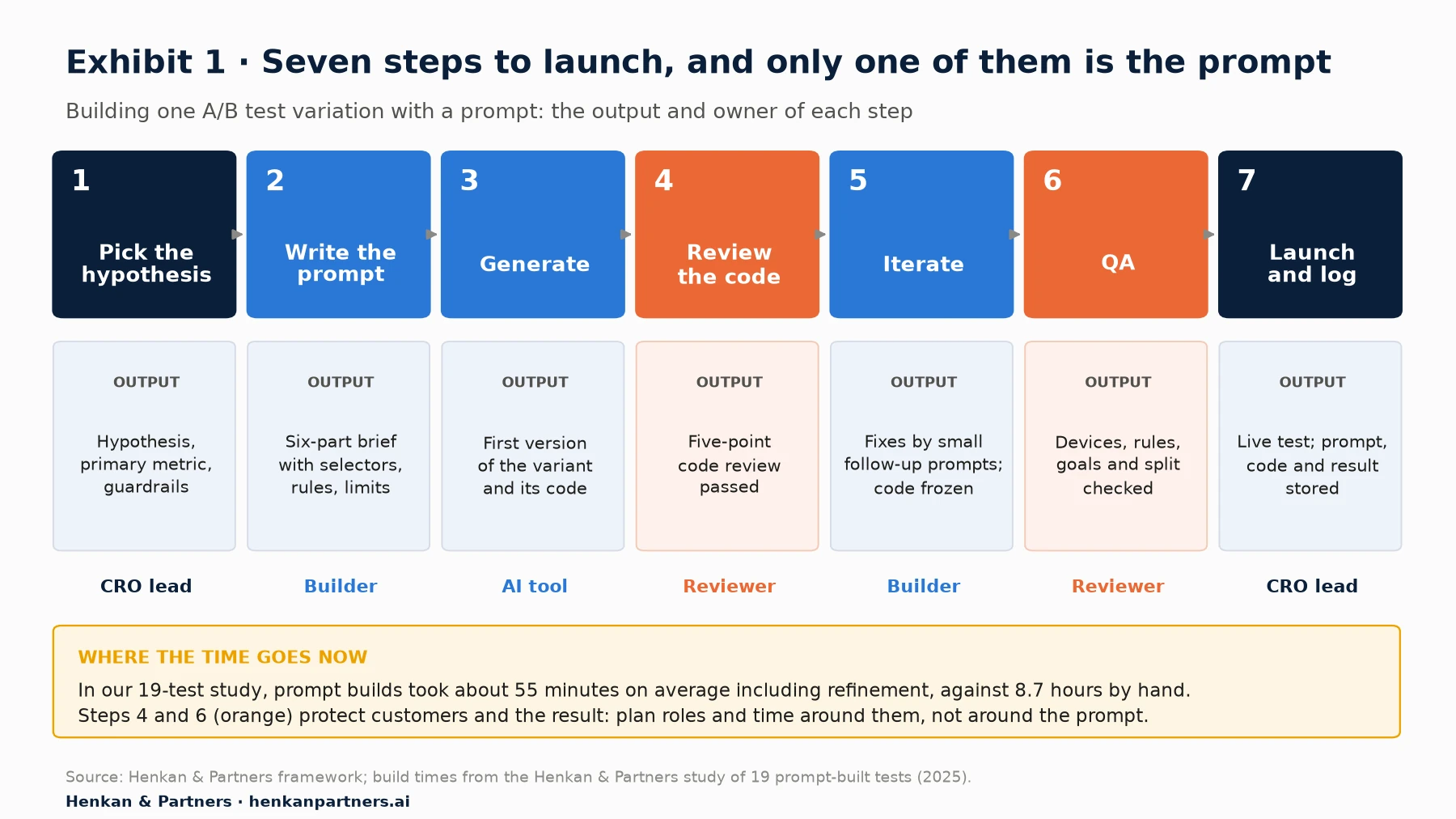
What this shows. The build steps (2 and 3) are now the fastest part of the process. The steps that protect customers and the result (4 to 7) take the same care as before, and step 4 is new: someone must read code that a model wrote. Plan your time and roles around steps 4 to 6, not around the prompt.
Before you start: four things to have in place
- A working testing setup. The testing tool's tag (for example the Kameleoon snippet, which you need before a PBX experiment can run live on your site) must already run on the page, with consent handled and a preview or simulation mode you know how to use.
- Access to the page's structure. You do not need to code, but you do need to open the browser inspector and copy an element's attributes. Our marketer's guide to DOM manipulation explains the basics in plain language.
- A reviewer. Someone who can read JavaScript and CSS well enough to run the checks in Section 6. In a small team this is often a front-end developer doing a short review per test.
- A place to store the prompt, the code and the result. A shared test log or repository. You will need it to rebuild a winner and to reuse prompts that worked.
Section 3 · Step 1: the hypothesis
Pick a hypothesis that lives in the front end and can be described in one sentence
Not every good test idea is a good prompt-built test. The best candidates change what the visitor sees on a page the testing tool already controls: words, visibility, order, a new informational element, a link. The worst depend on data or rules that live on the server. Kameleoon's own prompt guidance says so directly: avoid requests such as "change the product price" or "adjust delivery options", because they "require back-end logic". Its developer guide adds that PBX "cannot modify backend logic; any change that involves servers, permissions, or business rules should be covered by feature flags or normal releases".
Before you write a prompt, run the idea through three questions:
- Can I describe the change in one sentence without saying "like the design"? If the change only makes sense next to a Figma file, prompting will need several rounds or a design import.
- Is every value the variant needs already on the page or in a rule I can write down? If the variant needs data the page does not have, a developer must expose it first.
- Would a broken version harm customers or revenue? Checkout, payment and pricing changes can be prompt-built, but they deserve a developer's review before launch.
Worked example (illustrative): a delivery-date promise under the add-to-cart button
Throughout this article we follow one illustrative test on a fictional home-goods retailer. The evidence behind it is real. In Baymard Institute's checkout research, 41% of sites in its benchmark did not provide the delivery date, "forcing participants to come to a halt to investigate or even guess when their order would arrive". Participants shown only a shipping speed, such as "2–4 business days", made inconsistent assumptions about weekends and holidays, and Baymard recommends showing an estimated delivery date alongside the cost of each option, "including on the Product Page if possible".
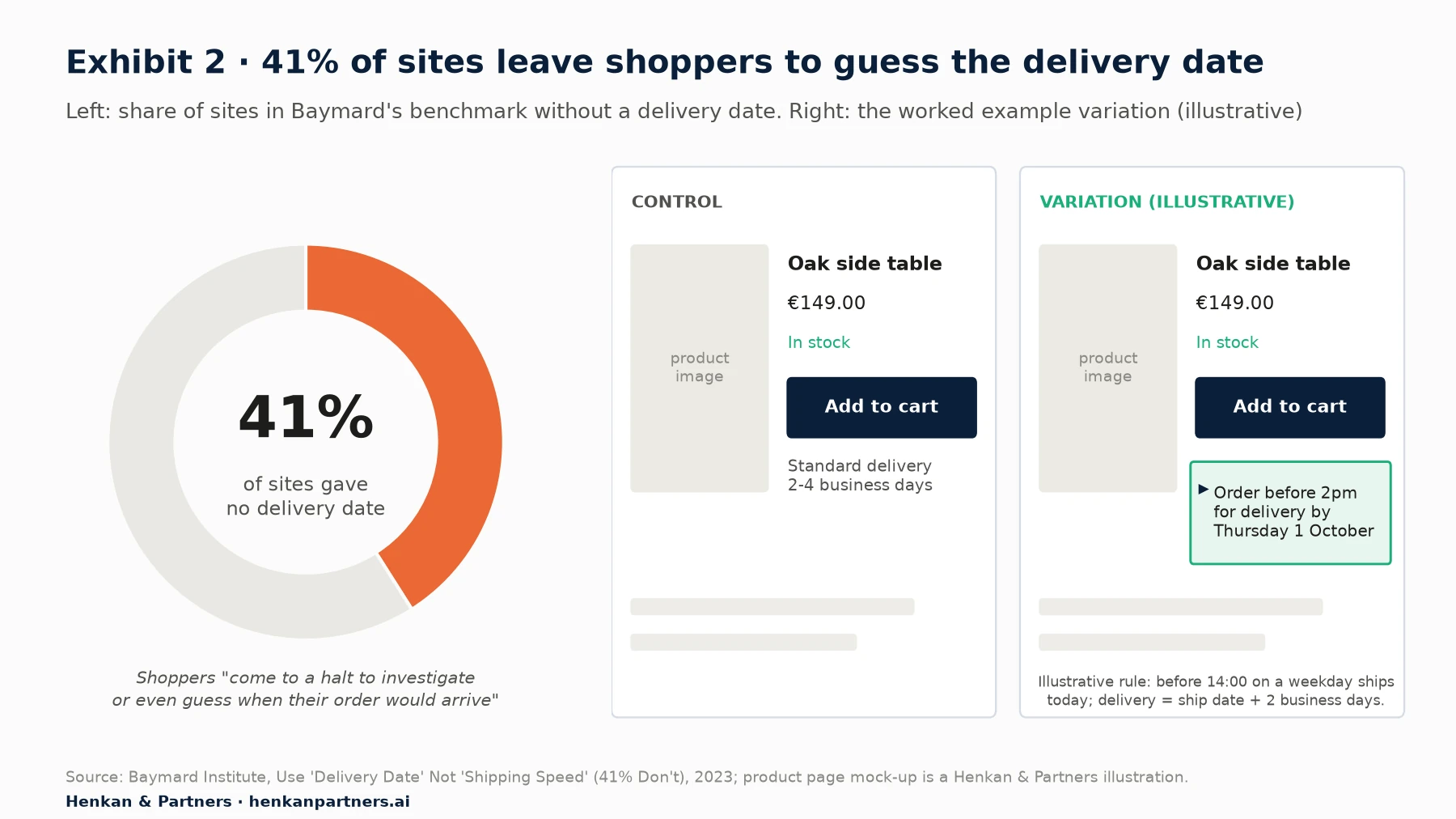
What this shows. The problem is common and documented, and the change is small, visual and easy to describe: one line of text under one button. That makes it a good prompt-built test. The hard part is not the display but the date itself, which must be true, as the hypothesis below makes clear.
The hypothesis, written before any prompt:
If we show an estimated delivery date directly under the add-to-cart button on product pages for in-stock items,
then more visitors will add to cart and complete an order,
because they will no longer have to guess when the item arrives (Baymard, 2023).

Primary metric: orders per visitor
Secondary metric: add-to-cart rate
Guardrails: returns and 'where is my order' contacts within 14 days, product page load time
One constraint shapes the whole build. A delivery promise is only helpful if it is right, and the true date usually depends on stock location, carrier and region, which live in back-end systems. In this illustration the operations team confirms a simple rule that holds for all in-stock items in mainland France: orders placed before 14:00 on a weekday leave the warehouse the same day, and standard delivery takes two business days. The variant can compute a date from that rule in the browser. If your rule is more complex than that, or varies by product, ask a developer to expose the real estimated date on the page first, and only then prompt the display.
For marketers. A prompt-built test is still a promise to real customers. If the date shown is wrong for a meaningful share of orders, you may win the test and lose trust afterwards. Agree the rule with operations in writing and list the exceptions (holidays, oversized items) before you write the prompt.
Section 4 · Step 2: the prompt
Write the prompt like a developer ticket: six parts, exact values and explicit limits
Every vendor that documents its AI builder gives the same core advice. Kameleoon's dos and don'ts ask you to be "highly specific", to structure each prompt as core action, target element and desired outcome, to stick to one request per prompt and to avoid vague terms such as "this" or "that area". Optimizely's guidance for its variation agent asks you to be explicit, to explain the "why", to state design-system constraints, to request accessibility and to "use negative constraints". AB Tasty advises being "as specific as possible" and starting with simple changes.
Our template turns that advice into six parts. It works in any tool, including a general-purpose assistant.
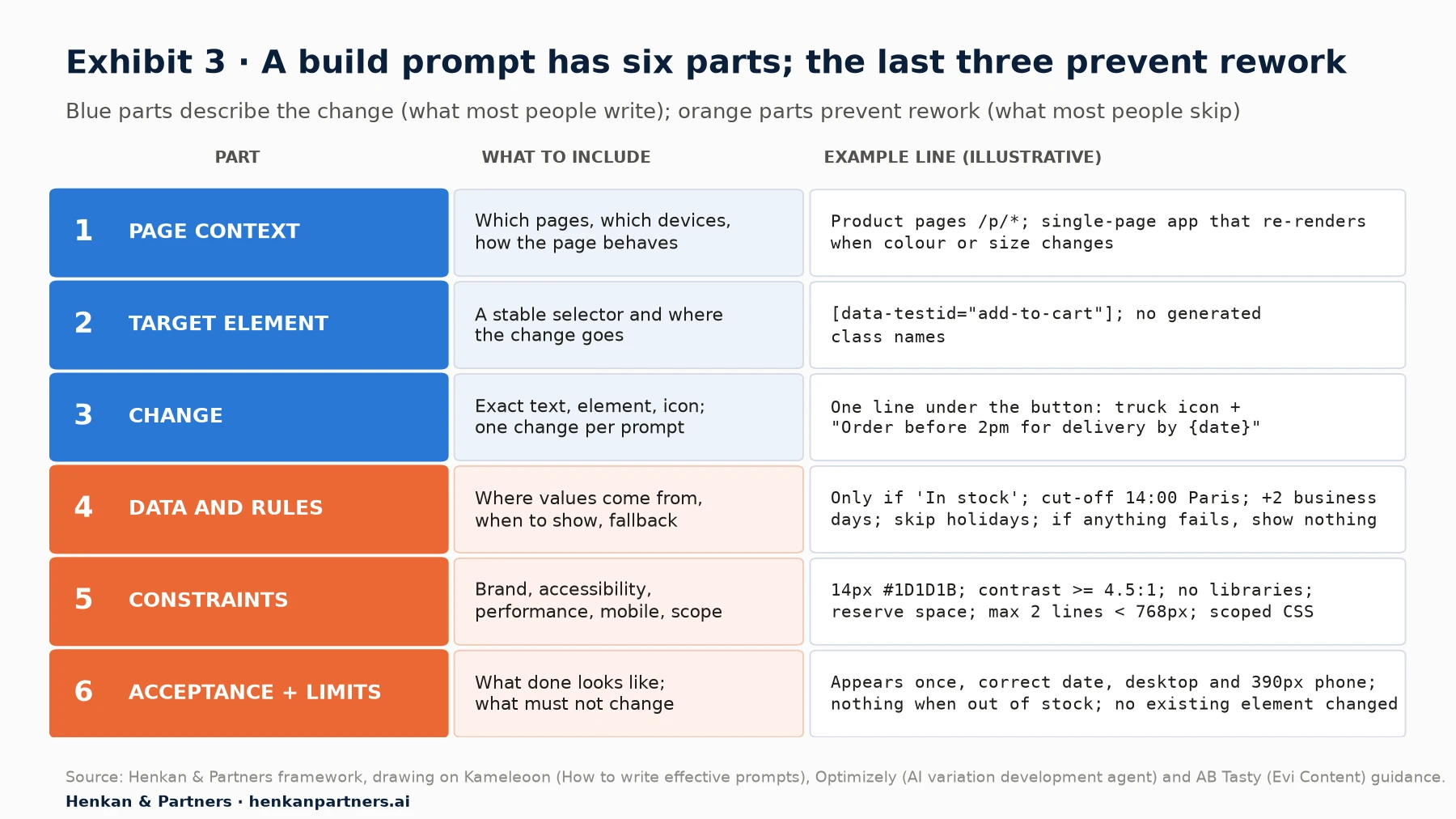
What this shows. Parts 1 to 3 describe the change, which is what most people write. Parts 4 to 6 are what separate a first-time success from five rounds of rework: the rules the variant must follow, the limits it must respect, and a test of done that you can check in the preview.
| Part | What to include | Why it matters |
|---|---|---|
| 1. Page context | Which pages (URL pattern), device scope, and how the page behaves (for example, a single-page app that re-renders when the shopper picks a size) | The model cannot see how your site behaves over time; it only sees the page it is on |
| 2. Target element | A stable selector, ideally a data attribute or ID copied from the inspector, and where the new element goes relative to it | Named selectors had higher first-attempt success in our study; "below the header" was read in different ways |
| 3. Change | The exact text, element type, icon and position; one change per prompt | Stacked requests produce unclear results, as Kameleoon's guidance warns |
| 4. Data and rules | Where each value comes from, the conditions for showing it and what to do when data is missing | Conditional logic caused 31% of shortfalls in our study |
| 5. Constraints | Brand (font, colours, spacing), accessibility (contrast, screen readers), performance (no libraries, no layout shift), mobile behaviour, CSS scope | Constraints prevent the most common side effects, such as global CSS that breaks other components |
| 6. Acceptance and limits | What "done" looks like and what must not change | Gives you a checklist for the preview and stops the model over-building |
The worked example prompt
Here is the full prompt for the delivery-date test. It is long by chat standards and short by ticket standards. Selectors and values are illustrative.
PAGE CONTEXT
Product pages matching /p/*. The site is a single-page app: the product area re-renders when the shopper changes colour or size, and when they navigate to another product without a page reload.

TARGET
The add-to-cart button, selector [data-testid="add-to-cart"]. Do not use generated class names such as .css-1x9k2.

CHANGE
Insert one line of text directly below the add-to-cart button: a small truck icon followed by the delivery message described below.

DATA AND RULES
1. Show the message only if [data-testid="stock-status"] contains the text "In stock".
2. Use Europe/Paris time. Before 14:00 Monday to Friday, the order ships today; otherwise it ships the next business day.
3. Delivery date = ship date + 2 business days. Skip weekends and these holidays: 2026-11-11, 2026-12-25.
4. Before 14:00 on a weekday show: "Order before 2pm for delivery by {Weekday D Month}". Otherwise show: "Order today for delivery by {Weekday D Month}".
5. If any value is missing or the rule fails, show nothing.

CONSTRAINTS
Brand: inherit the page font; 14px text in #1D1D1B; icon 16px in #0B1F3A; 8px space above the line.
Accessibility: real text (not an image), readable by screen readers, contrast at least 4.5:1, no animation.
Performance: no external libraries, fonts or images; inline SVG icon only; reserve the line's height so nothing below it moves.
Mobile: below 768px, allow at most two lines.
Scope: put all CSS under a new class .hk-delivery-promise. Do not change any existing element, style or event listener.

ROBUSTNESS AND TRACKING
Wait until the button exists before inserting. If the product area re-renders, re-insert the line once; never show it twice. When the line is shown, send one custom goal named "delivery_promise_viewed" through the testing tool's goal API.

ACCEPTANCE
On a desktop and a 390px-wide phone, for an in-stock product, the line appears once under the button with a correct date. For an out-of-stock product, nothing appears. Changing size keeps exactly one line.
Three habits make this prompt work. It names a stable selector and forbids generated class names, which change with each site release. It states the rule as numbered steps with a fallback, so the model has no gaps to fill with guesses. And it says what must not change, which is the cheapest protection against a variant that quietly breaks something else.
If your tool supports it, put the constraints that apply to every test into a standing instruction rather than repeating them. Kameleoon's PBX has a "Master Prompt" under AI Settings for "overarching instructions", and Optimizely's agent retrieves page styles to stay on brand. A standing instruction is the right place for your brand tokens, CSS naming rule and accessibility baseline.
Our view. Kameleoon's guidance warns against "technical jargon" in prompts, and for simple visual changes plain language is enough. For anything with rules, data or single-page-app behaviour, we find that a precise selector and numbered rules beat friendly prose. Write for a literal-minded junior developer who has never seen your site.
Section 5 · Step 3: generate
The main AI A/B test builders differ in where the AI works and how much code you see
Once the prompt is ready, the generate step depends on the tool. The four main testing platforms and the general-purpose route below are described from each vendor's own documentation, as checked in September 2026. Features and plans change often; check the current documentation before you commit.
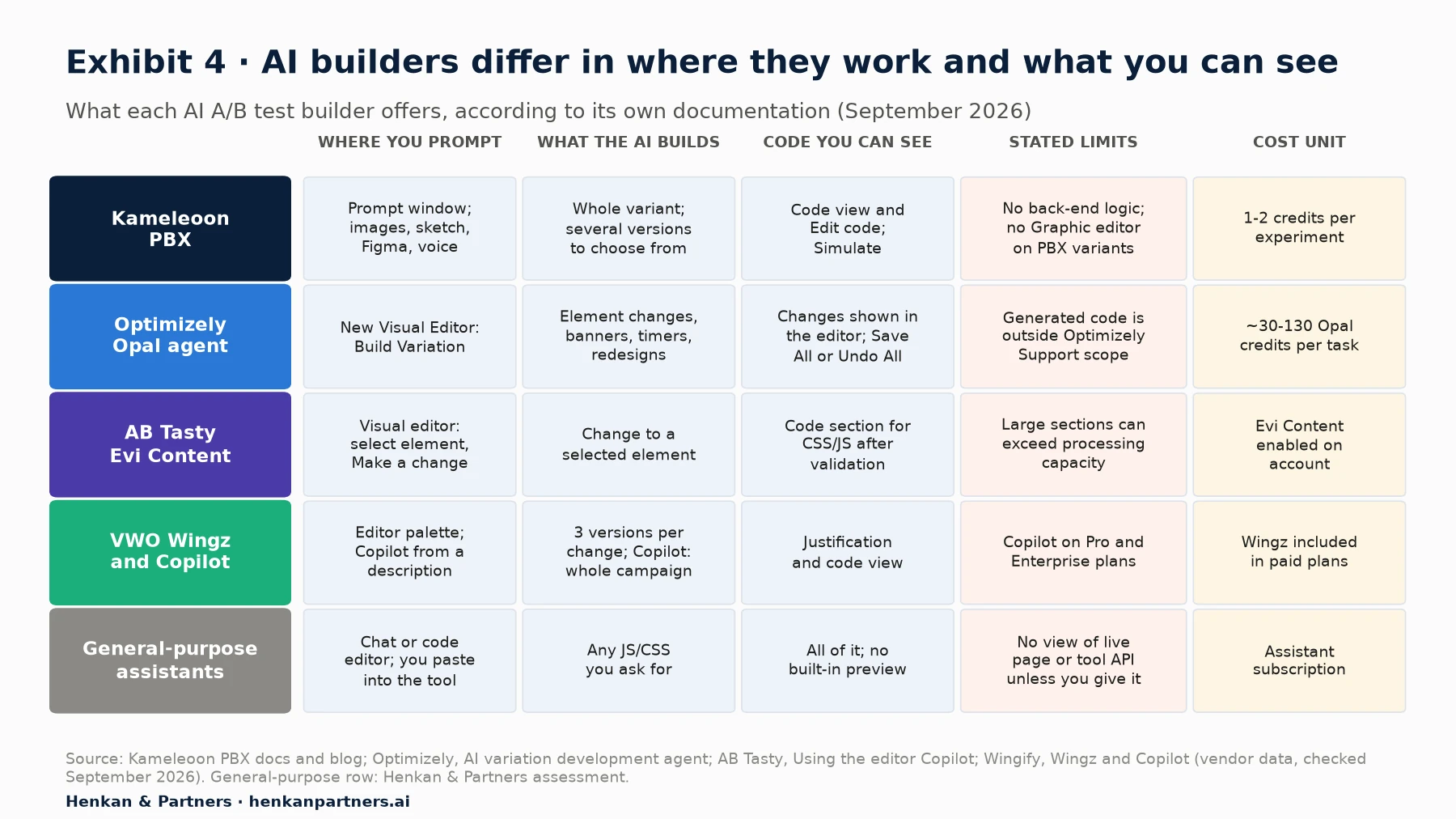
What this shows. The tools split into two families. Kameleoon PBX builds a whole variant from a conversation and makes the code central. Optimizely, AB Tasty and VWO add AI inside an existing visual editor, which keeps familiar workflows but works best element by element. Credit units are not comparable across vendors, so model cost at your own test volume.
Kameleoon Prompt-Based Experimentation (PBX)
You start a new A/B experiment and choose By Prompt (Starter and Trial plans open the prompt interface directly). You can add up to 10 images for context, draw a sketch to point at an area, import a Figma design or dictate. The tool shows its reasoning as it works, may highlight elements or offer design options for you to confirm, and produces versions you choose between with Apply version. A Code switch shows the CSS and JavaScript, Edit code lets you change it, and Simulate tests the variant live before you click Finalize to set goals, audience and traffic.
Three details matter for review. PBX adopts your project's single-page-app settings, and its FAQ says it uses Kameleoon's JavaScript API, including `runWhenElementPresent()` and `enableDynamicRefresh()`, to handle dynamic pages, re-rendering and flicker. You "can't use the Graphic editor" on a PBX-generated variant. And one credit equals one generated code version, with "1 experiment = 1 to 2 credits" depending on prompt quality. Since April 2026, PBX 2.0 adds a Build agent that "browses across your site" to understand components in context, Figma-to-code, and agents to configure tests and ship winners to production through an MCP server. Kameleoon reports a 97% reduction in build time across 1,000 prompt-based experiments on 48 websites (vendor data, measured against a longer baseline than ours).
Optimizely Opal: AI variation development agent
Inside Optimizely Web Experimentation or Personalization, you open the new Visual Editor, click Build Variation and type the change. Opal can modify or create elements, suggest improvements and create countdown timers, banners and widgets, and it retrieves page styles to stay on brand. You review and click Save All or Undo All. You can also ask it to generate a new variation from an existing one. Prerequisites include Opti ID login and a connection between the testing product and Opal.
Two limits are stated plainly in the documentation. A task uses about 30 credits for a simple addition, 70 for a styling update and 130 for a complex change such as sticky navigation or a redesign. And "any code Opal generates is a custom code solution and falls outside the scope of Optimizely Support": the review is yours.
AB Tasty: Evi Content in the visual editor
In the AB Tasty visual editor you select an element, click Make a change and type the instruction. If the result is not right, you click "Not exactly what I had in mind" and refine; when it is, you validate and can continue editing by hand or in the code section. The documentation flags one practical limit: selecting a large section such as a whole header can exceed Evi Content's "processing capacity", so it recommends targeting individual elements and making changes one at a time.
VWO: Wingz in the editor and Copilot for whole campaigns
VWO and AB Tasty merged in 2026 and, since September 2026, have operated under one brand, Wingify; both products keep running while they are gradually folded into one Wingify experience, and Wingify describes Wingz as the AI layer that brings together AB Tasty's Evi and VWO's Copilot. In the VWO editor (now the Wingify Editor), the Wingz assistant works on a selected element, returns three versions of each change, accepts up to four reference files (such as a CSV, PDF or image, 20 MB in total) and shows its justification and the underlying code. VWO Copilot, announced in August 2025 for Pro and Enterprise plans, "creates an entire experiment in just one click" from a plain-language description, including variations, metrics and audience, which you can edit before launch.
General-purpose assistants: ChatGPT, Claude, coding assistants and app builders
You can also ask a general-purpose assistant or a coding assistant in your code editor to write the variant's JavaScript and CSS, then paste it into your testing tool's custom-code area. This works, and it gives you full control, but be clear about the limits:
- It cannot see your live page unless you paste the relevant HTML or connect a browser tool. It will guess selectors and structure, and guesses are the main source of fragile code.
- It does not know your testing tool's API unless you tell it. Ask explicitly for the tool's wait-for-element and goal methods, or the code will use generic patterns that can flicker.
- There is no built-in preview. You go straight to the testing tool's preview and QA, so the review in Section 6 carries all the weight.
- Browser helpers are for exploring, not shipping. Chrome DevTools' AI assistance can explain an element's styles and "apply the suggested change" to the page in your browser, which is useful to try a styling idea. Google flags it as experimental and able to "generate inaccurate" information.
- App builders build apps. Lovable, for example, describes itself as a platform for "building, iterating on, and deploying web applications". It is useful to prototype a component or a landing page for a split-URL test, not to inject changes into an existing site.
For leaders. Choose the tool for your stack, statistics and governance first, and the AI builder second. The builders are converging quickly. What differs, and lasts, is where the AI is allowed to act, whether you can see and edit the code, and who supports it when it breaks. For a wider view of the vendors, see our A/B testing tool market report.
Section 6 · Step 4: review
Review the generated code on five points before you trust the preview
A preview that looks right proves only that the variant works once, on your screen, on the page you had open. The code review asks whether it will keep working for every visitor, on every re-render, without side effects. You do not need to be a developer to ask the questions below, but someone who reads JavaScript should confirm the answers. In most tools you can see the code: Kameleoon's Code view, Wingz's code view, AB Tasty's code section, and of course anything a general-purpose assistant wrote.
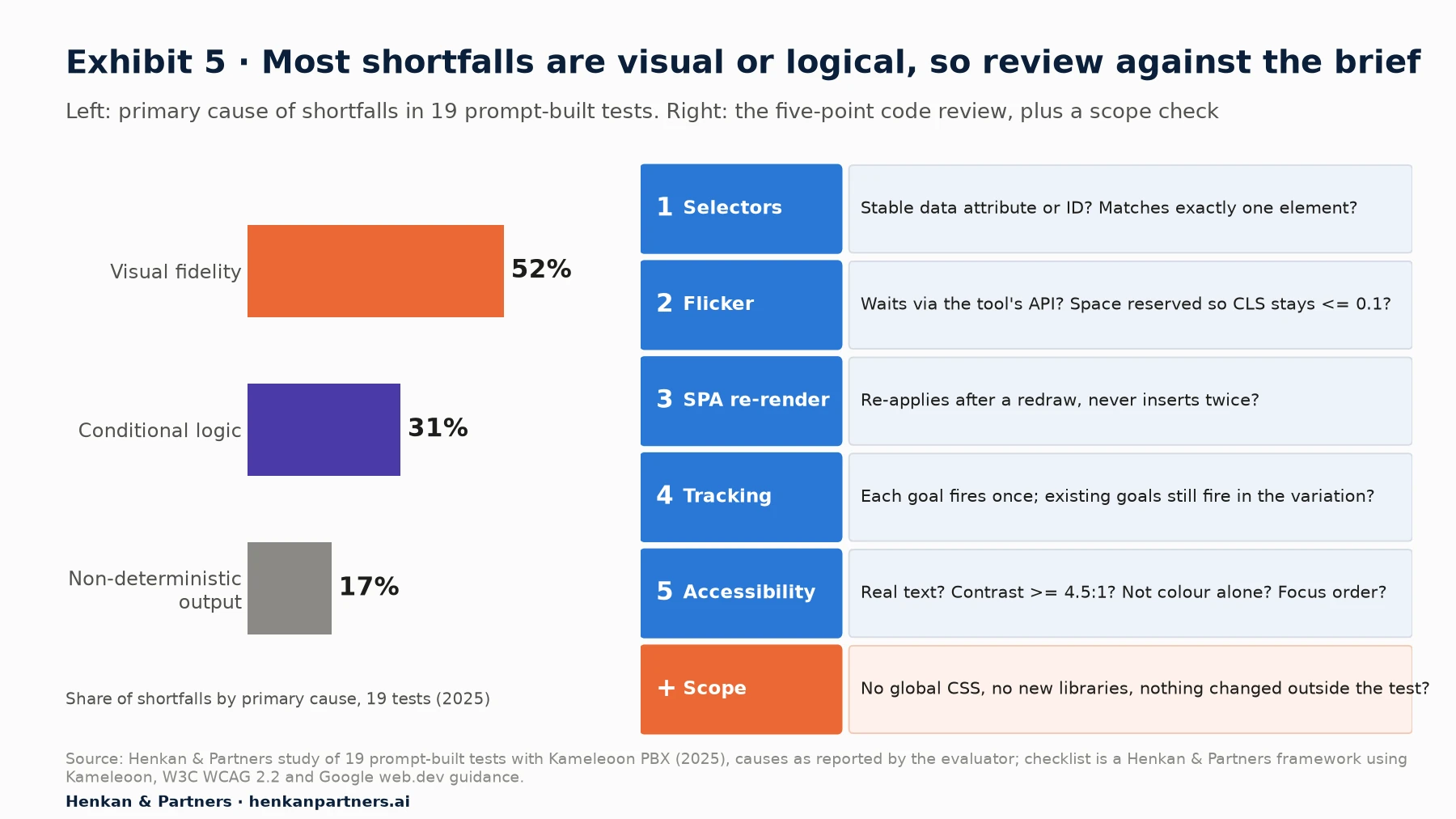
What this shows. Most shortfalls in our study were visible (the layout was not what was meant) or logical (the rule was not applied). Both are caught by a careful review against the prompt's acceptance criteria. The checklist adds the invisible risks, such as flicker, re-rendering and tracking, that a single preview does not reveal.
1. Selectors: will the code find the right element tomorrow?
Look at how the code finds the button. A data attribute or stable ID is robust. A long chain such as `div > div:nth-child(3) > button` or a generated class name will break at the next site release, and the test will silently stop showing the variant. Check too that the selector matches one element only: a product page with a sticky add-to-cart bar may have two buttons with the same attribute. Our developer's guide to DOM manipulation covers selector strategy in depth.
2. Flicker: does the control show before the variant?
Flicker is the brief flash of the original page before the variation applies. Kameleoon's documentation lists two causes: the script runs "after the browser has already displayed the page", or the change takes too long to apply. Its anti-flicker rule hides content while the script loads and is removed after a default timeout of 1,000 milliseconds if the script is late. Check that the code waits for elements using the tool's own method, for Kameleoon `Kameleoon.API.Core.runWhenElementPresent()`, rather than polling with timers. For a new element like our delivery line, also check that space is reserved so the page does not jump: Google's threshold for good Cumulative Layout Shift is 0.1 or less.
3. Single-page apps: does the change survive a re-render?
On sites built with React, Vue or similar frameworks, the page updates without reloading. When the shopper picks another size, the framework may redraw the product area and wipe out the inserted line, or the code may run again and insert it twice. Look for code that watches for changes, such as a MutationObserver or the tool's dynamic-refresh setting, and that checks whether the element already exists before inserting it. In our study, a variant with anchor links triggered "route not found" errors in a single-page app, which would have broken navigation if launched unchecked.
4. Tracking: does every goal fire once, in both groups?
Check that the custom goal (`delivery_promise_viewed` in our example) fires once per view, not on every re-render, and that the add-to-cart and order goals still fire in the variation. A variant that breaks a click listener will look like a losing test when it is really a broken one. Where you can, record the same "eligible" event in control, so that you can analyse only visitors who would have seen the line.
5. Accessibility: can everyone read and use it?
Check that the message is real text, not an image or a pseudo-element that screen readers skip; that the contrast ratio is at least 4.5:1 for normal text, the WCAG 2.2 minimum; that no meaning relies on colour alone; and that the new element does not sit between the button and the next item in the keyboard focus order in a way that confuses. In our study, 95% of successful prompt-built variants met WCAG AA checks, but "successful" is the key word.
Plus a scope check: does the code touch anything else?
Search the CSS for selectors that are not scoped to the test, such as `button { }` or `.container { }`. In our study, one generated hero redesign wrote site-wide rules that broke dropdown menus and pop-over layers elsewhere on the page. Also check for new external requests, libraries or fonts the prompt did not ask for.
For illustration, a well-built variant for our example has this shape. It is simplified; real generated code will be longer.
Kameleoon.API.Core.runWhenElementPresent('[data-testid="add-to-cart"]', function (els) {
  var btn = els[0];
  if (document.querySelector('.hk-delivery-promise')) return;      // never twice
  var stock = document.querySelector('[data-testid="stock-status"]');
  if (!stock || stock.textContent.indexOf('In stock') === -1) return; // rule 1
  var msg = buildMessage(new Date());                                 // rules 2-4, returns '' on failure
  if (!msg) return;                                                   // rule 5
  var line = document.createElement('p');
  line.className = 'hk-delivery-promise';
  line.textContent = msg;                                             // real text, not an image
  btn.insertAdjacentElement('afterend', line);
  if (!window.hkPromiseGoalSent) {                                    // send the goal once,
    window.hkPromiseGoalSent = true;                                  // not on every re-render
    Kameleoon.API.Goals.processConversion(GOAL_ID);                   // GOAL_ID: your goal's ID
  }
}, null, true);                                                     // true: re-runs when the SPA re-renders the button
For marketers. You can run most of this review yourself with two questions to the tool: "Explain what this code does, line by line" and "List every element and style this code changes outside .hk-delivery-promise". If the answer to the second is not "none", ask for a fix before anyone else sees the preview.
Section 7 · Step 5: iterate
Iterate with one small follow-up prompt at a time, and stop after a set number of rounds
First results are rarely perfect. Optimizely's guidance says so directly: "AI-generated variations might not be perfect on the first try." The skill is to fix one thing per round, and to know when to stop prompting and hand over to a developer.
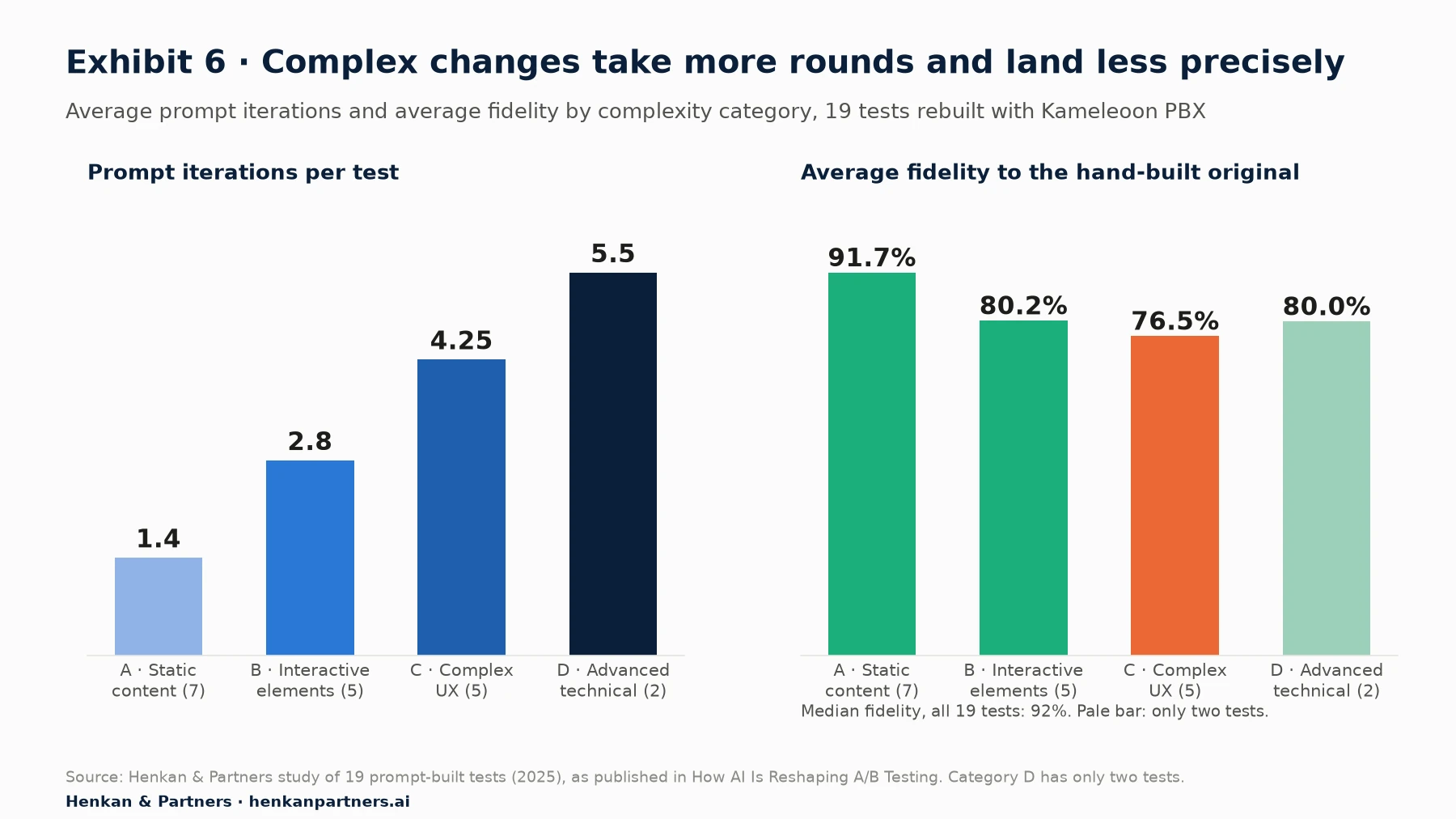
What this shows. Simple changes usually land in one or two rounds. Complex changes take four or more, and each round is human time spent reviewing and rewriting, so they keep less of the speed gain. Fidelity also falls with complexity, although the spread within each category is wide. A stop rule based on rounds protects your time.
Good follow-up prompts are narrow and refer to what you can see. For the worked example, typical rounds might be:
| What you see in the preview | Follow-up prompt |
|---|---|
| The line shows twice after changing size | "When the product area re-renders, the delivery line appears twice. Before inserting, check whether .hk-delivery-promise already exists inside the product area and do nothing if it does." |
| The date is wrong on Friday afternoon | "On Friday after 14:00 the date should be Wednesday, not Tuesday: ship date is Monday, plus two business days. Fix the business-day calculation and show me the function." |
| The icon is too large on mobile | "Below 768px, set the icon to 14px and keep it vertically centred with the first line of text. Change nothing else." |
| Buttons elsewhere changed colour | "The CSS affects buttons outside the test. Scope every rule to .hk-delivery-promise and remove any rule that targets button, p or other global selectors." |
Three rules keep iteration under control:
- Set a round limit before you start. In our experience, if a change is not right after four rounds, the brief is missing something only a designer or developer can supply. Hand it over with the prompt history rather than keep rewording.
- Freeze the code once approved. Language models are non-deterministic: the same prompt can produce different code on another run, which we saw in our study. Approve the exact build that will go live, and never regenerate after QA.
- Save the prompt that worked. Add the final prompt, the code and later the result to your test log. Over time this becomes a prompt library for your site, which is the fastest way to raise first-round success.
Section 8 · Steps 6 and 7: QA and launch
QA and launch a prompt-built test exactly like a hand-built one, then log the prompt with the result
Once the code is approved, the test follows the same launch process as any other. Our A/B test QA checklist covers it in full; the points below are the ones that matter most for prompt-built variants.
- Preview on real devices, not only in the builder. Use the tool's simulation or QA mode (Kameleoon's Simulate, or the equivalent in other tools) and force the variation on the browser and device pairs that carry most of your traffic. For our example, test an in-stock and an out-of-stock product, before and after 14:00, and on a Friday.
- Check the acceptance criteria from the prompt. They are your test script. If the prompt said "never twice", change the size five times and count.
- Confirm targeting, goals and traffic allocation. In Kameleoon this happens after Finalize; in VWO Copilot the AI proposes metrics and audience, which you must still check.
- Watch the first 24 to 48 hours. Check that the visitor split matches the plan (a sample ratio mismatch often signals a variant bug), that goals fire in both groups and that guardrails, such as page speed and errors, are stable.
- Log the prompt, the code and the decision. When the test ends, a winning variant can be rebuilt properly by a developer or, in Kameleoon's case, moved to production with PBX Ship. A losing one teaches you something only if you can find it again.
Our view. Faster builds tempt teams to skip QA, and that is exactly backwards. In our study, five of 19 prompt-built variants scored below 70% fidelity and would have needed substantial work before launch. The time you save on the build should be partly reinvested in QA, not all spent on more tests.
Section 9 · Prompt or developer
Use prompts for changes you can describe precisely, and developers for layout precision and business logic
The practical question is not whether AI can build tests. It can build many. The question is which tests to route to a prompt, which to a developer, and which to a hybrid where a prompt produces the first draft and a developer finishes it. Two factors decide most cases: how precisely the change can be described in words, and how much it depends on logic or data that live outside the page.
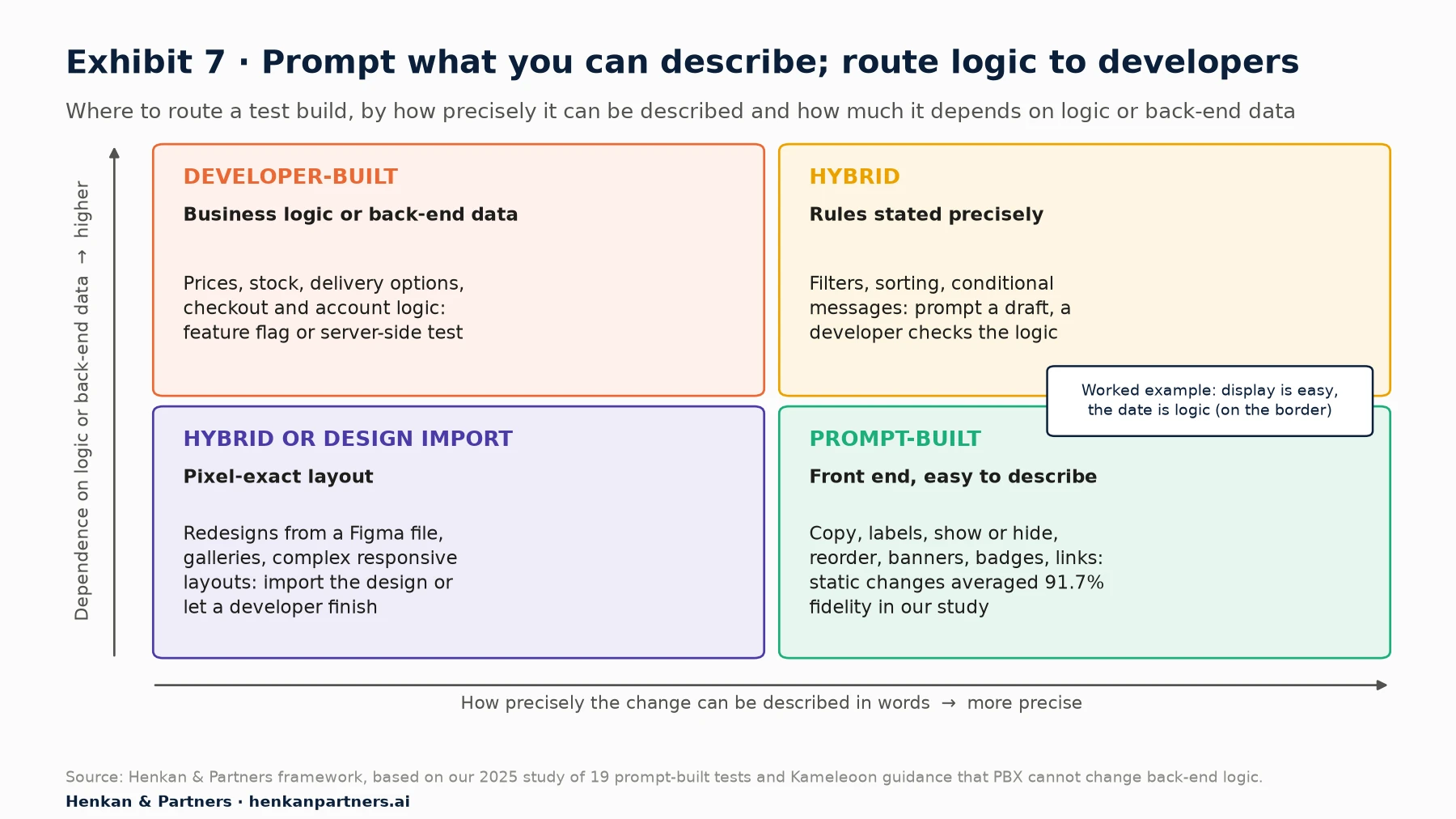
What this shows. Most everyday tests sit in the prompt-built quadrant. Our delivery-date example sits on the border: the display is easy to describe, but the date is business logic, so it is prompt-built only because the rule is simple and confirmed. With a more complex rule it moves to the developer quadrant.
| Type of test | Suggested route | Why |
|---|---|---|
| Copy, headlines, labels, microcopy | Prompt | Easy to specify; in our study static changes averaged 91.7% fidelity |
| Show, hide or reorder existing elements | Prompt | Selectors and positions can be named exactly |
| New informational element (banner, badge, message) | Prompt, with a data check | Display is easy; confirm every value it shows is on the page or in a written rule |
| Pixel-exact redesign from a design file | Hybrid or Figma import | Visual precision caused 52% of shortfalls in our study |
| Multi-step flows, galleries, filters with rules | Hybrid | Needed about four or more rounds in our study; a developer finishes faster |
| Prices, stock, delivery options, checkout logic | Developer, feature flag or server-side | Kameleoon states that PBX cannot change back-end logic; treat other builders the same way |
Two further points shape the choice. First, who is building. A marketer without developer support gains the most from prompting, because it opens up tests that were simply not possible before. A team with developers gains by moving them to the hybrid and developer quadrants, where their time is worth most. Second, what happens to winners. A prompt-built variant is test code, not production code. Plan for the winner to be rebuilt in the product, or use a tool that supports that hand-off.
For how the rest of the testing cycle is changing, hear Frédéric De Todaro, Chief Product Officer at Kameleoon, discuss prompt-based experimentation on our podcast, Studio 001.
Section 10 · Operating model
Scale prompt-built tests with a standing prompt, a named reviewer and a shared library
One prompt-built test is a trick. Twenty a month is an operating model. Teams that scale well put four things in place, in our experience:
| Element | What it is | Owner |
|---|---|---|
| Standing instruction | Brand tokens, CSS naming rule, accessibility baseline, the tool's wait and goal methods; in PBX, the Master Prompt | Lead developer or CRO lead |
| Prompt library | Final prompts that worked, by test type and page template, with the code and result | Whoever builds; curated monthly |
| Named reviewer | The person who runs the five-point code review and signs off QA | Front-end developer or trained CRO specialist |
| Round limit and hand-off rule | When a build moves from prompt to developer, and what is handed over | CRO lead |
Cost needs a model too. The units differ by vendor: Kameleoon counts one credit per generated code version and one to two credits per experiment, with Starter plans from 30 credits a month; Optimizely's Opal variation agent uses about 30 to 130 credits a task depending on complexity; Wingz is included in paid Wingify (VWO) plans. Estimate your monthly build volume and the likely number of rounds per test, then compare. In our study the average was 1.4 rounds for static changes and 4.25 for complex UX.
Finally, measure the right thing. Build time is the easiest number to improve and the least important. Track the time from approved hypothesis to launch, the share of prompt-built tests that pass QA first time, and the number of tests that produce a decision. If build time falls but launches do not rise, the bottleneck has moved to QA or traffic, and that is where to invest next.
For leaders. The build step is becoming cheap. The scarce skills are now choosing what to test, writing a precise brief and reviewing what the AI produced. Invest in those, and give someone clear accountability for every variant that reaches customers.
Section 11 · Next steps
What to do next
1. Pick three prompt-ready tests from your backlog
Choose three ideas that change only the front end and can be described in a sentence: a message, a label, a reordered element. Write a hypothesis and a primary metric for each before you open any AI tool. If your backlog is thin, our guide to turning customer insight into a test backlog will help.
2. Write your standing instruction
Put your brand tokens, CSS scoping rule, accessibility baseline and the testing tool's element-wait and goal methods into one short document. Load it as the tool's standing instruction if it has one, or paste it at the top of every prompt.
3. Build one test with the six-part template and review it on five points
Use the template in Exhibit 3 and the review in Exhibit 5. Time each step. Note how many rounds it took and what the follow-up prompts fixed; that is the start of your prompt library.
4. Run a small reconstruction test before you scale
Rebuild five to ten past tests with your chosen tool and compare them with the hand-built originals, as we did in our 19-test study. It tells you, for your site and framework, which kinds of tests the tool builds reliably.
5. Set the round limit, the reviewer and the hand-off rule
Decide who signs off each prompt-built variant, how many rounds are allowed before a developer takes over, and how winners reach production. Write it down and share it with everyone who can launch a test.
6. Get help if you want to move faster
We help teams set up prompt-based experimentation on Kameleoon, Optimizely, AB Tasty and VWO, from the first standing prompt to QA and governance at scale. Talk to us.
FAQ
Frequently asked questions about prompt-based experimentation
Frequently asked questions
What is prompt-based experimentation?
Prompt-based experimentation is building an A/B test variation by describing the change in plain language, with an AI model writing the code. Kameleoon launched it as PBX in June 2025, and Optimizely, AB Tasty and VWO now offer their own AI builders. You still review, QA and launch the test as usual.
Can AI build an A/B test for me?
Yes, for most front-end changes. In our rebuild of 19 real tests with Kameleoon PBX, 11 matched the hand-built original at 90% fidelity or better and build time fell by about 89% on average. Changes that need pixel-exact layout or business logic were much less reliable.
What is the best AI A/B test builder?
It depends on your platform and workflow. Kameleoon PBX builds whole variants from a conversation and shows the code; Optimizely's Opal agent, AB Tasty's Evi Content and VWO's Wingz work inside their visual editors. Choose the testing platform for your stack and governance first, then use its builder.
How do I write a good prompt for an A/B test?
Write it like a developer ticket: page context, a stable selector for the target element, the exact change, the data and rules, constraints for brand, accessibility, performance and mobile, and acceptance criteria. Make one change per prompt and say what must not change.
Do I need to know how to code to build a test with a prompt?
No, but you need to know your page. Learn to copy an element's attributes from the browser inspector, and have someone who reads JavaScript review the generated code before launch.
Can I use ChatGPT or Claude to build an A/B test?
Yes. A general-purpose assistant can write the JavaScript and CSS, which you paste into your testing tool's custom-code area. It cannot see your live page unless you share the HTML, and it does not know your tool's API unless you tell it, so the review and QA carry more weight.
Do AI-generated A/B tests need QA?
Yes, and slightly more than hand-built ones. Check selectors, flicker, single-page-app re-rendering, tracking, accessibility and CSS scope, then QA on real devices. Approve the exact code that ships, because the same prompt can give different code on another run.
What can't prompt-based experimentation do?
It cannot change back-end logic such as prices, stock or delivery options; Kameleoon states this plainly in its PBX documentation. It also struggles with pixel-exact layouts and complex conditional rules. Use a developer, a feature flag or a server-side test for those.
How much does prompt-based experimentation cost?
Vendors price it differently. Kameleoon counts one to two credits per experiment, with Starter plans from 30 credits a month; Optimizely's Opal variation agent uses about 30 to 130 credits per task; Wingify includes Wingz in its paid plans. Model the cost at your own monthly test volume.
Key terms
- Prompt-based experimentation
- Building A/B test variations from natural-language descriptions, with AI writing the code. It removes the developer from routine builds, which makes the brief the key skill.
- PBX
- Kameleoon's Prompt-Based Experimentation feature. It matters as the first testing product built around prompting, and the one used in our 19-test study.
- Opal
- Optimizely's AI platform, which includes the AI variation development agent. Its code is treated as custom code outside Optimizely Support, so your team owns the review.
- Variation (variant)
- The changed version of a page shown to part of the traffic in an A/B test. Building it is the step prompts automate.
- Prompt
- The written instruction given to the AI. Its precision largely decides the quality of the variation.
- Standing instruction (master prompt)
- Instructions applied to every prompt, such as brand tokens and CSS rules. It saves repetition and makes output more consistent.
- CSS selector
- An address that identifies an element on a page, such as [data-testid="add-to-cart"]. Stable selectors keep a variation working after site releases.
- DOM
- The Document Object Model, the structure of elements the browser builds from a page. Test code changes the DOM to create a variation.
- Flicker
- A brief flash of the original page before the variation applies. It harms the experience and can bias results.
- Single-page application (SPA)
- A site that updates content without full page reloads, built with frameworks such as React or Vue. Variations must survive re-renders or they vanish or duplicate.
- MutationObserver
- A browser feature that watches for changes to the page. Test code uses it to re-apply a change after the site redraws an area.
- Cumulative Layout Shift (CLS)
- Google's measure of unexpected movement on a page; 0.1 or less is good. New elements must reserve space to avoid raising it.
- Fidelity score
- In our study, how completely a prompt-built variant reproduced the hand-built original. It is a useful measure when you test a tool on your own site.
- Non-determinism
- The same prompt giving different code on different runs. It is why you approve and store the exact code that ships.
- Sample ratio mismatch (SRM)
- When the observed split of visitors differs from the planned split. It usually signals a bug and invalidates the result.
Sources
All sources were checked in September 2026. Tool features, credits and plans come from each vendor's own documentation, blog posts or announcements and are vendor data; they change often. Kameleoon's 97% build-time reduction is vendor-reported. Figures on build time, fidelity, iterations and causes of shortfalls come from the Henkan & Partners study of 19 prompt-built tests (2025, single evaluator), reported as published in our research article. Exhibits 1, 3 and 7, the right-hand panel of Exhibit 5, the prompt template, the review checklist, the routing guide and the operating model are Henkan & Partners frameworks. The worked example, including its prompt, selectors, rules and code, is illustrative. Exhibit 4's general-purpose row is our assessment.
- Henkan & Partners (2025, updated 2026). How AI Is Reshaping A/B Testing: What 19 Prompt-Built Tests Tell Us About Speed, Quality and Limits.
- Kameleoon (2025). Introducing Prompt-based Experimentation (vendor announcement).
- Kameleoon (2025). What we learned from 1,000 prompt-based experiments (vendor data).
- Kameleoon (2025). A developer's guide to prompt-based experimentation.
- Kameleoon (2026). PBX 2.0 is changing testing again (vendor announcement).
- Kameleoon (n.d.). Create a prompt-based experiment (vendor documentation).
- Kameleoon (n.d.). How to write effective prompts (dos and don'ts) (vendor documentation).
- Kameleoon (n.d.). Prompt-based experimentation FAQ (vendor documentation).
- Kameleoon (n.d.). Prompt-based experimentation plans (vendor documentation).
- Kameleoon (n.d.). Flicker in A/B testing: causes, solutions and best practices (vendor documentation).
- Optimizely (n.d.). AI variation development agent (vendor documentation).
- AB Tasty (n.d.). Using the editor Copilot (Evi Content) (vendor documentation).
- Wingify (2025). Create optimization campaigns by prompting with Copilot (vendor announcement).
- Wingify (n.d.). Create variations effortlessly with Wingz (vendor documentation).
- Wingify (2026). VWO and AB Tasty combine to create a global digital experience optimization platform.
- Wingify (2026). AB Tasty and VWO unite under Wingify, launching a unified platform, new brand identity and a website (press release, 16 September 2026).
- Wingify (2026). Inside Wingify: the digital experience optimization suite (vendor blog).
- Google, Chrome for Developers (n.d.). AI assistance in Chrome DevTools.
- Lovable (n.d.). Welcome to Lovable (vendor documentation).
- Baymard Institute (2023). Use 'Delivery Date' not 'Shipping Speed' (41% don't).
- W3C (2023). Understanding Success Criterion 1.4.3: Contrast (Minimum). WCAG 2.2.
- Google, web.dev (n.d.). Cumulative Layout Shift (CLS).
- Henkan & Partners (n.d.). Studio 001: Frédéric De Todaro, Chief Product Officer at Kameleoon, on prompt-based experimentation (podcast).
- Kameleoon (n.d.). Activation API reference (vendor documentation).