Focus
A/B Testing a Mobile App: Firebase A/B Testing or a Dedicated Platform?
Alexandre Suon · 2026-10-21
On the web, a test can go live this afternoon. In a mobile app, every variation must already sit inside a binary that has passed app review and reached users' phones. That single difference changes how you design, run and analyse mobile app A/B testing, and it decides whether Firebase A/B Testing is enough or whether you need a dedicated experimentation platform. This guide compares the two on statistics, identity, limits, cost and effort, and gives a decision framework and a migration checklist.
Executive summary
- App experiments are delivered differently from web experiments. The code for every variation has to ship in a release that goes through app review (Apple reviews at least 50% of submissions in under 24 hours and 90% in under 48 hours) and then reaches users gradually: Apple's phased release takes seven days to go from 1% to 100% of automatic-update users. Remote configuration and feature flags then switch variations on without a new release.
- Firebase A/B Testing is a capable, free starting point. It runs experiments on Remote Config parameters and notifications, targets by app version, platform, country, language and Google Analytics audiences, and reports a primary goal plus up to five other metrics. A/B Testing is included at no extra charge; Remote Config fetches move to pay-as-you-go above 100,000 a day from September 2026.
- Its limits are in statistics, identity and governance. Firebase uses a one-tailed fixed-horizon test at α = 0.05 with results refreshed daily, allows at most 24 running experiments and rollouts per project, stops collecting data after 90 days, assigns users by installation rather than by your own user ID, and documents no sample ratio mismatch check or variance reduction. In our simulation, acting on the first daily 'leader' in a two-week test raises the false-win rate from 5% to about 19%.
- Dedicated platforms add a decision layer. Sequential tests that allow early looks, CUPED variance reduction (about 50% less variance in the original Microsoft paper), automatic sample ratio checks, guarded rollouts with automatic rollback, metrics from your own warehouse, assignment on your user ID and one programme across web and app.
- Sensitivity matters more in apps than on web. A new-user test on day-7 retention needs about 51,000 users to detect a 5% relative change; at 2,000 installs a day that is about 33 days, including the seven days the metric needs to mature.
- Switch when your decisions outgrow the tool, not when you are bored of it. Stay on Firebase while you run a handful of tests on Analytics metrics. Move to, or add, a dedicated platform when you need more concurrent tests, back-end or revenue metrics, safe early stopping, cross-device users or one programme for web and app.
Section 1 · Why apps are different
Mobile app A/B testing differs from web testing in ways that change the tooling decision
Most experimentation teams learn their craft on websites, where a testing tool can change a page after it has been built and a variation can go live within the hour. Apps do not work that way. The interface is compiled code that runs on the user's phone, often in two separate code bases, and the version installed on each phone is the one the user last updated to.
Mobile app A/B testing is the practice of randomly assigning app users to two or more versions of an experience, delivered through remote configuration or feature flags inside the app, and comparing their behaviour on metrics fixed before launch. Unlike web testing, every variation's code must ship in an app release before the test can start.
The main constraint is the release chain. On iOS, a new build is reviewed by Apple; the App Review page says the team typically reviews 'at least 50% of submissions in less than 24 hours and 90% in less than 48 hours' (Apple, App Review). An update can then be released in phases over seven days, to 1%, 2%, 5%, 10%, 20%, 50% and finally 100% of users with automatic updates turned on (Apple, Release a version update in phases). On Google Play, staged rollouts let you choose the percentage of users who receive an update, but the percentage 'won't increase automatically', and halting a rollout does not move users who already updated back to the previous version (Google Play Console Help).
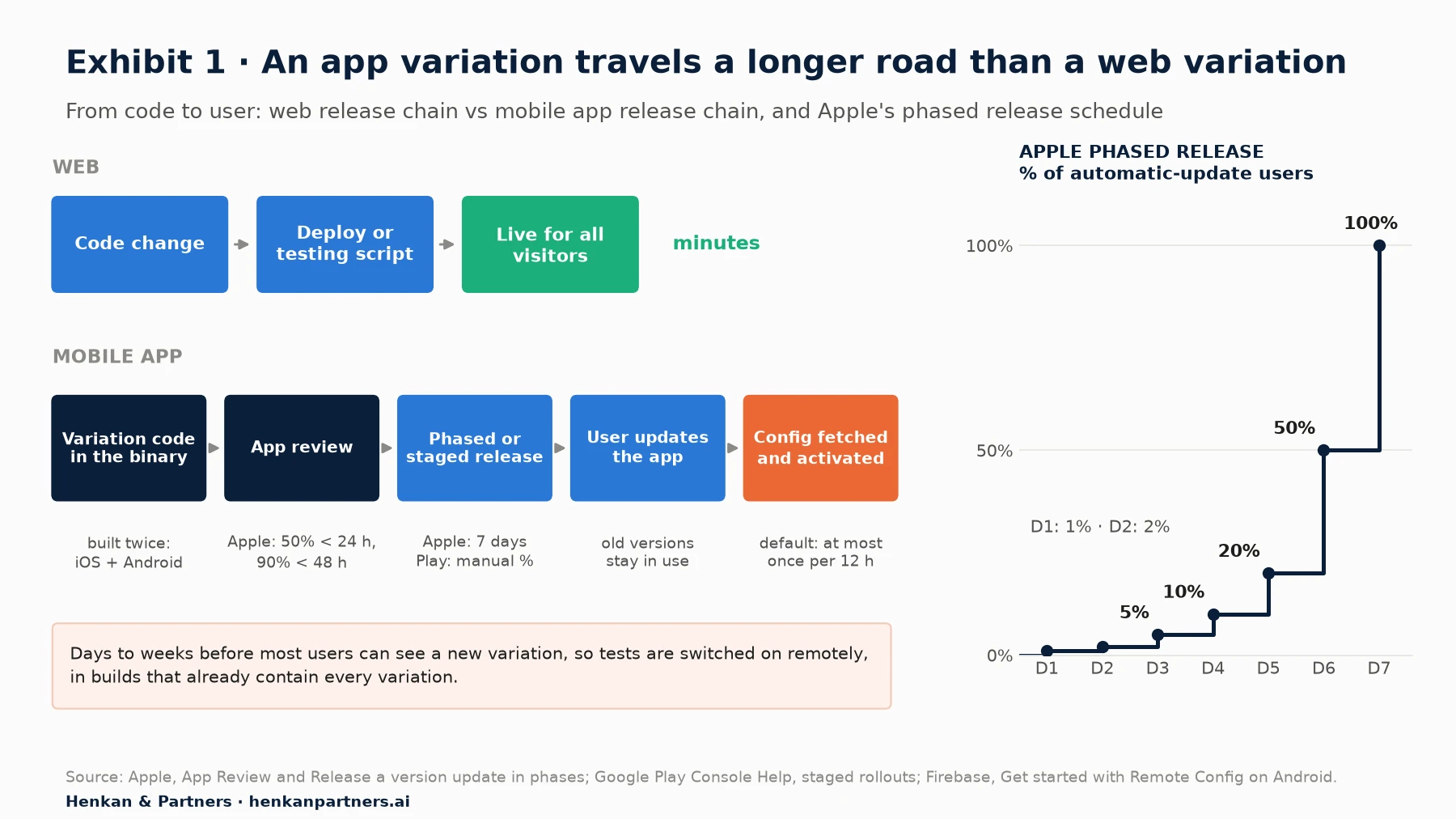
What this shows. A web test depends on one deployment. An app test depends on a chain of steps the team only partly controls: review, phased release, the user's decision to update, and the moment the app fetches and activates its configuration. The practical rule follows: ship the code for all variations behind a switch, switched off, in a normal release; then start the experiment remotely once enough users run that version.
| Dimension | Web A/B testing | Mobile app A/B testing | Consequence for the test |
|---|---|---|---|
| Delivery | Script or server change, live in minutes | Variation code ships in a reviewed release, then is switched on remotely | Plan tests one or two releases ahead |
| Code bases | One front end | Often iOS and Android built separately, plus cross-platform frameworks | Build and QA each variation twice; analyse by platform |
| Unit of assignment | Usually a cookie or visitor ID | App installation or a logged-in user ID | Decide which ID defines a 'user' before launch |
| Versions in use | Everyone sees the current site | Several app versions live at once | Target the versions that contain the variation code |
| Connectivity | Online by definition | Sessions can start offline; events are sent later | Use cached configuration and expect late or lost events |
| Sample size | Visitors arrive every day | Many tests target logged-in or new users only | Tests run longer; variance reduction matters more |
| Rollback | Remove the script | Turn the flag off; a crashing binary needs a new release | Guard crashes and performance from day one |
Three of these differences deserve more detail because they cause most of the analysis problems we see in app tests.
- Two code bases. When iOS and Android are built by different teams, the 'same' variation is two implementations. A test that wins on Android and loses on iOS may be measuring a bug, not a user preference. Read results by platform before pooling them, and check that both builds log the same events.
- App versions. A variation only exists in builds that contain its code. If you target all users, people on older versions receive the default experience but may still be counted. Target by app version and build number, which Firebase and the dedicated platforms all support, and wait until enough users have updated.
- Offline use and lost telemetry. Phones close background threads to save battery and lose network connections. Microsoft's experimentation team found that telemetry loss is particularly likely on devices such as phones, and that a variation that crashes can cause its logs to be delayed or never sent, which distorts the traffic split (Fabijan et al., KDD 2019).
Our comparison of client-side and server-side A/B testing covers the same trade-off on the web. In apps the choice is made for you: almost every test is a server-controlled switch inside client code.
Section 2 · The delivery layer
Every variation must already be in the app: remote config and feature flags are the delivery layer
Because the binary cannot change between releases, app teams test by changing values the binary reads at run time. Two mechanisms do this, and every tool in this article is built on one or both.
Remote configuration is a set of key-value parameters, such as a button label, a price display rule or the number of products in a carousel, that the app downloads from a server and applies without a new release. Feature flags are on-off or multi-value switches around blocks of code, evaluated for each user against targeting rules. An experiment is a flag or parameter whose value is assigned at random and measured.
Apple's rules set the boundary. Guideline 2.5.2 says apps may not 'download, install, or execute code which introduces or changes features or functionality of the app' (Apple, App Review Guidelines). Changing a value that selects between behaviours already reviewed in the binary is the standard pattern; downloading new executable code to create a variation is not. In practice, this means the product team decides the variations before the release, not after it.
When the new values take effect is the app equivalent of web flicker. Firebase documents three loading strategies: fetch and activate at start-up, activate behind a loading screen, or activate values fetched in the previous session at the next start-up. It warns: 'Don't update or switch aspects of the UI while the user is viewing or interacting with it' (Firebase, Remote Config loading strategies). By default, the Remote Config SDK fetches new values at most once every 12 hours unless you set a shorter interval or use real-time updates (Firebase, Get started with Remote Config on Android). A test that starts today may not reach a user until their next fetch and their next launch.
Our view. Treat the switch as part of the feature, not as part of the test. Every new screen or behaviour that might be tested ships behind a flag that defaults to the current experience, with an owner and a removal date. Teams that do this can start a test the day the release reaches enough users; teams that do not wait a full release cycle for every test idea.
Section 3 · Firebase A/B Testing
Firebase A/B Testing is a capable, free starting point built on Remote Config and Google Analytics
Firebase A/B Testing is Google's experimentation layer for apps. It 'works with Remote Config so you can test changes within your app' and 'with FCM so you can test different marketing messages' (Firebase, A/B Testing overview). It supports Android, iOS and web apps. For many app teams it is already installed, because Remote Config, Crashlytics and Google Analytics for Firebase are common parts of the app stack.
What it does well:
- Set-up cost close to zero. If the app already uses Remote Config and Google Analytics, an experiment is a configuration in the console: choose parameters, variants, targeting, exposure and metrics.
- Useful targeting. Experiments can target by version, build number, platform, operating system, country or region, language, Google Analytics audience or user property, first open, random percentage and custom signals, among 17 options (Firebase, Create Remote Config experiments).
- App-native metrics. Goal metrics include crash-free users, estimated ad revenue, estimated total revenue, purchase revenue and retention from day 1 to day 15 and beyond; you can track 'up to five non-goal metrics' (Firebase, Create Remote Config experiments).
- Activation events. You can count only users who reach a given event, such as opening the basket, which removes users who never saw the change from the analysis. Activation events are not available for web.
- One-click rollout. A winning variant can be rolled out to 100% of the targeted users from the results page, and Remote Config rollouts let you raise exposure step by step while you watch Crashlytics and Analytics (Firebase, Remote Config rollouts).
- BigQuery export. Experiment membership is written as a user property named firebase_exp_ plus the experiment ID, so analysts can rebuild results in BigQuery (Firebase, Create Remote Config experiments).
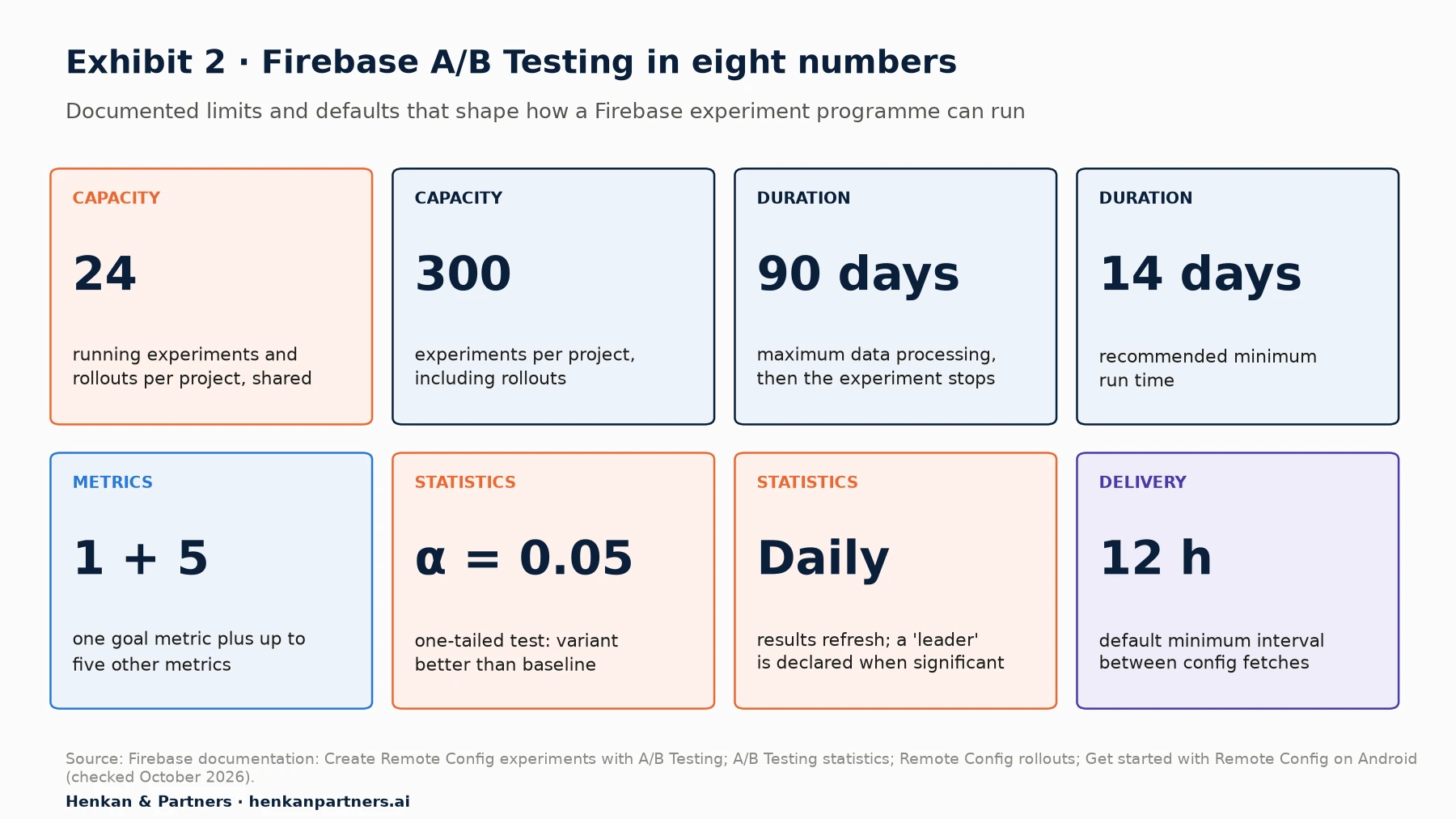
What this shows. None of these limits matters for a team running two or three tests a quarter. Several of them matter a great deal for a team running a programme: the cap of 24 running experiments includes rollouts, the statistics are fixed-horizon with a daily 'leader', and only one metric decides.
| Area | What Firebase A/B Testing does | Why it matters |
|---|---|---|
| Concurrency | Up to 300 experiments per project, of which up to 24 running experiments and rollouts at once | Rollouts use the same 24 slots as tests |
| Duration | Two weeks recommended minimum; data processed for a maximum of 90 days, after which the experiment stops | Long-term retention or subscription effects need your own analysis |
| Statistics | Frequentist; z-test of proportions for conversion metrics and an unequal-variance t-test for continuous ones; one-tailed, α = 0.05 | A one-tailed 5% test equals a two-sided 10% test for wins; no documented sequential correction |
| Results | Refreshed once a day; a 'leader' is declared when a variant is significantly better on the goal | Stopping at the first leader inflates false wins (Section 4) |
| Metrics | One goal and up to five other metrics, from Firebase and Google Analytics events | Back-end revenue, margin or returns need BigQuery work |
| Assignment | Hash of experiment ID and Firebase installation ID | A user with two devices, or who reinstalls, counts as two users |
| Configuration | Targeting uses Remote Config conditions, evaluated top to bottom; reused conditions are locked until the experiment ends; weights cannot change after start | Template hygiene becomes part of experiment QA |
| Price | A/B Testing at no added charge; Remote Config fetches free up to 100,000 a day, then pay-as-you-go on Blaze from 1 September 2026 | Large apps should model fetch volume |
Section 4 · Firebase's limits
Firebase's limits show up in statistics, identity and governance rather than in features
The statistics are fixed-horizon, one-tailed and refreshed daily
Firebase states that it 'uses frequentist inference', with 'a significance level of 0.05', and that p-values 'are based on a one-tailed test, where the Variant value is greater than the Baseline value' (Firebase, A/B Testing statistics). It does not require a sample size to be set before launch, recommends two weeks as the minimum run time and refreshes results once a day. A variant becomes the 'leader' when it is significantly better than the baseline on the goal metric.
Two consequences follow. First, a one-tailed test at 5% has the same threshold for a win as a two-sided test at 10%, so it is more permissive than the 95% two-sided standard most teams assume; in exchange it needs about 21% fewer users for the same power. Second, nothing in the method corrects for repeated looks. Peeking at a fixed-horizon test and stopping when it looks significant inflates the false-positive rate, a problem that sequential tests were designed to solve (Johari, Pekelis & Walsh, KDD 2017).
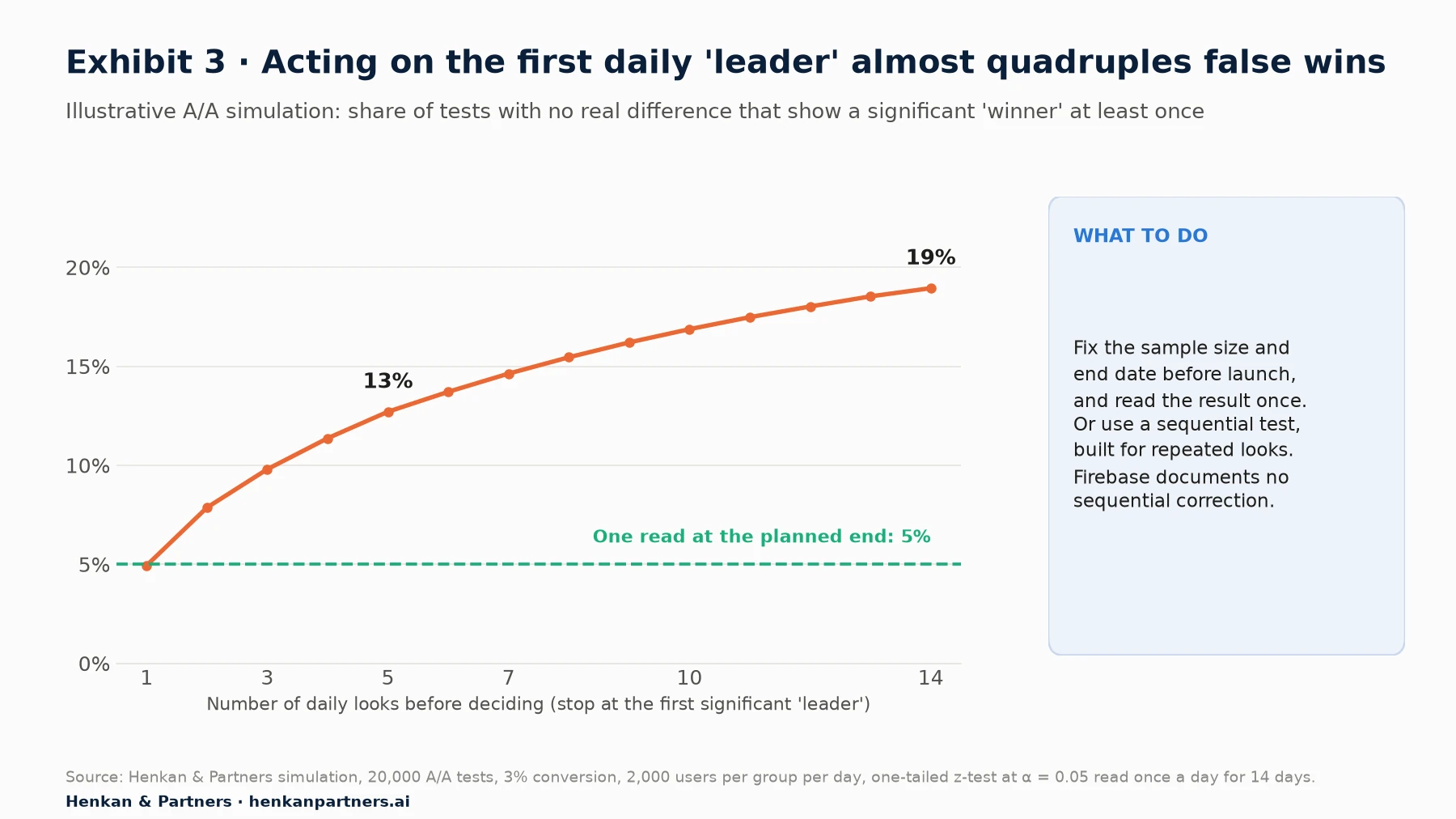
What this shows. When there is no real difference, a single read at the planned end produces a false winner 5% of the time, as designed. Reading the result every day and stopping at the first significant 'leader' raises that to about 19% over two weeks. The fix does not require a new tool: decide the sample size and the end date before launch, and read the result once. A tool with sequential testing makes daily reads safe; Firebase does not claim to. Sequential tests can also be fast where it matters most: Netflix monitors new app versions with them and, in one canary, rejected the hypothesis of no change in play delay 'after about 60 seconds' (Lindon et al., Netflix Technology Blog, 2024).
Users are installations, not people
Firebase assigns variants by hashing the experiment ID with the Firebase installation ID. On web it notes that a user in a different browser, a private window or after clearing storage is treated as a new user (Firebase, Create Remote Config experiments). On mobile the same logic applies to a second device or a reinstall. For apps where most value comes from logged-in customers who also use the website, that means the same person can see two variants, and the test cannot follow them across channels. Dedicated platforms assign on an ID you provide, so a logged-in customer keeps one variant on every device.
No documented trust checks
We found no sample ratio mismatch (SRM) check or variance reduction method in the Firebase A/B Testing documentation. SRM matters in apps more than on web: about 6% of experiments at Microsoft and about 10% of triggered analyses at LinkedIn showed an SRM, and the causes listed include telemetry lost on phones and variations that crash before they log (Fabijan et al., KDD 2019). Because membership is exported to BigQuery, you can run the check yourself: compare users per variant with the configured weights, using a chi-square test, before reading any metric.
One goal, Analytics events, 24 slots
- Metrics. Goals and additional metrics come from Firebase and Google Analytics events. Revenue confirmed by your back end, margin, refunds, subscription renewals or store purchases recorded server-side need a separate analysis in BigQuery or elsewhere.
- Concurrency. A/B tests and Remote Config rollouts 'share the total experiment limit: 24' (Firebase, Remote Config rollouts). A team that releases every feature through a rollout and tests a few ideas at once reaches the cap quickly.
- Rollback. Rollouts are watched in Crashlytics and Analytics and rolled back by a person; the documentation describes no automatic rollback on a guardrail.
- Configuration. Conditions are evaluated in order, reused conditions are locked until the experiment ends, and variant weights cannot change after launch. These rules are sound, but in a busy Remote Config template they make the template itself something to review before each test.
For marketers. Firebase is a good place to learn. Write the hypothesis, the goal metric, the sample size and the end date in the test plan before you start, and ignore the daily 'leader' until the end date. That alone removes the most common error.
For leaders. Firebase's limits are not a reason to buy a platform on day one. They are a list of the questions to ask when the programme grows: how many tests at once, decided on which metrics, with what safety net.
Section 5 · Dedicated platforms
Dedicated platforms add a stats engine, trust checks, safe rollouts and one programme across web and app
Kameleoon, Optimizely, AB Tasty, LaunchDarkly, Statsig and Amplitude Experiment all provide native SDKs for iOS and Android and, in most cases, Flutter and React Native. Their flag and configuration layer does what Remote Config does. The difference lies in what sits around it: how results are computed, how bad variations are caught and how the programme is governed.
- Sequential testing. Optimizely Feature Experimentation's Stats Engine 'uses sequential testing that lets you monitor results continuously' and controls the false discovery rate (Optimizely, Statistical analysis methods). Statsig's sequential testing 'adjusts p-values and confidence intervals so you can read experiment results before the target sample size' (Statsig docs). Amplitude Experiment offers sequential testing and a Bonferroni correction for multiple comparisons.
- Variance reduction (CUPED). Statsig adjusts each user's metric with the same metric measured over the 7 days before exposure; Optimizely reads two weeks of pre-experiment data by default for numeric metrics; Kameleoon applies CUPED with its frequentist method.
- Automatic trust checks. Statsig 'runs SRM checks on all experiments and feature gates as part of Health Checks', using a chi-square test (Statsig docs).
- Guarded rollouts and automatic rollback. LaunchDarkly's guarded rollouts increase traffic step by step, use sequential tests to detect regressions and, if enabled, roll the release back automatically; they require an Enterprise plan with the Guardian add-on. Kameleoon's rollback conditions turn off a rule or a whole environment when a goal crosses a threshold after a minimum number of visitors.
- Your metrics and your IDs. Warehouse-native options (Optimizely Analytics, Statsig Warehouse Native and others) compute results from the tables where back-end revenue and refunds live, and every platform lets you pass your own user ID, so logged-in users keep their variant across devices.
- Web and app in one place. The same team, metric definitions and test library can cover the website and the app, which matters when a journey starts on one and ends on the other.
CUPED deserves a closer look because sample size is the binding constraint in most apps. The method uses each user's behaviour before the test to remove noise that has nothing to do with the variation.
Adjusted metric for user i:  Y_adj,i = Y_i − θ × (X_i − mean(X))
where Y_i is the metric during the test, X_i the same metric before the test, and θ = cov(X, Y) ÷ var(X)

Variance after adjustment = variance before × (1 − ρ²), where ρ is the correlation between X and Y
Sample size needed scales with the variance: ρ = 0.7 → about half the users
In the original paper, Deng, Xu, Kohavi and Walker report that CUPED reduced variance 'by about 50%', 'effectively achieving the same statistical power with only half of the users, or half the duration' (WSDM 2013). The catch for apps is that CUPED needs a history. Amplitude advises against it 'when targeting only new users' (Amplitude docs), so onboarding and first-session tests gain nothing from it.
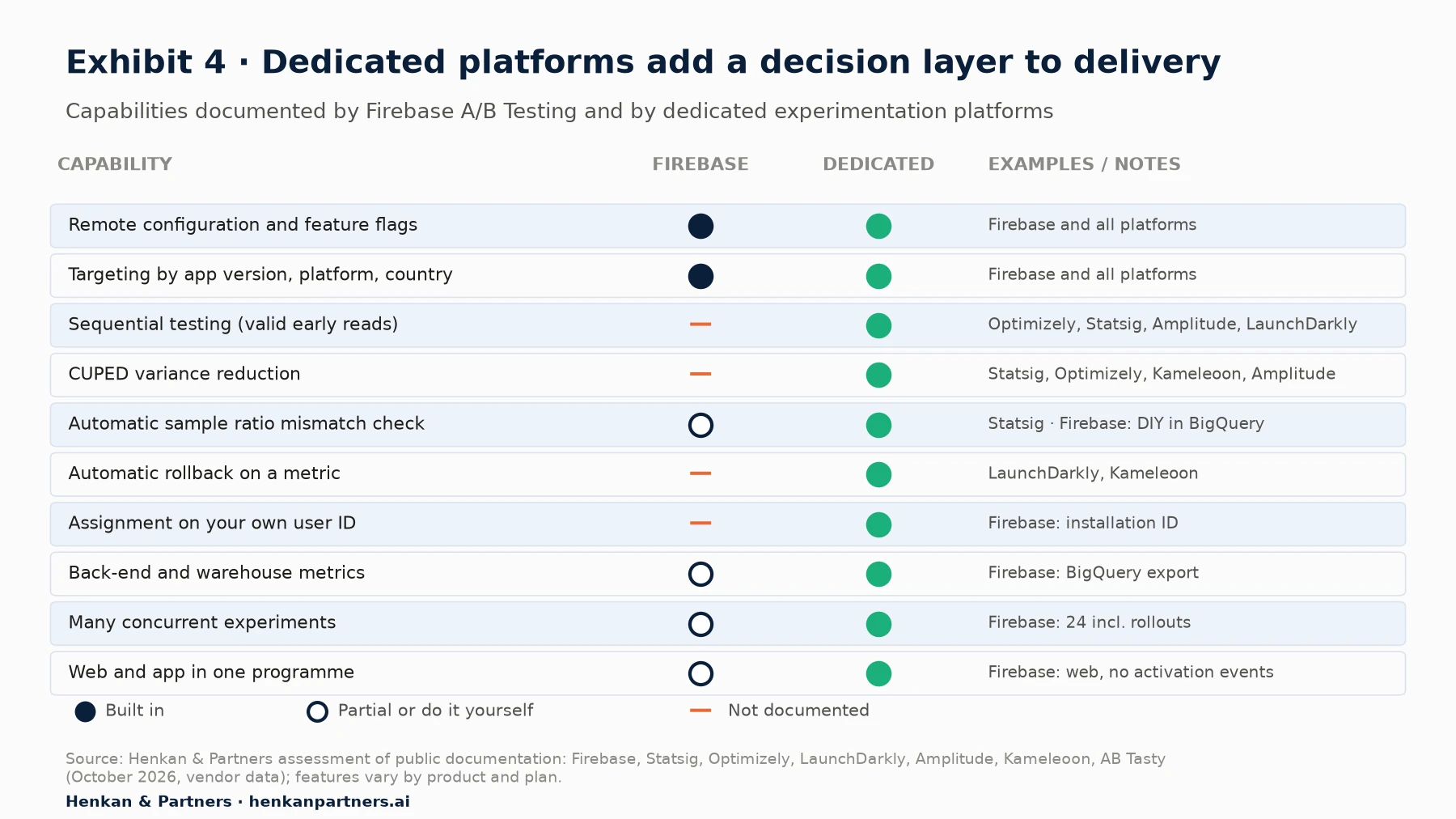
What this shows. The two columns are equal on delivery: both can put a variation in front of a targeted group of app users. They differ on everything that turns a result into a decision you can defend. Where Firebase is marked 'do it yourself', the capability can be rebuilt in BigQuery, at the cost of analyst time on every test.
| Platform | Mobile SDKs (documented) | Statistics and trust | Rollout safety |
|---|---|---|---|
| Firebase A/B Testing | Android, Apple platforms, web | Frequentist, one-tailed, α = 0.05, daily refresh; no documented SRM check or CUPED | Manual rollouts monitored in Crashlytics and Analytics; 24 running slots shared with tests |
| Statsig | iOS, Android, React Native, Expo, Unity | Sequential testing; CUPED with a 7-day pre-period; automatic SRM checks | Rollout alerts; free tier of 2 million events a month, Pro from $150 a month |
| Optimizely Feature Experimentation | Swift, Android, React Native, Flutter | Stats Engine (sequential, false discovery rate control); CUPED on numeric metrics | Feature flags and targeted rollouts |
| LaunchDarkly | iOS, Android, Flutter, React Native | Sequential regression detection in guarded rollouts | Guarded rollouts with optional automatic rollback (Enterprise with Guardian add-on) |
| Amplitude Experiment | iOS, Android, Flutter, React Native | Sequential or t-test; Bonferroni correction; optional CUPED (not advised for new users only) | Feature flags with percentage rollouts |
| Kameleoon | Android, iOS, Flutter, React Native | Frequentist, sequential and Bayesian methods; CUPED with the frequentist method | Automatic rollback on goal thresholds; email alerts |
| AB Tasty | iOS, Android, Flutter, React Native | Real-time analytics per variation; statistical method not detailed on the product page | Gradual rollouts; flags switched off without redeploying code |
Disclosure: Henkan & Partners is a Kameleoon Platinum partner and works with several of the other tools listed. The comparison is based only on each vendor's public documentation.
Our optimisation tool selection scorecard gives a structured way to compare vendors once you have decided that you need one, and our history of the A/B testing tool market explains how these platforms grew from web testing and feature flagging.
Section 6 · Sample size
Apps rarely run out of ideas to test; they run out of users per variant
A website gets new visitors every day. Many app tests are limited to a narrower group: new installs for onboarding tests, logged-in buyers for checkout tests, users on the latest version for anything new. The sample grows only as fast as that group, and metrics such as day-7 retention add a week before the last users can be counted.
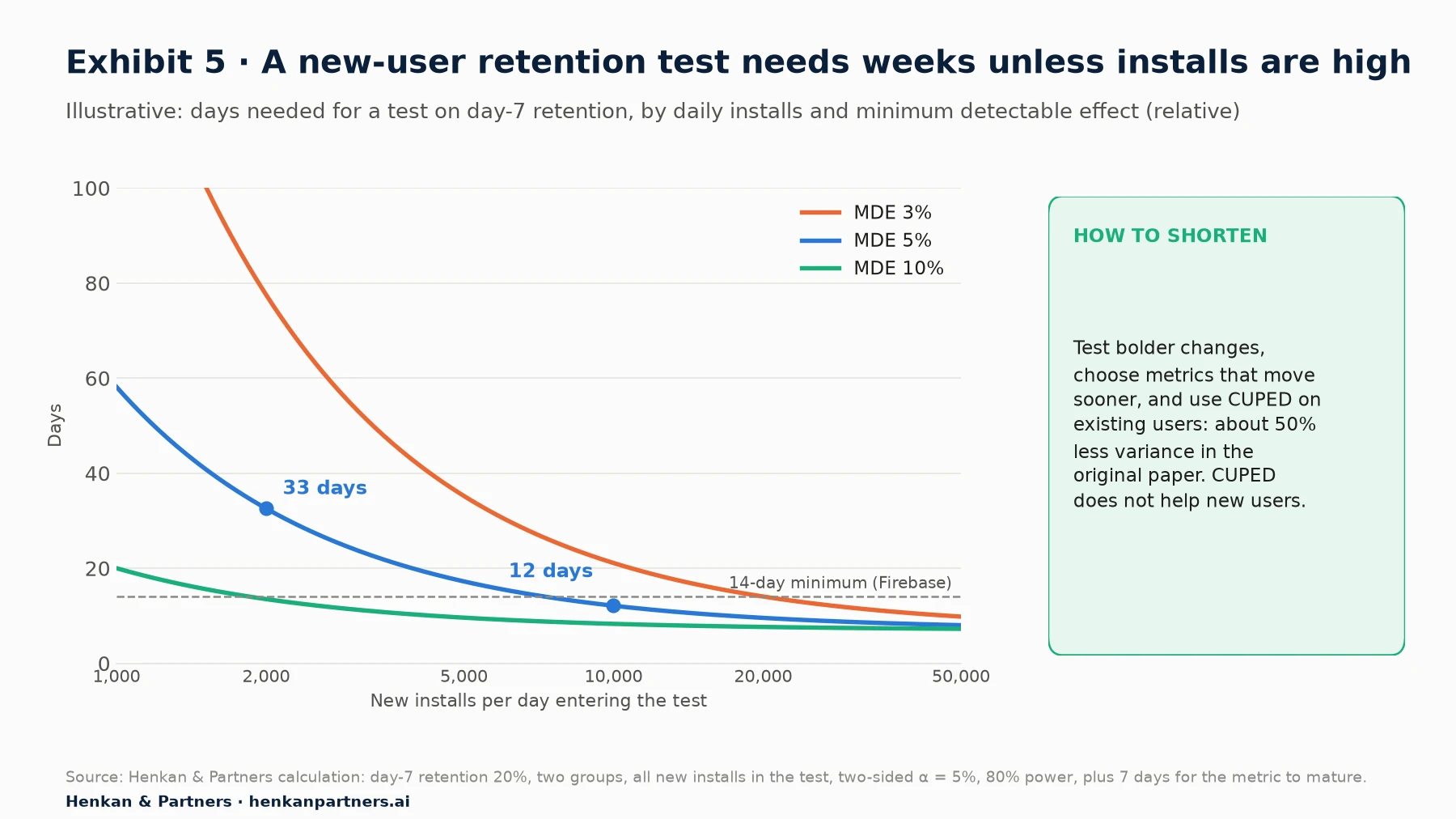
What this shows. At 2,000 installs a day, detecting a 5% relative change in day-7 retention (from 20% to 21%) needs about 51,000 users and about 33 days. Detecting 3% needs about 141,000 users, more than two months. At 10,000 installs a day the same 5% test fits in under two weeks. The usual answer in apps is to test bolder changes, pick metrics that move sooner, and use variance reduction on tests that involve existing users.
Users per group (two proportions) ≈ (z₁₋α/₂ + z₁₋β)² × [p₁(1 − p₁) + p₂(1 − p₂)] ÷ (p₂ − p₁)²

Example: p₁ = 20%, p₂ = 21%, α = 5% two-sided, power 80% → about 25,600 per group, 51,200 in total
Days = total users ÷ eligible new users per day + days for the metric to mature
Our guide to A/B test sample size and duration covers the formulas in more detail, including revenue metrics, and our article on guardrail metrics explains how to protect crash rates and performance while a test runs.
For marketers. Before you design an app test, ask how many eligible users reach the tested screen each day. If the answer gives a duration longer than six weeks, change the test, not the statistics.
For leaders. In apps, traffic is the scarce resource. A platform with CUPED and sequential tests is, in effect, a way to buy more of it.
Section 7 · Cost and effort
Firebase is cheaper to license, not always cheaper to run
Firebase A/B Testing has no separate price. Remote Config, which it relies on, moves to pay-as-you-go on 1 September 2026: Spark and Blaze projects get 100,000 fetch requests a day at no cost, and Blaze projects then pay $0.06 per 10,000 requests up to 10 million a day and $0.01 per 10,000 above that. Projects enabled before that date have transition periods until 1 December 2026 (Spark) or 1 February 2027 (Blaze) (Firebase, Remote Config pricing).
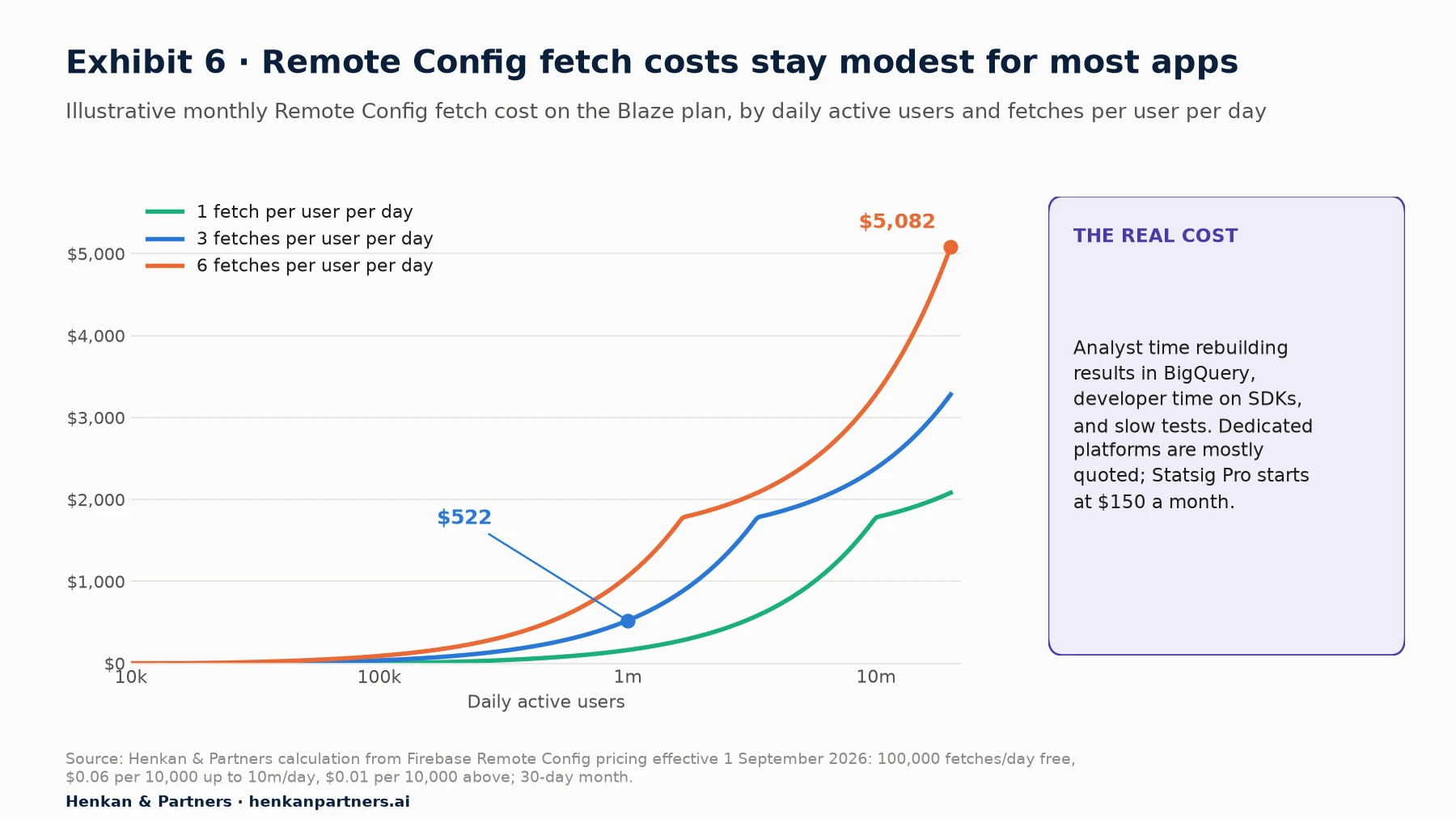
What this shows. For an app with one million daily users fetching three times a day, Remote Config costs about $520 a month. Licence fees for dedicated platforms are usually quoted, not published, with exceptions such as Statsig's free tier of 2 million events a month and its Pro plan from $150 a month for 5 million events (Statsig pricing). The larger cost on either side is people: analysts rebuilding results in BigQuery when the tool cannot, developers wiring a second SDK, and product managers waiting for slow tests.
| Cost item | Firebase A/B Testing | Dedicated platform |
|---|---|---|
| Licence | None for A/B Testing; Remote Config fetches above 100,000 a day on Blaze | Usually annual contract based on users, events or flags; some public tiers |
| SDK work | Often already installed with Analytics and Crashlytics | One SDK per platform; event forwarding or warehouse connection |
| Analysis per test | Console read-out; BigQuery work for back-end metrics, SRM checks and segments | Most checks and metrics automated once defined |
| Governance | Template hygiene; 24 slots shared with rollouts | Roles, approvals, test library and metric catalogue built in |
| Hidden cost | False wins from daily reads; long tests without variance reduction | Under-used licence if the team runs few tests |
Section 8 · Decision framework
Stay on Firebase while tests are few and simple; switch when your decisions outgrow it
The right question is not which tool is better in general. It is which decisions your team must make each quarter, and whether the tool can support them without heavy manual work. Five questions settle most cases.
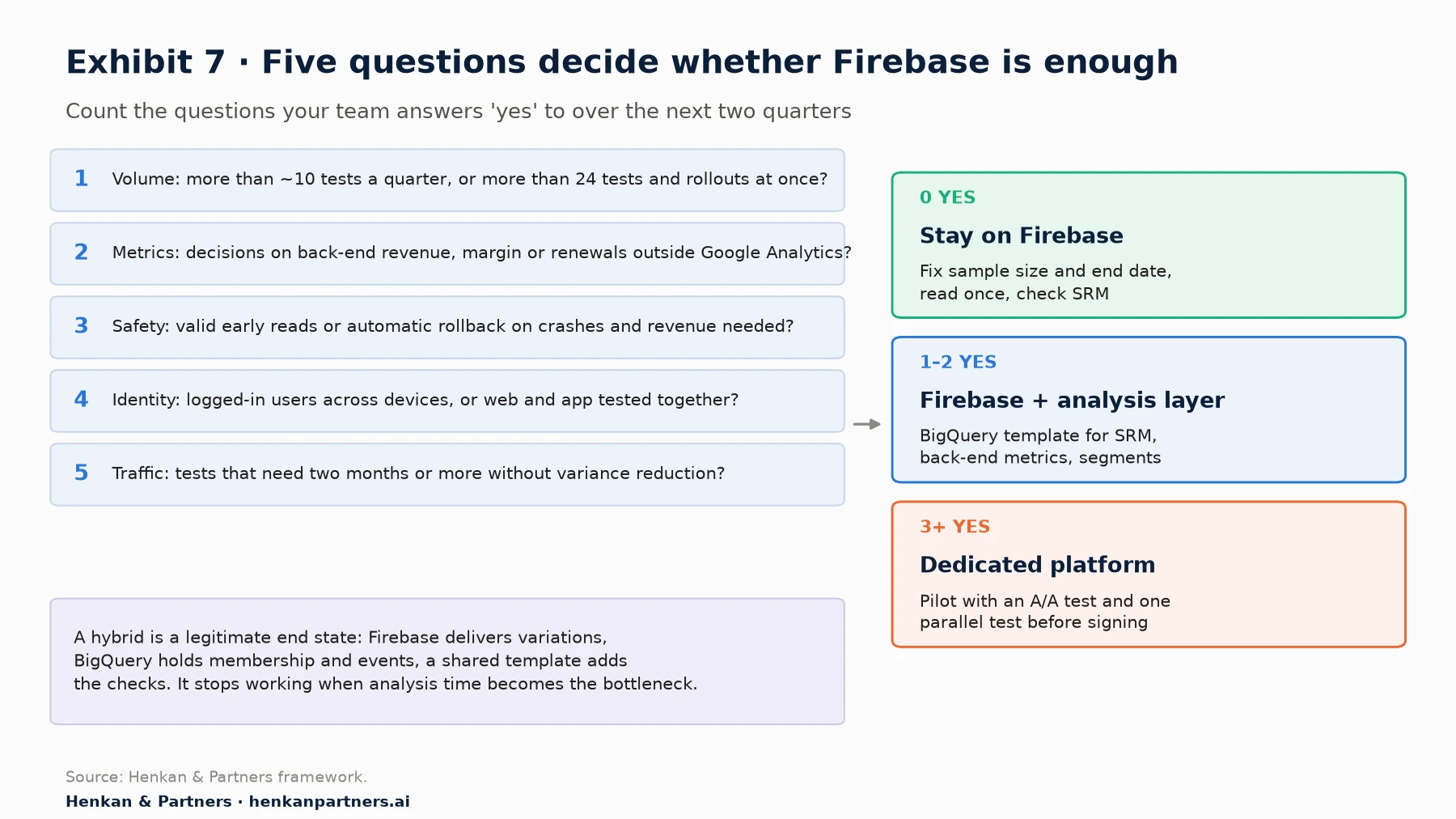
What this shows. Most teams fall in the middle band at some point. A hybrid is a legitimate end state, not a failure: Firebase delivers the variations, BigQuery holds the membership and events, and a shared analysis template adds the SRM check, back-end metrics and fixed-horizon rules Firebase leaves out. The hybrid stops working when analysis time per test becomes the bottleneck, or when the team needs early stopping and automatic rollback that a template cannot provide.
| Signal | Firebase is enough | Consider a dedicated platform |
|---|---|---|
| Volume | Fewer than about ten tests a quarter | Many tests at once, or rollouts competing with tests for the 24 slots |
| Decision metric | Retention, engagement or in-app purchase events in Google Analytics | Back-end revenue, margin, refunds or renewals |
| Speed and safety | You can wait for the planned end date | You need valid early reads or automatic rollback on crashes and revenue |
| Identity | Anonymous or single-device usage | Logged-in customers on several devices or on web and app |
| Traffic | Tests reach their sample in two to four weeks | Tests need two months or more without variance reduction |
| Team | One product team, a part-time analyst | Several squads, a central experimentation team, audit needs |
Our view. Do not migrate because a vendor demo looked better. Migrate when you can name the decisions the current tool prevents: the tests you could not run at the same time, the metric you could not use, the bad release you caught too late. If you cannot name three, fix your process first.
Section 9 · Migration checklist
If you switch, migrate in parallel and keep Remote Config for what it does well
Moving from Firebase to a dedicated platform, or adding one next to it, is mostly an SDK and data project. The checklist below is the order we use.
- Inventory what runs today. List every live Remote Config parameter, condition, experiment and rollout, with its owner. Mark which ones are experiments, which are permanent configuration and which are dead.
- Decide the identity model. Choose the ID that defines a user (installation, logged-in ID, or both with an alias) and make sure the app, the back end and the warehouse use the same one.
- Define the metric catalogue once. Write the goal, secondary and guardrail metrics, including crash-free users and app start time, with their event or table source. Reuse the same definitions on web.
- Install the SDK on both platforms in one release. Ship the new SDK in the iOS and Android builds behind a flag, with the default experience unchanged, and check start-up time and app size.
- Run an A/A test. Split users at random with no change and confirm the split, the event counts and the metric values match on both platforms. Fix any sample ratio mismatch before the first real test.
- Run one test in parallel. Run the next real test on the new platform and rebuild the same result from BigQuery or your warehouse. Differences usually point to exposure logging or identity.
- Move flags gradually. Move experiments first, then feature flags with rollouts. Keep Remote Config for static configuration if it is cheaper, but avoid two tools controlling the same parameter.
- Retire old switches. Remove flags and parameters whose tests have ended, in code and in the console. Old switches are the main source of configuration conflicts.
Section 10 · Common mistakes
Seven mistakes that invalidate mobile app A/B tests
- Starting before the version is out. Users on older builds receive the default value and dilute the result. Target the build that contains the variation and wait for adoption.
- Stopping at the first daily leader. With a fixed-horizon test, decide the end date in advance and read the result once, or use a tool with sequential testing.
- Pooling iOS and Android without checking each. Two implementations can behave differently. Look at each platform before reading the total.
- Changing the screen in front of the user. Activating new values mid-session creates the app version of flicker. Activate at start-up or on the next launch.
- Ignoring crashes and performance. Track crash-free users and app start time as guardrails on every test, since a variant that crashes also loses the events that would reveal it.
- Counting users who never saw the change. Use an activation event or exposure logging so that only users who reached the tested screen are analysed.
- Leaving switches in the code. Every finished test leaves a flag behind. Without a removal date, the template and the code fill up with dead conditions that break the next test.
Our list of A/B testing mistakes and the A/B test launch QA checklist cover the errors that apps share with websites.
Section 11 · What to do next
What to do next
1. Audit your switches and slots
Count the Remote Config parameters, conditions, running experiments and rollouts in each project, and how many of the 24 slots you use in a typical month.
2. Add the missing checks to Firebase
Build a BigQuery template that runs an SRM check and adds back-end metrics for every experiment, and write the sample size and end date into every test plan.
3. Answer the five questions
Go through the decision framework with product, engineering and analytics. If you answer yes three times or more, list the decisions the current set-up prevents and shortlist platforms against them.
4. Pilot before you commit
Run an A/A test and one real test in parallel on the shortlisted platform before signing a multi-year contract.
5. Get a second opinion
Henkan & Partners designs and runs experimentation programmes for web and app teams, from Firebase set-ups to dedicated platforms, and works inside the tools you already use. Talk to us.
FAQ
Frequently asked questions about mobile app A/B testing
Frequently asked questions
What is mobile app A/B testing?
It is the practice of randomly assigning app users to two or more versions of an experience and comparing their behaviour on metrics fixed before launch. Because app code ships through store releases, the variations are built into the app and switched on remotely through remote configuration or feature flags.
How is A/B testing a mobile app different from testing a website?
Variation code must ship in a reviewed release before the test starts, several app versions are live at once, iOS and Android are often separate code bases, users are identified by installation or login rather than cookies, and many tests target narrower groups, so they take longer.
Is Firebase A/B Testing free?
A/B Testing itself has no separate charge. It relies on Remote Config, whose fetch requests are free up to 100,000 a day; above that, Blaze projects pay $0.06 per 10,000 requests from 1 September 2026, with transition periods for existing projects.
What are the limits of Firebase A/B Testing?
Up to 24 running experiments and rollouts per project and 300 experiments in total, data processed for 90 days at most, one goal plus up to five other metrics from Firebase and Google Analytics events, a one-tailed fixed-horizon test at α = 0.05 refreshed daily, and assignment by installation ID. The documentation describes no sample ratio mismatch check or variance reduction.
How long should a mobile app A/B test run?
Until it reaches the sample size calculated before launch, and for at least one or two full weeks to cover weekly cycles; Firebase recommends two weeks as a minimum. Add the maturation window of the metric, for example seven days for day-7 retention.
Can I check Firebase A/B test results every day?
You can look, but you should not stop the test the first time a leader appears. Firebase uses a fixed-horizon test without a correction for repeated looks; in our simulation, stopping at the first daily leader over two weeks raised false wins from 5% to about 19%.
When should I move from Firebase to a dedicated experimentation platform?
When you need more concurrent tests than the 24 slots allow, decide on back-end revenue or margin, need valid early reads or automatic rollback, test logged-in users across devices or web and app together, or need variance reduction to finish tests in time.
Which platforms support A/B testing in mobile apps?
Besides Firebase, Kameleoon, Optimizely Feature Experimentation, AB Tasty, LaunchDarkly, Statsig and Amplitude Experiment all document native iOS and Android SDKs, and most also support Flutter and React Native. They differ on statistics, rollout safety and pricing.
Does Apple allow A/B testing in iOS apps?
Yes, when the variations are already in the reviewed binary and remote values only select between them. Guideline 2.5.2 forbids downloading or executing code that introduces or changes features, so new behaviour cannot be added remotely.
Key terms
- Mobile app A/B testing
- Randomly assigning app users to versions of an experience delivered through remote configuration or flags. It matters because app variations must ship in a release before the test starts.
- Remote configuration
- Parameters the app downloads from a server to change behaviour without a new release. It matters because it is the delivery layer for most app tests.
- Feature flag
- A switch around a block of code, evaluated for each user against targeting rules. It matters because it lets teams ship code switched off and test or roll it out later.
- Phased release
- Apple's seven-day release of an update to a growing share of automatic-update users. It matters because it controls how fast a new variation's code reaches users.
- Staged rollout
- Google Play's release of an update to a chosen percentage of users. It matters because halting it does not move users back to the previous version.
- Activation event
- An event a user must trigger to be counted in a Firebase experiment. It matters because it removes users who never saw the change from the analysis.
- Installation ID
- The identifier Firebase uses to assign variants to an app installation. It matters because the same person on two devices counts as two users.
- Fixed-horizon test
- A test analysed once, at a sample size set in advance. It matters because repeated looks with early stopping inflate false positives.
- Sequential test
- A test designed to be analysed repeatedly as data arrives without inflating false positives. It matters because it makes early reads and early stopping valid.
- One-tailed test
- A test that looks for an effect in one direction only. It matters because a one-tailed 5% test sets the same bar for a win as a two-sided 10% test.
- CUPED
- A variance reduction method that adjusts each user's metric using the same metric before the test. It matters because it can cut the sample needed by about half, but not for new users.
- Sample ratio mismatch (SRM)
- A gap between the observed and configured traffic split larger than chance allows. It matters because it usually signals lost telemetry, crashes or broken assignment.
- Guarded rollout
- A progressive release that monitors metrics and pauses or rolls back on a regression. It matters because it limits harm from a bad release without waiting for a person.
- Minimum detectable effect (MDE)
- The smallest effect a test is designed to detect with the planned power. It matters because halving it roughly quadruples the sample size.
Sources
All sources were checked in October 2026. Features of Firebase, Statsig, Optimizely, LaunchDarkly, Amplitude, Kameleoon and AB Tasty come from their own documentation and are vendor data; they vary by product and plan. Exhibits 4 and 7 and Tables 1, 3, 4 and 5 are Henkan & Partners frameworks or assessments; Exhibits 3, 5 and 6 are our own illustrative calculations from the assumptions stated in each caption. Quotations are from English-language sources.
- Firebase (n.d.). Firebase A/B Testing (vendor documentation).
- Firebase (n.d.). Create Firebase Remote Config experiments with A/B Testing (vendor documentation).
- Firebase (n.d.). A/B Testing concepts and statistics (vendor documentation).
- Firebase (n.d.). Get started with Remote Config on Android, Remote Config loading strategies, Remote Config parameters and conditions and Remote Config rollouts (vendor documentation).
- Firebase (2026). Pricing for Remote Config and Firebase pricing (vendor documentation).
- Apple (n.d.). App Review and App Review Guidelines, guideline 2.5.2.
- Apple (n.d.). Release a version update in phases. App Store Connect Help.
- Google (n.d.). Release app updates with staged rollouts. Play Console Help.
- Deng, A., Xu, Y., Kohavi, R. & Walker, T. (2013). Improving the Sensitivity of Online Controlled Experiments by Utilizing Pre-Experiment Data. WSDM 2013.
- Fabijan, A., Gupchup, J., Gupta, S., Omhover, J., Qin, W., Vermeer, L. & Dmitriev, P. (2019). Diagnosing Sample Ratio Mismatch in Online Controlled Experiments. KDD 2019.
- Johari, R., Pekelis, L. & Walsh, D. (2017). Peeking at A/B Tests: Why it matters, and what to do about it. KDD 2017.
- Lindon, M., Sanden, C., Shirikian, V., Liu, Y., Mishra, M. & Tingley, M. (2024). Sequential A/B Testing Keeps the World Streaming Netflix, Part 1: Continuous Data. Netflix Technology Blog.
- Statsig (n.d.). CUPED, SRM checks, Sequential testing, Rollout Alerts, Client SDKs and Pricing (vendor documentation).
- Optimizely (n.d.). Statistical analysis methods overview, CUPED and SDK reference guides (vendor documentation).
- LaunchDarkly (n.d.). Guarded rollouts and Client-side SDKs (vendor documentation).
- Amplitude (n.d.). Finalize your experiment's statistical preferences and Experiment SDKs (vendor documentation).
- Kameleoon (n.d.). Feature Experimentation SDK overview, CUPED and Automatically rollback a feature (vendor documentation).
- AB Tasty (n.d.). Feature Experimentation & Rollout and SDKs (vendor documentation).
- Henkan & Partners. Peeking simulation, sample-size and Remote Config cost calculations (assumptions stated in each exhibit caption).