Focus
GA4 BigQuery Export and Measurement Protocol for Developers: Schema, First Queries and Server-Side Events
Alexandre Suon · 2026-10-02
The GA4 BigQuery export turns Google Analytics from a set of reports into a database you own: every collected event, unsampled, one row at a time. The Measurement Protocol does the reverse and lets your servers send events GA4 could never see in a browser, such as refunds and offline sales. This guide for developers covers how to link the export, how the daily, streaming and fresh daily exports differ, how to read the nested schema, five starter SQL queries, how to keep BigQuery costs under control, and how to send server-side events that GA4 can actually use.
Executive summary
- Link the BigQuery export now, because it is not retroactive. Data starts flowing within 24 hours of linking and only from that day. Linking needs Editor access on the GA4 property, Owner access on a Google Cloud project with the BigQuery API enabled, and a data location you cannot change later without recreating the link.
- Pick the export type by how fresh and how complete the data must be. The daily export writes `events_YYYYMMDD` once a day and can update it for up to 72 hours; standard properties are limited to 1 million events a day. Streaming fills `events_intraday_YYYYMMDD` within minutes, has no event limit, costs $0.05 per GB and is best effort. Fresh daily is for Analytics 360 only.
- The schema is one row per event, with parameters and products nested inside. Read parameters with `UNNEST(event_params)` and the right typed column, build sessions from `user_pseudo_id` plus `ga_session_id`, and never sum event-level values after unnesting `items`.
- Storage is cheap; scanning is what you pay for. At 1 million events a day, a year of history costs about $10 a month to store and streaming about $2.50 a month, but a dashboard that rescans 30 days of raw events every hour costs about $213 a month (Henkan & Partners estimate). Filter on `_TABLE_SUFFIX`, select only the columns you need, set maximum bytes billed and point dashboards at summary tables.
- Use the Measurement Protocol to add server truths, not to replace the tag. Refunds, cancellations and offline conversions belong on the server. Each event needs the browser's `client_id` (and `session_id` to join a session), arrives inside time windows from 24 hours to 63 days depending on the use, and is never rejected loudly: the endpoint returns 2xx even for malformed payloads, so validate in CI.
- Close the loop in BigQuery. The export is also your best monitoring tool: daily queries for duplicate transaction IDs, missing currencies and refunds that never arrived catch tracking bugs before they reach a board deck.
Section 1 · The job
BigQuery is where GA4 stops being a report and becomes a database you own
Most developers meet GA4 through a ticket: a product manager wants a number the interface cannot give, a marketer wants order data joined with campaign data, or finance wants revenue that matches the back office. The GA4 interface and its Data API answer many questions, but both apply thresholds, cardinality limits, consent modelling and estimation. When you need every event, joined with your own data, you need the export.
The GA4 BigQuery export is a built-in link that copies the raw event data collected by a Google Analytics 4 property into a dataset in your own Google BigQuery project, with one row per event and its parameters, user, device, traffic source and e-commerce fields nested inside it. It is available on standard (free) and Analytics 360 properties, starts on the day you link it, and is not retroactive.
This article is step 4 of The ABC of GA4 for Developers. It assumes you know the event model (events, parameters, user properties and the items array) from step 1, how events are pushed from a dataLayer spec in step 2, and how to debug and QA them in step 3. If you need the conceptual picture of how GA4 processes data, read how GA4 actually works first; we do not repeat it here.
| Tool | What it gives you | Use it when | Watch out for |
|---|---|---|---|
| GA4 interface and explorations | Processed reports with modelled data and attribution | Business users need self-service answers | Thresholds, (other) rows, sampling in explorations |
| GA4 Data API | The same processed metrics, programmatically | You feed a dashboard or app with standard metrics | Quotas and the same processing rules as the interface |
| BigQuery export | Every collected event, unsampled, joinable with your data | You need event-level analysis, long history, joins or exact counts | You rebuild sessions, metrics and attribution yourself; cost of careless queries |
| Measurement Protocol | A way to send events from your servers into GA4 | Refunds, cancellations, offline sales, server-confirmed events | Needs browser IDs and tight timing; silent failures |
Section 2 · Linking
Link the export today, because it only starts from the day you switch it on
Linking takes about fifteen minutes if the right people are in the room. Two permissions trip teams up most often: you need Editor or above on the GA4 property and Owner on the Google Cloud project (or a custom role with the resource-manager and service-usage permissions Google lists). Agree on the project and billing account before you start.
The click path
- Create or choose a Google Cloud project. In the Google Cloud console, open APIs & Services > Library and enable the BigQuery API. Attach a billing account, or start in the BigQuery sandbox (see below).
- Open the link screen in GA4. Go to Admin > Product links > BigQuery links and click Link.
- Choose the project. Pick the Cloud project you prepared. GA4 creates a dataset named `analytics_<property ID>` in it.
- Choose the data location. Pick the region or multi-region (for example EU or US) where the data will live. Decide this with whoever owns data protection: changing it later means deleting the link and creating a new one.
- Configure data streams and events. Include the streams you need and, if volume is a concern, exclude events you will never analyse. Exclusions are your main lever to stay under the daily export limit.
- Choose the export frequency. Tick Daily, Streaming, or both (and Fresh daily on eligible 360 properties). You can also enable the daily user data export, which writes user-level tables. Advertising identifiers only matter for mobile app streams.
- Review and submit. Data starts arriving within 24 hours. Check the next day that `events_YYYYMMDD` tables appear in the dataset.
| Decision | Options | Our default | Why it matters |
|---|---|---|---|
| Data location | Single region or multi-region (e.g. EU, US) | The region where your other customer data lives (EU for most European retailers) | Cannot be changed without recreating the link; joins across locations are not possible |
| Streams and events | All, or exclude streams and specific events | Export all streams; exclude only high-volume noise you will never query | Keeps a standard property under 1 million events a day |
| Frequency | Daily, streaming, both; fresh daily on 360 | Daily for everyone; add streaming only for a real intraday need | Streaming costs money and is best effort |
| User data export | On or off | On if you build audiences or lifetime metrics | Adds `users_` and `pseudonymous_users_` tables with one row per changed user |
| Billing | Sandbox or paid | Paid, with a budget alert and a custom query quota | Sandbox tables expire after 60 days |
The BigQuery sandbox lets you try the export without a payment method, and Google says you can export to it free of charge, with sandbox limits. Those limits matter: tables, views and partitions expire automatically after 60 days, storage is capped at 10 GiB for the lifetime of the sandbox, and streaming is not supported. The sandbox is fine for learning the schema. It is not a place to keep history, which is the main reason to link in the first place.
Section 3 · Export types
Daily, streaming and fresh daily exports trade completeness for speed
GA4 offers three export types. They differ in when data lands, how complete it is and who can use them. Getting this right decides whether a dashboard shows yesterday's numbers correctly or quietly under-reports them.
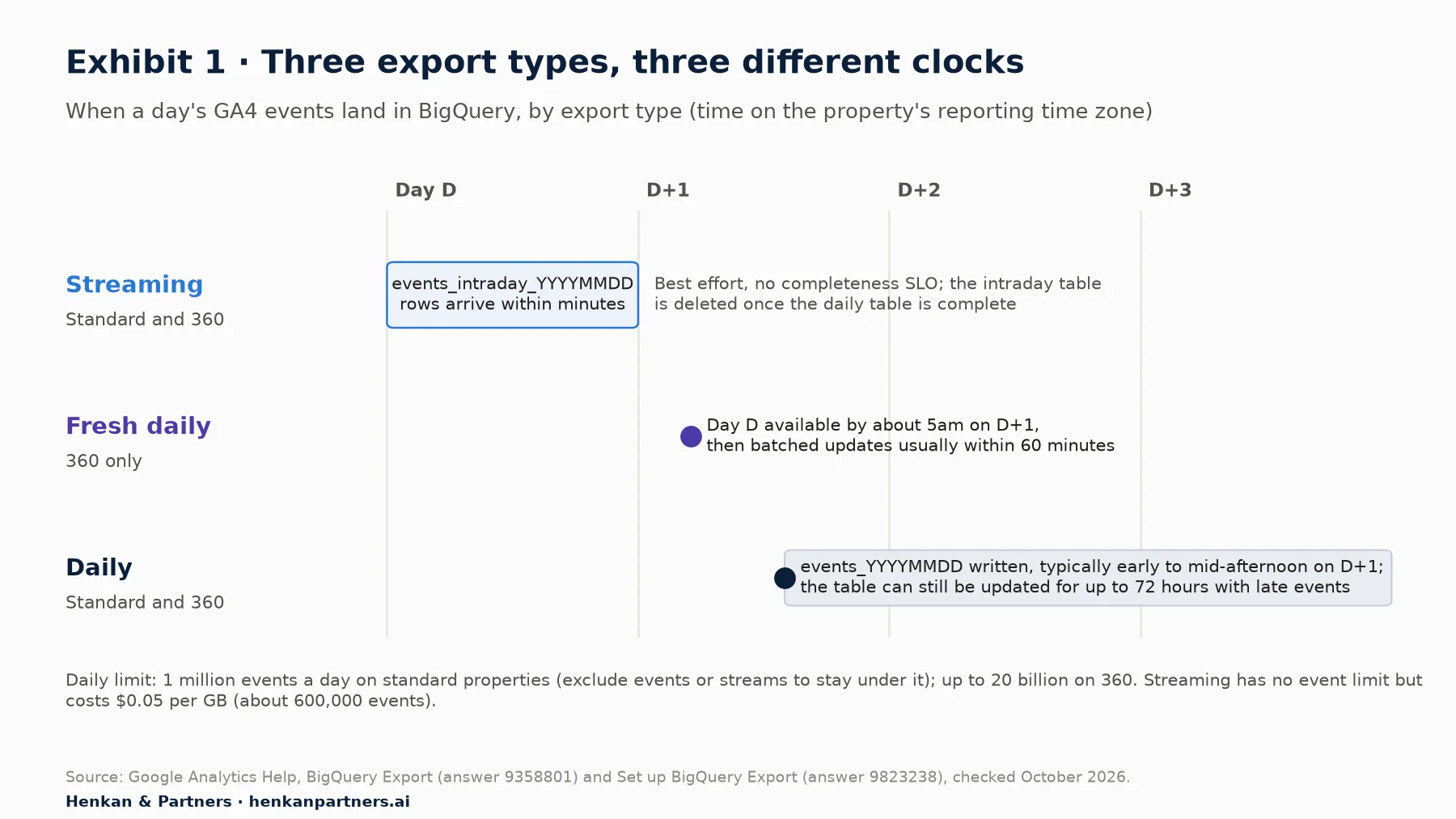
What this shows. The daily table is the reference: complete, but late and still subject to updates for up to 72 hours as late events arrive (for example from the Measurement Protocol or app SDKs). Streaming gives you today, but without a completeness guarantee. Fresh daily closes the gap for 360 customers. A pipeline that reads yesterday's table at 8am, before the daily export has run, will read nothing at all.
| Daily | Streaming | Fresh daily | |
|---|---|---|---|
| Who can use it | Standard and 360 | Standard and 360 | 360 only (Normal and Large properties) |
| Table | `events_YYYYMMDD` | `events_intraday_YYYYMMDD` | Separate fresh daily tables |
| When data lands | Once a day, typically early to mid-afternoon in the property's time zone | Within minutes | By about 5am, then updates usually within 60 minutes |
| Completeness | Complete; updated for up to 72 hours with late events | Best effort, no completeness SLO; new users' `traffic_source` name, source and medium missing | Same schema as the daily export |
| Event limit | 1 million a day (standard); up to 20 billion (360) | None | 360 limits |
| Cost | Storage and queries only | Plus $0.05 per GB, about 600,000 events | Storage and queries |
What happens above the limit? Google sends email notifications to properties that exceed 1 million events a day in the daily export and warns that the export may be paused. Your options are to exclude events or streams, to rely on streaming (which has no event limit), or to move to Analytics 360. Do the arithmetic early: 1 million events a day is roughly 30,000 to 50,000 sessions a day for a typical e-commerce implementation with enhanced measurement and a full funnel (Henkan & Partners rule of thumb; check your own events per session in the GA4 interface).
For developers. Schedule downstream jobs on the arrival of the table, not on the clock. A scheduled query that runs at 6pm usually works; one triggered by the table's creation (for example through Cloud Logging and Pub/Sub) always works. Re-run the previous three days each night so late events are included.
Section 4 · The schema
The schema is one row per event, and most query bugs come from how you unnest it
Every row in `events_YYYYMMDD` is one event. Columns that describe the event, the user, the device and the traffic source sit side by side, and repeated fields hold the variable parts: `event_params`, `user_properties` and `items`. This design keeps the table flexible, because you can add parameters without schema changes, but it means almost every useful query starts by flattening something.
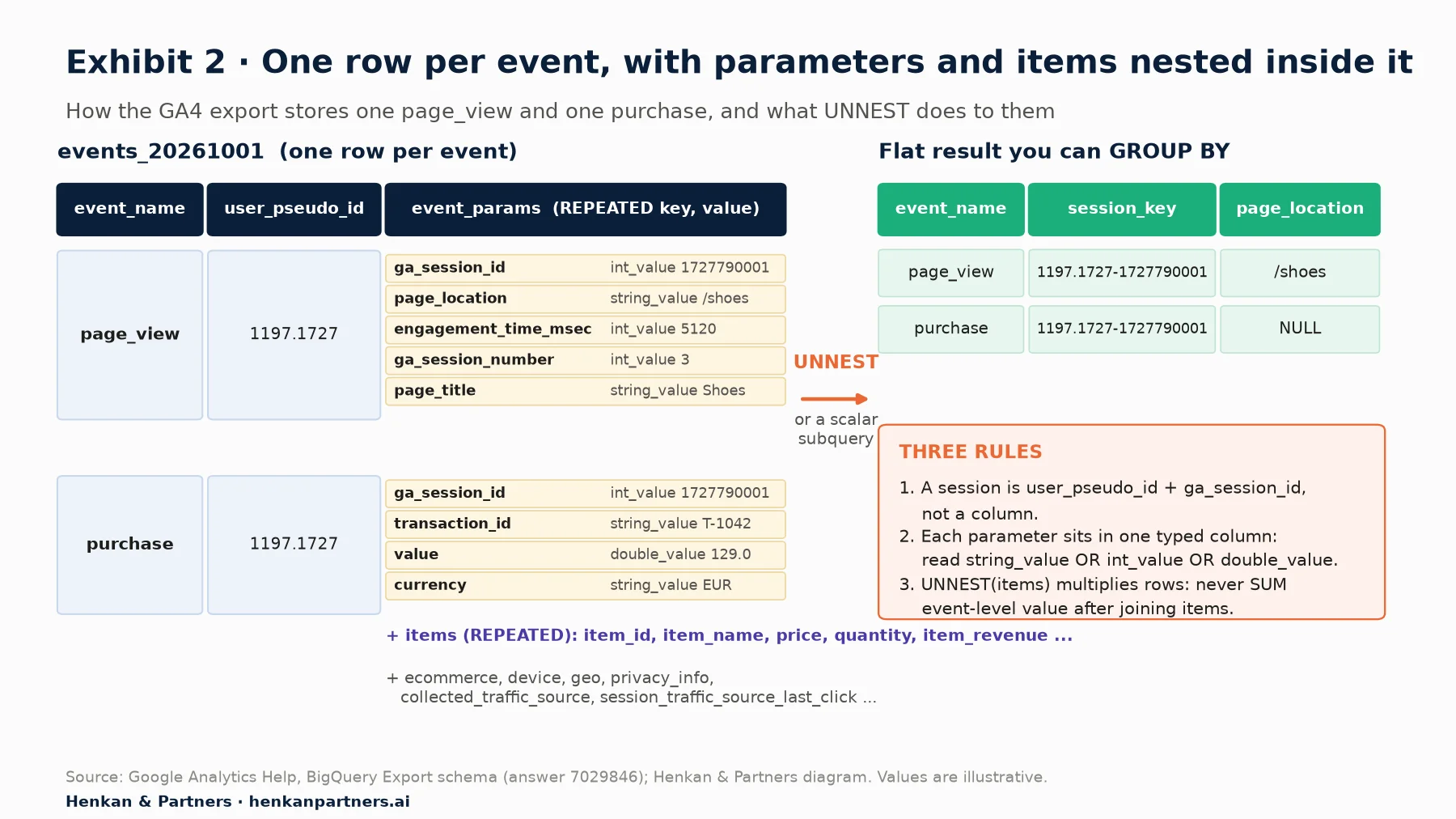
What this shows. A parameter is not a column: it is an entry in a list attached to the row, and its value sits in exactly one of `string_value`, `int_value` or `double_value` (`float_value` exists but Google lists it as currently unused). Reading the wrong typed column returns NULL without an error. The same applies to sessions, which you build yourself, and to products, which multiply rows as soon as you unnest them.
The fields you will use most
| Field | Type | What it holds | Gotcha |
|---|---|---|---|
| `event_date` | STRING | Date in the property's reporting time zone (YYYYMMDD) | `event_timestamp` is UTC in microseconds; convert before comparing with the interface |
| `event_name` | STRING | page_view, add_to_cart, purchase, your custom events | Case-sensitive; a typo in the tag is a different event here too |
| `event_params` | REPEATED RECORD | Key plus typed value for every parameter | Use the typed column your tag actually sends (numbers sent as strings land in `string_value`) |
| `user_pseudo_id` | STRING | The client ID from the `_ga` cookie (web) | Counts browsers, not people; NULL on cookieless pings |
| `user_id` | STRING | Your own login ID, if you set it | Only on events where you sent it |
| `privacy_info` | RECORD | `analytics_storage`, `ads_storage`, `uses_transient_token` | Rows with `analytics_storage = 'No'` have no user or session IDs |
| `collected_traffic_source` | RECORD | UTM values and click IDs (gclid, dclid, srsltid) present on the event | Event-level, not session-level |
| `session_traffic_source_last_click` | RECORD | Last-click session source across manual, Google Ads, SA360, DV360, CM360 and cross-channel campaigns | Use this, not `traffic_source`, for session reporting |
| `traffic_source` | RECORD | The source that first acquired the user | First-user only, never updated |
| `ecommerce` | RECORD | transaction_id, purchase_revenue, refund_value, tax, shipping | Also present in USD-converted versions |
| `items` | REPEATED RECORD | item_id, item_name, price, quantity, item_revenue, item_refund, list and promotion fields, item_params | Unnesting multiplies rows per item |
Sessions, consent and the user tables
There is no session table. A session is the combination of `user_pseudo_id` and the `ga_session_id` event parameter, and you count sessions by counting distinct pairs. Session-level attributes (landing page, session source) come from the events in that session, usually the first one or the `session_start` event.
Consent mode changes what you see. In advanced consent mode, GA4 still receives events from visitors who deny analytics storage, but without identifiers. In the export these appear as rows where `privacy_info.analytics_storage` is `No`, with no `user_pseudo_id` and no `ga_session_id` (GA4BigQuery, third-party analysis). They count as events but not as users or sessions, and none of GA4's modelled data is exported. Expect BigQuery user and session counts to be lower than the interface on consent-heavy sites. Our article on user consent in e-commerce covers the legal side.
If you enable the user data export, GA4 also writes `users_YYYYMMDD` (keyed by user ID) and `pseudonymous_users_YYYYMMDD` (keyed by pseudonymous ID). Each contains a row only for users whose data changed that day, with fields such as last activity, audience membership, user properties and lifetime engagement. They are change logs, not snapshots: to get the current state of a user, take their latest row.
Section 5 · Starter queries
Five starter queries cover most of the first requests a developer receives
The queries below use standard GoogleSQL. Three run as-is against Google's public GA4 sample e-commerce dataset, `bigquery-public-data.ga4_obfuscated_sample_ecommerce`, which holds obfuscated data from the Google Merchandise Store from 1 November 2020 to 31 January 2021. Some fields contain placeholders such as `<Other>`, NULL or empty strings, so treat its numbers as practice, not benchmarks. The other two use fields the sample predates; replace `my-project.analytics_123456789` with your own project and dataset.
Two habits apply to all of them. Always filter with `_TABLE_SUFFIX` so BigQuery reads only the daily tables you need (the wildcard `events_` also matches `events_intraday_`, and a date range on the suffix excludes those). And read parameters with a scalar subquery, `(SELECT value.int_value FROM UNNEST(event_params) WHERE key = '...')`, which keeps one row per event, rather than a cross join, which multiplies rows.
Query 1: daily events, users and sessions
-- Q1. Daily events, users and sessions (runs on the public sample dataset)
SELECT
  event_date,
  COUNT(*) AS events,
  COUNT(DISTINCT user_pseudo_id) AS users,
  COUNT(DISTINCT CONCAT(user_pseudo_id, '-', CAST(
    (SELECT value.int_value FROM UNNEST(event_params) WHERE key = 'ga_session_id') AS STRING))) AS sessions
FROM `bigquery-public-data.ga4_obfuscated_sample_ecommerce.events_*`
WHERE _TABLE_SUFFIX BETWEEN '20201201' AND '20201207'
GROUP BY event_date
ORDER BY event_date;
`CONCAT` returns NULL when either part is NULL, so cookieless rows drop out of the user and session counts but stay in the event count. That is the behaviour you want, and it is one reason these counts sit below the GA4 interface.
Query 2: an e-commerce funnel by users
-- Q2. Users reaching each e-commerce step (runs on the public sample dataset)
WITH steps AS (
  SELECT
    user_pseudo_id,
    MAX(IF(event_name = 'view_item', 1, 0)) AS viewed,
    MAX(IF(event_name = 'add_to_cart', 1, 0)) AS added,
    MAX(IF(event_name = 'begin_checkout', 1, 0)) AS checkout,
    MAX(IF(event_name = 'purchase', 1, 0)) AS purchased
  FROM `bigquery-public-data.ga4_obfuscated_sample_ecommerce.events_*`
  WHERE _TABLE_SUFFIX BETWEEN '20201201' AND '20201231'
    AND user_pseudo_id IS NOT NULL
  GROUP BY user_pseudo_id
)
SELECT
  SUM(viewed) AS view_item,
  SUM(viewed * added) AS then_add_to_cart,
  SUM(viewed * added * checkout) AS then_begin_checkout,
  SUM(viewed * added * checkout * purchased) AS then_purchase
FROM steps;
This counts users who did every previous step at some point in the period, not necessarily in order or in one session. For a strict sequence, compare `event_timestamp` values per user or session. GA4's funnel exploration and our funnel and cohort analysis guide explain open and closed funnels.
Query 3: orders and revenue by session source and medium
-- Q3. Last 28 complete days of purchases by last-click session source / medium (your property)
WITH purchases AS (
  SELECT
    IFNULL(session_traffic_source_last_click.cross_channel_campaign.source, '(not set)') AS source,
    IFNULL(session_traffic_source_last_click.cross_channel_campaign.medium, '(not set)') AS medium,
    ecommerce.transaction_id AS transaction_id,
    ecommerce.purchase_revenue AS revenue
  FROM `my-project.analytics_123456789.events_*`
  WHERE _TABLE_SUFFIX BETWEEN FORMAT_DATE('%Y%m%d', DATE_SUB(CURRENT_DATE(), INTERVAL 28 DAY))
                          AND FORMAT_DATE('%Y%m%d', DATE_SUB(CURRENT_DATE(), INTERVAL 1 DAY))
    AND event_name = 'purchase'
)
SELECT source, medium,
  COUNT(DISTINCT transaction_id) AS orders,
  ROUND(SUM(revenue), 2) AS revenue
FROM purchases
GROUP BY source, medium
ORDER BY revenue DESC;
`session_traffic_source_last_click` is the closest export field to the session source and medium in GA4 reports. It does not reproduce GA4's data-driven attribution, which is not exported. If revenue looks inflated, run query 5 first: duplicate purchase events are summed here.
Query 4: item performance from the items array
-- Q4. Top items by revenue (runs on the public sample dataset)
SELECT
  item.item_name,
  SUM(item.quantity) AS units,
  ROUND(SUM(item.item_revenue), 2) AS item_revenue,
  COUNT(DISTINCT ecommerce.transaction_id) AS orders
FROM `bigquery-public-data.ga4_obfuscated_sample_ecommerce.events_*`,
  UNNEST(items) AS item
WHERE _TABLE_SUFFIX BETWEEN '20201201' AND '20201231'
  AND event_name = 'purchase'
GROUP BY item.item_name
ORDER BY item_revenue DESC
LIMIT 20;
Here the cross join is intended: you want one row per item. The trap is adding `ecommerce.purchase_revenue` to the same query, which would repeat the order total once per item. Sum item fields at item level and order fields at event level, in separate subqueries if you need both.
Query 5: a daily QA check for purchases
-- Q5. Yesterday's purchase events with a duplicate, missing or incomplete transaction (your property)
WITH p AS (
  SELECT
    ecommerce.transaction_id AS transaction_id,
    (SELECT value.string_value FROM UNNEST(event_params) WHERE key = 'currency') AS currency,
    TIMESTAMP_MICROS(event_timestamp) AS ts
  FROM `my-project.analytics_123456789.events_*`
  WHERE _TABLE_SUFFIX = FORMAT_DATE('%Y%m%d', DATE_SUB(CURRENT_DATE(), INTERVAL 1 DAY))
    AND event_name = 'purchase'
),
by_tx AS (
  SELECT transaction_id, COUNT(*) AS purchase_events,
    COUNTIF(currency IS NULL) AS missing_currency, MIN(ts) AS first_seen
  FROM p
  GROUP BY transaction_id
)
SELECT * FROM by_tx
WHERE purchase_events > 1 OR missing_currency > 0
   OR transaction_id IS NULL OR transaction_id = '(not set)';
Schedule this to run after the daily table lands and alert when it returns rows. Duplicates usually point to a confirmation page that fires again on reload, or to a purchase sent from both browser and server. A missing currency means GA4 cannot convert the value. Our debugging and QA guide explains how to fix both at the source, and the GA4 e-commerce audit checklist lists the wider checks.
Section 6 · Reconciliation
Expect BigQuery and the GA4 interface to disagree, and document why before anyone asks
Your first query will not match the GA4 interface, and that is normal. Google's own developer guidance on bridging the two lists the main reasons. The interface estimates users and sessions with the HyperLogLog++ algorithm, while BigQuery lets you count them exactly. The interface includes modelled data for consent-denied traffic, and "none of the modeled data is available in the BigQuery event export". Google signals can merge devices in the interface, while BigQuery keeps separate `user_pseudo_id` values. Daily tables can change for up to 72 hours. The interface groups rare values as (other), which does not exist in the export. And `event_date` is in the property time zone while `event_timestamp` is UTC.
Write a one-page metric dictionary that says how your team defines users, sessions, revenue and source in BigQuery, compare complete days in the same time zone, and track the gap over time. A stable gap is a definition difference; a gap that jumps overnight is a tracking or consent change worth investigating.
For the full explanation of how GA4 counts, and why each surface applies different rules, see how GA4 actually works.
Section 7 · Cost control
Storage is cheap; scanning is what you pay for, so design queries and tables for it
BigQuery charges for three things that matter here: storage, the streaming export, and the bytes your queries scan. With on-demand pricing in the US multi-region, Google lists queries at $6.25 per TiB scanned after the first free TiB each month, active logical storage at about $0.023 per GiB a month and long-term storage (tables not modified for 90 consecutive days) at about $0.016, roughly 30% less, with the first 10 GiB free. Google estimates that 1 GB of export data is about 600,000 GA4 events. Those figures let you size the bill before you link.
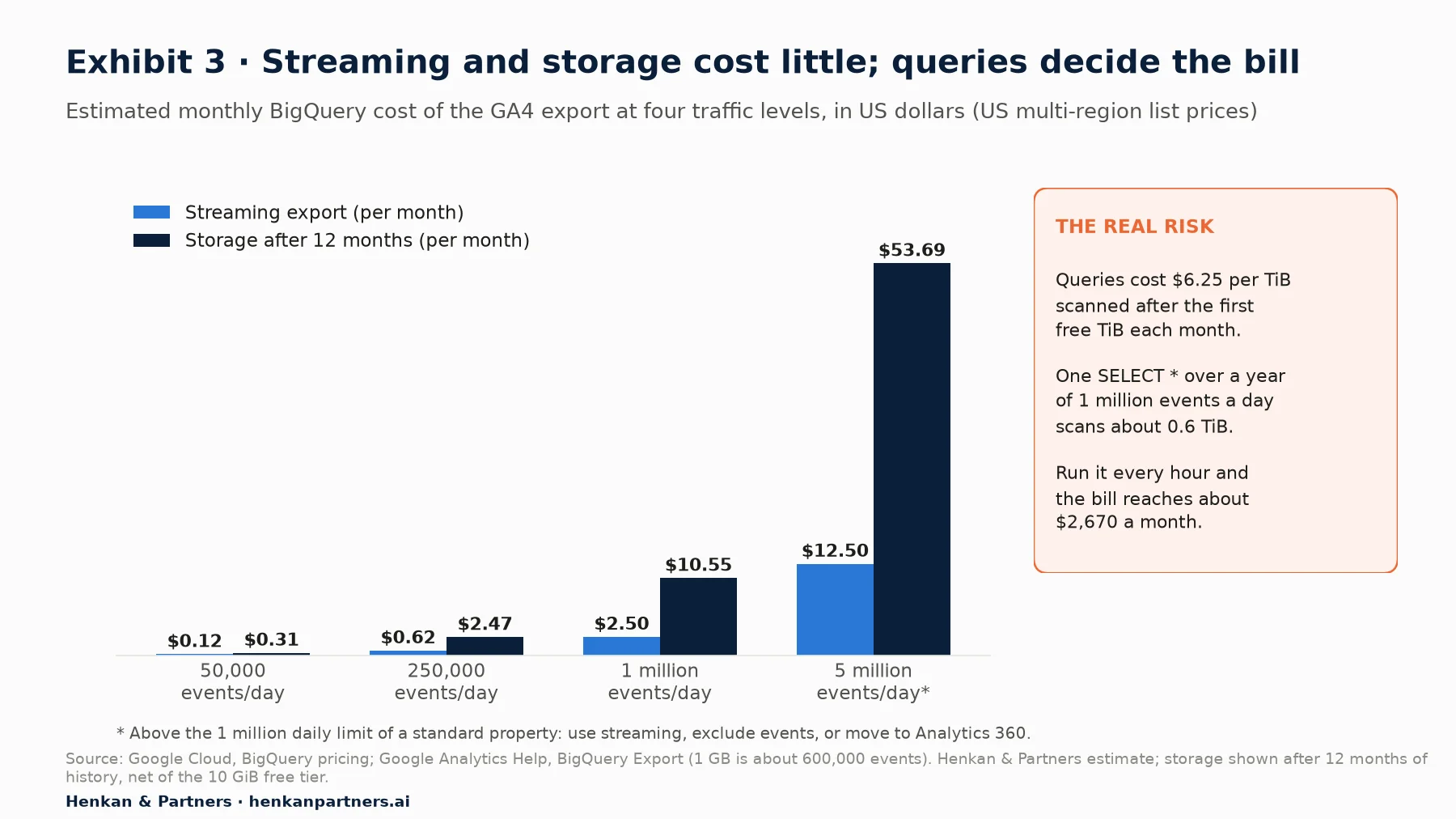
What this shows. For most sites, storing and streaming GA4 data costs less than a coffee a month, and even at 5 million events a day it stays under $70. The bill is decided by queries. A single `SELECT *` over a year of data at 1 million events a day scans about 0.6 TiB, around $3.70. That is harmless once and expensive when a tool runs it every hour.
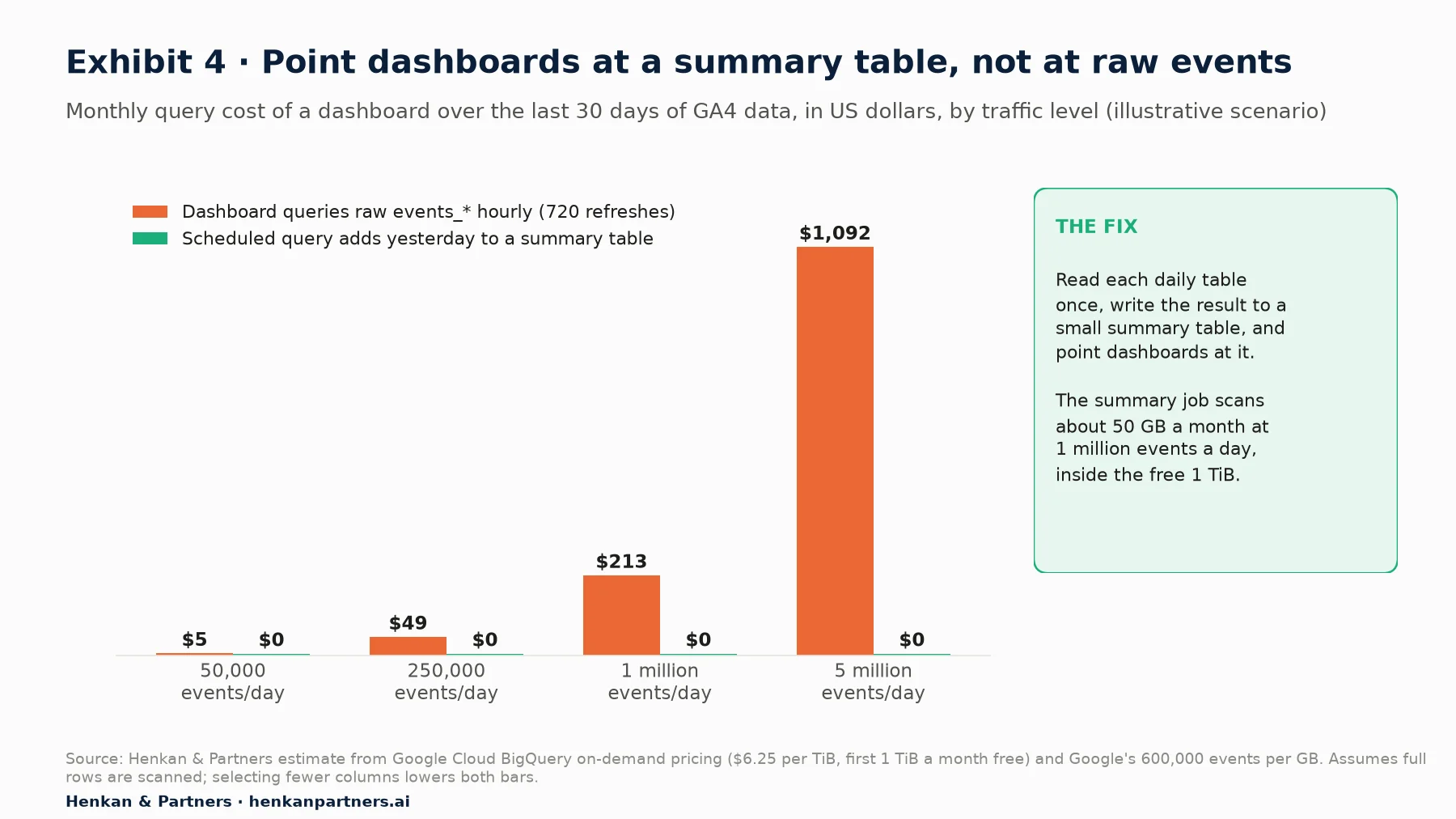
What this shows. The same dashboard costs from nothing to over $1,000 a month depending on one design choice. A dashboard connected straight to `events_*` rescans the whole window on every refresh. A scheduled query that reads only yesterday's table once a day and appends it to a small summary table scans about 50 GB a month at 1 million events a day, inside the free tier. Selecting fewer columns lowers both bars, because BigQuery bills only the columns you read.
Seven cost controls to set up on day one
- Filter every query on `_TABLE_SUFFIX`. GA4 export tables are date-sharded, one table per day, so the suffix filter is what limits the scan.
- **Never `SELECT `.* BigQuery stores data by column and bills the columns you read. `LIMIT` does not reduce the bytes scanned on these tables.
- Check the estimate before running. The console's query validator, or a dry run with `--dry_run`, shows bytes to be processed without charge. Use table preview, which is free, to look at rows.
- Set maximum bytes billed. A query that would exceed the limit fails without charge. Set it in your tools and in service accounts used by dashboards.
- Set custom quotas. Cap the data processed per day per project or per user, so a runaway notebook cannot spend a month's budget in an afternoon.
- Materialise summary tables. Use scheduled queries, Dataform or dbt to build partitioned, clustered daily tables (sessions, orders, items) and point dashboards at them.
- Add a budget alert. A Cloud Billing budget with email alerts at 50%, 90% and 100% costs nothing and catches what the other controls miss.
For leaders. Ask two questions of any team using the export: which dashboards read raw `events_*` tables directly, and is there a daily query quota? If the answers are "several" and "no", the cost risk is real even when this month's bill is small.
Section 8 · Measurement Protocol
Use the Measurement Protocol to add server truths to GA4, not to replace the tag
Some events never happen in a browser. A refund is approved in the back office, a click-and-collect order is paid in store, a subscription renews at night, a lead becomes a customer in the CRM. The GA4 Measurement Protocol lets your servers send these events to GA4 over HTTPS. Google is explicit about its role: it is meant "to augment automatic collection through gtag, Tag Manager, and Google Analytics for Firebase, not to replace it". Used alone, it gives only partial reporting.
For a web data stream you POST JSON to `https://www.google-analytics.com/mp/collect` (or `https://region1.google-analytics.com/mp/collect` to collect in the EU, available since May 2025), with two query parameters: `measurement_id` (the stream's G- ID) and `api_secret`, which you create under Admin > Data streams > your stream > Measurement Protocol API secrets. The secret must stay on the server. The body carries a `client_id`, optional `user_id`, `timestamp_micros`, `user_properties`, `consent`, location and device fields, and an `events` array.
| Limit | Value | What to do about it |
|---|---|---|
| Events per request | 25 | Batch, and split larger batches |
| Parameters per event / user properties per request | 25 / 25 | Send only what reports or audiences need |
| Event and parameter names | 40 characters, letters, numbers and underscores, starting with a letter | Reuse the names in your tracking plan |
| Parameter values | 100 characters (500 on 360) | Send IDs, not descriptions |
| User property name / value | 24 / 36 characters | Keep user properties short and coded |
| Request body | 130 kB | Watch long items arrays |
| Backdating with `timestamp_micros` | Up to 72 hours | Send promptly; queue and retry rather than batch weekly |
| Reserved names | Events such as session_start, first_visit, user_engagement; parameter prefixes `_`, `firebase_`, `ga_`, `google_`, `gtag.` | Validate names in CI |
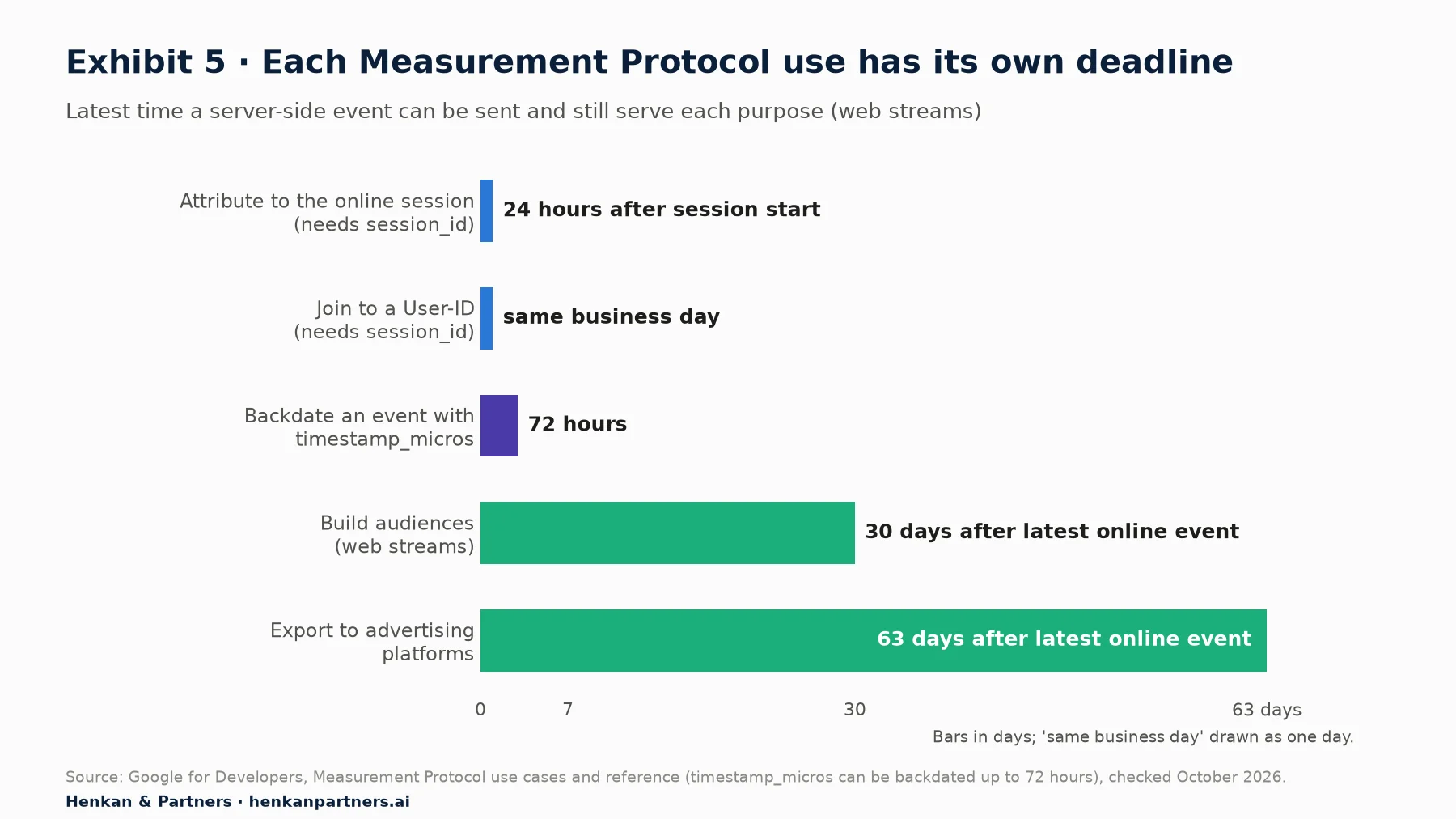
What this shows. Timing decides what a server event can do. To land in the browser session that started the journey, it must carry that `session_id` and arrive within 24 hours of the session start. For audiences or advertising exports the windows are longer, 30 and 63 days after the latest online event. A nightly batch that sends last week's refunds will arrive too late for most of these uses.
Section 9 · Implementation
A server event is only useful if it carries the browser's IDs, passes validation and is retried
Most Measurement Protocol projects fail quietly. The endpoint "does not return HTTP error codes, even if an event is malformed": a 2xx status only proves the request was received. Events with the wrong client ID create phantom users, events without a session ID land outside any session, and events sent twice double revenue. Exhibit 6 shows the flow we recommend.
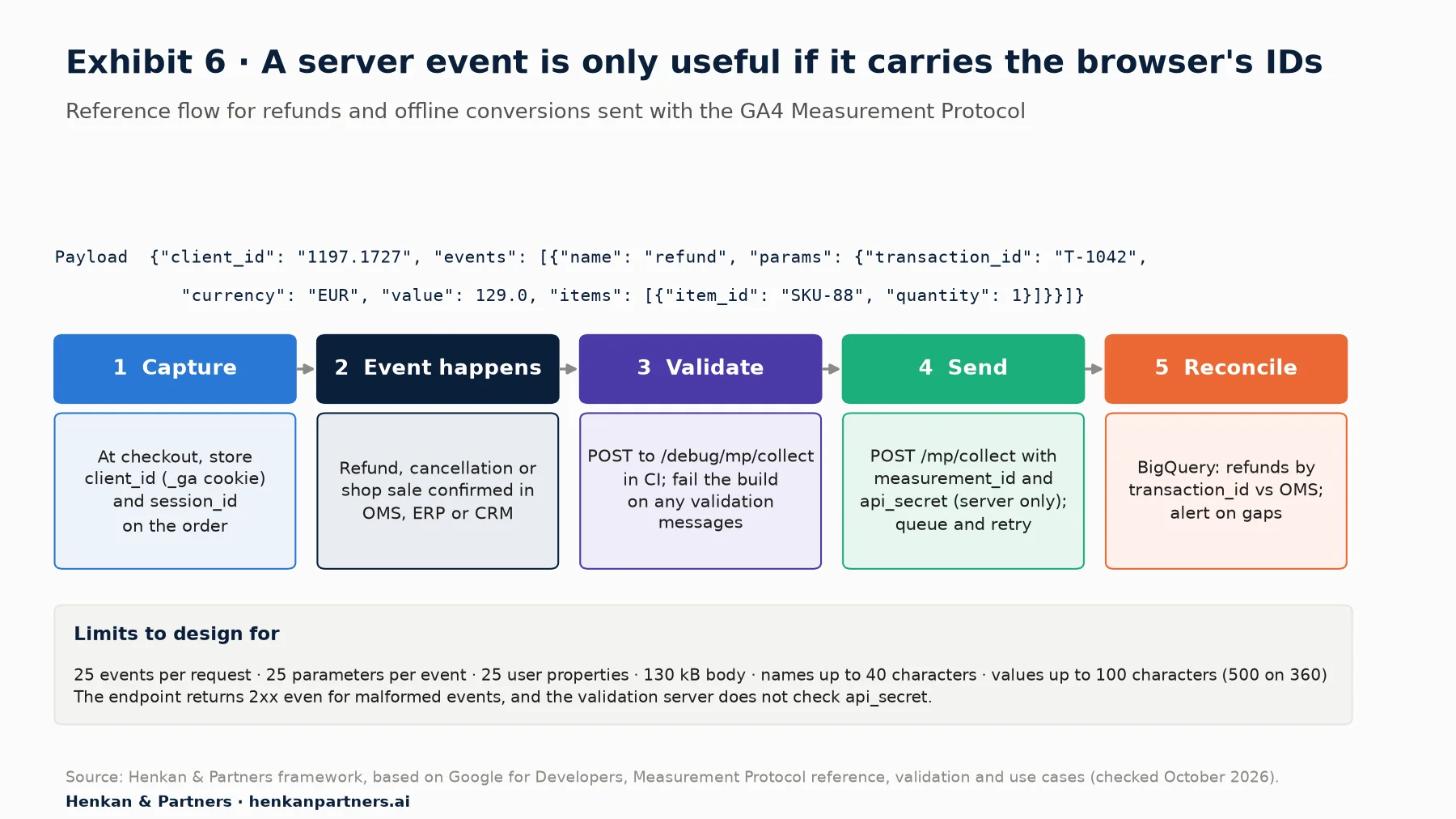
What this shows. The work that makes server events useful happens before and after the HTTP call. You capture the browser's identifiers when you still have them, at checkout. You validate payloads automatically, because production will not tell you they are wrong. And you check in BigQuery that what the order system recorded is what GA4 received.
Step 1: capture the IDs while the visitor is still in the browser
Read the IDs with the Google tag's `get` command and send them with the order: `gtag('get', 'G-XXXXXXX', 'client_id', cb)` and the same call with `session_id`. Alternatively, parse them from the `_ga` cookie on the server. Since February 2026 the Measurement Protocol accepts either the classic two-number client ID (for example `1197.1727`) or the full cookie value, and the same for the session ID, although Google still recommends sending the non-cookie values. Store both on the order record, next to the consent state at the time of purchase.
Step 2: send the event from the server, with a queue
# Python: send a full refund for an order to GA4 (web stream)
import os, requests

MP_URL = "https://region1.google-analytics.com/mp/collect"   # EU endpoint; or www.google-analytics.com
PARAMS = {"measurement_id": os.environ["GA4_MEASUREMENT_ID"],
          "api_secret": os.environ["GA4_API_SECRET"]}          # server-side only

def send_refund(order):
    payload = {
        "client_id": order.ga_client_id,          # captured at checkout
        "events": [{
            "name": "refund",
            "params": {
                "transaction_id": order.id,        # same ID as the purchase event
                "currency": order.currency,
                "value": order.refund_amount,
                "items": [{"item_id": i.sku, "quantity": i.qty} for i in order.refunded_items],
            },
        }],
    }
    r = requests.post(MP_URL, params=PARAMS, json=payload, timeout=5)
    r.raise_for_status()   # proves receipt only: GA4 returns 2xx for malformed events too
Google's e-commerce documentation requires `transaction_id` for refunds and recommends item details so GA4 can show item-level refund metrics. Put the call behind a queue with retries, so a network failure does not lose a refund, and log every payload with its order ID. If you do not send `consent`, GA4 applies the consent settings of the corresponding online interactions; if your consent platform records a refusal, respect it on the server too. Server-side sending does not change your legal obligations.
Step 3: validate in CI, and avoid double counting
Send the same payload to `/debug/mp/collect` (or `region1.google-analytics.com/debug/mp/collect`) in your test suite and fail the build if the response's `validationMessages` array is not empty. Codes such as `NAME_RESERVED`, `VALUE_OUT_OF_BOUNDS` and `EXCEEDED_MAX_ENTITIES` tell you exactly which field is wrong. Two caveats from Google's documentation: the validation server does not check `api_secret`, and events sent to it never appear in reports. Run one end-to-end check against a test property after each deployment.
- Send each fact from one place. If the browser sends `purchase`, the server must not send it too, or revenue doubles. Use the server for what the browser cannot see (refunds, cancellations, offline sales) or move the whole event server-side deliberately.
- Keep names consistent. The server's `refund` and `purchase` events must use the same `transaction_id` format and currency as the browser's, or BigQuery cannot join them.
- Reconcile weekly. Compare refunds and offline sales in BigQuery (`ecommerce.refund_value`, `items.item_refund`) with the order system and alert on gaps.
Our view. Teams often reach for the Measurement Protocol when the real problem is a browser tag that fires unreliably. Fix the tag first. If you need server control of all your data flows, look at server-side Google Tag Manager, which is step 5 of this path and covers consent, cookies and hosting in depth.
Section 10 · AI
AI assistants write good GA4 SQL when you give them the schema, read-only access and a cost cap
The nested GA4 schema is well documented and widely discussed, so large language models are good at writing first drafts of these queries. Two official connectors now let AI agents reach the data directly through the Model Context Protocol (MCP). Google's Google Analytics MCP server gives read-only access to GA4 reporting and configuration; it "can't edit your Google Analytics configuration or settings". Google Cloud's managed BigQuery MCP server exposes tools such as `list_table_ids`, `get_table_info`, `execute_sql` and `execute_sql_readonly`, with a three-minute query timeout and a 3,000-row result limit.
- Give the agent read-only tools. Use `execute_sql_readonly` and a service account with only the MCP Tool User, BigQuery Data Viewer and BigQuery Job User roles Google lists for the server.
- Cap the cost. Apply maximum bytes billed and a per-user custom quota to the agent's identity. An agent that retries a failing query over `events_*` can scan terabytes.
- Feed it the schema and your metric dictionary. Most wrong answers come from guessed fields (a parameter read from the wrong typed column, `traffic_source` used for sessions) rather than bad SQL.
- Review before you publish. Treat AI-written queries like a junior analyst's: check the row grain, the date filter and the unnesting before numbers reach a decision.
- Keep personal data out of prompts. Query aggregates, not raw rows with user IDs, when the output goes to a third-party model.
Section 11 · What to do next
What to do next
1. Link the export this week
Agree the Cloud project, billing and data location, then link daily export for all streams. Add streaming only if someone needs intraday data. Check the first `events_YYYYMMDD` table the next afternoon.
2. Put the cost guardrails in place before the first dashboard
Set a budget alert, a daily custom query quota and maximum bytes billed for every service account. Build summary tables with scheduled queries and connect dashboards to those, never to raw `events_*`.
3. Ship the five starter queries
Run queries 1, 2 and 4 on the public sample to learn the schema, then adapt them and queries 3 and 5 to your property. Schedule query 5 as a daily alert on purchase quality.
4. Move refunds and offline events to the Measurement Protocol
Capture `client_id` and `session_id` at checkout, send refunds and offline conversions from the server with a queue, validate payloads in CI and reconcile them in BigQuery each week. Agree the event names and owners in the shared GA4 tracking plan.
5. Use the kit, and ask for help when the stakes are high
To brief stakeholders and document what you build, download the GA4 Tracking Request Kit: it contains a question bank per role, an event spec template, a naming convention, a QA checklist and a tracking-plan sheet layout. If you are migrating a large property, reconciling GA4 with finance, or designing server-side events for a complex order flow, talk to us.
Disclosure: Henkan & Partners sells analytics implementation and data engineering services, including GA4, BigQuery and server-side tracking work.
FAQ
Frequently asked questions about the GA4 BigQuery export and Measurement Protocol
Frequently asked questions
What is the GA4 BigQuery export?
It is a built-in link that copies the raw events collected by a Google Analytics 4 property into a dataset in your own BigQuery project, one row per event with parameters, user, device, traffic source and e-commerce data nested inside. It is available on free and 360 properties, unsampled and without the thresholds applied in GA4 reports.
Is the GA4 BigQuery export free?
The link itself is free on standard properties, but BigQuery charges for storage, streaming and queries. For most sites storage and the daily export cost a few dollars a month or less, and the first 1 TiB of queries and 10 GiB of storage each month are free. The real cost risk is queries that rescan raw tables, such as dashboards connected to events_* directly.
Can I export historical GA4 data to BigQuery?
No. Google's setup guide says data starts flowing within 24 hours of linking, and the export offers no option to backfill the days before the link. That is why we recommend linking as early as possible, even if nobody will query the data yet.
What is the difference between daily and streaming export in GA4?
The daily export writes a complete events_YYYYMMDD table once a day, usually in the afternoon of the following day, and can update it for up to 72 hours; standard properties are limited to 1 million events a day. Streaming writes events_intraday_YYYYMMDD within minutes, has no event limit, costs $0.05 per GB and is best effort, without a completeness guarantee. Fresh daily is a faster complete export for Analytics 360.
What happens if my GA4 property exceeds 1 million events a day?
Google notifies properties that exceed the daily export limit and warns that the daily export may be paused. You can exclude events or data streams in the link settings, rely on the streaming export, which has no event limit, or upgrade to Analytics 360, which allows up to 20 billion events a day.
Why don't my BigQuery numbers match GA4 reports?
GA4 reports estimate users and sessions with HyperLogLog++, include modelled data for consent-denied traffic, can merge devices with Google signals and group rare values as (other). BigQuery holds only observed events, counts exactly, keeps separate pseudonymous IDs and can change for 72 hours as late events arrive. Time zones and incomplete days cause the rest.
How do I unnest event_params in BigQuery?
Use a scalar subquery per parameter, for example (SELECT value.int_value FROM UNNEST(event_params) WHERE key = 'ga_session_id'), and read the typed column your tag actually sends: string_value, int_value or double_value. This keeps one row per event. A cross join with UNNEST(event_params) creates one row per parameter instead.
What is the GA4 Measurement Protocol used for?
It lets your servers send events to GA4 over HTTPS, for interactions a browser cannot see: refunds, cancellations, offline or in-store sales, subscription renewals and CRM conversions. Each event needs the visitor's client_id, and a session_id sent within 24 hours of the session start if it should count in that session.
Can the Measurement Protocol replace gtag.js or Google Tag Manager?
No. Google states that it is meant to augment automatic collection, not replace it, and that using it alone gives only partial reporting. Sessions, engagement and page data come mainly from the browser tag. Use the protocol for server-side facts and server-side Tag Manager if you want to route all browser data through your own server.
Key terms
- BigQuery
- Google Cloud's serverless data warehouse, billed for storage and bytes scanned. It matters because it is where GA4's raw events live once exported, and where you join them with orders, CRM and costs.
- Daily export
- The GA4 export that writes a complete events_YYYYMMDD table once a day and updates it for up to 72 hours. It is the reference table for analysis, limited to 1 million events a day on standard properties.
- Streaming export
- The GA4 export that writes events to events_intraday_YYYYMMDD within minutes, at $0.05 per GB. It matters for intraday monitoring but is best effort and lacks some new-user source fields.
- Fresh daily export
- An Analytics 360 export that delivers complete daily data by about 5am with frequent updates. It matters for 360 customers who need complete data early in the day.
- _TABLE_SUFFIX
- A pseudo-column that holds the part of a table name matched by a wildcard such as events_*. Filtering on it limits which daily tables are scanned, which controls both speed and cost.
- event_params
- The repeated field holding every parameter of an event as a key and a typed value. Most GA4 SQL starts by reading from it, and reading the wrong typed column returns NULL silently.
- UNNEST
- A GoogleSQL operator that turns an array, such as event_params or items, into rows. It is essential for GA4 data, and misused it multiplies rows and inflates totals.
- user_pseudo_id
- The pseudonymous browser or app-instance ID in the export, taken from the _ga cookie on the web. It counts browsers rather than people and is missing on cookieless pings.
- ga_session_id
- An event parameter holding the session's identifier. Combined with user_pseudo_id it defines a session, which is not a column in the export.
- session_traffic_source_last_click
- A record holding the last-click source of the session across manual and Google advertising campaigns. Use it rather than traffic_source, which is first-user only, for session-level reporting.
- Measurement Protocol
- Google's HTTP API for sending events to GA4 from servers. It matters for refunds and offline conversions, and it fails silently, so payloads must be validated.
- API secret
- A key created per data stream that authorises Measurement Protocol requests. It must stay on the server, because anyone holding it can send data to your property.
- Validation server
- The /debug/mp/collect endpoint that checks Measurement Protocol payloads and returns validation messages. It is the only way to see errors, but it does not check the API secret.
- Maximum bytes billed
- A per-query BigQuery setting that makes a query fail without charge if it would scan more than a limit. It is the simplest guard against expensive mistakes.
- Cookieless ping
- An event GA4 receives in advanced consent mode when analytics storage is denied, without client or session ID. It counts as an event but not as a user or session in BigQuery.
Sources
All Google documentation was checked in October 2026; GA4 and BigQuery features, limits and prices change often, so check the linked pages before relying on a specific number. Prices are US multi-region list prices in US dollars. Exhibits 1 and 5 show data from Google documentation. Exhibits 3 and 4 are Henkan & Partners estimates calculated from Google's published prices and its figure of about 600,000 events per GB; Exhibit 4 is an illustrative scenario. Exhibits 2 and 6 are Henkan & Partners frameworks. The analysis of cookieless pings in the export comes from a third-party specialist site, not from Google.
- Google Analytics Help (2026). Set up BigQuery Export.
- Google Analytics Help (2026). BigQuery Export.
- Google Analytics Help (2026). BigQuery Export schema.
- Google for Developers (2026). Basic queries for Google Analytics BigQuery event export data.
- Google for Developers (2026). BigQuery sample dataset for Google Analytics ecommerce web implementation.
- Google for Developers (2026). Queries for Google Analytics user-data export.
- Google for Developers (2023). Bridge the gap between the Google Analytics UI and BigQuery export.
- Google Cloud (2026). BigQuery pricing.
- Google Cloud (2026). Estimate and control costs.
- Google Cloud (2026). Enable the BigQuery sandbox.
- Google for Developers (2026). Measurement Protocol (Google Analytics 4).
- Google for Developers (2026). Send Measurement Protocol events to Google Analytics.
- Google for Developers (2026). Measurement Protocol reference.
- Google for Developers (2026). Validate Measurement Protocol events.
- Google for Developers (2026). Measurement Protocol use cases.
- Google for Developers (2026). Measurement Protocol changelog.
- Google for Developers (2026). Measure ecommerce.
- Google for Developers (2026). gtag.js API reference.
- Google Cloud (2026). Use the BigQuery MCP server.
- Google for Developers (2026). Try the Google Analytics MCP server.
- GA4BigQuery, Johan van de Werken (2024). Navigating consent mode in the GA4 BigQuery export.