Focus
GA4 for Developers: The Event Data Model, Limits and Gotchas You Need Before Writing a Line of Tracking
Alexandre Suon · 2026-10-02
GA4 for developers starts with the event data model: events, parameters, user properties, the items array and the identifiers that tie them together. This first step of the developer path explains how GA4 stores what you send, the limits it applies without warning, and the mistakes that can never be repaired after release, so you can design your tracking before you write a line of it.
Executive summary
- GA4 has no fixed schema for your business, so the code you write becomes the schema. Every interaction is an event with a name and up to 25 parameters on a standard property; what you call things and where you put values decide which questions the data can answer.
- Pick the scope before the name. A value belongs to the event, to a product in the items array or to the user. GA4 offers event-, item- and user-scoped custom dimensions, but no session scope, and user properties keep only the last value sent.
- The limits are tight and mostly silent. Event names stop at 40 characters, parameter values at 100 (500 on Analytics 360), user property values at 36, and a standard property has 50 event-scoped, 25 user-scoped and 10 item-scoped custom dimensions. Design under them rather than discover them in production.
- GA4 counts browsers until you send a user_id. The `_ga` cookie identifies a browser, not a person. A `user_id` of up to 256 characters, free of personal data and set to `null` on logout, links devices, but Google does not reprocess data collected before User-ID was implemented.
- Data settles over days, then sets hard. Daily tables typically arrive in about 12 hours, late events are accepted for up to two calendar days plus today, and key event attribution can change for 12 days. Custom dimensions, data filters and identity fixes apply only from the day they are made.
- Most (not set) values and broken reports are predictable. They come from a missing `page_view` or `session_start`, parameters sent on later events only, registration done late or consent commands in the wrong order. A one-page model agreed before the build prevents nearly all of them.
Section 1 · Why it matters
GA4 is the analytics schema you are most likely to inherit, so learn its model before you code
The GA4 data model is the structure Google Analytics 4 uses to store what a website or app sends it: a stream of named events, each carrying parameters (details of the interaction), optional items (products), user properties (attributes of the person) and identifiers for the browser, the signed-in user and the session.
If you build for the web, you will meet GA4. According to W3Techs, Google Analytics was used by 47.2% of all websites on 1 October 2026, which is 82.7% of the sites that use any traffic analysis tool it monitors. Product managers, designers and marketers in your company read its reports every week. The quality of those reports is decided by people like you, often in a single pull request, months before anyone looks at the data.
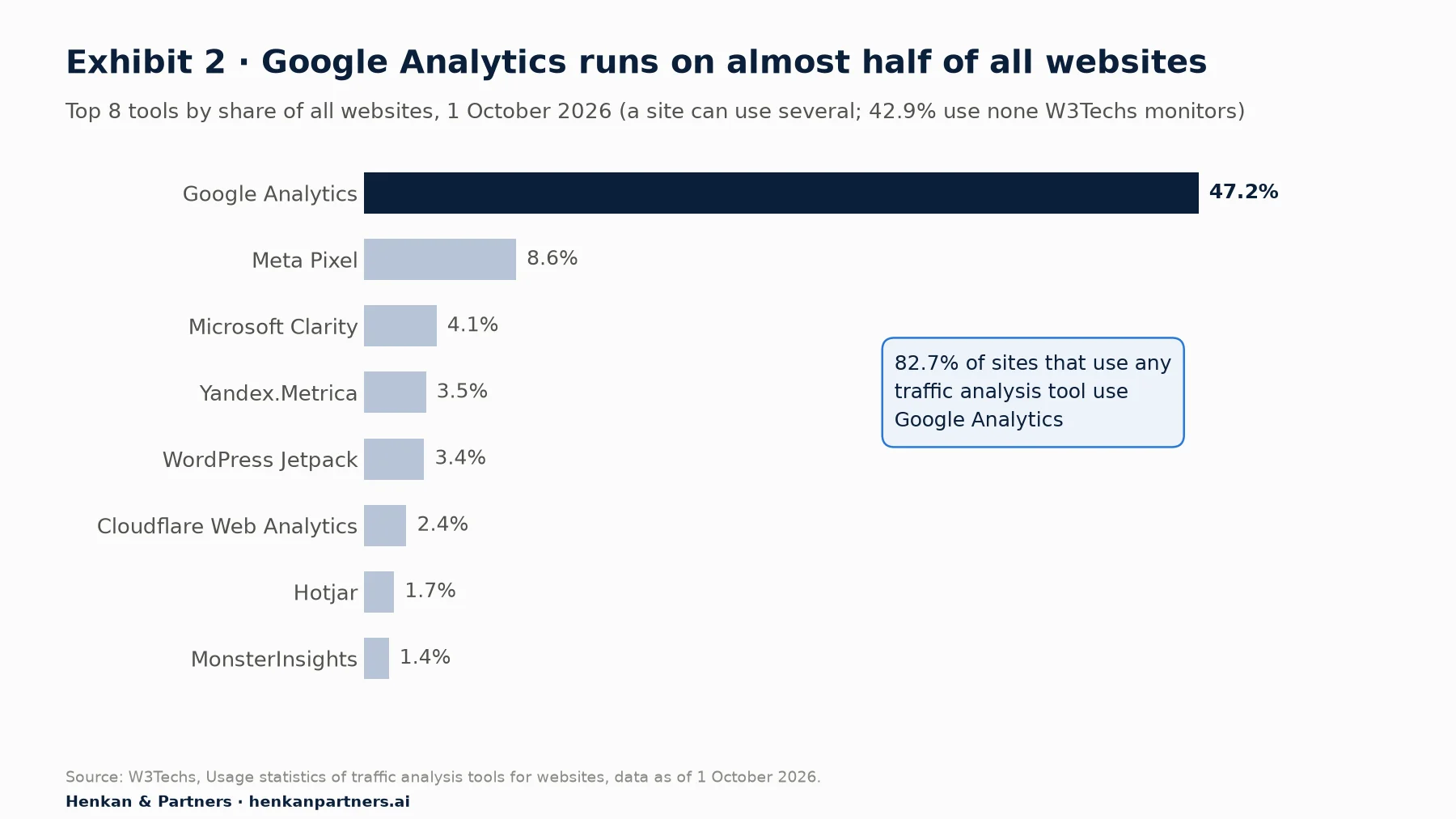
What this shows. Google Analytics is not one option among many: it is the default. That makes its data model the one your colleagues have learned to read, and the one most third-party tools, consultants and AI assistants expect. Getting it right once pays back across every team that uses the reports.
This article is the A · Ask step of our developer path. It covers the questions you should be able to answer about any tracking request before you build it: what kind of data is this, which scope does it belong to, what will GA4 do with it, and what happens if we get it wrong. The next steps cover the build itself (from tracking request to dataLayer spec), debugging and QA and the BigQuery export and Measurement Protocol. If you want the end-to-end view of how a GA4 number is produced, from the browser to the report, read how GA4 works first; we do not repeat it here.
Six questions to ask of every tracking request
- Is there a recommended event for this? If Google already defines one (`sign_up`, `add_to_cart`, `generate_lead`), use its name and parameters.
- What is the scope of each value? Event, item or user. If the answer is "session", rethink it (Section 3).
- Will it fit the limits? Name length, number of parameters, value length and the custom dimension slots left on the property.
- Who is the user? Is the person signed in, and do we send a `user_id`?
- Does it contain personal data? Emails, names, phone numbers or free text typed by users must never reach GA4.
- When must it be live and registered? Anything not sent and registered before launch day is lost for launch day.
For leaders. Most GA4 problems that reach a dashboard were created at design time and cannot be repaired afterwards. Ask for a one-page data model (event names, parameters, scopes, identity rules) to be reviewed before each feature with tracking is built. It costs an hour and protects months of data.
Section 2 · Building blocks
Every GA4 hit is an event, and each event has four layers: identifiers, user properties, parameters and items
In GA4 a page view, a click, an add to cart and a purchase are all the same thing: an event with a name. What distinguishes them is the data attached. Exhibit 1 shows a single `add_to_cart` event as GA4 receives it and the scope of each layer.
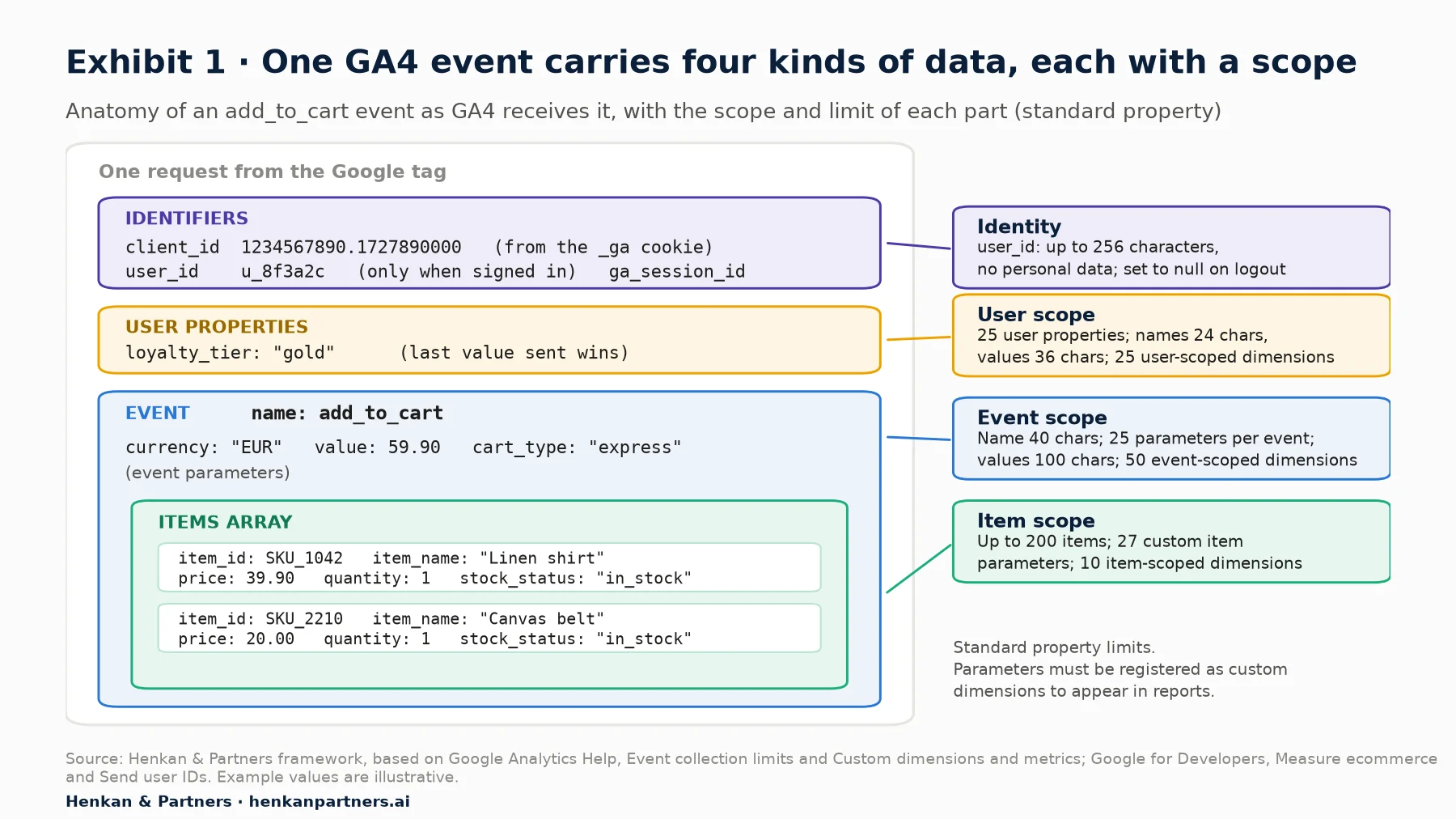
What this shows. One request carries four different kinds of data, and each has its own rules. Identifiers decide who did it, user properties describe the person, event parameters describe the action, and the items array describes the products involved. Most design errors come from putting a value in the wrong layer.
Google sorts events into four families, and the family decides how much work you have to do:
| Event family | Who defines it | Examples | What you do |
|---|---|---|---|
| Automatically collected | `first_visit`, `session_start`, `user_engagement` | Nothing; never send these names yourself | |
| Enhanced measurement | Google, switched on in Admin | `scroll`, `click` (outbound), `view_search_results`, `file_download` | Check the settings; do not duplicate them in code |
| Recommended | Google defines name and parameters | `login`, `sign_up`, `search`, `add_to_cart`, `purchase` | Send them with the documented parameters |
| Custom | You | `filter_apply`, `size_guide_open` | Name, document and register parameters yourself |
Recommended events matter more than they look. GA4's standard e-commerce reports read `view_item`, `add_to_cart`, `begin_checkout` and `purchase` with the parameters Google documents; the `search` event expects a `search_term`. Use a custom name for the same action and those reports stay empty. The rule of thumb: look up the recommended events reference first, and only invent a name when nothing fits.
For product managers and designers. When you write a tracking request, describe the user action and the question it answers, and let the developer map it to a recommended event. The role-specific guides show how: for product managers and for designers.
Section 3 · Scope
Choose the scope before the name, because a value in the wrong scope answers the wrong question
Scope is the level a value describes. GA4 offers three scopes for custom dimensions: event, item and user. There is no session-scoped custom dimension. Each scope has its own quota, and a value registered in one scope cannot simply be moved to another later: you create a new dimension, and it only collects data from that day.
| If the value describes… | Scope | Send it as | Example |
|---|---|---|---|
| The action itself | Event | An event parameter | `filter_name: "colour"` on `filter_apply` |
| One product among several in the event | Item | A parameter inside each object of `items` | `stock_status: "low"` per product |
| The person, and stays true for a while | User | A user property | `loyalty_tier: "gold"` |
| Who the signed-in person is | Identity (not a dimension) | The `user_id` field | `u_8f3a2c` |
| The visit as a whole | No session scope | An event parameter on the relevant events, or derive it later | `checkout_type` sent on each checkout event |
User properties keep only the last value
Google's documentation is explicit: "Google Analytics uses the most recent value of a user property for each user." That makes user properties right for slow-changing attributes such as a loyalty tier or a plan type, and wrong for anything that changes during a visit. If you set `cart_value_band` as a user property, every report will show the band from the user's latest event, not the band at the time of the purchase you are analysing. With gtag.js you set user properties once with the `set` command, and they are attached to subsequent events on the page:
gtag('set', 'user_properties', { loyalty_tier: 'gold' });
gtag('event', 'add_to_cart', { currency: 'EUR', value: 59.90, items: [ /* … */ ] });
Item parameters and event parameters are different fields
A `discount` on the event and a `discount` on each item are two separate data points, read by different reports. Put product attributes (size, colour, stock status, margin band) inside the items, where they describe one product, and put attributes of the action (list name, checkout step, payment type) on the event. Item-scoped custom dimensions are the scarcest resource on a standard property: ten slots.
Our view. In our experience, a dimension registered in the wrong scope is one of the most frequent findings in GA4 audits, usually a user property used for something that changes per visit. Fixing them means a new dimension and a broken time series. Ten minutes on scope at design time avoids it. For the business side of choosing dimensions, see e-commerce custom dimensions.
Section 4 · Names
Names are case-sensitive and effectively permanent, so fix the convention before the first push
GA4 treats a name as an exact string. Google's naming rules are short and strict:
- Case-sensitive. "`my_event` and `My_Event` are distinct events." A front-end that sends `Add_To_Cart` while the app sends `add_to_cart` splits your data in two.
- Letters, numbers and underscores only, no spaces, and the name must start with a letter.
- Length. Event and parameter names up to 40 characters; user property names up to 24.
- Reserved names. Do not send names GA4 uses itself, such as `first_visit`, `session_start`, `user_engagement`, `page_view` or `error`. Google's event naming rules list the full set for web, and the Measurement Protocol reference adds the names reserved for server-side events.
- Reserved prefixes. Parameter names cannot start with `_`, `firebase_`, `ga_`, `google_` or `gtag.`; user property names cannot start with `_`, `firebase_`, `ga_` or `google_`, and `user_id` is reserved as a user property name.
Because history cannot be renamed, the convention must exist before the first event ships. A convention that works in practice:
| Rule | Convention | Good | Bad |
|---|---|---|---|
| Case | snake_case, all lower case | `size_guide_open` | `SizeGuideOpen`, `size-guide-open` |
| Shape | object_action, past or present tense used consistently | `filter_apply`, `video_start` | `clicked_on_the_filter_button` |
| Recommended first | Use Google's name when one exists | `sign_up` with `method` | `register_success` |
| Parameters | Generic and reusable across events | `filter_name`, `filter_value` | `colour_filter_value_selected` |
| Values | Stable codes, not display text | `"size_s"` | `"Small (fits UK 8)"` |
The last row matters more than it seems. Display text changes with translations and copy edits; a stable code does not. Every new value of a registered dimension is also a new row in reports, which feeds the cardinality problem in Section 5.
AI assistants can draft a spec, but they do not know your property
A code assistant will happily produce a dataLayer push or an event spec from a user story. That is a reasonable first draft. It will not know which custom dimension slots are already used, which names your team already ships, or whether a value carries personal data. Google publishes an experimental, read-only Google Analytics MCP server that lets an assistant read a property's configuration, including its custom dimensions and metrics, through the Admin and Data APIs. Use that kind of access to check a draft against reality, and keep a person accountable for the final names. The shared tracking plan article covers how AI fits into the review workflow.
Section 5 · Limits
Design under the limits, because GA4 rarely warns you when you break them
GA4's limits fall into two groups. Collection limits constrain each request: name lengths, parameters per event, value lengths. Configuration limits constrain the property: how many custom dimensions, metrics and key events you can register. Analytics 360, the paid version, raises most of the second group and some of the first (parameters per event, user properties, parameter value length), but not the naming rules.
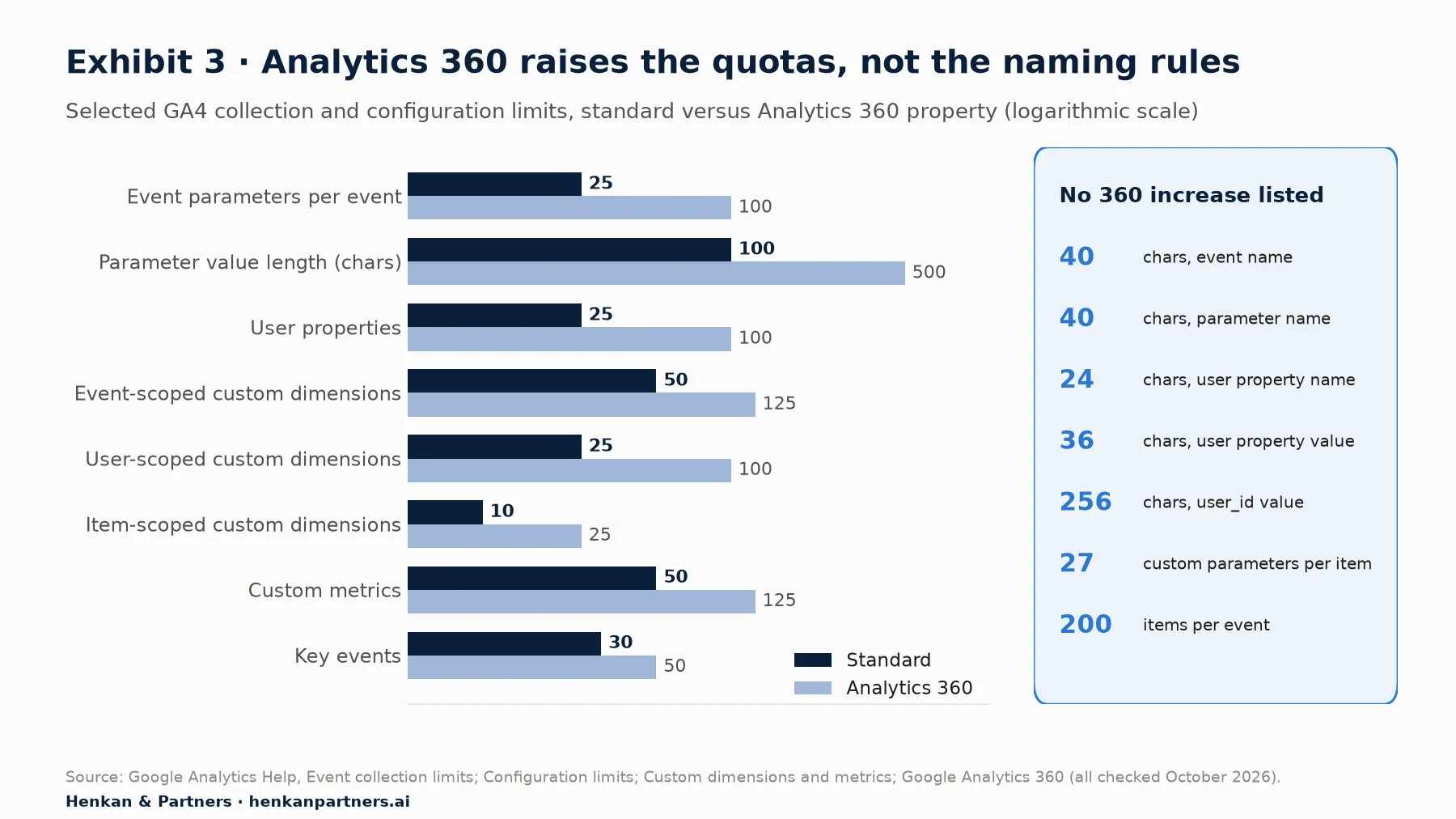
What this shows. The quotas a standard property runs out of first are custom dimensions, especially the ten item-scoped slots, and the 100-character value limit. Naming rules are identical on both tiers, so paying for 360 does not rescue a bad naming scheme.
The browser does not show an error when you exceed a limit. In our experience, values over the length limit arrive truncated and parameters beyond the cap simply do not appear, so the first sign is a report that looks wrong weeks later. Two cheap checks catch this early: GA4's DebugView during development, and the Measurement Protocol's validation server when you send events from a server. Our debugging and QA guide walks through both.
| Limit (standard property) | What it means in practice |
|---|---|
| 25 parameters per event | Enough for most events; e-commerce events use several on the event and the rest inside items |
| 100 characters per parameter value | Long URLs, search queries and error messages get cut; `page_location` is allowed 1,000, `page_title` 300 and `page_referrer` 420 |
| 25 user properties, values up to 36 characters | User properties are for short codes, not descriptions |
| 50 event-, 25 user-, 10 item-scoped custom dimensions | Plan slots like a budget; after deleting one, Google asks you to wait 48 hours before adding another |
| 30 key events | Mark only outcomes that matter as key events |
| 500 distinct event names per app user | Applies to app data streams; on the web the practical limit is your team's ability to keep names consistent |
Cardinality: the limit nobody writes down
Cardinality is the number of distinct values a dimension takes. Google calls any dimension with more than 500 values high-cardinality. When a report table has more rows than its limit, GA4 groups the rarer values into a single (other) row. Google's advice is direct: do not create custom dimensions for unique user IDs, session IDs or timestamps, and send high-cardinality values as event parameters without registering them if you only need them in BigQuery. A product SKU registered as an event-scoped dimension on a large catalogue is a classic way to fill reports with (other).
Section 6 · Items
Treat the items array as a contract between your product catalogue and GA4
E-commerce events carry products in an array called `items`. GA4's monetisation reports read it, so its rules are not optional. From Google's e-commerce guide:
- Each item needs an `item_id` or an `item_name`; send both, and use the same ID as your catalogue and product feeds.
- Up to 200 items per event and up to 27 custom item parameters on top of the prescribed ones such as `price`, `quantity`, `item_brand` and `item_category`.
- If you send `value`, you must send `currency` at event level (a three-letter ISO 4217 code such as `EUR`).
- `purchase` needs a unique `transaction_id`, which GA4 uses to deduplicate purchases collected through web streams.
gtag('event', 'purchase', {
  transaction_id: 'T-20261002-0042',
  currency: 'EUR',
  value: 59.90,
  items: [
    { item_id: 'SKU_1042', item_name: 'Linen shirt', price: 39.90, quantity: 1 },
    { item_id: 'SKU_2210', item_name: 'Canvas belt', price: 20.00, quantity: 1 }
  ]
});
Three gotchas recur in audits. Prices sent as strings with a currency symbol ("€39,90") instead of numbers. Item IDs that differ between `view_item` and `purchase` because one comes from the page template and the other from the order system. And a missing `transaction_id`, which removes GA4's built-in defence against a confirmation page reloaded three times. The dataLayer spec article shows how to push e-commerce data cleanly, including clearing the previous `ecommerce` object in Google Tag Manager, and the GA4 e-commerce audit checklist lists the checks to run on a live site.
Section 7 · Identity
GA4 counts browsers until you send a user_id, and it never stitches the past
By default, GA4 identifies a browser, not a person. The Google tag stores a random identifier, the client_id, in a first-party cookie called `_ga`, which Google documents with a two-year default expiry; browsers may cap it at 400 days (Chrome) or 7 days (Safari) for visitors who do not return. A second cookie, `_ga_<container-id>`, persists session state. Clear cookies, switch device or open a private window, and GA4 sees a new user.
The user_id fixes part of this for signed-in users. You send your own stable, non-personal identifier, and GA4 can connect activity across sessions, devices and platforms, provided the property's reporting identity includes User-ID.
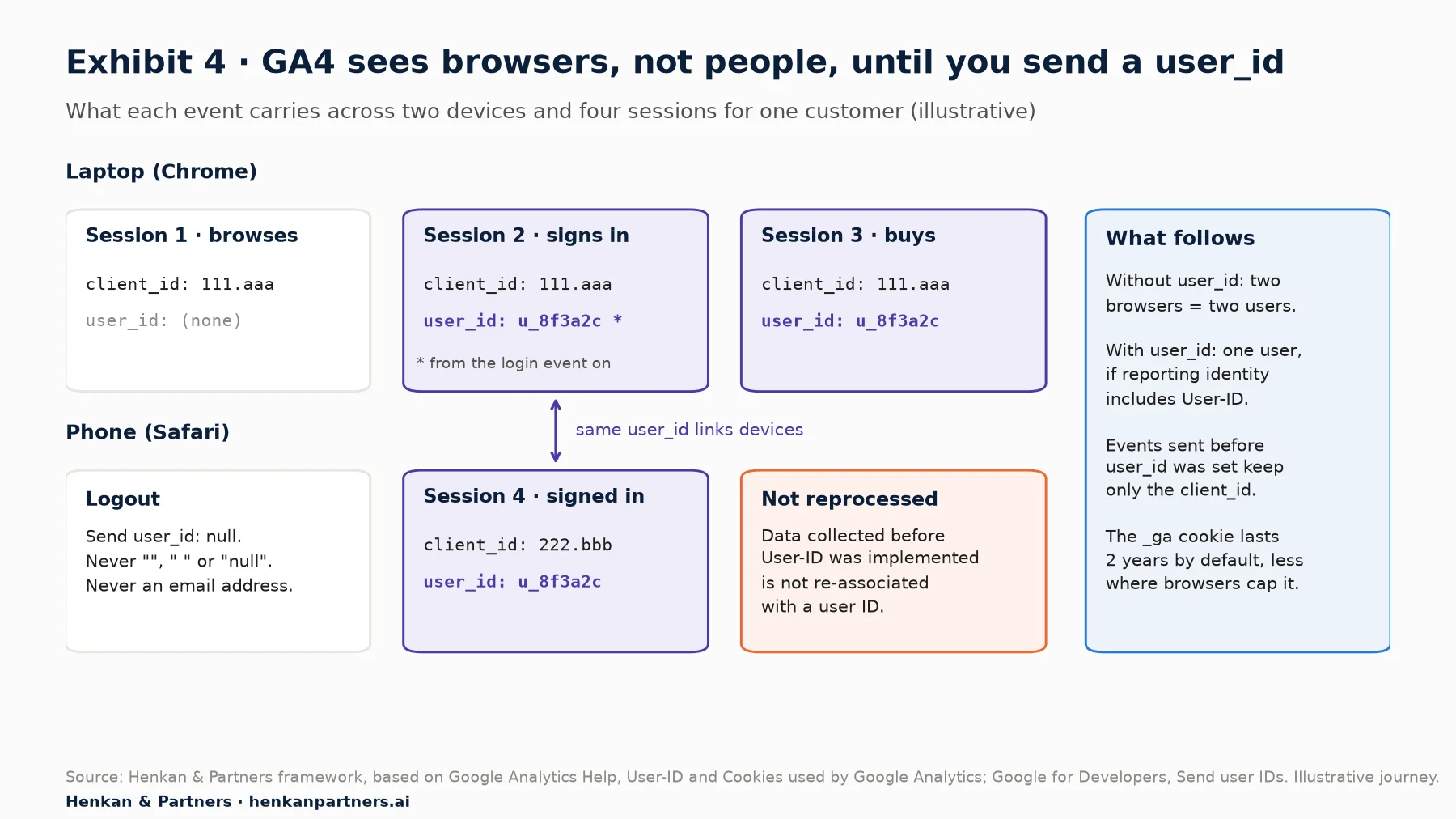
What this shows. Without a user_id, the same customer is two users. With it, the signed-in sessions join up, but events sent before the user_id was set keep only the browser's client_id. Identity is decided at collection time; reports can only combine what the events already carry.
The user_id rules developers must follow
- Unique, persistent and up to 256 characters. One ID per person, the same on every device. Google warns that one ID shared by several people skews the data, and that repeatedly setting a blank or dummy user ID "can lead to inaccurate data (including permanent data loss)".
- No personal data. Never an email, phone number or anything a third party could use to identify someone. Use an internal, opaque ID.
- Send it only when signed in, and set it to `null` on logout. Google says not to send an empty string, a blank string or the words `"null"` or `"NULL"`.
- Send it as `user_id`, not as a user property or event parameter, and never register it as a custom dimension: it is the textbook high-cardinality value.
- It is not retroactive. Google states that data collected before implementation "won't be reprocessed and associated with a user ID".
// after a successful login
gtag('set', { user_id: 'u_8f3a2c' });

// after logout
gtag('set', { user_id: null });
For marketers and analysts. A user count that drops after a User-ID release is usually good news: GA4 is merging duplicate browsers into people. Annotate the release date and do not compare user counts across it.
Section 8 · Sessions
Sessions are computed from events, so do not try to manage them in your code
A GA4 session is not something you open and close. When a page loads and no session is active, GA4 logs a `session_start` event and generates a `ga_session_id` (the start timestamp in seconds) and a `ga_session_number`. Every later event in the visit carries that ID. A session ends after 30 minutes of inactivity by default, a timeout you can change under Admin > Data streams > (your web stream) > Configure tag settings > Show all > Adjust session timeout.
Two differences with Universal Analytics, GA4's predecessor, catch developers who have migrated old code. In Google's words, GA4 sessions "aren't restarted at midnight or when new campaign parameters are encountered". And GA4 estimates session counts in reports with the HyperLogLog++ algorithm, so a session count computed exactly in BigQuery can differ slightly from the interface.
- Do not fire your own `session_start`. It is a reserved name; send it and you corrupt session counts.
- Do not invent a session-scoped dimension. Send the value on each event where it matters, or derive it in BigQuery from `ga_session_id`.
- Make sure every session has a `page_view`. A session without one has a (not set) landing page (Section 9).
- Fire the Google tag early. Google traces (not set) traffic sources to tags that fire too late; in our experience, events queued before the configuration tag loads are the usual culprit.
For single-page applications, page views on route changes are a build decision covered in the dataLayer spec article. The principle here is simpler: sessions, engagement and landing pages are all computed from the events you send, so a missing or duplicated event changes them.
Section 9 · (not set)
Most (not set) values are predictable implementation bugs, not GA4 mysteries
Google defines (not set) as "a placeholder name that Analytics uses when it hasn't received any information for a dimension". In other words, GA4 looked for a value and the events did not contain one. The common causes are well documented, and almost all of them trace back to the data model.
| Where you see (not set) | Usual cause | Fix |
|---|---|---|
| Session source / medium | No `session_start` processed for the session, often a Google tag trigger that fires too late | In Google Tag Manager, fire the Google tag on Initialization - All Pages |
| Landing page | The session has no `page_view` event | Send a page view on every page and route change |
| Custom dimension | Registered recently (Google mentions (not set) in the first 24 hours; allow 24 to 48 hours), or the parameter is only sent on some events | Register on release day; send the parameter on every event the dimension should describe |
| Content group | Combined with automatic events such as `session_start` that do not carry `content_group` | Analyse content groups on `page_view` |
| Google Ads dimensions | Accounts not linked, auto-tagging off, or broken manual UTM tags | Link accounts and enable auto-tagging (marketing owns this) |
| Any dimension after consent changes | Consent commands misused, for example a `default` sent where an `update` was needed | Set defaults before tags fire; use `update` after the user chooses |
The custom dimension row explains a frequent surprise. An event-scoped dimension only has a value on events that carried the parameter. If `page_type` is sent on `page_view` but you look at it next to `add_to_cart`, the add-to-cart rows show (not set). That is not a bug in GA4; it is a scope decision you made, perhaps without noticing.
For leaders. Ask for (not set) to be tracked as a quality metric on your key dimensions. A sudden rise after a release is the cheapest alarm you can have for a broken tag.
Section 10 · Time and permanence
GA4 data arrives late and then sets hard, so know what you can never fix retroactively
Two facts about time shape how you release tracking. First, data is not final when you see it. Google's data freshness table gives typical processing times: the Realtime report in a few minutes, standard intraday tables in 2 to 6 hours, daily tables in about 12 hours. GA4 accepts events up to two calendar days plus today after they were triggered and ignores later ones, and attribution credit for key events can change for up to 12 days.
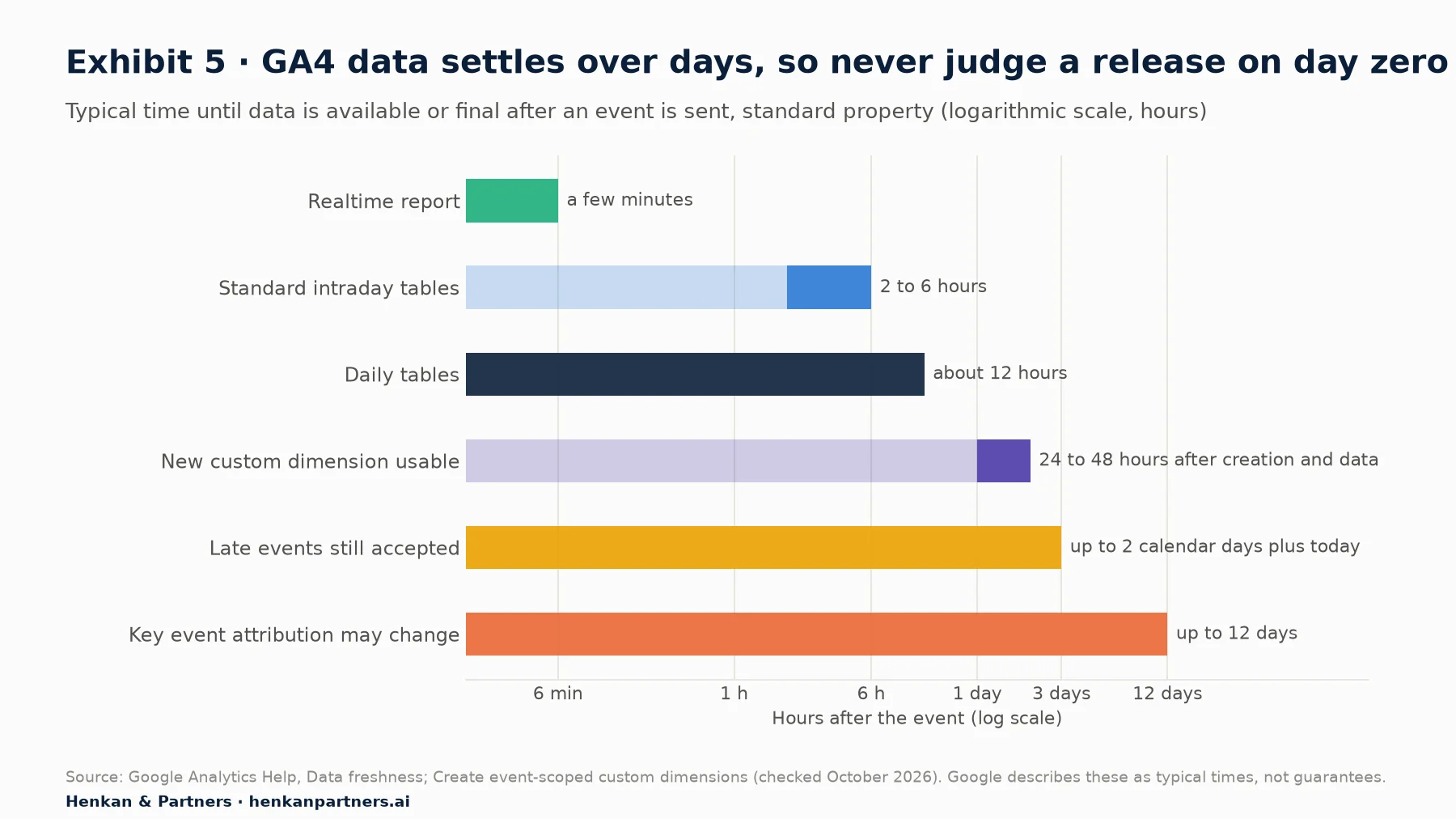
What this shows. A release checked on the same afternoon is checked against incomplete data. Use DebugView and Realtime to confirm events arrive, and wait at least two full days before judging volumes or comparing them with your back office.
Second, many decisions apply only from the moment they are made. Custom dimensions do not apply retroactively. A user ID is not attached to earlier data. Data filters are permanent: excluded data "is never processed and will never be available in Google Analytics or BigQuery". Data retention, which on a standard property can be set to 2 or 14 months, limits how far back explorations and funnel reports can go, though not standard aggregated reports. And personal data sent by mistake can only be removed with a data deletion request, which deletes rather than corrects and cannot be undone.
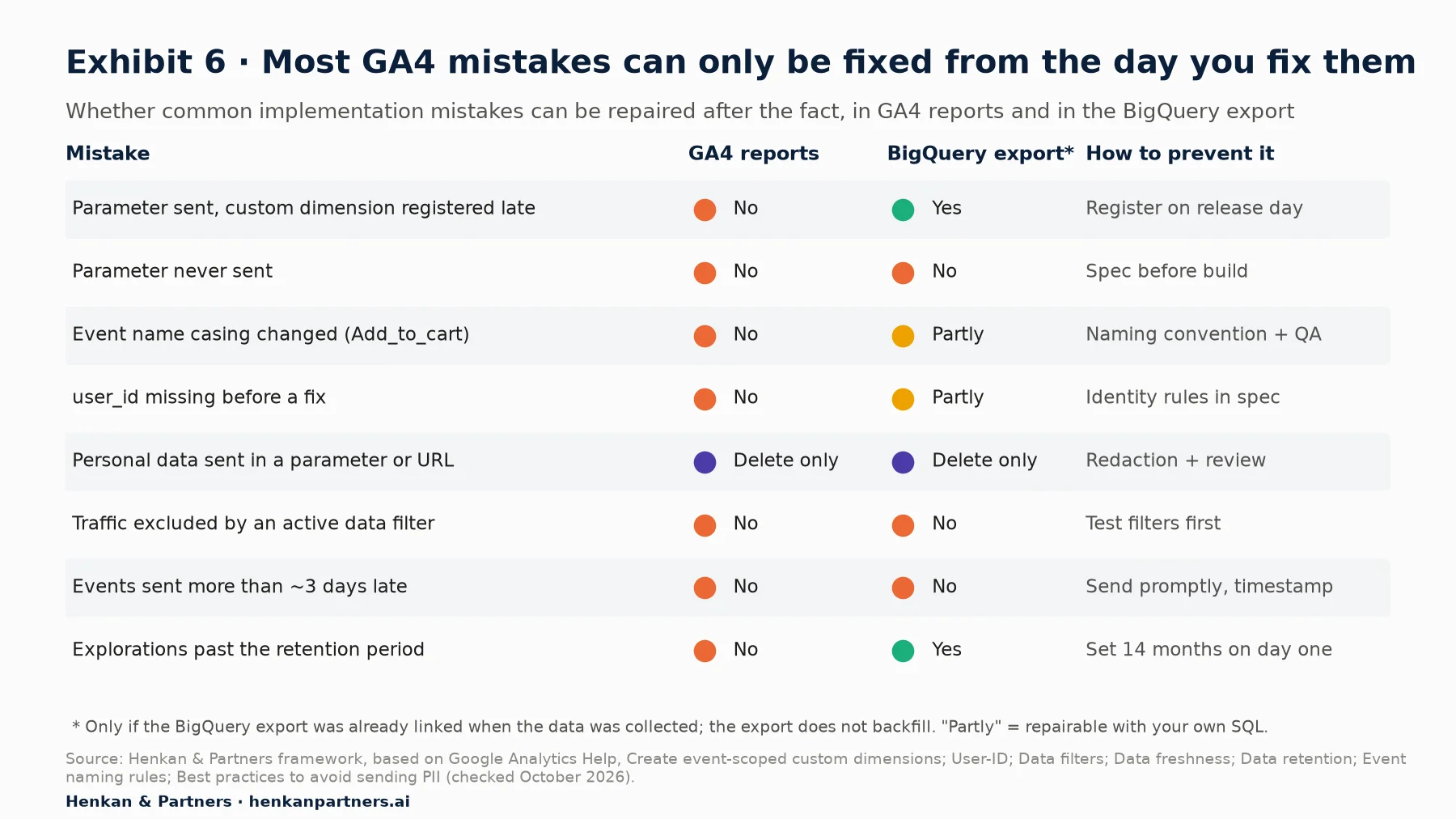
What this shows. In the GA4 interface almost nothing is retroactive. The BigQuery export keeps the raw parameters, so it can rescue a late registration or a retention limit, but only if it was linked before the data was collected. That is the strongest argument for linking it on day one, covered in our BigQuery export guide.
Personal data and consent are design constraints, not afterthoughts
Google prohibits sending personally identifiable information to Analytics, including email addresses, personal phone numbers and similar identifiers. Developers leak it most often through URLs and page titles (a confirmation page with `?email=` in the query string), through site search terms and form fields that users type into, and through custom parameters. GA4 offers data redaction, configured in Admin, which removes email addresses on a best-effort basis and strips query parameters you list. Treat it as a safety net, not a design: strip personal data before it reaches the tag.
Consent Mode decides what the tags may store. Its current version (often called Consent Mode v2) relies on four consent types for Google's measurement and advertising tags: `ad_storage`, `analytics_storage`, `ad_user_data` and `ad_personalization` (Google defines three more, for functionality, personalisation and security storage). Default consent states must be set before any tag fires and updated after the visitor chooses. In basic mode tags wait for consent; in advanced mode they load with consent denied and send cookieless measurements that Google uses for modelling. For a developer, the consequence is simple: a visitor who refuses analytics storage has no persistent client_id, so user, session and identity logic behaves differently for them. The consent guide covers the legal side, and the tag management guide and server-side GTM article cover where tags run.
Disclosure: Henkan & Partners implements and audits GA4 tracking for clients.
Section 11 · What to do next
What to do next: five steps before your next tracking ticket
1. Read the property before you write code
Open Admin > Data display > Custom definitions and list what is registered, in which scope, and how many slots remain. Check the data retention setting, the session timeout and whether the BigQuery export is linked. Ten minutes here prevents most of the irreversible mistakes in Exhibit 6.
2. Write a one-page data model
For each new event: name (recommended if possible), trigger, parameters with scope and example values, identity rule, and the questions it answers. Have it reviewed by the person who asked for the data. The GA4 tracking plan article shows the full format and the review ritual across product, design, engineering and marketing.
3. Agree a naming convention and enforce it in code
snake_case, object_action, recommended names first, stable codes for values. Put the allowed names in a typed constant or schema so a typo fails the build instead of splitting your data.
4. Register custom dimensions on release day
Registration is not retroactive and takes 24 to 48 hours to show. Make it part of the definition of done for any ticket that adds a parameter, and link the BigQuery export now if it is not already.
5. Check, then wait two days, then check again
Validate events in DebugView before release, confirm arrival in Realtime after release, and compare volumes with your back office after two full days. The next article in this path, from tracking request to dataLayer spec, turns this model into code. You can also download the GA4 Tracking Request Kit, with an event spec template, naming convention and QA checklist. If you want a second pair of eyes on your model, talk to us.
FAQ
Frequently asked questions about the GA4 data model for developers
Frequently asked questions
What is the GA4 data model?
It is the structure GA4 uses to store data: a stream of named events, each with parameters, optional items for products, user properties describing the person, and identifiers for the browser (client_id), the signed-in user (user_id) and the session. Everything you track is expressed as events within this structure.
How many parameters can a GA4 event have?
Up to 25 event parameters per event on a standard property and 100 on Analytics 360. E-commerce events can also carry up to 200 items, each with up to 27 custom item parameters in addition to the prescribed ones.
What is the maximum length of a GA4 event name?
40 characters, the same as for parameter names. Names are case-sensitive, must start with a letter and may contain only letters, numbers and underscores.
What is the difference between client_id and user_id in GA4?
The client_id is a random identifier stored in the _ga cookie and identifies a browser. The user_id is your own identifier for a signed-in person, sent only when they are logged in, which lets GA4 connect their activity across devices if the reporting identity includes User-ID.
Are GA4 custom dimensions retroactive?
No. A custom dimension only shows data collected after it is created, and Google says to allow 24 to 48 hours before using it in reports. Raw parameters sent earlier remain available in the BigQuery export if it was linked at the time.
Does GA4 have session-scoped custom dimensions?
No. GA4 offers event-, item- and user-scoped custom dimensions. Send session-level context as an event parameter on the relevant events, or derive it in BigQuery using ga_session_id.
Why does GA4 show (not set)?
Because a dimension had no value in the events GA4 received. Common causes are sessions without a page_view or session_start, parameters sent only on some events, custom dimensions registered recently, unlinked Google Ads accounts and consent commands used in the wrong order.
How long does GA4 take to process data?
Google gives typical times: a few minutes for the Realtime report, 2 to 6 hours for standard intraday tables and about 12 hours for daily tables. Events arriving more than two calendar days plus today after they were triggered are ignored, and key event attribution can change for up to 12 days.
Can I send personal data such as email addresses to GA4?
No. Google prohibits sending personally identifiable information to Analytics. Strip it from URLs, page titles, search terms and parameters before it reaches the tag, and use GA4's data redaction only as a safety net.
Key terms
- Event
- A named interaction sent to GA4, such as page_view or purchase. It is the only unit GA4 stores, so every question you want to answer must map to events.
- Event parameter
- A key-value pair describing an event, such as currency or filter_name. Parameters carry the detail that makes an event useful, within a limit of 25 per event on a standard property.
- Items array
- The list of products attached to an e-commerce event. GA4's monetisation reports read it, so its IDs, prices and currency must be consistent.
- User property
- An attribute of the user, such as a loyalty tier. GA4 keeps the most recent value, so it suits slow-changing attributes only.
- Scope
- The level a value describes: event, item or user. It decides which custom dimension quota it uses and which questions it can answer.
- Custom dimension
- A parameter or user property registered in Admin so it appears in reports. Registration is not retroactive and slots are limited, so it must be planned.
- Cardinality
- The number of distinct values a dimension takes. High cardinality pushes rare values into the (other) row and makes reports harder to read.
- client_id
- The random browser identifier stored in the _ga cookie. It is why GA4 counts browsers rather than people by default.
- user_id
- Your own non-personal identifier for a signed-in person, up to 256 characters. It links devices and sessions but is not applied to past data.
- Recommended event
- An event whose name and parameters Google defines, such as sign_up or add_to_cart. Using them makes standard reports work without extra configuration.
- (not set)
- The placeholder GA4 shows when a dimension has no value in the events received. It usually signals an implementation or scope issue.
- Data freshness
- How long GA4 takes to process data before it appears in reports. It determines when release checks and comparisons are reliable.
- Consent Mode
- Google's framework for passing visitors' consent choices to tags through consent types such as analytics_storage and ad_storage. It changes what identifiers GA4 can store for each visitor.
Sources
All sources were checked in October 2026. GA4 limits, interface paths and processing times come from Google's official documentation and can change; check the linked pages before relying on a specific figure. Market share data is from W3Techs. Exhibits 1, 4 and 6 and the naming convention are Henkan & Partners frameworks based on the Google documentation listed; example values are illustrative. Statements marked "in our experience" reflect Henkan & Partners client work and are not published data.
- Google Analytics Help (2026). Event collection limits.
- Google Analytics Help (2026). Configuration limits.
- Google Analytics Help (2026). Custom dimensions and metrics.
- Google Analytics Help (2026). Create event-scoped custom dimensions.
- Google Analytics Help (2026). Google Analytics 360.
- Google Analytics Help (2026). About events.
- Google Analytics Help (2026). Event naming rules.
- Google Analytics Help (2026). (not set) in reports.
- Google Analytics Help (2026). About the (other) row.
- Google Analytics Help (2026). User-ID.
- Google Analytics Help (2026). Cookies used by Google Analytics.
- Google Analytics Help (2026). About Analytics sessions.
- Google Analytics Help (2026). Comparing metrics: Google Analytics vs. Universal Analytics.
- Google Analytics Help (2026). Data freshness.
- Google Analytics Help (2026). Data retention.
- Google Analytics Help (2026). Data filters.
- Google Analytics Help (2026). Best practices to avoid sending Personally Identifiable Information (PII).
- Google Analytics Help (2026). Data-deletion requests.
- Google for Developers (2026). Measurement Protocol reference: reserved names and limits.
- Google for Developers (2026). Validate Measurement Protocol events.
- Google for Developers (2026). Send user IDs.
- Google for Developers (2026). Send user properties.
- Google for Developers (2026). Measure ecommerce.
- Google Analytics Help (2026). Minimize duplicate key events with transaction IDs.
- Google for Developers (2026). Recommended events.
- Google for Developers (2026). Google tag API reference.
- Google for Developers (2026). Consent mode overview.
- Google Analytics (2026). Google Analytics MCP server (experimental), GitHub.
- W3Techs (2026). Usage statistics of traffic analysis tools for websites.