Focus
GA4 for Marketers: The Acquisition Questions It Answers and Why Its Numbers Never Match Your Ad Platforms
Alexandre Suon · 2026-10-02
GA4 for marketers comes down to two skills: asking the acquisition questions Google Analytics 4 answers well, and knowing why its numbers will never match Google Ads or Meta. This first step of The ABC of GA4 for Marketers shows which report answers which question, how GA4 sorts traffic into channels, what key events are, and how to explain the gap with your ad platforms.
Executive summary
- GA4 is where most marketing performance gets judged, so reading it correctly is a core marketing skill. Google Analytics runs on 47.2% of all websites and holds 82.7% of the traffic-analysis market (W3Techs, October 2026).
- Two acquisition reports answer two different questions. User acquisition tells you which channel first brought a user; Traffic acquisition tells you which channel started each session. Both can be right at once.
- Channels are rules, not facts. GA4 sorts every session into one of 19 default channels using the source, medium and campaign it receives. Badly tagged links end up in Direct or Unassigned.
- Key events are your definition of success, and they feed Google Ads. You can mark up to 30 events as key events in a standard property. Since 2024 GA4 calls them key events, and a separate "conversion" is created from a key event when you want to bid on it in Google Ads.
- GA4 and ad platforms disagree by design. They use different attribution models, windows and reporting dates: Google Ads reports conversions "on the ad impression date", GA4 on the day they happen, and Meta counts view-through and engage-through conversions that GA4 cannot see. A gap is normal; an unexplained gap is the problem.
- Start with ten standard questions and a reconciliation routine. We map ten common questions to the exact report and metric, and give a five-step routine to explain the GA4 to platform gap each month.
Section 1 · Why it matters
GA4 is the common scoreboard for marketing, so marketers need to read it themselves
GA4 for marketers means using Google Analytics 4 to answer acquisition questions (which channels, campaigns and landing pages bring engaged visitors and valuable actions) while understanding the rules GA4 applies to sessions, channels, key events and attribution, so that its numbers can be compared fairly with ad platforms and back-office data.
Google Analytics 4 (GA4) is the analytics tool most websites run, and in campaign reviews it is usually the neutral referee, because it sees every channel, not only the one a platform sells. It also frustrates marketers: it rarely agrees with the platform you just paid, and words such as first user, session and key event each change the answer.
This article is the A (Ask) step of The ABC of GA4 for Marketers. It covers the questions GA4 can answer for you and how to read its numbers without getting fooled. The B (Brief) step, how to ask for UTM conventions, key events and ad platform links, covers the tracking you need. The C (Conclude) steps cover attribution and how to judge channels fairly and e-commerce reports for marketers and merchandisers. If you want the mechanics of how GA4 collects and processes data, read Beyond the Numbers: How GA4 Actually Works first; we do not repeat it here.
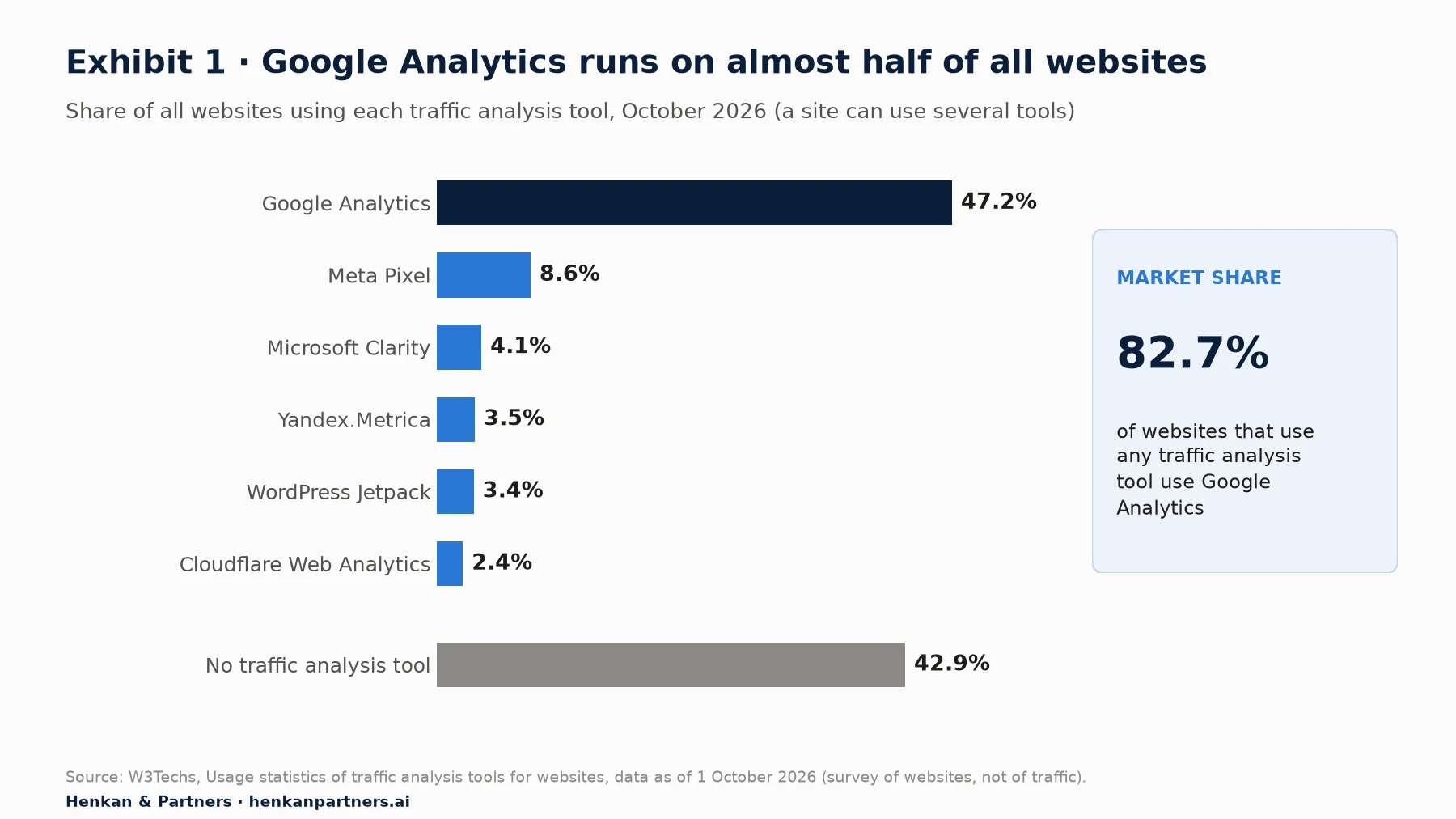
What this shows. Google Analytics appears on 47.2% of all websites W3Techs surveys, and on 82.7% of the sites that use any traffic-analysis tool. Sites often run several tools, so the shares overlap. For a marketer, the implication is practical: whatever else you use, someone in the business will judge your campaigns with GA4 numbers, so you need to know how they are built.
What GA4 does well for marketers, and where it stops
GA4 is strong at post-click questions: once someone lands on your site, which channel brought them, did they engage, did they complete a key event, and how much revenue followed. It sees all channels side by side, including the ones that cost nothing, such as organic search, email and, since May 2026, AI assistants.
It is weak, or blind, on everything before the click. GA4 does not see impressions or spend on Meta, TikTok or LinkedIn, and it cannot tell you whether a channel caused a sale or only touched it. Those questions need the ad platforms themselves, incrementality tests or media-mix models, which we cover in the attribution step of this path and in our guide to acquisition and retention channels.
| Question type | GA4 answers it? | Better source when GA4 cannot |
|---|---|---|
| Which channels bring visits, engaged sessions and key events? | Yes, its core strength | n/a |
| Which channel first acquired a user, and what are they worth later? | Yes, with user-scoped dimensions | CRM or BigQuery for long-term value |
| How did a Google Ads campaign perform after the click? | Yes, if Google Ads is linked | Google Ads for spend, impressions, bids |
| How many people saw a Meta or TikTok ad? | No, GA4 sees no impressions from other platforms | The ad platform |
| Did this channel cause extra sales? | No, attribution shares credit; it does not prove cause | Incrementality or geo tests, media-mix models |
Section 2 · The two acquisition reports
User acquisition and Traffic acquisition answer different questions, so choose the report before you read the number
GA4 has two acquisition reports, and most marketing confusion starts with reading one as if it were the other. Both live under Reports > Acquisition.
- Reports > Acquisition > User acquisition is "scoped to new users". It shows how new users first found you, using user-scoped dimensions such as First user source, First user medium and First user campaign. Every later session of that user is credited to the channel that first brought them.
- Reports > Acquisition > Traffic acquisition is "scoped to new sessions". It shows where each session came from, new or returning visitor, using session-scoped dimensions such as Session source, Session medium, Session campaign and Session source / medium. Its default view groups rows by session channel and shows sessions, engaged sessions, engagement rate, average engagement time per session, event count and key events.
Google's own example makes the difference concrete. A user first arrives from Google, then comes back directly ten more times. In User acquisition, all 11 sessions sit under Google. In Traffic acquisition, the ten direct sessions also stay under Google if they happen within the key event lookback window (90 days by default); only direct returns after that window are counted under (direct).
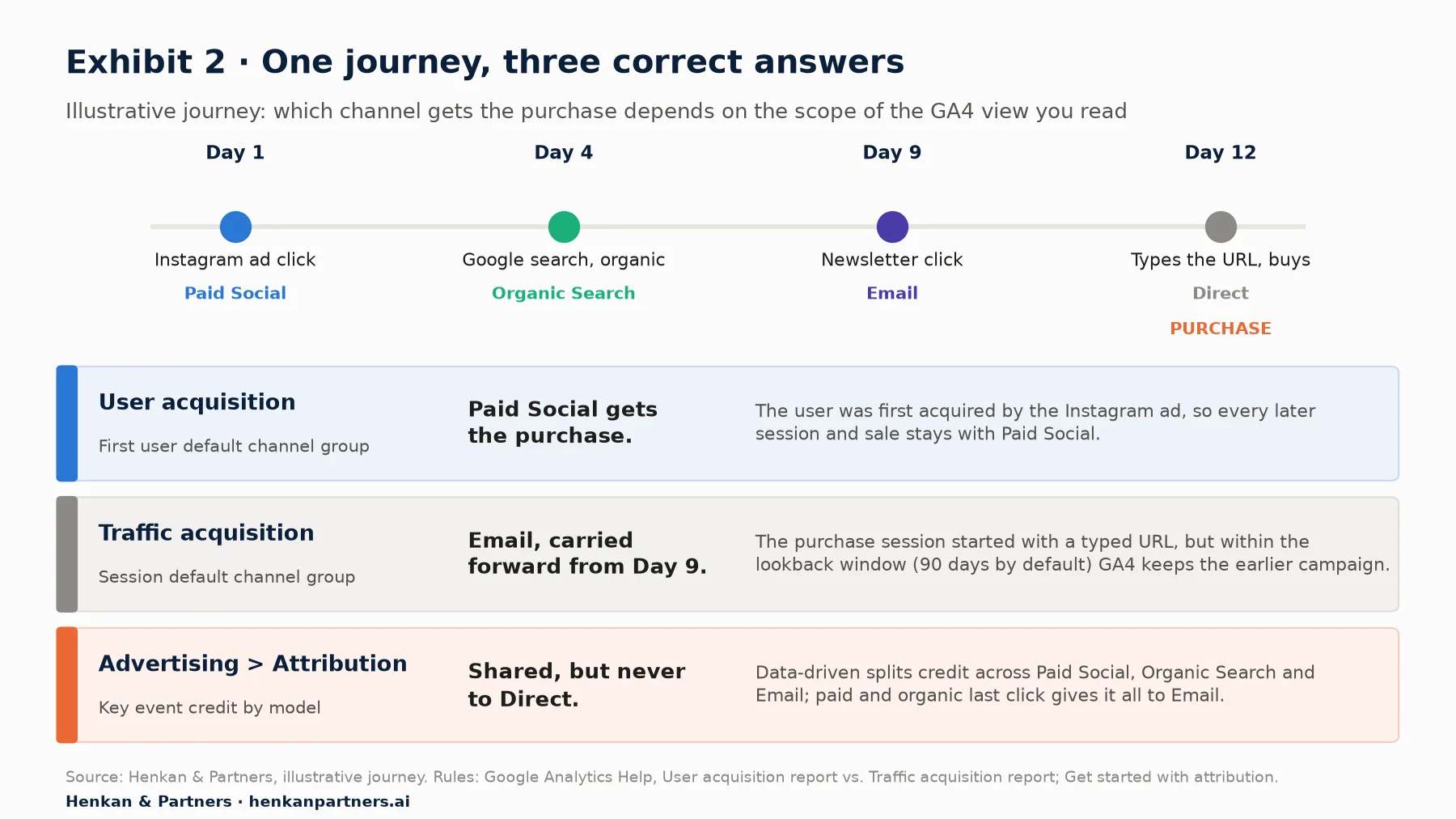
What this shows. The same purchase is credited to a different channel depending on the scope you read. User acquisition asks who brought the user first, Traffic acquisition asks who started the session, and the attribution reports ask how credit for the key event is shared across touchpoints. None of them is wrong; they answer different questions, and a dashboard that mixes them without saying so will mislead.
| If your question is… | Use | Primary dimension | Watch out for |
|---|---|---|---|
| Which channels bring us new users? | Reports > Acquisition > User acquisition | First user default channel group | Later visits by the same user stay with the first channel |
| Which channels drive visits and engagement this week? | Reports > Acquisition > Traffic acquisition | Session default channel group | Direct returns within the lookback window keep the earlier campaign; untagged links inflate Direct |
| Which campaigns drive sessions? | Traffic acquisition, switch the primary dimension | Session campaign | Campaign names are only as clean as your UTM tags |
| How much credit does each channel get for purchases or leads? | Advertising > Attribution | Key event credit by channel | Depends on the reporting attribution model |
For marketers. Put the scope in the title of every chart you share: "New users by first user channel" or "Sessions by session channel". It ends most arguments before they start.
For leaders. If a channel looks great in User acquisition and weak in Traffic acquisition, it is good at finding people and other channels bring them back. That is a budget insight, not a data error.
Engagement also changes meaning: in User acquisition it covers all sessions of the users a channel first brought, in Traffic acquisition only the sessions that channel started. GA4 counts a session as engaged if it "lasts longer than 10 seconds, has a key event, or has 2 or more screen or page views". Engagement rate is the share of engaged sessions, and bounce rate is simply the share of sessions that were not engaged. A low engagement rate on a paid campaign is worth knowing before you look at conversions.
Section 3 · Channels
The default channel group is a set of rules, and your UTM tags decide which channel a visit lands in
GA4 does not "know" that a visit came from your newsletter. It reads three values sent with the visit (source, medium and campaign, set either by Google Ads auto-tagging or by the `utm_` parameters on your links) and applies a fixed list of rules. The result is the default channel group: 19 channels, from Direct and Organic Search to Paid Social, Email, Affiliates, Cross-network and, since 13 May 2026, AI Assistant. If no rule matches, the session is labelled Unassigned.
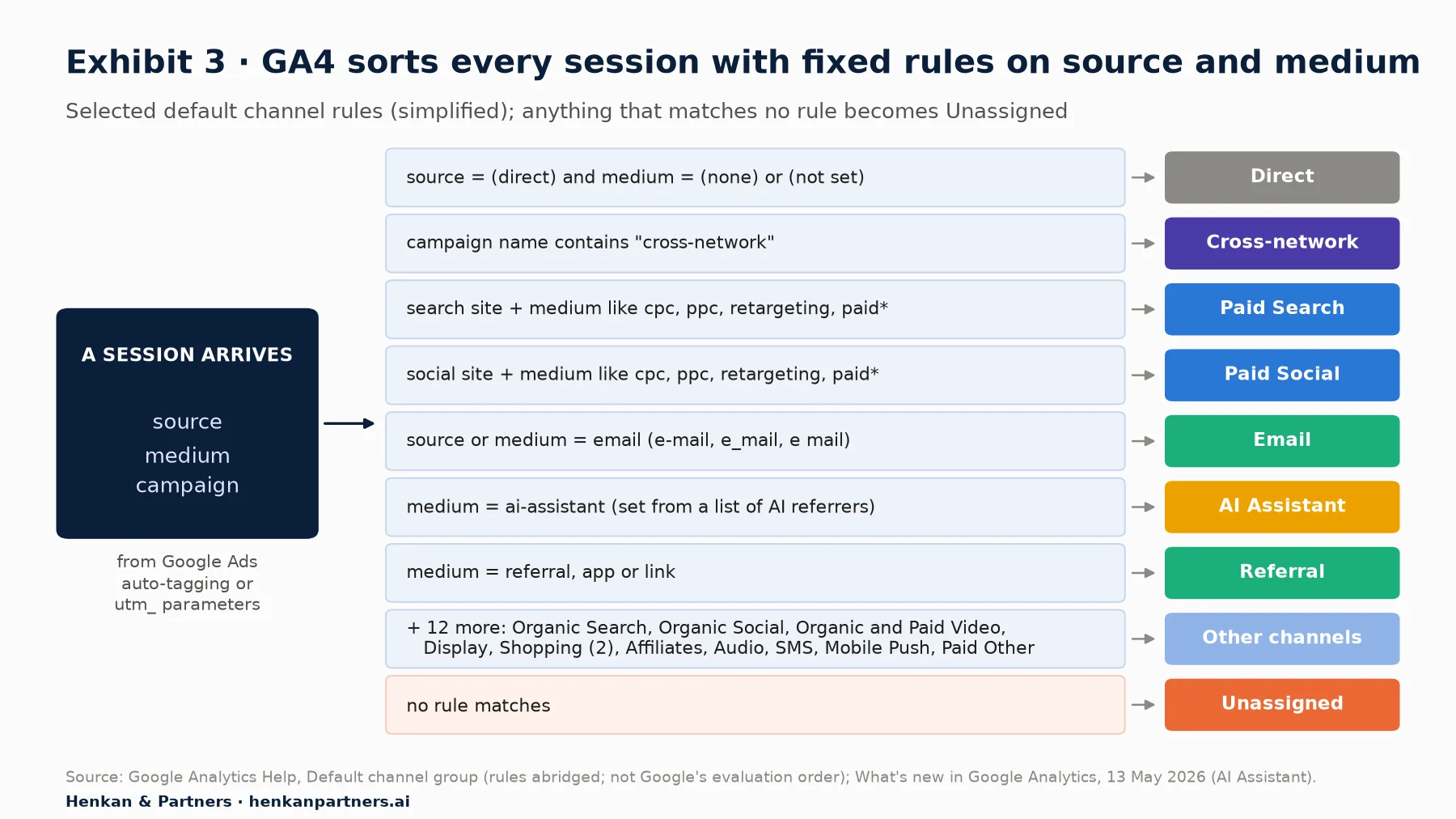
What this shows. The channel you see is the output of rules applied to the values your links send. A paid Instagram ad tagged with `utm_medium=social` will be counted as Organic Social, because only mediums such as `cpc`, `ppc`, `retargeting` or values starting with `paid` qualify as paid. Rule order and exact spelling matter more than intent, which is why the next step of this path is a UTM naming convention.
| Channel | Google's rule (abridged) | Typical marketer mistake |
|---|---|---|
| Direct | Source is "(direct)" and medium is "(not set)" or "(none)" | Untagged email, SMS or QR links end up here |
| Paid Search | Search site source and medium matching `^(.cp.|ppc|retargeting|paid.*)
| Using `utm_medium=search` for ads |
| Paid Social | Social site source and medium matching the same paid pattern | Using `utm_medium=social` for paid posts, which lands in Organic Social |
| Source or medium is email, e-mail, e_mail or e mail | Using `newsletter` as the medium | |
| Referral | Medium is referral, app or link | Partner links tagged as `partner`, which fall into Unassigned |
| Cross-network | Campaign name contains "cross-network" | Expecting Performance Max to show as Paid Search |
| AI Assistant | Medium is "ai-assistant", set automatically when the referrer is on Google's list of AI assistants | Assuming chatbot traffic still sits in Referral; history before May 2026 does |
| Unassigned | No other rule matched | Treating it as noise rather than a tagging bug to fix |
Three more details are worth knowing. Channel definitions "aren't case sensitive and can't be edited", so you cannot fix a bad rule in place. Organic Search now explicitly includes clicks from Google's AI Overviews and AI Mode. And since 11 June 2026, a source grouping dimension consolidates source values for Facebook, Instagram and TikTok, so the many source values a single platform sends can be read as one.
When the default rules do not fit, add a custom channel group
If your business needs channels Google does not offer, for example splitting brand and non-brand paid search or isolating a retail media network, create a custom channel group in Admin > Data display > Channel groups > Create new channel group. A standard property can have two custom groups in addition to the default one, each with up to 50 channels, and they apply to your reports retroactively. Designing them well is part of the UTM and channel brief.
Section 4 · Key events
Key events are your definition of success, so choose a few and agree them with the business
Every interaction GA4 records is an event: a page view, a scroll, an add to cart, a purchase. A key event is "an event that measures an action that's particularly important to the success of your business". Marking an event as a key event changes nothing in how it is collected; it tells GA4 to count it in the Key events columns and to use it in attribution reports. GA4 used to call these "conversions"; Google renamed them key events in 2024 (CMSWire reported the change in April 2024), saying it was "unifying how conversions are defined" across Google Analytics and Google Ads.
To mark an event as a key event: in Admin, under Data display, click Events, find the event and click the star next to it. You can mark up to 30 key events in a standard property and 50 in Analytics 360. In our experience three to eight is the useful range for marketing; beyond that, the key events column becomes a sum of unrelated things and nobody trusts it.
Event, key event, conversion: three levels, three audiences
| Level | What it is | Who uses it | Where it is managed |
|---|---|---|---|
| Event | Any interaction GA4 collects, e.g. `add_to_cart` | Analysts, developers | Your tracking (tag or dataLayer) |
| Key event | An event marked as important to the business, e.g. `purchase`, `generate_lead` | Everyone reading GA4 reports | Admin > Data display > Events (star) |
| Conversion | Created from a key event to measure and bid in Google Ads | Paid media and bidding | Advertising > Conversion management, or Google Ads > Goals |
That last level matters for the "why don't the numbers match" question. A Google Ads conversion created from a GA4 key event can have its own counting method and conversion window, and Google notes that "Google Ads conversions don't appear in standard Google Analytics reports". Since January 2026, conversion attribution settings for web conversions can also be adjusted independently for every conversion (a beta for Google Ads customers), so two teams can legitimately see two numbers for the same purchase event.
Our view. Agree the list of key events and their business definition in writing, with one owner. "Lead" should mean the same thing in GA4, in Google Ads and in the CRM. The tracking request itself, with names and parameters, belongs in the Brief step and the shared GA4 tracking plan.
Section 5 · Why numbers differ
GA4 and your ad platforms count different things, so a gap is normal and only an unexplained gap is a problem
Every marketer eventually holds two numbers for the same campaign. The instinct is to look for a bug; usually there is none. Each tool applies its own rules about who gets credit, for how long after the ad and on which date, and those rules are documented. Google's own troubleshooting page lists attribution models, lookback windows, conversion counting, cross-device modelling, view-through conversions and invalid-traffic filtering among the causes.
| Reason | GA4 | Google Ads | Meta Ads |
|---|---|---|---|
| Who gets credit | Shares credit across all channels it sees, paid and organic; direct visits get credit only when the whole path is direct | Credits Google ad interactions only | Credits Meta ad interactions only |
| What counts as an interaction | Clicks that start a session (no impressions from other platforms) | Clicks, plus engaged views and views where enabled | Link clicks, engage-through (likes, shares, comments, 5-second video views) and views |
| How long after the interaction | Key event lookback: 90 days by default (30 or 60 possible); 30 days for first visit | Click-through window: 30 days by default (1 to 90); engaged-view 3 days; view-through 1 day | Default for website conversions: 7-day click, 1-day engage-through, 1-day view-through |
| Which date the sale is reported on | The day the key event happened | "The ad impression date" | Depends on the reporting setting; check it before comparing |
| Time zone | Property reporting time zone | Ad account time zone | Ad account time zone |
| Consent refusals | Modelled only if thresholds are met and reporting identity is Blended | Conversion modelling for unconsented users | Platform's own modelling |
| Cross-device | Browsers, unless user ID or Google signals join them | Modelled cross-device conversions | Meta's own cross-device matching |
| When the number settles | 24–48 hours; key event credit can shift for up to 12 days | Conversions can arrive up to 90 days after the click | Within the attribution window |
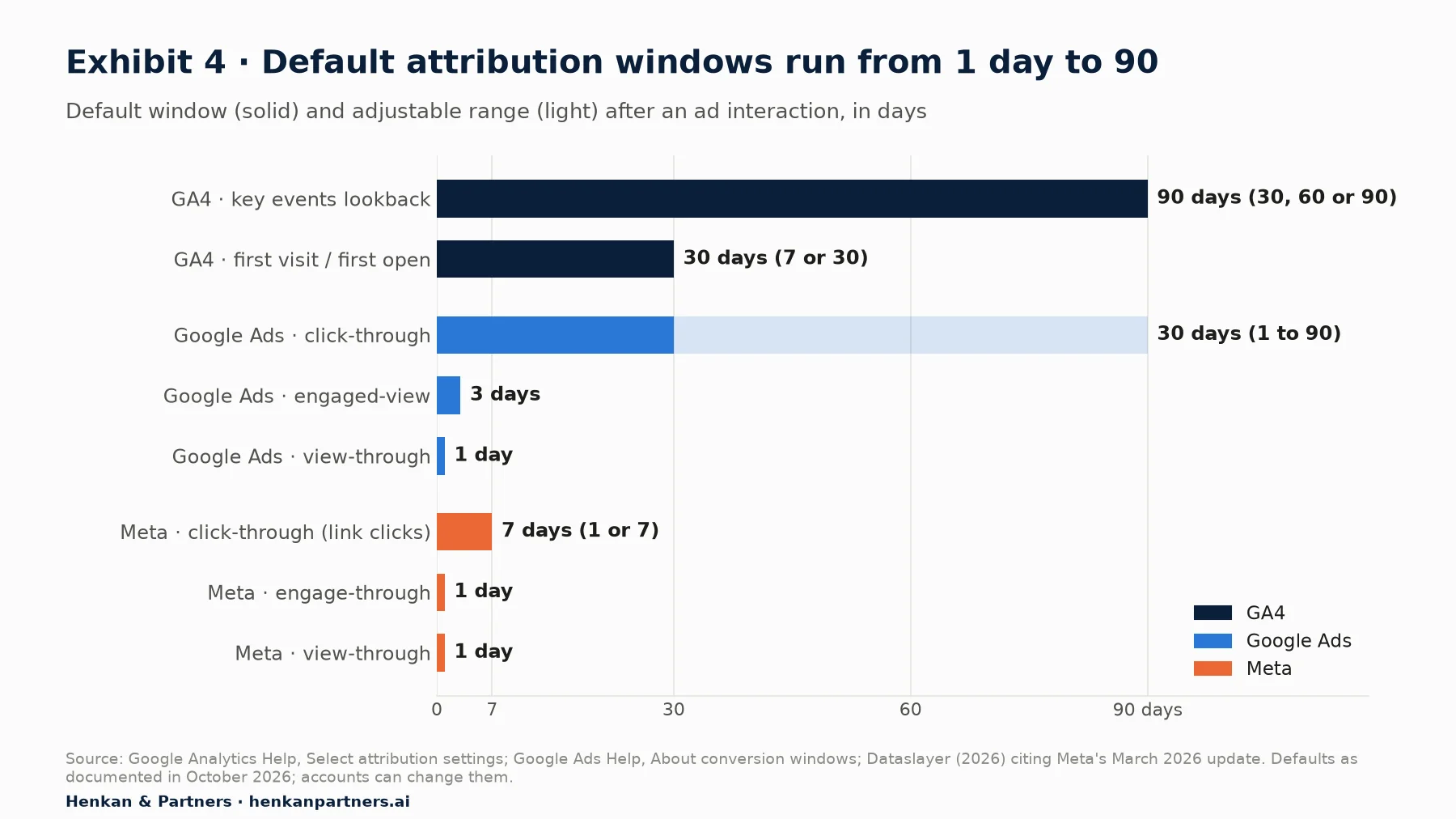
What this shows. GA4 will credit a purchase to a campaign clicked up to 90 days earlier, while Meta's default window stops at seven days after a click and one day after a view. A sale on day 10 after a Meta click therefore appears in GA4's attribution paths but not in Meta's default numbers; a sale one day after someone merely saw a Meta ad appears in Meta but can never appear in GA4, which records no Meta impressions.
Meta changed its definitions in 2026, so year-on-year comparisons need care
Two 2026 changes affect any GA4 versus Meta comparison, both reported by trade publications citing Meta. On 3 March 2026, Meta restricted click-through attribution to actual link clicks and moved likes, shares, saves, comments and short video views into a separate engage-through category with a one-day window. And since 12 January 2026, Meta's Ads Insights API no longer returns 7-day and 28-day view-through windows (per PPC Land and Supermetrics), which changes what reporting connectors can pull. If Meta numbers moved in spring 2026, check these definitions first.
Consent refusals hit every tool differently
In Europe, many visitors refuse analytics or advertising cookies. With Consent Mode (Google's way of passing the visitor's choice to its tags through four signals: `ad_storage`, `analytics_storage`, `ad_user_data` and `ad_personalization`), the advanced implementation sends cookieless pings when consent is denied, and Google uses them to model behaviour. GA4 only shows modelled data when a property collects at least 1,000 events a day with analytics consent denied for at least 7 days, has at least 1,000 daily users with consent granted for 7 of the previous 28 days, and uses the Blended reporting identity. Modelled data is not available in audiences, user-level explorations or the BigQuery export. Ad platforms run their own modelling on their own rules. The result is another legitimate gap; see our guide to user consent in e-commerce for how to measure it.
For marketers. Never add up the conversions each platform claims. Each one counts the sales it touched, so the same order is often claimed by Google, Meta and the affiliate network at once. GA4 or your order system is the de-duplicated total.
For leaders. Ask for the gap, not for a single number: "Meta reports 1.9 times GA4's figure, of which X is view-through and Y is the window". A stable, explained ratio is healthy. A ratio that jumps from one month to the next is the signal to investigate.
Section 6 · Worked example
A five-step reconciliation turns "which number is right?" into a monthly ten-minute check
Here is the routine we use with clients, on illustrative data: Meta Ads Manager reports 1,200 purchases for September, GA4 shows 640 purchases from Paid Social. The aim is not to make the numbers equal but to explain the difference by cause and watch whether it stays stable.
- Align the frame. Same dates, time zone, purchase definition and scope (session or attribution figures, not first user). Note each platform's attribution setting.
- Remove what GA4 cannot see. Ask Meta for a breakdown by attribution type. View-through and engage-through purchases involve no click to your site, so GA4 cannot credit them to Meta.
- Adjust for windows and dates. Sales after day 7 appear only in GA4; sales reported on the impression date may fall in another month.
- Account for consent and identity. Estimate the share of visitors who refused analytics consent, and check whether GA4 is on the Blended identity with modelling active. Meta's own cross-device matching can find buyers that GA4 counts as separate browsers.
- Check tracking health. Look at Unassigned, (not set) and Direct during campaign weeks; a session that lost its UTM tags drops out of Paid Social.
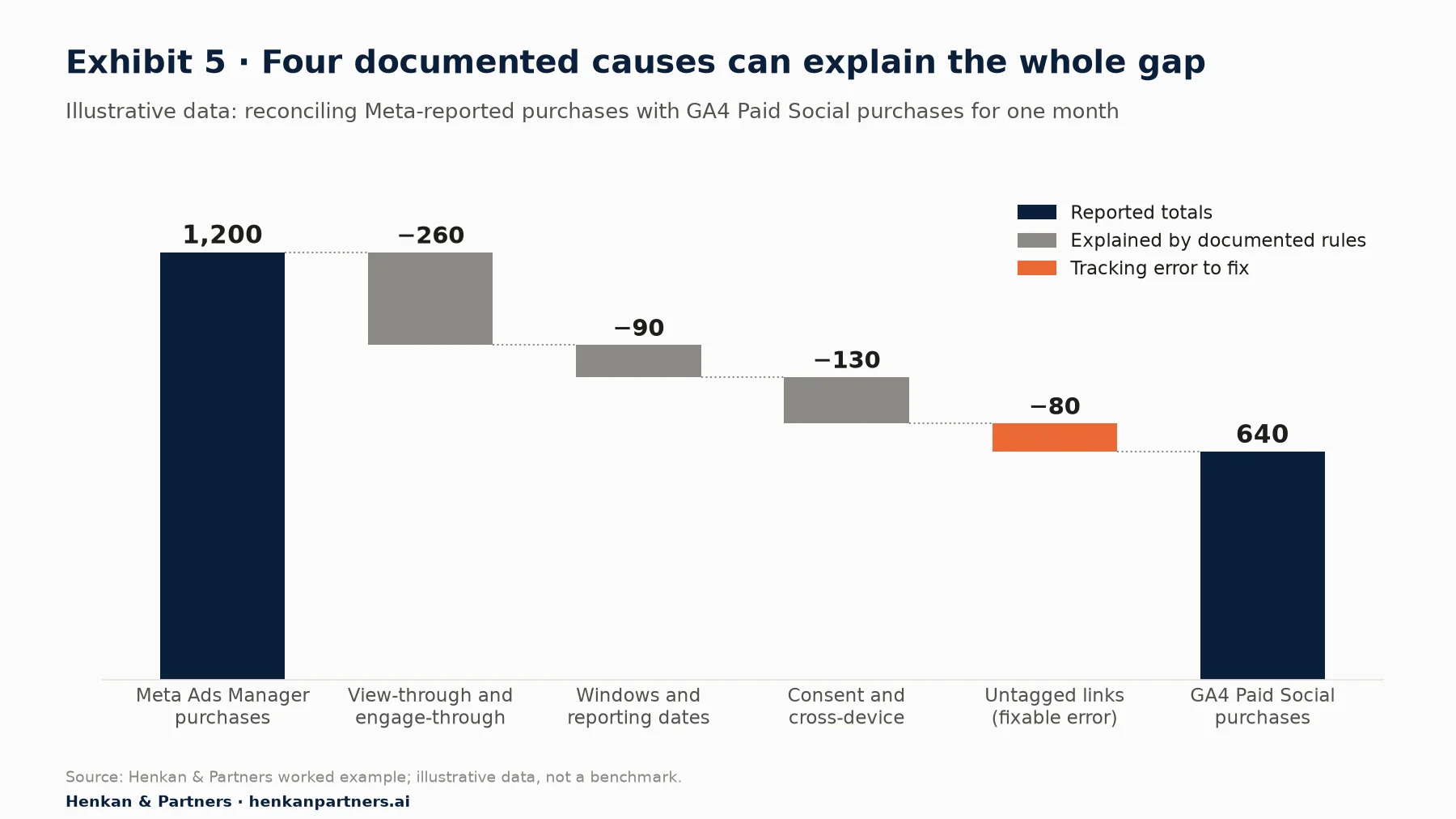
What this shows. Once each cause is sized, the conversation changes from "GA4 is broken" to "Meta's number includes 260 view-based purchases that we cannot verify on site". The 80 purchases lost to untagged links are the only part of the gap that is a fixable error. In real accounts, sizing the view-through share and the consent gap needs the platform's breakdowns and your consent rate; anything left unexplained after the five steps is where to look for a tracking bug.
Explained gap ratio = platform-reported key events ÷ GA4 key events for the same channel, same dates, same time zone
Unexplained gap = platform figure − GA4 figure − (view/engage-through + window and date + consent and identity effects)
Illustrative example: 1,200 ÷ 640 = 1.9; unexplained after the four causes = 0
Section 7 · Reading traps
Five reading traps cause most marketing misreads, and each one has a quick check
Beyond attribution, a handful of rules regularly mislead marketers. Each has a quick check.
- Direct is bigger than it should be. Untagged emails, SMS, QR codes, app links and some redirects arrive without a source and land in Direct. If Direct jumps during a campaign week, suspect your links before you credit brand strength.
- (not set) in source / medium. GA4 uses (not set) when it received no value. For session source / medium, Google says it appears "for sessions where the automatically collected event `session_start` is missing", often because the Google tag fires late. For Google Ads dimensions, manual UTM tagging instead of auto-tagging can produce it.
- Unassigned is a tagging problem, not a channel. It means the source and medium matched none of the 19 channel rules. Look at the session source / medium behind it and fix the convention.
- Yesterday is not final. Google says data processing "can take 24-48 hours", and attribution credit for key events "can change for up to 12 days". Do not judge a campaign launched yesterday, and do not compare a fresh week with a settled one.
- Time zone changes create false spikes. Changing the property time zone "only affects data going forward" and can create a flat spot or a spike on the day of the change. Check the time zone in Admin before comparing GA4 with an ad account set to another one.
For thresholding, sampling and the (other) row, see How GA4 Actually Works and our GA4 audit checklist for e-commerce, which covers the settings that cause these problems.
Section 8 · Ten standard questions
Ten standard questions cover most of a marketer's weekly needs, and each maps to one report
Most marketing teams ask the same ten questions every month. Writing them down with the exact report, dimension and metric turns GA4 into a routine and gives you a shared vocabulary with your analyst and agency. The table below is our standard set; the e-commerce reports step adds the product and merchandising questions.
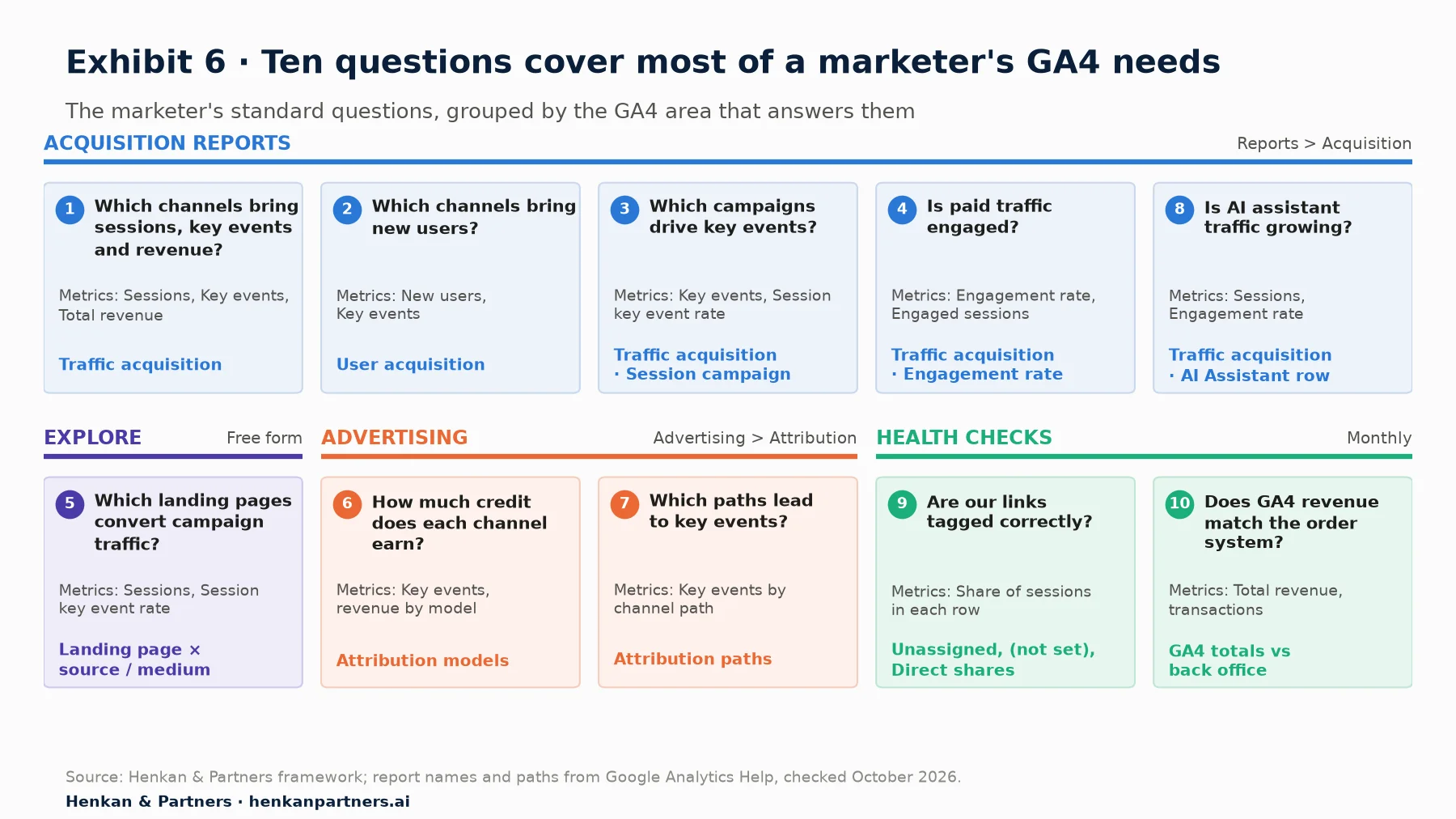
What this shows. Five of the ten questions are answered in the two acquisition reports, one in a free-form exploration and two in the Advertising section; the last two are health checks rather than performance questions. In our experience, teams that run the health checks every month spend far less time arguing about numbers in campaign reviews.
| # | Question | Where in GA4 | Dimension | Metrics | Caveat |
|---|---|---|---|---|---|
| 1 | Which channels bring the most sessions, key events and revenue? | Reports > Acquisition > Traffic acquisition | Session default channel group | Sessions, Key events, Total revenue | Session scope; untagged links inflate Direct |
| 2 | Which channels bring new users and customers? | Reports > Acquisition > User acquisition | First user default channel group | New users, Key events | Credit stays with the first channel |
| 3 | Which campaigns drive key events? | Traffic acquisition, primary dimension switched | Session campaign | Key events, Session key event rate | Only as clean as the UTM tags |
| 4 | Is paid traffic engaged or bouncing? | Traffic acquisition | Session source / medium | Engagement rate, Engaged sessions | Engaged = over 10 s, a key event or 2+ pages |
| 5 | Which landing pages convert campaign traffic? | Explore > Free form | Landing page × Session source / medium | Sessions, Session key event rate | Thresholds and sampling can apply |
| 6 | How much credit does each channel earn for purchases or leads? | Advertising > Attribution > Attribution models | Default channel group | Key events, revenue by model | Model change rewrites history |
| 7 | Which paths lead to key events? | Advertising > Attribution > Attribution paths | Channel path | Key events by path | Direct gets no credit unless the path is all direct |
| 8 | Is AI assistant traffic growing, and does it engage? | Traffic acquisition | Session default channel group (AI Assistant) | Sessions, Engagement rate, Key events | Channel exists from 13 May 2026 |
| 9 | Are our links tagged correctly? | Traffic acquisition | Session source / medium | Sessions in Unassigned, (not set), Direct | A rising share means a tagging bug |
| 10 | Does GA4 revenue match the order system? | Traffic acquisition totals vs back office | Date | Total revenue, transactions | Consent and refunds explain part of the gap |
If Google Ads is linked to GA4, its campaign report in the Advertising section adds cost and clicks next to behaviour after the click; the Brief step covers how to request the link.
Section 9 · Limits and AI
GA4 shows which channels are involved, not which ones work, and AI assistants make it easier to ask but not easier to trust
The most expensive misreading of GA4 is treating attribution as proof. Every GA4 model, data-driven included, shares credit among the channels a buyer touched; none tells you what would have happened without a channel. Brand search and retargeting often look excellent because they reach people who were going to buy anyway. To judge a channel's real contribution, you need an experiment: a geo test, a holdout, a platform lift study, or a media-mix model fed by those experiments. The attribution step explains how to combine them, and our A/B testing guide covers the experimental basics.
Asking GA4 questions through AI assistants
AI assistants can now query GA4 for you. Google publishes an experimental Google Analytics MCP server (MCP, the Model Context Protocol, is a standard way to connect AI assistants to tools). It uses read-only access and offers functions such as `run_report`, `run_funnel_report` and `list_google_ads_links`. A marketer can ask "which campaigns drove the most key events last week?" in plain language and get a table back.
The risks are the same traps, only faster: an assistant may use first user dimensions when you meant session ones, or compare an unsettled day with a settled one. Check scope, dates and attribution model before anything reaches a deck. Disclosure: Henkan & Partners builds analytics assistants for clients, including Stuart, our own MCP-based analytics platform.
For leaders. Ask your team for three numbers on every channel: GA4 attributed key events, the platform-reported figure, and the result of the latest incrementality test, if any. The first two tell you how credit is shared; only the third tells you whether to spend more.
Section 10 · What to do next
What to do next: five moves to make GA4 your team's trusted acquisition view
1. Label the scope on every chart
Rename shared dashboards so each chart says first user or session and names the attribution model. It costs an hour and removes the most common disagreement.
2. Agree three to eight key events with the business
List them, define each one in business terms, name an owner, and check that the same definitions are used for Google Ads conversions. Mark them in Admin > Data display > Events.
3. Fix your links before your reports
Look at Unassigned, (not set) and Direct in Traffic acquisition. If any is growing, write a UTM convention and a custom channel group, following the Brief step of this path. You can download the GA4 Tracking Request Kit, which includes a question bank per role, an event spec template, a naming convention, a QA checklist and a tracking-plan sheet layout.
4. Reconcile GA4 with each ad platform once a month
Run the five-step routine from Section 6 and track the explained gap ratio over time. Share the ratio with finance so platform numbers are read with the right discount.
5. Continue the path, and bring the team along
Next, read how to ask for UTM conventions, key events and ad platform links, then attribution for marketers and e-commerce reports for marketers. Step 5 is our GA4 audit checklist for e-commerce, and step 6, the GA4 tracking plan, shows how marketing, product, design and engineering request and check tracking together. If you want a second pair of eyes on your acquisition reporting, Talk to us.
FAQ
Frequently asked questions about GA4 for marketers
Frequently asked questions
What is GA4 for marketers?
It is the use of Google Analytics 4 to answer acquisition questions: which channels, campaigns and landing pages bring engaged visitors and key events. It also means understanding the rules behind those numbers (scopes, channel rules, key events and attribution) so they can be compared fairly with ad platforms.
What is the difference between user acquisition and traffic acquisition in GA4?
User acquisition is scoped to new users and credits all of a user's sessions to the channel that first brought them, using First user dimensions. Traffic acquisition is scoped to sessions and credits each session to the channel that started it, using Session dimensions; direct returns within the key event lookback window keep the earlier campaign. Use the first for acquiring new customers and the second for channel activity.
Why don't GA4 and Google Ads conversions match?
They apply different rules. Google Ads credits only Google ad interactions, reports conversions on the ad impression date, and can include engaged-view and view-through conversions and modelled cross-device conversions. GA4 shares credit across all channels, reports on the date of the key event and can take 24–48 hours to process. Time zones and conversion windows also differ.
Why are my Meta Ads conversions higher than GA4?
Meta counts view-through and engage-through conversions that involve no click to your site, which GA4 cannot attribute to Meta. Meta also runs its own cross-device matching, and its default window for website conversions is 7-day click, 1-day engage-through and 1-day view-through. Untagged links and consent refusals reduce GA4's count further.
What are key events in GA4?
Key events are events you mark as important to your business, such as a purchase or a lead. They replaced the term conversions in GA4 in 2024. You mark them in Admin > Data display > Events by clicking the star; a standard property allows up to 30. Google Ads conversions can then be created from key events.
What does Unassigned mean in GA4?
Unassigned is the value GA4 uses when a session's source, medium and campaign match none of the default channel rules. It usually means links were tagged with values GA4 does not recognise, such as utm_medium=newsletter. Fix it with a UTM naming convention or a custom channel group.
How does GA4 define an engaged session?
A session is engaged if it lasts longer than 10 seconds, has a key event, or has two or more page or screen views. Engagement rate is the share of engaged sessions, and bounce rate is the share of sessions that were not engaged.
Does GA4 track AI chatbot traffic like ChatGPT?
Yes. Since 13 May 2026 GA4 has an AI Assistant default channel. When the referrer is on Google's list of AI assistants, GA4 sets the medium to ai-assistant and groups the session under AI Assistant. Earlier visits from these tools remain in Referral or other channels.
Key terms
- Acquisition
- How visitors arrive at your site or app. It matters because GA4 reports it at user level and session level, and the two give different answers.
- Attribution model
- The rule that shares credit for a key event across the channels a user touched. It matters because changing it in GA4 rewrites historical reports.
- Attribution window (lookback window)
- How long after an ad interaction a conversion can still be credited to it. It matters because GA4, Google Ads and Meta use different defaults.
- Consent Mode
- Google's mechanism for passing a visitor's cookie choices to its tags, through four consent signals. It matters because refusals reduce what GA4 records and modelling only partly fills the gap.
- Custom channel group
- A set of channel rules you define, alongside the default group. It matters because the default rules cannot be edited and custom groups apply retroactively.
- Default channel group
- Google's fixed rules that sort each session into channels such as Paid Search or Email. It matters because your UTM values decide which channel a visit lands in.
- Engaged session
- A session lasting over 10 seconds, with a key event, or with two or more page views. It matters because engagement rate is a quick test of traffic quality.
- Engage-through attribution
- Meta's 2026 category for conversions after non-link interactions such as likes, comments or short video views. It matters because GA4 cannot see these interactions.
- First user dimensions
- User-scoped dimensions that record the source, medium and campaign of a user's first visit. They matter because they answer which channel acquired the user, not which started a session.
- Key event
- An event marked as important to the business, such as a purchase or lead. It matters because key events drive the key event columns, attribution reports and Google Ads conversions.
- Session dimensions
- Session-scoped dimensions that record where each session came from. They matter because they are the right view for channel activity and campaign traffic.
- UTM parameters
- Tags added to links (utm_source, utm_medium, utm_campaign and others) to tell analytics where a visit came from. They matter because badly chosen values send traffic into the wrong channel or Unassigned.
- View-through conversion
- A conversion credited to an ad that was seen but not clicked. It matters because ad platforms count them and GA4 cannot.
- Incrementality test
- An experiment that compares a group exposed to a channel with one that is not. It matters because it is the only way to show a channel caused extra sales.
Sources
All sources were checked in October 2026. Google documentation is cited as published on Google's help and developer sites at that date; Google updates these pages without version numbers, and interface paths may change. W3Techs data is a survey of websites, not of traffic. Meta's 2026 attribution changes are reported from secondary sources citing Meta's announcement, because Meta's help pages could not be retrieved for verification. Exhibits 2 and 6 and Tables 1 and 6 are Henkan & Partners frameworks; Exhibit 5 is an illustrative worked example, not a benchmark.
- W3Techs (2026). Usage statistics of traffic analysis tools for websites (data as of 1 October 2026).
- Google Analytics Help (n.d.). User acquisition report vs. Traffic acquisition report.
- Google Analytics Help (n.d.). Traffic acquisition report.
- Google Analytics Help (n.d.). Default channel group.
- Google Analytics Help (n.d.). Custom channel groups.
- Google Analytics Help (2026). What's new in Google Analytics (entries of 16 January, 13 May and 11 June 2026).
- Google Analytics Help (n.d.). Mark events as key events.
- Google Analytics Help (n.d.). About key events.
- Google Analytics Help (n.d.). Conversions vs. key events in Google Analytics.
- Google Analytics Help (n.d.). Creating and managing conversions.
- Google Analytics Help (n.d.). Engagement rate and bounce rate.
- Google Analytics Help (n.d.). Select attribution settings.
- Google Analytics Help (n.d.). Get started with attribution.
- Google Analytics Help (n.d.). Data freshness.
- Google Analytics Help (n.d.). Set up Analytics for a website and/or app (reporting time zone).
- Google Analytics Help (n.d.). Behavioral modeling for consent mode.
- Google Analytics Help (n.d.). What the value (not set) means in your reports.
- Google Analytics Help (n.d.). Free-form exploration.
- Google for Developers (n.d.). Consent mode overview.
- Google Ads Help (n.d.). Data discrepancies: Factors and troubleshooting.
- Google Ads Help (n.d.). About conversion windows.
- Dataslayer (2026). Meta attribution change 2026: what engage-through attribution is and why your numbers look different.
- Digital Applied (2026). Meta's attribution change: why reported conversions dip.
- PPC Land (2025). Meta restricts attribution windows and data retention in Ads Insights API.
- Supermetrics (2026). Facebook Ads: new historical limitations, attribution window and metric removals, January 12, 2026.
- CMSWire (2024). Google Analytics' key events vs. conversions: what's new?.
- Google Analytics (n.d.). Google Analytics MCP Server (Experimental). GitHub.