Focus
How Marketers Should Ask for GA4 Tracking: UTM Conventions, Key Events and Ad Platform Links
Alexandre Suon · 2026-10-02
Most GA4 problems marketers complain about were created by marketers: a `utm_medium` nobody recognises, a lead form with no value, a Google Ads account never linked. This guide shows you how to ask for GA4 UTM campaign tracking that works: a naming convention and governance sheet, custom channel groups, the key events and parameters to request from developers, the Google Ads, Search Console and Merchant Center links, remarketing audiences and what consent changes.
Executive summary
- GA4 can only report the campaigns you describe correctly, so the brief is the marketer's job. Five asks cover it: a UTM convention, channel groups, key events with values, product links, and audiences with consent. Each needs an owner and a check.
- The `utm_medium` value decides the channel. GA4's default channel group matches medium and source against fixed rules that you cannot edit. Values such as `newsletter` or `influencer` match no rule and end up in Unassigned; a paid social link tagged `Social_Paid` can be counted as Organic Social.
- A naming convention is only as good as its governance. Google says parameter values are case sensitive and recommends lowercase. A shared sheet with dropdowns, a URL formula, one owner per link and a monthly reconciliation keeps reports clean.
- Ask developers for key events with values, not for "conversion tracking". Standard properties allow 30 key events. Google's recommended `generate_lead` and `purchase` events expect `value` and `currency`; `purchase` also needs `transaction_id` and `items`.
- Link Google Ads, Search Console and Merchant Center on day one, and import other costs. Links bring cost, query and free-listing data into GA4. Note one trap: in GA4, Google Ads auto-tagging takes priority over manual UTMs. Campaign data import has required a currency field for cost uploads since July 2026.
- Audiences and consent decide whether remarketing works. GA4 audiences backfill 30 days and can keep members up to 540 days, but they reach Google Ads only with a link, personalised advertising and Google signals. Without consent signals, EEA users have been left out of those audiences since March 2024.
Section 1 · The brief
GA4 UTM campaign tracking starts with a written brief, because GA4 reports only what you describe
GA4 UTM campaign tracking is the practice of tagging every non-Google marketing link with consistent UTM parameters (`utm_source`, `utm_medium`, `utm_campaign` and optional extras) and configuring Google Analytics 4 around them, through channel groups, key events, product links and audiences, so that each visit, lead and sale is credited to the right channel and campaign.
This is step 2 of The ABC of GA4 for Marketers. Step 1 covered the questions GA4 answers for marketers and why its numbers never match your ad platforms. This step is about the brief: what to ask for, in what form, from whom. Step 3 covers attribution in GA4 and step 4 the e-commerce reports.
You do not need to write code to get this right. You need to make five decisions and write them down. In our experience, most messy GA4 acquisition data comes from undocumented habits: each agency tags links its own way, nobody owns the list of approved values, and the lead form fires an event with no value. Developers cannot fix that, because it is not a code problem.
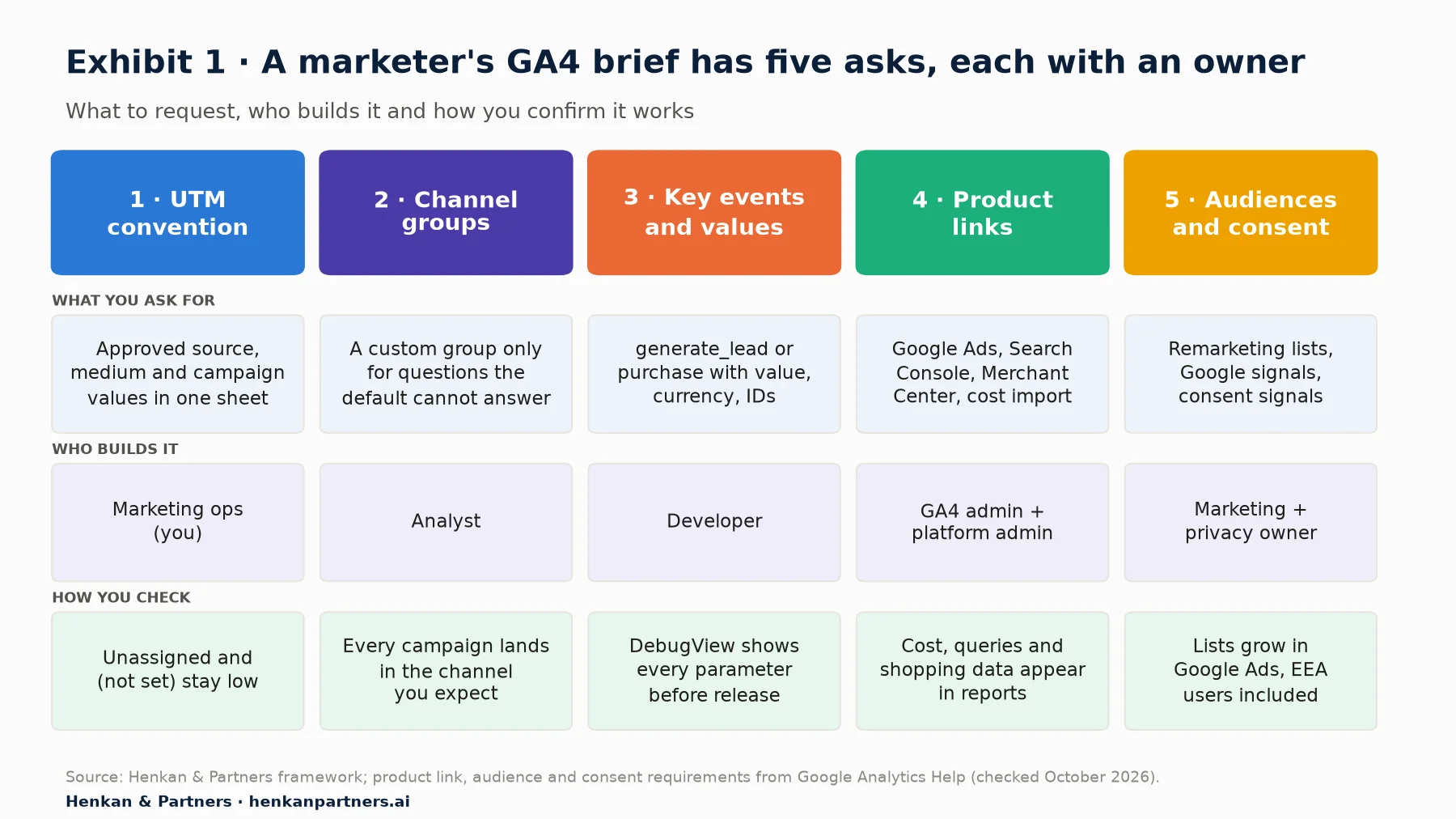
What this shows. Only the first ask is fully in your hands; the other four need an analyst, a developer, an administrator or your privacy owner. Writing down the check for each ask matters as much as the ask itself, because it tells everyone when the work is done. The rest of this guide follows the five columns in order.
For marketers. You own the vocabulary: which sources, mediums and campaign names exist. Everyone else builds on it.
For leaders. Ask who owns the UTM sheet and when it was last reconciled with GA4. If nobody can answer, channel reporting is a guess.
Section 2 · UTM parameters
Three UTM parameters are mandatory, two are useful and the rest are optional
UTM parameters are labels you add to the end of a link, after a `?`, so GA4 knows where a visit came from. Google lists nine. It says you "should always use `utm_source`, `utm_medium`, and `utm_campaign`", and that values are case sensitive: `utm_source=google` and `utm_source=Google` are two different sources. Google recommends lowercase as standard practice.
| Parameter | What it describes | Example | Our rule |
|---|---|---|---|
| utm_source | Who sends the traffic: a site, platform or partner | meta, google, brevo, awin | Required. Platform name from an approved list. |
| utm_medium | How it arrives: the marketing medium | cpc, paid-social, email, affiliate | Required. Must match a default channel rule (Section 3). |
| utm_campaign | The campaign, promotion or slogan | 2026-11_fr_black-friday_rt | Required. Built from a fixed pattern (Section 4). |
| utm_id | A campaign ID that identifies a specific campaign | bf26-meta-01 | Use it whenever you will import cost data. |
| utm_content | Which creative or link, to compare versions | video-15s-v2 | Use it for creative and placement tests. |
| utm_term | The paid keyword | running-shoes | Only for non-Google paid search. |
| utm_source_platform | The platform responsible for directing traffic to the property | dv360 | Leave it to the platforms that set it. |
| utm_creative_format | Type of creative (display, native, video, search) | video | Not currently reported in GA4. |
| utm_marketing_tactic | Targeting criteria (remarketing, prospecting) | prospecting | Not currently reported, so encode tactic in the campaign name. |
Two practical points follow from the table. First, `utm_creative_format` and `utm_marketing_tactic` look useful but Google says they are not currently reported, so if you need to split prospecting from retargeting, put the tactic in `utm_campaign`, where you can filter on it. Second, `utm_id` is what joins imported cost data to sessions (Section 8), so add it from the start rather than retrofitting it.
When not to add UTMs
Do not tag internal links, such as a homepage banner pointing to a category page. In our experience, UTMs on internal links fill campaign reports with your own banners and can take credit away from the channel that actually brought the visitor. Measure internal banners with Google's recommended promotion events (`view_promotion`, `select_promotion`) instead. Also leave Google Ads links alone if auto-tagging is on: Google states that in GA4, auto-tagging is prioritised over manual tagging because there is no override option.
Section 3 · Medium and channels
Your utm_medium values must match Google's channel rules, or traffic lands in Unassigned
GA4 sorts every visit into a channel, such as Paid Social, Email or Affiliates, using the default channel group. Google's rules use the source, the medium and sometimes the campaign name, and they are checked in order. Google is explicit: "Channel definitions aren't case sensitive and can't be edited." If nothing matches, the visit goes into Unassigned. How these channels behave in reports is covered in GA4 for marketers; here the point is to choose medium values that the rules recognise.
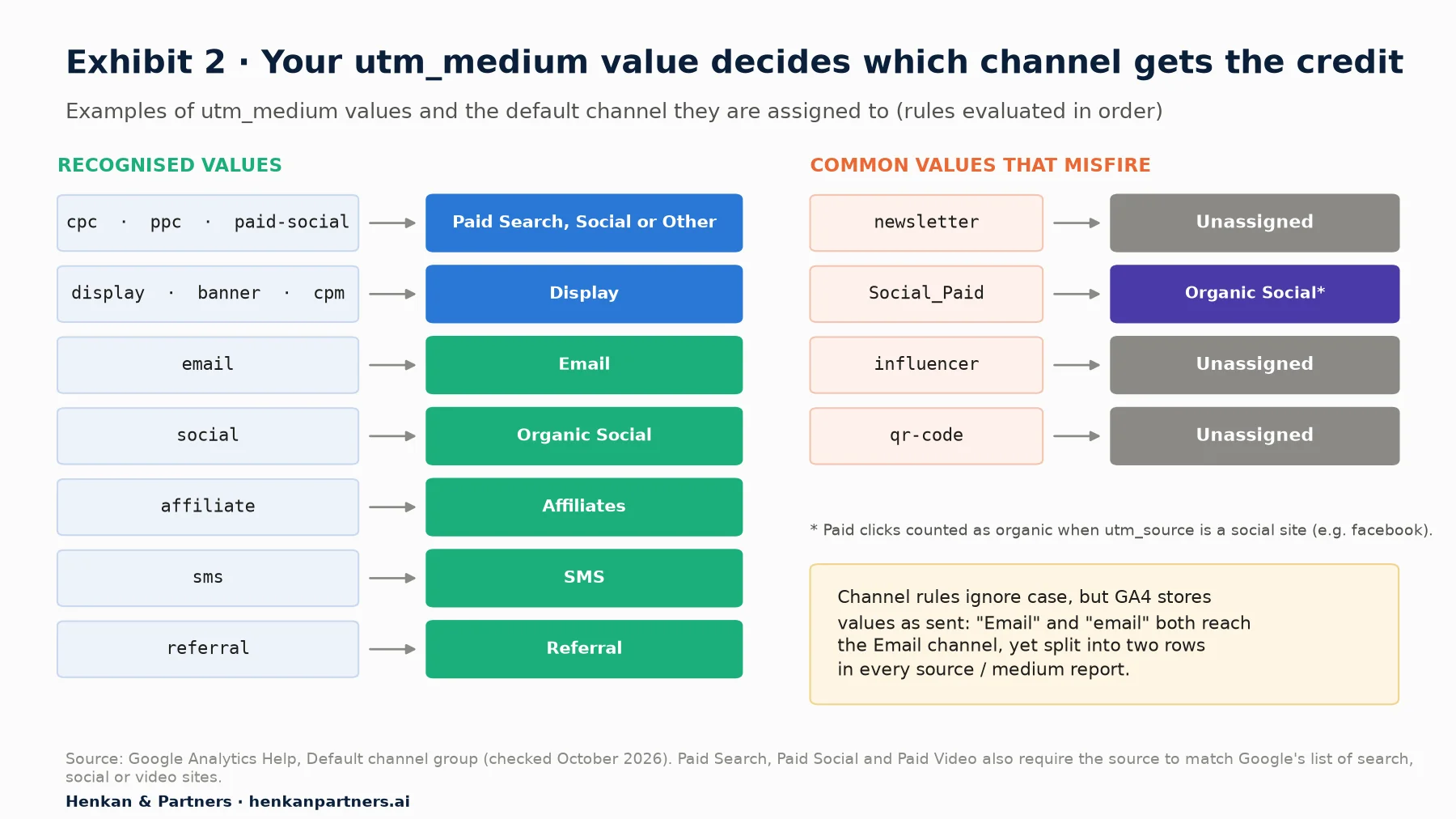
What this shows. A paid medium must match the pattern `^(.cp.|ppc|retargeting|paid.*)
| Channel you want | utm_medium to use | utm_source | Common mistake |
|---|---|---|---|
| Paid Social | paid-social (or cpc) | facebook, instagram, linkedin, tiktok | social-paid, Social_Paid, ads |
| Paid Search (non-Google) | cpc | bing, duckduckgo | search, sem |
| Display | display | the network or publisher | programmatic, native-ads |
| the tool or list, e.g. brevo | newsletter, crm, edm | ||
| Affiliates | affiliate | the network, e.g. awin | partners, affiliation |
| SMS | sms | the tool | text, whatsapp-campaign |
| Organic Social | social | the network | influencer, ugc |
Two more rules matter. Paid Search, Paid Social and Paid Video also need the source to be on Google's list of search, social or video sites, which you can download from the same help page. If your source is a niche network that is not on the list, a paid medium lands in Paid Other. And since May 2026 GA4 has an AI Assistant channel: Google sets the medium to `ai-assistant` when the referrer is a known AI assistant such as ChatGPT, Gemini or Claude. Do not reuse that value for your own campaigns. For how to measure that traffic, see measuring AI search visibility.
Our view. A small Unassigned share is normal. When it grows above a few per cent of sessions, look at the medium values first: in our experience the cause is almost always a new agency, tool or team using its own vocabulary.
Section 4 · Naming convention
A naming convention is a one-page rulebook: lowercase, hyphens, fixed lists and one campaign pattern
A UTM naming convention is a short document that says which values are allowed and how to write them. Keep it to one page, so people read it. Ours has six rules.
- Lowercase everything. GA4 stores values as sent, so `Email` and `email` become two rows in your source / medium report even though both reach the Email channel.
- Hyphens inside words, underscores between parts. `black-friday` is one idea; `2026-11_fr_black-friday_rt` has four parts you can split later.
- Fixed lists for source and medium. No free text. If someone needs a new value, they ask the owner, who adds it to the list.
- One pattern for campaign names: `yyyy-mm_market_theme_tactic`, for example `2026-11_uk_spring-sale_prospecting`. The date sorts campaigns in time, the market splits countries, the tactic replaces the unreported `utm_marketing_tactic`.
- A short, stable `utm_id` per campaign and platform, used as the key for cost imports.
- No personal data, ever. Never put an email address, name or customer ID in a UTM. Google's policy is that no data be passed to Google that it could recognise as personally identifiable information, and that applies to URL parameters too.
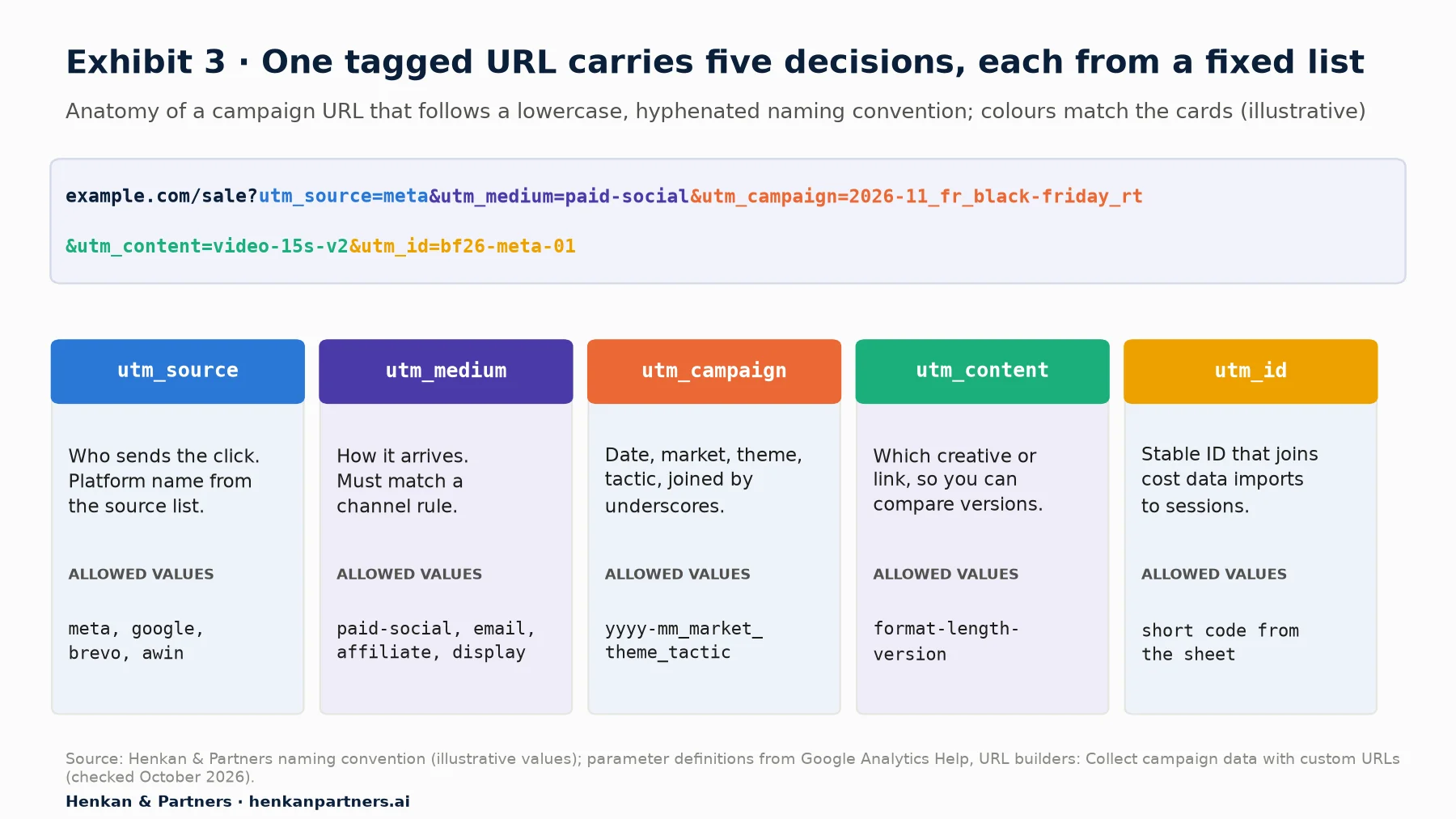
What this shows. Each part of the URL answers one question and draws its value from a fixed list or pattern. Because the campaign name has four parts separated by underscores, you can later filter all French campaigns, all November campaigns or all retargeting in an exploration without a lookup table.
Worked example: tagging a Black Friday campaign (illustrative)
A fashion retailer runs Black Friday in France on Meta (prospecting and retargeting), in an email to its list and through an affiliate network. Using the convention, the marketer writes four rows in the sheet before anything goes live:
| Placement | utm_source | utm_medium | utm_campaign | utm_content |
|---|---|---|---|---|
| Meta, prospecting video | meta | paid-social | 2026-11_fr_black-friday_prospecting | video-15s-v1 |
| Meta, retargeting carousel | meta | paid-social | 2026-11_fr_black-friday_rt | carousel-v1 |
| Email to subscribers | brevo | 2026-11_fr_black-friday_crm | hero-cta | |
| Affiliate network | awin | affiliate | 2026-11_fr_black-friday_affiliate | deal-page |
One question for the analyst: with `utm_source=meta`, will Paid Social match? It depends on whether `meta` is on Google's list of social sources. Check the downloadable list. If it is not, use the source value the list does contain, such as `facebook` or `instagram`, or add a rule in a custom channel group (Section 6). Testing one link before launch in GA4's Realtime report takes two minutes and avoids a month of misattributed spend.
Section 5 · Governance
A governance sheet stops UTM drift, and AI can help audit it but should not invent values
Conventions decay. New agencies arrive, someone copies an old link, a tool adds its own tags. The fix is a UTM governance sheet: one shared spreadsheet where every tagged link is created, with dropdowns for allowed values and a formula that builds the URL.
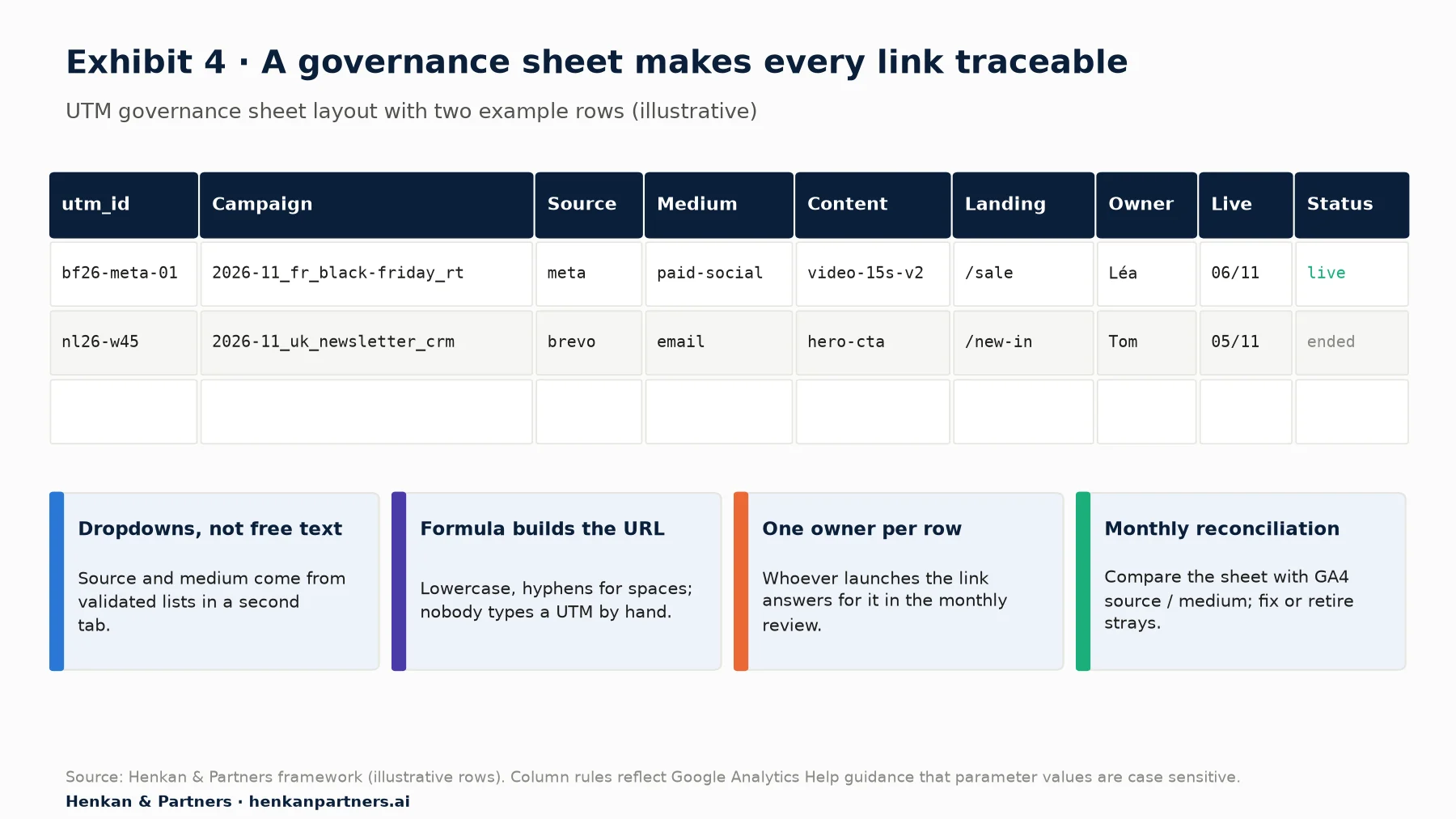
What this shows. The sheet is the single source of truth for every tagged link, so any source / medium value in GA4 that is not in the sheet is an error to investigate. The owner and status columns make the monthly review fast: you know whom to ask and which links should no longer receive traffic.
Run the reconciliation once a month. In GA4, open Reports > Acquisition > Traffic acquisition, change the primary dimension to Session source / medium, add Session campaign as a secondary dimension and compare the list with your sheet. Look at three things: values that are not in the sheet, Unassigned sessions, and `(not set)` campaigns. Since July 2026 GA4 also shows a diagnostic that flags campaign data accuracy issues caused by missing Google Ads URL parameters (the GBRAID and gad_ identifiers).
Where AI helps, and where it does not
AI assistants are good at the boring parts: turning a media plan into tagged URLs that follow your convention, flagging values that break the pattern, and summarising the monthly reconciliation. Google publishes an experimental, read-only Google Analytics MCP server (Model Context Protocol, a standard way to connect AI assistants to tools). Its tools include `run_report` and `list_google_ads_links`, so an assistant can pull source / medium by campaign and compare it with your sheet.
The risk is invention. An assistant asked to "tag these links" without your lists will create plausible new values, which is exactly the drift you are trying to stop. Give it the approved lists, ask it to refuse anything else, and keep a human approving new values. Never paste customer data into a prompt to build links.
Section 6 · Custom channel groups
Build a custom channel group only for questions the default cannot answer
A custom channel group is your own set of channel rules, applied alongside the default. You create it in Admin > Data display > Channel groups > Create new channel group, which starts from a copy of the default group that you then edit. Standard properties can have 2 custom groups in addition to the default (5 on Analytics 360), each with up to 50 channels. Google states that custom channel groups can be applied to reports retroactively, so you can fix history, not just the future.
Good reasons to build one: splitting Paid Social into prospecting and retargeting using the tactic in your campaign name; separating brand and non-brand search; or giving a big channel such as marketplaces or retail media its own line. Bad reasons: fixing broken UTMs (fix the tags instead) or recreating your agency's reporting categories one by one.
- Order matters. Google says traffic goes to "the first channel whose definition it matches", so put narrow rules (Retargeting) above broad ones (Paid Social).
- Audiences change only going forward. When you edit a group, reports and segments show the new definition immediately, but audiences built on it change prospectively only.
- Not in BigQuery. Custom channel groups are not part of the BigQuery export schema, so your data team has to rebuild the logic in SQL.
- Deletion is final. Deleting a group cannot be undone and affects reports and audiences that use it.
For marketers. Ask the analyst for one custom group, named after the question it answers, such as "Paid social by tactic", and keep the default for comparisons with the rest of the business.
For leaders. Two slots on a standard property is a scarce resource. Decide who can use them.
Section 7 · What to ask developers
Ask developers for key events with values, not for "conversion tracking"
UTMs tell GA4 where a visit came from. Key events tell it what the visit was worth. A key event is an event you mark as important to your business, such as a purchase or a lead. In March 2024 Google renamed GA4 "conversions" to key events, as Search Engine Journal reported at the time; "conversion" now means a Google Ads conversion, which can be created from a key event but does not appear in standard GA4 reports. Standard properties allow 30 key events (50 on Analytics 360), so mark only the outcomes you will report on or bid on.
Your request to developers should name the event, the moment it fires, the parameters and an example. Use Google's recommended events wherever one exists, because Google says they unlock more reports and suggested audiences. For a lead-generation or e-commerce marketer, these are the ones that matter:
| Business outcome | Recommended event | Parameters to ask for | Mark as key event? |
|---|---|---|---|
| Form or quote request submitted | generate_lead | value, currency (required if value is set), lead_source | Yes |
| Lead qualified by sales | qualify_lead | value, currency, lead_source | Yes, often sent from the CRM |
| Lead became a customer | close_convert_lead | value, currency, lead_source | Yes, for value-based bidding |
| Account created | sign_up | method | If sign-ups are a goal |
| Order completed | purchase | transaction_id, value, currency, items (required); tax, shipping | Yes |
| Newsletter subscription | custom event, e.g. newsletter_signup | form location, list name | Only if you report on it |
Three details save most of the rework. Value and currency: Google notes that if you set `value` then `currency` is required for revenue metrics to be computed accurately; for leads, agree a value per lead type with finance. Counting method: Google recommends counting a key event "once per event"; the legacy "once per session" setting is mostly found on goals migrated from Universal Analytics, and it changes the numbers you compare with ad platforms. Offline stages: `qualify_lead` and `close_convert_lead` usually happen in a CRM, not on the website, so they need a server-side feed; developers will explain the options in the developer path.
Write each request as a short event spec, using the template in the shared GA4 tracking plan, where marketing, product, design and engineering track requests from question to QA. If you need extra context on every lead or order, such as the form name or a promotion code, register it as a custom dimension; our guide to e-commerce custom dimensions lists the useful ones.
For marketers. Before release, ask to see the event in Admin > Data display > DebugView with every parameter filled in. If `value` is empty or `currency` missing in DebugView, it will be empty in your reports and in Google Ads bidding.
Section 8 · Product links
Link Google Ads, Search Console and Merchant Center on day one, and import other costs
Product links connect GA4 to other Google products. They are free and take minutes to set up, so there is no reason to wait. They live in Admin > Product links. You need editor or administrator access on the GA4 side, plus the matching rights on the other product: admin access in Google Ads, verified ownership in Search Console.
| Link | Permissions | What you get | Watch out for |
|---|---|---|---|
| Google Ads | GA4 editor or administrator; Google Ads admin access | Cost, clicks and impressions in GA4; key events imported as Ads conversions; GA4 audiences in Google Ads. Data appears in GA4 within 48 hours. | Auto-tagging (gclid) beats manual UTMs in GA4. Conversions created from GA4 are secondary until you change them for bidding. |
| Search Console | GA4 editor; verified owner in Search Console | Google Organic Search Queries and Google Organic Search Traffic reports, with queries next to GA4 metrics | One web stream links to one Search Console property. The report collection is unpublished by default. Data lags 48 hours; 16 months kept. |
| Merchant Center | GA4 editor or Merchant Center admin | Free listings traffic labelled with the source platform Shopping Free Listings and the Organic Shopping channel; purchase key events visible in Merchant Center | Optional auto-tagging adds a `srsltid` parameter to free listing links; tell whoever owns URL rules. |
| Campaign data import (non-Google) | Access to Data import in GA4 Admin | Cost, clicks and impressions from Meta, TikTok, email and other platforms in GA4 | utm_source, utm_medium and date must match exactly; currency required for cost since July 2026. |
Google Ads: link, then decide which key events drive bidding
In Admin > Product links > Google Ads links, click Link, choose the account, keep Enable Personalized Advertising (on by default) if you want audiences, and enable auto-tagging. A property can hold up to 400 Google Ads links. Then import key events into Google Ads, either from Google Ads (Goals > Summary > + Create conversion action, then choose the GA4 property) or from GA4's Advertising section under Conversion management. Google says conversion actions created through the GA4 interface are set as secondary, and "it can take up to 24 hours" for data to appear. Decide deliberately which ones become primary, because those drive bidding. Your developers do not need to be involved, but your media agency does.
Non-Google costs: import them with the same UTMs
Campaign data import (formerly cost data import) lets you upload cost, clicks and impressions for non-Google campaigns, from a CSV, Google Sheets, BigQuery, SFTP and several other sources. Google is strict: "The values you use for utm_source, utm_medium, utm_campaign, and date in your imported file must exactly match the values your users have logged." `utm_id` is optional but highly recommended. This is where the governance sheet pays off: if the sheet and the links agree, the import matches. Imported data appears within 24 hours in Reports > Acquisition > Non Google campaign and in Advertising > Planning > All channels. In August 2026 Google added a validation report to check import quality.
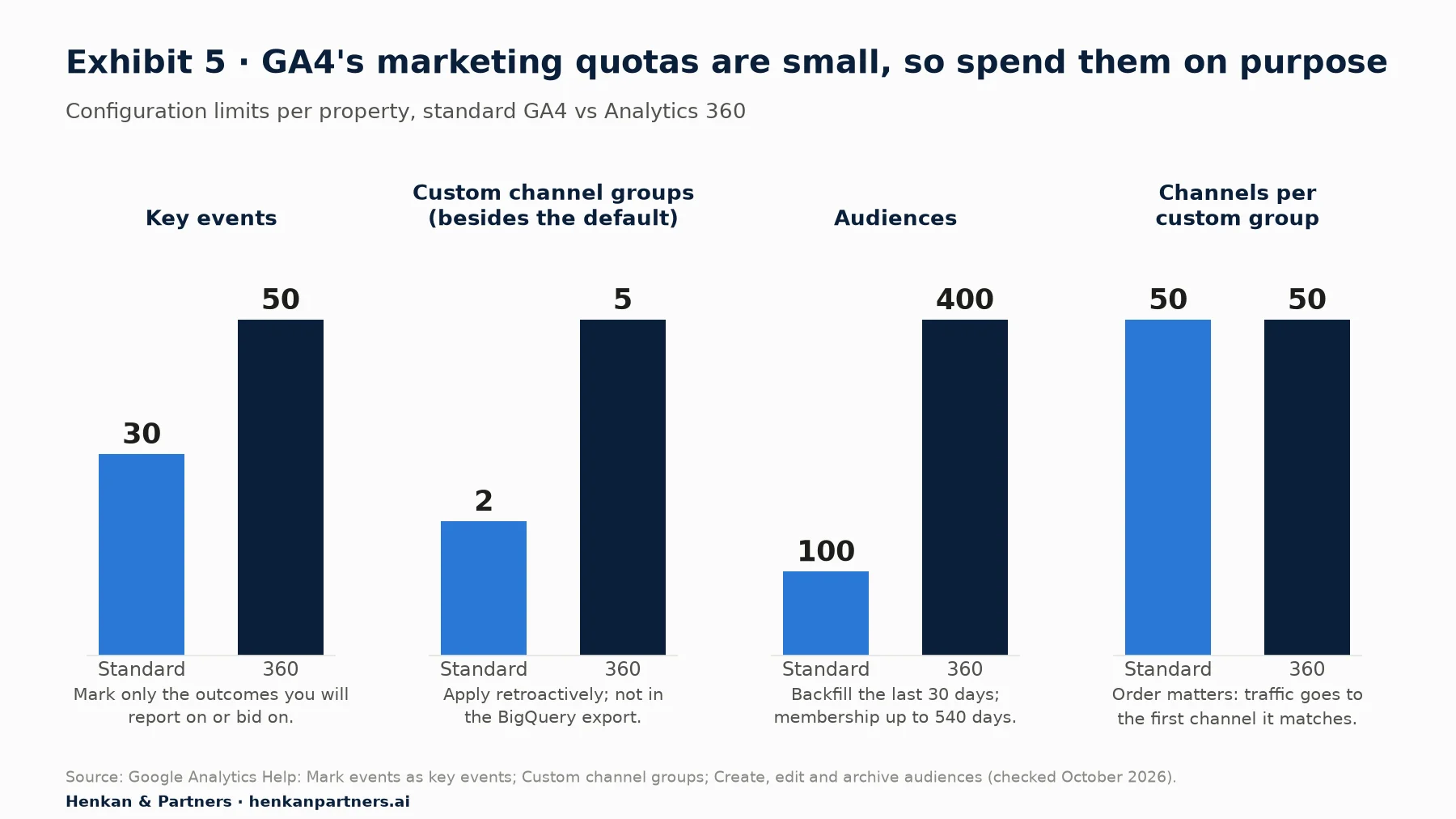
What this shows. A standard property gives you 30 key events, 2 custom channel groups and 100 audiences. These limits rarely bind a well-planned property, but they fill quickly when every team and agency adds its own. Treat them as a budget that the GA4 owner allocates, not as a free resource.
Section 9 · Audiences
Remarketing audiences need a link, Google signals and consent before they need clever definitions
A GA4 audience is a group of users who meet conditions you define, for example "added to cart in the last 7 days and did not purchase". Create one in Admin > Data display > Audiences > New audience. Google's documentation sets the rules you should know before you brief one:
- Backfill: when you create an audience, GA4 adds users who met the criteria during the last 30 days.
- Duration: membership can last up to 540 days; with "reset on new activity" the limit is 14 months.
- Limits: 100 audiences per standard property, 400 on Analytics 360.
- Delay: Google says it can take 24 to 48 hours for an audience to accumulate users.
- Sharing with Google Ads: requires the Google Ads link and personalised advertising enabled; audiences then appear in the Google Ads shared library.
- Google signals: Google states that activating Google signals is a requirement for all web and app remarketing.
Write the audience request like an event spec: a name that states the rule (`cart-abandoners_7d_no-purchase`), the conditions, the membership duration, the destination (Google Ads, Display & Video 360) and the campaign that will use it. Start with four or five audiences that map to real campaigns: cart abandoners, recent purchasers to exclude, high-value customers, engaged non-buyers and leads that did not convert. Predictive audiences and merchandising audiences are covered in GA4 e-commerce reports for marketers.
Our view. In our experience, exclusion audiences are among the quickest wins. Excluding recent purchasers from prospecting campaigns is one of the simplest ways to stop paying for clicks from people who already bought.
Section 10 · Consent
Consent decides how much of your campaign data GA4 and Google Ads can use
Every ask in this guide depends on consent. Google's consent mode uses four signals: `ad_storage` and `analytics_storage` control cookies, `ad_user_data` controls sending user data to Google for advertising, and `ad_personalization` controls personalised advertising. In basic consent mode, Google tags are blocked until the user interacts with the banner. In advanced consent mode, tags load with consent denied by default and send cookieless pings, which Google uses for modelling.
The marketing consequence is concrete. Google states that without these signals, "only end users outside the EEA will be included in audiences used by your linked advertising products starting early March, 2024." So if your banner does not pass `ad_user_data` and `ad_personalization`, European remarketing lists quietly shrink. You can check the status in Admin > Data collection and modification > Consent settings.
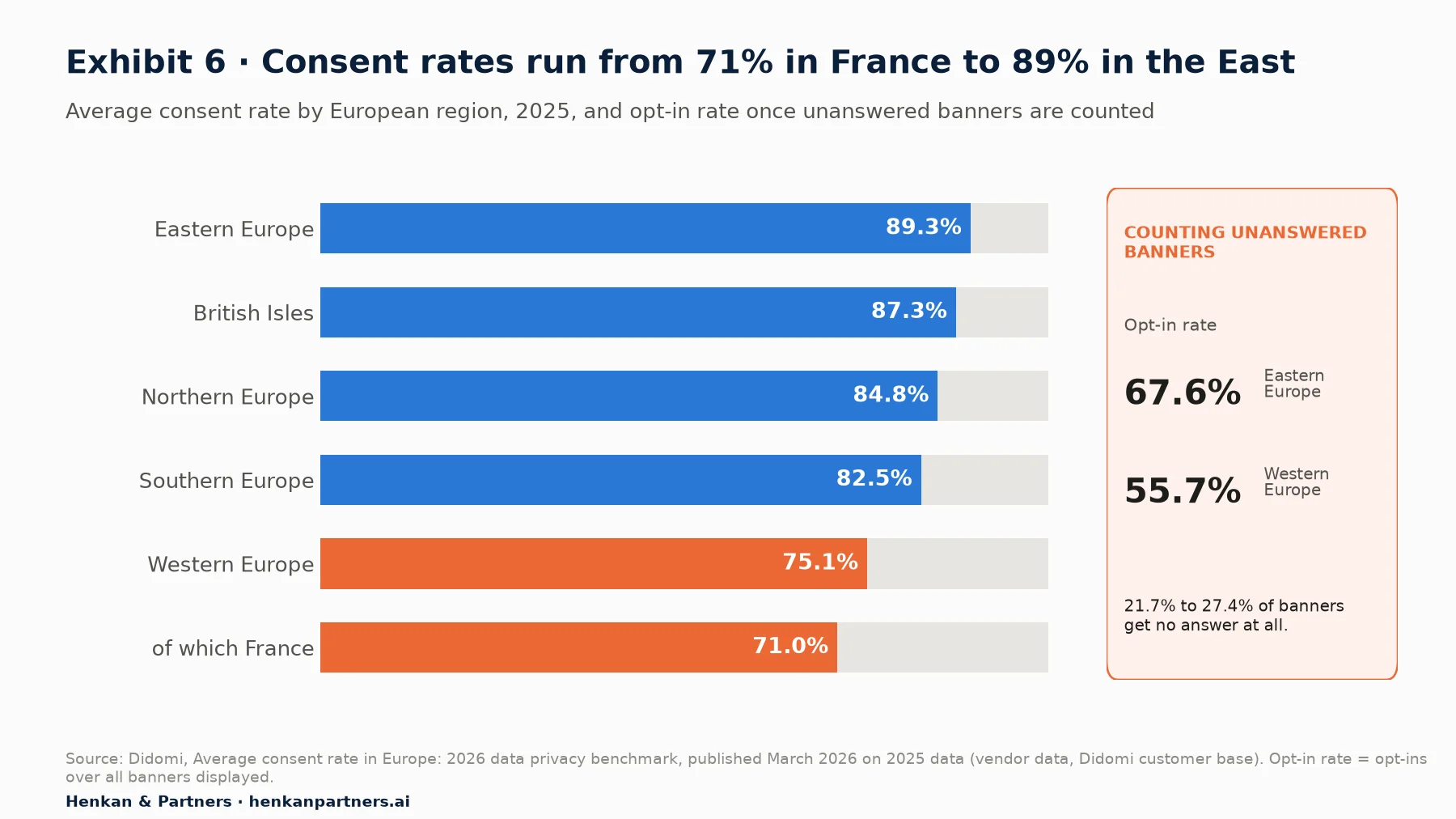
What this shows. Even in the best region, roughly one visitor in ten who answers the banner does not consent, and in France it is close to three in ten. Counting banners nobody answers, opt-in falls to 55.7% in Western Europe. Campaign reports, key events and audiences all sit on top of this gap, which is one reason GA4 numbers trail ad platform numbers in Europe.
What to ask for: confirmation from your privacy owner that the consent platform sends all four signals; a decision on basic versus advanced mode, made with legal; and a test, in Tag Assistant, of the accept and reject paths before each campaign launch. Our guide to user consent in e-commerce covers the legal side, and the GA4 audit checklist covers how to check consent mode and modelled data.
Disclosure: Henkan & Partners implements GA4, consent mode and tag management for clients and works with several analytics and testing vendors. No vendor reviewed this article.
Section 11 · What to do next
What to do next
1. Write the one-page convention this week
List approved sources and mediums aligned with Table 2, fix the campaign name pattern and the `utm_id` format, and share it with every agency. Then build the governance sheet with dropdowns and a URL formula. You can start from the layout in our free GA4 Tracking Request Kit, which includes the naming convention, an event spec template, a QA checklist and a tracking-plan sheet.
2. Measure your Unassigned share and fix the top offenders
In Traffic acquisition, sort source / medium by sessions, list every value that is not in your convention and retag the live links. Note the date, so you can see the effect next month.
3. Brief developers on key events with values
Send one event spec per outcome using Table 4, agree lead values with finance and check every parameter in DebugView before release. Add the requests to the shared GA4 tracking plan.
4. Link Google Ads, Search Console and Merchant Center, and import other costs
Ask the GA4 administrator to create the three links, publish the Search Console collection and set up campaign data import for your biggest non-Google platform first.
5. Build five audiences and verify consent signals
Create the audiences your campaigns will actually use, confirm Google signals and personalised advertising are on, and check consent settings for EEA traffic. Then move to attribution in GA4 to judge channels fairly. If you want a second pair of eyes on your set-up, talk to us.
FAQ
Frequently asked questions about GA4 UTM campaign tracking
Frequently asked questions
What is GA4 UTM campaign tracking?
It is the practice of adding consistent UTM parameters to marketing links and configuring GA4 around them, with channel groups, key events, product links and audiences, so each visit, lead and sale is credited to the right channel and campaign. GA4 reads utm_source, utm_medium and utm_campaign, plus optional parameters such as utm_id and utm_content.
Which UTM parameters are required in GA4?
Google says you should always use utm_source, utm_medium and utm_campaign. utm_id is optional but highly recommended if you import cost data, and utm_content helps compare creatives. utm_creative_format and utm_marketing_tactic are accepted but not currently reported.
Are UTM parameters case sensitive in GA4?
Yes. Google states that parameter values are case sensitive, so utm_source=google and utm_source=Google are different sources. Default channel rules ignore case, but your reports will still split the two values into separate rows. Use lowercase everywhere.
Why is my GA4 traffic showing as Unassigned?
Unassigned is the value GA4 uses when no default channel rule matches the source and medium. The usual cause is custom medium values such as newsletter, influencer or qr-code. Replace them with recognised values like email, social or affiliate, or create a custom channel group.
Should I add UTMs to Google Ads links?
Not if auto-tagging is on. Google states that in GA4 auto-tagging is prioritised over manual tagging because there is no override option, and auto-tagging is required to import Google Ads cost data and to import GA4 key events into Google Ads.
How many key events can I have in GA4?
Standard properties can mark up to 30 events as key events, and Analytics 360 properties up to 50. Mark only the outcomes you will report on or bid on, and send value and currency with them.
How do I create a custom channel group in GA4?
Go to Admin, Data display, Channel groups and click Create new channel group, which starts from a copy of the default group. Standard properties can have 2 custom groups plus the default, each with up to 50 channels. Traffic goes to the first channel it matches, and groups apply to reports retroactively.
How do I import Meta or TikTok ad costs into GA4?
Use campaign data import. Upload cost, clicks and impressions by date with utm_source, utm_medium and ideally utm_campaign and utm_id that exactly match your links. Since July 2026 a currency field is required for cost data, and imported data appears within 24 hours.
Why are my GA4 audiences not populating in Google Ads?
Check that Google Ads is linked with personalised advertising enabled, that Google signals is on, that ads personalisation is not disabled for the users' region and that your consent banner sends ad_user_data and ad_personalization. New audiences can take 24 to 48 hours to fill.
Key terms
- UTM parameter
- A label added to a link (such as utm_source) that tells GA4 where a visit came from. It matters because GA4 cannot attribute non-Google traffic correctly without it.
- utm_medium
- The UTM parameter describing how traffic arrives, such as email or cpc. It matters because GA4's channel rules depend mainly on it.
- utm_id
- A campaign ID passed in the URL. It matters because it is the most reliable key for joining imported cost data to sessions.
- Naming convention
- The written rules for UTM values: allowed lists, case and campaign name pattern. It matters because inconsistent values split and misclassify reports.
- UTM governance sheet
- A shared spreadsheet where every tagged link is created from approved values, with an owner. It matters because it is the reference for monthly reconciliation.
- Default channel group
- Google's fixed rules that assign each visit to a channel such as Paid Social or Email. It matters because it cannot be edited, so your tags must fit it.
- Unassigned
- The channel GA4 uses when no rule matches. It matters because a growing share signals broken tagging.
- Custom channel group
- Your own channel rules applied alongside the default, up to 2 on standard properties. It matters because it answers questions the default cannot, retroactively.
- Key event
- An event marked as important to the business, such as purchase or generate_lead, formerly called a conversion in GA4. It matters because reports and Google Ads bidding depend on it.
- Auto-tagging
- Google Ads adding a gclid click ID to ad URLs. It matters because GA4 prioritises it over manual UTMs and needs it to import costs.
- Campaign data import
- Uploading cost, clicks and impressions for non-Google campaigns into GA4. It matters because it puts all channels' spend next to GA4 outcomes.
- Audience
- A group of users meeting conditions you define, shareable with Google Ads. It matters because it powers remarketing and exclusions.
- Google signals
- A GA4 setting that associates data with signed-in Google users. It matters because Google requires it for remarketing.
- Consent mode
- Google's mechanism that adjusts tags to users' consent through four signals. It matters because missing ad_user_data and ad_personalization signals exclude EEA users from linked audiences.
Sources
All sources were checked in October 2026. Google documentation is cited as published on Google's help and developer sites at that date; Google updates these pages without version numbers. Didomi consent rates are vendor data from its own customer base. Exhibits 1, 3 and 4 and the naming rules are Henkan & Partners frameworks; the Black Friday tagging plan is illustrative. Exhibits 2 and 5 are drawn from Google documentation and Exhibit 6 from Didomi.
- Google Analytics Help (n.d.). URL builders: Collect campaign data with custom URLs.
- Google Analytics Help (n.d.). Campaigns and traffic sources.
- Google Analytics Help (n.d.). Default channel group.
- Google Analytics Help (n.d.). Custom channel groups.
- Google Analytics Help (n.d.). About key events.
- Google Analytics Help (n.d.). Mark events as key events.
- Google Analytics Help (n.d.). Change the counting method of key events.
- Search Engine Journal (2024). Google Unifies Conversion Reporting Across Ads & Analytics.
- Google Analytics Help (n.d.). Recommended events.
- Google Analytics Help (n.d.). Best practices to avoid sending Personally Identifiable Information (PII).
- Google for Developers (n.d.). Recommended events reference (gtag.js).
- Google Analytics Help (n.d.). Connect Google Ads to Google Analytics.
- Google Ads Help (n.d.). About auto-tagging.
- Google Ads Help (n.d.). Import Google Analytics conversions.
- Google Analytics Help (n.d.). Connect Search Console to Google Analytics.
- Google Analytics Help (n.d.). Connect Google Merchant Center to Google Analytics.
- Google Analytics Help (n.d.). Import campaign data.
- Google Analytics Help (2026). What's new in Google Analytics (entries of 13 May, 28 and 30 July, and 10 August 2026).
- Google Analytics Help (n.d.). Create, edit, and archive audiences.
- Google Analytics Help (n.d.). Why your audiences may not be populating in Google Ads.
- Google for Developers (n.d.). Consent mode overview.
- Google Analytics Help (n.d.). Verify and update consent settings in Google Analytics.
- Google Ads Help (n.d.). Updates to consent mode for traffic in the European Economic Area (EEA).
- Didomi (2026). Average consent rate in Europe: 2026 data privacy benchmark (vendor data).
- Google Analytics (n.d.). Google Analytics MCP Server (Experimental). GitHub.