Focus
Store Locator Optimisation: Understanding Prospects Before They Choose a Location
Alexandre Suon · 2026-10-21
For a business with many locations, the store locator is where online research turns into a visit, a call or a booking. It is also one of the least studied pages on most websites: often a third-party widget, rarely tracked properly, almost never tested. This guide shows how to understand what prospects come to do on the locator, design it around those jobs, make every location findable in search, measure it even when it runs in an iframe, and turn continuous customer feedback into an A/B test backlog.
Executive summary
- The locator is a drive-to-store page, not a utility. For retailers, gyms, hotels, banks, clinics and franchises, it is the hand-off between online research and a physical visit. In a Google study, 76% of people who searched on their smartphone for something nearby visited a business within a day, and 28% of those searches led to a purchase.
- Prospects come with six jobs. Find the nearest location, check it is open, check it offers what they need, compare options, act (book, sign up, call) and get there. Design and measure each job separately, because each fails for different reasons.
- Most UX gains come from a few basics. A search box before the map, geolocation requested only after a click (Chrome data shows 30% of prompts allowed after an interaction, against 12% without one), a list that leads on mobile, filters for what matters, and result cards that show distance, today's hours and one clear action.
- Search engines need location pages, not just a widget. Googlebot declines permission requests and follows only real links, so an iframe-only locator hides your locations. Give each location a crawlable page with LocalBusiness structured data, and point its Business Profile to that page.
- Third-party iframes break tracking unless you bridge them. Safari blocks cross-site cookies and Firefox partitions them, so tags inside the iframe split sessions. Ask the vendor to send events to the parent page with postMessage, or use its hosted pages with your own tags, and track a single event plan with a location identifier.
- Ask, watch, then test. Short intent, blocker and missing-information surveys on the locator, plus five remote user tests each quarter, explain what the numbers cannot. Every recurring answer becomes a hypothesis in the A/B test backlog, judged on high-intent actions such as directions, calls and bookings.
Section 1 · Why the locator matters
The store locator is the hand-off between online research and a physical visit
Most optimisation work in e-commerce targets the product page, the basket and the checkout. For a business that sells through a network of places, that misses a large part of the journey. A gym chain sells memberships in its clubs. A hotel group sells stays in its hotels. A bank opens accounts in branches, an optician sells glasses in stores, a franchise network makes most of its revenue at the counter. For all of them, the website's job is often to send a qualified prospect to the right location, and the page that does that is the store locator.
A store locator (also called a store finder, club finder or branch locator) is the page or tool that helps a visitor find the right physical location of a business, usually by searching a place or sharing their position, and then shows the details and actions for each location: address, distance, opening hours, services, directions, phone and booking.
The research on local search explains why this page deserves attention. In a 2016 diary study, Google found that 76% of people who search on their smartphones for something nearby visit a business within a day, and that 28% of those searches result in a purchase (Google/Purchased Digital Diary, 2016). In the same period, mobile searches containing 'near me' grew 136% year over year in the US (Google internal data, March 2016). More recent surveys show that the website is still part of the path: in BrightLocal's 2026 survey of 1,002 US adults, 54% of consumers said they check a business's website after reading positive reviews, up from 32% when the question was last asked in 2019.
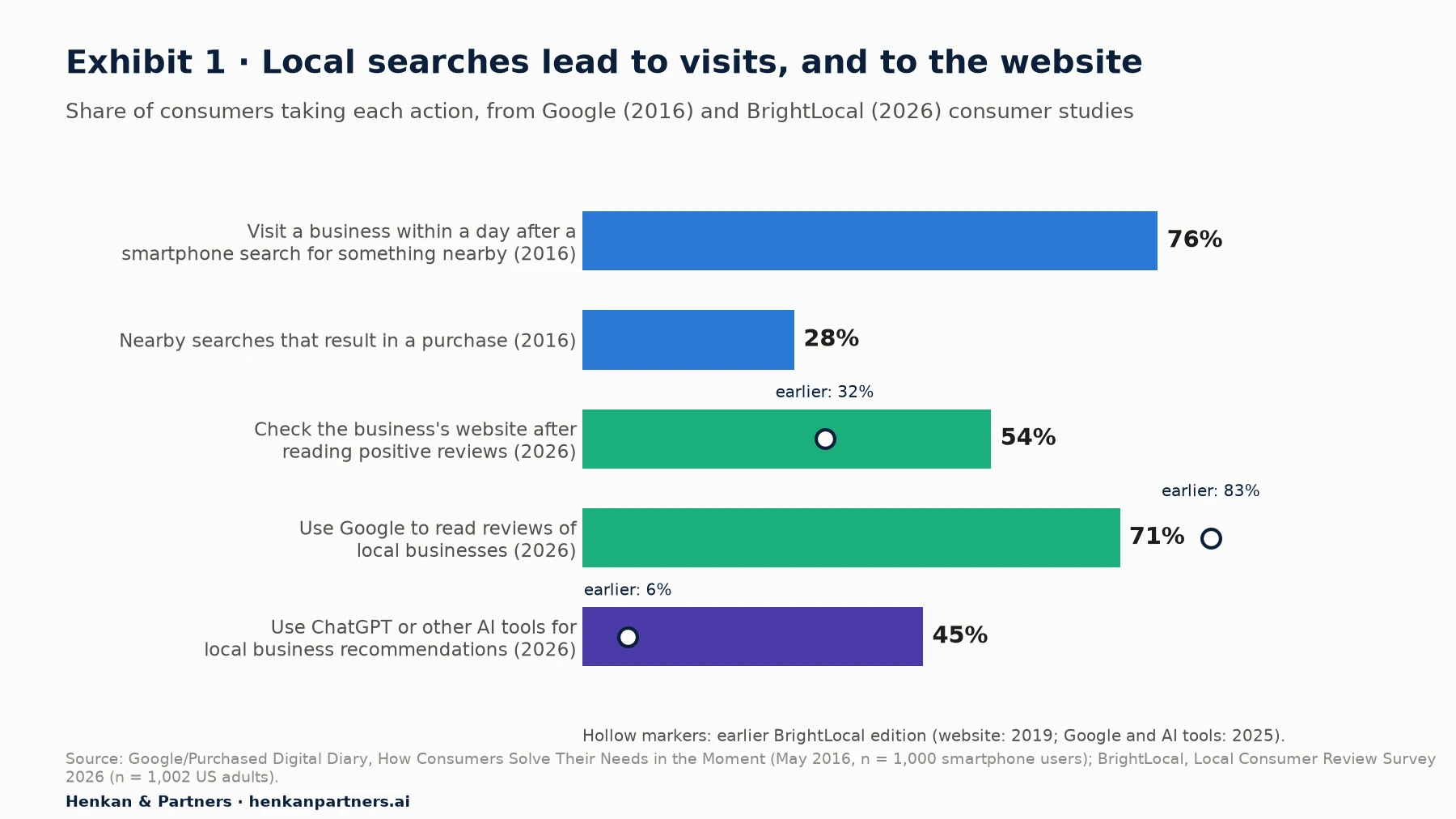
What this shows. Local intent is close to action: most people who look for something nearby on a phone act within a day. The second half of the chart shows how the path is shifting. Google is still the main source for local reviews, but its share fell from 83% to 71% in a year, while the share of consumers using ChatGPT or other AI tools for local recommendations rose from 6% to 45% (BrightLocal, 2026). Whatever the entry point, prospects end up on your site to check details, and the locator and location pages are where they land. The Google figures date from 2016, so read them as a sign of intent rather than a current benchmark.
Despite this, the locator is often the least owned page on the site. It is frequently bought as a widget from a local marketing vendor, embedded by the web team, and then left alone. Marketing does not measure it, the testing programme cannot reach it, and nobody asks the people who use it what they were trying to do. The rest of this guide is about changing that.
| Sector | Typical locator name | What 'conversion' means | High-intent action to track |
|---|---|---|---|
| Retail and fashion | Store locator | A store visit, a click-and-collect order, a product check | Directions, stock check, reserve in store |
| Gyms and fitness | Club finder | A trial pass, a visit, a membership | Book a visit or trial, start sign-up, call |
| Hotels and hospitality | Hotel finder, destination page | A booking in the chosen property | Check availability, start booking |
| Banking and insurance | Branch locator | An appointment with an adviser | Book an appointment, call the branch |
| Health and services | Clinic or centre finder | A booked appointment | Book online, call |
| Franchise networks | Find a store, find an agency | A lead passed to the right franchisee | Contact form with location, call, directions |
Section 2 · Prospect jobs
Prospects come to the locator with six jobs, and each one fails differently
A locator visitor rarely wants 'a map'. They want to get something done, and the map is only one way to help. Nielsen Norman Group's report on store finders, which covers locators for stores, offices, dealers, branches and ATMs and draws on five rounds of e-commerce research across more than 350 websites, frames the goal in the same terms: customers should be able to 'find the most convenient location that offers the services they need' (NN/g, Store Finders and Locators report, 5th edition). We break that goal into six jobs.
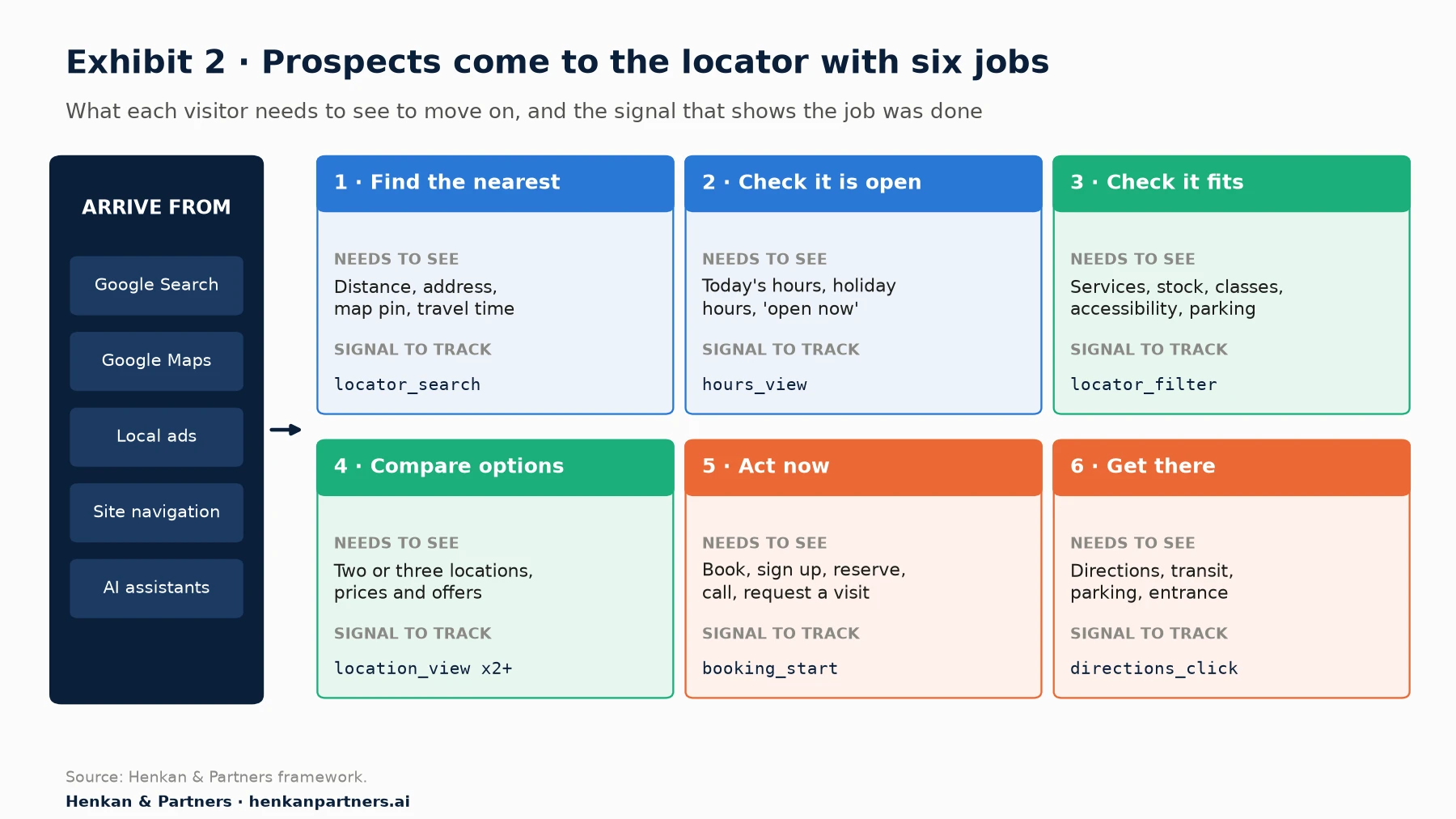
What this shows. Each job needs different information and leaves a different trace in your data. 'Find the nearest' depends on search and distance. 'Check it is open' depends on hours that are correct and visible, including holidays. 'Check it fits' depends on filters and service lists. 'Compare' depends on the ability to see two or three locations side by side. 'Act' and 'get there' depend on clear buttons. When a locator underperforms, the first diagnostic question is: which job is failing?
| Job | Typical question in the prospect's head | Information that answers it | Common failure |
|---|---|---|---|
| Find the nearest | 'Which one is closest to me, or to my office?' | Search by postcode, city or address; distance; travel time | Search accepts only one format; map loads before the search box |
| Check it is open | 'Can I go tonight, or on Sunday?' | Today's hours, 'open now', holiday and seasonal hours | Hours hidden one click away, or out of date |
| Check it fits | 'Does this one have a pool, a pharmacy, parking, step-free access?' | Services, equipment, stock, accessibility, parking | No filters, or filters that return zero results |
| Compare options | 'Which of these two is better for me?' | Prices or offers by location, facilities, opening hours | Only one location visible at a time on mobile |
| Act now | 'Can I book, sign up or reserve from here?' | Booking, sign-up or reservation entry point with the location pre-filled | Generic CTA that drops the chosen location |
| Get there | 'How do I get there and where do I park?' | Directions link to the user's maps app, transit, parking, entrance | Directions open an in-page map instead of the user's app |
Our view. Price is the job most locators ignore. For gyms, hotels and services, the price often differs by location, and prospects compare it before they move. If prices vary, show at least a 'from' price per location on the result card, or say clearly where the price can be found. Hiding it rarely makes the question go away; it only sends the prospect to a competitor's site or to the phone.
Section 3 · UX best practices
Get the visitor from 'where?' to 'which one?' in one screen
Good store locator UX is mostly about removing steps between the question and the answer. The practices below come from usability research, browser documentation and what we see when we watch people use locators.
Start with a search box, and ask for location only after a click
Many locators open with a full-screen map and a browser prompt asking for the visitor's location. Both are costly. The browser's Geolocation API only works on secure (HTTPS) pages and always asks the user for permission (MDN Web Docs). Google's guidance on permissions is direct: 'Only ask for permission after the user has interacted with the page.' Chrome telemetry shows that 77% of permission prompts on desktop are shown without a signal of user intent, and only 12% of those are allowed; after a user interaction, allow rates rise to 30% (web.dev, 2024).
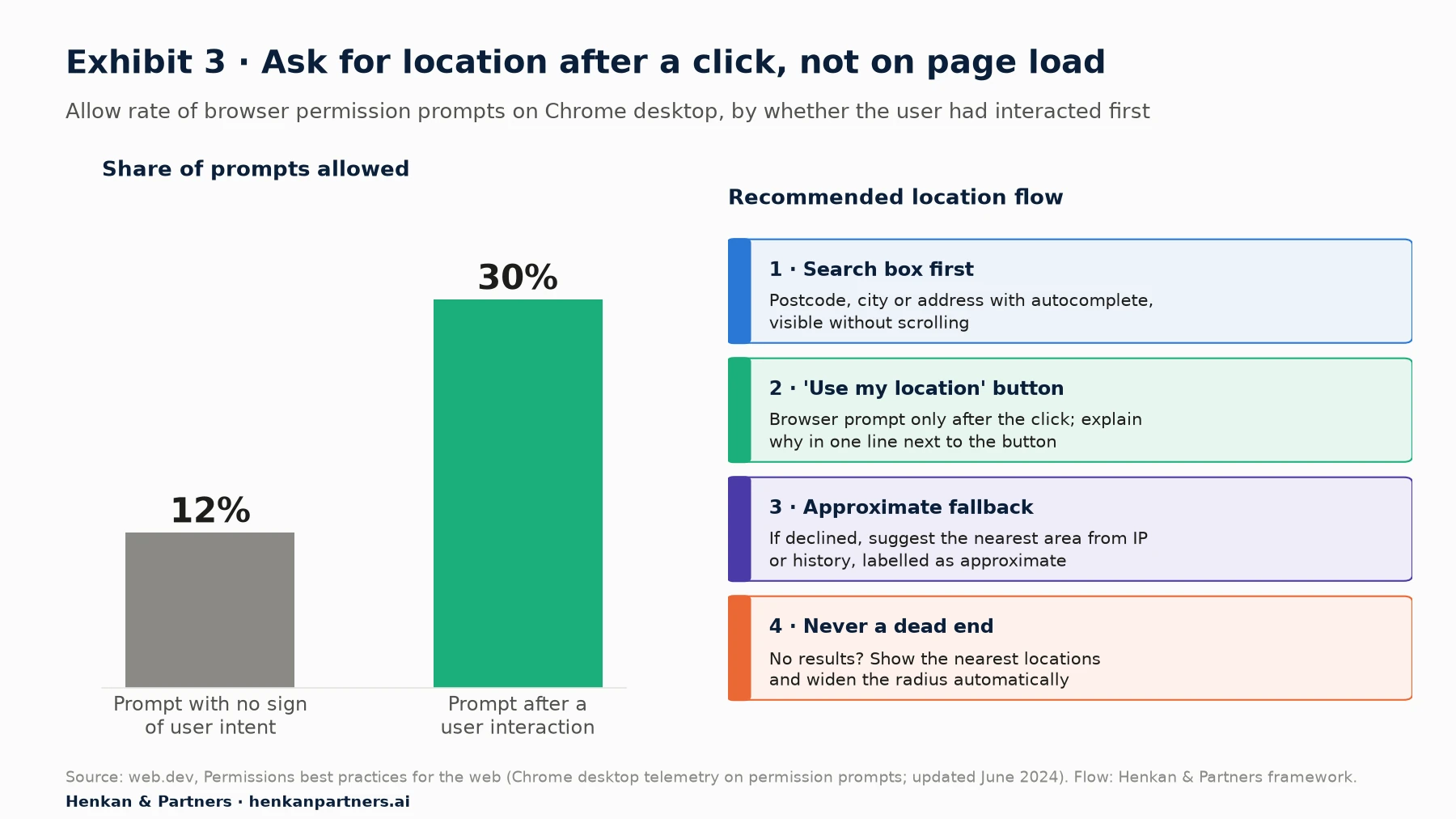
What this shows. The Chrome figures cover permission prompts in general, not only location, but the direction is clear: a prompt that follows a click is allowed about two and a half times as often as one that appears on its own. The practical design follows from it. Put a search box first, accepting postcode, city or full address with autocomplete. Add a 'Use my location' button next to it, with one line explaining why. If the visitor declines, suggest an approximate area and say that it is approximate. And never show an empty result: widen the radius and show the nearest locations instead.
Let the list lead on mobile, and use the map to confirm
A map is good at showing where things are relative to each other. It is poor at helping someone choose. On a phone, a map and a list compete for the same small screen, and a map-first layout pushes the information people need (distance, hours, services, actions) below the fold. We recommend a list-first layout on mobile, with a toggle to the map, and a split view on desktop where the list and map stay in sync. Each result card should carry the same few elements in the same order:
- Name and distance from the searched place, with the unit the market expects (km or miles).
- Status now: 'Open now, closes at 21:00' or 'Closed, opens tomorrow at 7:00', computed in the location's time zone.
- Two or three key attributes that differ between locations and matter for the choice: services, price from, parking, accessibility.
- One primary action that fits the business (book a visit, start sign-up, check availability), plus directions and tap-to-call.
- A link to the location page, with the location's name in the link text.
Filter by what changes the choice, and keep the chosen location through to the action
Filters should reflect the attributes that actually differ between locations and that prospects ask about. A gym network's prospects filter by pool, classes or opening hours; a retailer's by click-and-collect or a specific department; a bank's by appointment availability or accessibility. Two rules prevent the most common frustration: show the number of results each filter will return, and never let a combination of filters produce an empty page without suggesting the nearest match.
When the visitor acts, carry the chosen location forward. A 'Book a visit' or 'Join' button that sends the prospect to a generic form, where they must pick the location again, loses people at the moment of highest intent. The directions link should open the visitor's own maps app with the destination filled in, rather than drawing a route inside the page.
Keep the page fast and usable without the map
Locators often load a map library, a vendor script and a full list of locations before the visitor has typed anything. Google's Core Web Vitals give the targets: Largest Contentful Paint within 2.5 seconds, Interaction to Next Paint of 200 milliseconds or less and Cumulative Layout Shift of 0.1 or less, measured at the 75th percentile of page loads, separately for mobile and desktop (web.dev). Three techniques help most: render the search box and list in the page's own HTML, load the map only when the visitor opens it (a static image or placeholder until then, the 'facade' pattern that Chrome's Lighthouse documentation describes for heavy third-party embeds such as video players and chat widgets), and reserve space for the map so the layout does not jump. The list should also work with a keyboard and a screen reader, because a map alone is not accessible. Our mobile UX audit guide covers field measurement of speed in more detail.
Section 4 · Local SEO
Each location needs a crawlable page of its own, linked from the locator and from its Business Profile
A locator that works well for people can still be invisible to search engines. Three of Google's own rules explain why. First, 'generally, Google can only crawl your link if it's an <a> HTML element … with an href attribute' (Google Search Central, Make your links crawlable). Results that appear only after a search or a script event have no such links. Second, Google says to 'expect Googlebot to decline user permission requests', so a page that needs geolocation to show anything shows nothing to the crawler (Google Search Central, Fix Search-related JavaScript problems). Third, content inside an iframe belongs to another page; Google can sometimes include embedded content when it indexes the parent page, but you control very little of how that happens (Google Search Central blog, 2022). Uberall, one of the main locator vendors, says plainly of its iframe embed: 'Uberall does not recommend this solution, as it is not beneficial for SEO.'
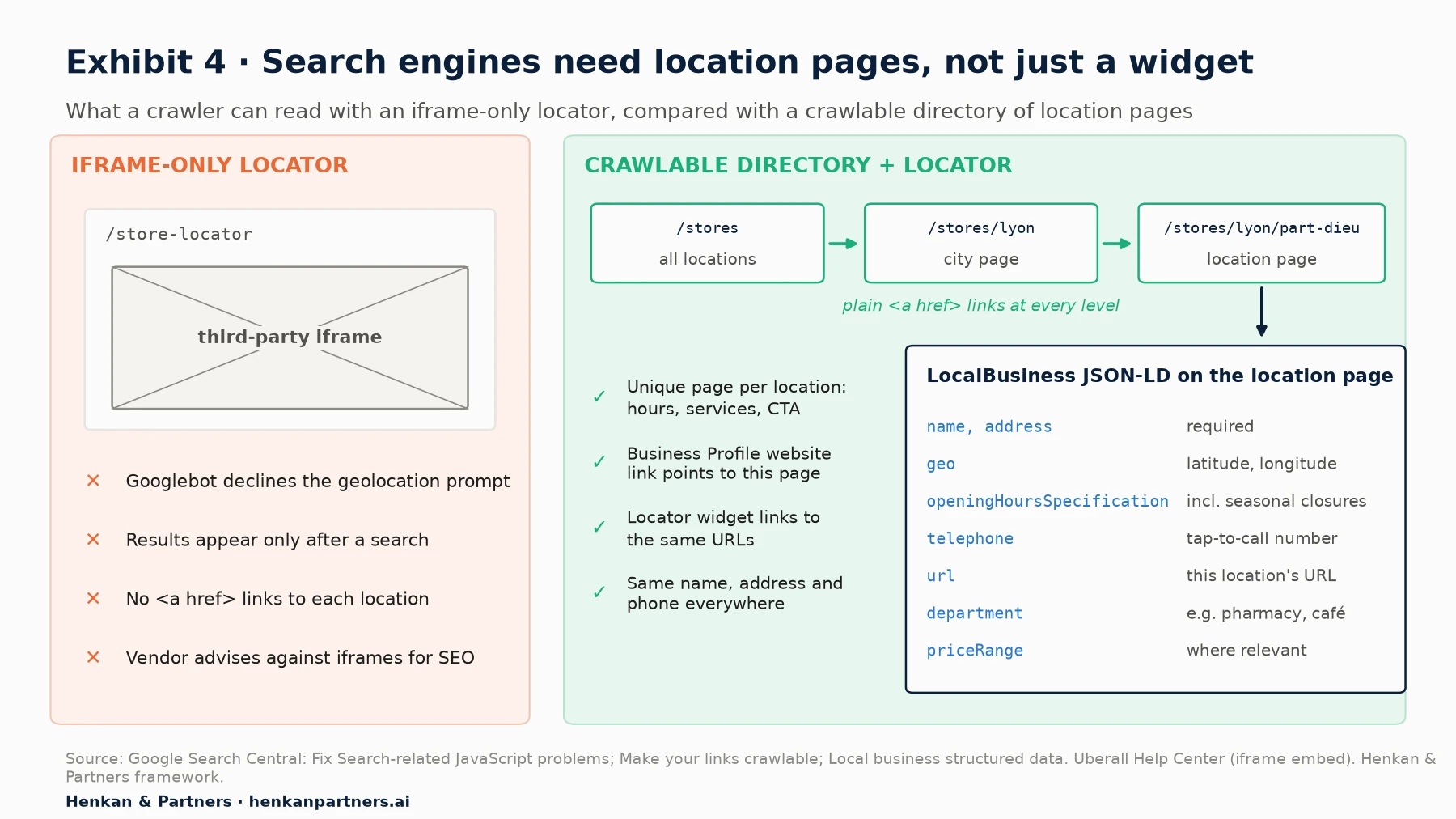
What this shows. The fix is not to remove the widget but to add a layer underneath it. A directory of all locations links with plain links to city or region pages, which link to one page per location. The widget links to the same URLs. Each location page carries its unique content (address, hours, services, photos, team, prices where relevant, local offers) and a clear call to action. The location's Google Business Profile points to that page as its website, so prospects arriving from Maps land on the right place rather than on the home page.
Mark up every location page with LocalBusiness structured data
Google's documentation for local business structured data lists two required properties, `name` and `address`, and recommends others including `geo` (latitude and longitude), `openingHoursSpecification` (with `validFrom` and `validThrough` for seasonal closures), `telephone`, `url` (the fully qualified URL of the specific location), `priceRange` and `department` for distinct departments inside a store. It also says to 'define each local business location as a LocalBusiness type' and to use 'the most specific LocalBusiness sub-type possible' (Google Search Central): for example `ExerciseGym` or `HealthClub` for a gym, `Hotel` for a hotel and `BankOrCreditUnion` for a bank branch.
Location page structure (Henkan & Partners framework)

/stores                          → all locations, grouped by region, plain links
/stores/{city}                   → locations in the city, short intro, map
/stores/{city}/{location-name}   → one location: NAP, hours, services, CTA,
                                   LocalBusiness JSON-LD with the same NAP

NAP = name, address, phone: identical on the page, in the markup,
in the Business Profile and in the locator data feed.
Location pages also matter for AI search. When an assistant answers 'which gym near me has a pool and opens at 6 am?', it needs a page that states those facts in text it can read. Our guide to AI search optimisation for e-commerce covers how assistants select sources.
Section 5 · Measurement
When the locator is a third-party iframe, bridge its events into your own tags
Locators are usually supplied by specialist vendors (Yext, Uberall and Solocal's Bridge are common examples in Europe) or built on a mapping API. How you can measure them depends on how they are deployed. There are three common models, and the measurement options differ sharply between them.
| Deployment model | How it works | What you can measure with your own tags | Main risk |
|---|---|---|---|
| JavaScript embed in your page | Vendor script renders the locator inside your page's DOM | Everything, if the vendor exposes events or a data layer; clicks can also be tracked directly | Script weight and layout shift |
| Cross-site iframe | Locator served from the vendor's domain inside a frame on your page | Only what the vendor sends to the parent page; nothing inside the frame by default | Lost events, split sessions, no A/B testing inside the frame |
| Hosted location pages | Vendor hosts the locator and location pages, often on a subdomain such as stores.brand.com | Everything, if you add your tag manager and consent tool to the hosted pages | Tags or consent missing on the subdomain; self-referrals |
Why tracking inside a cross-site iframe fails
An analytics tag inside a frame served from another site is a third-party context, and browsers now restrict it. Since March 2020, Safari blocks cookies for cross-site resources by default (WebKit, 2020). Since June 2022, Firefox has rolled out Total Cookie Protection by default, which partitions cookies by site (Mozilla, 2022). Chrome decided in April 2025 to keep its current approach of letting users choose, and not to roll out a new standalone prompt for third-party cookies (Google Privacy Sandbox, 2025), and Safari remains the default browser on the iPhone. In practice, a tag inside the iframe starts a separate, often cookieless, visit: the locator session is cut off from the visit that brought the prospect, and a booking made inside the frame loses its source. Your testing and survey tools face the same wall: the same-origin policy means scripts on your page cannot read or change a cross-origin frame (MDN Web Docs).
Ask the vendor to post events to the parent page
The standard solution is a message bridge. The `window.postMessage()` method 'safely enables cross-origin communication between Window objects', for example 'between a page and an iframe embedded within it' (MDN Web Docs). The locator frame posts each interaction to the parent page; a listener on your page checks where the message came from, validates it and pushes it into your data layer, where your tag manager handles it under your consent settings, with your first-party cookies. Simo Ahava, who documented the pattern for Google Analytics 4, calls it 'the only viable solution for tracking cross-site iframe traffic with GA4' (Ahava, 2020, updated 2021).
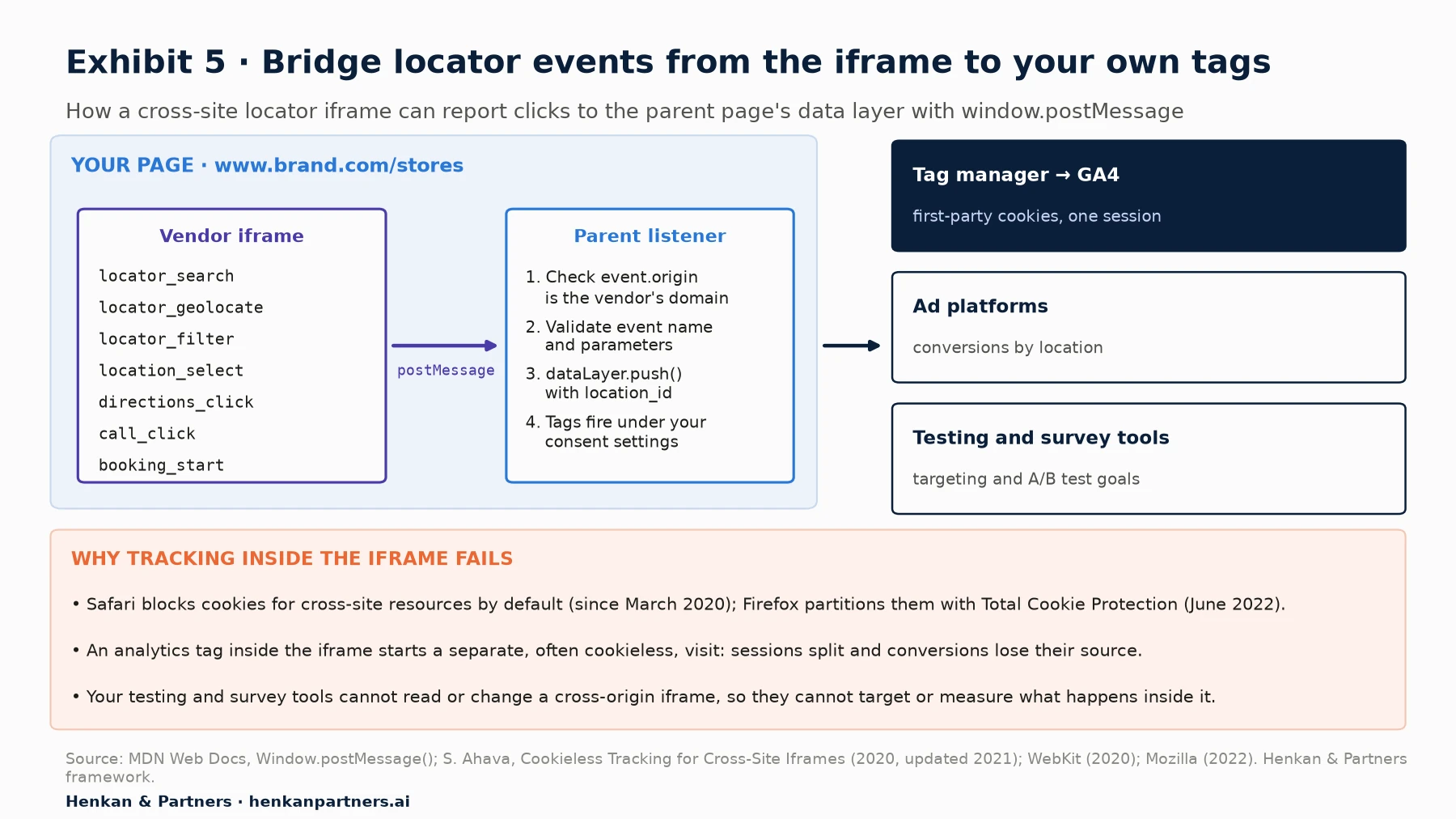
What this shows. The parent page, not the frame, becomes the single place where locator events enter your measurement. Two security details matter: the listener must check `event.origin` against the vendor's exact domain before trusting a message, and the frame should post to your exact origin rather than to any page. Before signing with a vendor, ask three questions: does the locator post events to the parent page, can we choose the event names and parameters, and can it pass the location identifier with every event?
Vendors that host pages for you work differently. Uberall's documentation for its self-service locator explains how to connect GA4 and notes that the locator sends `page_view` events manually for interactions, with searches and pin views captured as virtual page views; it asks you to set `send_page_view: false` in the configuration (Uberall Help Center). Yext's Pages product lets you add third-party analytics such as Google Analytics by adding a script tag to the head of every page, and its own analytics tracks page views, sessions and call-to-action clicks, with 'Get Directions' and 'Tap to Call' among the predefined event types you can map to (Yext Help Center). When the hosted pages sit on a subdomain of your site, tag them with the same GA4 web data stream as the main site. When they sit on a different domain, set up cross-domain measurement, which passes identifiers in a `_gl` URL parameter and can fail when navigation is triggered by JavaScript rather than by a direct user action (Google Analytics Help).
Write one event plan for the locator, whatever the vendor
| Event | When it fires | Key parameters |
|---|---|---|
| `locator_search` | A search runs (typed place or 'use my location') | search_method (text, geolocation, fallback), results_count, radius_km |
| `locator_geolocate` | The visitor clicks 'Use my location' | permission_result (granted, denied, error) |
| `locator_filter` | A filter is applied or removed | filter_name, filter_value, results_count |
| `location_select` | A result card is opened or a location page viewed | location_id, result_rank, distance_km |
| `directions_click` | Directions link clicked | location_id, distance_km |
| `call_click` | Tap-to-call clicked | location_id |
| `booking_start` / `sign_up_start` | The main action starts with the location pre-filled | location_id, offer_id where relevant |
| `locator_no_results` | A search returns no location | search_term (truncated, no personal data), radius_km |
The `location_id` parameter is the most valuable field in the plan: it lets you join locator behaviour to each location's own results, such as visits, sign-ups or bookings recorded in the CRM or point of sale. Our guide to the GA4 data layer specification for developers explains how to document events like these, and our article on user consent in e-commerce covers how consent choices affect what you can collect.
Section 6 · KPIs
Measure the locator by the high-intent actions it sends to locations
Page views and time on page say little about a locator. A short visit can be a perfect one: the prospect found the nearest club, saw it was open and tapped directions. The KPIs that matter follow the jobs and end with an action that predicts a visit.
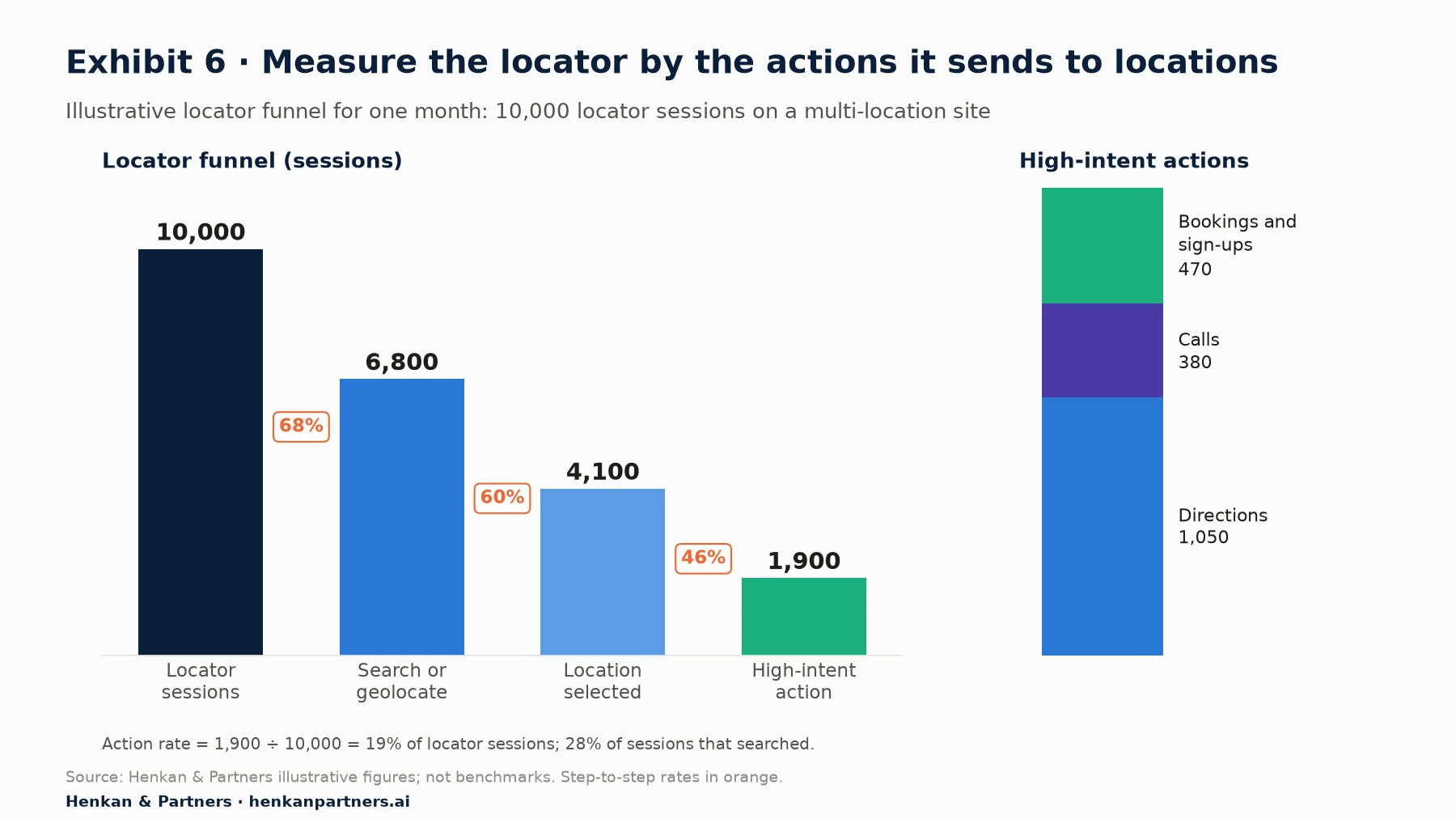
What this shows. In this illustrative month, 19% of locator sessions end in a high-intent action, and the largest absolute loss is at the first step: 3,200 sessions never search at all. That points to the entry of the page (search box visibility, prompt on load, slow map) rather than to the result cards. The split of actions matters too. Directions clicks show intent to visit but are not visits; bookings and sign-ups are closer to revenue but rarer. Track each separately and do not add them into a single 'conversion' without weighting.
| KPI | Definition | Source | Caveat |
|---|---|---|---|
| Search engagement rate | Locator sessions with a search or geolocation ÷ locator sessions | Web analytics (bridged events) | Visitors arriving on a location page skip the search |
| No-result rate | Searches returning zero locations ÷ searches | Web analytics | Spikes reveal unsupported formats or areas without coverage |
| Location selection rate | Sessions with `location_select` ÷ sessions with a search | Web analytics | Low rates can mean the card already answered the question |
| High-intent action rate | Sessions with directions, call or booking start ÷ locator sessions | Web analytics | Directions and calls are proxies for visits, not visits |
| Bookings and sign-ups by location | Completed bookings or sign-ups carrying a location_id | Booking system, CRM, analytics | Needs the location to survive into the form |
| Business Profile actions | Calls, direction requests and website clicks per profile | Google Business Profile performance | Happens on Google, before your site |
| Store visits (modelled) | Ad clicks or views followed by a visit | Google Ads store visit conversions | Modelled from aggregated, anonymous data; eligibility thresholds apply |
Two sources outside your analytics complete the picture. Google Business Profile reports, per location, the number of times people clicked the call button, asked for directions and clicked through to the website (Google Business Profile Help). Google Ads can report store visit conversions, which are 'modeled numbers' built from 'anonymous, aggregated statistics', available only to eligible advertisers with verified locations, enough ad interactions and enough visits to pass privacy thresholds (Google Ads Help). Both are useful for trends and for media decisions; neither replaces a direct link between a locator session and a sign-up or booking with a location identifier.
For marketers. Ask for one monthly view per location: locator selections, directions, calls, bookings and Business Profile actions side by side. Locations with high interest but few actions are where content, offers or hours need attention first.
For leaders. Treat the locator as a revenue page with an owner and a target, typically the high-intent action rate, and include it in the experimentation roadmap like the checkout.
Section 7 · Voice of customer
Ask prospects what they came to do, what stopped them and what was missing
In the illustrative funnel above, analytics shows that 3,200 sessions never searched; it does not show why. Continuous, very short surveys on the locator and location pages fill that gap. Three question families cover most needs: intent (what did you come to do?), blocker (what stopped you?) and missing information (what did you need that you could not find?). Our guide to on-site survey design covers wording, triggers, sample size and privacy in depth; here we focus on what to ask on a locator.
| Type | Example question | Answer options | Trigger |
|---|---|---|---|
| Intent | What brings you to this page today? | Find the nearest location / Check opening hours / Compare locations / Check prices or offers / Book or sign up / Get directions / Something else | After a first search, or 20 seconds on a location page |
| Intent | Which location are you planning to visit, if any? | This one / Another one / Not sure yet / Not planning to visit | On a location page, after scrolling past the hours |
| Blocker | Is anything stopping you from choosing a location today? | Hours / Price / Distance / Services or equipment / Parking or access / Need more information / Nothing | Exit intent on the locator (desktop) or after a back navigation |
| Missing information | Did you find everything you needed about this location? | Yes / No, then: What was missing? (open text) | After a directions or call click, or on page exit |
| Missing information | What would help you decide between these locations? | Open text | After two or more location views in a session |
| After the action | How did you find this location? | Google Search / Google Maps / AI assistant / Social media / Our website / Word of mouth / Other | Booking or sign-up confirmation page |
Two planning numbers keep these surveys honest. First, trigger on behaviour: in Survicate's 2025 benchmark of 3,029 pop-up surveys, the median response rate was 11.7% for surveys triggered by an event and 3.8% for exit-intent surveys (Survicate, 2025, vendor data). At those rates, 400 answers need about 3,400 displays with an event trigger and about 10,500 with exit intent. Second, size the sample: with 200 answers, a share near 50% has a margin of error of about ±6.9 points at 95% confidence; with 400 answers, about ±4.9 points. Record the `location_id` with each answer, so you can read blockers by location and join them to behaviour.
Our view. The 'missing information' question pays back fastest. Its answers are concrete (holiday hours, parking, prices, whether a class needs booking) and they usually lead to content fixes that do not even need a test. Blocker answers about price or distance, by contrast, are business decisions: route them to the people who own pricing and the network, not only to the web team.
Section 8 · User testing
Watch five prospects choose a location, every quarter
Surveys tell you what people say; user tests show what they do. A remote, moderated or unmoderated session in which a participant completes a realistic task on their own phone reveals problems that neither analytics nor surveys catch: a postcode field that rejects a space, hours that are hard to read, a 'Join' button that loses the club, a directions link that opens the wrong app.
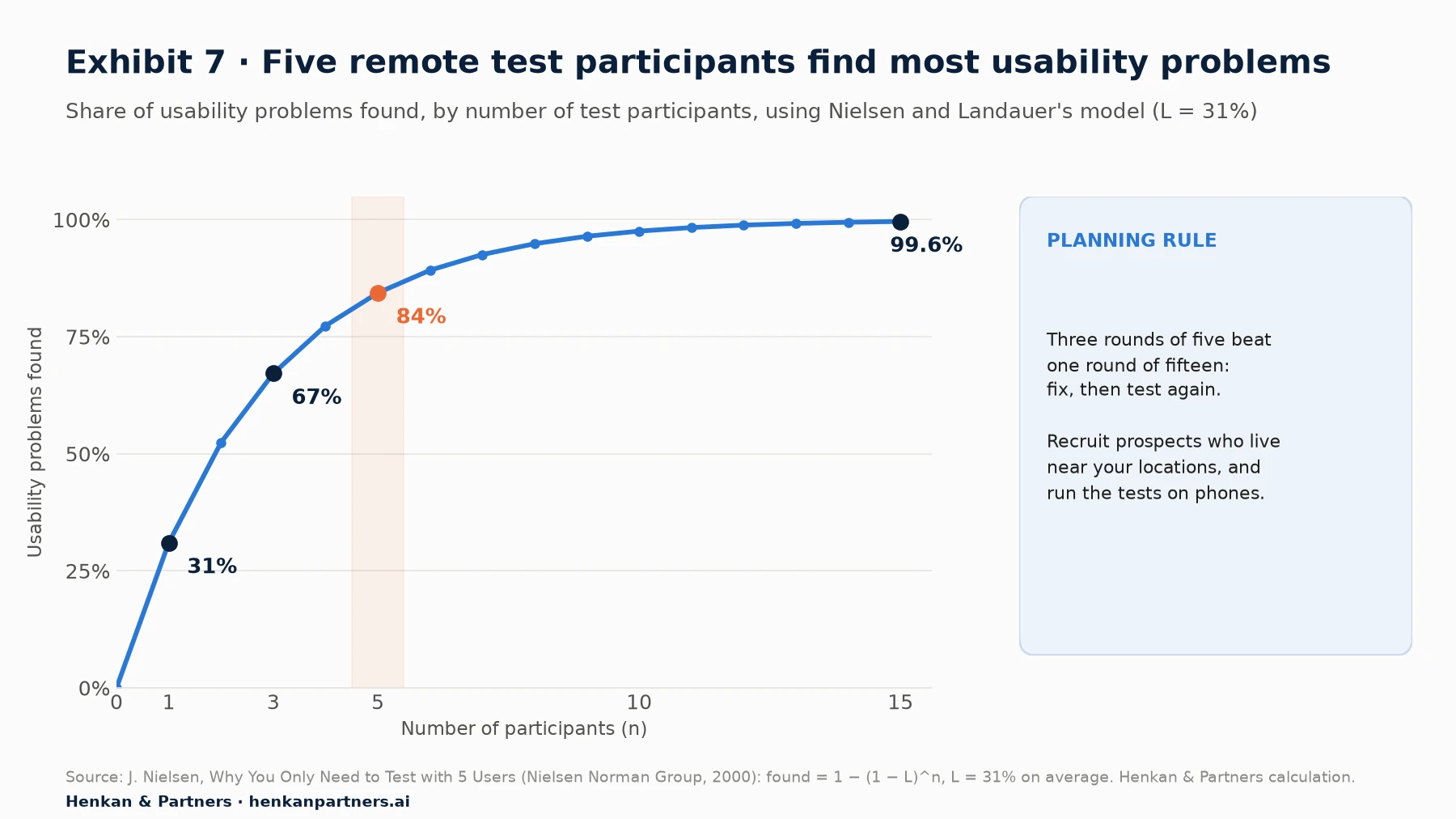
What this shows. Using Nielsen and Landauer's model, in which one participant reveals on average 31% of a design's usability problems, five participants reveal about 84%, which Nielsen rounds to 85%. Nielsen's advice is to spend the same budget on several small rounds: test with five, fix, and test again, rather than one round of fifteen. For a locator, a quarterly round of five is enough to keep the page honest.
- Recruit real prospects. People who live or work near your locations and are considering the category, not existing members or staff.
- Use their own phones. Locators are used on the move; desktop tests miss the most important context.
- Give jobs, not instructions. 'You want to try a class after work on Thursday near your office. Find where you would go and book it.' 'You are on holiday next week and need a branch open on Saturday morning.'
- Include one comparison task. 'Choose between the two nearest locations and explain your choice.' This is where missing information shows.
- Watch the hand-off. Follow the participant into the directions app, the booking form or the phone call, because many failures happen after the locator.
When you cannot recruit quickly, synthetic users can help prepare a test script or generate hypotheses, but they do not replace watching real people. Our article on synthetic users in customer research sets out where they help and where they do not.
Section 9 · From insight to A/B test
Turn every recurring answer into a test hypothesis, judged on high-intent actions
Survey answers, user test observations and funnel data become valuable when they feed a backlog. The method is the one we describe in our guide to turning customer insights into a test backlog: group observations into insights, write hypotheses that name the evidence, the change, the audience and the metric, then prioritise. On a locator, the examples below are typical.
| Evidence | Hypothesis | Primary metric | Guardrail |
|---|---|---|---|
| 32% of searches start without a typed place; geolocation prompt shown on load | Removing the prompt on load and adding a 'Use my location' button next to the search box will raise search engagement | Search engagement rate | No-result rate |
| 'Opening hours' is the top intent; user tests show hours one click away | Showing today's status ('Open now, closes 21:00') on each card will raise location selection and actions | High-intent action rate | Call rate (should not rise for hours questions) |
| 'Price' is the top blocker on location pages | Showing a 'from' price per location will raise booking starts | Booking or sign-up start rate | Booking completion rate |
| User tests: 'Join' loses the chosen club | Pre-filling the location in the sign-up form will raise completed sign-ups | Sign-ups with location_id | Form errors |
| Mobile users scroll past the map to reach the list | A list-first mobile layout with a map toggle will raise location selection | Location selection rate | Directions clicks, LCP |
Two practical constraints shape locator testing. First, a client-side testing tool cannot change what is inside a cross-origin iframe, so test what you control: the page around the widget, the location pages, the entry points to the locator, or vendor configuration options switched by a feature flag. Our comparison of client-side and server-side A/B testing explains the trade-offs. Second, locator traffic is smaller than checkout traffic, so pick primary metrics that are frequent enough to reach significance, such as the high-intent action rate, and keep completed bookings or sign-ups as guardrails, as described in our article on guardrail metrics. Check the required sample size before launch with our guide to A/B test sample size and duration.
Section 10 · Checklist and common mistakes
Most locator problems come from ten avoidable mistakes
- Asking for location on page load. Ask after a click on 'Use my location', and offer a search box first.
- A map before a search box. The map is a confirmation tool; the search box and list do the work.
- Empty results. Never show zero results; widen the radius and show the nearest locations.
- Hours one click away, or wrong. Show today's status on the card and keep holiday hours up to date in one data source.
- A generic call to action. Carry the chosen location into the booking, sign-up or contact form.
- An iframe-only locator. Add a crawlable directory and one page per location with LocalBusiness markup.
- Different names, addresses or phone numbers across the page, the markup, the Business Profile and the vendor feed.
- Tags inside the iframe. Bridge events to the parent page with postMessage, or tag the hosted pages yourself.
- Measuring page views. Measure jobs and high-intent actions, with a location identifier on every event.
- Never asking or watching. Run continuous micro-surveys and a quarterly round of five user tests, and feed both into the backlog.
| Area | Check | Done? |
|---|---|---|
| Search | Search box visible without scrolling; accepts postcode, city and address; autocomplete | ☐ |
| Geolocation | Prompt only after a click; approximate fallback; no dead ends | ☐ |
| Results | Distance, today's status, key attributes, one primary action, directions, tap-to-call | ☐ |
| Filters | Reflect real differences between locations; show result counts | ☐ |
| Location pages | One crawlable page per location, linked with plain links from a directory | ☐ |
| Structured data | LocalBusiness JSON-LD with name, address, geo, hours, phone and URL; validated | ☐ |
| Business Profile | Website link points to the location page; same NAP everywhere | ☐ |
| Speed | Core Web Vitals within 'good' thresholds on mobile; map loaded on demand | ☐ |
| Tracking | Event plan with location_id; iframe events bridged; consent respected | ☐ |
| Voice of customer | Intent, blocker and missing-information surveys live; answers carry location_id | ☐ |
| User tests | Five prospects on their phones, every quarter | ☐ |
| Testing | Locator hypotheses in the backlog with primary metrics and guardrails | ☐ |
Section 11 · What to do next
What to do next
1. Audit the locator on a phone, against the six jobs
Take each job in Exhibit 2 and try it on two or three locations, on your own phone, outside the office network. Note every step where the information is missing, wrong or one click too far.
2. Find out how your locator is deployed, and what it can send
Check whether it is a JavaScript embed, a cross-site iframe or hosted pages. Ask the vendor whether it can post events to the parent page with a location identifier, and whether its hosted pages can carry your tag manager and consent tool.
3. Implement the event plan and a monthly location view
Start with search, location selection, directions, calls and booking or sign-up starts, all with `location_id`. Add Business Profile actions per location to the same monthly view.
4. Launch two micro-surveys and book the first round of user tests
An intent question after the first search and a missing-information question on location pages are enough to start. Recruit five local prospects for a remote test within the month.
5. Get a second opinion on your locator
Henkan & Partners audits store locators and location pages, sets up tracking that works across iframes and subdomains, runs voice-of-customer programmes and A/B tests the changes, in the tools you already use. Talk to us.
FAQ
Frequently asked questions about store locator optimisation
Frequently asked questions
What is a store locator?
A store locator is the page or tool that helps visitors find the right physical location of a business by searching a place or sharing their position. It shows each location's address, distance, opening hours, services and actions such as directions, calls and booking.
What are store locator best practices?
Put a search box that accepts postcode, city or address before the map; ask for geolocation only after a click; lead with a list on mobile; show distance, today's opening status and one clear action on each result; offer filters for attributes that differ between locations; never show an empty result; and keep the chosen location through to booking or sign-up.
Should a store locator ask for the user's location automatically?
No. Ask after the visitor clicks a 'Use my location' button. Chrome data shows that only 12% of permission prompts shown without a sign of user intent are allowed, against 30% after an interaction. Always offer a search box as well.
How do you make a store locator good for SEO?
Give every location its own crawlable page, linked with plain HTML links from a directory of all locations, and mark it up with LocalBusiness structured data. Point each location's Google Business Profile website link to that page. A locator that only works inside an iframe or after a search is hard for search engines to read.
How do you track a store locator in an iframe?
Do not rely on tags inside the iframe, because browsers restrict cross-site cookies. Ask the vendor to send each interaction to the parent page with window.postMessage, check the message origin, push it into your data layer with a location identifier and let your tag manager send it to analytics.
What KPIs should you use for a store locator?
Search engagement rate, no-result rate, location selection rate and, above all, the high-intent action rate: directions, calls and booking or sign-up starts per locator session. Complete the view with bookings or sign-ups by location, Google Business Profile actions and, where eligible, modelled store visits from Google Ads.
What questions should you ask in a store locator survey?
One intent question ('What brings you to this page today?'), one blocker question ('Is anything stopping you from choosing a location today?') and one missing-information question ('Did you find everything you needed about this location?'). Keep each survey to one to three questions and trigger it on behaviour.
Can you A/B test a store locator?
Yes, but a client-side testing tool cannot change a cross-origin iframe. Test the page around the widget, the location pages and the entry points, or switch vendor configuration options with a feature flag. Use frequent metrics such as the high-intent action rate as the primary metric and keep completed bookings as a guardrail.
Key terms
- Store locator
- The page or tool that helps visitors find the right physical location of a business. It matters because it is where online research turns into a visit, a call or a booking.
- Drive-to-store
- Marketing and website activity designed to bring online prospects to a physical location. It matters because much of the value it creates is recorded offline.
- Location page
- A crawlable page dedicated to one location, with its details and actions. It matters because search engines and AI assistants can read it, unlike most locator widgets.
- LocalBusiness structured data
- Schema.org markup that describes a business location, with properties such as name, address, geo, opening hours and phone. It matters because it states location facts in a form search engines can use.
- NAP consistency
- Using the same name, address and phone number for a location everywhere it appears. It matters because conflicting details confuse both prospects and search engines.
- Google Business Profile
- The free listing that shows a business on Google Search and Maps, with calls, direction requests and website clicks reported per location. It matters because many prospects act there before reaching your site.
- Geolocation API
- The browser feature that shares a visitor's position with a page after they give permission. It matters because asking at the wrong moment lowers the share of visitors who allow it.
- Third-party iframe
- A frame on your page that loads content from another site, such as a vendor's locator. It matters because browsers restrict its cookies and your scripts cannot read inside it.
- postMessage
- A browser method that lets a page and an embedded frame from another origin exchange messages safely. It matters because it is the standard way to bring locator events from an iframe into your own tags.
- Cross-domain measurement
- Analytics configuration that keeps one visitor and one session across several domains, using a URL parameter in GA4. It matters when locator pages are hosted on another domain.
- High-intent action
- An action that signals a likely visit or purchase, such as a directions click, a call or a booking start. It matters because it is a better locator KPI than page views.
- Store visit conversions
- A Google Ads metric that estimates visits to physical locations after ad interactions, using modelled, aggregated data. It matters for media decisions but is not a direct count.
- Micro-survey
- A one- to three-question survey triggered by behaviour on a page. It matters because it explains intent and blockers that analytics cannot show.
- Remote user test
- A session in which a participant completes a realistic task on their own device while their screen and voice are recorded. It matters because it shows where people struggle, not only where they leave.
Sources
All sources were checked in October 2026. Google's local search figures date from 2016 and come from a Google-commissioned diary study; BrightLocal and Survicate figures are vendor data; Chrome permission figures are Google telemetry on permission prompts in general, not only location. Uberall and Yext details come from their own documentation. Exhibits 2, 4 and 5 and Tables 1 to 5 and 8 are Henkan & Partners frameworks; Exhibit 6 and Table 7 are illustrative; Exhibit 7 and the survey planning numbers are our own calculations from standard formulas. Locator vendors are named as examples only.
- Google/Purchased Digital Diary (2016). How Consumers Solve Their Needs in the Moment. Think with Google.
- Google (n.d.). 10 years of digital marketing insights ('near me' mobile searches, Google internal data, March 2016). Think with Google.
- BrightLocal (2026). Local Consumer Review Survey 2026 (vendor data).
- Nielsen Norman Group (n.d.). Store Finders and Locators: E-commerce UX Report, 5th edition.
- Nielsen, J. (2000). Why You Only Need to Test with 5 Users. Nielsen Norman Group.
- web.dev (2024). Permissions best practices for the web.
- web.dev (n.d.). Web Vitals.
- Chrome for Developers (n.d.). Lazy load third-party resources with facades.
- MDN Web Docs (n.d.). Geolocation API and Window: postMessage() method.
- Google Search Central (n.d.). Make your links crawlable.
- Google Search Central (n.d.). Fix Search-related JavaScript problems.
- Google Search Central (n.d.). Local business (LocalBusiness) structured data.
- Google Search Central Blog (2022). New robots tag: indexifembedded.
- Google Business Profile Help (n.d.). Business Profile performance.
- Google Ads Help (n.d.). About store visit conversions.
- Google Analytics Help (n.d.). Set up cross-domain measurement.
- WebKit (2020). Full Third-Party Cookie Blocking and More.
- Mozilla (2022). Firefox rolls out Total Cookie Protection by default to more users worldwide.
- Google Privacy Sandbox (2025). Next steps for Privacy Sandbox and tracking protections in Chrome.
- Ahava, S. (2020, updated 2021). Cookieless Tracking for Cross-Site Iframes.
- Uberall Help Center (n.d.). How to embed the Uberall Locator via iFrame and Optimising your GA4 tracking for the Uberall self-service locator (vendor documentation).
- Yext Help Center (n.d.). Third-Party Analytics and Implement Yext Analytics (vendor documentation).
- Survicate (2025). Popup Survey Benchmarks (vendor data).
- Henkan & Partners. Illustrative locator funnel and test hypotheses; survey margin-of-error and display calculations; usability-problem curve (formulas as stated in the article).