Focus
How Product Managers Should Ask for GA4 Tracking: From User Story to Event Spec
Alexandre Suon · 2026-10-02
Most GA4 tracking requests fail before a line of code is written, because they ask for events instead of answers. This guide shows product managers how to write a GA4 tracking request a developer can build and a tester can check: start from the decision and the question, reuse what GA4 already collects, write an event spec with names, triggers, parameters and acceptance criteria, register custom dimensions before release, and put tracking in the ticket and the definition of done. A worked example takes a new "save for later" feature from user story to spec.
Executive summary
- Ask for answers, not events. A good request starts with the decision you will make and the question you need answered, then names the metric. The event is the last thing you write, and often the analyst or developer refines it with you.
- Check what GA4 already collects before asking for anything new. Google sorts events into four types: automatically collected, enhanced measurement, recommended and custom. Google itself says to create custom events only when no other event works, because they do not show up in most standard reports.
- An event spec has eight fields, and each one prevents a known bug. Event name, trigger, parameters with example values, scope and registration, key event status, owner, acceptance criteria and the report where it will be read. Names are case-sensitive, must start with a letter and are limited to 40 characters.
- GA4's quotas make every custom dimension a scarce slot. A standard property allows 50 event-scoped, 25 user-scoped and 10 item-scoped custom dimensions and 30 key events. Custom dimensions take 24 to 48 hours to appear and do not apply to data collected before you created them, so register them before release day.
- Tracking belongs in the user story and the definition of done. Add a tracking section to the ticket, write acceptance criteria in Given/When/Then form, and do not close the story until the events are seen in DebugView, carry no personal data and are logged in the tracking plan.
- Track less, but track it well. Every event should answer a question someone has committed to asking. Over-tracking burns quota, slows QA and buries the events that matter. The "save for later" example needs three events, all of them Google recommended events, plus three registered parameters.
Section 1 · Why requests fail
A GA4 tracking request fails when it starts with events instead of questions
A GA4 tracking request is a written brief from a product manager (or designer or marketer) asking for new data to be collected in Google Analytics 4. A good request states the decision it supports, the question and metric it answers, and an event spec: the event name, when it fires, its parameters with example values, how parameters are registered, the acceptance criteria a tester will check, and who owns it.
Most product managers have seen a request like this in a backlog: "Track all clicks on the new cart page." A developer has to guess what "all clicks" means and what to call the events, a tester cannot say whether it works, and three weeks after release nobody can answer the question behind it, because nobody wrote it down.
The fix is to reverse the order. You start from the product decision, write the question, pick the metric that answers it, and only then describe the event. That is the B in our ABC of GA4 for product managers. Step A, the questions GA4 can answer and how not to be fooled by the numbers, comes first; steps C, measuring feature adoption with explorations and measuring a product launch, come after. For the basics of how GA4 counts, read how GA4 works.
Bad tracking is expensive in a quiet way. Gartner's 2020 research estimated that poor data quality costs organisations at least $12.9 million a year on average. That figure covers all data, not just web analytics, but the mechanism is the same.
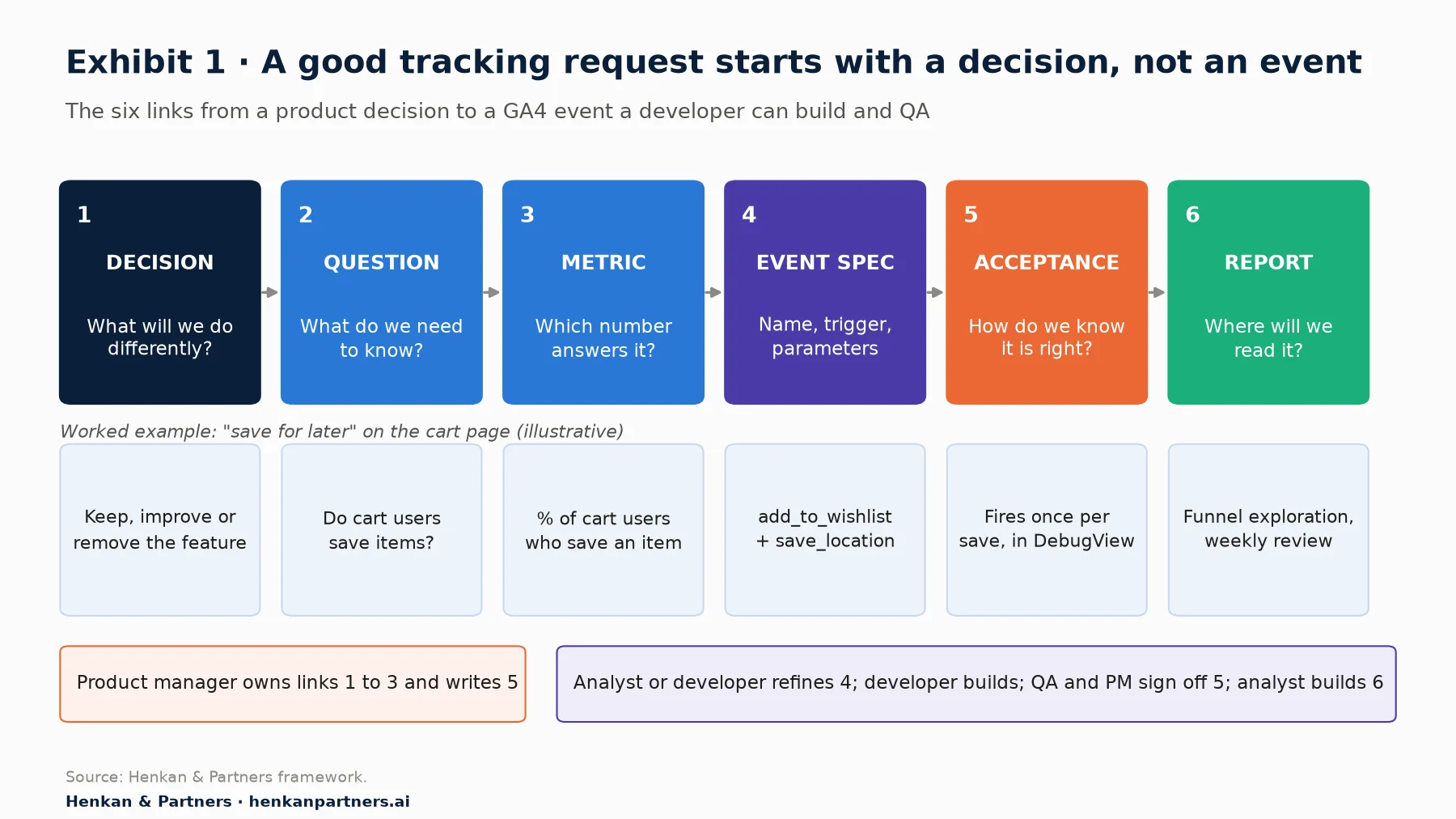
What this shows. The product manager owns the first three links and the acceptance criteria. The analyst or developer usually refines the event spec, because they know the naming convention, the quotas and what is already collected. If any link is missing, the chain breaks: an event without a question becomes noise, and a question without a report never gets answered.
Section 2 · Questions first
Write the decision and the question first, because they decide what is worth tracking
Before you open a ticket, write three sentences.
- The decision. "After eight weeks we will decide whether to keep, improve or remove save for later." If no decision depends on the data, you probably do not need the tracking.
- The question. "Do shoppers who reach the cart use save for later, and do saved items get bought later?" Write it as people would ask it in a review meeting.
- The metric and threshold. "Share of cart users who save at least one item; share of saved items later added back to the cart. We keep the feature if at least X% of cart users save an item and checkout rate does not fall." Picking the threshold before launch stops you from moving the goalposts later.
Good questions are specific, tied to a user action and answerable with a count or a rate. Weak ones are vague ("how is the cart doing?") or unanswerable in GA4 ("why do people abandon?"). GA4 tells you what happened and how often. For why, you need research: session replay, surveys or usability tests. Our session replay guide explains when that is the better tool.
| Weak request | Why it fails | Better request |
|---|---|---|
| "Track all clicks on the cart page" | No question, no names, nothing to test. Generates dozens of events nobody reads. | "We need to know what share of cart users save an item for later. Fire add_to_wishlist when a save succeeds." |
| "Add a conversion for the new feature" | Uses the old term (key events replaced conversions in GA4 in 2024) and confuses using a feature with a business outcome. | "Track feature use as an event. Keep purchase as the key event, and compare purchase rate for users who used the feature." |
| "Send the user's email so we can join to CRM" | Google's policy forbids sending personally identifiable information to GA4. | "Send a non-personal logged_in flag. Joins to CRM happen in the warehouse with a pseudonymous ID agreed with legal." |
| "Track the filters" | Unclear which filters, which values, and whether a click or an applied result counts. | "Fire filter_apply when results refresh, with filter_name and filter_value from a fixed list." |
For product managers. If you cannot name the decision, park the request. Tracking added "just in case" still has to be built, tested and maintained.
For analysts. Ask for the three sentences before writing a spec. They quickly expose requests GA4 cannot answer, or that existing data already answers.
Section 3 · Reuse first
Check what GA4 already collects, because the cheapest event is the one you do not have to build
Google groups GA4 events into four types, and the order matters. Check them top to bottom before you ask for anything new.
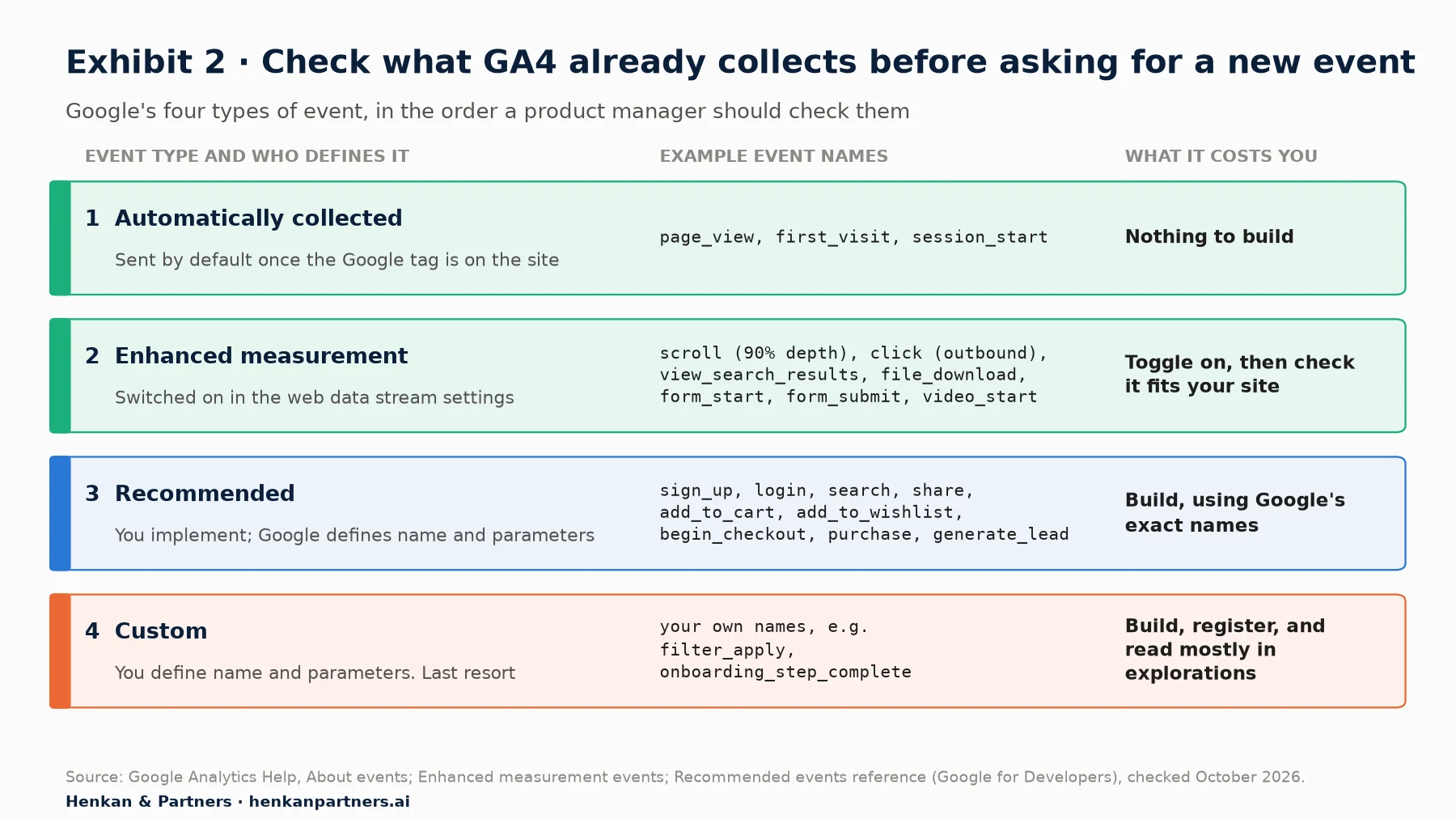
What this shows. Each step down the ladder costs more. Automatically collected and enhanced measurement events need no development. Recommended events need building, but GA4's standard reports already understand them. Custom events need building, registering and usually an exploration to read them, which is why Google advises creating them only when nothing else works.
Enhanced measurement is free, but read the small print
Enhanced measurement can answer some questions on day one, but each event is narrower than its name suggests. Google documents that scroll fires only once a user reaches 90% of the page depth, click covers outbound links only, and view_search_results needs the search term in the URL. form_start and form_submit fire on the first interaction with a form in a session and on submission, and, in our experience, can misfire on custom-built forms, so ask your developer to check before relying on them. The sibling article GA4 for product managers covers how to read these numbers.
Prefer Google's recommended events, even for product features
Recommended events have names and parameters defined by Google, and GA4's built-in reports, such as the e-commerce reports, depend on those exact names. Many features map onto them: "save for later" to add_to_wishlist, account creation to sign_up, onboarding to tutorial_begin and tutorial_complete, a lead form to generate_lead. Use the recommended name and its parameters exactly; addToWishlist or wishlist_add are different events to GA4, and will not feed the standard reports.
Only when nothing fits do you need a custom event. That is common for product-specific actions such as applying a filter, changing a setting or completing a step in a configurator.
Section 4 · The event spec
An event spec has eight fields, and each one prevents a bug you would otherwise find in production
An event spec is the unit of a tracking request: one row per event in the tracking plan, written so that a developer can build it without guessing and a tester can check it without asking. These are the eight fields we use.
| Field | What to write | Bug it prevents |
|---|---|---|
| 1. Event name | Google's recommended name if one fits, otherwise a custom name following the convention in Section 5. | Two names for one action (save_item and saveForLater) splitting the numbers. |
| 2. Trigger | The user action and the system state, e.g. "when the save succeeds", not "on click". | Counting failed saves, double clicks or page reloads as real actions. |
| 3. Parameters and example values | Each parameter with a real example and, for text, the allowed values. | Free text with 200 spellings of the same thing; values over 100 characters cut off. |
| 4. Scope and registration | Which parameters become event-, user- or item-scoped custom dimensions, with the display name. | Data that is collected but never visible in reports. |
| 5. Key event? | Yes or no, and why. Usually no for feature use. | Key event lists cluttered with clicks; the 30-slot limit used up. |
| 6. Owner | Product owner of the question and technical owner of the event. | Orphan events nobody can explain or retire. |
| 7. Acceptance criteria | Given/When/Then statements, plus checks on duplicates, consent and personal data. | "It fires" being the only test, so wrong values go live. |
| 8. Where it will be read | The report or exploration and the review where the metric is used. | Tracking that ships and is never looked at. |
Fire on success, not on click
A click is an intention. A successful save, a completed sign-up or a payment accepted by the bank is an outcome. If the save can fail (the item is out of stock, the session expired), a click-based event inflates your numbers. Write the trigger as the moment the system confirms the action, and say what happens on reload and double click.
Give every parameter an example value and a fixed list
Developers implement exactly what you write. If you write "location", you may get "Cart", "cart page", "/cart" and "basket" from four different components. Write the parameter name, an example in quotes and, for text, the full list of allowed values: `save_location` = `"cart" | "product_page" | "listing"`. Fixed lists also keep cardinality (the number of distinct values) low; Google warns that high-cardinality custom dimensions can hurt reports on standard properties.
Write acceptance criteria a tester can run
Acceptance criteria turn "is the tracking right?" into a yes or no. We use the same Given/When/Then format as the user story:
Given a signed-in shopper with 2 items in the cart
When they click "Save for later" on one item and the save succeeds
Then exactly 1 add_to_wishlist event fires
  And currency = "EUR" and value = price × quantity of that item
  And items[0].item_id equals the product SKU
  And save_location = "cart"
  And no parameter contains an email, name, phone number or user ID
  And reloading the cart does not fire the event again
A tester can check every line in DebugView or Tag Assistant. The developer article on GA4 debugging and QA shows how.
Section 5 · Naming
Naming conventions matter because GA4 treats every spelling as a different event
GA4 is strict about names, and it never merges spellings for you. Google's event naming rules say event names are case-sensitive (my_event and My_Event are two different events), must start with a letter, and may use only letters, numbers and underscores, with no spaces. Some names are reserved, such as page_view and click on the web, and parameter names cannot start with prefixes like google_, ga_ or firebase_.
Within those rules, pick one convention and write it down. The one we recommend for product teams:
- Use Google's recommended name whenever one fits. Never rename it to match your internal jargon.
- For custom events, use lowercase snake_case in object_action form, e.g. filter_apply, onboarding_step_complete, saved_item_remove. Google's own names read action_object (add_to_cart); either works if you never mix them.
- Name the action, not the UI element. filter_apply survives a redesign; blue_button_click does not.
- Use parameters for variants, not new event names. One filter_apply event with filter_name = "size" beats filter_size_apply, filter_colour_apply and filter_brand_apply.
- Write parameter values in lowercase, from fixed lists, and never put personal data, free text typed by users or full URLs with query strings in them.
Then respect the hard limits. Event names and parameter names can be at most 40 characters; parameter values at most 100 characters (with longer allowances only for page_title, page_referrer and page_location); an event can carry at most 25 parameters on a standard property. Analytics 360 raises that to 100 parameters and most parameter values to 500 characters, but not the 40-character name limits. Web streams have no limit on the number of distinct event names, but every name still has to be documented, tested and maintained.
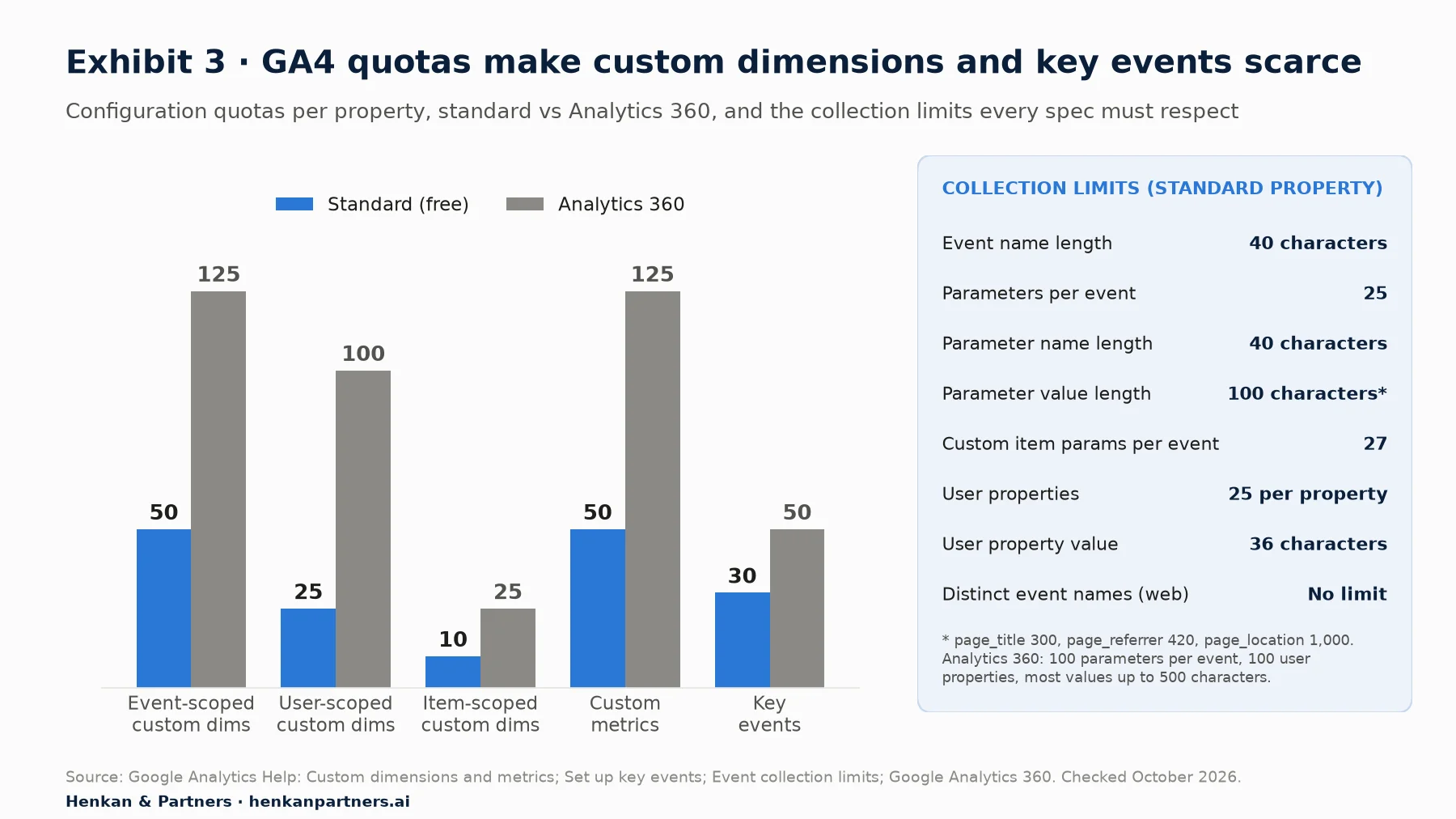
What this shows. On a free GA4 property you have 50 event-scoped custom dimensions to share across every team and every feature, and only 30 key events. Analytics 360 raises the quotas and some collection limits, but not the 40-character limits on event and parameter names, so each new parameter needs a question behind it.
Our view. Agree the naming convention once, at the level of the whole property, and put it in the tracking plan. When each squad invents its own, a property ends up with signup, sign_up and SignUp within a year, and every report has to stitch them back together. The shared tracking plan article covers how to govern this across product, design, engineering and marketing.
Section 6 · Registration
Register custom dimensions and key events before release, because GA4 does not apply them to the past
Sending a parameter is not enough to see it in GA4's reports and explorations. A custom parameter only becomes a usable dimension once someone registers it as a custom dimension. In our experience this is the step most often forgotten, and the gap cannot be filled afterwards in the interface.
How to register a custom dimension
- In GA4, go to Admin, then under Data display open Custom definitions.
- On the Custom dimensions tab, click Create custom dimension.
- Enter a Dimension name (the label people will see in reports, e.g. "Save location"), choose the Scope (Event, User or Item), add a Description, and enter the Event parameter exactly as the developer sends it (e.g. save_location).
- Click Save. Scope and parameter name cannot be changed after saving, so check them twice.
Google says you can start reporting on a new custom dimension 24 to 48 hours after it is created and data is sent, and that (not set) may appear as a value in the first 24 hours. Registration does not apply to data collected before you created the dimension: if the parameter ships on Monday and is registered on Friday, the interface will not show Monday to Thursday. The raw BigQuery export, if you have it, does contain every parameter sent, registered or not, which is one reason analysts like it.
Choose the right scope
Event scope describes one action, such as where the save happened; most product parameters are event-scoped. User scope describes the person across events, such as a subscription plan, and is sent as a user property (25 per standard property, values up to 36 characters, never personal data). Item scope describes a product in the items array; standard properties have only 10 slots, so our article on e-commerce custom dimensions lists which ones usually earn one.
Mark key events sparingly
In March 2024 Google renamed GA4 "conversions" to key events (the date is from Search Engine Journal's report of the announcement), and kept the word "conversion" for key events used in Google Ads. You mark a key event under Admin, then Data display, then Events, by clicking the star next to the event, or by creating it as a key event. A standard property can have up to 30 key events (50 on Analytics 360), and marking one is not retroactive: it affects reports from that moment only.
Feature usage is rarely a key event. A key event should be an outcome that matters to the business, such as a purchase, a sign-up or a qualified lead. Keep "used save for later" as a normal event, and compare the purchase rate of users who did and did not use it. Feature clicks in key events inflate the figure everyone watches.
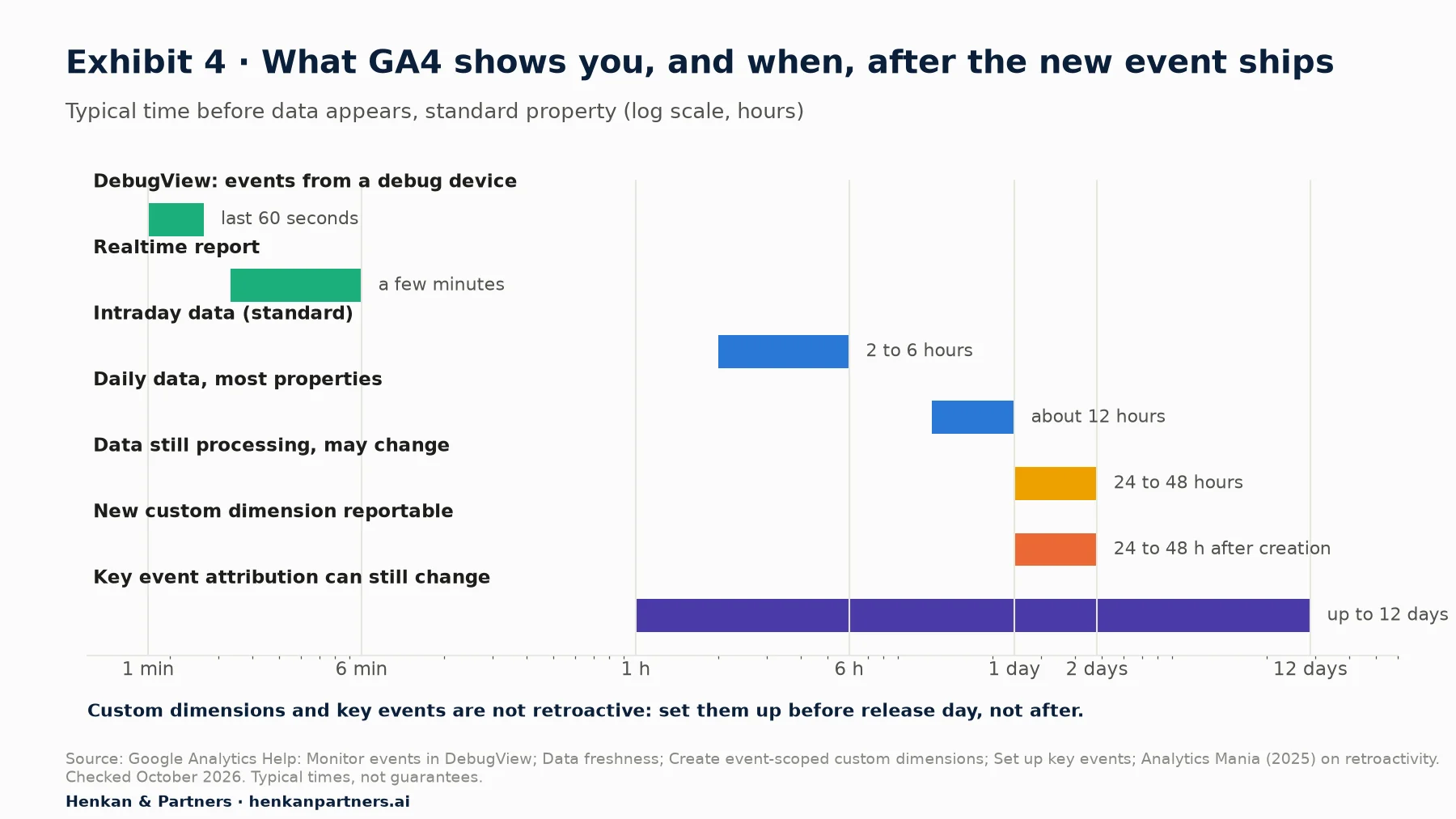
What this shows. You can verify an event within a minute in DebugView, but you should not read trends from it for at least two days, and attribution of key events can keep moving for up to 12 days. Late registration and late key event marking cannot be undone, so both belong in the release checklist.
Section 7 · In the ticket
Put tracking in the ticket and the definition of done, or it will ship last and break first
Tracking kept in a spreadsheet nobody opens during the sprint ships late or not at all. Put tracking requirements in the feature ticket, and tracking checks in the team's definition of done. The Scrum Guide defines the definition of done as a formal description of the state of the increment when it meets the quality measures required for the product. Treat correct tracking as one of those quality measures. We made the same argument for product owners in general in web analytics for product owners; here is the GA4-specific version.
A tracking section for your Jira (or Linear) ticket
Add this block to every user story that changes what users can do.
TRACKING REQUIREMENTS
Decision:   what we will decide with this data, and when
Question:   the question in plain words
Metric:     the number that answers it, and the threshold
Events:     event names, with links to tracking plan rows (e.g. SFL-01)
Register:   custom dimensions to create, with scope; key event yes/no
Acceptance: Given / When / Then statements
Report:     where the metric will be read, and by whom
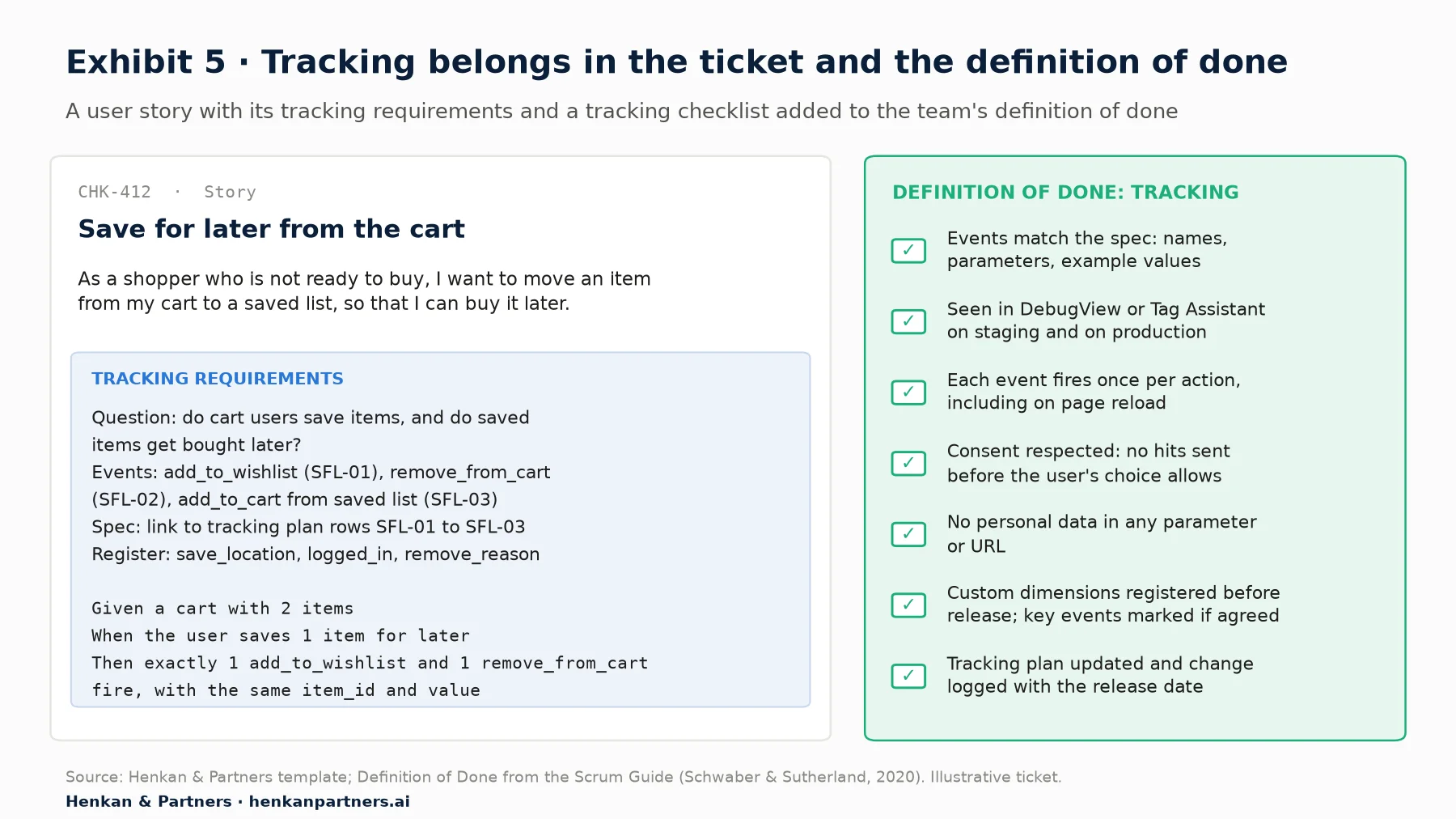
What this shows. The tracking requirements travel with the story, so they are estimated, built and tested in the same sprint as the feature. The checklist applies to every story, so nobody argues case by case.
For product managers. Put tracking in the estimate. A feature with three events and three registered dimensions is usually a small addition if planned with the story, and a disruptive one if bolted on after release.
For engineering leads. Refuse tracking tickets without acceptance criteria, as you would any feature ticket.
Section 8 · Less is more
Over-tracking costs more than it seems, so every event must earn its place
When tracking is cheap to request, teams ask for everything, and pay later in used-up custom dimension slots, unfinished QA and reports full of event names nobody trusts. A few well-specified events beat many vague ones.
We use four tests before an event goes into a spec. An event that fails two of them usually does not belong in GA4.
- Question test. Does it answer a written question with a decision attached?
- Reuse test. Could an existing event plus a parameter answer it?
- Read test. Will a named person read it in a named report this quarter?
- Privacy test. Can it be specified without personal data or user-typed free text? Google's policy is that nothing passed to Google Analytics may be recognisable as personally identifiable information, and it flags custom dimensions and site search terms as risky fields.
| Usually worth tracking | Usually not worth tracking in GA4 |
|---|---|
| Successful completion of a feature's core action (save, apply, share, submit) | Every click or hover on a page, especially decorative elements |
| Entry into and completion of a multi-step flow | Each individual field focus in a long form (use a form analytics or replay tool instead) |
| Errors that block a user (validation failed, out of stock) | Technical events with no user impact (component mounted, API polled) |
| Variant or setting chosen, as a parameter from a fixed list | Free text the user typed, or IDs that could identify a person |
Our view. Give every custom event an expiry review. If nobody has used it in two quarters, retire it in the tracking plan and remove it from the code. Tracking debt behaves like technical debt: it accumulates quietly, and it breaks at the worst moment, usually during a redesign.
Consent also limits what you will see. Visitors who refuse analytics cookies are not observed in the same way, and how GA4 handles them depends on your consent mode set-up. Your acceptance criteria should check that no event fires before the visitor's choice allows it. Our article on user consent in e-commerce explains the mechanics, and the tag management guide explains how consent is wired into the tag manager.
Section 9 · Worked example
Worked example: three recommended events cover "save for later" from save to cart
Here is the whole method on one feature. The example is illustrative, not a client implementation. An online fashion shop is adding a Save for later link to each cart line. Clicking it moves the item from the cart to a saved list below the cart. From the saved list, the shopper can move the item back to the cart or remove it.
Decision, questions and metrics
- Decision. After eight weeks, keep the feature as is, improve it (for example by adding saved items to the account page), or remove it.
- Question 1: adoption. What share of shoppers who view the cart save at least one item? Metric: users with add_to_wishlist from the cart ÷ users with view_cart.
- Question 2: return. What share of saved items are later moved back to the cart? Metric: add_to_cart events from the saved list ÷ add_to_wishlist events from the cart.
- Question 3: guardrail. Does checkout start rate from the cart fall? Metric: users with begin_checkout ÷ users with view_cart, compared with the period before launch or, better, an A/B test.
Question 3 matters because a save-for-later link could also give hesitant shoppers an easy way out of the cart. Our A/B testing guide explains why a controlled test is the stronger answer, and the next article in this path, on measuring a product launch in GA4, explains when a before/after comparison is good enough.
The events
Every action maps to a Google recommended event, so the e-commerce reports keep working. The whole feature needs only three custom parameters.
| ID | User action (on success) | Event | Key parameters | Notes |
|---|---|---|---|---|
| SFL-01 | Saves an item from a cart line or product page | add_to_wishlist | currency, value, items[] (item_id, price, quantity); save_location; logged_in | Recommended event. Google lists items as required, and currency as required whenever value is sent. |
| SFL-02 | The saved item leaves the cart | remove_from_cart | currency, value, items[]; remove_reason = "saved_for_later" | Decision to record: without it, cart value in GA4 stays overstated. |
| SFL-03 | Moves a saved item back to the cart | add_to_cart | currency, value, items[] with item_list_id = "saved_for_later", item_list_name = "Saved for later" | Uses the standard item list parameters, so no new event name is needed. |
| Existing | Views the cart; starts checkout | view_cart, begin_checkout | Already in the e-commerce implementation | Check they exist and are complete before launch. |
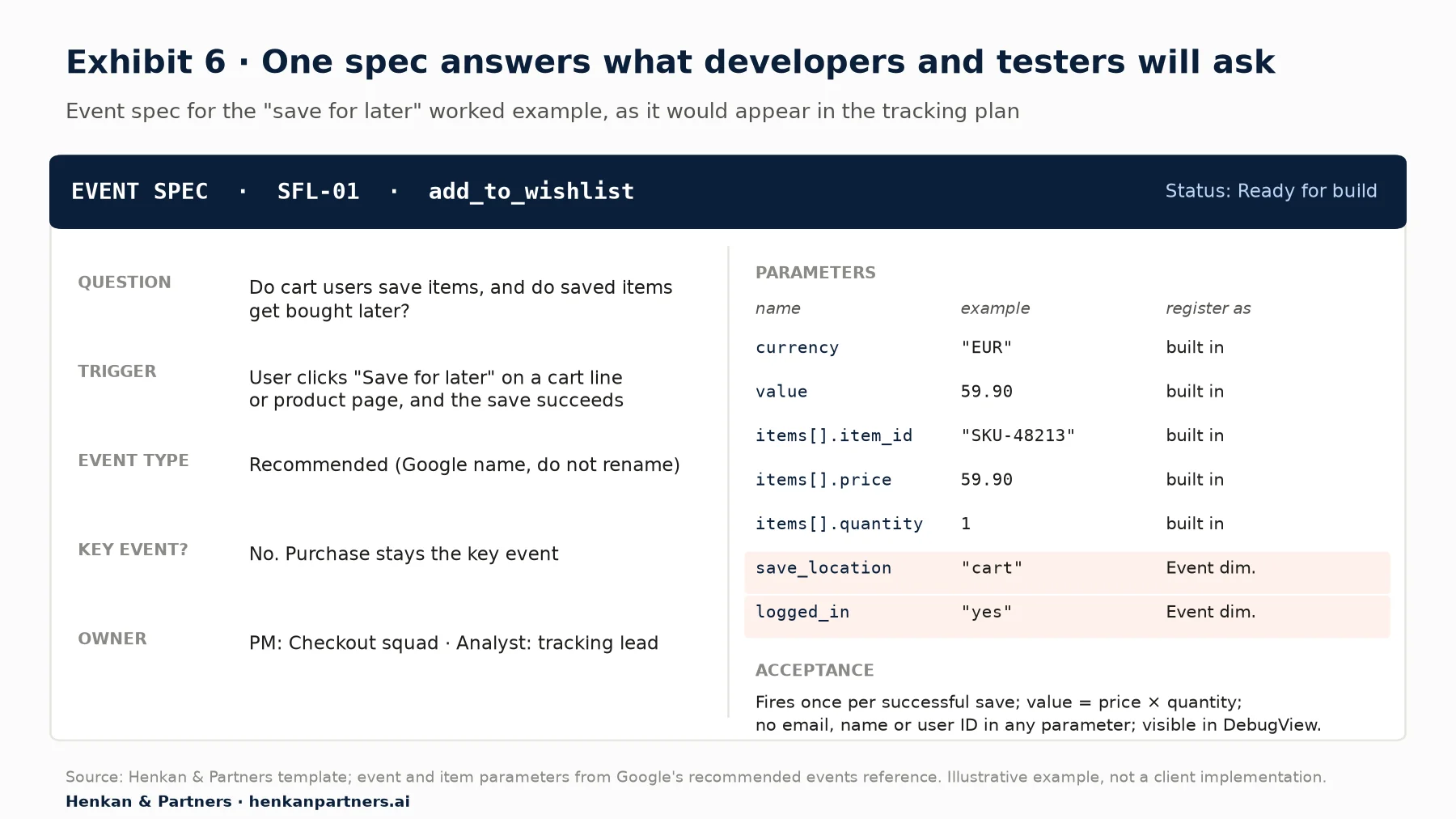
What this shows. The spec fits on one card and answers every question a developer or tester would otherwise ask in a meeting. Only the two highlighted parameters need registering as custom dimensions; everything else is built into GA4's e-commerce schema, so the event appears in standard reports without extra set-up.
Registration and acceptance
- Register before release: save_location as an event-scoped custom dimension "Save location", logged_in as "Logged in", and remove_reason as "Remove reason". Check with the analyst that slots are free and that a similar dimension does not already exist.
- Key events: none added. Purchase remains the key event.
- Acceptance: the Given/When/Then statements in Section 4 for SFL-01, and equivalents for SFL-02 and SFL-03, including "saving one item fires one add_to_wishlist and one remove_from_cart with the same item_id and value".
How you will read it
Two days after release, the analyst builds a funnel exploration from view_cart to add_to_wishlist (filtered on save location = cart) to add_to_cart (item list = saved for later), plus a segment comparison of users who saved versus users who did not. The next article in this path, measuring feature adoption in GA4, walks through those explorations click by click, and our funnel and cohort analysis guide explains how to read them. A higher purchase rate among savers shows correlation, not causation.
One question remains harder: did saved items get bought later? GA4 does not link a purchase back to an earlier save by itself. You can approximate it by asking the developer to keep the item list on the purchase item, or answer it precisely by joining add_to_wishlist and purchase on item and user in the BigQuery export.
Section 10 · AI
AI assistants can draft specs and check what exists, but a person must own the result
Given a user story and your naming convention, an AI assistant can draft event specs, Given/When/Then criteria and a QA checklist in minutes. Connected to your analytics through the Model Context Protocol (MCP), an open standard that lets an AI assistant call external tools, it can also check what already exists. Google publishes an experimental, read-only Google Analytics MCP server whose tools include listing a property's custom dimensions and metrics and running reports, so an assistant can tell you whether save_location is already registered before you ask for it.
The risks are predictable. Models invent plausible but wrong names (add_to_wish_list) and parameters that are not in Google's reference; they repeat out-of-date terms and limits, such as "conversions" instead of key events; and they may suggest personal data as parameters. Check every recommended event against the official reference, never paste customer data into an assistant, and keep the same acceptance checks as for hand-written tracking.
Our view. Use AI to draft, and humans to decide. The product manager owns the question, the analyst owns the names and the quotas, and nothing ships without passing the same acceptance checks as hand-written tracking.
Disclosure: Henkan & Partners designs and audits GA4 tracking plans for clients and builds AI tools for analytics work.
Section 11 · What to do next
What to do next: five steps to better GA4 tracking requests from your team
1. Write the three sentences for your next feature
Before the next refinement session, write the decision, the question and the metric for the feature at the top of your backlog. If you cannot, the feature may need research before it needs tracking.
2. Audit what you already have
Ask your analyst for the list of events and custom dimensions in the property, and check which enhanced measurement settings are on.
3. Add the tracking section to your ticket template
Copy the template from Section 7 into Jira, Linear or whatever your team uses, and add the tracking checklist to the definition of done.
4. Agree the naming convention and the tracking plan
One convention, one tracking plan, one owner. Read the GA4 tracking plan article, the shared capstone of all four ABC of GA4 paths, and download the GA4 Tracking Request Kit, which includes a question bank for product managers, the event spec template, a naming convention, a QA checklist and a tracking plan sheet layout. Designers, developers and marketers have their own versions of this article: for designers, for developers and for marketers.
5. Get help if the foundations are shaky
If nobody trusts the GA4 numbers today, fix that first; better requests on a broken property only add noise. Our GA4 e-commerce audit checklist is a one-day way to find out. If you want an experienced team to set up the tracking plan, review your specs or train your product managers, talk to us.
FAQ
Frequently asked questions about GA4 tracking requests
Frequently asked questions
What is a GA4 tracking request?
A GA4 tracking request is a written brief asking for new data to be collected in Google Analytics 4. A good one states the decision it supports, the question and metric it answers, and an event spec with event name, trigger, parameters with example values, registration, acceptance criteria and an owner.
How do I write an event spec for GA4?
Write one row per event with eight fields: event name, trigger (on success, not on click), parameters with example values and allowed lists, scope and custom dimension registration, whether it is a key event, owner, Given/When/Then acceptance criteria, and the report where it will be read.
What are the GA4 event naming rules?
Event names are case-sensitive, must start with a letter, can contain only letters, numbers and underscores, and can be at most 40 characters. Some names, such as page_view and click on the web, are reserved. Most teams use lowercase snake_case.
How many custom dimensions can I have in GA4?
A standard GA4 property allows 50 event-scoped, 25 user-scoped and 10 item-scoped custom dimensions, plus 50 custom metrics. Analytics 360 raises these to 125, 100 and 25, and 125 custom metrics.
Are GA4 custom dimensions retroactive?
No. Custom dimensions apply to data collected after you register them, and Google says they become reportable 24 to 48 hours after creation. Register them before the release that starts sending the parameter. The BigQuery export does keep unregistered parameters.
Should a new feature be a key event in GA4?
Usually not. Key events should be business outcomes such as purchases, sign-ups or qualified leads. A standard property allows 30 key events, and marking one is not retroactive. Track feature use as a normal event and compare outcomes for users who did and did not use it.
Can I send user emails or IDs to GA4 in event parameters?
No. Google's policy is that no data passed to Google Analytics may be recognisable as personally identifiable information, including email addresses, names and phone numbers. Use non-personal flags instead. To recognise signed-in users, ask your analyst about GA4's User-ID feature, which uses an internal identifier that must not itself be personal data.
Key terms
- Event
- A single user interaction or occurrence recorded by GA4, such as page_view or add_to_cart. It matters because everything in GA4, including sessions and key events, is built from events.
- Event parameter
- A detail sent with an event, such as save_location or currency. It matters because parameters carry the context that turns a count into an answer, but only registered ones appear in reports.
- Event spec
- The written definition of one event: name, trigger, parameters, registration, key event status, owner and acceptance criteria. It matters because it is what developers build and testers check against.
- Recommended event
- An event whose name and parameters Google has defined, such as add_to_wishlist or sign_up. It matters because GA4's built-in reports only understand these exact names.
- Custom event
- An event you name and define yourself. It matters because it fills gaps, but mostly needs explorations to analyse and costs more to maintain.
- Enhanced measurement
- A set of events GA4 can collect automatically once switched on in the web data stream, such as scroll and outbound click. It matters because it can answer some questions with no development.
- Custom dimension
- A registered event, user or item parameter that can be used in reports and explorations. It matters because quotas are limited and registration is not retroactive.
- Scope
- Whether a custom dimension describes an event, a user or an item. It matters because it decides how the value is attributed in reports and which quota it uses.
- Key event
- An event marked as important to the business, called a conversion in GA4 until 2024. It matters because key events drive many reports and Google Ads conversions, and only 30 are allowed on standard properties.
- Cardinality
- The number of distinct values a dimension can take. It matters because high-cardinality custom dimensions can degrade reports and push values into an aggregated row.
- Acceptance criteria
- Testable statements, often in Given/When/Then form, that define when the tracking is correct. They matter because they turn "does it work?" into a check anyone can run.
- Definition of done
- The Scrum term for the quality measures every increment must meet before it is considered done. It matters because adding tracking checks to it makes tracking part of the job, not an afterthought.
- DebugView
- A GA4 report showing events from a debug device in near real time. It matters because it lets testers validate tracking the same day.
- Tracking plan
- The shared document listing every event, parameter and dimension, with owners and change history. It matters because it is the single source of truth across product, design, engineering and marketing.
- Personally identifiable information (PII)
- Data that can identify a person, such as an email address, name or phone number. It matters because Google's policy forbids sending it to Google Analytics.
Sources
All sources were checked in October 2026. Google documentation is cited as published on Google's help and developer sites at that date; Google updates these pages without version numbers, so interface paths and limits may change. The retroactivity of custom dimensions is taken from Analytics Mania, an independent GA4 training site, because Google's custom dimension pages state the 24 to 48 hour delay but not retroactivity explicitly. The March 2024 date of the key events rename comes from Search Engine Journal, because Google's help pages describe the change without dating it. The Gartner figure covers data quality in general, not web analytics specifically. Exhibits 1, 5 and 6 and Tables 1 to 4 are Henkan & Partners frameworks and templates; the "save for later" example is illustrative, not a client implementation.
- Google Analytics Help (n.d.). About events.
- Google Analytics Help (n.d.). Event naming rules.
- Google for Developers (n.d.). Recommended events reference.
- Google Analytics Help (n.d.). Recommended events.
- Google Analytics Help (n.d.). Enhanced measurement events.
- Google Analytics Help (n.d.). Event collection limits.
- Google Analytics Help (n.d.). Google Analytics 360 (Google Analytics 4 properties).
- Google Analytics Help (n.d.). Custom dimensions and metrics.
- Google Analytics Help (n.d.). Create event-scoped custom dimensions.
- Google Analytics Help (n.d.). Set up key events.
- Google Analytics Help (n.d.). About key events and conversions.
- Southern, M. G., Search Engine Journal (2024). Google Unifies Conversion Reporting Across Ads & Analytics.
- Google Analytics Help (n.d.). Data freshness.
- Google Analytics Help (n.d.). Monitor events in DebugView.
- Google Analytics Help (n.d.). (not set) in reports.
- Google Analytics Help (n.d.). Best practices to avoid sending Personally Identifiable Information (PII).
- Fedorovicius, J., Analytics Mania (2025). A Guide to Custom Dimensions in Google Analytics 4.
- Schwaber, K. and Sutherland, J. (2020). The Scrum Guide.
- Gartner (2020). Data Quality: Why It Matters and How to Achieve It.
- Google Analytics (n.d.). Google Analytics MCP Server (Experimental). GitHub.